
Ghost in your shell. Ante is a self-contained agent harness with a highly optimized core. It works like Claude Code or Codex, with none of their dependencies or model constraints.
See the codeSee what people are saying (1)
README







Ante
[!WARNING] Beta preview: Expect breaking changes and incomplete functionality. macOS and Linux only; on Windows, we suggest WSL.
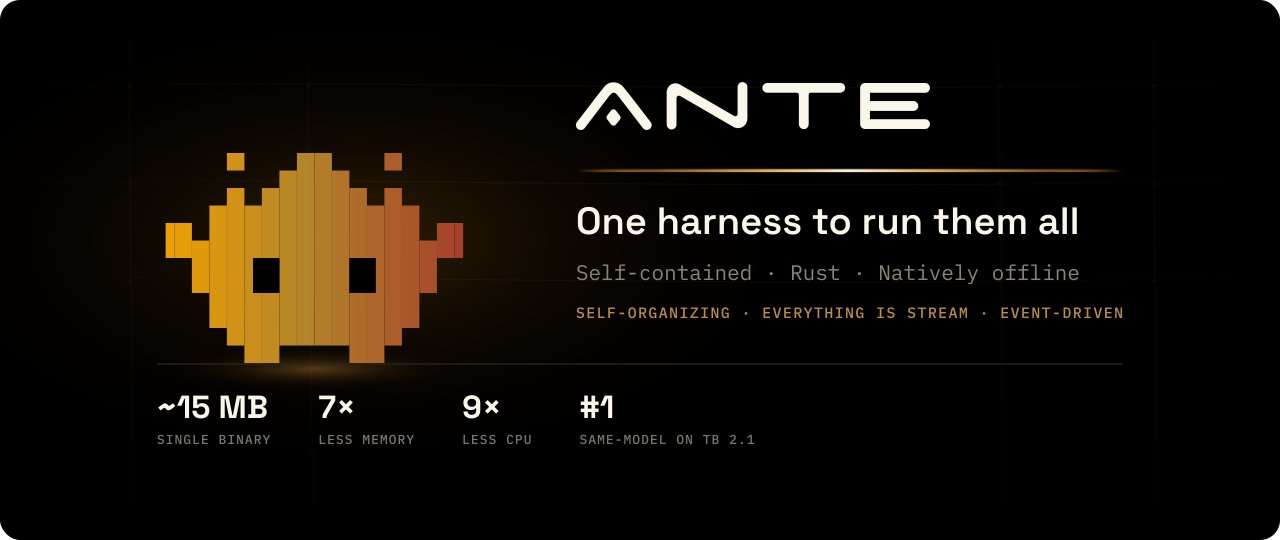
A ghost in your shell. Ante is a self-contained coding agent that lives in your terminal and self-organizes. One ~15MB compressed download from Antigma Labs that expands to a single Rust executable with zero runtime dependencies, built to get the most out of any model.
It works like Claude Code or Codex, with none of their dependencies or model constraints. It can also be the optimized core for building your own harness and high-performing assistants.
curl -fsSL https://ante.run/install.sh | bash
ante
We care about the harness, not a co-trained model or a secret prompt. The harness and the model are a dynamic duo: they should evolve together but not be bound together. Prompts belong to the user.
Ante makes this declarative: one settings profile can define the whole agent, replacement system prompt included.
🥇 Continuously evaluated and evolved in public
We evaluate Ante as a harness across different model families instead of coupling it to one hero model. Ante runs Terminal-Bench 2.1 continuously under official leaderboard constraints: 89 tasks, 5 trials each. Each result pins the exact Ante build you can download and links the raw Harbor run for independent audit. Latest full run: 83.9% with open-weight DeepSeek V4.1 Flash (370/445 trials, Ante 0.preview.98, about $18 of inference).
Same model, different harness

Live cross-model results → · Same-model harness comparison → · Methodology →
🪶 A fraction of the footprint
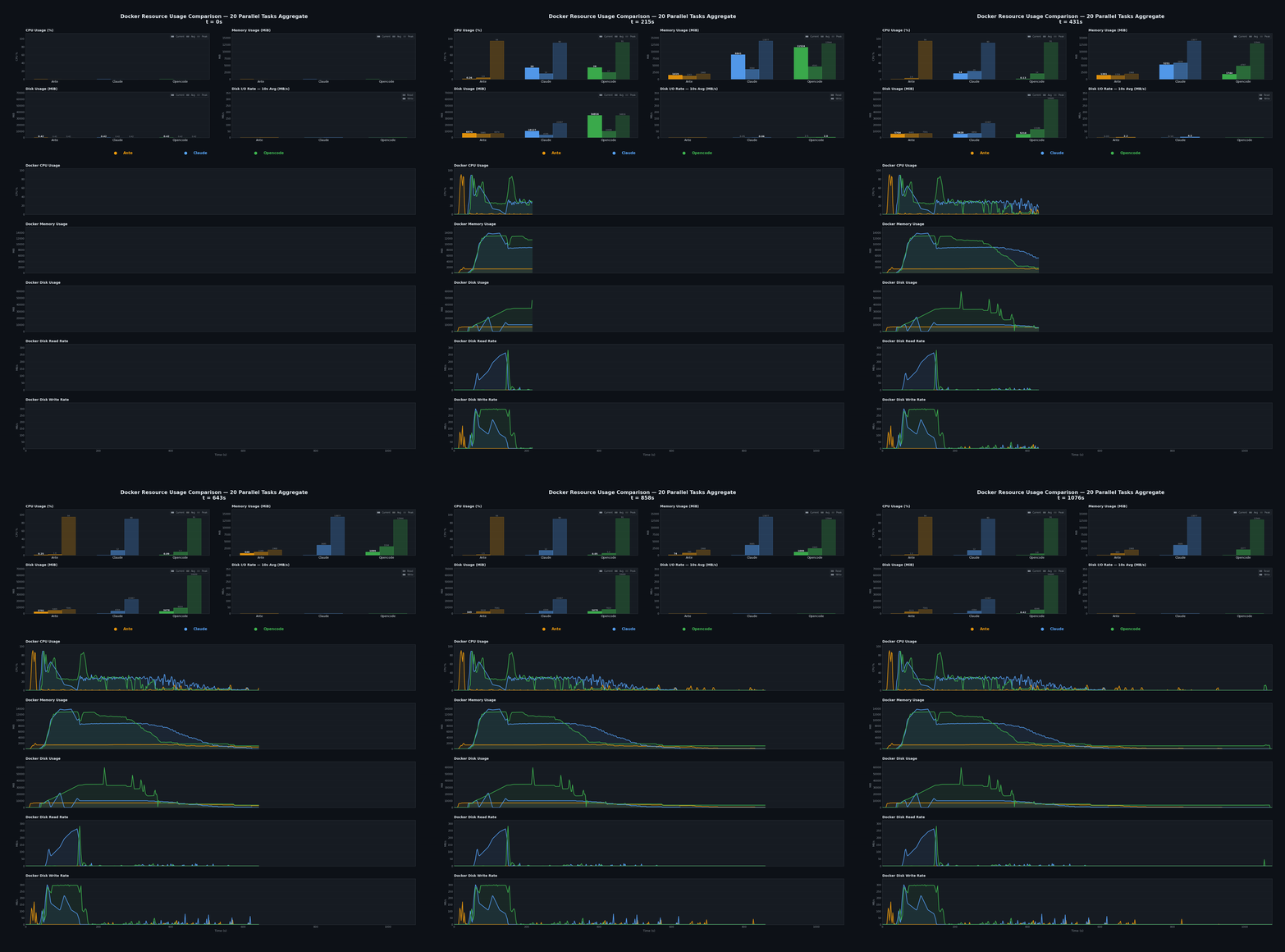
Ante is hand-written Rust: the heavy parts (Grep, git) are embedded in one binary and one process, and local inference is handled by a managed llama.cpp. Across the same 20 parallel tasks in Docker, Ante uses ~7× less peak memory, ~9× less average CPU, and ~5× less disk I/O than Claude Code.
Raw numbers → · Benchmark details →
🔌 Natively offline
Ante's inference engine is a pinned, managed version of llama.cpp. Point it at a GGUF file and the whole loop runs on your machine: no API key, no account, no internet.
ante --offline-model ~/.ante/models/Qwen3.5-9B-Q4_K_M.gguf \
  -p "add error handling to src/main.rs"
We think about the engine layer in public too. nanochat-rs is a small GPT inference core we wrote in pure Rust on candle: readable, runnable, and living in the same process as the code that calls it. It is a study project rather than part of the binary, published because in-process inference is where local models get interesting for agents.
Offline mode → · nanochat-rs → · Where this is going →
These three properties are one design decision. An agent you can verify, afford, and run anywhere is light enough to run by the thousands: the substrate for self-organizing intelligence.
Orchestrate agents with /term
Open an agent in a terminal. Let Ante drive it. Step in whenever you want. /term gives you and Ante a shared view of another interactive session, so coordinating agents feels like working side by side in your terminal.
/term ante
/term claude
/term codex
Each command opens a named terminal and launches the installed CLI when the session is new. Ask the main Ante to give another agent a task, read its progress, send follow-up prompts, or compare answers from several agents. You can watch and type in the same terminal at any time.
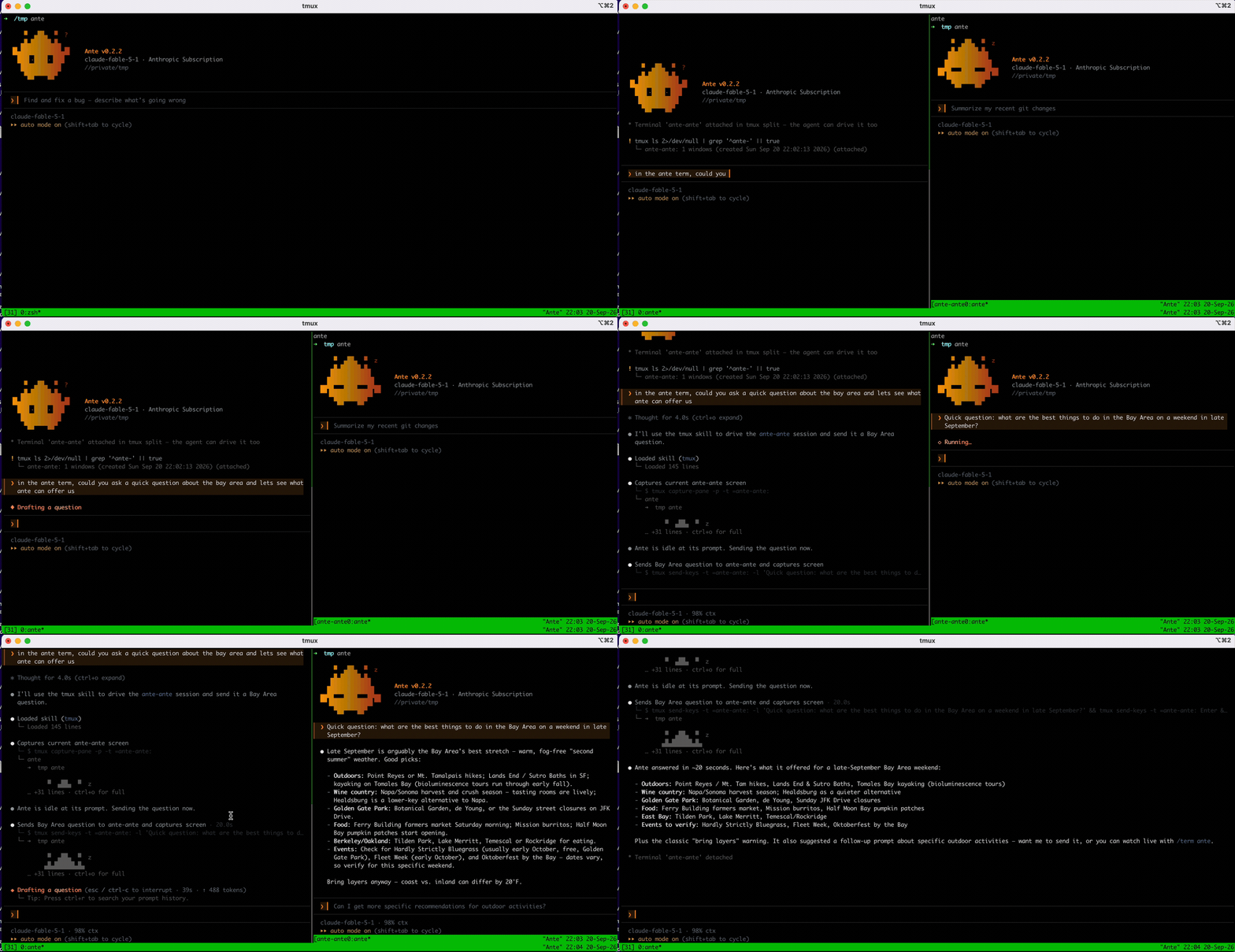
Use an agent's native fork command to branch a saved conversation, or ask Ante to hand the current task and findings to a fresh session. These terminals make useful persistent, interactive subagents: detach a viewer and the agent keeps running; restart Ante and reconnect to the same live session. Run /term to find your sessions, attach or detach, and stop them when you're done.
Requires tmux and whichever agent CLIs you want to run. Terminal orchestration walkthrough → · Forking conversations →
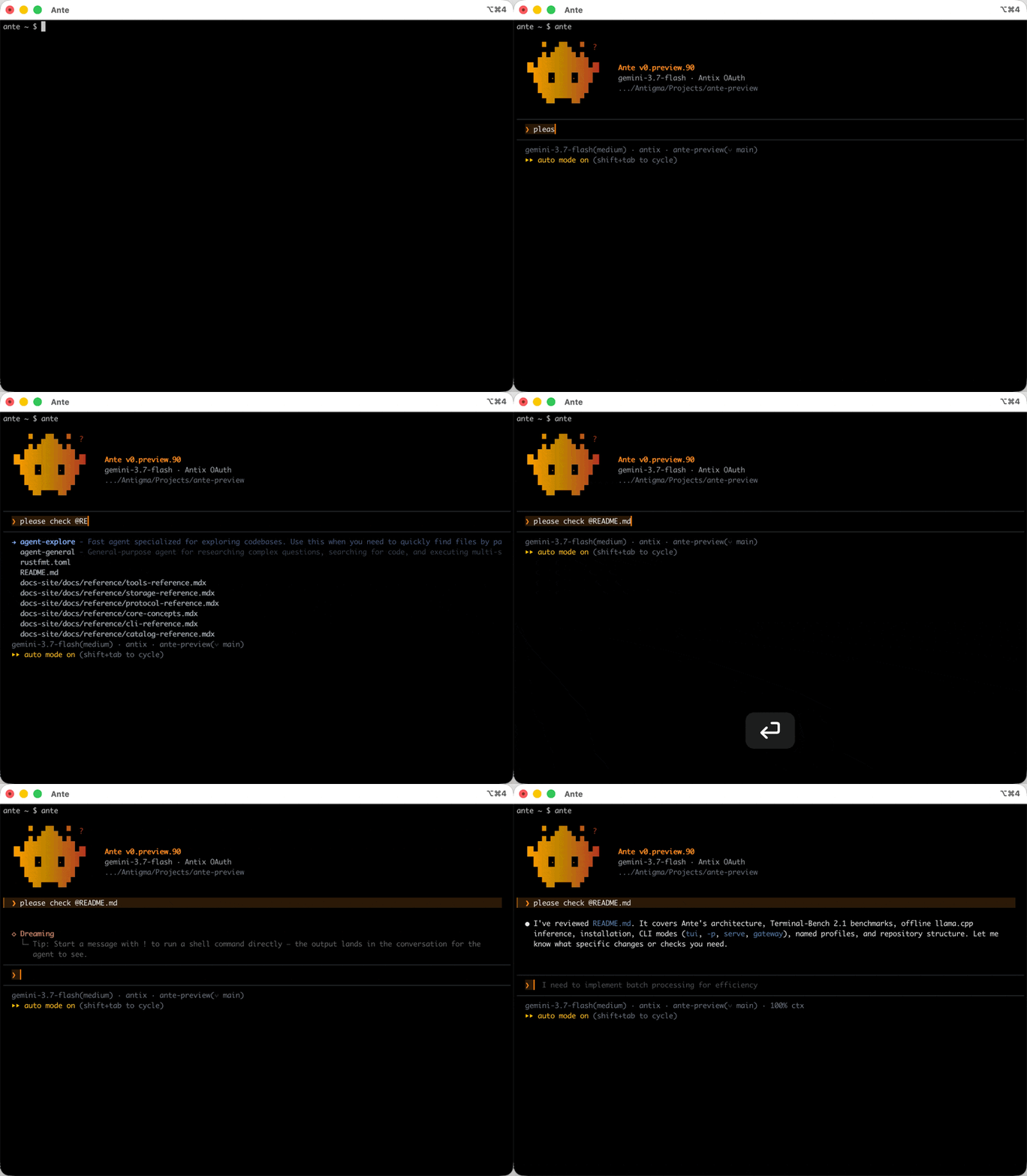
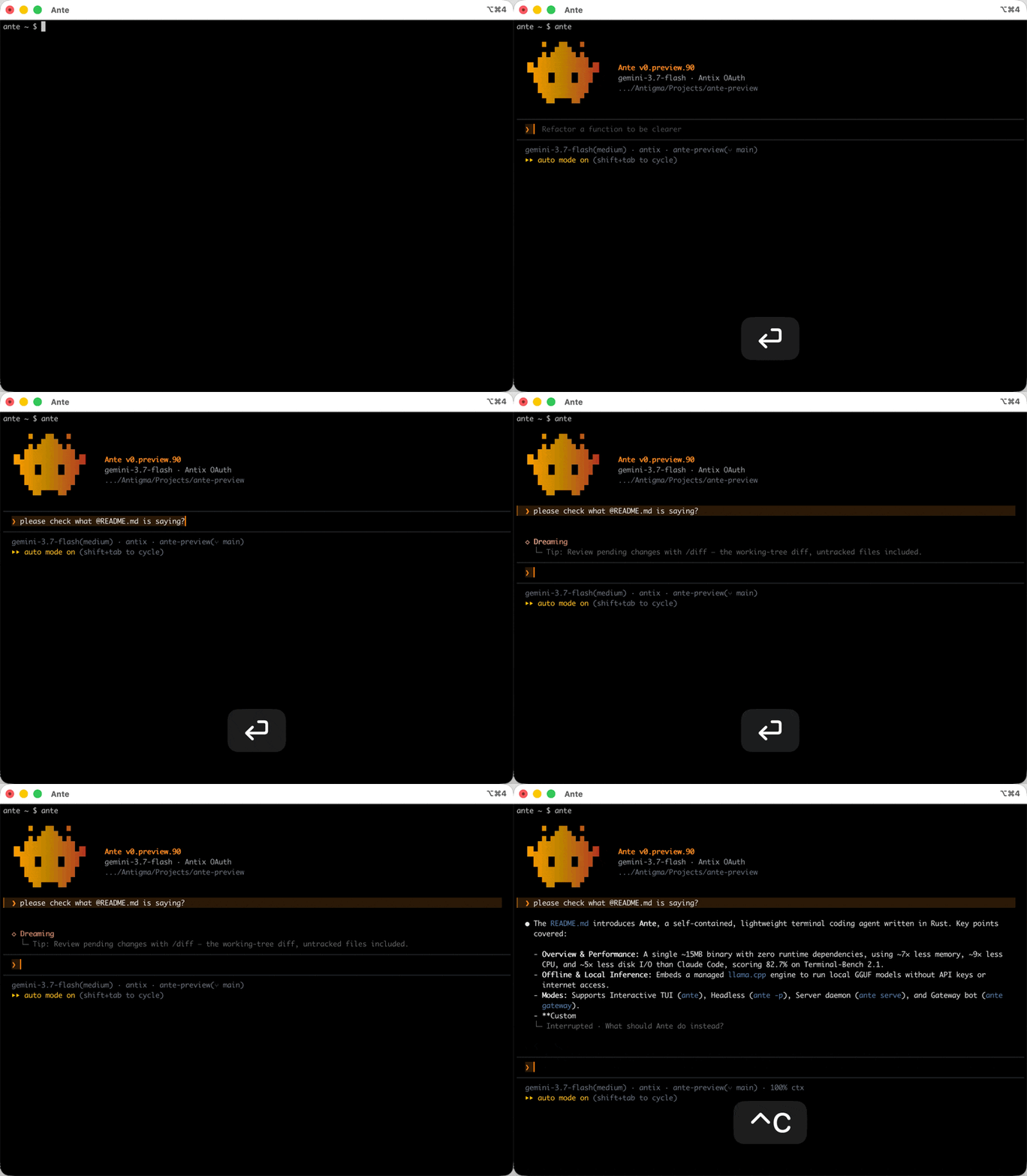
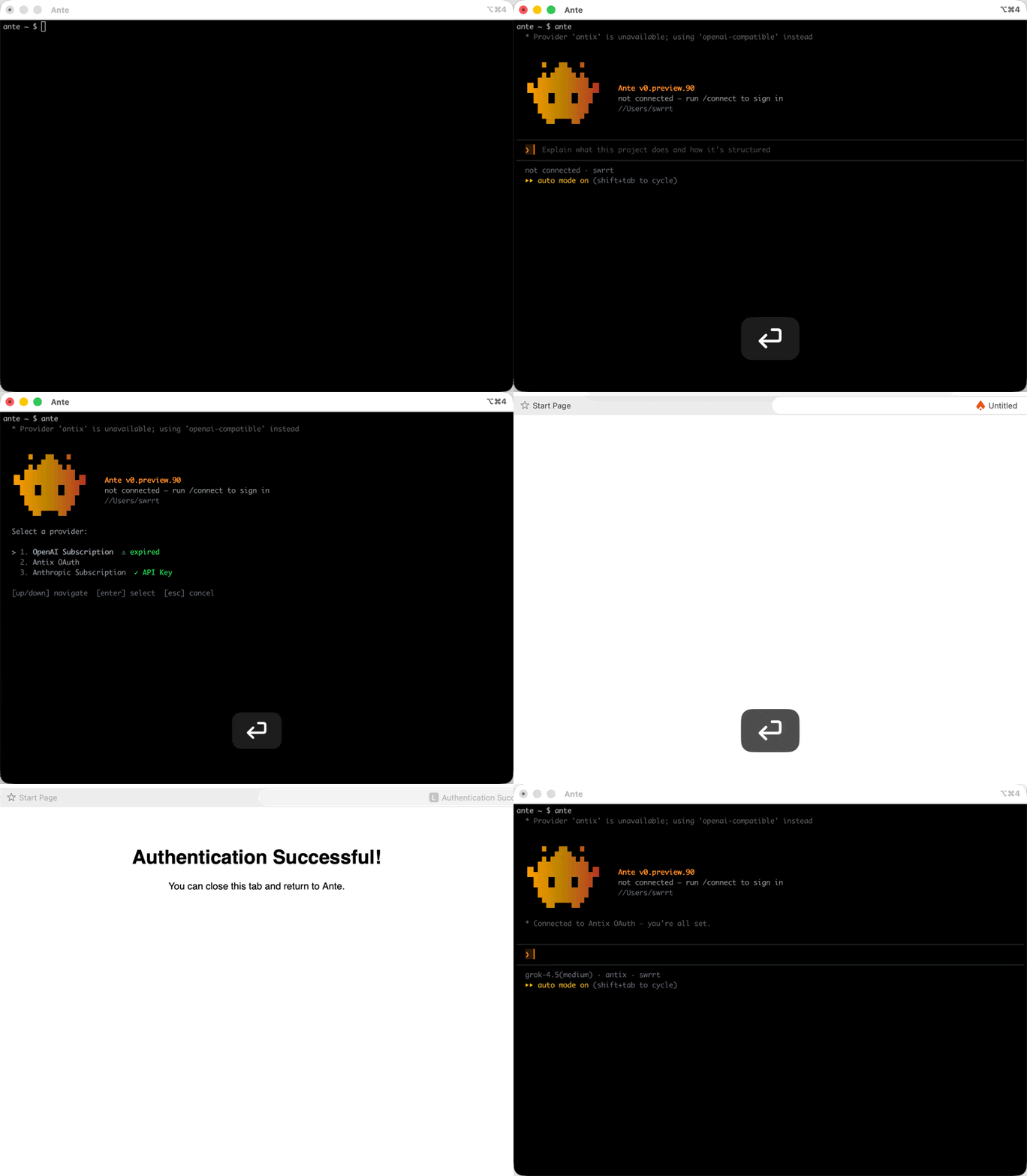
See it in action
Quick Start
Installation
Ante is a single, self-contained binary with no external dependencies: download and run.
curl -fsSL https://ante.run/install.sh | bash

# Install a specific release channel
curl -fsSL https://ante.run/install.sh | bash -s -- nightly

# Install into a directory already on PATH
curl -fsSL https://ante.run/install.sh | ANTE_INSTALL_DIR=/usr/local/bin bash
Modes
| Mode | Command | Use it for |
|---|---|---|
| Interactive TUI | ante | day-to-day work in the terminal (--fullscreen for alternate screen) |
| Headless | ante -p "..." | one-shot tasks, scripts, CI |
| Server | ante serve | editor plugins and integrations, over stdio, socket (--sock), or WebSocket |
| Gateway | ante gateway | running Ante as a Slack or Discord bot (requires ante-gateway) |
Headless examples
# Fix a bug
ante -p "find and fix the failing test in src/auth"

# Review a diff
git diff | ante -p "review this for security issues"

# Use a different provider
ante --provider openai --model gpt-5.6 -p "refactor the database module"

# Resume a saved session
ante --resume ses_01ARZ3NDEKTSV4RRFFQ69G5FAV -p "now add tests"

# Run fully offline with a local GGUF model
ante --offline-model ~/.ante/models/Qwen3.5-9B-Q4_K_M.gguf \
  -p "add error handling to src/main.rs"
Update Ante
ante update

# One-off update from a different channel
ante update --channel nightly

# Roll back or pin to an exact release
ante update --version v0.2.2
One binary, many agents
Ante's behavior lives in a settings file, and --profile <name> swaps that file per run: system prompt, tool set, skills, memory. The same binary can be a full assistant in one terminal and a minimal agent in the next.
For project-specific workflows, Ante loads .ante/settings.json from the nearest ancestor of the session directory, layering tool and skill filters, reasoning effort, and other supported session settings over user preferences. Project settings cannot change the provider or model, add MCP servers, or widen permissions.
Curated profiles demonstrate how flexible this is:
pi: Strips Ante down to four tools (Read, Write, Edit, Bash) and a short replacement system prompt; file search runs throughrg, subagents throughante -p "<task>", web access throughcurl.plan: A read-only research and planning agent with file mutations disabled, designed to produce an implementation plan before you execute.
cp curated/pi.settings.json ~/.ante/
ante --profile pi
A profile replaces the whole settings file, so anything it omits falls back to Ante defaults, and explicit CLI flags still win. Ante also ships a built-in bare profile for stripped-down runs: no skills, MCP servers, session saving, or auto-memory. Share what you build in curated/.
Named profiles → · Project settings → · Curated profiles →
Supported Providers
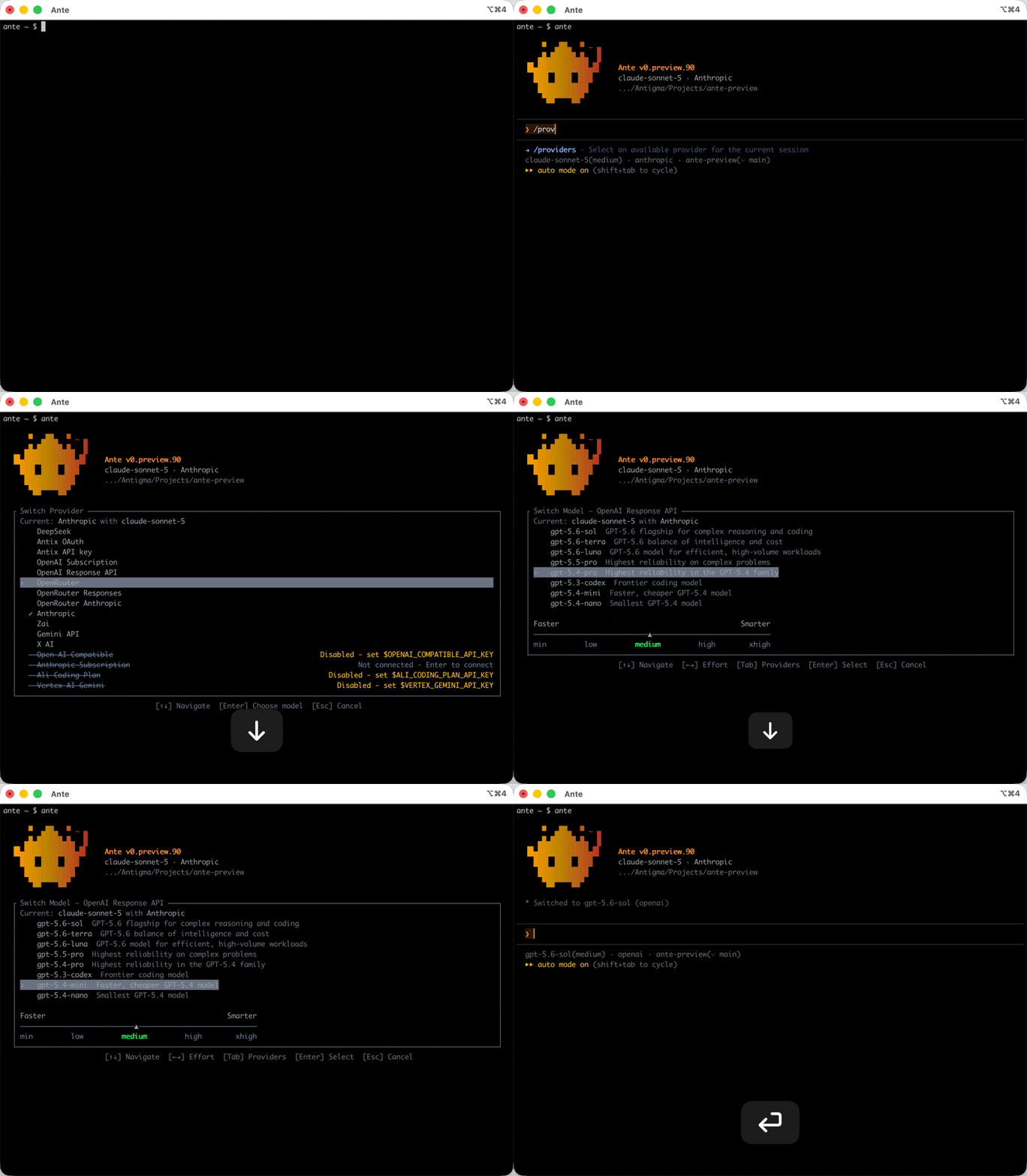
Bring your own API key, subscription, or local model; no account required, not even with us. Provider support comes in two layers.
Built-in presets we maintain. 15 hosted-provider presets plus the local provider, with per-provider quirks handled: wire dialect, API key and OAuth flows, thinking and streaming behavior.
| Provider | Example Models |
|---|---|
| Anthropic | Claude Sonnet 5, Opus 5, Fable 5.1 (API key or subscription OAuth) |
| OpenAI | GPT-6 Astra and the GPT-5.6 family (API key or ChatGPT/Codex OAuth) |
| Google Gemini | Gemini 3.x family (Gemini API or Vertex AI) |
| Grok (xAI) | Grok 4.6 |
| DeepSeek | DeepSeek V4.1 Flash |
| Open Router | Any Open Router model, over three wire styles |
| Local (GGUF) | Any GGUF model via built-in llama.cpp |
| ...and more | Zai, Antix, OpenAI-compatible |
A config layer for everything else. Your own proxy, gateway, or inference engine is one entry in ~/.ante/catalog.json: a wire_style (Ante speaks four API dialects), an auth style (bearer, header, or query, from an env var or OAuth), plus http_headers and extra_body for whatever else the endpoint expects. The combinations cover most setups without a plugin or a code change:
{
  "providers": {
    "my-gateway": {
      "base_url": "https://gateway.example.com/v1",
      "wire_style": "OpenAiCompatible",
      "auth": { "bearer": { "env_key": "MY_GATEWAY_API_KEY" } },
      "http_headers": { "X-Org": "my-team" },
      "extra_body": { "service_tier": "priority" }
    }
  }
}
Providers guide → · Catalog Reference →
What's in this repo
- Applications:
ante-acp— Agent Client Protocol server driving Ante from editors like Zed and JetBrains IDEs.ante-gateway— Slack and Discord gateway for Ante.
- Protocol & SDKs:
crates/protocol-shape— Wire message schema spoken byante serve.crates/ante-sdk— Async Rust SDK for controlling Ante over stdio or Unix domain sockets.
- Core Primitives:
crates/exec— Bounded async process execution.crates/llm— LLM provider profiles and shared primitives.
- Evaluation:
ante-harbor/— Harbor agent adapter behind our Terminal-Bench results.
- Profiles & Docs:
curated/— Reusable settings profiles (such aspiandplan) and skills.docs-site/— Source for docs.antigma.ai.examples/— Example integrations and custom harness implementations.
Building applications from source
Build and install either application with Cargo:
cargo install --path ante-acp
cargo install --path ante-gateway
Once installed on PATH, they can be invoked directly (ante-acp, ante-gateway) or dispatched via ante:
ante acp       # runs ante-acp
ante gateway   # runs ante-gateway
The protocol surface maps to Ante's client-daemon architecture:
┌─────────────────────────────────────────────────────────────┐
│                         Clients                             │
│                                                             │
│   ┌───────────┐    ┌───────────┐    ┌────────────────────┐  │
│   │    TUI    │    │ Headless  │    │    ante serve      │  │
│   │  (ante)   │    │ (ante -p) │    │   stdio/sock/ws    │  │
│   └─────┬─────┘    └─────┬─────┘    └─────────┬──────────┘  │
└─────────┼────────────────┼─────────────────────┼────────────┘
          │                │                     │
          ▼                ▼                     ▼
┌─────────────────────────────────────────────────────────────┐
│                         Daemon                              │
│                                                             │
│   Session ──▶ Turn ──▶ Step                                │
│                                                             │
│   ┌──────────┐  ┌──────────────┐  ┌───────────────────┐     │
│   │  Tools   │  │  Permission  │  │  Skills / Agents  │     │
│   └──────────┘  └──────────────┘  └───────────────────┘     │
└────────────────────────┬────────────────────────────────────┘
                         │
                         ▼
┌─────────────────────────────────────────────────────────────┐
│                     LLM Providers                           │
│                                                             │
│   Anthropic · OpenAI · Gemini · Grok · Open Router · Local  │
└─────────────────────────────────────────────────────────────┘
The bigger picture
Ante is designed for cellular-native agents: like cells in an organism, tiny, expendable, massively replicated. That thesis is why the three headline claims exist. A cell-scale agent must be verified (reliability compounds at scale), tiny (every byte is multiplied by thousands), and self-contained (no runtime to install, no service to phone home to). Read more in our philosophy and agent organization patterns.
FAQ
Why another terminal agent?
The name is the answer: Another Terminal agent, and ante, the stake you put on the table to play. Ante is fast, lightweight, and the only terminal agent with native local inference built in. We believe a self-contained agent core that self-organizes is the foundation of the coming agent economy.
How is Ante different from other agents?
Ante has most of the features you expect from agents like Claude Code or Codex: multi-agents, skills, MCP, persistent memory. The difference is the build philosophy.
- Built from scratch in Rust: one executable that downloads as ~15MB compressed and unpacks to 34.1 MiB (the figure our harness comparison tables report). Core components like
Grep(fully rebuilt and customized) andgitrun in the same process, so nothing is shelled out and no resources leak. Most similar projects ship on Node.js or CPython and carry an order-of-magnitude larger footprint. - Local inference is built in: a local GGUF model is all Ante needs to run without any provider.
- No vendor lock-in, not even to ourselves: no account needed, reuse your existing API credentials. An opt-in, fully integrated server-side experience lives at antix.antigma.ai.
- Every claim is backed by public, reproducible benchmarks of the exact builds we ship: antigma.ai/eval.
Beyond the footprint it comes down to agent architecture, and ultimately to who is building it and with what philosophy. Anyone can fork a binary; taste and engineering rigor don't copy. Those differences leak into every detail of the product.
Why care about runtime optimization like memory and I/O if model inference is usually the biggest bottleneck?
For one-on-one agent interactions, runtime overhead like memory usage and I/O is often less important than model inference.
But our vision is much bigger: millions of agents self-organizing and communicating at massive scale. At that point, even small inefficiencies get multiplied millions or billions of times, so runtime optimization becomes economically significant.
Can I run Ante completely offline?
Yes. Ante has a built-in llama.cpp engine that runs GGUF models locally. It handles engine installation, model discovery, and memory management automatically. No API keys or internet connection required.
Can I use my own custom models or providers?
Yes. Create a ~/.ante/catalog.json file to add or override providers and models with custom endpoints, API keys, and configurations. Any OpenAI-compatible API works.
What is the ante serve mode for?
Server mode runs Ante as a long-lived daemon that communicates over a structured JSONL protocol. It's ideal for building editor plugins, web UIs, and custom integrations on top of Ante.
Documentation
Full documentation is available at docs.antigma.ai.
License
Source code in this repository (including the SDK and protocol crates) is licensed under the Apache License 2.0.
The prebuilt ante binary is free to use — including commercially — during
the alpha preview under the Binary Preview Terms. The SDK
and protocol surface you build against here remain permissively licensed.
Contributors


Similar repos


Languages
Rust
75.0%
Python
16.0%
TypeScript
5.1%
CSS
3.9%
Ghost in your shell. Ante is a self-contained agent harness with a highly optimized core. It works like Claude Code or Codex, with none of their dependencies or model constraints.
See the codeSee what people are saying (1)
README
Ante
[!WARNING] Beta preview: Expect breaking changes and incomplete functionality. macOS and Linux only; on Windows, we suggest WSL.
A ghost in your shell. Ante is a self-contained coding agent that lives in your terminal and self-organizes. One ~15MB compressed download from Antigma Labs that expands to a single Rust executable with zero runtime dependencies, built to get the most out of any model.
It works like Claude Code or Codex, with none of their dependencies or model constraints. It can also be the optimized core for building your own harness and high-performing assistants.
curl -fsSL https://ante.run/install.sh | bash
ante
We care about the harness, not a co-trained model or a secret prompt. The harness and the model are a dynamic duo: they should evolve together but not be bound together. Prompts belong to the user.
Ante makes this declarative: one settings profile can define the whole agent, replacement system prompt included.
🥇 Continuously evaluated and evolved in public
We evaluate Ante as a harness across different model families instead of coupling it to one hero model. Ante runs Terminal-Bench 2.1 continuously under official leaderboard constraints: 89 tasks, 5 trials each. Each result pins the exact Ante build you can download and links the raw Harbor run for independent audit. Latest full run: 83.9% with open-weight DeepSeek V4.1 Flash (370/445 trials, Ante 0.preview.98, about $18 of inference).
Same model, different harness
Live cross-model results → · Same-model harness comparison → · Methodology →
🪶 A fraction of the footprint
Ante is hand-written Rust: the heavy parts (Grep, git) are embedded in one binary and one process, and local inference is handled by a managed llama.cpp. Across the same 20 parallel tasks in Docker, Ante uses ~7× less peak memory, ~9× less average CPU, and ~5× less disk I/O than Claude Code.
Raw numbers → · Benchmark details →
🔌 Natively offline
Ante's inference engine is a pinned, managed version of llama.cpp. Point it at a GGUF file and the whole loop runs on your machine: no API key, no account, no internet.
ante --offline-model ~/.ante/models/Qwen3.5-9B-Q4_K_M.gguf \
  -p "add error handling to src/main.rs"
We think about the engine layer in public too. nanochat-rs is a small GPT inference core we wrote in pure Rust on candle: readable, runnable, and living in the same process as the code that calls it. It is a study project rather than part of the binary, published because in-process inference is where local models get interesting for agents.
Offline mode → · nanochat-rs → · Where this is going →
These three properties are one design decision. An agent you can verify, afford, and run anywhere is light enough to run by the thousands: the substrate for self-organizing intelligence.
Orchestrate agents with /term
Open an agent in a terminal. Let Ante drive it. Step in whenever you want. /term gives you and Ante a shared view of another interactive session, so coordinating agents feels like working side by side in your terminal.
/term ante
/term claude
/term codex
Each command opens a named terminal and launches the installed CLI when the session is new. Ask the main Ante to give another agent a task, read its progress, send follow-up prompts, or compare answers from several agents. You can watch and type in the same terminal at any time.
Use an agent's native fork command to branch a saved conversation, or ask Ante to hand the current task and findings to a fresh session. These terminals make useful persistent, interactive subagents: detach a viewer and the agent keeps running; restart Ante and reconnect to the same live session. Run /term to find your sessions, attach or detach, and stop them when you're done.
Requires tmux and whichever agent CLIs you want to run. Terminal orchestration walkthrough → · Forking conversations →
See it in action
Quick Start
Installation
Ante is a single, self-contained binary with no external dependencies: download and run.
curl -fsSL https://ante.run/install.sh | bash

# Install a specific release channel
curl -fsSL https://ante.run/install.sh | bash -s -- nightly

# Install into a directory already on PATH
curl -fsSL https://ante.run/install.sh | ANTE_INSTALL_DIR=/usr/local/bin bash
Modes
| Mode | Command | Use it for |
|---|---|---|
| Interactive TUI | ante | day-to-day work in the terminal (--fullscreen for alternate screen) |
| Headless | ante -p "..." | one-shot tasks, scripts, CI |
| Server | ante serve | editor plugins and integrations, over stdio, socket (--sock), or WebSocket |
| Gateway | ante gateway | running Ante as a Slack or Discord bot (requires ante-gateway) |
Headless examples
# Fix a bug
ante -p "find and fix the failing test in src/auth"

# Review a diff
git diff | ante -p "review this for security issues"

# Use a different provider
ante --provider openai --model gpt-5.6 -p "refactor the database module"

# Resume a saved session
ante --resume ses_01ARZ3NDEKTSV4RRFFQ69G5FAV -p "now add tests"

# Run fully offline with a local GGUF model
ante --offline-model ~/.ante/models/Qwen3.5-9B-Q4_K_M.gguf \
  -p "add error handling to src/main.rs"
Update Ante
ante update

# One-off update from a different channel
ante update --channel nightly

# Roll back or pin to an exact release
ante update --version v0.2.2
One binary, many agents
Ante's behavior lives in a settings file, and --profile <name> swaps that file per run: system prompt, tool set, skills, memory. The same binary can be a full assistant in one terminal and a minimal agent in the next.
For project-specific workflows, Ante loads .ante/settings.json from the nearest ancestor of the session directory, layering tool and skill filters, reasoning effort, and other supported session settings over user preferences. Project settings cannot change the provider or model, add MCP servers, or widen permissions.
Curated profiles demonstrate how flexible this is:
pi: Strips Ante down to four tools (Read, Write, Edit, Bash) and a short replacement system prompt; file search runs throughrg, subagents throughante -p "<task>", web access throughcurl.plan: A read-only research and planning agent with file mutations disabled, designed to produce an implementation plan before you execute.
cp curated/pi.settings.json ~/.ante/
ante --profile pi
A profile replaces the whole settings file, so anything it omits falls back to Ante defaults, and explicit CLI flags still win. Ante also ships a built-in bare profile for stripped-down runs: no skills, MCP servers, session saving, or auto-memory. Share what you build in curated/.
Named profiles → · Project settings → · Curated profiles →
Supported Providers
Bring your own API key, subscription, or local model; no account required, not even with us. Provider support comes in two layers.
Built-in presets we maintain. 15 hosted-provider presets plus the local provider, with per-provider quirks handled: wire dialect, API key and OAuth flows, thinking and streaming behavior.
| Provider | Example Models |
|---|---|
| Anthropic | Claude Sonnet 5, Opus 5, Fable 5.1 (API key or subscription OAuth) |
| OpenAI | GPT-6 Astra and the GPT-5.6 family (API key or ChatGPT/Codex OAuth) |
| Google Gemini | Gemini 3.x family (Gemini API or Vertex AI) |
| Grok (xAI) | Grok 4.6 |
| DeepSeek | DeepSeek V4.1 Flash |
| Open Router | Any Open Router model, over three wire styles |
| Local (GGUF) | Any GGUF model via built-in llama.cpp |
| ...and more | Zai, Antix, OpenAI-compatible |
A config layer for everything else. Your own proxy, gateway, or inference engine is one entry in ~/.ante/catalog.json: a wire_style (Ante speaks four API dialects), an auth style (bearer, header, or query, from an env var or OAuth), plus http_headers and extra_body for whatever else the endpoint expects. The combinations cover most setups without a plugin or a code change:
{
  "providers": {
    "my-gateway": {
      "base_url": "https://gateway.example.com/v1",
      "wire_style": "OpenAiCompatible",
      "auth": { "bearer": { "env_key": "MY_GATEWAY_API_KEY" } },
      "http_headers": { "X-Org": "my-team" },
      "extra_body": { "service_tier": "priority" }
    }
  }
}
Providers guide → · Catalog Reference →
What's in this repo
- Applications:
ante-acp— Agent Client Protocol server driving Ante from editors like Zed and JetBrains IDEs.ante-gateway— Slack and Discord gateway for Ante.
- Protocol & SDKs:
crates/protocol-shape— Wire message schema spoken byante serve.crates/ante-sdk— Async Rust SDK for controlling Ante over stdio or Unix domain sockets.
- Core Primitives:
crates/exec— Bounded async process execution.crates/llm— LLM provider profiles and shared primitives.
- Evaluation:
ante-harbor/— Harbor agent adapter behind our Terminal-Bench results.
- Profiles & Docs:
curated/— Reusable settings profiles (such aspiandplan) and skills.docs-site/— Source for docs.antigma.ai.examples/— Example integrations and custom harness implementations.
Building applications from source
Build and install either application with Cargo:
cargo install --path ante-acp
cargo install --path ante-gateway
Once installed on PATH, they can be invoked directly (ante-acp, ante-gateway) or dispatched via ante:
ante acp       # runs ante-acp
ante gateway   # runs ante-gateway
The protocol surface maps to Ante's client-daemon architecture:
┌─────────────────────────────────────────────────────────────┐
│                         Clients                             │
│                                                             │
│   ┌───────────┐    ┌───────────┐    ┌────────────────────┐  │
│   │    TUI    │    │ Headless  │    │    ante serve      │  │
│   │  (ante)   │    │ (ante -p) │    │   stdio/sock/ws    │  │
│   └─────┬─────┘    └─────┬─────┘    └─────────┬──────────┘  │
└─────────┼────────────────┼─────────────────────┼────────────┘
          │                │                     │
          ▼                ▼                     ▼
┌─────────────────────────────────────────────────────────────┐
│                         Daemon                              │
│                                                             │
│   Session ──▶ Turn ──▶ Step                                │
│                                                             │
│   ┌──────────┐  ┌──────────────┐  ┌───────────────────┐     │
│   │  Tools   │  │  Permission  │  │  Skills / Agents  │     │
│   └──────────┘  └──────────────┘  └───────────────────┘     │
└────────────────────────┬────────────────────────────────────┘
                         │
                         ▼
┌─────────────────────────────────────────────────────────────┐
│                     LLM Providers                           │
│                                                             │
│   Anthropic · OpenAI · Gemini · Grok · Open Router · Local  │
└─────────────────────────────────────────────────────────────┘
The bigger picture
Ante is designed for cellular-native agents: like cells in an organism, tiny, expendable, massively replicated. That thesis is why the three headline claims exist. A cell-scale agent must be verified (reliability compounds at scale), tiny (every byte is multiplied by thousands), and self-contained (no runtime to install, no service to phone home to). Read more in our philosophy and agent organization patterns.
FAQ
Why another terminal agent?
The name is the answer: Another Terminal agent, and ante, the stake you put on the table to play. Ante is fast, lightweight, and the only terminal agent with native local inference built in. We believe a self-contained agent core that self-organizes is the foundation of the coming agent economy.
How is Ante different from other agents?
Ante has most of the features you expect from agents like Claude Code or Codex: multi-agents, skills, MCP, persistent memory. The difference is the build philosophy.
- Built from scratch in Rust: one executable that downloads as ~15MB compressed and unpacks to 34.1 MiB (the figure our harness comparison tables report). Core components like
Grep(fully rebuilt and customized) andgitrun in the same process, so nothing is shelled out and no resources leak. Most similar projects ship on Node.js or CPython and carry an order-of-magnitude larger footprint. - Local inference is built in: a local GGUF model is all Ante needs to run without any provider.
- No vendor lock-in, not even to ourselves: no account needed, reuse your existing API credentials. An opt-in, fully integrated server-side experience lives at antix.antigma.ai.
- Every claim is backed by public, reproducible benchmarks of the exact builds we ship: antigma.ai/eval.
Beyond the footprint it comes down to agent architecture, and ultimately to who is building it and with what philosophy. Anyone can fork a binary; taste and engineering rigor don't copy. Those differences leak into every detail of the product.
Why care about runtime optimization like memory and I/O if model inference is usually the biggest bottleneck?
For one-on-one agent interactions, runtime overhead like memory usage and I/O is often less important than model inference.
But our vision is much bigger: millions of agents self-organizing and communicating at massive scale. At that point, even small inefficiencies get multiplied millions or billions of times, so runtime optimization becomes economically significant.
Can I run Ante completely offline?
Yes. Ante has a built-in llama.cpp engine that runs GGUF models locally. It handles engine installation, model discovery, and memory management automatically. No API keys or internet connection required.
Can I use my own custom models or providers?
Yes. Create a ~/.ante/catalog.json file to add or override providers and models with custom endpoints, API keys, and configurations. Any OpenAI-compatible API works.
What is the ante serve mode for?
Server mode runs Ante as a long-lived daemon that communicates over a structured JSONL protocol. It's ideal for building editor plugins, web UIs, and custom integrations on top of Ante.
Documentation
Full documentation is available at docs.antigma.ai.
License
Source code in this repository (including the SDK and protocol crates) is licensed under the Apache License 2.0.
The prebuilt ante binary is free to use — including commercially — during
the alpha preview under the Binary Preview Terms. The SDK
and protocol surface you build against here remain permissively licensed.
Similar repos
Contributors
Languages
Rust
75.0%
Python
16.0%
TypeScript
5.1%
CSS
3.9%