
S.M.A.R.T. health, temperature and performance of your Mac's internal drives. Native macOS app, no network.
Swift
1
44 commits
updated Sep 24, 2026
See what people are saying
README

Health, temperature and performance of your Mac's drives, explained in plain language.
Internal NVMe and SATA drives today. External USB drives are coming in version 1.0.


Free and open source · macOS 14 or later · Apple Silicon and Intel · Latest version
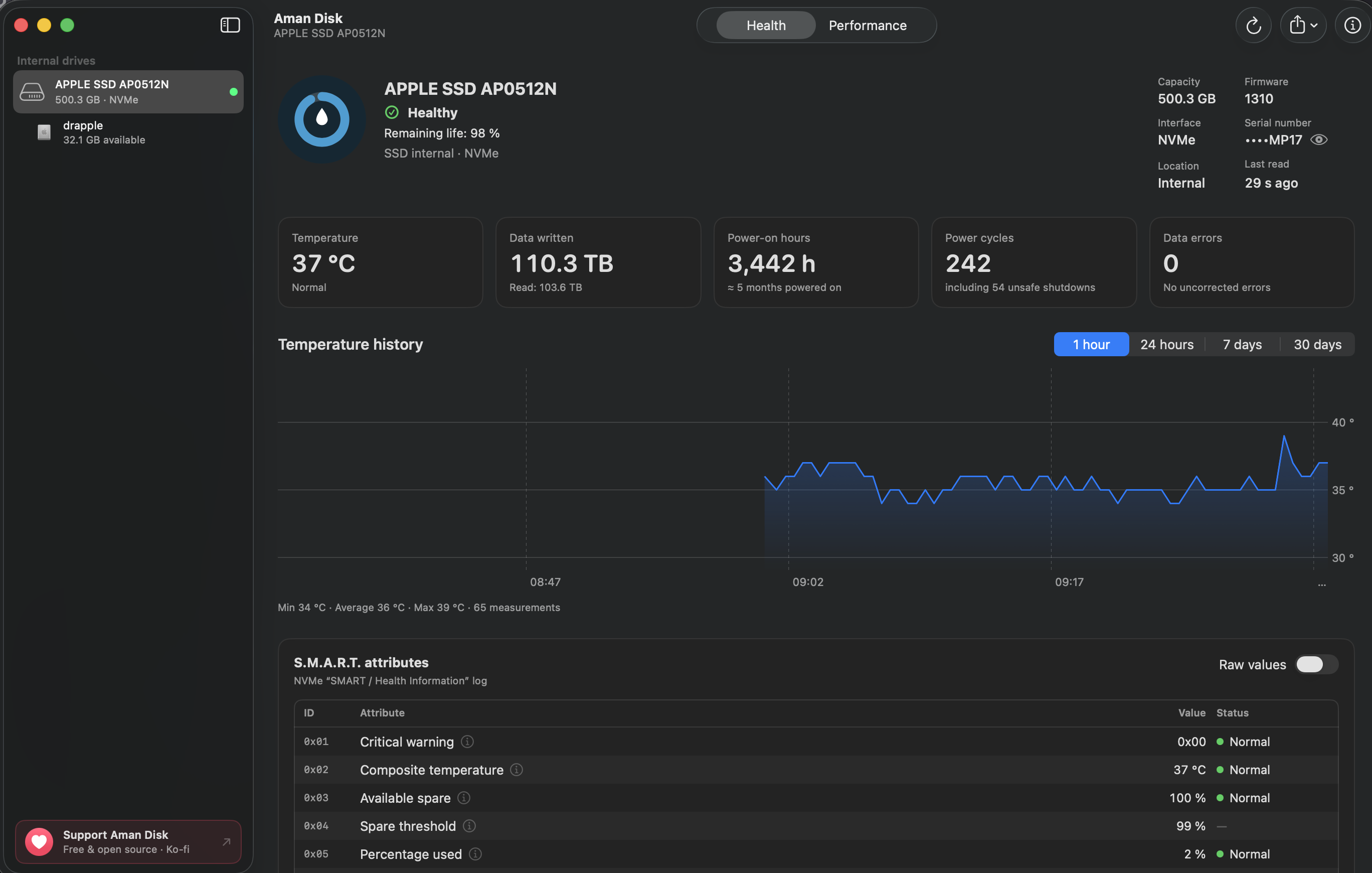
Screenshots
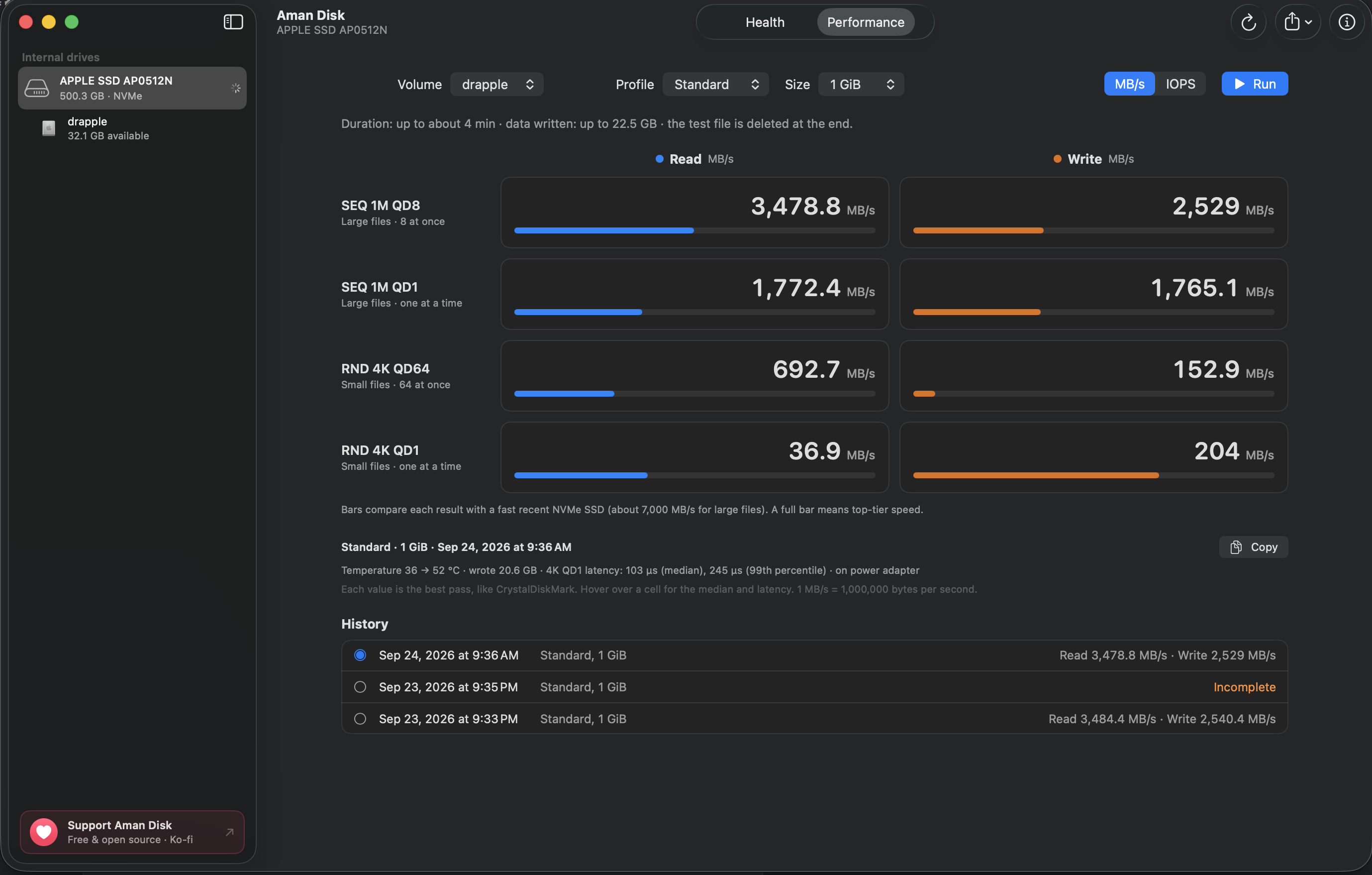
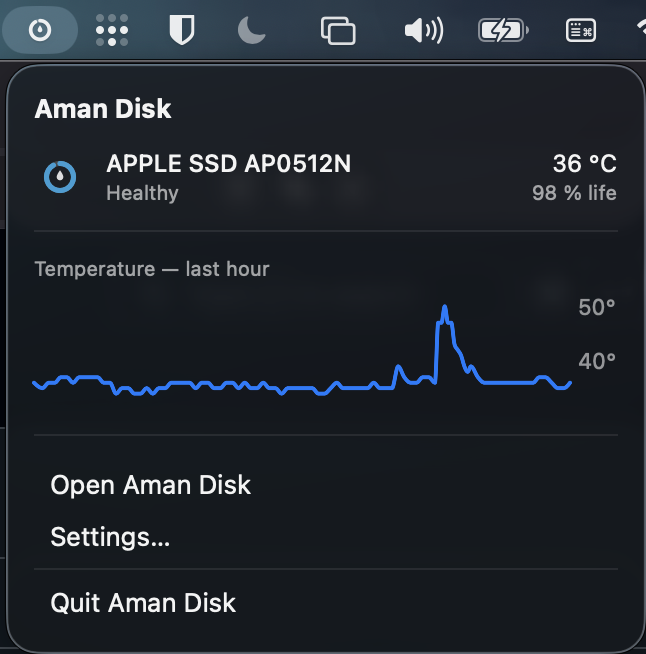
| Performance test | Menu bar |
|---|---|
 |  |
Features
- NVMe and ATA/AHCI health: reads S.M.A.R.T. data from NVMe SSDs, Apple PCIe AHCI SSDs and SATA drives, with a clear status (“Healthy”, “Needs attention”, “Likely failing”) and the remaining life when the drive reports it.
- Attributes explained: every S.M.A.R.T. attribute has a readable name and an explanation; values are converted to their unit (°C, hours, TB), or shown as raw hexadecimal on request.
- Temperature history: one reading every 30 seconds, kept at full resolution for 24 hours, then as averages for 30 days; charts over 1 hour, 24 hours, 7 days and 30 days. Each reading adds about 170 bytes to the history, so the app doesn't wear out the drive it watches.
- Performance test: sequential and random reads and writes, with large and small blocks at several queue depths. The test file is always deleted.
- Menu bar: status and temperature of each internal drive, with the last hour's curve. The app can stay there when its window is closed.
- Live Dock icon: the ring around the icon follows the health of the startup drive.
- Alerts: a notification when a drive changes status, stays too hot, or drops below 50%, 25% or 10% of its life (off by default).
- Reports: PDF, text or JSON export, with the serial number masked by default.
- English and French interface.
Privacy
- No network connection: Aman Disk never connects to the Internet. No telemetry, no update check. The only links (GitHub, including “Check for New Versions…”, and Ko-fi) open in your browser when you click them.
- No data sent: history and results stay on your Mac, in
~/Library/Application Support/io.github.aman-disk.AmanDisk/. - Aman never changes your data. One exception: it turns on S.M.A.R.T. if it's turned off (you can disable this in Settings). The app never asks for an administrator password. The performance test, which you start yourself, writes a temporary file that is deleted afterwards, even if the app is force-quit.
Installation
- Download the DMG (
Aman-Disk-<version>.dmg) from the latest release. - Open it and drag Aman Disk into the Applications folder.
- Open Aman Disk. The first time, macOS blocks it: follow the steps below. You only need to do this once.
macOS says Aman Disk can't be opened
Aman Disk is free and open source, but it isn't signed with a paid Apple Developer ID, so macOS can't verify who made it and blocks it the first time. The source code is all here, and you can build the app yourself.
macOS 15 Sequoia or later
- Open Aman Disk, then click Done in the warning.
- Go to System Settings › Privacy & Security and scroll down to Security.
- Next to “Aman Disk was blocked to protect your Mac”, click Open Anyway, then confirm with your password or Touch ID.
If the Open Anyway button isn't there, open Aman Disk once more, then go back to System Settings.
macOS 14 Sonoma: in the Applications folder, Control-click Aman Disk, choose Open, then click Open.
Or, in Terminal (any version), remove the download flag that macOS checks:
xattr -dr com.apple.quarantine "/Applications/Aman Disk.app"
The DMG contains the same steps in How to Install.txt.
Build from source
scripts/bundle.sh --release   # Aman Disk.app, universal binary
scripts/make-dmg.sh           # dist/Aman-Disk-<version>.dmg
scripts/test.sh               # full test suite (also works without Xcode)
Demo mode (DISKHEALTH_DEMO=1) shows fictional drives in every state.
Compatibility
- macOS 14 Sonoma or later.
- Apple Silicon and Intel Macs (universal binary).
- Internal NVMe and AHCI/SATA drives, including Fusion Drive.
- External USB drives: coming in version 1.0 (see below).
Roadmap to 1.0
The main goal of version 1.0 is external USB drives: reading the health of SSDs and hard drives in USB enclosures, when the enclosure passes S.M.A.R.T. commands through. To help, open an issue with the model of your USB drive or enclosure: it helps decide which ones to support first.
Why “Aman”?
The name has three meanings, and all of them fit an app that watches over your drives:
- In Kabyle, aman means water, hence the drop at the center of the icon. The ring around it is also ⴰ, the letter A of the Tifinagh alphabet.
- In Tolkien's world, Aman is the Blessed Realm, the land in the far West where the Valar live. It is Gandalf's original home: before coming to Middle-earth, he lived there as Olórin, in the gardens of Lórien in Valinor.
- In Arabic, amān (أمان) means safety and security, and also peace of mind: the calm of knowing you are protected.
Support the project
Aman Disk is free and open source. If you find it useful, you can support its development on Ko-fi.

License
MIT © 2026 MidZai
Contributors

44 commits
Similar repos


Languages
Swift
94.2%
C
4.7%
Shell
1.1%
S.M.A.R.T. health, temperature and performance of your Mac's internal drives. Native macOS app, no network.
Swift
1
44 commits
updated Sep 24, 2026
See what people are saying
README
Health, temperature and performance of your Mac's drives, explained in plain language.
Internal NVMe and SATA drives today. External USB drives are coming in version 1.0.
Free and open source · macOS 14 or later · Apple Silicon and Intel · Latest version
Screenshots
| Performance test | Menu bar |
|---|---|
| |
Features
- NVMe and ATA/AHCI health: reads S.M.A.R.T. data from NVMe SSDs, Apple PCIe AHCI SSDs and SATA drives, with a clear status (“Healthy”, “Needs attention”, “Likely failing”) and the remaining life when the drive reports it.
- Attributes explained: every S.M.A.R.T. attribute has a readable name and an explanation; values are converted to their unit (°C, hours, TB), or shown as raw hexadecimal on request.
- Temperature history: one reading every 30 seconds, kept at full resolution for 24 hours, then as averages for 30 days; charts over 1 hour, 24 hours, 7 days and 30 days. Each reading adds about 170 bytes to the history, so the app doesn't wear out the drive it watches.
- Performance test: sequential and random reads and writes, with large and small blocks at several queue depths. The test file is always deleted.
- Menu bar: status and temperature of each internal drive, with the last hour's curve. The app can stay there when its window is closed.
- Live Dock icon: the ring around the icon follows the health of the startup drive.
- Alerts: a notification when a drive changes status, stays too hot, or drops below 50%, 25% or 10% of its life (off by default).
- Reports: PDF, text or JSON export, with the serial number masked by default.
- English and French interface.
Privacy
- No network connection: Aman Disk never connects to the Internet. No telemetry, no update check. The only links (GitHub, including “Check for New Versions…”, and Ko-fi) open in your browser when you click them.
- No data sent: history and results stay on your Mac, in
~/Library/Application Support/io.github.aman-disk.AmanDisk/. - Aman never changes your data. One exception: it turns on S.M.A.R.T. if it's turned off (you can disable this in Settings). The app never asks for an administrator password. The performance test, which you start yourself, writes a temporary file that is deleted afterwards, even if the app is force-quit.
Installation
- Download the DMG (
Aman-Disk-<version>.dmg) from the latest release. - Open it and drag Aman Disk into the Applications folder.
- Open Aman Disk. The first time, macOS blocks it: follow the steps below. You only need to do this once.
macOS says Aman Disk can't be opened
Aman Disk is free and open source, but it isn't signed with a paid Apple Developer ID, so macOS can't verify who made it and blocks it the first time. The source code is all here, and you can build the app yourself.
macOS 15 Sequoia or later
- Open Aman Disk, then click Done in the warning.
- Go to System Settings › Privacy & Security and scroll down to Security.
- Next to “Aman Disk was blocked to protect your Mac”, click Open Anyway, then confirm with your password or Touch ID.
If the Open Anyway button isn't there, open Aman Disk once more, then go back to System Settings.
macOS 14 Sonoma: in the Applications folder, Control-click Aman Disk, choose Open, then click Open.
Or, in Terminal (any version), remove the download flag that macOS checks:
xattr -dr com.apple.quarantine "/Applications/Aman Disk.app"
The DMG contains the same steps in How to Install.txt.
Build from source
scripts/bundle.sh --release   # Aman Disk.app, universal binary
scripts/make-dmg.sh           # dist/Aman-Disk-<version>.dmg
scripts/test.sh               # full test suite (also works without Xcode)
Demo mode (DISKHEALTH_DEMO=1) shows fictional drives in every state.
Compatibility
- macOS 14 Sonoma or later.
- Apple Silicon and Intel Macs (universal binary).
- Internal NVMe and AHCI/SATA drives, including Fusion Drive.
- External USB drives: coming in version 1.0 (see below).
Roadmap to 1.0
The main goal of version 1.0 is external USB drives: reading the health of SSDs and hard drives in USB enclosures, when the enclosure passes S.M.A.R.T. commands through. To help, open an issue with the model of your USB drive or enclosure: it helps decide which ones to support first.
Why “Aman”?
The name has three meanings, and all of them fit an app that watches over your drives:
- In Kabyle, aman means water, hence the drop at the center of the icon. The ring around it is also ⴰ, the letter A of the Tifinagh alphabet.
- In Tolkien's world, Aman is the Blessed Realm, the land in the far West where the Valar live. It is Gandalf's original home: before coming to Middle-earth, he lived there as Olórin, in the gardens of Lórien in Valinor.
- In Arabic, amān (أمان) means safety and security, and also peace of mind: the calm of knowing you are protected.
Support the project
Aman Disk is free and open source. If you find it useful, you can support its development on Ko-fi.
License
MIT © 2026 MidZai
Similar repos
Contributors
44 commits
Languages
Swift
94.2%
C
4.7%
Shell
1.1%