Meesa Multis Maker is a Windows tool by MeesaJarJar for creating and editing Ultima Online multi structures and GUMP graphics. Features an isometric canvas with drag-and-drop placement, transforms (scale/rotate/flip/skew), AI-powered texture regeneration via ComfyUI, MUL/UOP file support, and a built-in pixel painter.
C#
8
22 commits
updated Oct 7, 2026
The ultimate tool for creating Ultima Online multi structures and GUMP graphics with AI-powered texture regeneration
Features � Installation � Getting Started � Editors � AI Integration � Shortcuts � License
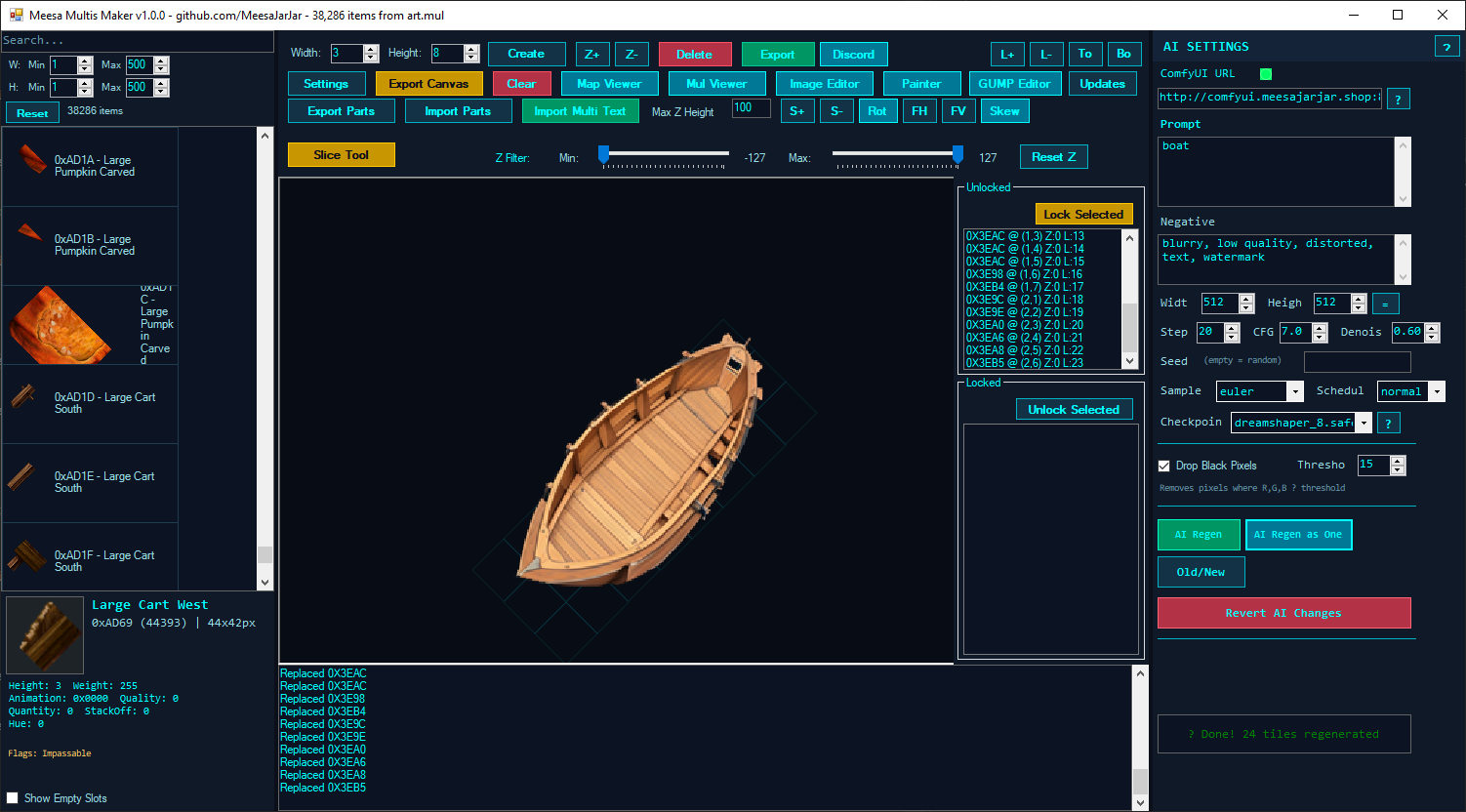
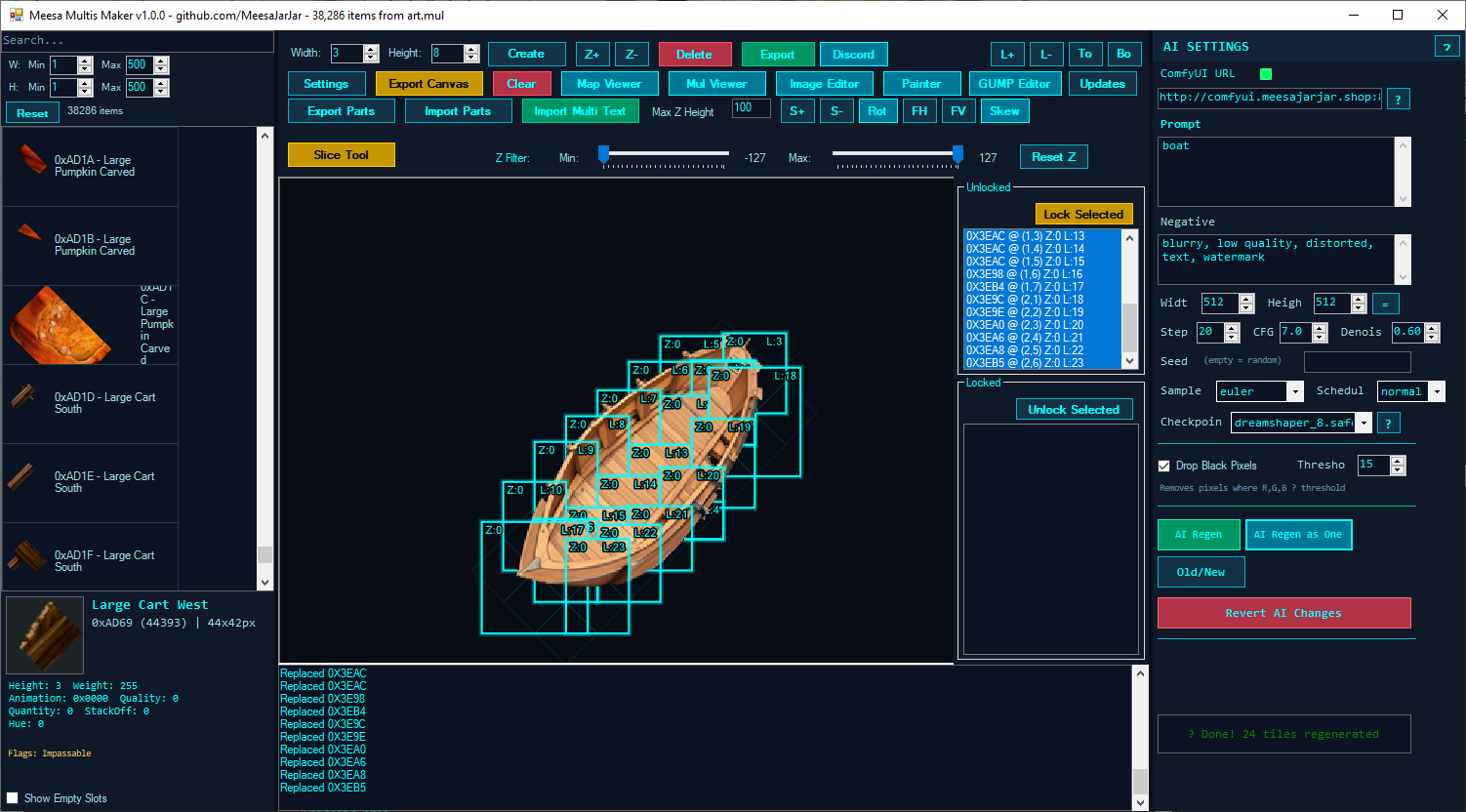
Meesa Multis Maker is a Windows desktop application for composing, editing, exporting, and AI-regenerating isometric game assets used in Ultima Online-style multis and GUMPs. It provides a powerful canvas for placing item art on an isometric diamond grid with support for complex transforms and integrates AI pipelines for texture and static regeneration.
pip install faster-whisper laion-clap transformers librosa torch torchvisionllama-server.exe beside its ggml-*.dll files in MeesaMultisMaker/LLM/bin/ for local LLM/vision features (weights auto-download)
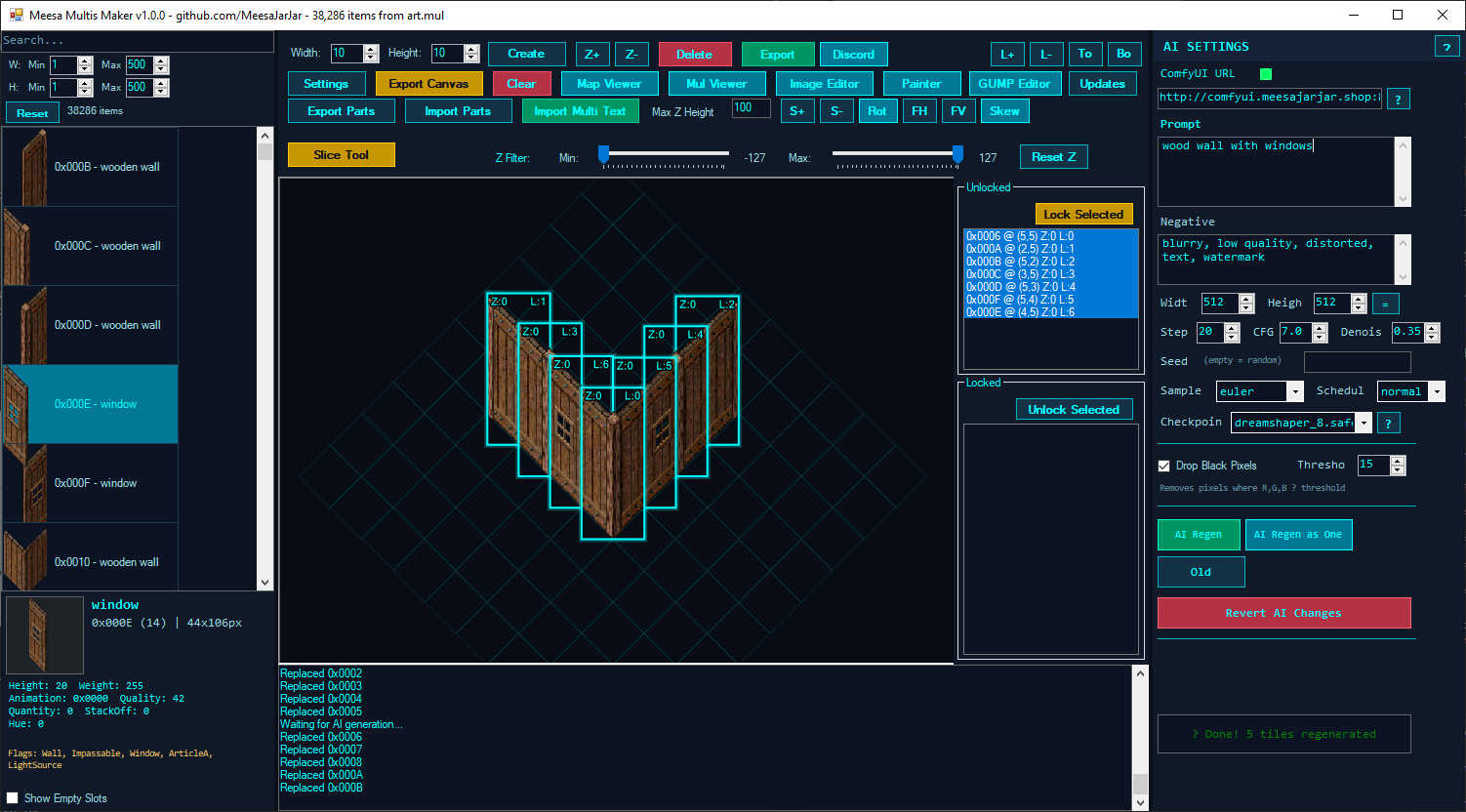
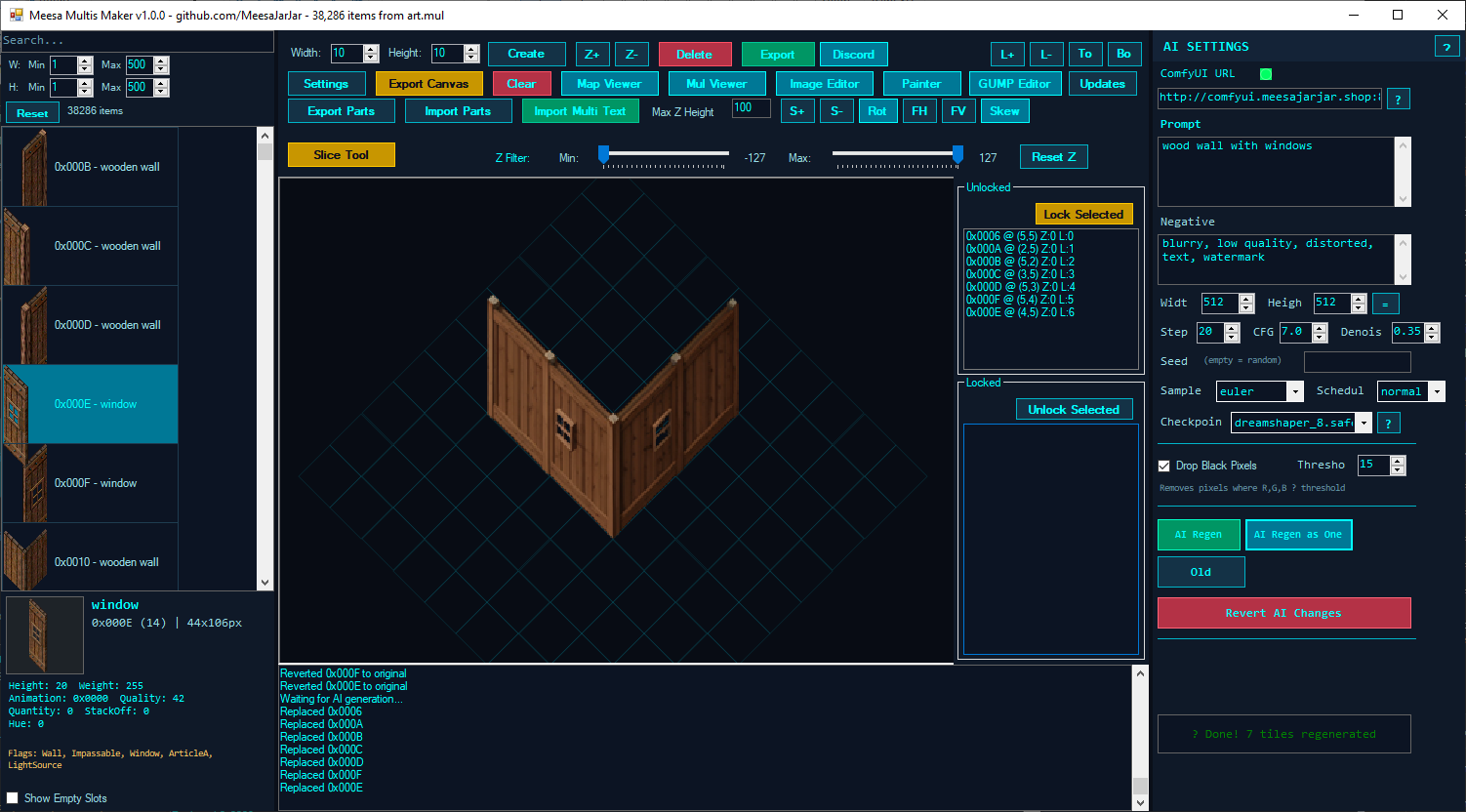
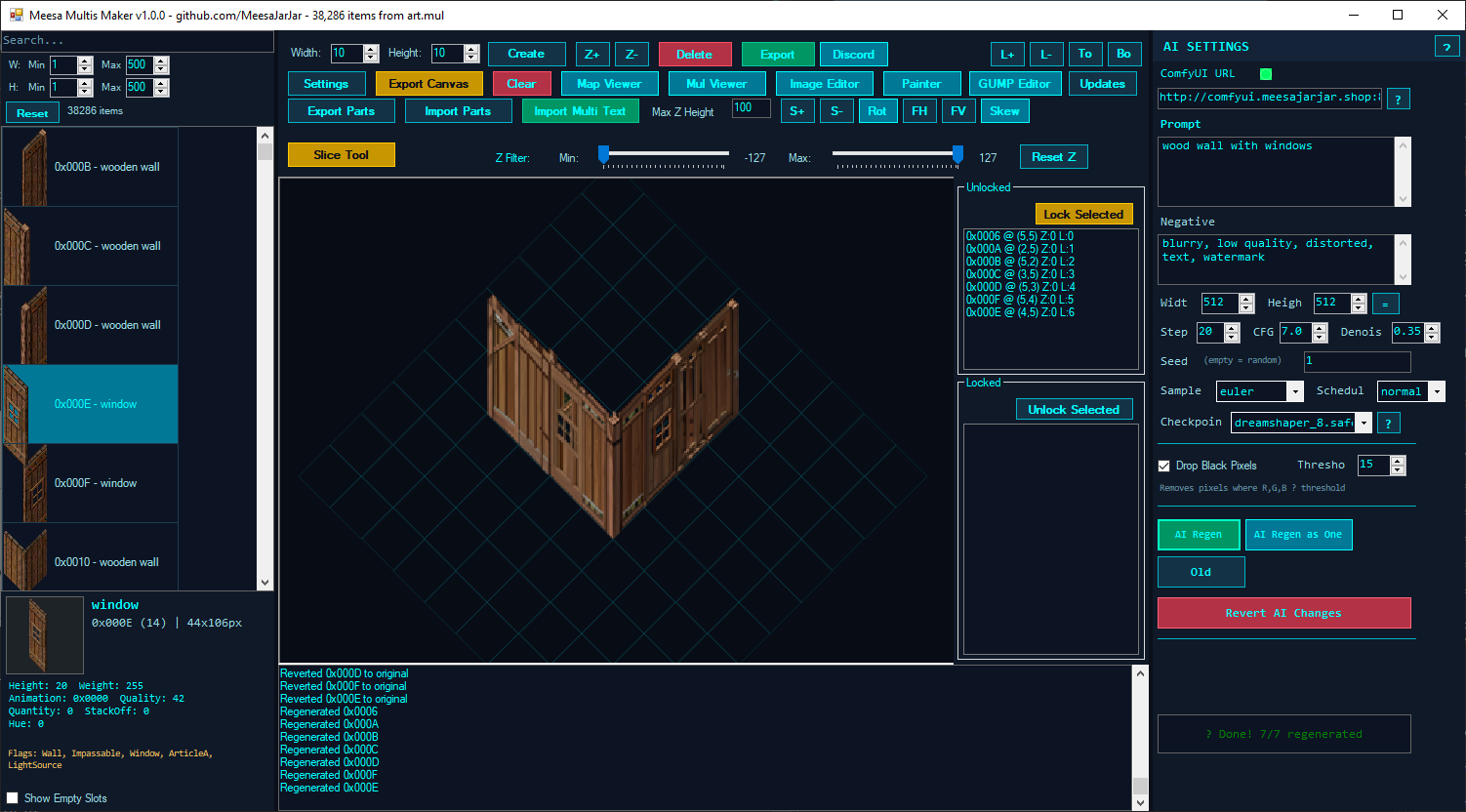
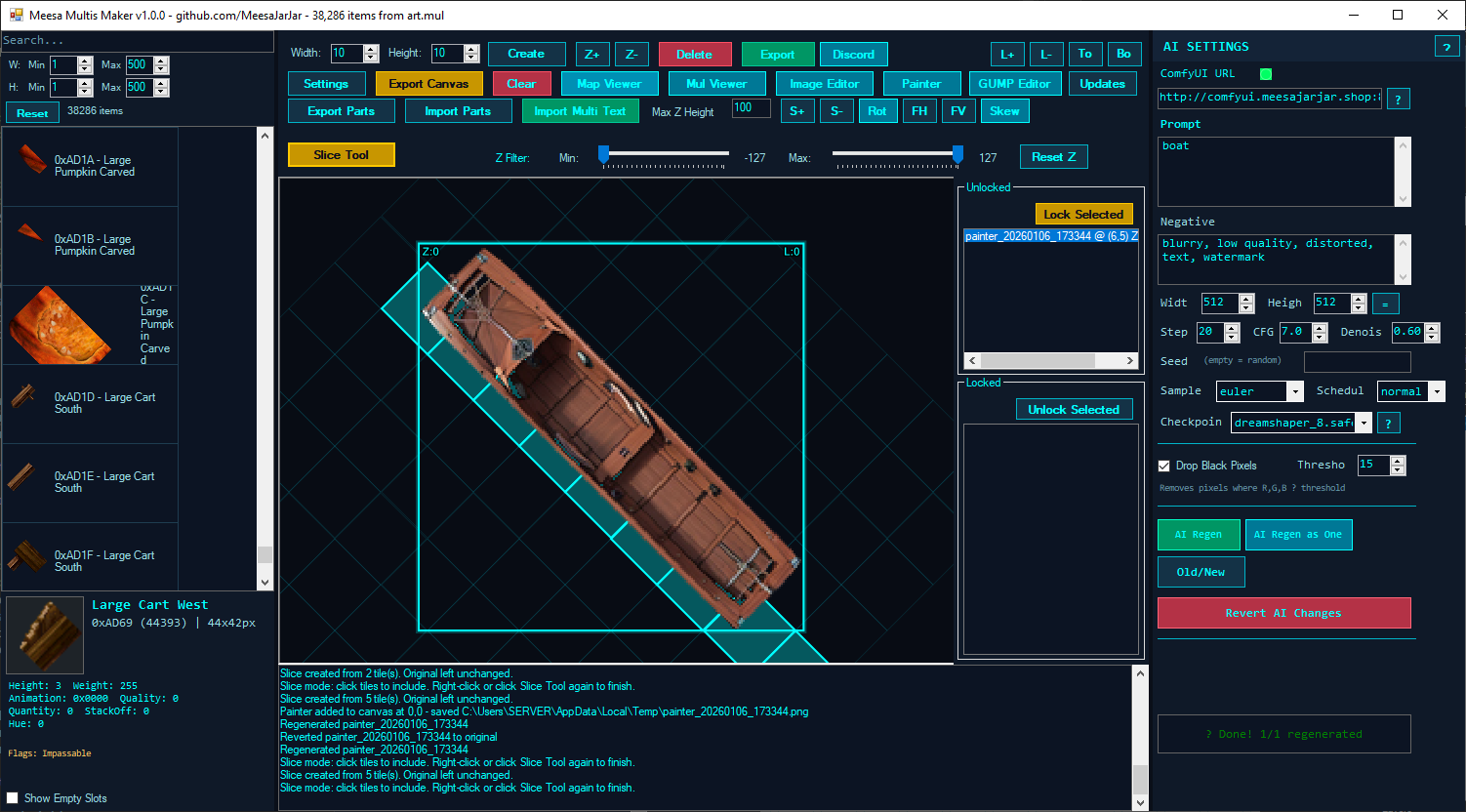
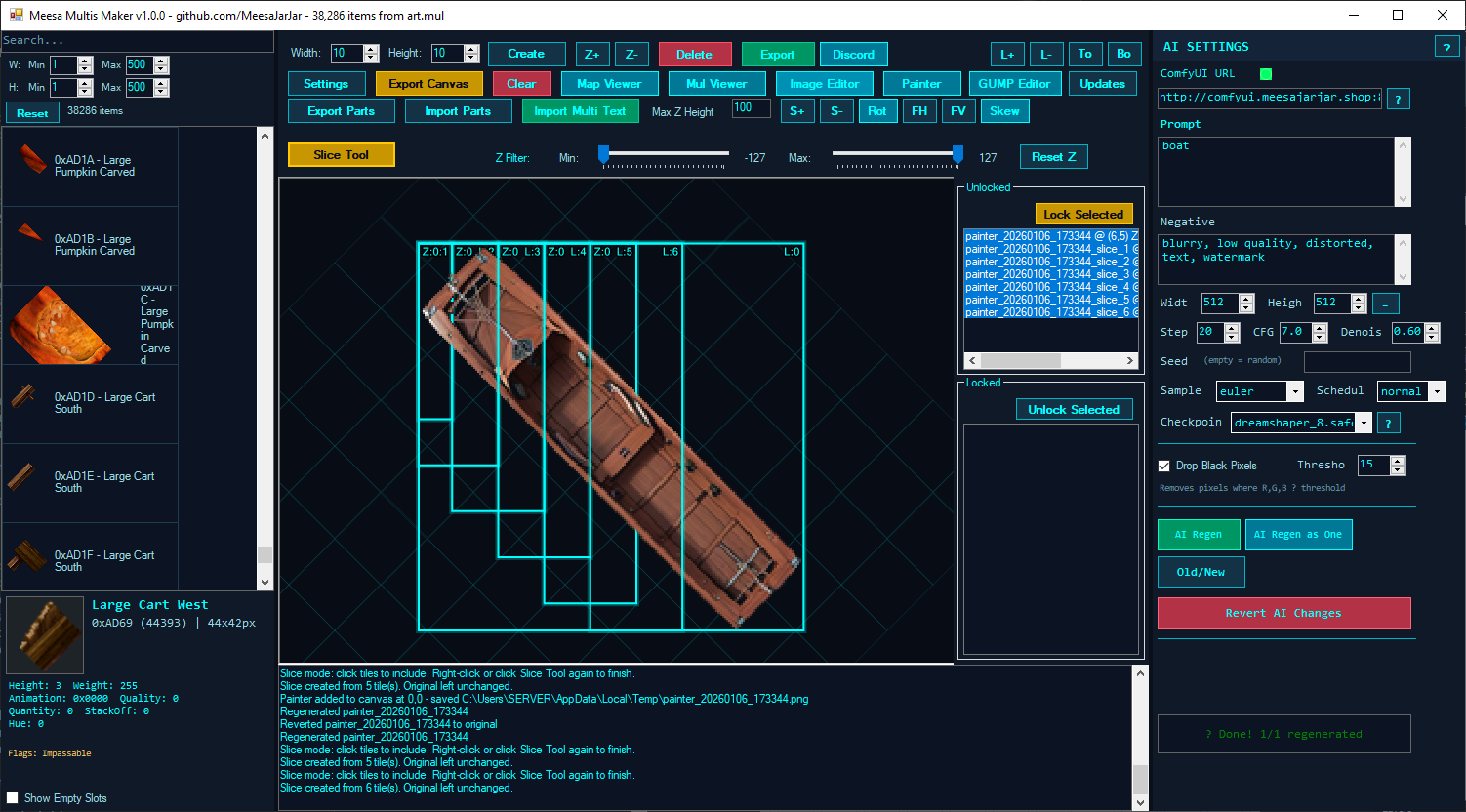
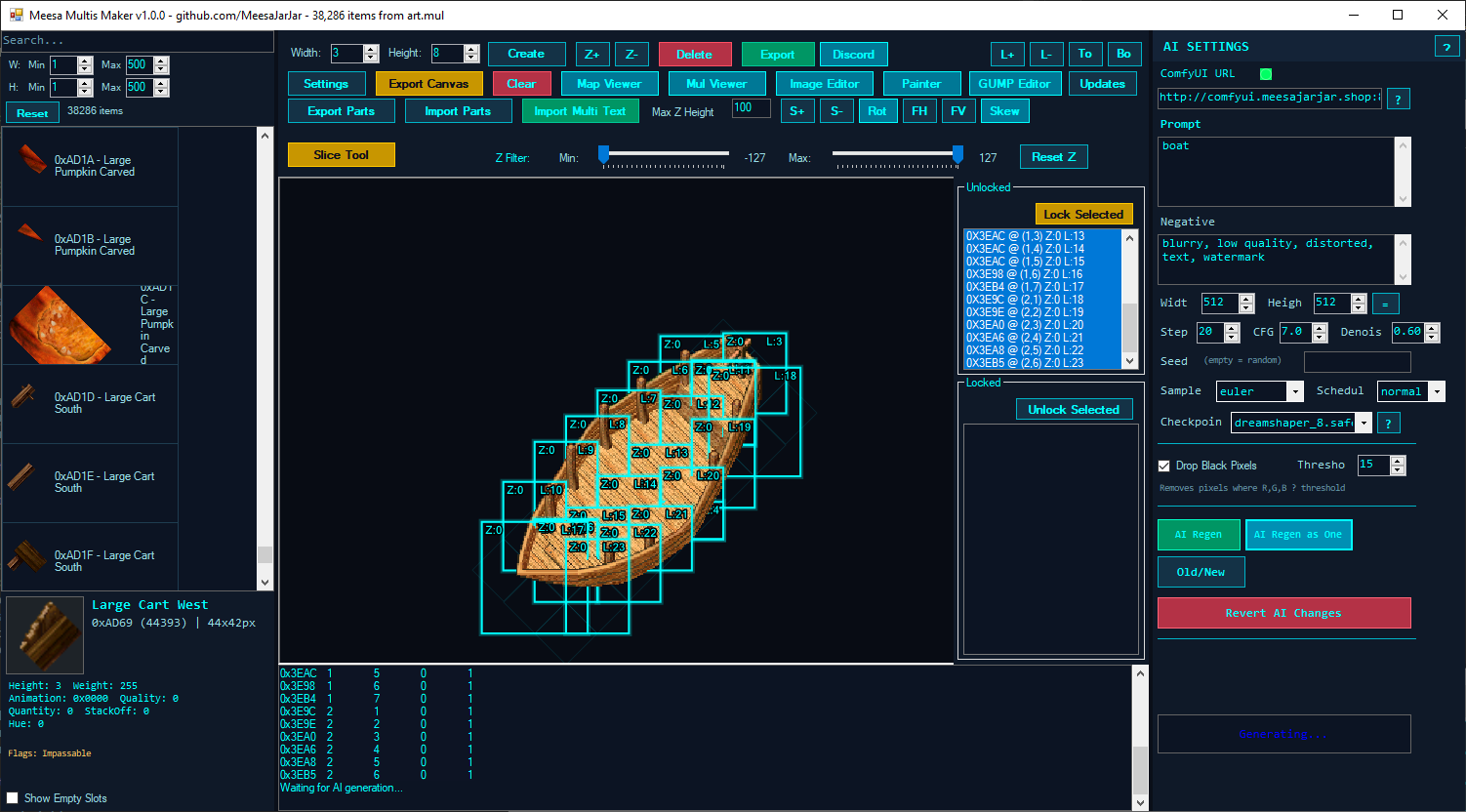
Create vertical slices of placed images based on selected diamond tiles - perfect for creating building pieces that align perfectly with the isometric grid.
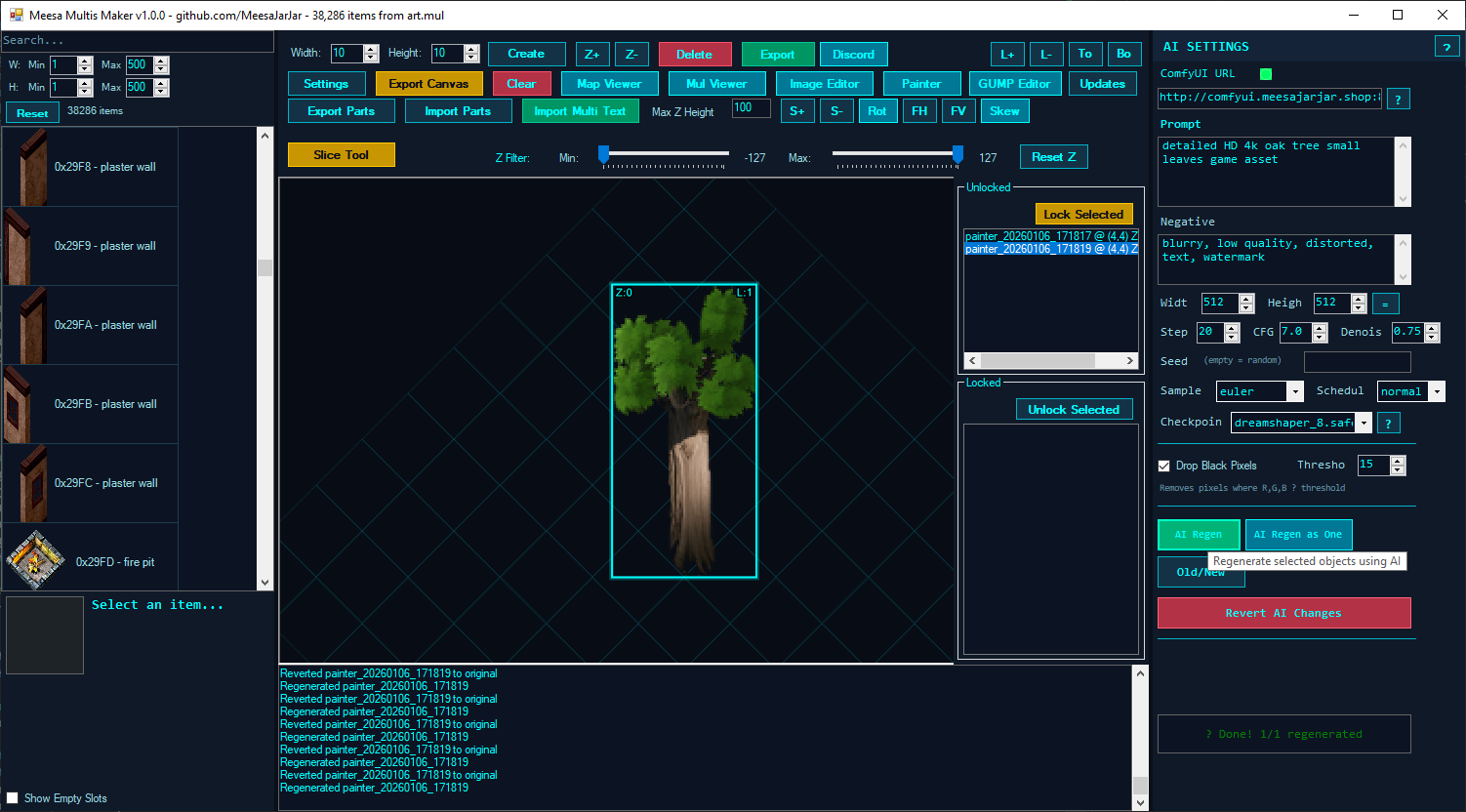
All image generation runs through a ComfyUI server (local or remote):
flux-2-klein-9b.safetensors + flux2 CLIP + flux2-vae), which gets dedicated inpaint workflows when selectedAI Features:
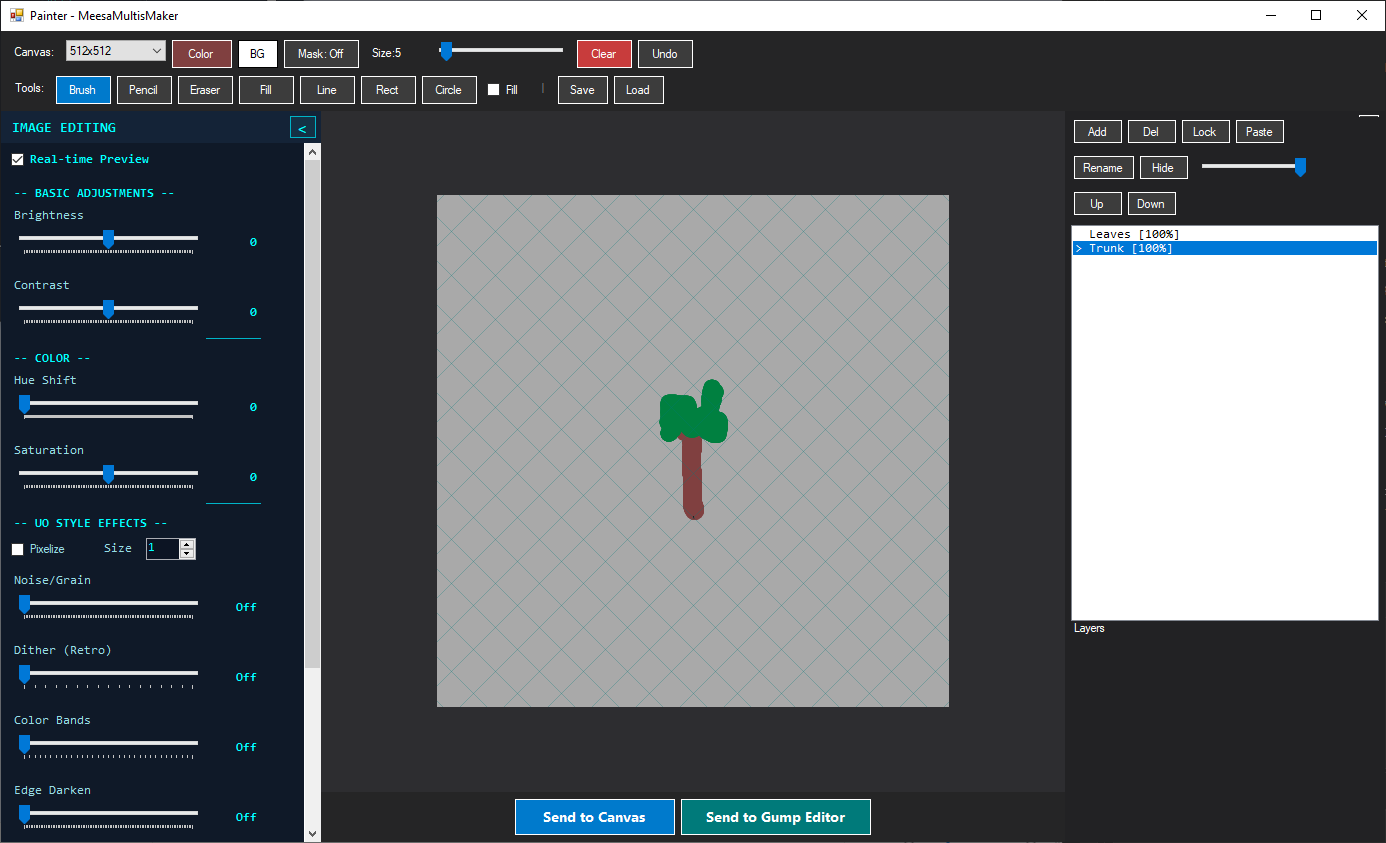
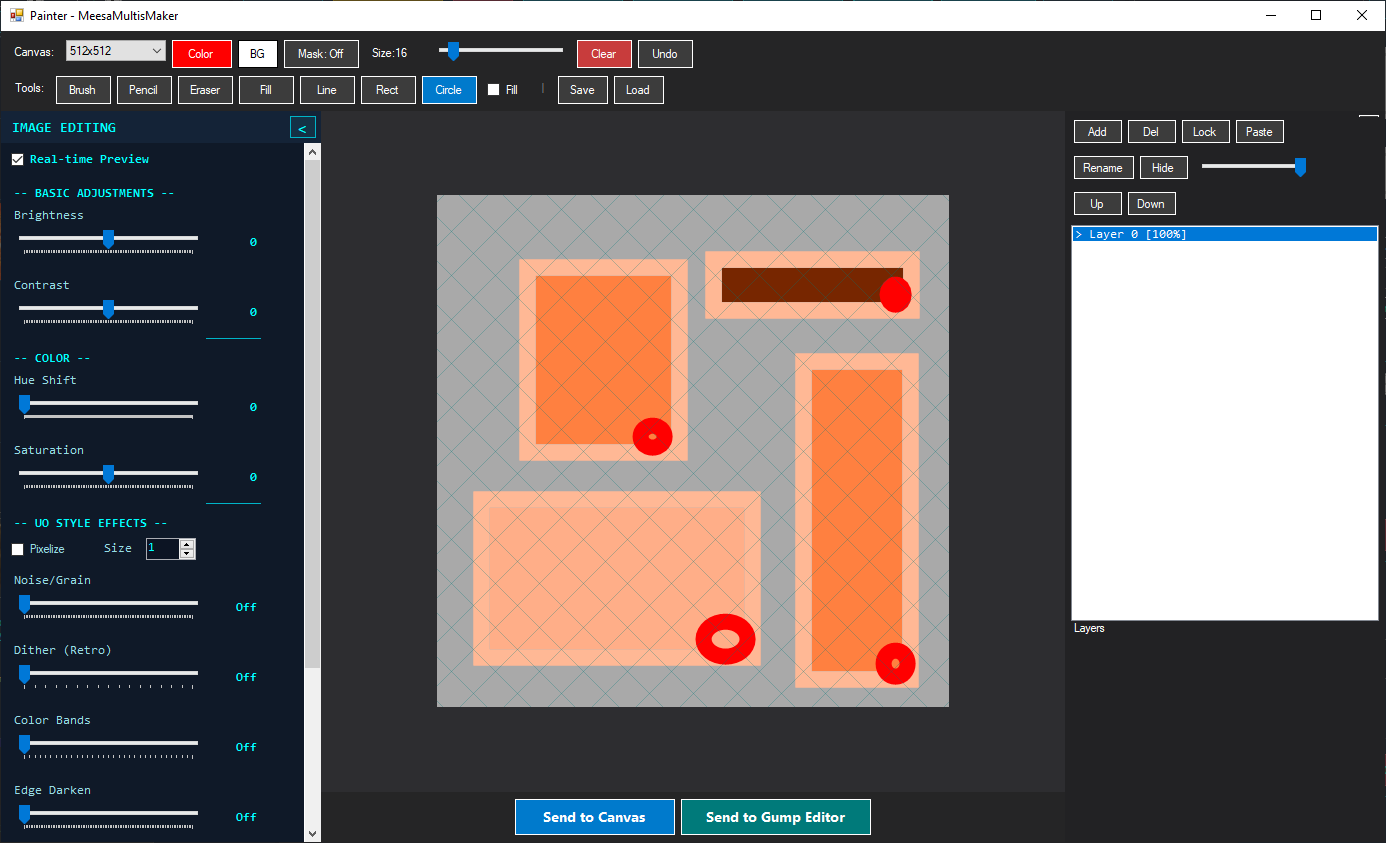
A full-featured layer-based pixel art editor for creating custom sprites.
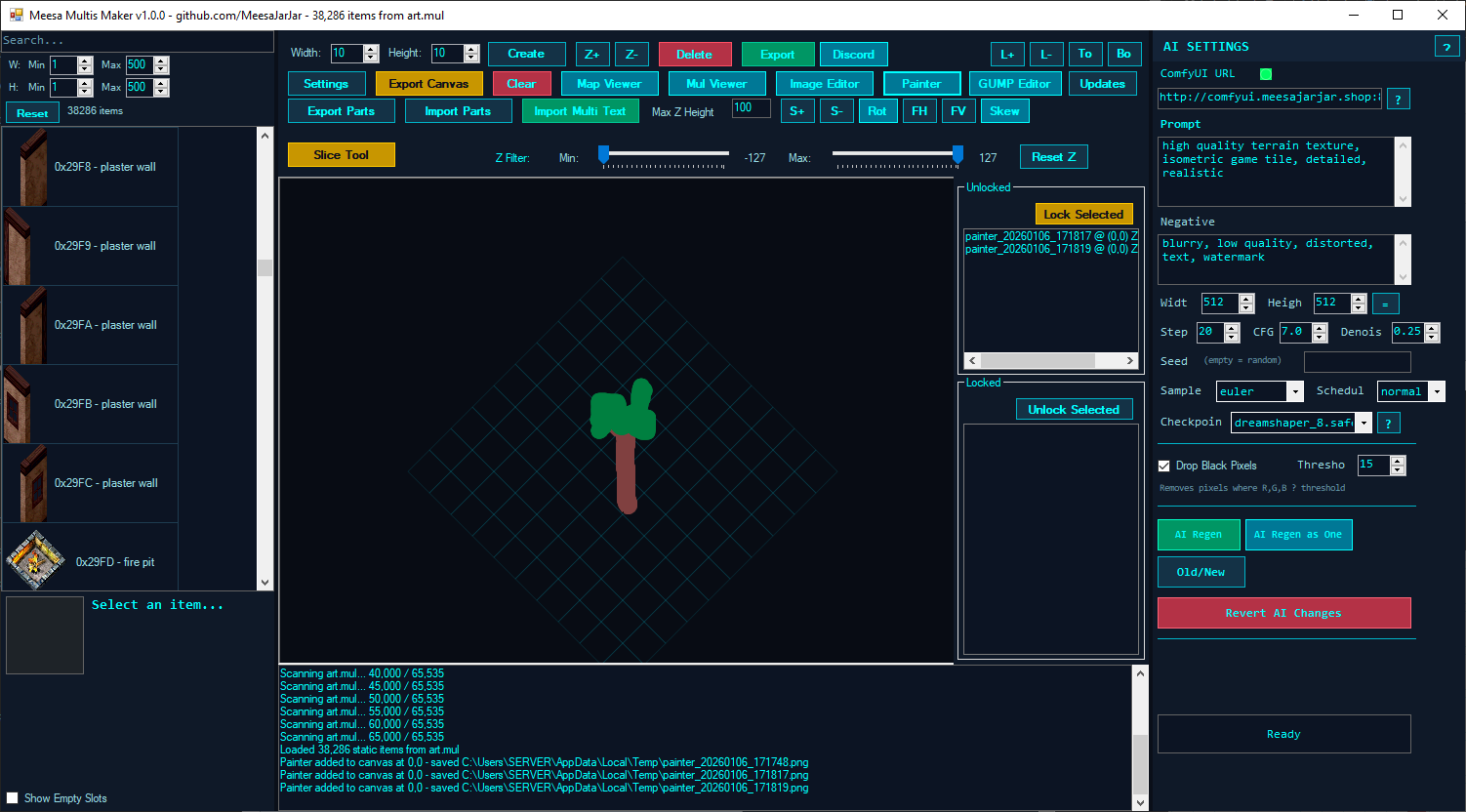
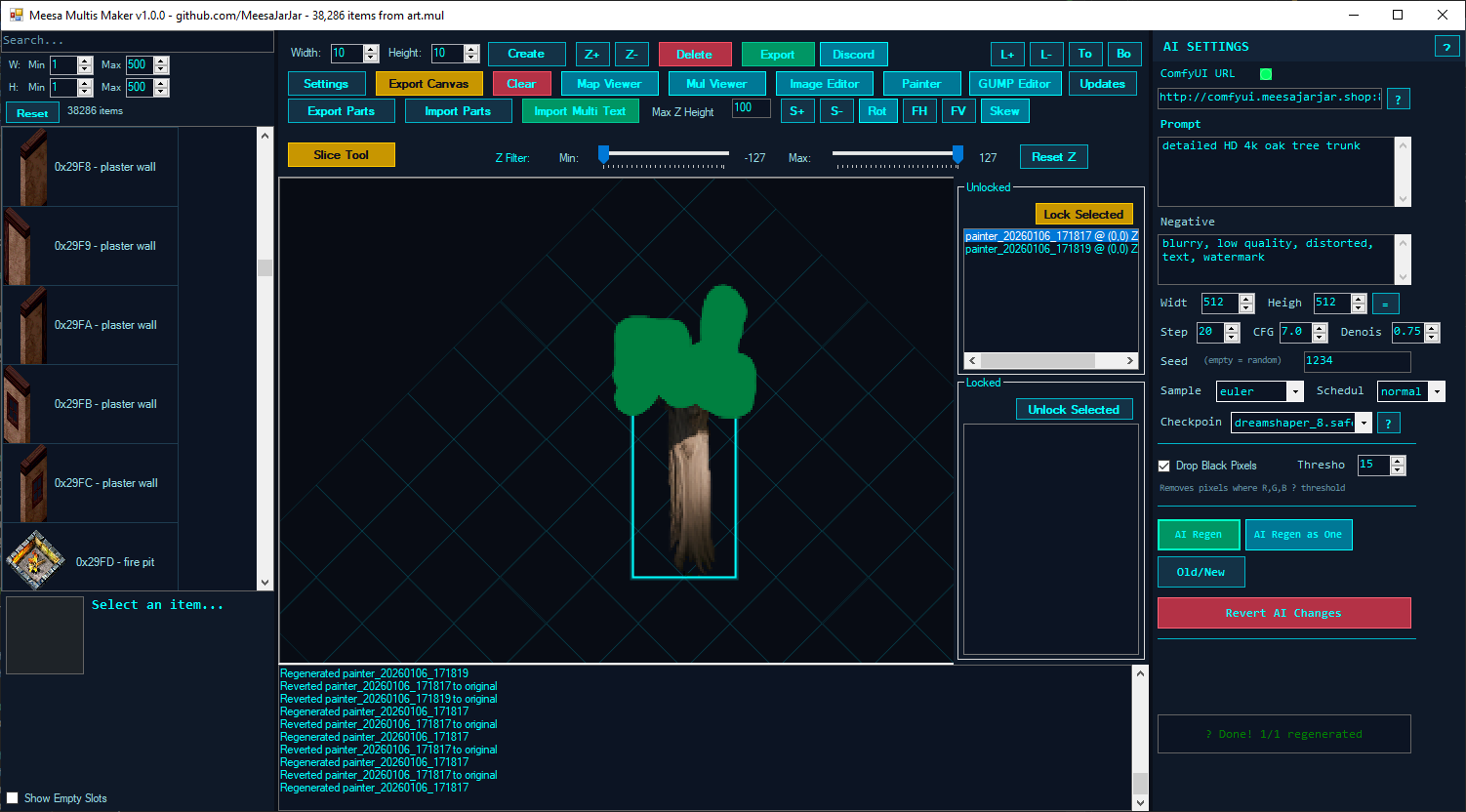
Features:
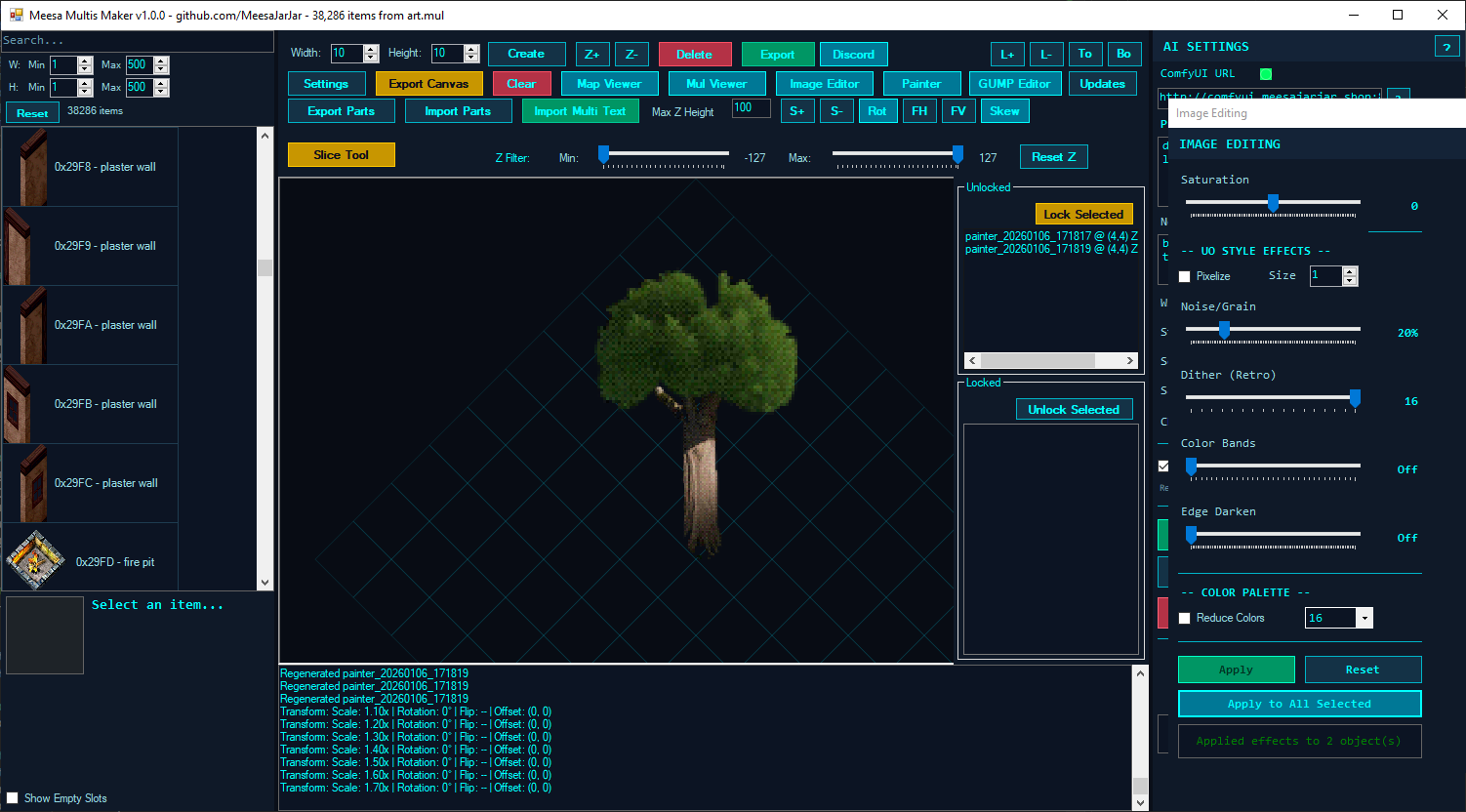
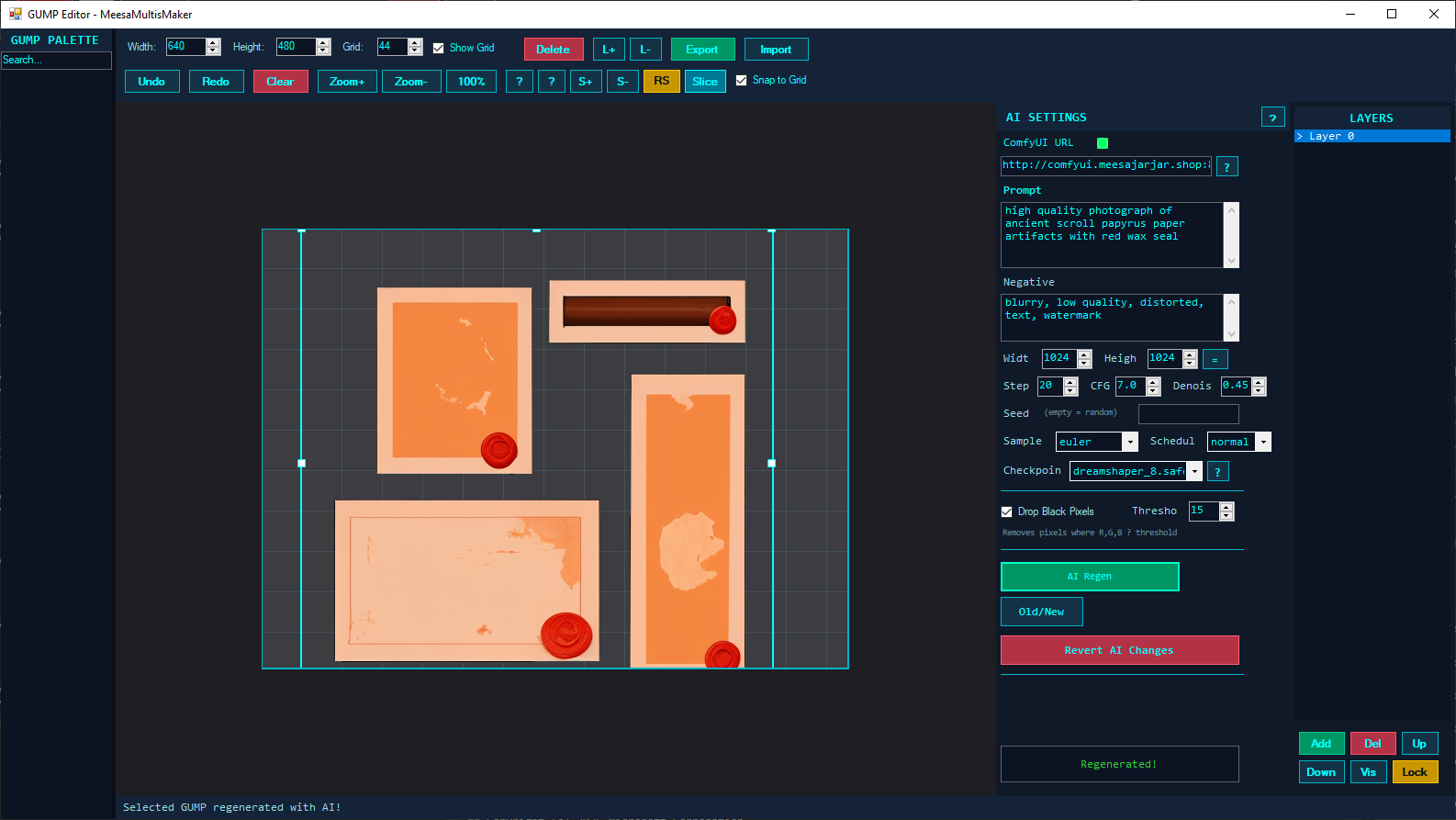
Specialized editor for Ultima Online UI graphics (GUMPs).
Features:
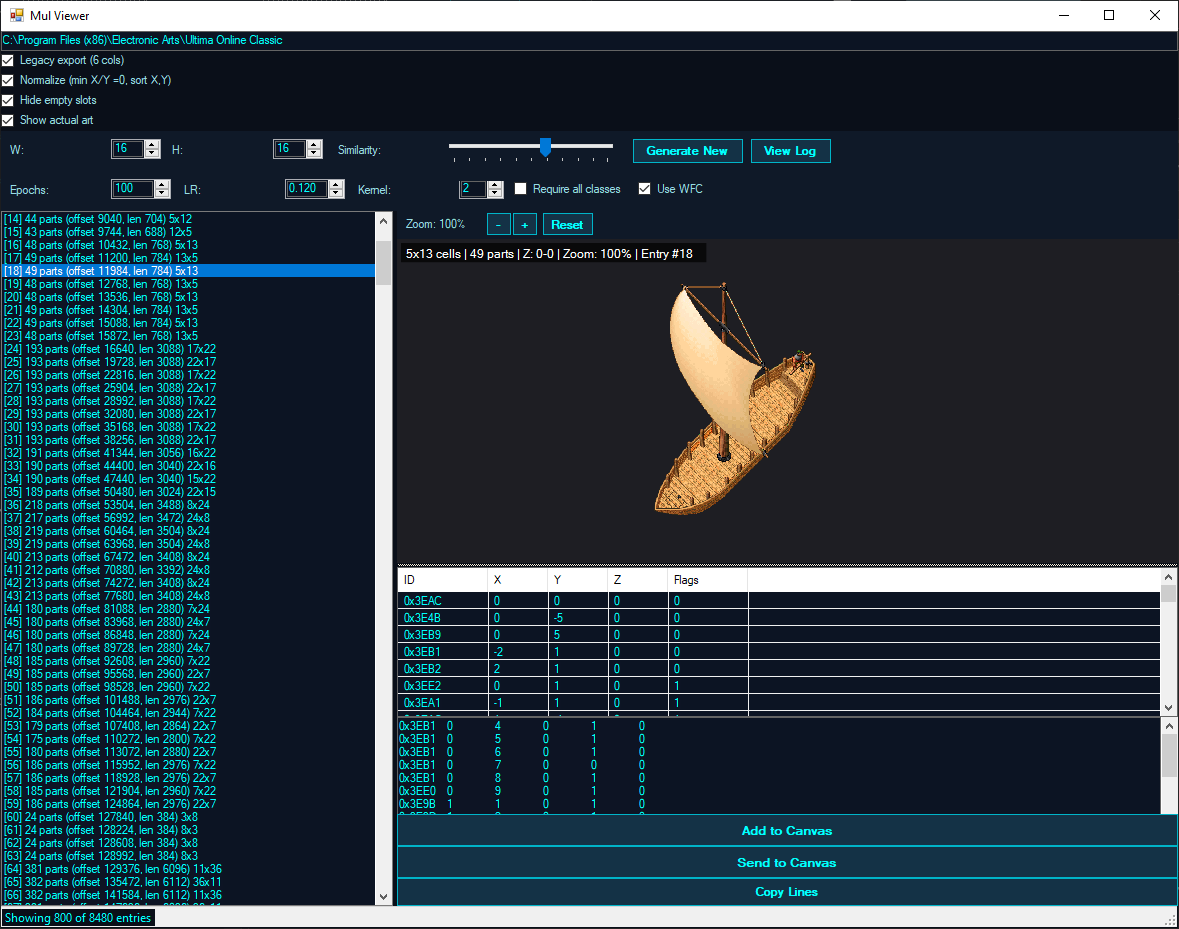
Browser for viewing and generating multi structures from MUL files.
Features:
Structure Generation (AI-like):
Text-to-3D sprite pipeline ("MultisMaker1"): prompt ComfyUI for a model, orbit it through the 8 UO facings, slice it into floor-aligned UO tiles, and send the tiles to the canvas.
Use view as input for iterative refine; timestamped .ply outputsSet S, UO-mode pitch lock (~26.57), splat-density cap for previews, middle-drag pan on ground plane, Quad Top/Front/Side/Persp views, direction buttonsTILE 44x44, Z_PIXEL 4, FloorGridCells 10; floor grid drives tiles (no manual X/Z counts); origin-relative send, canvas centers batch; calibrated 1 cell = 44px export + zoom; centered crop; dials-baked + slice-time yaw; orbit re-cuts, dials re-cut debounced, EnsureFreshSlice on send/exportTilesReady), export-all, 9-slice expand + hollow, auto-refreshReclassify / RefreshSlicesKeepActive; undo split IsDelete vs mutateO0 mirror PixelOffsetX/Y, non-destructive, no bitmap paddingViewer/player/editor for Ultima Online mobile animations (anim.mul family): scrub frames, edit, and export PNG sequences. See the full guides in docs/: ANIMATION_EDITOR_GUIDE.md, ANIMATION_EDITOR_QUICK_REF.md, ANIMATION_EDITOR_TROUBLESHOOTING.md.
ComfyUI-powered sound design: text-to-SFX, text-to-music, voice cloning / voice design (Qwen TTS), a webcam-driven ambient Watcher that scores the scene with generative foley + music layers, and UO sound.mul / music-folder integration.
FASTAUDIOTGEN SFX, WORKINGAUDIO Music, Qwen TTS clone/design); category forced SFX/Music; reprompt off by default; saver filename_prefix pinned to short IDs (no Errno 22); upload/audio then upload/image fallback; queue/history polling with fail-fast server errorsyyMMdd_HHmmss_kind), never prompt text; master pipe-delimited AudioPrompts.csv (id|created|kind|seed|duration_s|audio_file|prompt) + library.jsonl with prompt/seed/workflow/file/scene/caption-45dB + pad + micro-fades); ffmpeg decode to editable WAV + mm_savewav siblingON AIR mini-views with playheadsffmpeg dshow, VL Qwen2-VL-2B via local server; two editable persisted questions (foley/music); sense every N sec (never blocks), 1s scheduler prefetches before clip end reusing freshest prompt; foley length = period, music overlap + 15s minimum hold; adaptive render estimates with EWMA; queue-to-ready timing; 15s failure backoff; layer-disable mid-render keeps file without airing; snapshot force-queuesΔ%, default 4%) + word-Jaccard prompt gate (0.85); static scenes loop on-air file with zero GPU (loop-prepped CrossfadeLoop), dynamic scenes prefetch with lead timeON AIR pulse, played Xs stamp; click for full PROMPT/SCENE/HEARD, hover tooltip, double-click loads to Clips, Clear, 200 capAudioGateServer.py on 127.0.0.1:18171, killed on close) - Whisper vocal bouncer (≥4 words on instrumental intent → one hardened retry, air best, loser kept); CLAP match floor (reject <0.10 → one retry, air best); LUFS match (-19 music / -16 foley, TP -2, LRA 11, two-pass loudnorm with rate pin); scores in log + timeline/library tags; Bounce vocals / CLAP gate checkboxeslaion/sound-effect-captioning-whisper, lazy load, first 30s) - auto-caption aired + manual/radio takes into library Caption (searchable, backfilled by Describe); Describe buttons on timeline cards + clip panelsoundLegacyMUL.uop (1655 entries, in-place fixed-size replace + .bak, FitToFrames); Music/Digital/*.mp3 + Config.txt browser; slot play, clip-to-slot, save, fit; 22050 mono conversion for legacy slots
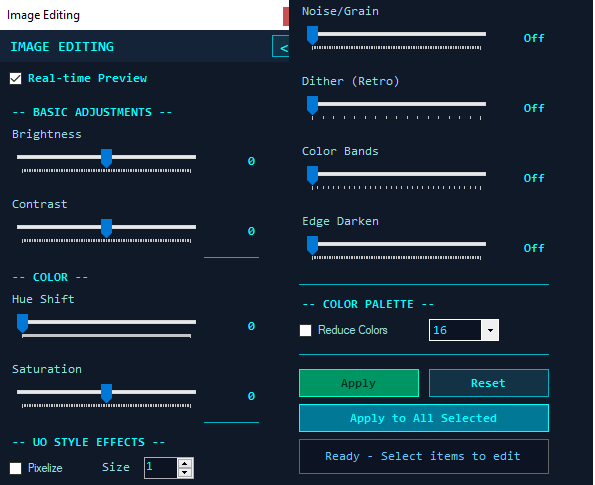
Quick image effects editor for adjusting brightness, contrast, and applying filters to selected objects.
World map browser with tile/static editing and AI replacement.
Features:
Export the currently loaded map as a high-resolution isometric image or a set of tiled JPEG files with an interactive HTML viewer.
Export Options:
Output Modes:
| Image Size | Output |
|---|---|
| ? 100 MP | Single PNG, JPEG, or BMP file |
| > 100 MP | Folder of 512�512 JPEG tiles with HTML viewer |
Tiled Export Contents:
tile_R_C.jpg - Full-resolution rendered tiles (row R, column C)viewer.html - Interactive pan/zoom map viewer (open in any browser)minimap.jpg - Isometric radar-color overview for quick navigationglobe_texture.png - Composited image from the coarsest mipmap level, suitable for projecting onto a 3D globeL1/, L2/, � LN/ - Mipmap tile pyramids for efficient zoomed-out viewingHTML Viewer Features:
Rendering Details:
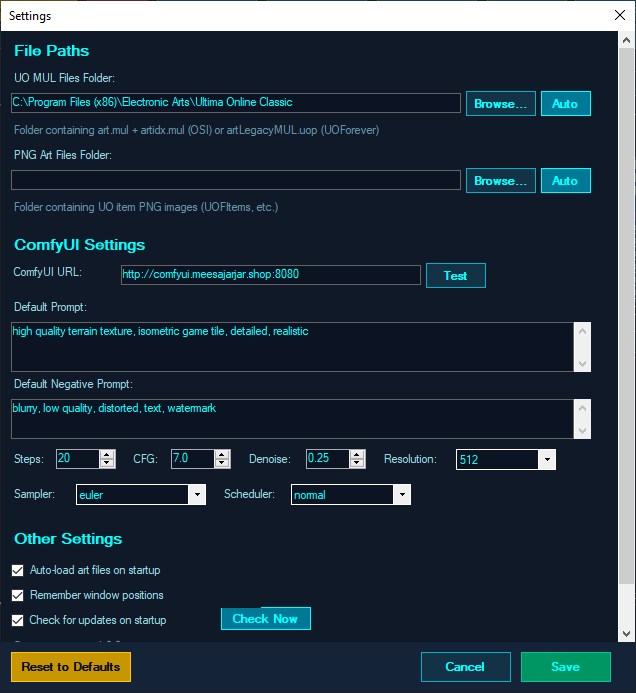
MeesaMultisMaker.exeC:\Program Files (x86)\Electronic Arts\Ultima Online ClassicC:\Program Files (x86)\UOForever\UOart.mul + artidx.mul)artLegacyMUL.uop)All image generation runs through a ComfyUI server (local or remote).
Selecting a flux-2-klein checkpoint switches inpaint workflows to the
dedicated Flux.2 Klein graph (Flux UNET + flux2 CLIP + Flux2 VAE).
ComfyUI provides more flexibility with model selection and advanced workflows.
Advantages:
Requirements:
ComfyUI can run in Google Colab notebooks for free using their T4 free GPUs.
Step 1. Go to https://colab.research.google.com/
Step 2. Click "New notebook" button.
Step 3. Paste this script into the notebook cell:
!git clone https://github.com/comfyanonymous/ComfyUI.git
!pip install -r /content/ComfyUI/requirements.txt
!pip install pinggy
!mkdir -p models/checkpoints
!wget -O models/checkpoints/sd_xl_base_1.0.safetensors \
https://huggingface.co/stabilityai/stable-diffusion-xl-base-1.0/resolve/main/sd_xl_base_1.0.safetensors?download=true

!wget -O /content/ComfyUI/models/checkpoints/dreamshaper_8.safetensors \
https://huggingface.co/jzli/DreamShaper-8/resolve/main/dreamshaper_8.safetensors

import pinggy

tunnel = pinggy.start_tunnel(forwardto="localhost:8188")

print("Public URL(s):")
for url in tunnel.urls:
    print(url)

!cd /content/ComfyUI && python main.py --listen 0.0.0.0
Step 4. Click the Play button to run the script.
Step 5. Copy the pinggy URL and paste it into the ComfyUI URL field. Add :80 to the end.
Example: http://eyzzg-33-125-104-65.a.free.pinggy.link:80
Install ComfyUI
git clone https://github.com/comfyanonymous/ComfyUI
cd ComfyUI
pip install -r requirements.txt
Download Required Models
Place these in your ComfyUI models/checkpoints folder:
dreamshaper_8.safetensorsv1-5-pruned-emaonly.ckptStart ComfyUI
python main.py --listen 0.0.0.0 --port 8080
Configure in Meesa Multis Maker
http://localhost:8080| Setting | Description | Default |
|---|---|---|
| AI Backend | ComfyUI (Server) | ComfyUI |
| Prompt | Positive prompt for generation | (varies) |
| Negative Prompt | Elements to avoid | "blurry, low quality..." |
| Steps | Denoising steps | 20 |
| CFG Scale | Prompt adherence | 4.0 |
| Denoise | Transformation strength | 0.55 |
| Sampler | Sampling method | euler |
| Scheduler | Noise schedule | normal |
| Resolution | Output size | 512x512 |
| Drop Black Pixels | Remove dark backgrounds | Enabled |
| Black Threshold | Darkness cutoff for removal | 15 |
| Use Case | Steps | CFG | Denoise | Sampler |
|---|---|---|---|---|
| Quick Preview | 15 | 4 | 0.4 | euler |
| Standard Quality | 20 | 4 | 0.55 | euler |
| High Quality | 30 | 5 | 0.6 | dpmpp_2m |
| Subtle Changes | 15 | 4 | 0.3 | euler |
Good prompts for UO-style assets:
Negative prompt suggestions:
| Key | Action |
|---|---|
| Middle Mouse | Pan canvas |
| Ctrl + Scroll | Zoom in/out |
| Escape | Exit current mode (Slice/Skew/Rotate) |
| Key | Action |
|---|---|
| Click | Select single object |
| Ctrl + Click | Add/remove from selection |
| Ctrl + Drag | Marquee select |
| Alt + Drag | Marquee deselect |
| Key | Action |
|---|---|
| Delete | Delete selected objects |
| Numpad 1-9 | Move in grid directions |
| Alt + Arrows | Pixel offset (fine movement) |
| Alt + Shift + Arrows | Fast pixel offset |
| Key | Action |
|---|---|
| + / - | Scale up/down |
| Shift + +/- | Scale faster |
| R | Toggle rotate mode |
| Shift + R | Rotate 15 degrees |
| Ctrl + R | Rotate -90 degrees |
| F | Flip horizontal |
| Shift + F | Flip vertical |
| K | Toggle skew mode |
| Shift + K | Reset skew |
| Ctrl + T | Reset all transforms |
| Key | Action |
|---|---|
| Ctrl + C | Copy selection |
| Ctrl + V | Paste at cursor |
| Ctrl + Z | Undo |
| Ctrl + Y | Redo |
| H | Hide selected objects |
| Shift + H | Show all hidden objects |
| Key | Action |
|---|---|
| Numpad 8 | Move X-1, Y-1 |
| Numpad 2 | Move X+1, Y+1 |
| Numpad 4 | Move X-1, Y+1 |
| Numpad 6 | Move X+1, Y-1 |
| Numpad 7 | Move X-1 |
| Numpad 9 | Move Y-1 |
| Numpad 1 | Move Y+1 |
| Numpad 3 | Move X+1 |
| Page Up / + | Move Z+1 |
| Page Down / - | Move Z-1 |
| Escape | Cancel lasso selection |
| Key | Action |
|---|---|
| Ctrl + Z | Undo (per-layer) |
| Ctrl + V | Paste image as layer |
| Ctrl + N | Add new layer |
| Ctrl + +/- | Zoom in/out |
| Ctrl + 0 | Reset zoom |
| Key | Action |
|---|---|
| Delete | Delete selected gump(s) |
| Ctrl + Z | Undo |
| Ctrl + Y | Redo |
| Ctrl + S | Export canvas |
Settings are stored in:
%APPDATA%\MeesaMultisMaker\config.xml
Audio generations live in Documents\MeesaMultisMaker\Audio\ (library.jsonl prompt ledger, AudioPrompts.csv pipe-delimited prompt log, rendered clips).
"Parameter is not valid" error on images
ComfyUI connection fails
http://localhost:8080):80 to the pinggy URLMissing art/textures
art.mul and artidx.mul exist (or artLegacyMUL.uop for UOP format)AI generation produces black images
AI output is wrong size (too large/small)
Multi generation produces empty results
Google Colab session disconnects
Tab-separated values with columns:
TileID  X   Y   Z   Flags
0x0001  0   0   0   1
0x0002  1   0   0   1
art.mul / artidx.mul - Item and land artartLegacyMUL.uop - UOP format artgumpart.mul / gumpidx.mul - UI graphicsgumpartLegacyMUL.uop - UOP format gumpsmap*.mul - World map datastatics*.mul / staidx*.mul - Static objectsmulti.mul / multi.idx - Multi structurestiledata.mul - Item propertiesRequirements: Windows, .NET SDK (builds the .NET Framework 4.8.1 target), and NuGet restore (automatic).
git clone https://github.com/MeesaJarJar/MeesaMultisMaker.git
cd MeesaMultisMaker
dotnet build MeesaMultisMaker/MeesaMultisMaker.csproj -c Release
The binary lands in MeesaMultisMaker/bin/Release/MeesaMultisMaker.exe. No game files ship with the repo: point the app at your own Ultima Online installation on first launch.
Feature dependencies (all optional, all downloaded on first use except where noted):
models/ folders.llama-server.exe is NOT in the repo: download a Windows release from llama.cpp and place it (with its ggml-*.dll files, already in MeesaMultisMaker/LLM/bin/) next to them.ffmpeg, and pip install faster-whisper laion-clap transformers librosa torch torchvision; without them generation still works, gates report unavailable.AppConfig.JarJarPushEnabled = false); the buttons render grayed-out. Flip the flag to restore it against your own server.This project is licensed under the MIT License. See the LICENSE file for full terms.
Pull requests are welcome:
Made with love for the Ultima Online community
Copyright 2024-2026 MeesaJarJar. All rights reserved.
Meesa Multis Maker is a Windows tool by MeesaJarJar for creating and editing Ultima Online multi structures and GUMP graphics. Features an isometric canvas with drag-and-drop placement, transforms (scale/rotate/flip/skew), AI-powered texture regeneration via ComfyUI, MUL/UOP file support, and a built-in pixel painter.
C#
8
22 commits
updated Oct 7, 2026
The ultimate tool for creating Ultima Online multi structures and GUMP graphics with AI-powered texture regeneration
Features � Installation � Getting Started � Editors � AI Integration � Shortcuts � License
Meesa Multis Maker is a Windows desktop application for composing, editing, exporting, and AI-regenerating isometric game assets used in Ultima Online-style multis and GUMPs. It provides a powerful canvas for placing item art on an isometric diamond grid with support for complex transforms and integrates AI pipelines for texture and static regeneration.
pip install faster-whisper laion-clap transformers librosa torch torchvisionllama-server.exe beside its ggml-*.dll files in MeesaMultisMaker/LLM/bin/ for local LLM/vision features (weights auto-download)
Create vertical slices of placed images based on selected diamond tiles - perfect for creating building pieces that align perfectly with the isometric grid.
All image generation runs through a ComfyUI server (local or remote):
flux-2-klein-9b.safetensors + flux2 CLIP + flux2-vae), which gets dedicated inpaint workflows when selectedAI Features:
A full-featured layer-based pixel art editor for creating custom sprites.
Features:
Specialized editor for Ultima Online UI graphics (GUMPs).
Features:
Browser for viewing and generating multi structures from MUL files.
Features:
Structure Generation (AI-like):
Text-to-3D sprite pipeline ("MultisMaker1"): prompt ComfyUI for a model, orbit it through the 8 UO facings, slice it into floor-aligned UO tiles, and send the tiles to the canvas.
Use view as input for iterative refine; timestamped .ply outputsSet S, UO-mode pitch lock (~26.57), splat-density cap for previews, middle-drag pan on ground plane, Quad Top/Front/Side/Persp views, direction buttonsTILE 44x44, Z_PIXEL 4, FloorGridCells 10; floor grid drives tiles (no manual X/Z counts); origin-relative send, canvas centers batch; calibrated 1 cell = 44px export + zoom; centered crop; dials-baked + slice-time yaw; orbit re-cuts, dials re-cut debounced, EnsureFreshSlice on send/exportTilesReady), export-all, 9-slice expand + hollow, auto-refreshReclassify / RefreshSlicesKeepActive; undo split IsDelete vs mutateO0 mirror PixelOffsetX/Y, non-destructive, no bitmap paddingViewer/player/editor for Ultima Online mobile animations (anim.mul family): scrub frames, edit, and export PNG sequences. See the full guides in docs/: ANIMATION_EDITOR_GUIDE.md, ANIMATION_EDITOR_QUICK_REF.md, ANIMATION_EDITOR_TROUBLESHOOTING.md.
ComfyUI-powered sound design: text-to-SFX, text-to-music, voice cloning / voice design (Qwen TTS), a webcam-driven ambient Watcher that scores the scene with generative foley + music layers, and UO sound.mul / music-folder integration.
FASTAUDIOTGEN SFX, WORKINGAUDIO Music, Qwen TTS clone/design); category forced SFX/Music; reprompt off by default; saver filename_prefix pinned to short IDs (no Errno 22); upload/audio then upload/image fallback; queue/history polling with fail-fast server errorsyyMMdd_HHmmss_kind), never prompt text; master pipe-delimited AudioPrompts.csv (id|created|kind|seed|duration_s|audio_file|prompt) + library.jsonl with prompt/seed/workflow/file/scene/caption-45dB + pad + micro-fades); ffmpeg decode to editable WAV + mm_savewav siblingON AIR mini-views with playheadsffmpeg dshow, VL Qwen2-VL-2B via local server; two editable persisted questions (foley/music); sense every N sec (never blocks), 1s scheduler prefetches before clip end reusing freshest prompt; foley length = period, music overlap + 15s minimum hold; adaptive render estimates with EWMA; queue-to-ready timing; 15s failure backoff; layer-disable mid-render keeps file without airing; snapshot force-queuesΔ%, default 4%) + word-Jaccard prompt gate (0.85); static scenes loop on-air file with zero GPU (loop-prepped CrossfadeLoop), dynamic scenes prefetch with lead timeON AIR pulse, played Xs stamp; click for full PROMPT/SCENE/HEARD, hover tooltip, double-click loads to Clips, Clear, 200 capAudioGateServer.py on 127.0.0.1:18171, killed on close) - Whisper vocal bouncer (≥4 words on instrumental intent → one hardened retry, air best, loser kept); CLAP match floor (reject <0.10 → one retry, air best); LUFS match (-19 music / -16 foley, TP -2, LRA 11, two-pass loudnorm with rate pin); scores in log + timeline/library tags; Bounce vocals / CLAP gate checkboxeslaion/sound-effect-captioning-whisper, lazy load, first 30s) - auto-caption aired + manual/radio takes into library Caption (searchable, backfilled by Describe); Describe buttons on timeline cards + clip panelsoundLegacyMUL.uop (1655 entries, in-place fixed-size replace + .bak, FitToFrames); Music/Digital/*.mp3 + Config.txt browser; slot play, clip-to-slot, save, fit; 22050 mono conversion for legacy slots
Quick image effects editor for adjusting brightness, contrast, and applying filters to selected objects.
World map browser with tile/static editing and AI replacement.
Features:
Export the currently loaded map as a high-resolution isometric image or a set of tiled JPEG files with an interactive HTML viewer.
Export Options:
Output Modes:
| Image Size | Output |
|---|---|
| ? 100 MP | Single PNG, JPEG, or BMP file |
| > 100 MP | Folder of 512�512 JPEG tiles with HTML viewer |
Tiled Export Contents:
tile_R_C.jpg - Full-resolution rendered tiles (row R, column C)viewer.html - Interactive pan/zoom map viewer (open in any browser)minimap.jpg - Isometric radar-color overview for quick navigationglobe_texture.png - Composited image from the coarsest mipmap level, suitable for projecting onto a 3D globeL1/, L2/, � LN/ - Mipmap tile pyramids for efficient zoomed-out viewingHTML Viewer Features:
Rendering Details:
MeesaMultisMaker.exeC:\Program Files (x86)\Electronic Arts\Ultima Online ClassicC:\Program Files (x86)\UOForever\UOart.mul + artidx.mul)artLegacyMUL.uop)All image generation runs through a ComfyUI server (local or remote).
Selecting a flux-2-klein checkpoint switches inpaint workflows to the
dedicated Flux.2 Klein graph (Flux UNET + flux2 CLIP + Flux2 VAE).
ComfyUI provides more flexibility with model selection and advanced workflows.
Advantages:
Requirements:
ComfyUI can run in Google Colab notebooks for free using their T4 free GPUs.
Step 1. Go to https://colab.research.google.com/
Step 2. Click "New notebook" button.
Step 3. Paste this script into the notebook cell:
!git clone https://github.com/comfyanonymous/ComfyUI.git
!pip install -r /content/ComfyUI/requirements.txt
!pip install pinggy
!mkdir -p models/checkpoints
!wget -O models/checkpoints/sd_xl_base_1.0.safetensors \
https://huggingface.co/stabilityai/stable-diffusion-xl-base-1.0/resolve/main/sd_xl_base_1.0.safetensors?download=true

!wget -O /content/ComfyUI/models/checkpoints/dreamshaper_8.safetensors \
https://huggingface.co/jzli/DreamShaper-8/resolve/main/dreamshaper_8.safetensors

import pinggy

tunnel = pinggy.start_tunnel(forwardto="localhost:8188")

print("Public URL(s):")
for url in tunnel.urls:
    print(url)

!cd /content/ComfyUI && python main.py --listen 0.0.0.0
Step 4. Click the Play button to run the script.
Step 5. Copy the pinggy URL and paste it into the ComfyUI URL field. Add :80 to the end.
Example: http://eyzzg-33-125-104-65.a.free.pinggy.link:80
Install ComfyUI
git clone https://github.com/comfyanonymous/ComfyUI
cd ComfyUI
pip install -r requirements.txt
Download Required Models
Place these in your ComfyUI models/checkpoints folder:
dreamshaper_8.safetensorsv1-5-pruned-emaonly.ckptStart ComfyUI
python main.py --listen 0.0.0.0 --port 8080
Configure in Meesa Multis Maker
http://localhost:8080| Setting | Description | Default |
|---|---|---|
| AI Backend | ComfyUI (Server) | ComfyUI |
| Prompt | Positive prompt for generation | (varies) |
| Negative Prompt | Elements to avoid | "blurry, low quality..." |
| Steps | Denoising steps | 20 |
| CFG Scale | Prompt adherence | 4.0 |
| Denoise | Transformation strength | 0.55 |
| Sampler | Sampling method | euler |
| Scheduler | Noise schedule | normal |
| Resolution | Output size | 512x512 |
| Drop Black Pixels | Remove dark backgrounds | Enabled |
| Black Threshold | Darkness cutoff for removal | 15 |
| Use Case | Steps | CFG | Denoise | Sampler |
|---|---|---|---|---|
| Quick Preview | 15 | 4 | 0.4 | euler |
| Standard Quality | 20 | 4 | 0.55 | euler |
| High Quality | 30 | 5 | 0.6 | dpmpp_2m |
| Subtle Changes | 15 | 4 | 0.3 | euler |
Good prompts for UO-style assets:
Negative prompt suggestions:
| Key | Action |
|---|---|
| Middle Mouse | Pan canvas |
| Ctrl + Scroll | Zoom in/out |
| Escape | Exit current mode (Slice/Skew/Rotate) |
| Key | Action |
|---|---|
| Click | Select single object |
| Ctrl + Click | Add/remove from selection |
| Ctrl + Drag | Marquee select |
| Alt + Drag | Marquee deselect |
| Key | Action |
|---|---|
| Delete | Delete selected objects |
| Numpad 1-9 | Move in grid directions |
| Alt + Arrows | Pixel offset (fine movement) |
| Alt + Shift + Arrows | Fast pixel offset |
| Key | Action |
|---|---|
| + / - | Scale up/down |
| Shift + +/- | Scale faster |
| R | Toggle rotate mode |
| Shift + R | Rotate 15 degrees |
| Ctrl + R | Rotate -90 degrees |
| F | Flip horizontal |
| Shift + F | Flip vertical |
| K | Toggle skew mode |
| Shift + K | Reset skew |
| Ctrl + T | Reset all transforms |
| Key | Action |
|---|---|
| Ctrl + C | Copy selection |
| Ctrl + V | Paste at cursor |
| Ctrl + Z | Undo |
| Ctrl + Y | Redo |
| H | Hide selected objects |
| Shift + H | Show all hidden objects |
| Key | Action |
|---|---|
| Numpad 8 | Move X-1, Y-1 |
| Numpad 2 | Move X+1, Y+1 |
| Numpad 4 | Move X-1, Y+1 |
| Numpad 6 | Move X+1, Y-1 |
| Numpad 7 | Move X-1 |
| Numpad 9 | Move Y-1 |
| Numpad 1 | Move Y+1 |
| Numpad 3 | Move X+1 |
| Page Up / + | Move Z+1 |
| Page Down / - | Move Z-1 |
| Escape | Cancel lasso selection |
| Key | Action |
|---|---|
| Ctrl + Z | Undo (per-layer) |
| Ctrl + V | Paste image as layer |
| Ctrl + N | Add new layer |
| Ctrl + +/- | Zoom in/out |
| Ctrl + 0 | Reset zoom |
| Key | Action |
|---|---|
| Delete | Delete selected gump(s) |
| Ctrl + Z | Undo |
| Ctrl + Y | Redo |
| Ctrl + S | Export canvas |
Settings are stored in:
%APPDATA%\MeesaMultisMaker\config.xml
Audio generations live in Documents\MeesaMultisMaker\Audio\ (library.jsonl prompt ledger, AudioPrompts.csv pipe-delimited prompt log, rendered clips).
"Parameter is not valid" error on images
ComfyUI connection fails
http://localhost:8080):80 to the pinggy URLMissing art/textures
art.mul and artidx.mul exist (or artLegacyMUL.uop for UOP format)AI generation produces black images
AI output is wrong size (too large/small)
Multi generation produces empty results
Google Colab session disconnects
Tab-separated values with columns:
TileID  X   Y   Z   Flags
0x0001  0   0   0   1
0x0002  1   0   0   1
art.mul / artidx.mul - Item and land artartLegacyMUL.uop - UOP format artgumpart.mul / gumpidx.mul - UI graphicsgumpartLegacyMUL.uop - UOP format gumpsmap*.mul - World map datastatics*.mul / staidx*.mul - Static objectsmulti.mul / multi.idx - Multi structurestiledata.mul - Item propertiesRequirements: Windows, .NET SDK (builds the .NET Framework 4.8.1 target), and NuGet restore (automatic).
git clone https://github.com/MeesaJarJar/MeesaMultisMaker.git
cd MeesaMultisMaker
dotnet build MeesaMultisMaker/MeesaMultisMaker.csproj -c Release
The binary lands in MeesaMultisMaker/bin/Release/MeesaMultisMaker.exe. No game files ship with the repo: point the app at your own Ultima Online installation on first launch.
Feature dependencies (all optional, all downloaded on first use except where noted):
models/ folders.llama-server.exe is NOT in the repo: download a Windows release from llama.cpp and place it (with its ggml-*.dll files, already in MeesaMultisMaker/LLM/bin/) next to them.ffmpeg, and pip install faster-whisper laion-clap transformers librosa torch torchvision; without them generation still works, gates report unavailable.AppConfig.JarJarPushEnabled = false); the buttons render grayed-out. Flip the flag to restore it against your own server.This project is licensed under the MIT License. See the LICENSE file for full terms.
Pull requests are welcome:
Made with love for the Ultima Online community
Copyright 2024-2026 MeesaJarJar. All rights reserved.



