
A proof of concept for caching shared Apple downloads on an Ubuntu host in a local network.
Go
1
36 commits
updated Sep 30, 2026
See what people are saying
README
Open Apple Cache
I'm Maurice, and this is my proof of concept for running an Apple content cache on Linux.
I started it because Apple's built-in content cache requires a Mac. Open Apple Cache runs in an Ubuntu VM or LXC container instead. It stores eligible App Store downloads, software updates and other public Apple CDN files, then serves the same file from local storage when another device requests it.
The project is still a POC. I use it in my own test network with a Mac, iPhone, iPad, HomePod and Apple TV. It is not affiliated with or supported by Apple.
Experimental status
Open Apple Cache is highly experimental. It uses undocumented Apple behavior that can change without notice, and it has not been tested across every device, network or type of Apple content.
The project is provided as is, without warranty or a guarantee that it will always work correctly. Expect bugs and do not rely on it for critical or production workloads. If you find a problem, please open an issue with the steps needed to reproduce it. Remove passwords, tokens, IP addresses and Apple session data from logs before posting them.
What it does
- caches App Store packages, Apple updates and on-demand resources;
- validates matching Apple packages when signed download URLs change;
- reuses validated byte-range blocks when Apple rotates signed package URLs;
- streams large downloads without loading the complete file into memory;
- supports cache hits, byte ranges and parallel requests;
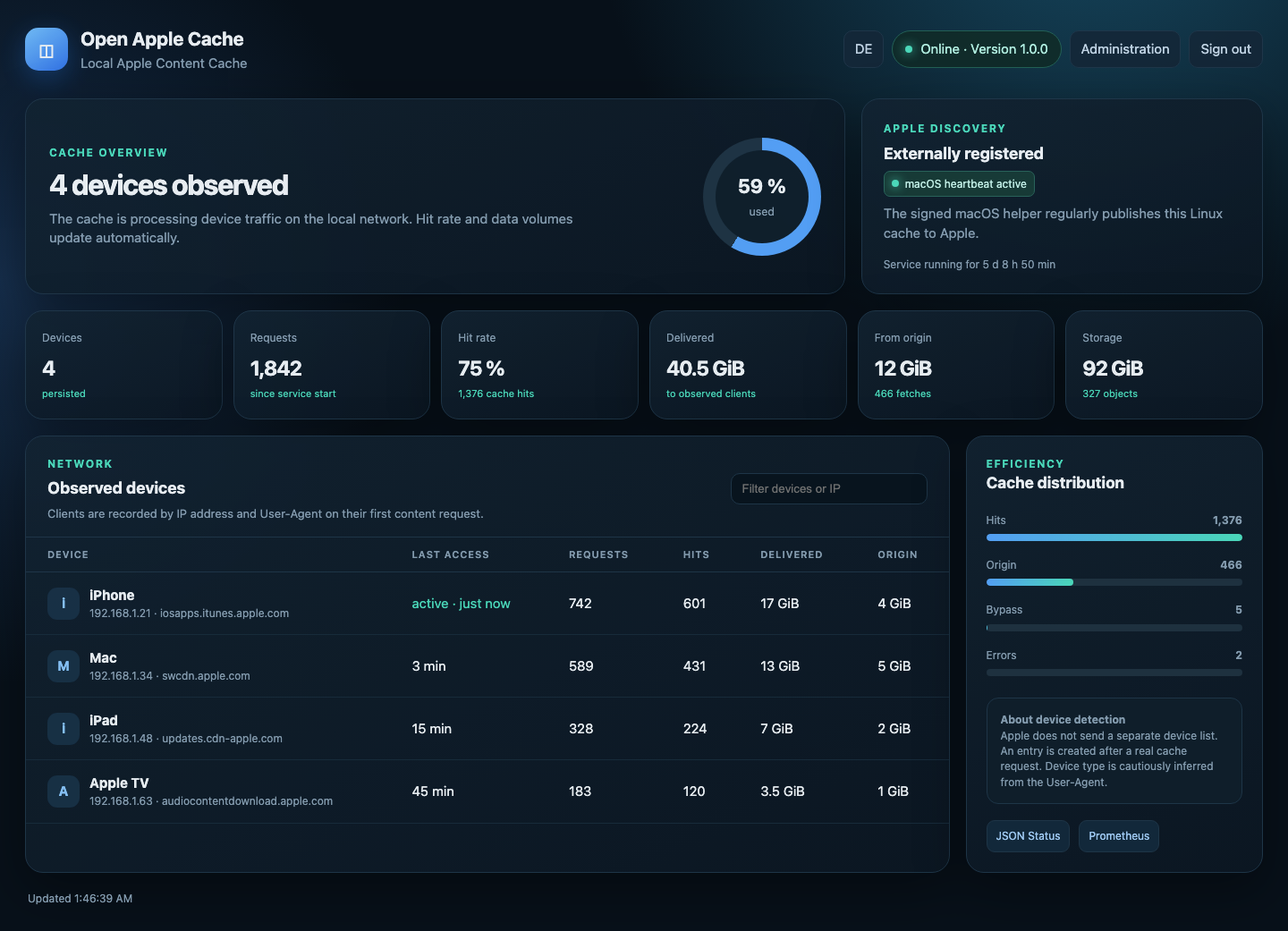
- shows traffic, hit rate, storage use and observed clients in a web dashboard;
- provides local admin and viewer accounts;
- supports optional Microsoft Entra ID sign-in;
- manages internal or Let's Encrypt certificates;
- limits cache access to the configured local network and public Apple content.
Requests with authorization data, personal cookies or private responses are not stored.
Screenshots
Dashboard
Settings
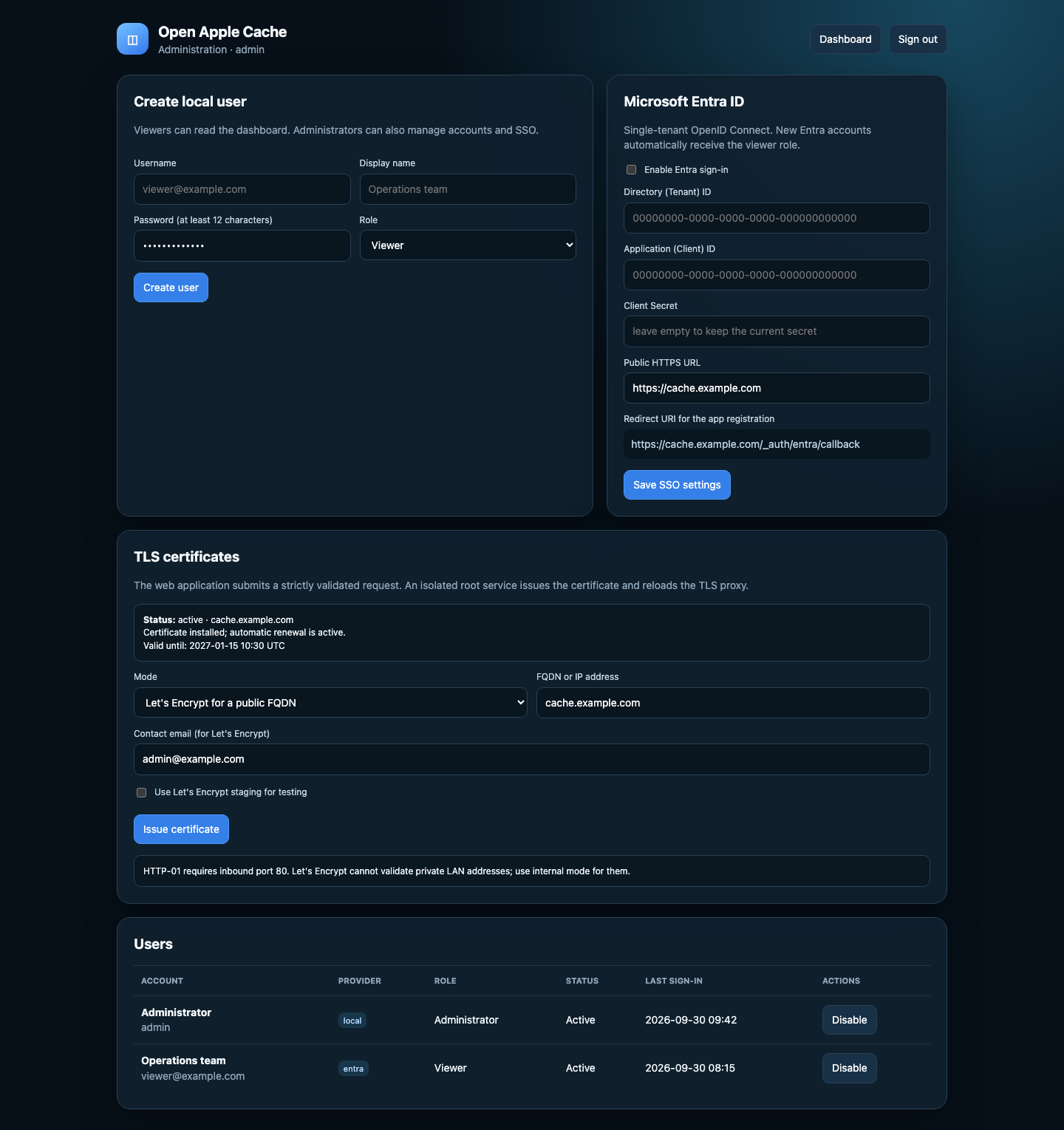
The screenshots contain example data.
Requirements
- Ubuntu 26.04 LTS in a VM or LXC container;
- a fixed IP address on the client network;
- at least 20 GB of free storage;
- root access during setup;
- one Mac for the Apple registration helper.
Getting started
git clone https://github.com/Mau2rice0/Open-Apple-Cache.git && cd Open-Apple-Cache && sudo ./setup.sh
The setup reads the cache address and client network from the Linux interface used for the default route. On a host with several LAN interfaces, use --address and --lan to select different values.
Open https://SERVER-IP/ when the setup has finished. The first certificate is self-signed. Get the one-time admin token with:
sudo cat /var/lib/open-apple-cache/setup-token
The Linux setup, first login and Mac registration are explained in the setup guide.
Useful commands
systemctl status open-apple-cache nginx
journalctl -u open-apple-cache -f
python3 scripts/smoke.py --cache http://SERVER-IP:8080
The smoke test downloads a small public Apple file twice and checks that the second request is a cache hit.
Updating
Run the updater from the existing Git checkout:
cd Open-Apple-Cache
sudo ./update.sh
The updater requires a clean main checkout. It fetches only a fast-forward update, runs the tests, creates a metadata backup, installs the new runtime files and verifies both services. Existing configuration, accounts, certificates, audit records and cached objects are preserved. If deployment or health checks fail, the previous runtime files are restored automatically.
How it works
Apple devices discover content caches through an Apple service. A small helper in mac-helper uses the private macOS content-cache framework to register the Linux endpoint. The Go service listens on port 8080 for cache traffic. Nginx provides the dashboard over HTTPS on port 443.
The registration method is undocumented and may stop working after a macOS or Apple server change. The cache itself keeps running, but automatic discovery depends on a successful registration. My notes are in REGISTRATION-RESEARCH.md.
Development
The service uses the Go standard library and has no third-party Go dependencies.
go test ./...
go vet ./...
go build ./...
The tests and the live POC checks are described in VERIFICATION.md.
Notable changes for upcoming and published versions are tracked in CHANGELOG.md.
Feedback
If something does not work, open an issue with your Ubuntu and macOS versions, the step that failed and the relevant log output. Bug reports and fixes are welcome. Please remove IP addresses, passwords, tokens and Apple session data first.
Security issues should be reported as described in SECURITY.md.
License
Open Apple Cache is available under the MIT License.
Maurice Flöthmann · mo-cloud.de · GitHub
Built because keeping a Mac awake just to cache another download felt a little excessive.
Similar repos


Languages
Go
73.1%
Shell
13.4%
Python
9.4%
Objective-C
4.1%
A proof of concept for caching shared Apple downloads on an Ubuntu host in a local network.
Go
1
36 commits
updated Sep 30, 2026
See what people are saying
README
Open Apple Cache
I'm Maurice, and this is my proof of concept for running an Apple content cache on Linux.
I started it because Apple's built-in content cache requires a Mac. Open Apple Cache runs in an Ubuntu VM or LXC container instead. It stores eligible App Store downloads, software updates and other public Apple CDN files, then serves the same file from local storage when another device requests it.
The project is still a POC. I use it in my own test network with a Mac, iPhone, iPad, HomePod and Apple TV. It is not affiliated with or supported by Apple.
Experimental status
Open Apple Cache is highly experimental. It uses undocumented Apple behavior that can change without notice, and it has not been tested across every device, network or type of Apple content.
The project is provided as is, without warranty or a guarantee that it will always work correctly. Expect bugs and do not rely on it for critical or production workloads. If you find a problem, please open an issue with the steps needed to reproduce it. Remove passwords, tokens, IP addresses and Apple session data from logs before posting them.
What it does
- caches App Store packages, Apple updates and on-demand resources;
- validates matching Apple packages when signed download URLs change;
- reuses validated byte-range blocks when Apple rotates signed package URLs;
- streams large downloads without loading the complete file into memory;
- supports cache hits, byte ranges and parallel requests;
- shows traffic, hit rate, storage use and observed clients in a web dashboard;
- provides local admin and viewer accounts;
- supports optional Microsoft Entra ID sign-in;
- manages internal or Let's Encrypt certificates;
- limits cache access to the configured local network and public Apple content.
Requests with authorization data, personal cookies or private responses are not stored.
Screenshots
Dashboard
Settings
The screenshots contain example data.
Requirements
- Ubuntu 26.04 LTS in a VM or LXC container;
- a fixed IP address on the client network;
- at least 20 GB of free storage;
- root access during setup;
- one Mac for the Apple registration helper.
Getting started
git clone https://github.com/Mau2rice0/Open-Apple-Cache.git && cd Open-Apple-Cache && sudo ./setup.sh
The setup reads the cache address and client network from the Linux interface used for the default route. On a host with several LAN interfaces, use --address and --lan to select different values.
Open https://SERVER-IP/ when the setup has finished. The first certificate is self-signed. Get the one-time admin token with:
sudo cat /var/lib/open-apple-cache/setup-token
The Linux setup, first login and Mac registration are explained in the setup guide.
Useful commands
systemctl status open-apple-cache nginx
journalctl -u open-apple-cache -f
python3 scripts/smoke.py --cache http://SERVER-IP:8080
The smoke test downloads a small public Apple file twice and checks that the second request is a cache hit.
Updating
Run the updater from the existing Git checkout:
cd Open-Apple-Cache
sudo ./update.sh
The updater requires a clean main checkout. It fetches only a fast-forward update, runs the tests, creates a metadata backup, installs the new runtime files and verifies both services. Existing configuration, accounts, certificates, audit records and cached objects are preserved. If deployment or health checks fail, the previous runtime files are restored automatically.
How it works
Apple devices discover content caches through an Apple service. A small helper in mac-helper uses the private macOS content-cache framework to register the Linux endpoint. The Go service listens on port 8080 for cache traffic. Nginx provides the dashboard over HTTPS on port 443.
The registration method is undocumented and may stop working after a macOS or Apple server change. The cache itself keeps running, but automatic discovery depends on a successful registration. My notes are in REGISTRATION-RESEARCH.md.
Development
The service uses the Go standard library and has no third-party Go dependencies.
go test ./...
go vet ./...
go build ./...
The tests and the live POC checks are described in VERIFICATION.md.
Notable changes for upcoming and published versions are tracked in CHANGELOG.md.
Feedback
If something does not work, open an issue with your Ubuntu and macOS versions, the step that failed and the relevant log output. Bug reports and fixes are welcome. Please remove IP addresses, passwords, tokens and Apple session data first.
Security issues should be reported as described in SECURITY.md.
License
Open Apple Cache is available under the MIT License.
Maurice Flöthmann · mo-cloud.de · GitHub
Built because keeping a Mac awake just to cache another download felt a little excessive.
Similar repos
Languages
Go
73.1%
Shell
13.4%
Python
9.4%
Objective-C
4.1%