
Open-source native Apple client for the AI you choose - iPhone, iPad, Mac, Apple Watch, and CarPlay. Your keys; no intermediary.
See the codeREADME

Conduck
Your AI. Every Apple device. No Conduck middleman.
The native Apple client for your self-hosted or BYO-key AI.
Talk, type, share, and carry the same conversation across iPhone, iPad, Mac, Apple Watch, and CarPlay.

Watch the 40-second film · Build Conduck Community · Setup guide · Discord
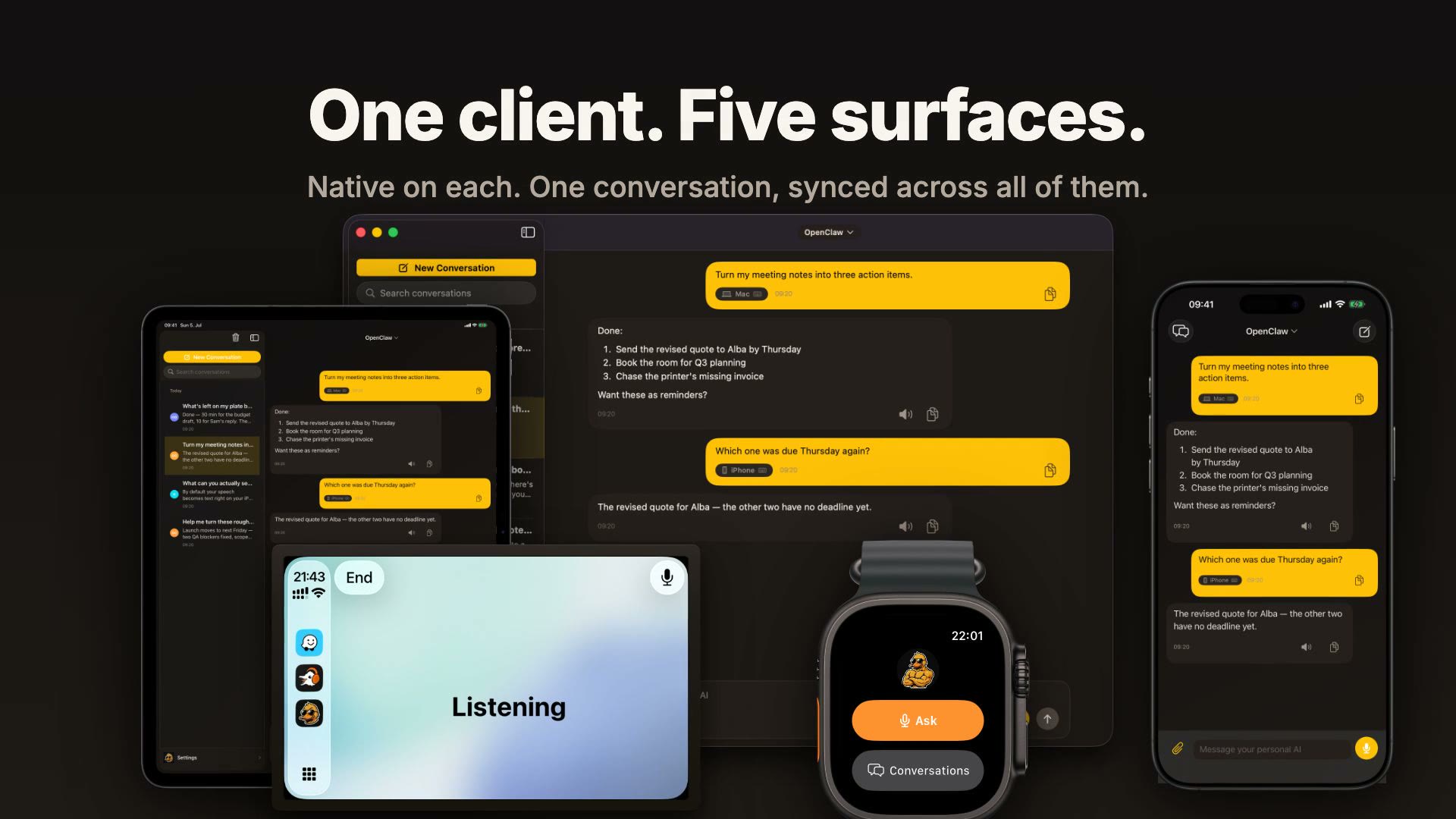
Conduck is the interface, not the AI service. There is no model inside the app and no Conduck account to create. You connect the AI you choose, then make it available wherever you already are: at your desk, on your wrist, in the car, or inside another app.
The official app is available on the App Store. Conduck-authored application code is open source under Apache-2.0. AI and speech-provider usage is billed directly by those providers under your own keys.
Try it in two minutes
Both paths are free. Neither needs an account with us.
You already run Ollama on a Mac. The same Wi-Fi is enough.
-
Let Ollama answer on your network. By default it listens on the Mac alone:
launchctl setenv OLLAMA_HOST "0.0.0.0:11434"then quit and reopen Ollama. Newer Ollama builds also offer this as a network toggle in the app's settings.
-
Find the Mac's address on your network: System Settings → Wi-Fi → Details, or
ipconfig getifaddr en0. It looks like192.168.1.20. -
In Conduck, open Settings → Personal AI and add a Custom endpoint with the address
http://192.168.1.20:11434. No key is needed. Test the connection and pick a model from the list it loads. -
Ask something.
Plain http:// works only for a private address and only while you are on that network. That is Apple's rule, and Conduck says so wherever you review the connection. To reach the same server from anywhere, including the car and the Watch away from home, put HTTPS in front of it: conduck-connect walks you through it.
You have no server yet. Open Settings → Personal AI and choose Sign in with OpenRouter. That creates a key in your own OpenRouter account, and you are chatting in about a minute. A hosted model chats and takes inline images and text files. Agent tools and file exchange need a self-hosted agent.
You run something else. Anything that speaks the OpenAI chat API (LM Studio, vLLM, LiteLLM, Open WebUI, OpenClaw, Hermes) connects the same way as Ollama. For an AI of your own, hand the adapter contract to the coding tool that built it; conduck-connect --check-adapter verifies the result before you pair.
Why Conduck
- Ask from anywhere. Use the Action Button, Control Center, or Shortcuts on iPhone and iPad, or ask from the Mac menu bar, a global hotkey, Apple Watch, or CarPlay.
- One conversation across your devices. Start on Mac, continue on iPhone, and check the reply from your Watch. Your threads sync through your own private iCloud.
- Talk, type, or share what is in front of you. Dictate with on-device speech, attach a photo or text file, share from another app, or use Screenshot & Ask on Mac.
- Bring the AI that fits you. Connect a self-hosted agent, an OpenAI-compatible model endpoint, or a hosted model through OpenRouter.
- See what you actually use. A Usage screen on iPhone, iPad, and Mac counts your turns, tokens, response times, and reliability, broken down by gateway, device, and model — measured on your device, visible only to you.
- Keep Conduck out of the middle. No Conduck-operated intermediary server, no account, and no analytics, ads, tracking, or telemetry. Your device talks directly to the AI and providers you chose, under your own keys.
One client. Five surfaces.
| Surface | What Conduck adds |
|---|---|
| iPhone | Native chat and voice, attachments, Action Button, Control Center, Shortcuts, and the share sheet |
| iPad | Native chat and voice, attachments, Control Center, Shortcuts, and the share sheet |
| Mac | Full desktop app, menu-bar companion, global hotkeys, Screenshot & Ask, and the share extension |
| Apple Watch | Quick voice or text capture, conversations, and replies from your wrist |
| CarPlay | Hands-free, multi-turn voice conversations on the road |
Work is your personal desk. Collect thoughts, screenshots and files from the app, share sheet, Shortcuts, Mac menu bar, Watch or CarPlay. Arrange loose materials and project folders on Home. Filing puts a material inside its project; opening the folder fills your workspace, and returning Home restores your arrangement. Click the material count to preview a folder’s contents and move materials while staying on Home. Larger folder titles and automatically varied colors help you find each project; you can choose a different color in its menu. You can deliberately add the same material to other projects, with edits shared across every appearance. When you are ready, shape a project brief, review the included files and choose which configured AI should receive it. Only your explicit confirmation starts that conversation. Captures stay on the desk; grouping never copies or deletes their files. Voice notes keep their words, while transcription uses the speech provider you chose. Cards and project organization sync through your own private iCloud; very large files stay on the device that captured them.
Conversation history follows you through your private iCloud. CarPlay runs through the iPhone app. Conduck requires iOS, iPadOS, macOS, and watchOS 26.5 or later; the Mac app requires Apple silicon (M1 or later).
How it works
Three steps. One is setup.
- Connect your AI. Paste a URL and key, scan a setup code from conduck-connect, or add an OpenRouter key if you do not run a server yet.
- Talk, type, or share. Use the full app or whichever system shortcut is closest at hand.
- Continue anywhere. Replies join the same conversation on your other devices through your own iCloud.
Connect your way
| Path | Examples | What you get |
|---|---|---|
| Self-hosted agent gateway | OpenClaw, Hermes, or an agent behind the Conduck adapter | Server-side agent tools, memory, long-running work, and optional full file exchange |
| OpenAI-compatible model endpoint | Ollama, LM Studio, vLLM, LiteLLM, a routing proxy, or another compatible service | Chat, vision, and declared capabilities; Conduck does not run an agent loop or execute returned tool calls |
| Hosted model | OpenRouter | Multi-turn chat and inline image or text/code attachments in about a minute, with your own API key and no server to run |
Images and text/code attachments can ride inline on every compatible lane. Full arbitrary-file exchange, including files created by an agent, requires a self-hosted agent plus an optional WebDAV folder reachable by both sides. The hosted-model lane covers chat, not an agent loop or full file exchange.
Private by architecture, not by promise
your device   -> your AI (direct HTTPS, or explicit private-network HTTP)
your device   -> your cloud voice provider (optional, direct HTTPS)
your devices <-> your private iCloud
your device  <-> your WebDAV file server (optional) <-> your agent
No Conduck-operated server sits on any of these paths.
- Conversations live on your device and mirror to your own private iCloud database. Apple encrypts that data, and it is not available to us.
- API keys and access tokens live in the Apple Keychain.
- Voice stays on-device by default through Apple's speech and read-aloud engines.
- If you choose cloud speech, audio goes directly to that provider under your own key.
- Conduck contains no analytics, ads, tracking, or telemetry.
The AI and optional providers you connect still receive the information you choose to send them. Their handling of it is governed by their own configuration and terms.
See exactly how your data moves · Read the privacy policy · Inspect the architecture
Get it
Two builds share this codebase:
| Official app | Personal source build | |
|---|---|---|
| Distribution | App Store | Build from source |
| Terms | Available to individuals, including professional use; organization-managed use requires a separate agreement | Apache-2.0, including commercial source use |
| Identity | Conduck name and artwork | “Conduck Community” with neutral placeholder art |
| CarPlay | Included | Not included because it requires an Apple per-team entitlement |
The terms for the official app cover its distribution and the Conduck brand. They place no restriction on the source in this repository, which is licensed under Apache-2.0.
The official build is made from this public application source with private branding, signing, and Apple's CarPlay entitlement added for distribution. No functional code is withheld.
Personal builds may display the Conduck Community identity. If you redistribute a build, choose your own product name, icons, and identity as required by TRADEMARKS.md.
Build from source
Conduck requires Xcode 26.5 or later.
- Clone this repository.
- Open
Conduck/Conduck.xcodeproj. - Build and run. Simulator builds need no configuration.
An unsigned simulator build cannot write to the Keychain, so a gateway added there will not persist. To exercise the app against a real gateway, build with a signing identity or use the launch arguments described in QA mode. To run on your own devices, see Building from source.
The result is Conduck Community: the same application functionality, minus the CarPlay entitlement, under a neutral identity with placeholder art. Official Conduck brand artwork is not part of this repository and is not covered by the code license; see TRADEMARKS.md.
Before changing the application, read the architecture document. It records the decisions and deliberately rejected alternatives — the part the code alone cannot tell you.
The words this project uses
Several of these words carry a narrower meaning here than they do elsewhere in the industry, and gateway carries nearly the opposite one. Read this glossary before working on the code or architecture.
Open the contributor glossary
Gateway
In Conduck, a gateway is a machine you own that stays on and runs an agent for you: a VPS, home server, or always-on Mac mini. It holds the agent's tools, file system, and long-running jobs. Conduck is the thin client that talks to it over HTTPS — or over explicit plain HTTP at a local-only address — and keeps the conversation on your device.
This differs from the common industry meaning of “AI gateway.” LiteLLM, Portkey, Kong AI Gateway, Cloudflare AI Gateway, and similar products are routing proxies: they sit in front of model providers and handle keys, failover, caching, rate limits, or spend. They do not themselves provide an agent loop, tools, or a working file system.
If you use an AI gateway in that industry sense, it normally sits farther downstream:
Conduck -> your agent runtime -> your AI gateway -> model provider
OpenRouter is an AI gateway in the industry sense. Conduck treats it as a hosted-model lane: you operate no server, and that lane provides chat rather than agent tools or full file exchange.
Agent runtime, or harness
The scaffolding that turns a model into an agent: the loop that lets it call tools, read and write files, and continue across multiple steps. Claude Code, Codex CLI, OpenClaw, and Hermes are examples.
Conduck does not contain an agent runtime. It talks to yours.
Hosted model
A model reached through somebody else's API under your own key, with no server of your own in the path. Conduck's hosted lane is deliberately limited to chat.
Images and text/code attachments can still be sent to the model. Agent tools, an agent loop, and full file exchange require a self-hosted agent gateway.
Model endpoint
Any URL that answers OpenAI-compatible chat-completion requests. The term says nothing about what is behind the URL: it may be a hosted service, Ollama, vLLM, a routing proxy, or a custom agent.
That is why Conduck asks you to declare the capabilities of a custom endpoint instead of guessing them.
Adapter
The published adapter contract defines the request and reply shapes a server implements to work with Conduck. Anything that speaks that contract can connect, regardless of what it is written in.
The adapter build brief explains how to place one in front of an AI you wrote yourself. conduck-connect checks software written for Conduck with --check-adapter. A stock server that was not written specifically for Conduck — such as Ollama, vLLM, or LiteLLM — is checked against the more forgiving app compatibility surface with --check-server.
File server
A WebDAV server that both your devices and agent can reach, used to move complete files in either direction. It is separate from the gateway and belongs to you.
Conduck ships no file-server binary and is only a client of one you already run. The hosted-model lane has no file server, so it does not offer full file exchange.
Backend
This word appears in two different senses.
In public privacy claims, “backend” means a server operated by Conduck. There is none.
In the source, Conversation.backend and RemoteAgentBackend are frozen persistence identifiers that record which kind of AI a conversation uses. Renaming them would orphan data already stored on users' devices. Public prose therefore says “gateway kind” or names the lane instead.
Connecting to your gateway
Transport and certificate requirements for self-hosted gateways
This applies only to self-hosted lanes. A hosted model needs an API key but no certificate setup of your own.
Use HTTPS for gateways whenever possible. Conduck also accepts an explicitly configured plain-HTTP address only for loopback, a private IPv4 or IPv6 literal, or a Bonjour name ending in .local; it warns that the connection is unencrypted. Public and otherwise routable plain-HTTP addresses are rejected. A Tailscale address still needs HTTPS because it is not a local-only address under this rule.
For HTTPS, Conduck refuses a self-signed certificate or one issued by a private certificate authority the device does not trust.
Conduck cannot offer an “ignore certificate errors” switch. App Transport Security — the platform rule Apple applies to app network traffic — allows an app to make certificate checks stricter, not looser.
On a managed fleet, a root certificate already trusted by the devices works, whether pushed by MDM or installed and enabled in Certificate Trust Settings. Otherwise, fix trust on the server side. The setup guide covers Tailscale Serve, Let's Encrypt, and reverse-proxy options such as Caddy.
Documentation
Two documents cover the project. They are written for both people and AI coding agents. Individual files document themselves through mandatory header comments, while the test suite records detailed behavior.
docs/ai-context/spec.mdexplains the architecture, its boundaries, the decisions behind them, and the alternatives deliberately rejected.docs/ai-context/project-structure.mdmaps the folders and build targets and explains where to begin for each kind of change.
Community and contributing
- Chat, questions, and setup help: Discord.
- Bugs and feature requests: GitHub issues.
- Contributions are welcome under the Developer Certificate of Origin (
git commit -s, no CLA). See CONTRIBUTING.md. - Report security vulnerabilities privately as described in SECURITY.md, not through a public issue.
License and trademarks
Conduck-authored code and neutral placeholder art are licensed under Apache-2.0. Bundled third-party code remains under its own licenses; see NOTICE and THIRD_PARTY_NOTICES.md.
The Conduck™ name and official duck-character artwork are excluded from that license. Their use is governed by TRADEMARKS.md.
Apple, the Apple logo, Apple Watch, App Store, CarPlay, iCloud, iPad, iPhone, Mac, macOS, watchOS, and Xcode are trademarks of Apple Inc., registered in the U.S. and other countries and regions.
Contributors

346 commits

1 commits
See what people are saying
Similar repos


Languages
Swift
99.5%
Open-source native Apple client for the AI you choose - iPhone, iPad, Mac, Apple Watch, and CarPlay. Your keys; no intermediary.
See the codeREADME
Conduck
Your AI. Every Apple device. No Conduck middleman.
The native Apple client for your self-hosted or BYO-key AI.
Talk, type, share, and carry the same conversation across iPhone, iPad, Mac, Apple Watch, and CarPlay.
Watch the 40-second film · Build Conduck Community · Setup guide · Discord
Conduck is the interface, not the AI service. There is no model inside the app and no Conduck account to create. You connect the AI you choose, then make it available wherever you already are: at your desk, on your wrist, in the car, or inside another app.
The official app is available on the App Store. Conduck-authored application code is open source under Apache-2.0. AI and speech-provider usage is billed directly by those providers under your own keys.
Try it in two minutes
Both paths are free. Neither needs an account with us.
You already run Ollama on a Mac. The same Wi-Fi is enough.
-
Let Ollama answer on your network. By default it listens on the Mac alone:
launchctl setenv OLLAMA_HOST "0.0.0.0:11434"then quit and reopen Ollama. Newer Ollama builds also offer this as a network toggle in the app's settings.
-
Find the Mac's address on your network: System Settings → Wi-Fi → Details, or
ipconfig getifaddr en0. It looks like192.168.1.20. -
In Conduck, open Settings → Personal AI and add a Custom endpoint with the address
http://192.168.1.20:11434. No key is needed. Test the connection and pick a model from the list it loads. -
Ask something.
Plain http:// works only for a private address and only while you are on that network. That is Apple's rule, and Conduck says so wherever you review the connection. To reach the same server from anywhere, including the car and the Watch away from home, put HTTPS in front of it: conduck-connect walks you through it.
You have no server yet. Open Settings → Personal AI and choose Sign in with OpenRouter. That creates a key in your own OpenRouter account, and you are chatting in about a minute. A hosted model chats and takes inline images and text files. Agent tools and file exchange need a self-hosted agent.
You run something else. Anything that speaks the OpenAI chat API (LM Studio, vLLM, LiteLLM, Open WebUI, OpenClaw, Hermes) connects the same way as Ollama. For an AI of your own, hand the adapter contract to the coding tool that built it; conduck-connect --check-adapter verifies the result before you pair.
Why Conduck
- Ask from anywhere. Use the Action Button, Control Center, or Shortcuts on iPhone and iPad, or ask from the Mac menu bar, a global hotkey, Apple Watch, or CarPlay.
- One conversation across your devices. Start on Mac, continue on iPhone, and check the reply from your Watch. Your threads sync through your own private iCloud.
- Talk, type, or share what is in front of you. Dictate with on-device speech, attach a photo or text file, share from another app, or use Screenshot & Ask on Mac.
- Bring the AI that fits you. Connect a self-hosted agent, an OpenAI-compatible model endpoint, or a hosted model through OpenRouter.
- See what you actually use. A Usage screen on iPhone, iPad, and Mac counts your turns, tokens, response times, and reliability, broken down by gateway, device, and model — measured on your device, visible only to you.
- Keep Conduck out of the middle. No Conduck-operated intermediary server, no account, and no analytics, ads, tracking, or telemetry. Your device talks directly to the AI and providers you chose, under your own keys.
One client. Five surfaces.
| Surface | What Conduck adds |
|---|---|
| iPhone | Native chat and voice, attachments, Action Button, Control Center, Shortcuts, and the share sheet |
| iPad | Native chat and voice, attachments, Control Center, Shortcuts, and the share sheet |
| Mac | Full desktop app, menu-bar companion, global hotkeys, Screenshot & Ask, and the share extension |
| Apple Watch | Quick voice or text capture, conversations, and replies from your wrist |
| CarPlay | Hands-free, multi-turn voice conversations on the road |
Work is your personal desk. Collect thoughts, screenshots and files from the app, share sheet, Shortcuts, Mac menu bar, Watch or CarPlay. Arrange loose materials and project folders on Home. Filing puts a material inside its project; opening the folder fills your workspace, and returning Home restores your arrangement. Click the material count to preview a folder’s contents and move materials while staying on Home. Larger folder titles and automatically varied colors help you find each project; you can choose a different color in its menu. You can deliberately add the same material to other projects, with edits shared across every appearance. When you are ready, shape a project brief, review the included files and choose which configured AI should receive it. Only your explicit confirmation starts that conversation. Captures stay on the desk; grouping never copies or deletes their files. Voice notes keep their words, while transcription uses the speech provider you chose. Cards and project organization sync through your own private iCloud; very large files stay on the device that captured them.
Conversation history follows you through your private iCloud. CarPlay runs through the iPhone app. Conduck requires iOS, iPadOS, macOS, and watchOS 26.5 or later; the Mac app requires Apple silicon (M1 or later).
How it works
Three steps. One is setup.
- Connect your AI. Paste a URL and key, scan a setup code from conduck-connect, or add an OpenRouter key if you do not run a server yet.
- Talk, type, or share. Use the full app or whichever system shortcut is closest at hand.
- Continue anywhere. Replies join the same conversation on your other devices through your own iCloud.
Connect your way
| Path | Examples | What you get |
|---|---|---|
| Self-hosted agent gateway | OpenClaw, Hermes, or an agent behind the Conduck adapter | Server-side agent tools, memory, long-running work, and optional full file exchange |
| OpenAI-compatible model endpoint | Ollama, LM Studio, vLLM, LiteLLM, a routing proxy, or another compatible service | Chat, vision, and declared capabilities; Conduck does not run an agent loop or execute returned tool calls |
| Hosted model | OpenRouter | Multi-turn chat and inline image or text/code attachments in about a minute, with your own API key and no server to run |
Images and text/code attachments can ride inline on every compatible lane. Full arbitrary-file exchange, including files created by an agent, requires a self-hosted agent plus an optional WebDAV folder reachable by both sides. The hosted-model lane covers chat, not an agent loop or full file exchange.
Private by architecture, not by promise
your device   -> your AI (direct HTTPS, or explicit private-network HTTP)
your device   -> your cloud voice provider (optional, direct HTTPS)
your devices <-> your private iCloud
your device  <-> your WebDAV file server (optional) <-> your agent
No Conduck-operated server sits on any of these paths.
- Conversations live on your device and mirror to your own private iCloud database. Apple encrypts that data, and it is not available to us.
- API keys and access tokens live in the Apple Keychain.
- Voice stays on-device by default through Apple's speech and read-aloud engines.
- If you choose cloud speech, audio goes directly to that provider under your own key.
- Conduck contains no analytics, ads, tracking, or telemetry.
The AI and optional providers you connect still receive the information you choose to send them. Their handling of it is governed by their own configuration and terms.
See exactly how your data moves · Read the privacy policy · Inspect the architecture
Get it
Two builds share this codebase:
| Official app | Personal source build | |
|---|---|---|
| Distribution | App Store | Build from source |
| Terms | Available to individuals, including professional use; organization-managed use requires a separate agreement | Apache-2.0, including commercial source use |
| Identity | Conduck name and artwork | “Conduck Community” with neutral placeholder art |
| CarPlay | Included | Not included because it requires an Apple per-team entitlement |
The terms for the official app cover its distribution and the Conduck brand. They place no restriction on the source in this repository, which is licensed under Apache-2.0.
The official build is made from this public application source with private branding, signing, and Apple's CarPlay entitlement added for distribution. No functional code is withheld.
Personal builds may display the Conduck Community identity. If you redistribute a build, choose your own product name, icons, and identity as required by TRADEMARKS.md.
Build from source
Conduck requires Xcode 26.5 or later.
- Clone this repository.
- Open
Conduck/Conduck.xcodeproj. - Build and run. Simulator builds need no configuration.
An unsigned simulator build cannot write to the Keychain, so a gateway added there will not persist. To exercise the app against a real gateway, build with a signing identity or use the launch arguments described in QA mode. To run on your own devices, see Building from source.
The result is Conduck Community: the same application functionality, minus the CarPlay entitlement, under a neutral identity with placeholder art. Official Conduck brand artwork is not part of this repository and is not covered by the code license; see TRADEMARKS.md.
Before changing the application, read the architecture document. It records the decisions and deliberately rejected alternatives — the part the code alone cannot tell you.
The words this project uses
Several of these words carry a narrower meaning here than they do elsewhere in the industry, and gateway carries nearly the opposite one. Read this glossary before working on the code or architecture.
Open the contributor glossary
Gateway
In Conduck, a gateway is a machine you own that stays on and runs an agent for you: a VPS, home server, or always-on Mac mini. It holds the agent's tools, file system, and long-running jobs. Conduck is the thin client that talks to it over HTTPS — or over explicit plain HTTP at a local-only address — and keeps the conversation on your device.
This differs from the common industry meaning of “AI gateway.” LiteLLM, Portkey, Kong AI Gateway, Cloudflare AI Gateway, and similar products are routing proxies: they sit in front of model providers and handle keys, failover, caching, rate limits, or spend. They do not themselves provide an agent loop, tools, or a working file system.
If you use an AI gateway in that industry sense, it normally sits farther downstream:
Conduck -> your agent runtime -> your AI gateway -> model provider
OpenRouter is an AI gateway in the industry sense. Conduck treats it as a hosted-model lane: you operate no server, and that lane provides chat rather than agent tools or full file exchange.
Agent runtime, or harness
The scaffolding that turns a model into an agent: the loop that lets it call tools, read and write files, and continue across multiple steps. Claude Code, Codex CLI, OpenClaw, and Hermes are examples.
Conduck does not contain an agent runtime. It talks to yours.
Hosted model
A model reached through somebody else's API under your own key, with no server of your own in the path. Conduck's hosted lane is deliberately limited to chat.
Images and text/code attachments can still be sent to the model. Agent tools, an agent loop, and full file exchange require a self-hosted agent gateway.
Model endpoint
Any URL that answers OpenAI-compatible chat-completion requests. The term says nothing about what is behind the URL: it may be a hosted service, Ollama, vLLM, a routing proxy, or a custom agent.
That is why Conduck asks you to declare the capabilities of a custom endpoint instead of guessing them.
Adapter
The published adapter contract defines the request and reply shapes a server implements to work with Conduck. Anything that speaks that contract can connect, regardless of what it is written in.
The adapter build brief explains how to place one in front of an AI you wrote yourself. conduck-connect checks software written for Conduck with --check-adapter. A stock server that was not written specifically for Conduck — such as Ollama, vLLM, or LiteLLM — is checked against the more forgiving app compatibility surface with --check-server.
File server
A WebDAV server that both your devices and agent can reach, used to move complete files in either direction. It is separate from the gateway and belongs to you.
Conduck ships no file-server binary and is only a client of one you already run. The hosted-model lane has no file server, so it does not offer full file exchange.
Backend
This word appears in two different senses.
In public privacy claims, “backend” means a server operated by Conduck. There is none.
In the source, Conversation.backend and RemoteAgentBackend are frozen persistence identifiers that record which kind of AI a conversation uses. Renaming them would orphan data already stored on users' devices. Public prose therefore says “gateway kind” or names the lane instead.
Connecting to your gateway
Transport and certificate requirements for self-hosted gateways
This applies only to self-hosted lanes. A hosted model needs an API key but no certificate setup of your own.
Use HTTPS for gateways whenever possible. Conduck also accepts an explicitly configured plain-HTTP address only for loopback, a private IPv4 or IPv6 literal, or a Bonjour name ending in .local; it warns that the connection is unencrypted. Public and otherwise routable plain-HTTP addresses are rejected. A Tailscale address still needs HTTPS because it is not a local-only address under this rule.
For HTTPS, Conduck refuses a self-signed certificate or one issued by a private certificate authority the device does not trust.
Conduck cannot offer an “ignore certificate errors” switch. App Transport Security — the platform rule Apple applies to app network traffic — allows an app to make certificate checks stricter, not looser.
On a managed fleet, a root certificate already trusted by the devices works, whether pushed by MDM or installed and enabled in Certificate Trust Settings. Otherwise, fix trust on the server side. The setup guide covers Tailscale Serve, Let's Encrypt, and reverse-proxy options such as Caddy.
Documentation
Two documents cover the project. They are written for both people and AI coding agents. Individual files document themselves through mandatory header comments, while the test suite records detailed behavior.
docs/ai-context/spec.mdexplains the architecture, its boundaries, the decisions behind them, and the alternatives deliberately rejected.docs/ai-context/project-structure.mdmaps the folders and build targets and explains where to begin for each kind of change.
Community and contributing
- Chat, questions, and setup help: Discord.
- Bugs and feature requests: GitHub issues.
- Contributions are welcome under the Developer Certificate of Origin (
git commit -s, no CLA). See CONTRIBUTING.md. - Report security vulnerabilities privately as described in SECURITY.md, not through a public issue.
License and trademarks
Conduck-authored code and neutral placeholder art are licensed under Apache-2.0. Bundled third-party code remains under its own licenses; see NOTICE and THIRD_PARTY_NOTICES.md.
The Conduck™ name and official duck-character artwork are excluded from that license. Their use is governed by TRADEMARKS.md.
Apple, the Apple logo, Apple Watch, App Store, CarPlay, iCloud, iPad, iPhone, Mac, macOS, watchOS, and Xcode are trademarks of Apple Inc., registered in the U.S. and other countries and regions.
See what people are saying
Similar repos
Contributors
346 commits
1 commits
Languages
Swift
99.5%