
See what people are saying (1)
README
🧠 Research Intelligence System
An autonomous, agentic pipeline for discovering, enriching, ranking, and synthesizing machine learning research papers.





🎥 Demonstration
[📽️ Watch the full system walkthrough and agent execution here]
📖 Overview
Keeping up with the exponential growth of ML research is impossible. Hundreds of papers are published continuously across research platforms and repositories. Most researchers rely on basic keyword searches or social media threads, missing critical cross-domain connections.
The Research Intelligence System is a single-agent research pipeline that combines deterministic data processing with probabilistic models to automate the research workflow:
- Discover papers from multiple sources.
- Normalize and persist paper metadata.
- Enrich research topics using an LLM.
- Generate local embeddings for semantic retrieval.
- Rank papers according to the research profile.
- Synthesize selected papers into a technical research summary.
The current implementation uses a single DeepAgents agent with specialized tools, rather than a multi-agent architecture.
🏗️ Architecture
(Architecture diagram generated below. For an editable version, see the Excalidraw instructions at the bottom of this file.)
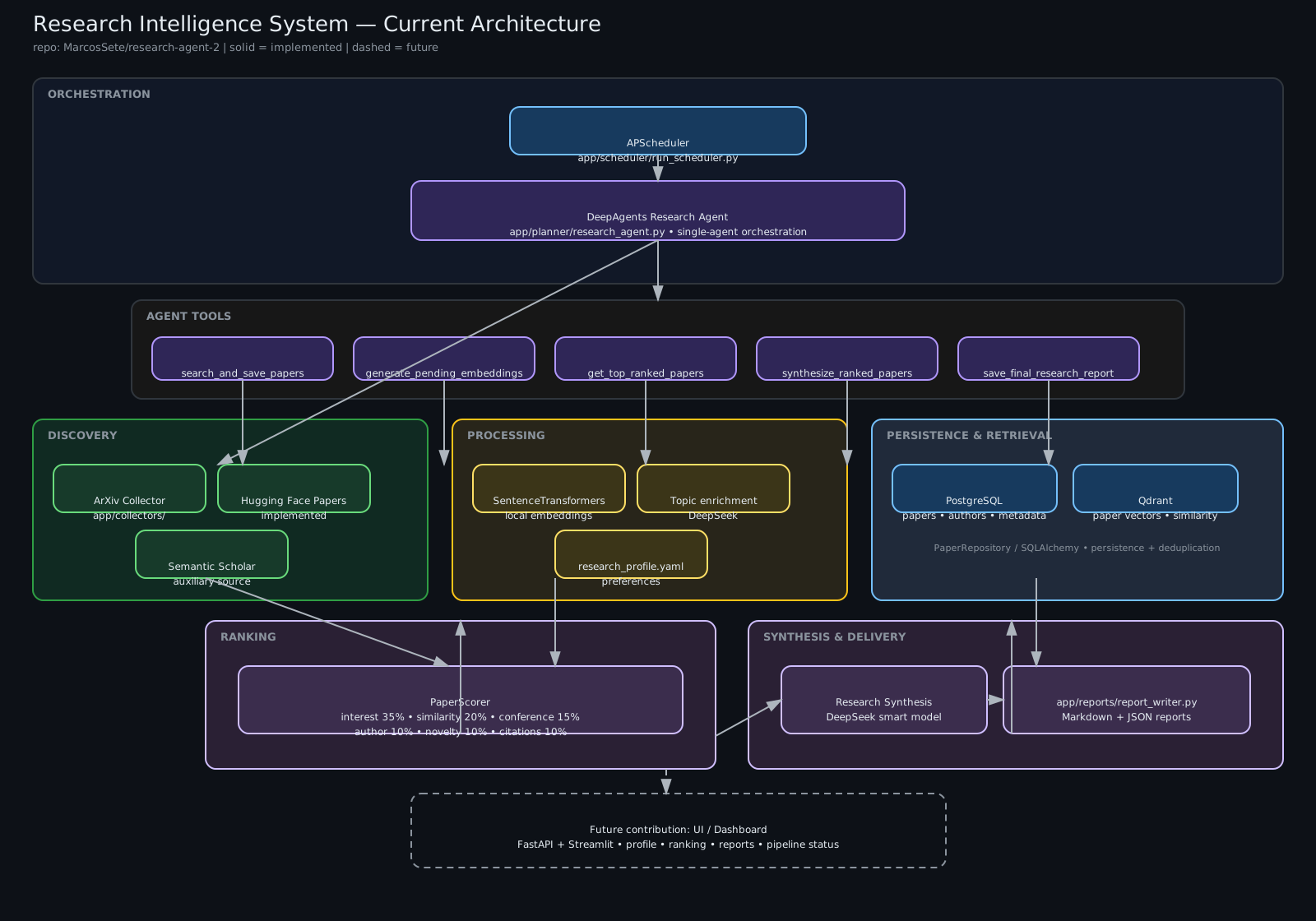
The editable architecture source is available at docs/images/architecture.excalidraw.
The system is divided into four distinct layers, ensuring separation of concerns and making it easy to swap out components:
- Discovery Layer: Collectors for Arxiv, Semantic Scholar, and Hugging Face Papers normalize data into a unified
PaperPydantic model. - Processing Layer:
- LLM Enrichment: Uses DeepSeek to dynamically expand research topics into related concepts.
- Ignored-topic filtering: Enriched ignored topics are represented as independent semantic terms for similarity checks.
- Embedding Service: Uses
SentenceTransformers(local, offline, open-source) to generate dense vector representations of abstracts.
- Storage Layer:
- PostgreSQL: Relational storage for paper and author metadata.
- Qdrant: High-performance vector database for semantic search and similarity checks.
- Agentic Layer: A single
DeepAgentsagent coordinates search, embedding generation, ranking, and technical synthesis through specialized tools.
🧬 Core Philosophy
- Local-First & Privacy: Embeddings are generated locally using HuggingFace
SentenceTransformers. No paper abstracts are sent to external APIs for vectorization. - Low Coupling: Uses standard SQL (PostgreSQL) and an open-source vector database (Qdrant). LLM access is centralized in
app/llm/factory.py. - Deterministic + Probabilistic: Collection, normalization, persistence, retrieval, and ranking rules are deterministic. Topic enrichment and research synthesis use probabilistic LLMs.
🛠️ Tech Stack
| Category | Technology | Why we use it |
|---|---|---|
| Orchestration | DeepAgents / LangChain | Tool calling and multi-step agent orchestration. |
| LLM Provider | DeepSeek (via langchain-deepseek) | Fast and reasoning models for enrichment and synthesis. |
| Vector DB | Qdrant | Rust-based, blazing fast, and fully self-hostable via Docker. |
| Relational DB | PostgreSQL + SQLAlchemy | The gold standard for relational data. Alembic handles schema migrations. |
| Embeddings | SentenceTransformers | Open-source, runs locally on CPU/GPU, no API keys required. |
| Validation | Pydantic V2 | Strict data validation from API ingestion to database storage. |
| Scheduling | APScheduler | Robust cron-like scheduling for weekly research jobs. |
🎨 Design Patterns
This project is built as a reference implementation for modern ML Engineering practices:
- Repository Pattern:
PaperRepositoryabstracts all database operations. The business logic never writes raw SQL. - Factory Pattern:
app/llm/factory.pycentralizes LLM instantiation, allowing easy swapping between "Fast" (routing) and "Smart" (reasoning) models. - Strategy Pattern:
BaseCollectorandBaseEmbeddingServicedefine interfaces. Adding a new source (e.g.,HuggingFaceCollector) requires zero changes to the core pipeline. - CQRS (Command Query Responsibility Segregation): The ingestion pipeline (Commands) is decoupled from the ranking/reporting pipeline (Queries).
🚀 Getting Started
Prerequisites
- Python 3.11+
- Docker & Docker Compose (for PostgreSQL and Qdrant)
- A DeepSeek API Key (Get one at platform.deepseek.com)
1. Clone and Setup Environment
git clone https://github.com/MarcosSete/research-agent-2.git
cd research-agent-2

# Create virtual environment
python -m venv venv
source venv/bin/activate  # On Windows: venv\Scripts\activate

# Install dependencies
pip install -r requirements.txt
2. Infrastructure (Docker)
Start the database and vector store:
docker-compose up -d
3. Configuration
Copy the example environment file and add your API keys:
cp .env.example .env
Edit .env and add your DEEPSEEK_API_KEY.
4. Database Migrations
Apply the SQLAlchemy schemas to PostgreSQL:
alembic upgrade head
5. Run the Agent
Execute the research pipeline manually to test the connection:
python -m app.planner.research_agent
6. Start the Scheduler
Leave the cron job running to automatically collect papers every Sunday at 08:00:
python -m app.scheduler.run_scheduler
⚙️ Customizing Your Research Profile
Each user's research preferences are configured in:
config/research_profile.yaml
This is the main file you should edit to personalize the system's research behavior. You do not need to modify the agent code to define your interests.
Example
interests:
  - Deep Learning
  - Reinforcement Learning
  - Probabilistic Machine Learning
  - Deep Generative Modeling
  - Graph Neural Network
  - Causal Machine Learning

priority:
  Deep Learning: 100
  Reinforcement Learning: 80
  Probabilistic Machine Learning: 70
  Deep Generative Modeling: 60
  Graph Neural Network: 50
  Causal Machine Learning: 40

ignored:
  - Healthcare
  - Biology

favorite_authors:
  - Richard Sutton
  - Yoshua Bengio
  - Yann LeCun

favorite_conferences:
  - NeurIPS
  - ICML
  - ICLR

reading_level: advanced
max_daily_papers: 20
summary_style: technical
What does each section mean?
| Field | Description |
|---|---|
interests | Topics you want to research. They are used as the basis for paper discovery and the semantic research profile. |
priority | Relative weight of each interest in the ranking. Higher values give that interest greater influence on the semantic profile. |
ignored | Topics or domains you want to avoid in the results. |
favorite_authors | Authors you consider relevant to your research. |
favorite_conferences | Conferences you consider relevant to your research. |
reading_level | Expected technical level for the paper synthesis, such as beginner, intermediate, or advanced. |
max_daily_papers | Configured limit of papers considered per execution/period. |
summary_style | Desired synthesis style, such as technical. |
🔑 Understanding priority
The priority section does not represent percentages or points directly added to each paper. It defines the relative importance of your interests within the profile used by the ranking system.
For example:
priority:
  Deep Learning: 100
  Reinforcement Learning: 80
  Graph Neural Network: 50
This means:
- Deep Learning → highest influence;
- Reinforcement Learning → intermediate influence;
- Graph Neural Network → lower influence among the three.
The values are relative. You can use, for example, 100 / 80 / 50, 10 / 8 / 5, or other proportional values.
Important: interests listed under priority should correspond to the interests defined under interests.
🛠️ How to customize
- Open
config/research_profile.yaml. - Edit the sections according to your research interests.
- Save the file.
- Run the agent again:
python -m app.planner.research_agent
The pipeline will use the updated profile on the next execution.
🤝 Contributing
This project is designed to be a collaborative effort. If you want to contribute, here are the areas that currently make the most sense:
Where to begin?
- Add a new Collector: ArXiv and Hugging Face Papers are already implemented, and Semantic Scholar is available as an auxiliary source. A new collector (for example, another academic paper index) is a good way to extend discovery while following the existing
BaseCollectorinterface. - Improve Ranking: The ranking pipeline is implemented in
app/ranking/scorer.py. Contributions can improve scoring behavior, add well-justified ranking signals, or improve the handling of research-profile preferences. - UI / Dashboard: The current system is CLI/Markdown based. A FastAPI + Streamlit dashboard could expose the research profile, trigger the pipeline, show ranking results, display generated reports, and provide pipeline status.
- Testing: Add unit and integration tests around collectors, ranking, persistence, embeddings, synthesis, and the end-to-end pipeline.
- Documentation & Architecture: Keep the README and
docs/images/architecture.excalidrawsynchronized with the implementation when the architecture changes.
Project Structure
research-agent-2/
├── app/
│   ├── collectors/     # ArXiv, Semantic Scholar, Hugging Face
│   ├── config/         # Application settings and research profile loader
│   ├── database/       # SQLAlchemy models, repository, session
│   ├── embeddings/     # Local embeddings and Qdrant integration
│   ├── llm/            # LLM factory and topic enrichment
│   ├── models/         # Domain models
│   ├── planner/        # Single-agent research orchestration
│   ├── ranking/        # Paper scoring
│   ├── reports/        # Markdown and JSON report persistence
│   ├── scheduler/      # Weekly APScheduler job
│   ├── skills/         # Agent tools
│   └── synthesis/      # Technical research synthesis
├── docs/
│   └── images/         # Architecture source (.excalidraw) and rendered diagram
├── scripts/            # Local execution and utility scripts
├── migrations/         # Alembic DB migrations
└── config/             # YAML profiles (research_profile.yaml)
📄 License
This project is open-source under the MIT License. Built with ❤️ by the ML Engineering community.
Contributors

115 commits
Similar repos


Languages
Python
98.8%
Mako
1.2%
See what people are saying (1)
README
🧠 Research Intelligence System
An autonomous, agentic pipeline for discovering, enriching, ranking, and synthesizing machine learning research papers.
🎥 Demonstration
[📽️ Watch the full system walkthrough and agent execution here]
📖 Overview
Keeping up with the exponential growth of ML research is impossible. Hundreds of papers are published continuously across research platforms and repositories. Most researchers rely on basic keyword searches or social media threads, missing critical cross-domain connections.
The Research Intelligence System is a single-agent research pipeline that combines deterministic data processing with probabilistic models to automate the research workflow:
- Discover papers from multiple sources.
- Normalize and persist paper metadata.
- Enrich research topics using an LLM.
- Generate local embeddings for semantic retrieval.
- Rank papers according to the research profile.
- Synthesize selected papers into a technical research summary.
The current implementation uses a single DeepAgents agent with specialized tools, rather than a multi-agent architecture.
🏗️ Architecture
(Architecture diagram generated below. For an editable version, see the Excalidraw instructions at the bottom of this file.)
The editable architecture source is available at docs/images/architecture.excalidraw.
The system is divided into four distinct layers, ensuring separation of concerns and making it easy to swap out components:
- Discovery Layer: Collectors for Arxiv, Semantic Scholar, and Hugging Face Papers normalize data into a unified
PaperPydantic model. - Processing Layer:
- LLM Enrichment: Uses DeepSeek to dynamically expand research topics into related concepts.
- Ignored-topic filtering: Enriched ignored topics are represented as independent semantic terms for similarity checks.
- Embedding Service: Uses
SentenceTransformers(local, offline, open-source) to generate dense vector representations of abstracts.
- Storage Layer:
- PostgreSQL: Relational storage for paper and author metadata.
- Qdrant: High-performance vector database for semantic search and similarity checks.
- Agentic Layer: A single
DeepAgentsagent coordinates search, embedding generation, ranking, and technical synthesis through specialized tools.
🧬 Core Philosophy
- Local-First & Privacy: Embeddings are generated locally using HuggingFace
SentenceTransformers. No paper abstracts are sent to external APIs for vectorization. - Low Coupling: Uses standard SQL (PostgreSQL) and an open-source vector database (Qdrant). LLM access is centralized in
app/llm/factory.py. - Deterministic + Probabilistic: Collection, normalization, persistence, retrieval, and ranking rules are deterministic. Topic enrichment and research synthesis use probabilistic LLMs.
🛠️ Tech Stack
| Category | Technology | Why we use it |
|---|---|---|
| Orchestration | DeepAgents / LangChain | Tool calling and multi-step agent orchestration. |
| LLM Provider | DeepSeek (via langchain-deepseek) | Fast and reasoning models for enrichment and synthesis. |
| Vector DB | Qdrant | Rust-based, blazing fast, and fully self-hostable via Docker. |
| Relational DB | PostgreSQL + SQLAlchemy | The gold standard for relational data. Alembic handles schema migrations. |
| Embeddings | SentenceTransformers | Open-source, runs locally on CPU/GPU, no API keys required. |
| Validation | Pydantic V2 | Strict data validation from API ingestion to database storage. |
| Scheduling | APScheduler | Robust cron-like scheduling for weekly research jobs. |
🎨 Design Patterns
This project is built as a reference implementation for modern ML Engineering practices:
- Repository Pattern:
PaperRepositoryabstracts all database operations. The business logic never writes raw SQL. - Factory Pattern:
app/llm/factory.pycentralizes LLM instantiation, allowing easy swapping between "Fast" (routing) and "Smart" (reasoning) models. - Strategy Pattern:
BaseCollectorandBaseEmbeddingServicedefine interfaces. Adding a new source (e.g.,HuggingFaceCollector) requires zero changes to the core pipeline. - CQRS (Command Query Responsibility Segregation): The ingestion pipeline (Commands) is decoupled from the ranking/reporting pipeline (Queries).
🚀 Getting Started
Prerequisites
- Python 3.11+
- Docker & Docker Compose (for PostgreSQL and Qdrant)
- A DeepSeek API Key (Get one at platform.deepseek.com)
1. Clone and Setup Environment
git clone https://github.com/MarcosSete/research-agent-2.git
cd research-agent-2

# Create virtual environment
python -m venv venv
source venv/bin/activate  # On Windows: venv\Scripts\activate

# Install dependencies
pip install -r requirements.txt
2. Infrastructure (Docker)
Start the database and vector store:
docker-compose up -d
3. Configuration
Copy the example environment file and add your API keys:
cp .env.example .env
Edit .env and add your DEEPSEEK_API_KEY.
4. Database Migrations
Apply the SQLAlchemy schemas to PostgreSQL:
alembic upgrade head
5. Run the Agent
Execute the research pipeline manually to test the connection:
python -m app.planner.research_agent
6. Start the Scheduler
Leave the cron job running to automatically collect papers every Sunday at 08:00:
python -m app.scheduler.run_scheduler
⚙️ Customizing Your Research Profile
Each user's research preferences are configured in:
config/research_profile.yaml
This is the main file you should edit to personalize the system's research behavior. You do not need to modify the agent code to define your interests.
Example
interests:
  - Deep Learning
  - Reinforcement Learning
  - Probabilistic Machine Learning
  - Deep Generative Modeling
  - Graph Neural Network
  - Causal Machine Learning

priority:
  Deep Learning: 100
  Reinforcement Learning: 80
  Probabilistic Machine Learning: 70
  Deep Generative Modeling: 60
  Graph Neural Network: 50
  Causal Machine Learning: 40

ignored:
  - Healthcare
  - Biology

favorite_authors:
  - Richard Sutton
  - Yoshua Bengio
  - Yann LeCun

favorite_conferences:
  - NeurIPS
  - ICML
  - ICLR

reading_level: advanced
max_daily_papers: 20
summary_style: technical
What does each section mean?
| Field | Description |
|---|---|
interests | Topics you want to research. They are used as the basis for paper discovery and the semantic research profile. |
priority | Relative weight of each interest in the ranking. Higher values give that interest greater influence on the semantic profile. |
ignored | Topics or domains you want to avoid in the results. |
favorite_authors | Authors you consider relevant to your research. |
favorite_conferences | Conferences you consider relevant to your research. |
reading_level | Expected technical level for the paper synthesis, such as beginner, intermediate, or advanced. |
max_daily_papers | Configured limit of papers considered per execution/period. |
summary_style | Desired synthesis style, such as technical. |
🔑 Understanding priority
The priority section does not represent percentages or points directly added to each paper. It defines the relative importance of your interests within the profile used by the ranking system.
For example:
priority:
  Deep Learning: 100
  Reinforcement Learning: 80
  Graph Neural Network: 50
This means:
- Deep Learning → highest influence;
- Reinforcement Learning → intermediate influence;
- Graph Neural Network → lower influence among the three.
The values are relative. You can use, for example, 100 / 80 / 50, 10 / 8 / 5, or other proportional values.
Important: interests listed under priority should correspond to the interests defined under interests.
🛠️ How to customize
- Open
config/research_profile.yaml. - Edit the sections according to your research interests.
- Save the file.
- Run the agent again:
python -m app.planner.research_agent
The pipeline will use the updated profile on the next execution.
🤝 Contributing
This project is designed to be a collaborative effort. If you want to contribute, here are the areas that currently make the most sense:
Where to begin?
- Add a new Collector: ArXiv and Hugging Face Papers are already implemented, and Semantic Scholar is available as an auxiliary source. A new collector (for example, another academic paper index) is a good way to extend discovery while following the existing
BaseCollectorinterface. - Improve Ranking: The ranking pipeline is implemented in
app/ranking/scorer.py. Contributions can improve scoring behavior, add well-justified ranking signals, or improve the handling of research-profile preferences. - UI / Dashboard: The current system is CLI/Markdown based. A FastAPI + Streamlit dashboard could expose the research profile, trigger the pipeline, show ranking results, display generated reports, and provide pipeline status.
- Testing: Add unit and integration tests around collectors, ranking, persistence, embeddings, synthesis, and the end-to-end pipeline.
- Documentation & Architecture: Keep the README and
docs/images/architecture.excalidrawsynchronized with the implementation when the architecture changes.
Project Structure
research-agent-2/
├── app/
│   ├── collectors/     # ArXiv, Semantic Scholar, Hugging Face
│   ├── config/         # Application settings and research profile loader
│   ├── database/       # SQLAlchemy models, repository, session
│   ├── embeddings/     # Local embeddings and Qdrant integration
│   ├── llm/            # LLM factory and topic enrichment
│   ├── models/         # Domain models
│   ├── planner/        # Single-agent research orchestration
│   ├── ranking/        # Paper scoring
│   ├── reports/        # Markdown and JSON report persistence
│   ├── scheduler/      # Weekly APScheduler job
│   ├── skills/         # Agent tools
│   └── synthesis/      # Technical research synthesis
├── docs/
│   └── images/         # Architecture source (.excalidraw) and rendered diagram
├── scripts/            # Local execution and utility scripts
├── migrations/         # Alembic DB migrations
└── config/             # YAML profiles (research_profile.yaml)
📄 License
This project is open-source under the MIT License. Built with ❤️ by the ML Engineering community.
Similar repos
Contributors
115 commits
Languages
Python
98.8%
Mako
1.2%