
README
Deep Dog 2 — research engine
Turn a question into a cited Markdown report. A supervisor plans the research, delegates work to platform agents, reviews their findings, and writes the final report.
Deep Dog 2 installs directly from GitHub as a Python package in your existing project. Call run_research() with just a question to use the defaults, or pass a per-run configuration to choose models, search, agent types and research budgets. See the quickstart for pip and uv installation, or clone the source to edit the engine and run the repository examples.
Official benchmark results
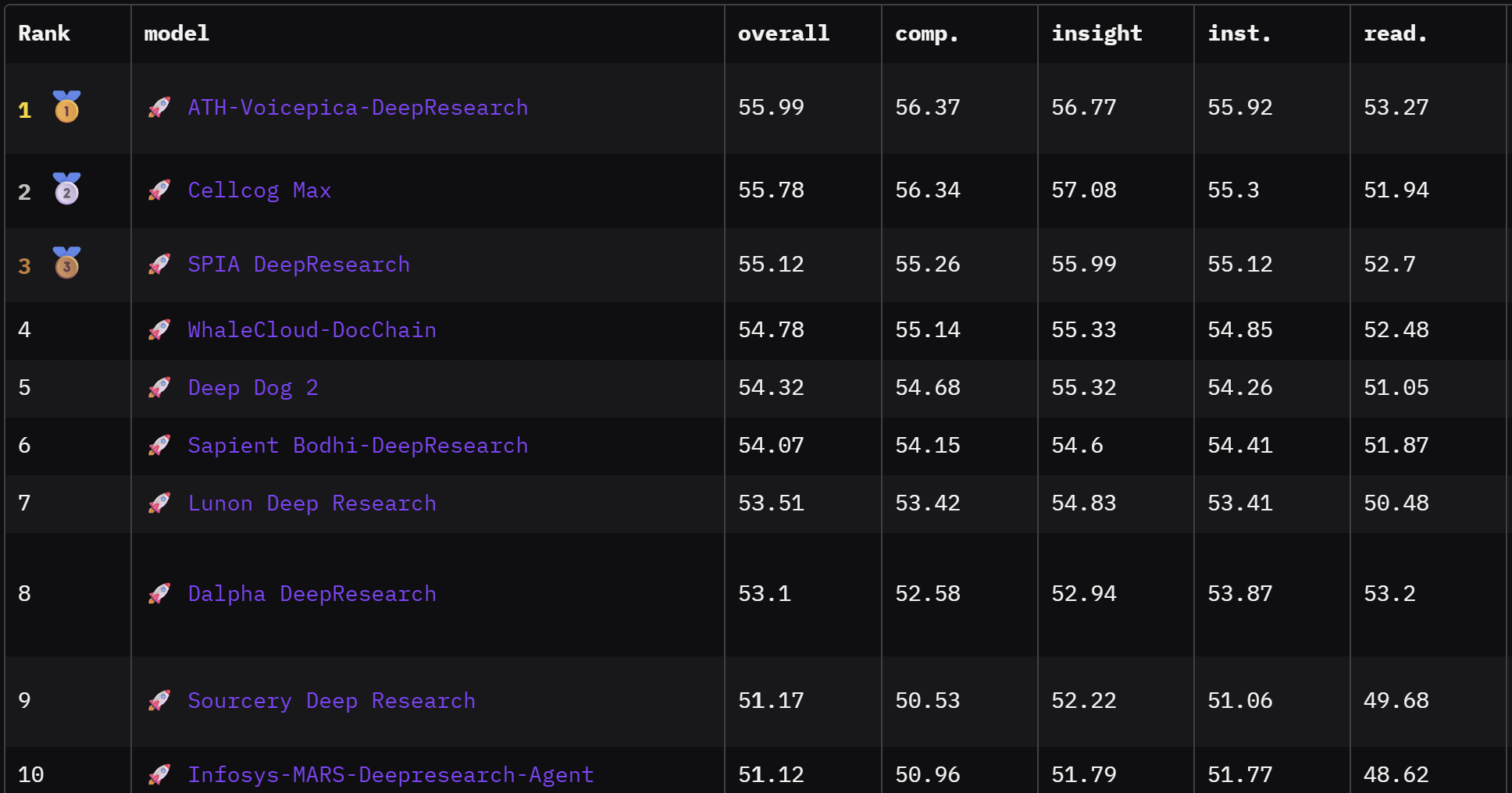
At the time of publication, Deep Dog 2 ranked 5th overall and 1st among open-source research agents on the DeepResearch Bench. The published run used a relatively economical profile: a 15-minute research window, a 20-iteration supervisor cap, at most 3 Exa searches per sub-agent, DeepSeek V4 Pro as supervisor, and DeepSeek V4 Flash for sub-agents.
- Role-specific models — use different models for the supervisor, initial draft, and platform sub-agents.
- Reflection and delegation — the supervisor plans research, delegates distinct questions, evaluates findings, and decides whether more work is needed.
- Platform specialization — Web is enabled by default; Reddit, Substack, General, PubMed, Arxiv, and SEC agents can be enabled through configuration.
- Evidence-first reports — findings are collected into a source registry, then final inline citations and the
## Sourcessection are validated before the report is returned. - Operational control — time limits, iteration caps, search budgets, fallback chains, and output modes can be tuned for local experiments or more economical deployments.
Features
- Supervisor + sub-agent architecture — configurable platform agents in config.py;
ResearchWebis enabled by default, with Reddit, Substack, General, PubMed, Arxiv and SEC agents available through configuration - Multiple search providers — Tavily and/or Exa (
WEB_SEARCH_ENGINEatdeep_research/config.py:658) - Provider-agnostic models — DeepSeek, MiMo, Meta Muse, Gemini, OpenAI, GLM, and OpenRouter-hosted models via a single
get_model()factory (deep_research/config.py:883) - Model fallback chains — per-role fallback lists (
SUBAGENT_MODEL_FALLBACK_CHAIN,SUPERVISOR_MODEL_FALLBACK_CHAIN,DRAFT_REPORT_MODEL_FALLBACK_CHAIN) - Cited reports — Markdown report, source metadata and optional research trace; applications can save the returned results
- LangGraph execution — recursion limit, timeouts, and observability logging
How It Works
Deep Dog 2 retains the draft-first, iterative refinement idea from Deep Dog 1, while making reflection, delegation, and source handling explicit:
User question
     |
     v
clarify_with_user → write_research_brief → write_draft_report
                                               |
                                               v
                                    supervisor research loop
                              ┌───────────────┼────────────────┐
                              │               │                │
                           reflect        delegate       conclude research
                         (think_tool)   (parallel agents)
                                              |
                                              v
                               Web / Reddit / Substack / ...
                                              |
                                              v
                                     findings + sources
                                              |
                                              └── repeat until complete
                                                        |
                                                        v
                              final report → citation validation → output
- Scope the question. The input is converted into a structured research brief.
- Create a scaffold. An initial draft establishes a useful report structure before live research begins. It is not treated as evidence.
- Reflect and delegate. The supervisor uses internal reflection to identify gaps and delegates focused, non-overlapping research tasks to platform agents.
- Research in parallel. Agents search, read, save, and compress findings using the tools available for their platform. Their results are returned with source metadata and citations.
- Evaluate. The supervisor reviews the findings and may request another round.
- Finalize the report. The final writer combines the brief, draft, and findings. Citation checks validate the relationship between inline citations and the final sources list.
Supervisor reflection is used for planning and control; it is not copied into the final research report. Optional subtopic evaluation and parallel subtopic reports can run after the main report when enabled in deep_research/config.py.
The supported prompt family is OPEN. Older configurations using LEGACY must switch to OPEN.
Official Benchmark Results
At the time of publication, Deep Dog 2 ranked 5th overall and 1st among open-source research agents on the DeepResearch Bench benchmark. These results were achieved with a relatively economical configuration: a maximum of 3 Exa searches per sub-agent, 15 minutes of research time, 20 total iterations, and DeepSeek V4 Pro and DeepSeek V4 Flash as the supervisor and sub-agent base models.
| Metric | Score |
|---|---|
| Overall | 0.5432 |
| Comprehensiveness | 0.5468 |
| Insight | 0.5532 |
| Instruction Following | 0.5426 |
| Readability | 0.5105 |
These results are a historical reproducibility profile, not a promise about current defaults. The current package defaults to DeepSeek V4 Flash for all model roles and uses a different supervisor iteration default. Benchmark rankings and scores may change as the leaderboard changes.
Estimated cost comparison
The following is a pricing-based estimate for one research task. It is not a controlled cost benchmark: the systems use different architectures, search providers and token budgets.
| System and configuration | Estimated cost per task | Basis |
|---|---|---|
| Deep Dog 2 — DeepSeek V4 Flash (off-peak) + Exa; 15-minute maximum, 20 supervisor iterations, at most 3 searches per sub-agent | $0.25–$0.60 | Approximately $0.20–$0.40 in DeepSeek inference and $0.05–$0.20 in Exa usage for this configuration |
| Gemini Deep Research — Google’s published typical-task estimate | $1–$3 | Google estimates about 80 search queries, 250k input tokens and 60k output tokens for a moderate task |
Deep Dog 2’s range is an estimate based on the DeepSeek V4 pricing (off-peak) and Exa pricing, using off-peak DeepSeek rates. Actual cost varies with prompt length, model output, cache hits, the number of delegated agents and how quickly the supervisor concludes. Exa currently advertises $20 in sign-up credits and $10 in credits each month; Tavily provides 1,000 free credits per month, equivalent to $8 at its $0.008 per-credit pay-as-you-go rate.
Costs are easy to change by changing the configuration: shorten the research window, lower the supervisor or sub-agent iteration limits, reduce searches per sub-agent, or use fewer agents. Nemotron 3.5 Lightning has also worked successfully as a sub-agent model in Deep Dog 2 and costs approximately half as much as DeepSeek V4 Flash in the tested setup. Google’s Gemini figures are its own published estimates; see the Gemini Deep Research pricing section for the assumptions behind them.
For a detailed explanation of the reflection and delegation methods used, see the engineering article Deep Dog 2: How Reflection and Structured Delegation Improve Supervisor–Subagent Research Systems.
Quickstart
Requires Python 3.11+, Git, a DeepSeek API key and an Exa API key. In your own project directory, use your existing Python environment or create one below.
Create and activate an environment if you do not already have one
Choose standard Python tooling:
# Standard Python tooling
python -m venv .venv
Or, using uv:
uv venv --python 3.11 --seed
--seed includes pip so either installer below works in this environment.
Activate the environment:
# macOS / Linux
source .venv/bin/activate
# Windows PowerShell
.venv\Scripts\Activate.ps1
Install the package directly from GitHub. Choose pip or uv:
# pip
python -m pip install "git+https://github.com/beneadie/deep_dog_2.git"
Or, with uv:
uv pip install "git+https://github.com/beneadie/deep_dog_2.git"
The installer fetches the repository, builds the package and installs its dependencies. You do not need a local source checkout or a PyPI release. This works because the repository includes Python packaging metadata in pyproject.toml; a Git repository needs a Python package build configuration to support this kind of install. The installed distribution is named deep-dog-2; the Python import is deep_research.
Add your keys to a .env file in your project directory:
DEEPSEEK_API_KEY=your-deepseek-key
EXA_API_KEY=your-exa-key
Keep .env out of version control by adding it to your project's .gitignore. If those keys are already set as environment variables, no .env file is needed; existing environment variables take precedence.
Create simple_research.py in your project with the following code. The two settings near the top are optional examples: change the model or maximum research time, and leave the rest of the configuration at its defaults:
import asyncio
from dotenv import load_dotenv

load_dotenv()

from deep_research.integration import RunConfig, run_research

MODEL = "deepseek-v4-flash"
MAX_MINUTES = 10

config = RunConfig(
    supervisor_model_fallback_chain=[MODEL],
    subagent_model_fallback_chain=[MODEL],
    draft_report_model_fallback_chain=[MODEL],
    research_time_max_minutes=MAX_MINUTES,
)

result = asyncio.run(
    run_research(
        "How is geothermal energy developing in Europe?",
        config=config,
    )
)
print(result.status)
print(result.final_report)
Run it with your project environment activated:
python simple_research.py
The example prints live progress, the run status and the Markdown report. It does not save a report file by default. Only DeepSeek and Exa credentials are needed here: the example uses DeepSeek V4 Flash for all roles and Exa for Web research. The maximum research window is set to 10 minutes above; other settings remain at their library defaults. Final writing can finish after the research window.
Updating the installed package
An installation uses a snapshot of the repository; it does not update automatically when new commits are published. To fetch and reinstall the current default-branch version, use the matching installer in your project environment:
# pip
python -m pip install --upgrade --force-reinstall "git+https://github.com/beneadie/deep_dog_2.git"
Or, with uv:
uv pip install --upgrade --reinstall-package deep-dog-2 "git+https://github.com/beneadie/deep_dog_2.git"
Reinstallation also picks up code changes that keep the same package version number. These commands can update dependencies too. For a reproducible deployment, append @<full-commit-hash> to the Git URL to install a specific revision. See pip's Git installation documentation and uv's package installation documentation.
Work from a source checkout
To modify the engine or use the repository's ready-made scripts, clone the source:
git clone https://github.com/beneadie/deep_dog_2.git
cd deep_dog_2
Create and activate an environment as above, then choose an editable install:
# pip
python -m pip install -e .
Or, with uv:
uv pip install -e .
The . selects the current checkout; -e makes local source edits available without reinstalling. To update a checkout, pull the upstream changes with Git; rerun the install command if dependencies or packaging metadata change.
Copy .env.example to .env in the checkout and fill in the same two keys. Edit QUESTION in scripts/simple_research.py, then run:
python scripts/simple_research.py
For a configurable command-line example, edit the CONFIG block in scripts/quickstart.py and run:
python scripts/quickstart.py "Compare sodium-ion and LFP batteries for home energy storage."
This CLI example saves outputs/report.md; use --output outputs/batteries.md to choose another filename. Returned partial output is saved separately with a .partial.md suffix, and unsuccessful runs exit with a nonzero status. Its explicit settings use a 2–10 minute research window and 20 supervisor iterations, while the minimal example uses the library defaults above.
The scripts/ examples and .env.example belong to the repository checkout. A package install does not copy them into your application directory; use the self-contained example above when installing directly from GitHub.
Demo
If the video player is not displayed, open or download the demo video here.
Use in your application
Import run_research from the installed deep_research.integration module, as in the quickstart. Keep the call and any RunConfig overrides in your own application code.
The report is a Markdown-formatted string. To save it, add:
from pathlib import Path

if result.status == "completed":
    Path("report.md").write_text(result.final_report, encoding="utf-8")
Automatic engine file saving is off by default. An existing SAVE_REPORT_TO_FILE=true deployment setting can enable it; remove that override for the default text-only behavior. The configurable quickstart script explicitly saves its own output.
Change only what you need
Every RunConfig field is optional. For example, to change the enabled agents and search budget, replace the run_research call above with:
from deep_research.integration import RunConfig

result = asyncio.run(run_research(
    "How is geothermal energy developing in Europe?",
    config=RunConfig(
        enabled_agents=["ResearchWeb", "ResearchArxiv"],
        subagent_max_searches=3,
    ),
))
For full control, expand the example below. If working from a source checkout, you can also edit scripts/quickstart.py. Every available field is listed in run_config.py, with the main options explained in the following sections.
Full configuration example: models, agents, search, budgets and output
import asyncio
from dotenv import load_dotenv

load_dotenv()  # Before engine imports: deployment defaults are read at import.

from deep_research.integration import RunConfig, run_research

config = RunConfig(
    supervisor_model_fallback_chain=["deepseek-v4-flash"],
    subagent_model_fallback_chain=["deepseek-v4-flash"],
    draft_report_model_fallback_chain=["deepseek-v4-flash"],
    enabled_agents=["ResearchWeb"],
    web_search_engine="exa",
    research_time_min_minutes=3,
    research_time_max_minutes=10,
    supervisor_max_iterations=20,
    subagent_max_iterations=5,
    subagent_max_searches=3,
    output_mode="none",
    log_mode="none",
    save_report_to_file=False,
    enable_source_log=False,
    logging_enabled=False,
)

async def main():
    result = await run_research(
        "How is geothermal energy developing in Europe?", config=config
    )
    print(result.status)  # completed, partial, failed, cancelled, or timed_out
    if result.failure:
        print(result.failure)
    print(result.final_report)

asyncio.run(main())
In an async application or notebook, use await run_research(...) directly. Check result.status: partial output may be an unfinished draft. Results also include source_registry, curated_sources, run_metadata and logs; use result.to_dict() for serialization.
For request-specific credentials, pass credentials=Credentials({"DEEPSEEK_API_KEY": key, ...}), importing Credentials from the integration module. Missing entries fall back to the process environment. Use separate configuration and credentials for each request rather than changing environment variables while runs are active.
Choose models
Each role takes an ordered list of model names. A one-item list simply selects one model; you do not need to configure fallbacks.
RunConfig field | Role | Example model selection |
|---|---|---|
supervisor_model_fallback_chain | Planning, delegation and final report | ["deepseek-v4-flash"] |
subagent_model_fallback_chain | Platform research and sub-agent report writing | ["deepseek-v4-flash"] |
draft_report_model_fallback_chain | Research brief and initial draft | ["deepseek-v4-flash"] |
Native DeepSeek uses DEEPSEEK_API_KEY; NVIDIA names route through OpenRouter and use OPENROUTER_API_KEY. To route the supervisor's DeepSeek model through OpenRouter too, set supervisor_route_via_openrouter=True.
To use another model, replace the name in the relevant role field. Agent models need tool calling; the brief model needs structured output. For fallbacks after model errors, add alternatives and set disable_model_fallback=False. Entries without credentials may be skipped during model construction even when runtime fallback is disabled.
Supported model routing is in config.py. For Google models, include the optional Google dependencies when installing the package:
# pip
python -m pip install "deep-dog-2[google] @ git+https://github.com/beneadie/deep_dog_2.git"
Or, with uv:
uv pip install "deep-dog-2[google] @ git+https://github.com/beneadie/deep_dog_2.git"
For an editable source checkout, use python -m pip install -e ".[google]" or uv pip install -e ".[google]" instead.
The configurable CLI example explicitly selects V4 Flash for each role. The library defaults also use V4 Flash as the primary model for each role, unless overridden by deployment environment settings.
Optional Nemotron profile
Nemotron 3.5 Lightning remains supported through OpenRouter and is a good low-cost choice for the research brief and initial draft. Those passes need structured output, but they do not call search or research tools. Keep DeepSeek for the supervisor and platform sub-agents unless the OpenRouter endpoint you choose explicitly supports tool calling:
config = RunConfig(
    supervisor_model_fallback_chain=["deepseek-v4-flash"],
    subagent_model_fallback_chain=["deepseek-v4-flash"],
    draft_report_model_fallback_chain=["nvidia/nemotron-3.5-lightning"],
    draft_route_via_openrouter=True,
)
This profile needs both DEEPSEEK_API_KEY and OPENROUTER_API_KEY. The model name is routed through OpenRouter automatically, but the explicit draft_route_via_openrouter=True makes the choice clear. You can use Nemotron for the supervisor or sub-agents only with a tool-capable endpoint; the standard model listing may expose endpoints that support structured output but not tools. See Nemotron on OpenRouter before changing those roles.
Choose search and agent types
Set web_search_engine to "exa", "tavily", or "both". Supply EXA_API_KEY, TAVILY_API_KEY, or both keys respectively. This selects web search; specialist agents use their own platform tools.
Only Web is enabled by default. Add the exact names you want:
enabled_agents=["ResearchWeb", "ResearchArxiv", "ResearchPubMed"]
| Agent name | Searches / reads | Additional setup |
|---|---|---|
ResearchWeb | General web sources | Exa and/or Tavily key |
ResearchReddit | Reddit discussions | REDDIT_CLIENT_ID, REDDIT_CLIENT_SECRET, REDDIT_USERNAME, REDDIT_PASSWORD |
ResearchSubstack | Substack articles | PERPLEXITY_API_KEY for search |
ResearchArxiv | arXiv papers | No platform key |
ResearchPubMed | PubMed literature | Set PUBMED_EMAIL to your contact email |
ResearchSEC | SEC EDGAR filings | Set SEC_EDGAR_CONTACT_EMAIL to your contact email |
ResearchGeneral | Multiple platforms | Credentials for the platforms you allow |
For ResearchGeneral, set general_agent_platforms=["web", "arxiv"] to limit its tools. An empty list allows all platforms. Platform keys use lowercase names (sec_edgar for SEC), while enabled_agents uses the Research... names above.
Enabling an agent makes it available; it does not force the supervisor to use it. Discovery and focused research use the same enabled platforms with different instructions and output modes.
validate_credentials(config, credentials) provides the configurable CLI example's preflight check. It checks presence, not key validity or account credit. Its specialist checks are incomplete: Perplexity is currently reported as optional even when Substack needs it. Supply the platform credentials listed above.
Set research budgets
All fields below belong to RunConfig. These are the values used by scripts/quickstart.py, not all library defaults.
| Field | Example | Meaning |
|---|---|---|
research_time_min_minutes | 2 | Minimum window before the supervisor normally accepts completion; other stop conditions can end earlier |
research_time_max_minutes | 10 | Target research window; the supervisor then wraps up and writes the final report |
supervisor_max_iterations | 20 | Supervisor loop budget, separate from sub-agent budgets |
subagent_max_iterations | 5 | Research tool-call rounds per delegated agent |
subagent_max_searches | 3 | Search tool calls per delegated agent, across its rounds |
subagent_max_reads | 10 | Items read per round |
subagent_max_total_reads | 25 | Default total read allowance per agent; the supervisor can override it for a task |
subagent_max_saves | 10 | Sources saved per agent |
subagent_max_concurrency | 3 | Parallel tool calls inside an agent |
Do not give sub-agents fewer than four loops for normal research. They need room to search → select → read → save. Five is a useful starting point. These describe the work that must fit, not four mandatory one-tool stages: a round can batch calls, and selection can happen during reasoning. Lower values are technically accepted but risk shallow or empty findings. Inline reports also need a final turn to write their answer.
Search limits are per delegated agent, not global. Ten agent invocations with three searches each can make up to 30 search tool calls. Search hits, provider requests and billable units are not necessarily the same as tool calls. More supervisor rounds can launch more agents and increase total cost.
There is no whole-run hard timeout. Time guidance encourages the supervisor to wrap up. Once the target research window plus one minute has elapsed, the next supervisor tool-routing step moves to final report writing instead of starting more research. Reaching the supervisor iteration limit also moves to final writing. Work already underway is allowed to return, and final writing and citation processing can finish after the research window, so total runtime can be longer than the configured research time.
The original per-subagent timeout (subagent_timeout_seconds, default 600, plus 30 seconds of outer allowance) and individual model/tool request timeouts still apply. These are separate from the research window. A host can also explicitly cancel a run; cancellation of synchronous work may not be instantaneous.
supervisor_max_concurrent_research and supervisor_max_concurrent_discovery guide delegation in the prompt; they are not enforced concurrency caps. Configuration values are also bounded by safety ceilings in run_config.py.
Curation agents and inline reports
The supervisor always produces the final report. These settings control what sub-agents return to it:
| Mode | How evidence is handled | Sub-agent returns |
|---|---|---|
sources | Saves useful sources as it goes | Curated source list with selection reasons; no extra report-writing call |
report | Saves useful sources as it goes | Mini-report from a separate model call using saved evidence |
sources_inline | Reads first, selects sources near the end | Curated source list |
report_inline | Keeps research in its conversation context | Mini-report written in the agent's own final response |
Curation (sources / report) makes the agent explicitly preserve useful evidence. Use sources when you want the supervisor to do the synthesis, or report when each task should return a written summary based on selected evidence.
Inline reports (report_inline) let the same agent write from the material it has seen, without a separate writer call. They suit discovery work that maps a topic or suggests research directions. They retain more material in context, so avoiding an extra call does not necessarily mean lower total cost.
Start with subagent_output_mode="sources" for focused research and discovery_output_mode="report_inline" for discovery. “Inline” describes where the agent writes its deliverable; it does not refer to citation style or streamed output.
Integration and diagnostics
Console progress is on by default, starting with the research brief and initial draft, followed by research activity and final writing. Messages are flushed immediately, so a model call should show which stage is waiting. To suppress console progress, pass runtime=RuntimeOptions(console_enabled=False) (import RuntimeOptions from deep_research.integration). Console progress is independent of logging_enabled, which controls detailed trace records.
Each sub-agent prints its own completion time and totals for search calls, distinct items read, and selected (saved) sources. Inline reports may have no explicitly saved sources. The console iteration display starts at zero; this does not change the research budget. Individual source events remain available through event_sink without printing a line for every source.
RuntimeOptions accepts event, trace and artifact sinks, cancellation, a checkpointer and run/thread IDs. Import it from deep_research.integration. Applications can keep output in memory and persist the returned report themselves, as the configurable CLI example does. Database storage is a host responsibility; output_mode="db" does not install a database backend.
Structured logging is on by default in the library. Set logging_enabled=True to retain rich records in result.logs or stream them to a trace_sink. These contain prompts, model-provided reasoning, tool calls and report content. Credential values are redacted, but research content remains. log_truncation=2000 limits each logged string; None means no truncation. TraceCollector is an in-memory sink. Product events are separate from rich traces.
In a source checkout, the older run_research.py remains available for timestamped output and prompt files (python run_research.py --help). It uses its own deployment configuration; editing scripts/quickstart.py's CONFIG does not configure that runner. run_platform.py runs a single platform agent for development.
Common issues:
- Import fails: activate your application's environment and use the GitHub package install command above. Editable installation (
-e .) applies only to a source checkout. - Missing keys: load
.envbefore engine imports and provide keys for your selected models and search providers. The defaults need onlyDEEPSEEK_API_KEYandEXA_API_KEY. UseRunConfigfor per-request changes. - Model rejects tools or structured output: choose an endpoint with the required capability; the routing catalog is not a live provider compatibility check.
- Empty or partial report: inspect
status,failureandrun_metadata, allow at least four sub-agent loops, and leave time for writing. - Unexpected scope: include the region, date range, audience and desired output in your question. The current graph does not pause to ask the user clarifying questions.
Development
From an activated environment in a source checkout, install the development dependencies and run the tests:
# pip
python -m pip install -e ".[dev]"
python -m pytest
Or, with uv:
uv pip install -e ".[dev]"
python -m pytest
The normal test suite is offline and does not require API keys or paid calls. It replaces the model factory with scripted FakeLLM objects that return canned responses, allowing the tests to exercise graph wiring, routing, events, cancellation and citation handling quickly and deterministically. These tests check the engine's behavior; they do not measure model quality or verify that a provider account works. The fakes are defined in tests/conftest.py.
For live integration checks, use scripts/test_tools.py with python scripts/test_tools.py --help. Those diagnostics run selected platform tools against real public services or providers; some checks require credentials and may use API quota. They are separate from the normal test suite. Dependencies are declared in pyproject.toml; requirements.txt delegates to it.
Only the OPEN prompt workflow is supported. Older configurations using prompt_version="LEGACY" or PROMPT_VERSION=LEGACY must switch to OPEN. The legacy example-report prompts and iterative draft-refinement tool have been removed; the initial draft and final report stages remain.
Start with integration.py for the API and run_config.py for configuration. Platform tools live under deep_research/agents.
Attribution and release status
Deep Dog 2 builds on Deep Dog 1 and ThinkDepth Deep Research by Paichun Lin.
This project is released under the MIT License. It builds on ThinkDepth Deep Research by Paichun Lin; see LICENSE for the full attribution and license notices.
Contributors

13 commits
See what people are saying
Similar repos


Languages
Python
99.8%
README
Deep Dog 2 — research engine
Turn a question into a cited Markdown report. A supervisor plans the research, delegates work to platform agents, reviews their findings, and writes the final report.
Deep Dog 2 installs directly from GitHub as a Python package in your existing project. Call run_research() with just a question to use the defaults, or pass a per-run configuration to choose models, search, agent types and research budgets. See the quickstart for pip and uv installation, or clone the source to edit the engine and run the repository examples.
Official benchmark results
At the time of publication, Deep Dog 2 ranked 5th overall and 1st among open-source research agents on the DeepResearch Bench. The published run used a relatively economical profile: a 15-minute research window, a 20-iteration supervisor cap, at most 3 Exa searches per sub-agent, DeepSeek V4 Pro as supervisor, and DeepSeek V4 Flash for sub-agents.
- Role-specific models — use different models for the supervisor, initial draft, and platform sub-agents.
- Reflection and delegation — the supervisor plans research, delegates distinct questions, evaluates findings, and decides whether more work is needed.
- Platform specialization — Web is enabled by default; Reddit, Substack, General, PubMed, Arxiv, and SEC agents can be enabled through configuration.
- Evidence-first reports — findings are collected into a source registry, then final inline citations and the
## Sourcessection are validated before the report is returned. - Operational control — time limits, iteration caps, search budgets, fallback chains, and output modes can be tuned for local experiments or more economical deployments.
Features
- Supervisor + sub-agent architecture — configurable platform agents in config.py;
ResearchWebis enabled by default, with Reddit, Substack, General, PubMed, Arxiv and SEC agents available through configuration - Multiple search providers — Tavily and/or Exa (
WEB_SEARCH_ENGINEatdeep_research/config.py:658) - Provider-agnostic models — DeepSeek, MiMo, Meta Muse, Gemini, OpenAI, GLM, and OpenRouter-hosted models via a single
get_model()factory (deep_research/config.py:883) - Model fallback chains — per-role fallback lists (
SUBAGENT_MODEL_FALLBACK_CHAIN,SUPERVISOR_MODEL_FALLBACK_CHAIN,DRAFT_REPORT_MODEL_FALLBACK_CHAIN) - Cited reports — Markdown report, source metadata and optional research trace; applications can save the returned results
- LangGraph execution — recursion limit, timeouts, and observability logging
How It Works
Deep Dog 2 retains the draft-first, iterative refinement idea from Deep Dog 1, while making reflection, delegation, and source handling explicit:
User question
     |
     v
clarify_with_user → write_research_brief → write_draft_report
                                               |
                                               v
                                    supervisor research loop
                              ┌───────────────┼────────────────┐
                              │               │                │
                           reflect        delegate       conclude research
                         (think_tool)   (parallel agents)
                                              |
                                              v
                               Web / Reddit / Substack / ...
                                              |
                                              v
                                     findings + sources
                                              |
                                              └── repeat until complete
                                                        |
                                                        v
                              final report → citation validation → output
- Scope the question. The input is converted into a structured research brief.
- Create a scaffold. An initial draft establishes a useful report structure before live research begins. It is not treated as evidence.
- Reflect and delegate. The supervisor uses internal reflection to identify gaps and delegates focused, non-overlapping research tasks to platform agents.
- Research in parallel. Agents search, read, save, and compress findings using the tools available for their platform. Their results are returned with source metadata and citations.
- Evaluate. The supervisor reviews the findings and may request another round.
- Finalize the report. The final writer combines the brief, draft, and findings. Citation checks validate the relationship between inline citations and the final sources list.
Supervisor reflection is used for planning and control; it is not copied into the final research report. Optional subtopic evaluation and parallel subtopic reports can run after the main report when enabled in deep_research/config.py.
The supported prompt family is OPEN. Older configurations using LEGACY must switch to OPEN.
Official Benchmark Results
At the time of publication, Deep Dog 2 ranked 5th overall and 1st among open-source research agents on the DeepResearch Bench benchmark. These results were achieved with a relatively economical configuration: a maximum of 3 Exa searches per sub-agent, 15 minutes of research time, 20 total iterations, and DeepSeek V4 Pro and DeepSeek V4 Flash as the supervisor and sub-agent base models.
| Metric | Score |
|---|---|
| Overall | 0.5432 |
| Comprehensiveness | 0.5468 |
| Insight | 0.5532 |
| Instruction Following | 0.5426 |
| Readability | 0.5105 |
These results are a historical reproducibility profile, not a promise about current defaults. The current package defaults to DeepSeek V4 Flash for all model roles and uses a different supervisor iteration default. Benchmark rankings and scores may change as the leaderboard changes.
Estimated cost comparison
The following is a pricing-based estimate for one research task. It is not a controlled cost benchmark: the systems use different architectures, search providers and token budgets.
| System and configuration | Estimated cost per task | Basis |
|---|---|---|
| Deep Dog 2 — DeepSeek V4 Flash (off-peak) + Exa; 15-minute maximum, 20 supervisor iterations, at most 3 searches per sub-agent | $0.25–$0.60 | Approximately $0.20–$0.40 in DeepSeek inference and $0.05–$0.20 in Exa usage for this configuration |
| Gemini Deep Research — Google’s published typical-task estimate | $1–$3 | Google estimates about 80 search queries, 250k input tokens and 60k output tokens for a moderate task |
Deep Dog 2’s range is an estimate based on the DeepSeek V4 pricing (off-peak) and Exa pricing, using off-peak DeepSeek rates. Actual cost varies with prompt length, model output, cache hits, the number of delegated agents and how quickly the supervisor concludes. Exa currently advertises $20 in sign-up credits and $10 in credits each month; Tavily provides 1,000 free credits per month, equivalent to $8 at its $0.008 per-credit pay-as-you-go rate.
Costs are easy to change by changing the configuration: shorten the research window, lower the supervisor or sub-agent iteration limits, reduce searches per sub-agent, or use fewer agents. Nemotron 3.5 Lightning has also worked successfully as a sub-agent model in Deep Dog 2 and costs approximately half as much as DeepSeek V4 Flash in the tested setup. Google’s Gemini figures are its own published estimates; see the Gemini Deep Research pricing section for the assumptions behind them.
For a detailed explanation of the reflection and delegation methods used, see the engineering article Deep Dog 2: How Reflection and Structured Delegation Improve Supervisor–Subagent Research Systems.
Quickstart
Requires Python 3.11+, Git, a DeepSeek API key and an Exa API key. In your own project directory, use your existing Python environment or create one below.
Create and activate an environment if you do not already have one
Choose standard Python tooling:
# Standard Python tooling
python -m venv .venv
Or, using uv:
uv venv --python 3.11 --seed
--seed includes pip so either installer below works in this environment.
Activate the environment:
# macOS / Linux
source .venv/bin/activate
# Windows PowerShell
.venv\Scripts\Activate.ps1
Install the package directly from GitHub. Choose pip or uv:
# pip
python -m pip install "git+https://github.com/beneadie/deep_dog_2.git"
Or, with uv:
uv pip install "git+https://github.com/beneadie/deep_dog_2.git"
The installer fetches the repository, builds the package and installs its dependencies. You do not need a local source checkout or a PyPI release. This works because the repository includes Python packaging metadata in pyproject.toml; a Git repository needs a Python package build configuration to support this kind of install. The installed distribution is named deep-dog-2; the Python import is deep_research.
Add your keys to a .env file in your project directory:
DEEPSEEK_API_KEY=your-deepseek-key
EXA_API_KEY=your-exa-key
Keep .env out of version control by adding it to your project's .gitignore. If those keys are already set as environment variables, no .env file is needed; existing environment variables take precedence.
Create simple_research.py in your project with the following code. The two settings near the top are optional examples: change the model or maximum research time, and leave the rest of the configuration at its defaults:
import asyncio
from dotenv import load_dotenv

load_dotenv()

from deep_research.integration import RunConfig, run_research

MODEL = "deepseek-v4-flash"
MAX_MINUTES = 10

config = RunConfig(
    supervisor_model_fallback_chain=[MODEL],
    subagent_model_fallback_chain=[MODEL],
    draft_report_model_fallback_chain=[MODEL],
    research_time_max_minutes=MAX_MINUTES,
)

result = asyncio.run(
    run_research(
        "How is geothermal energy developing in Europe?",
        config=config,
    )
)
print(result.status)
print(result.final_report)
Run it with your project environment activated:
python simple_research.py
The example prints live progress, the run status and the Markdown report. It does not save a report file by default. Only DeepSeek and Exa credentials are needed here: the example uses DeepSeek V4 Flash for all roles and Exa for Web research. The maximum research window is set to 10 minutes above; other settings remain at their library defaults. Final writing can finish after the research window.
Updating the installed package
An installation uses a snapshot of the repository; it does not update automatically when new commits are published. To fetch and reinstall the current default-branch version, use the matching installer in your project environment:
# pip
python -m pip install --upgrade --force-reinstall "git+https://github.com/beneadie/deep_dog_2.git"
Or, with uv:
uv pip install --upgrade --reinstall-package deep-dog-2 "git+https://github.com/beneadie/deep_dog_2.git"
Reinstallation also picks up code changes that keep the same package version number. These commands can update dependencies too. For a reproducible deployment, append @<full-commit-hash> to the Git URL to install a specific revision. See pip's Git installation documentation and uv's package installation documentation.
Work from a source checkout
To modify the engine or use the repository's ready-made scripts, clone the source:
git clone https://github.com/beneadie/deep_dog_2.git
cd deep_dog_2
Create and activate an environment as above, then choose an editable install:
# pip
python -m pip install -e .
Or, with uv:
uv pip install -e .
The . selects the current checkout; -e makes local source edits available without reinstalling. To update a checkout, pull the upstream changes with Git; rerun the install command if dependencies or packaging metadata change.
Copy .env.example to .env in the checkout and fill in the same two keys. Edit QUESTION in scripts/simple_research.py, then run:
python scripts/simple_research.py
For a configurable command-line example, edit the CONFIG block in scripts/quickstart.py and run:
python scripts/quickstart.py "Compare sodium-ion and LFP batteries for home energy storage."
This CLI example saves outputs/report.md; use --output outputs/batteries.md to choose another filename. Returned partial output is saved separately with a .partial.md suffix, and unsuccessful runs exit with a nonzero status. Its explicit settings use a 2–10 minute research window and 20 supervisor iterations, while the minimal example uses the library defaults above.
The scripts/ examples and .env.example belong to the repository checkout. A package install does not copy them into your application directory; use the self-contained example above when installing directly from GitHub.
Demo
If the video player is not displayed, open or download the demo video here.
Use in your application
Import run_research from the installed deep_research.integration module, as in the quickstart. Keep the call and any RunConfig overrides in your own application code.
The report is a Markdown-formatted string. To save it, add:
from pathlib import Path

if result.status == "completed":
    Path("report.md").write_text(result.final_report, encoding="utf-8")
Automatic engine file saving is off by default. An existing SAVE_REPORT_TO_FILE=true deployment setting can enable it; remove that override for the default text-only behavior. The configurable quickstart script explicitly saves its own output.
Change only what you need
Every RunConfig field is optional. For example, to change the enabled agents and search budget, replace the run_research call above with:
from deep_research.integration import RunConfig

result = asyncio.run(run_research(
    "How is geothermal energy developing in Europe?",
    config=RunConfig(
        enabled_agents=["ResearchWeb", "ResearchArxiv"],
        subagent_max_searches=3,
    ),
))
For full control, expand the example below. If working from a source checkout, you can also edit scripts/quickstart.py. Every available field is listed in run_config.py, with the main options explained in the following sections.
Full configuration example: models, agents, search, budgets and output
import asyncio
from dotenv import load_dotenv

load_dotenv()  # Before engine imports: deployment defaults are read at import.

from deep_research.integration import RunConfig, run_research

config = RunConfig(
    supervisor_model_fallback_chain=["deepseek-v4-flash"],
    subagent_model_fallback_chain=["deepseek-v4-flash"],
    draft_report_model_fallback_chain=["deepseek-v4-flash"],
    enabled_agents=["ResearchWeb"],
    web_search_engine="exa",
    research_time_min_minutes=3,
    research_time_max_minutes=10,
    supervisor_max_iterations=20,
    subagent_max_iterations=5,
    subagent_max_searches=3,
    output_mode="none",
    log_mode="none",
    save_report_to_file=False,
    enable_source_log=False,
    logging_enabled=False,
)

async def main():
    result = await run_research(
        "How is geothermal energy developing in Europe?", config=config
    )
    print(result.status)  # completed, partial, failed, cancelled, or timed_out
    if result.failure:
        print(result.failure)
    print(result.final_report)

asyncio.run(main())
In an async application or notebook, use await run_research(...) directly. Check result.status: partial output may be an unfinished draft. Results also include source_registry, curated_sources, run_metadata and logs; use result.to_dict() for serialization.
For request-specific credentials, pass credentials=Credentials({"DEEPSEEK_API_KEY": key, ...}), importing Credentials from the integration module. Missing entries fall back to the process environment. Use separate configuration and credentials for each request rather than changing environment variables while runs are active.
Choose models
Each role takes an ordered list of model names. A one-item list simply selects one model; you do not need to configure fallbacks.
RunConfig field | Role | Example model selection |
|---|---|---|
supervisor_model_fallback_chain | Planning, delegation and final report | ["deepseek-v4-flash"] |
subagent_model_fallback_chain | Platform research and sub-agent report writing | ["deepseek-v4-flash"] |
draft_report_model_fallback_chain | Research brief and initial draft | ["deepseek-v4-flash"] |
Native DeepSeek uses DEEPSEEK_API_KEY; NVIDIA names route through OpenRouter and use OPENROUTER_API_KEY. To route the supervisor's DeepSeek model through OpenRouter too, set supervisor_route_via_openrouter=True.
To use another model, replace the name in the relevant role field. Agent models need tool calling; the brief model needs structured output. For fallbacks after model errors, add alternatives and set disable_model_fallback=False. Entries without credentials may be skipped during model construction even when runtime fallback is disabled.
Supported model routing is in config.py. For Google models, include the optional Google dependencies when installing the package:
# pip
python -m pip install "deep-dog-2[google] @ git+https://github.com/beneadie/deep_dog_2.git"
Or, with uv:
uv pip install "deep-dog-2[google] @ git+https://github.com/beneadie/deep_dog_2.git"
For an editable source checkout, use python -m pip install -e ".[google]" or uv pip install -e ".[google]" instead.
The configurable CLI example explicitly selects V4 Flash for each role. The library defaults also use V4 Flash as the primary model for each role, unless overridden by deployment environment settings.
Optional Nemotron profile
Nemotron 3.5 Lightning remains supported through OpenRouter and is a good low-cost choice for the research brief and initial draft. Those passes need structured output, but they do not call search or research tools. Keep DeepSeek for the supervisor and platform sub-agents unless the OpenRouter endpoint you choose explicitly supports tool calling:
config = RunConfig(
    supervisor_model_fallback_chain=["deepseek-v4-flash"],
    subagent_model_fallback_chain=["deepseek-v4-flash"],
    draft_report_model_fallback_chain=["nvidia/nemotron-3.5-lightning"],
    draft_route_via_openrouter=True,
)
This profile needs both DEEPSEEK_API_KEY and OPENROUTER_API_KEY. The model name is routed through OpenRouter automatically, but the explicit draft_route_via_openrouter=True makes the choice clear. You can use Nemotron for the supervisor or sub-agents only with a tool-capable endpoint; the standard model listing may expose endpoints that support structured output but not tools. See Nemotron on OpenRouter before changing those roles.
Choose search and agent types
Set web_search_engine to "exa", "tavily", or "both". Supply EXA_API_KEY, TAVILY_API_KEY, or both keys respectively. This selects web search; specialist agents use their own platform tools.
Only Web is enabled by default. Add the exact names you want:
enabled_agents=["ResearchWeb", "ResearchArxiv", "ResearchPubMed"]
| Agent name | Searches / reads | Additional setup |
|---|---|---|
ResearchWeb | General web sources | Exa and/or Tavily key |
ResearchReddit | Reddit discussions | REDDIT_CLIENT_ID, REDDIT_CLIENT_SECRET, REDDIT_USERNAME, REDDIT_PASSWORD |
ResearchSubstack | Substack articles | PERPLEXITY_API_KEY for search |
ResearchArxiv | arXiv papers | No platform key |
ResearchPubMed | PubMed literature | Set PUBMED_EMAIL to your contact email |
ResearchSEC | SEC EDGAR filings | Set SEC_EDGAR_CONTACT_EMAIL to your contact email |
ResearchGeneral | Multiple platforms | Credentials for the platforms you allow |
For ResearchGeneral, set general_agent_platforms=["web", "arxiv"] to limit its tools. An empty list allows all platforms. Platform keys use lowercase names (sec_edgar for SEC), while enabled_agents uses the Research... names above.
Enabling an agent makes it available; it does not force the supervisor to use it. Discovery and focused research use the same enabled platforms with different instructions and output modes.
validate_credentials(config, credentials) provides the configurable CLI example's preflight check. It checks presence, not key validity or account credit. Its specialist checks are incomplete: Perplexity is currently reported as optional even when Substack needs it. Supply the platform credentials listed above.
Set research budgets
All fields below belong to RunConfig. These are the values used by scripts/quickstart.py, not all library defaults.
| Field | Example | Meaning |
|---|---|---|
research_time_min_minutes | 2 | Minimum window before the supervisor normally accepts completion; other stop conditions can end earlier |
research_time_max_minutes | 10 | Target research window; the supervisor then wraps up and writes the final report |
supervisor_max_iterations | 20 | Supervisor loop budget, separate from sub-agent budgets |
subagent_max_iterations | 5 | Research tool-call rounds per delegated agent |
subagent_max_searches | 3 | Search tool calls per delegated agent, across its rounds |
subagent_max_reads | 10 | Items read per round |
subagent_max_total_reads | 25 | Default total read allowance per agent; the supervisor can override it for a task |
subagent_max_saves | 10 | Sources saved per agent |
subagent_max_concurrency | 3 | Parallel tool calls inside an agent |
Do not give sub-agents fewer than four loops for normal research. They need room to search → select → read → save. Five is a useful starting point. These describe the work that must fit, not four mandatory one-tool stages: a round can batch calls, and selection can happen during reasoning. Lower values are technically accepted but risk shallow or empty findings. Inline reports also need a final turn to write their answer.
Search limits are per delegated agent, not global. Ten agent invocations with three searches each can make up to 30 search tool calls. Search hits, provider requests and billable units are not necessarily the same as tool calls. More supervisor rounds can launch more agents and increase total cost.
There is no whole-run hard timeout. Time guidance encourages the supervisor to wrap up. Once the target research window plus one minute has elapsed, the next supervisor tool-routing step moves to final report writing instead of starting more research. Reaching the supervisor iteration limit also moves to final writing. Work already underway is allowed to return, and final writing and citation processing can finish after the research window, so total runtime can be longer than the configured research time.
The original per-subagent timeout (subagent_timeout_seconds, default 600, plus 30 seconds of outer allowance) and individual model/tool request timeouts still apply. These are separate from the research window. A host can also explicitly cancel a run; cancellation of synchronous work may not be instantaneous.
supervisor_max_concurrent_research and supervisor_max_concurrent_discovery guide delegation in the prompt; they are not enforced concurrency caps. Configuration values are also bounded by safety ceilings in run_config.py.
Curation agents and inline reports
The supervisor always produces the final report. These settings control what sub-agents return to it:
| Mode | How evidence is handled | Sub-agent returns |
|---|---|---|
sources | Saves useful sources as it goes | Curated source list with selection reasons; no extra report-writing call |
report | Saves useful sources as it goes | Mini-report from a separate model call using saved evidence |
sources_inline | Reads first, selects sources near the end | Curated source list |
report_inline | Keeps research in its conversation context | Mini-report written in the agent's own final response |
Curation (sources / report) makes the agent explicitly preserve useful evidence. Use sources when you want the supervisor to do the synthesis, or report when each task should return a written summary based on selected evidence.
Inline reports (report_inline) let the same agent write from the material it has seen, without a separate writer call. They suit discovery work that maps a topic or suggests research directions. They retain more material in context, so avoiding an extra call does not necessarily mean lower total cost.
Start with subagent_output_mode="sources" for focused research and discovery_output_mode="report_inline" for discovery. “Inline” describes where the agent writes its deliverable; it does not refer to citation style or streamed output.
Integration and diagnostics
Console progress is on by default, starting with the research brief and initial draft, followed by research activity and final writing. Messages are flushed immediately, so a model call should show which stage is waiting. To suppress console progress, pass runtime=RuntimeOptions(console_enabled=False) (import RuntimeOptions from deep_research.integration). Console progress is independent of logging_enabled, which controls detailed trace records.
Each sub-agent prints its own completion time and totals for search calls, distinct items read, and selected (saved) sources. Inline reports may have no explicitly saved sources. The console iteration display starts at zero; this does not change the research budget. Individual source events remain available through event_sink without printing a line for every source.
RuntimeOptions accepts event, trace and artifact sinks, cancellation, a checkpointer and run/thread IDs. Import it from deep_research.integration. Applications can keep output in memory and persist the returned report themselves, as the configurable CLI example does. Database storage is a host responsibility; output_mode="db" does not install a database backend.
Structured logging is on by default in the library. Set logging_enabled=True to retain rich records in result.logs or stream them to a trace_sink. These contain prompts, model-provided reasoning, tool calls and report content. Credential values are redacted, but research content remains. log_truncation=2000 limits each logged string; None means no truncation. TraceCollector is an in-memory sink. Product events are separate from rich traces.
In a source checkout, the older run_research.py remains available for timestamped output and prompt files (python run_research.py --help). It uses its own deployment configuration; editing scripts/quickstart.py's CONFIG does not configure that runner. run_platform.py runs a single platform agent for development.
Common issues:
- Import fails: activate your application's environment and use the GitHub package install command above. Editable installation (
-e .) applies only to a source checkout. - Missing keys: load
.envbefore engine imports and provide keys for your selected models and search providers. The defaults need onlyDEEPSEEK_API_KEYandEXA_API_KEY. UseRunConfigfor per-request changes. - Model rejects tools or structured output: choose an endpoint with the required capability; the routing catalog is not a live provider compatibility check.
- Empty or partial report: inspect
status,failureandrun_metadata, allow at least four sub-agent loops, and leave time for writing. - Unexpected scope: include the region, date range, audience and desired output in your question. The current graph does not pause to ask the user clarifying questions.
Development
From an activated environment in a source checkout, install the development dependencies and run the tests:
# pip
python -m pip install -e ".[dev]"
python -m pytest
Or, with uv:
uv pip install -e ".[dev]"
python -m pytest
The normal test suite is offline and does not require API keys or paid calls. It replaces the model factory with scripted FakeLLM objects that return canned responses, allowing the tests to exercise graph wiring, routing, events, cancellation and citation handling quickly and deterministically. These tests check the engine's behavior; they do not measure model quality or verify that a provider account works. The fakes are defined in tests/conftest.py.
For live integration checks, use scripts/test_tools.py with python scripts/test_tools.py --help. Those diagnostics run selected platform tools against real public services or providers; some checks require credentials and may use API quota. They are separate from the normal test suite. Dependencies are declared in pyproject.toml; requirements.txt delegates to it.
Only the OPEN prompt workflow is supported. Older configurations using prompt_version="LEGACY" or PROMPT_VERSION=LEGACY must switch to OPEN. The legacy example-report prompts and iterative draft-refinement tool have been removed; the initial draft and final report stages remain.
Start with integration.py for the API and run_config.py for configuration. Platform tools live under deep_research/agents.
Attribution and release status
Deep Dog 2 builds on Deep Dog 1 and ThinkDepth Deep Research by Paichun Lin.
This project is released under the MIT License. It builds on ThinkDepth Deep Research by Paichun Lin; see LICENSE for the full attribution and license notices.
See what people are saying
Similar repos
Contributors
13 commits
Languages
Python
99.8%