A tiny friend in your Mac's notch and on your iPhone that keeps an eye on your AI coding agents: Claude Code, Codex, Cursor, Gemini CLI, Antigravity and more. Approve from the notch or your Lock Screen.
See the code
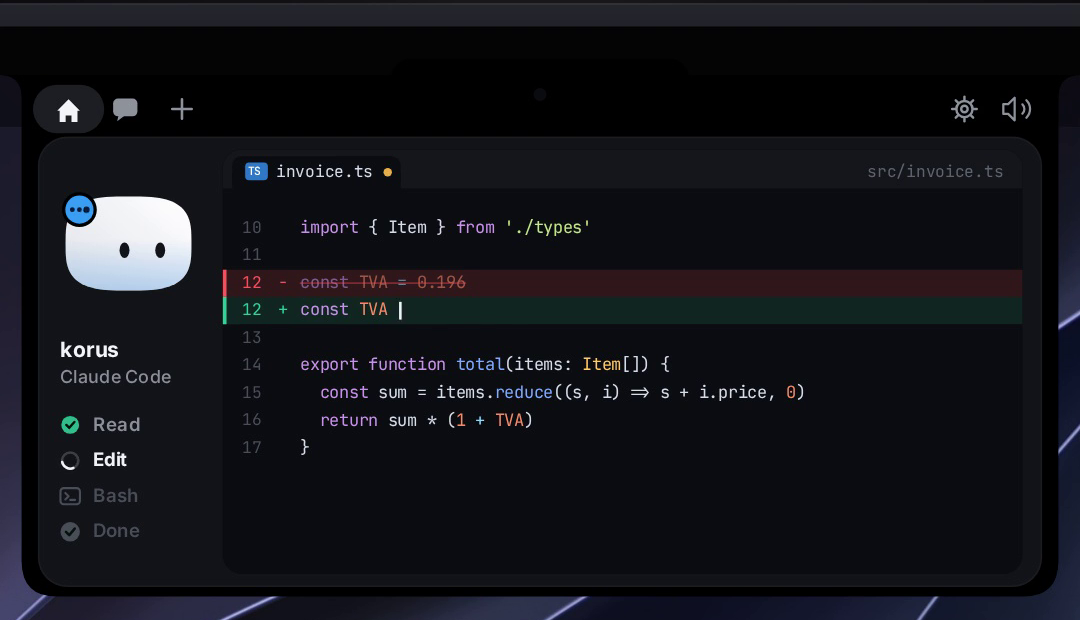
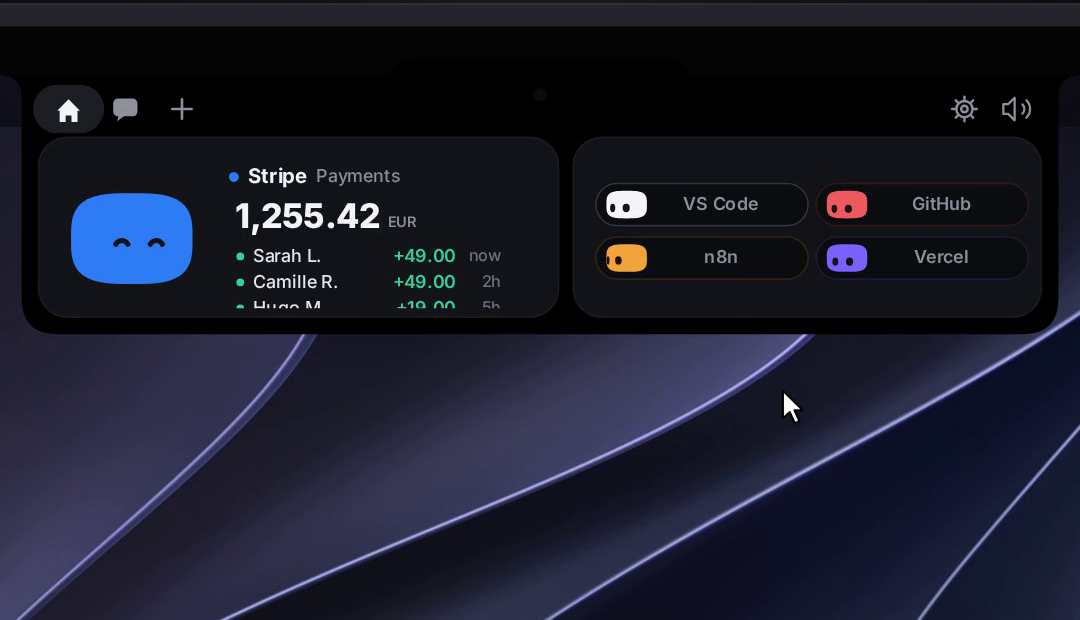
A tiny friend that lives in your Mac's notch — or at the top of your screen on Windows and Linux — and keeps an eye on your AI coding agent sessions. And now on your phone too: iPhone and Android.
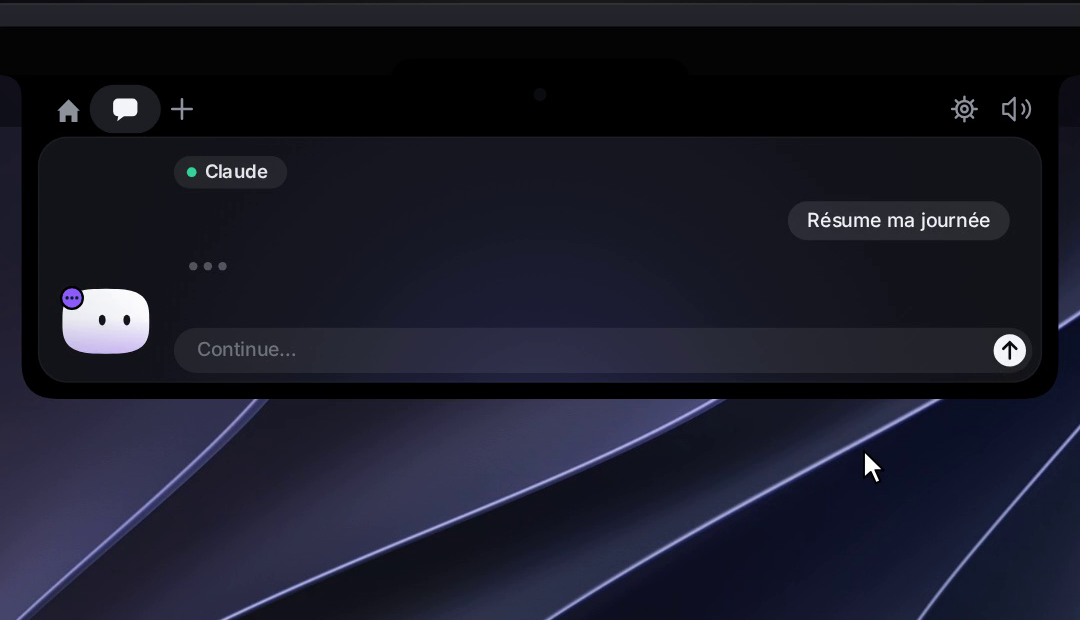
Approve permissions, watch your agents work, drop a file, chat with Claude — all without leaving what you're doing. Walk away from your Mac and Mochi follows you to your iPhone: Lock Screen, Dynamic Island, widgets, Siri.
New in 0.4: Coucou is a real Mac app. Hold a key anywhere, speak, let go: your words are pasted where you type, like Wispr Flow — free, open source, and offline with Parakeet. Record your calls without a bot in the meeting and get the transcript, the summary and the to-dos.







Some studios showed off gorgeous notch companions… and never let anyone use them. Coucou is the open version. Every line of code is open source under the MIT License: read it, fork it, learn from it. The Coucou name, Mochi and the sounds stay © Louis Raillé (see License).
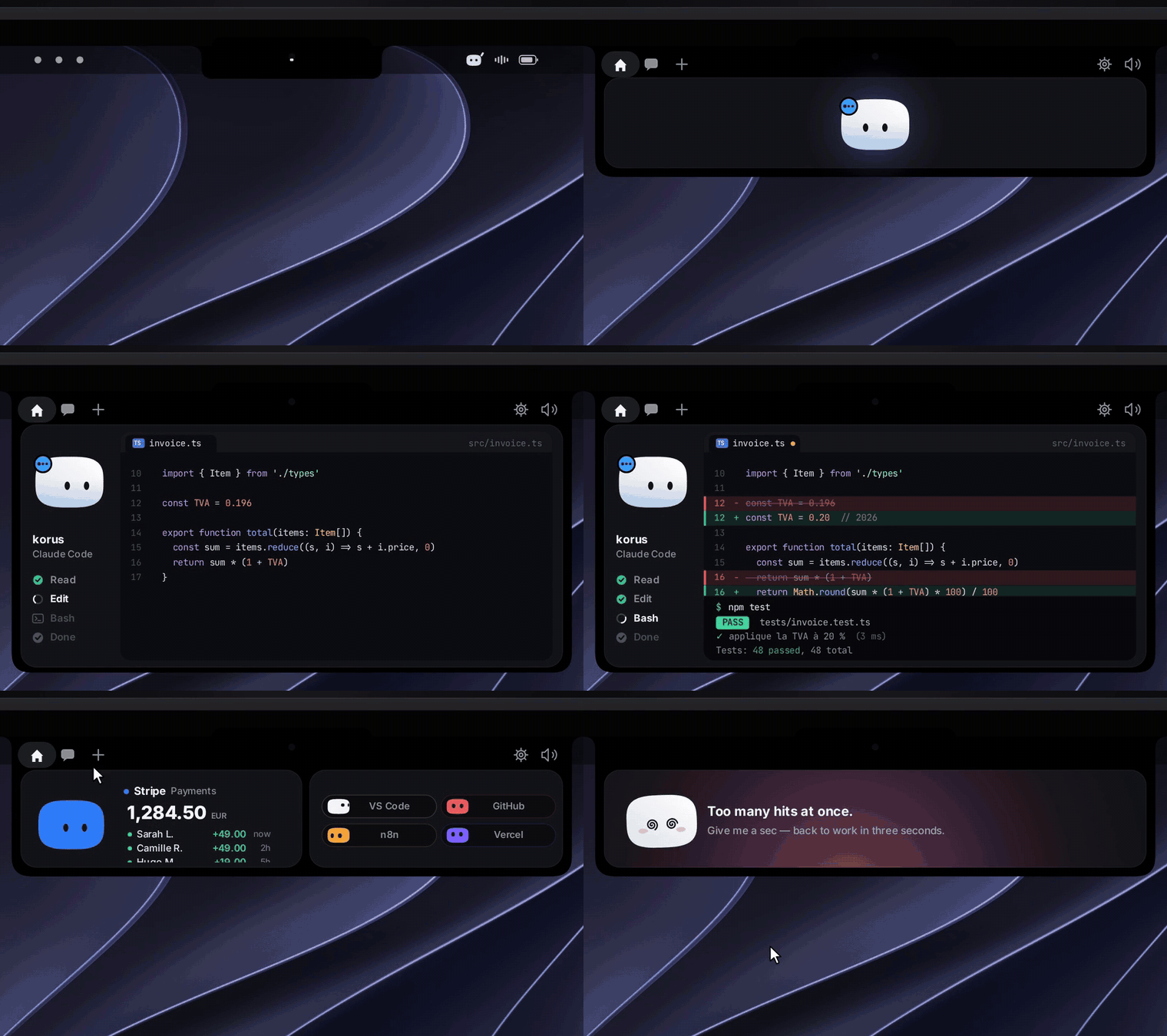
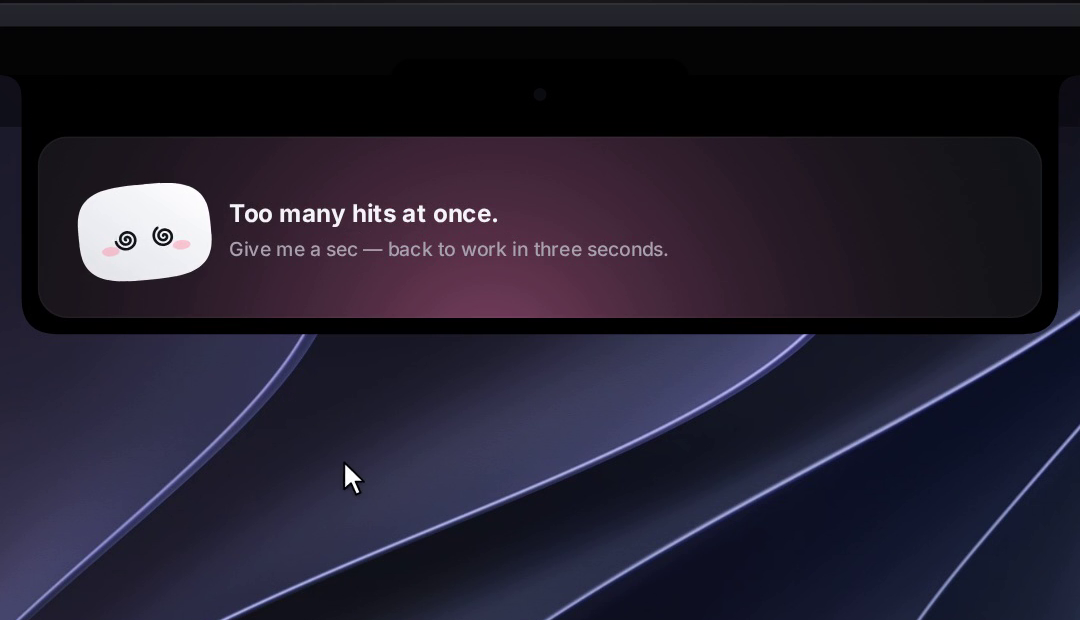
Meet Mochi: a soft little squircle with big eyes that pops out of your notch, waves hello, follows your cursor with its eyes, gets annoyed when you poke it (and dizzy if you insist), and tells you the moment Claude Code needs you.
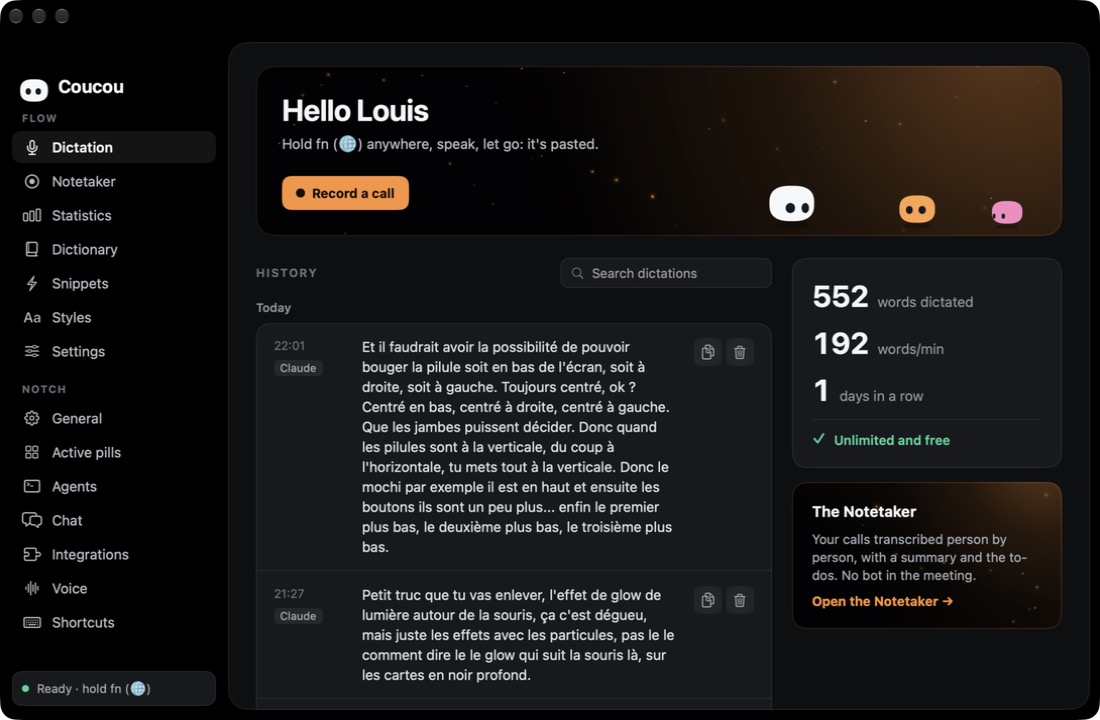
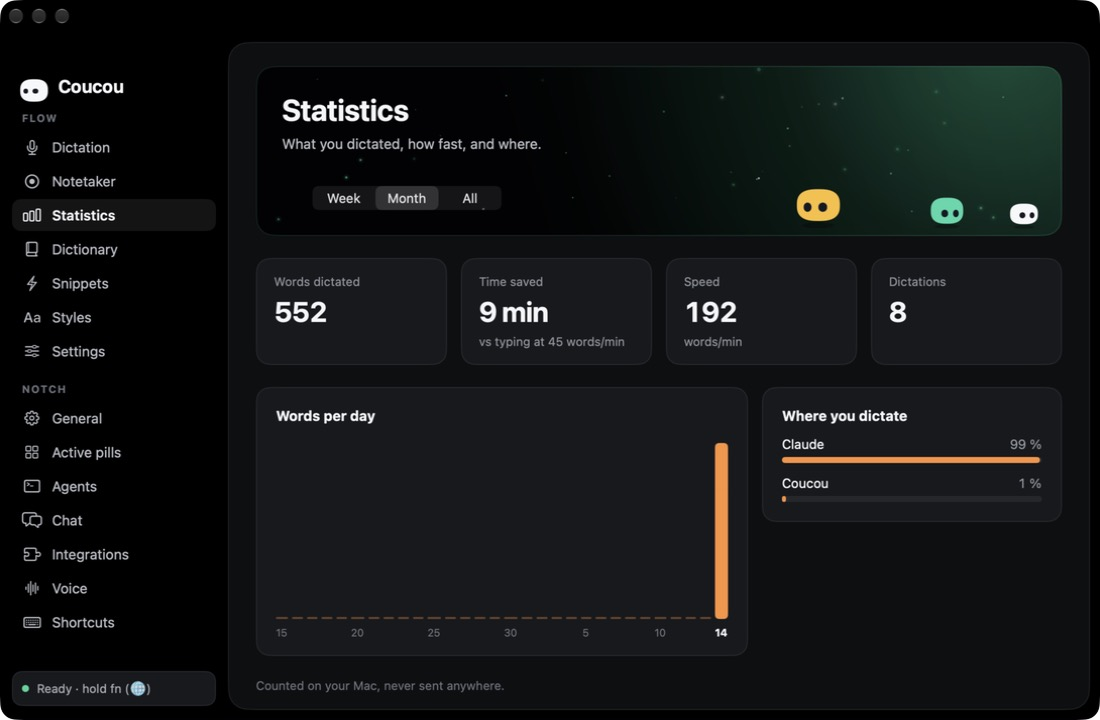
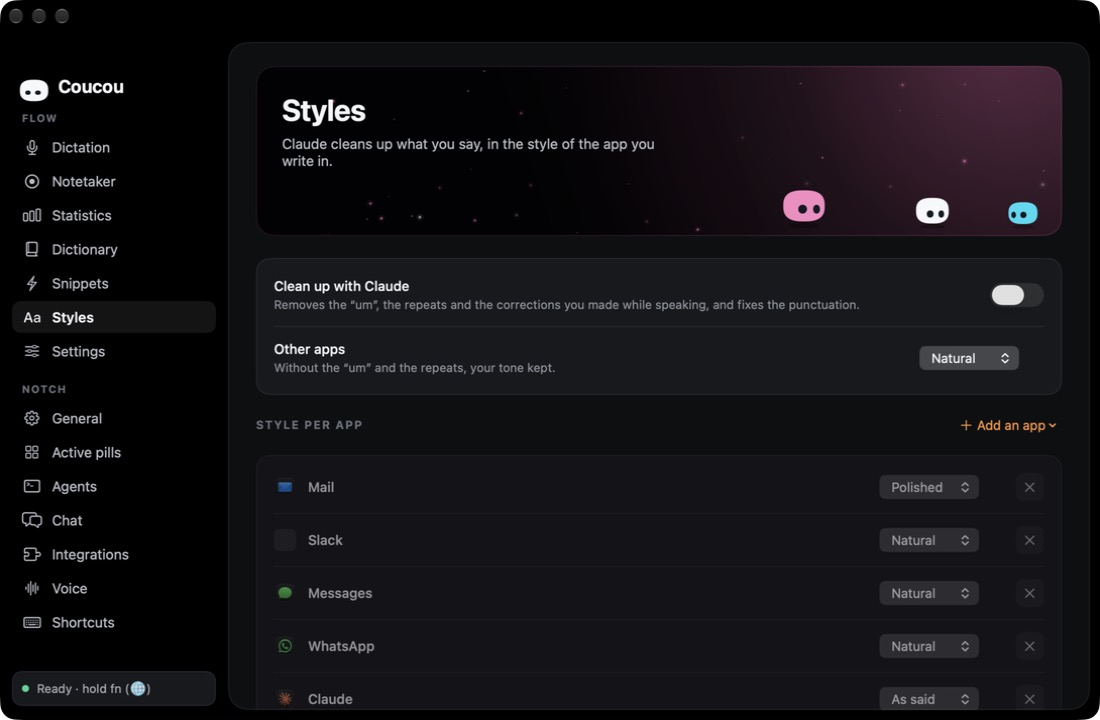
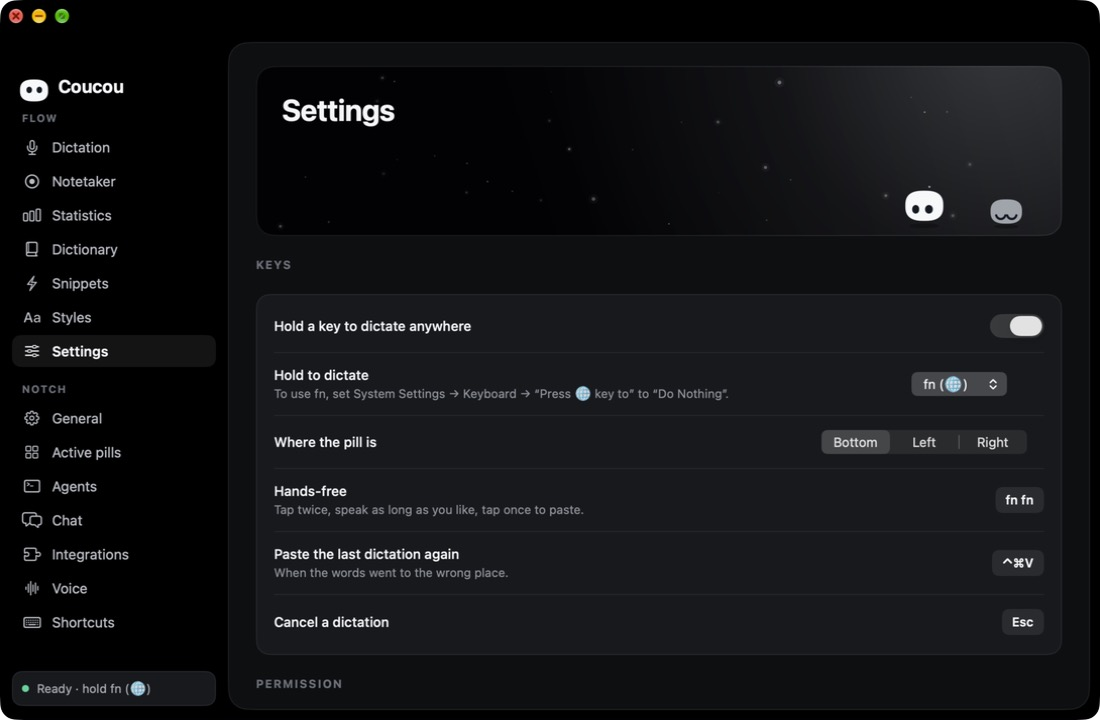
Since 0.4, Coucou has its own window and sits in the Dock. On the left, Flow — everything about your voice — and Notch, all the settings of the island. (macOS, GitHub build)
 |  |  |
Flow dictation and the Notetaker are on the Mac for now; Windows and Linux are next.
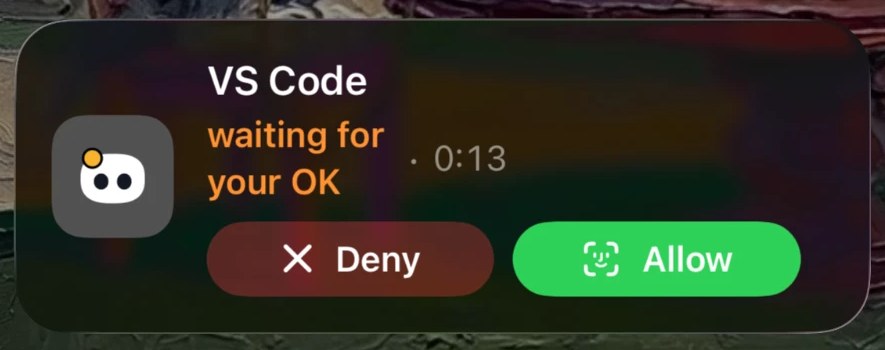
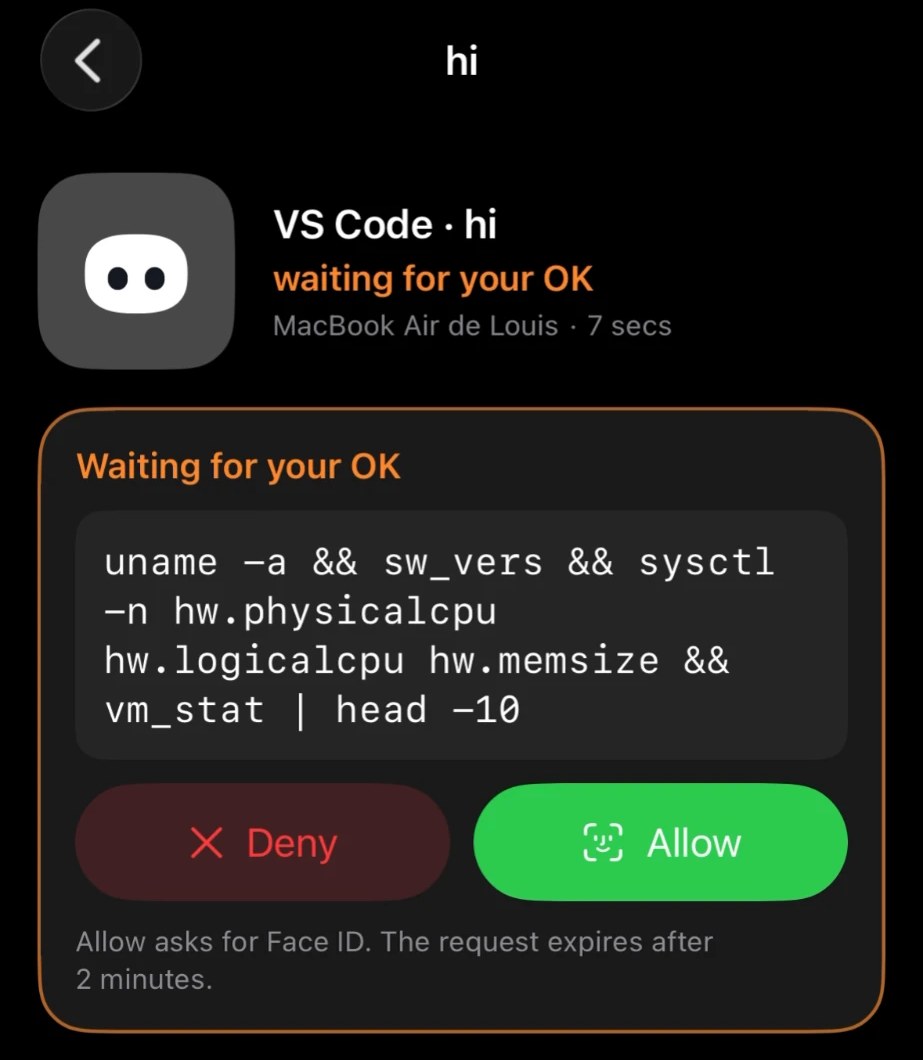
coucou_agent to give any agent its own pill (see docs/AGENTS.md). Finished? Mochi does a happy little jump.AskUserQuestion prompts show the choices right in the notch (single or multi-select, up to 4 questions). One click, or "Reply in terminal" to fall back to the CLI. Codex also gets Allow / Deny.finish.wav, approval.mp3…) in Settings → General → Sound → Open sounds folder to replace it.The Mac app does the work; the iPhone app keeps you in the loop when you step away. It goes as far into the Apple ecosystem as a dev tool can:
 | ||
 | 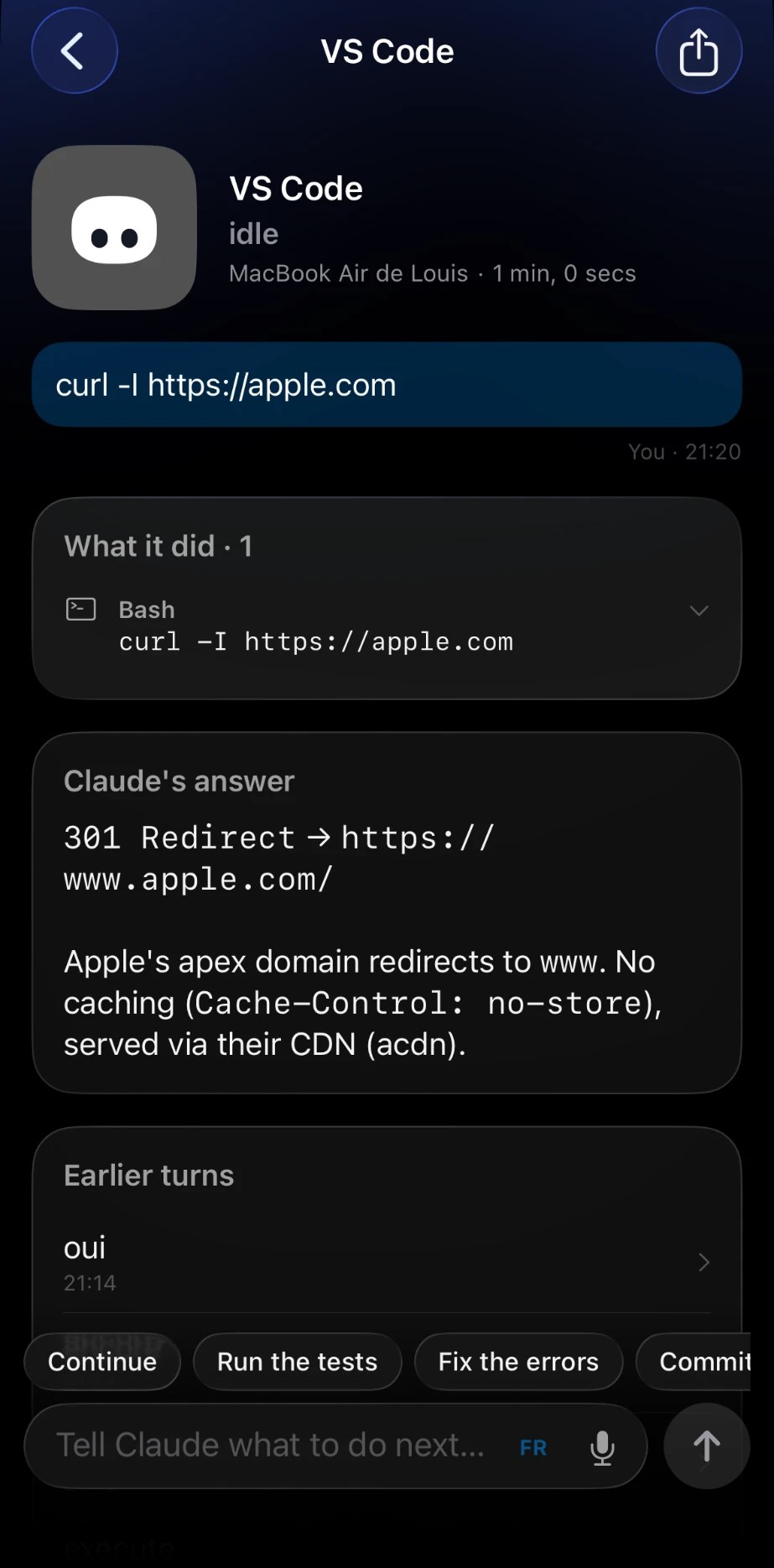 | 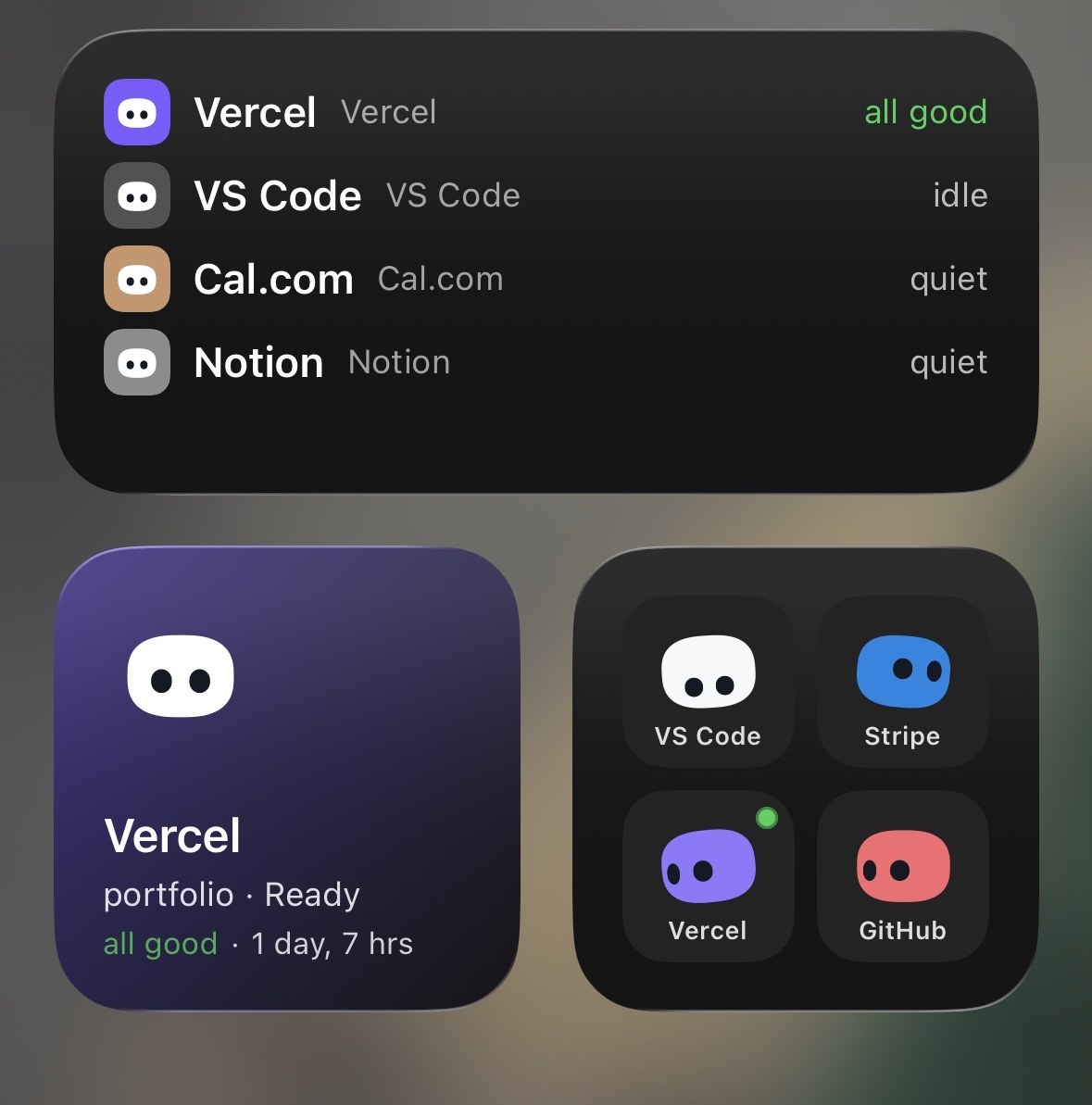 |
Get it on your iPhone in 3 steps: install Coucou on your iPhone (Join the TestFlight beta — free, App Store coming soon), turn on Settings → General → iPhone in the Mac app (0.1.9 or later), and use the same Apple Account in iCloud on both. Full guide, troubleshooting and build-it-yourself: docs/IPHONE.md.
Coucou for Android brings Mochi to Android phones. It was built by Rhytam Biswas (@Rhytam23) and lives in android/.
Status: tested on a real phone (Android 13) with the Windows app. The phone link is in Coucou 0.4.0 for Windows and Linux. Download the signed APK from the latest Android release. Android needs Coucou on Windows or Linux (not the Mac), Android 11 or later, and both on the same Wi-Fi. Full guide: android/README.md.
 |  |
 |  |
macOS releases are published as v* tags. See CHANGELOG.md for the full notes of each version.
| Version | Date | Highlights |
|---|---|---|
| 0.4.0 | Oct 14, 2026 | Coucou becomes an app: Flow dictation anywhere, Parakeet offline, the Notetaker, a window in the Dock |
| 0.3.0 | Oct 11, 2026 | « OK Coucou »: talk to Mochi, powered by Claude — pills, music, your services, web search, emails |
| 0.2.3 | Oct 8, 2026 | Terminal sessions, Spotify, a colour per Mochi, dictation in any language, open on hover, your own sounds |
| 0.2.2 | Oct 8, 2026 | Choose Mochi's screen, Claude Desktop pill, Codex plan usage, full questions, safer settings.json |
| 0.2.1 | Oct 7, 2026 | Hermes Agent support |
| 0.2.0 | Oct 6, 2026 | Copilot CLI, Muse Code, OpenCode and Amp, weekly recap, 10 languages |
| 0.1.9 | Oct 6, 2026 | iPhone services with live details and actions, smarter Live Activity |
| 0.1.8 | Oct 5, 2026 | Coucou on iPhone: sessions, widgets, approvals with Face ID, Mochi in the Dynamic Island |
| 0.1.7 | Oct 4, 2026 | Keyboard shortcuts |
| 0.1.6 | Oct 4, 2026 | Mochi on the desktop |
| 0.1.5 | Oct 4, 2026 | Wardrobe and seasonal outfits, new launch greeting |
| 0.1.4 | Oct 3, 2026 | Live diffs, GitHub pull requests, CI, reviews and contribution grid |
| 0.1.3 | Oct 3, 2026 | Answer Claude's questions from the notch, plan usage, local models, Apple Music |
| 0.1.2 | Oct 2, 2026 | Codex and Cursor support, the permission card stays until you answer |
| 0.1.1 | Oct 2, 2026 | Gemini and OpenAI chat, Linux build, more agents and pills, security hardening |
| 0.1.0 | Sep 27, 2026 | First release: Mochi, Claude Code sessions, chat, file drop, integrations |
Windows and Linux are released together, under the windows-v* and linux-v* tags. The newest Windows installer is always at windows-latest, the newest Linux AppImage at linux-latest.
| Windows & Linux | Date | Highlights |
|---|---|---|
| 0.5.0 · Windows · Linux | Oct 15, 2026 | Catches up with the Mac: the Coucou window, Flow dictation with Parakeet offline (X11 and Wayland), the Notetaker, « OK Coucou » |
| 0.4.0 · Windows · Linux | Oct 11, 2026 | Your Android phone: the link for Coucou for Android, by @Rhytam23 — approvals with your fingerprint, answers, chat, off by default |
| 0.3.0 · Windows · Linux | Oct 9, 2026 | Linux catches up: Spotify with Mochi dancing, global shortcuts on Wayland, Open terminal brings the terminal back; open on hover, your own sounds, a colour per Mochi |
| 0.2.0 · Windows | Oct 8, 2026 | Catches up with the Mac: nine agents with approvals, chat with any AI, plan usage, GitHub, wardrobe, 10 languages |
| 0.1.1 · Linux | Oct 1, 2026 | First Linux build (beta) |
Coucou for Android, by @Rhytam23, is released under the android-v* tags.
| Android | Date | Highlights |
|---|---|---|
| 0.2.0 | Oct 13, 2026 | Nine home-screen widgets: Mochi, your agents, plan usage and quick buttons, coloured by state |
| 0.1.0 | Oct 11, 2026 | First release: your agents, approvals with your fingerprint, answers and chat, linked to Windows or Linux |
No API key, no Claude Code, no setup — open Settings → General → Demo, click Try demo mode, and Coucou walks through a scripted session: a Claude Code session with live steps and a diff you can read, a permission request, an AskUserQuestion, a parallel Codex session, the GitHub, Stripe, Vercel and other integration pills loaded with sample data, the chat with a streamed response, the weekly recap with a share image you can actually save.
Nothing is written to disk during the demo — no Keychain entries, no hook files, no recap history. Your real sessions and keys are saved and restored exactly as they were when you stop.
Coucou is coming to the Mac App Store and the iPhone App Store: one click to install, automatic updates, and the iPhone app pairs with your Mac through your iCloud account, with nothing to configure. The links will be here as soon as Apple publishes them.
The App Store build of the Mac app runs in Apple's sandbox, so a few features stay in the GitHub build: Claude plan usage, the Apple Music pill and attaching the front window to the chat.
Everything else, troubleshooting included, is in docs/IPHONE.md.
Coucou-Android-0.2.0.apk from the release page on your phone (Android 11 or later) and open it. Android asks once to allow installs from your browser or file manager. You can also build it from source.Everything else, troubleshooting included, is in android/README.md.
Coucou.zip from Releases./Applications.Download Coucou-Windows.msi or Coucou-Windows-setup.exe (Windows 10/11, always the newest version) and run it. You can also build it from source.
Windows will show a warning the first time — that's expected. The installer isn't code-signed yet, so SmartScreen doesn't know the publisher:
This is only because the app isn't signed with a paid certificate yet. Coucou is open source, and Microsoft Defender scans the installer as clean.
Windows and Linux 0.5.0 catch up with the Mac: Coucou is now an app with its own window in the taskbar, Flow dictation anywhere (hold right Ctrl, speak, let go) with Parakeet running offline on your computer, the Notetaker for your calls, and « OK Coucou » to talk to Mochi, powered by Claude with your key. On Linux, dictation works on X11 and Wayland. 0.4.0 paired with Coucou for Android: approve, answer and chat from your Android phone (Settings → Android phone, off by default). 0.3.0 added open on hover, your own sounds, a colour of your own for each Mochi and the Mochi-to-desktop shortcut; on Linux, the Spotify pill with Mochi dancing to it, global shortcuts on Wayland and "Open terminal" that brings the terminal forward. 0.2.0 caught up with the Mac: Codex, Copilot CLI, Muse Code and six more agents with approvals from the island, answers to Claude's questions, live diffs, GitHub pull requests and CI, plan usage, local models, the wardrobe, Mochi on the desktop, keyboard shortcuts, the weekly recap and 10 languages. See the changelog.
There is no notch on a PC, so the island slides out of the top edge of the screen
instead of hiding inside one. See windows/README.md for the
rest of the differences.
Coucou for Linux 0.5.0 is out (x86_64): AppImage · .deb · .rpm · all files and checksums. The newest AppImage is always at linux-latest.
chmod +x Coucou-Linux-*.AppImage, then run it.sudo apt install ./Coucou-Linux-*.debsudo dnf install ./Coucou-Linux-*.rpmCheck a download with sha256sum -c SHA256SUMS --ignore-missing. On Arch Linux, build it with the PKGBUILD.
The island sits on the top edge on compositors with layer-shell — COSMIC, KDE
Plasma, Hyprland, Sway and other wlroots compositors. GNOME has no layer-shell,
so there it runs through XWayland as a dock window at the top of the screen. See windows/README.md.
macOS — requirements: macOS 15+, Xcode 16+, XcodeGen.
brew install xcodegen
git clone https://github.com/Louis-CFM/coucou.git
cd coucou/NotchBuddy
xcodegen
open NotchBuddy.xcodeproj   # then ⌘R
Windows — requirements: Rust, Node 20+, MSVC build tools.
git clone https://github.com/Louis-CFM/coucou.git
cd coucou/windows
npm install
npm run pack                # installer lands in windows/release/
Linux — requirements: Rust, Node 20+, and the WebKitGTK, gtk-layer-shell and appindicator development packages (Debian/Ubuntu names below).
sudo apt install build-essential pkg-config \
  libwebkit2gtk-4.1-dev libgtk-layer-shell-dev libayatana-appindicator3-dev \
  librsvg2-dev libssl-dev libdbus-1-dev patchelf \
  gstreamer1.0-plugins-base gstreamer1.0-plugins-good
git clone https://github.com/Louis-CFM/coucou.git
cd coucou/windows
npm install
npm run pack                # AppImage, .deb and .rpm land in windows/release/
Android — requirements: JDK 17 and the Android SDK (platform 35).
git clone https://github.com/Louis-CFM/coucou.git
cd coucou/android
./gradlew assembleDebug      # the APK lands in app/build/outputs/apk/debug/
On the Mac, open Coucou from the Dock or the menu bar: its window has every setting under Notch (⌘,). On Windows and Linux, click the Coucou icon in the system tray → Settings…
| What | Why | Where the key goes |
|---|---|---|
| Claude Code hooks | live sessions and approvals | Install hooks — Coucou backs up ~/.claude/settings.json, merges its hooks and shows you the diff before writing anything |
| Claude plan (macOS, GitHub build) | Plan usage gauge in the notch header | Install relay in Settings → Agents → Plan usage, then enable "Show in the notch" |
| Gemini CLI hooks | Gemini CLI sessions in the island | Install hooks in Settings → Gemini CLI — backs up ~/.gemini/settings.json |
| Antigravity (agy) hooks | agy sessions in the island | Install hooks in Settings → Antigravity — backs up ~/.gemini/config/hooks.json |
| Anthropic API key | chat and questions about files | Settings → Anthropic API · Keychain / Windows Credential Manager / Secret Service |
| Google AI API key (macOS) | chat with Google AI (Gemini) | Settings → Chat — other providers · Keychain |
| OpenAI API key (macOS) | chat with OpenAI | Settings → Chat — other providers · Keychain |
| Ollama server (macOS) | chat with local models via Ollama | Settings → Chat → Local models → Connect |
| LM Studio server (macOS) | chat with local models via LM Studio | Settings → Chat → Local models → Connect |
| iPhone (macOS) | sessions, approvals, questions and Mochi on your iPhone | Settings → General → iPhone · your private iCloud, see docs/IPHONE.md |
| Android phone (Windows, Linux) | sessions, approvals, questions and chat on your Android phone | Settings → Android phone · off by default, your local network only, see android/README.md |
| Active pills (macOS) | choose which tools and agents appear in the island | Settings → Active pills |
| Flow dictation (macOS, GitHub build) | hold a key, speak, the words are pasted | Coucou → Flow → Settings · the Accessibility and Microphone permissions |
| Parakeet (macOS, Apple silicon) | offline dictation, more accurate | Coucou → Flow → Settings → Recognition → Download (about 650 MB) |
| Stripe, n8n, GitHub, Vercel, Resend, Notion, Cal.com | the service pills | Keychain / Windows Credential Manager / Secret Service, all optional |
If Coucou isn't running, the hook exits immediately: Claude Code is never blocked.
| Agent | How it connects (Mac) | Mac-only? |
|---|---|---|
| Claude Code | Settings → Claude Code → Install hooks | No |
| Gemini CLI | Settings → Gemini CLI → Install hooks | No |
| Antigravity | Settings → Antigravity → Install hooks | No |
| Cursor | Hooks installed automatically alongside Claude Code | No |
| Codex | --agent codex flag; Settings → Codex → Install hooks | No |
| Copilot CLI | --agent copilot flag + camelCase events | No |
| Muse Code | --agent muse flag | No |
| OpenCode | Plugin — Settings → OpenCode Plugin → Install | No |
| Amp | Plugin — Settings → Amp Plugin → Install | No |
| Hermes | Plugin — Settings → Agents → Hermes → Install | No |
| Any other | --agent <name> flag; see docs/AGENTS.md | No |
OpenCode, Amp and Hermes use a plugin model rather than a hook command. Coucou installs the plugin file into ~/.config/opencode/plugins/, ~/.config/amp/plugins/ and ~/.hermes/plugins/coucou/ respectively. On Windows and Linux the plugins start the coucou-hook relay directly — see windows/README.md.
| Do this | Mochi does that |
|---|---|
| Hover the notch (top edge on Windows and Linux) | peeks out and says hi 👋 |
| Click it | opens |
| Hover Mochi | blinks, eyes grow |
| Click Mochi | squish + annoyed |
| Click 3 times fast | 😵💫 dizzy for a few seconds |
| Drag a file onto the island | turns into a box and swallows it |
| Drag Mochi onto a window (macOS) | attaches it as context |
| Click the model name above the chat box (macOS) | switch AI provider or model |
| Say « OK Coucou, play some music » (macOS) | listens, thinks, and does it |
| Hold right ⌥ and speak, in any app (macOS) | Mochi listens in the pill, your words are pasted |
| Hover the pill at the bottom of the screen (macOS) | opens a toolbar: dictate, record a call, open Coucou |
macOS
NSPanel hugging the notch, driven by a small state machine (hidden → petit → home).Canvas + TimelineView at 60 fps — squircle body, eyes projected on a sphere, spring animations. No Rive, no Lottie, no images.nb-hook script receives hook events and forwards them over a Unix socket to the app. For approvals it waits for your click, then answers the hook.PillCatalog.swift is the single source of truth — every pill (coding tools, agents, AI providers, services) is declared there with its ID, color and category.AVAudioPlayers.The macOS app is native Swift 6 / SwiftUI / AppKit with zero third-party dependencies.
iPhone
CoucouKit.relay/, a stateless Cloudflare Worker that holds the APNs key and only sees the agent's name and state.Windows
coucou-hook.exe and a named pipe; keys live in Windows Credential Manager.windows/README.md.Linux
coucou-hook, over a Unix socket in
$XDG_RUNTIME_DIR; keys live in the Secret Service.Android
windows/src-tauri/src/phone_link) is an opt-in server in the Windows and Linux app, on your local network only: TLS with a certificate pinned at pairing, a pairing code that "Pair again" replaces (and disconnects every phone), and approvals bound to the exact request the computer is waiting on. The protocol is in docs/ANDROID_LINK.md.Issues and PRs are very welcome — new integrations, new emotes, new sounds, bug fixes. See CONTRIBUTING.md.
Want to add or improve a translation? Open a PR with changes to NotchBuddy/Resources/Localizable.xcstrings.
Built by Louis Raillé with Claude Code. Coucou for Android and the phone link by Rhytam Biswas (@Rhytam23). Thanks to everyone who sent a pull request — see contributors. Inspired by the notch-companion concepts shared by design studios — this project is independent and not affiliated with any of them.
833 followers · starred Oct 2026
155 followers · starred Oct 2026
45 followers · starred Sep 2026
25 followers · starred Oct 2026
A tiny friend in your Mac's notch and on your iPhone that keeps an eye on your AI coding agents: Claude Code, Codex, Cursor, Gemini CLI, Antigravity and more. Approve from the notch or your Lock Screen.
See the code
A tiny friend that lives in your Mac's notch — or at the top of your screen on Windows and Linux — and keeps an eye on your AI coding agent sessions. And now on your phone too: iPhone and Android.
Approve permissions, watch your agents work, drop a file, chat with Claude — all without leaving what you're doing. Walk away from your Mac and Mochi follows you to your iPhone: Lock Screen, Dynamic Island, widgets, Siri.
New in 0.4: Coucou is a real Mac app. Hold a key anywhere, speak, let go: your words are pasted where you type, like Wispr Flow — free, open source, and offline with Parakeet. Record your calls without a bot in the meeting and get the transcript, the summary and the to-dos.
Some studios showed off gorgeous notch companions… and never let anyone use them. Coucou is the open version. Every line of code is open source under the MIT License: read it, fork it, learn from it. The Coucou name, Mochi and the sounds stay © Louis Raillé (see License).
Meet Mochi: a soft little squircle with big eyes that pops out of your notch, waves hello, follows your cursor with its eyes, gets annoyed when you poke it (and dizzy if you insist), and tells you the moment Claude Code needs you.
Since 0.4, Coucou has its own window and sits in the Dock. On the left, Flow — everything about your voice — and Notch, all the settings of the island. (macOS, GitHub build)
| | |
Flow dictation and the Notetaker are on the Mac for now; Windows and Linux are next.
coucou_agent to give any agent its own pill (see docs/AGENTS.md). Finished? Mochi does a happy little jump.AskUserQuestion prompts show the choices right in the notch (single or multi-select, up to 4 questions). One click, or "Reply in terminal" to fall back to the CLI. Codex also gets Allow / Deny.finish.wav, approval.mp3…) in Settings → General → Sound → Open sounds folder to replace it.The Mac app does the work; the iPhone app keeps you in the loop when you step away. It goes as far into the Apple ecosystem as a dev tool can:
| ||
| | |
Get it on your iPhone in 3 steps: install Coucou on your iPhone (Join the TestFlight beta — free, App Store coming soon), turn on Settings → General → iPhone in the Mac app (0.1.9 or later), and use the same Apple Account in iCloud on both. Full guide, troubleshooting and build-it-yourself: docs/IPHONE.md.
Coucou for Android brings Mochi to Android phones. It was built by Rhytam Biswas (@Rhytam23) and lives in android/.
Status: tested on a real phone (Android 13) with the Windows app. The phone link is in Coucou 0.4.0 for Windows and Linux. Download the signed APK from the latest Android release. Android needs Coucou on Windows or Linux (not the Mac), Android 11 or later, and both on the same Wi-Fi. Full guide: android/README.md.
| |
| |
macOS releases are published as v* tags. See CHANGELOG.md for the full notes of each version.
| Version | Date | Highlights |
|---|---|---|
| 0.4.0 | Oct 14, 2026 | Coucou becomes an app: Flow dictation anywhere, Parakeet offline, the Notetaker, a window in the Dock |
| 0.3.0 | Oct 11, 2026 | « OK Coucou »: talk to Mochi, powered by Claude — pills, music, your services, web search, emails |
| 0.2.3 | Oct 8, 2026 | Terminal sessions, Spotify, a colour per Mochi, dictation in any language, open on hover, your own sounds |
| 0.2.2 | Oct 8, 2026 | Choose Mochi's screen, Claude Desktop pill, Codex plan usage, full questions, safer settings.json |
| 0.2.1 | Oct 7, 2026 | Hermes Agent support |
| 0.2.0 | Oct 6, 2026 | Copilot CLI, Muse Code, OpenCode and Amp, weekly recap, 10 languages |
| 0.1.9 | Oct 6, 2026 | iPhone services with live details and actions, smarter Live Activity |
| 0.1.8 | Oct 5, 2026 | Coucou on iPhone: sessions, widgets, approvals with Face ID, Mochi in the Dynamic Island |
| 0.1.7 | Oct 4, 2026 | Keyboard shortcuts |
| 0.1.6 | Oct 4, 2026 | Mochi on the desktop |
| 0.1.5 | Oct 4, 2026 | Wardrobe and seasonal outfits, new launch greeting |
| 0.1.4 | Oct 3, 2026 | Live diffs, GitHub pull requests, CI, reviews and contribution grid |
| 0.1.3 | Oct 3, 2026 | Answer Claude's questions from the notch, plan usage, local models, Apple Music |
| 0.1.2 | Oct 2, 2026 | Codex and Cursor support, the permission card stays until you answer |
| 0.1.1 | Oct 2, 2026 | Gemini and OpenAI chat, Linux build, more agents and pills, security hardening |
| 0.1.0 | Sep 27, 2026 | First release: Mochi, Claude Code sessions, chat, file drop, integrations |
Windows and Linux are released together, under the windows-v* and linux-v* tags. The newest Windows installer is always at windows-latest, the newest Linux AppImage at linux-latest.
| Windows & Linux | Date | Highlights |
|---|---|---|
| 0.5.0 · Windows · Linux | Oct 15, 2026 | Catches up with the Mac: the Coucou window, Flow dictation with Parakeet offline (X11 and Wayland), the Notetaker, « OK Coucou » |
| 0.4.0 · Windows · Linux | Oct 11, 2026 | Your Android phone: the link for Coucou for Android, by @Rhytam23 — approvals with your fingerprint, answers, chat, off by default |
| 0.3.0 · Windows · Linux | Oct 9, 2026 | Linux catches up: Spotify with Mochi dancing, global shortcuts on Wayland, Open terminal brings the terminal back; open on hover, your own sounds, a colour per Mochi |
| 0.2.0 · Windows | Oct 8, 2026 | Catches up with the Mac: nine agents with approvals, chat with any AI, plan usage, GitHub, wardrobe, 10 languages |
| 0.1.1 · Linux | Oct 1, 2026 | First Linux build (beta) |
Coucou for Android, by @Rhytam23, is released under the android-v* tags.
| Android | Date | Highlights |
|---|---|---|
| 0.2.0 | Oct 13, 2026 | Nine home-screen widgets: Mochi, your agents, plan usage and quick buttons, coloured by state |
| 0.1.0 | Oct 11, 2026 | First release: your agents, approvals with your fingerprint, answers and chat, linked to Windows or Linux |
No API key, no Claude Code, no setup — open Settings → General → Demo, click Try demo mode, and Coucou walks through a scripted session: a Claude Code session with live steps and a diff you can read, a permission request, an AskUserQuestion, a parallel Codex session, the GitHub, Stripe, Vercel and other integration pills loaded with sample data, the chat with a streamed response, the weekly recap with a share image you can actually save.
Nothing is written to disk during the demo — no Keychain entries, no hook files, no recap history. Your real sessions and keys are saved and restored exactly as they were when you stop.
Coucou is coming to the Mac App Store and the iPhone App Store: one click to install, automatic updates, and the iPhone app pairs with your Mac through your iCloud account, with nothing to configure. The links will be here as soon as Apple publishes them.
The App Store build of the Mac app runs in Apple's sandbox, so a few features stay in the GitHub build: Claude plan usage, the Apple Music pill and attaching the front window to the chat.
Everything else, troubleshooting included, is in docs/IPHONE.md.
Coucou-Android-0.2.0.apk from the release page on your phone (Android 11 or later) and open it. Android asks once to allow installs from your browser or file manager. You can also build it from source.Everything else, troubleshooting included, is in android/README.md.
Coucou.zip from Releases./Applications.Download Coucou-Windows.msi or Coucou-Windows-setup.exe (Windows 10/11, always the newest version) and run it. You can also build it from source.
Windows will show a warning the first time — that's expected. The installer isn't code-signed yet, so SmartScreen doesn't know the publisher:
This is only because the app isn't signed with a paid certificate yet. Coucou is open source, and Microsoft Defender scans the installer as clean.
Windows and Linux 0.5.0 catch up with the Mac: Coucou is now an app with its own window in the taskbar, Flow dictation anywhere (hold right Ctrl, speak, let go) with Parakeet running offline on your computer, the Notetaker for your calls, and « OK Coucou » to talk to Mochi, powered by Claude with your key. On Linux, dictation works on X11 and Wayland. 0.4.0 paired with Coucou for Android: approve, answer and chat from your Android phone (Settings → Android phone, off by default). 0.3.0 added open on hover, your own sounds, a colour of your own for each Mochi and the Mochi-to-desktop shortcut; on Linux, the Spotify pill with Mochi dancing to it, global shortcuts on Wayland and "Open terminal" that brings the terminal forward. 0.2.0 caught up with the Mac: Codex, Copilot CLI, Muse Code and six more agents with approvals from the island, answers to Claude's questions, live diffs, GitHub pull requests and CI, plan usage, local models, the wardrobe, Mochi on the desktop, keyboard shortcuts, the weekly recap and 10 languages. See the changelog.
There is no notch on a PC, so the island slides out of the top edge of the screen
instead of hiding inside one. See windows/README.md for the
rest of the differences.
Coucou for Linux 0.5.0 is out (x86_64): AppImage · .deb · .rpm · all files and checksums. The newest AppImage is always at linux-latest.
chmod +x Coucou-Linux-*.AppImage, then run it.sudo apt install ./Coucou-Linux-*.debsudo dnf install ./Coucou-Linux-*.rpmCheck a download with sha256sum -c SHA256SUMS --ignore-missing. On Arch Linux, build it with the PKGBUILD.
The island sits on the top edge on compositors with layer-shell — COSMIC, KDE
Plasma, Hyprland, Sway and other wlroots compositors. GNOME has no layer-shell,
so there it runs through XWayland as a dock window at the top of the screen. See windows/README.md.
macOS — requirements: macOS 15+, Xcode 16+, XcodeGen.
brew install xcodegen
git clone https://github.com/Louis-CFM/coucou.git
cd coucou/NotchBuddy
xcodegen
open NotchBuddy.xcodeproj   # then ⌘R
Windows — requirements: Rust, Node 20+, MSVC build tools.
git clone https://github.com/Louis-CFM/coucou.git
cd coucou/windows
npm install
npm run pack                # installer lands in windows/release/
Linux — requirements: Rust, Node 20+, and the WebKitGTK, gtk-layer-shell and appindicator development packages (Debian/Ubuntu names below).
sudo apt install build-essential pkg-config \
  libwebkit2gtk-4.1-dev libgtk-layer-shell-dev libayatana-appindicator3-dev \
  librsvg2-dev libssl-dev libdbus-1-dev patchelf \
  gstreamer1.0-plugins-base gstreamer1.0-plugins-good
git clone https://github.com/Louis-CFM/coucou.git
cd coucou/windows
npm install
npm run pack                # AppImage, .deb and .rpm land in windows/release/
Android — requirements: JDK 17 and the Android SDK (platform 35).
git clone https://github.com/Louis-CFM/coucou.git
cd coucou/android
./gradlew assembleDebug      # the APK lands in app/build/outputs/apk/debug/
On the Mac, open Coucou from the Dock or the menu bar: its window has every setting under Notch (⌘,). On Windows and Linux, click the Coucou icon in the system tray → Settings…
| What | Why | Where the key goes |
|---|---|---|
| Claude Code hooks | live sessions and approvals | Install hooks — Coucou backs up ~/.claude/settings.json, merges its hooks and shows you the diff before writing anything |
| Claude plan (macOS, GitHub build) | Plan usage gauge in the notch header | Install relay in Settings → Agents → Plan usage, then enable "Show in the notch" |
| Gemini CLI hooks | Gemini CLI sessions in the island | Install hooks in Settings → Gemini CLI — backs up ~/.gemini/settings.json |
| Antigravity (agy) hooks | agy sessions in the island | Install hooks in Settings → Antigravity — backs up ~/.gemini/config/hooks.json |
| Anthropic API key | chat and questions about files | Settings → Anthropic API · Keychain / Windows Credential Manager / Secret Service |
| Google AI API key (macOS) | chat with Google AI (Gemini) | Settings → Chat — other providers · Keychain |
| OpenAI API key (macOS) | chat with OpenAI | Settings → Chat — other providers · Keychain |
| Ollama server (macOS) | chat with local models via Ollama | Settings → Chat → Local models → Connect |
| LM Studio server (macOS) | chat with local models via LM Studio | Settings → Chat → Local models → Connect |
| iPhone (macOS) | sessions, approvals, questions and Mochi on your iPhone | Settings → General → iPhone · your private iCloud, see docs/IPHONE.md |
| Android phone (Windows, Linux) | sessions, approvals, questions and chat on your Android phone | Settings → Android phone · off by default, your local network only, see android/README.md |
| Active pills (macOS) | choose which tools and agents appear in the island | Settings → Active pills |
| Flow dictation (macOS, GitHub build) | hold a key, speak, the words are pasted | Coucou → Flow → Settings · the Accessibility and Microphone permissions |
| Parakeet (macOS, Apple silicon) | offline dictation, more accurate | Coucou → Flow → Settings → Recognition → Download (about 650 MB) |
| Stripe, n8n, GitHub, Vercel, Resend, Notion, Cal.com | the service pills | Keychain / Windows Credential Manager / Secret Service, all optional |
If Coucou isn't running, the hook exits immediately: Claude Code is never blocked.
| Agent | How it connects (Mac) | Mac-only? |
|---|---|---|
| Claude Code | Settings → Claude Code → Install hooks | No |
| Gemini CLI | Settings → Gemini CLI → Install hooks | No |
| Antigravity | Settings → Antigravity → Install hooks | No |
| Cursor | Hooks installed automatically alongside Claude Code | No |
| Codex | --agent codex flag; Settings → Codex → Install hooks | No |
| Copilot CLI | --agent copilot flag + camelCase events | No |
| Muse Code | --agent muse flag | No |
| OpenCode | Plugin — Settings → OpenCode Plugin → Install | No |
| Amp | Plugin — Settings → Amp Plugin → Install | No |
| Hermes | Plugin — Settings → Agents → Hermes → Install | No |
| Any other | --agent <name> flag; see docs/AGENTS.md | No |
OpenCode, Amp and Hermes use a plugin model rather than a hook command. Coucou installs the plugin file into ~/.config/opencode/plugins/, ~/.config/amp/plugins/ and ~/.hermes/plugins/coucou/ respectively. On Windows and Linux the plugins start the coucou-hook relay directly — see windows/README.md.
| Do this | Mochi does that |
|---|---|
| Hover the notch (top edge on Windows and Linux) | peeks out and says hi 👋 |
| Click it | opens |
| Hover Mochi | blinks, eyes grow |
| Click Mochi | squish + annoyed |
| Click 3 times fast | 😵💫 dizzy for a few seconds |
| Drag a file onto the island | turns into a box and swallows it |
| Drag Mochi onto a window (macOS) | attaches it as context |
| Click the model name above the chat box (macOS) | switch AI provider or model |
| Say « OK Coucou, play some music » (macOS) | listens, thinks, and does it |
| Hold right ⌥ and speak, in any app (macOS) | Mochi listens in the pill, your words are pasted |
| Hover the pill at the bottom of the screen (macOS) | opens a toolbar: dictate, record a call, open Coucou |
macOS
NSPanel hugging the notch, driven by a small state machine (hidden → petit → home).Canvas + TimelineView at 60 fps — squircle body, eyes projected on a sphere, spring animations. No Rive, no Lottie, no images.nb-hook script receives hook events and forwards them over a Unix socket to the app. For approvals it waits for your click, then answers the hook.PillCatalog.swift is the single source of truth — every pill (coding tools, agents, AI providers, services) is declared there with its ID, color and category.AVAudioPlayers.The macOS app is native Swift 6 / SwiftUI / AppKit with zero third-party dependencies.
iPhone
CoucouKit.relay/, a stateless Cloudflare Worker that holds the APNs key and only sees the agent's name and state.Windows
coucou-hook.exe and a named pipe; keys live in Windows Credential Manager.windows/README.md.Linux
coucou-hook, over a Unix socket in
$XDG_RUNTIME_DIR; keys live in the Secret Service.Android
windows/src-tauri/src/phone_link) is an opt-in server in the Windows and Linux app, on your local network only: TLS with a certificate pinned at pairing, a pairing code that "Pair again" replaces (and disconnects every phone), and approvals bound to the exact request the computer is waiting on. The protocol is in docs/ANDROID_LINK.md.Issues and PRs are very welcome — new integrations, new emotes, new sounds, bug fixes. See CONTRIBUTING.md.
Want to add or improve a translation? Open a PR with changes to NotchBuddy/Resources/Localizable.xcstrings.
Built by Louis Raillé with Claude Code. Coucou for Android and the phone link by Rhytam Biswas (@Rhytam23). Thanks to everyone who sent a pull request — see contributors. Inspired by the notch-companion concepts shared by design studios — this project is independent and not affiliated with any of them.
833 followers · starred Oct 2026
155 followers · starred Oct 2026
45 followers · starred Sep 2026
25 followers · starred Oct 2026



