Reads and writes Game Boy and Game Boy Advance cartridge data. Supported hardware: GBxCart RW, GBFlash, Joey Jr, Game Bub
Python
889
150 commits
updated Sep 8, 2026
for Windows, Linux, macOS (→ Download)
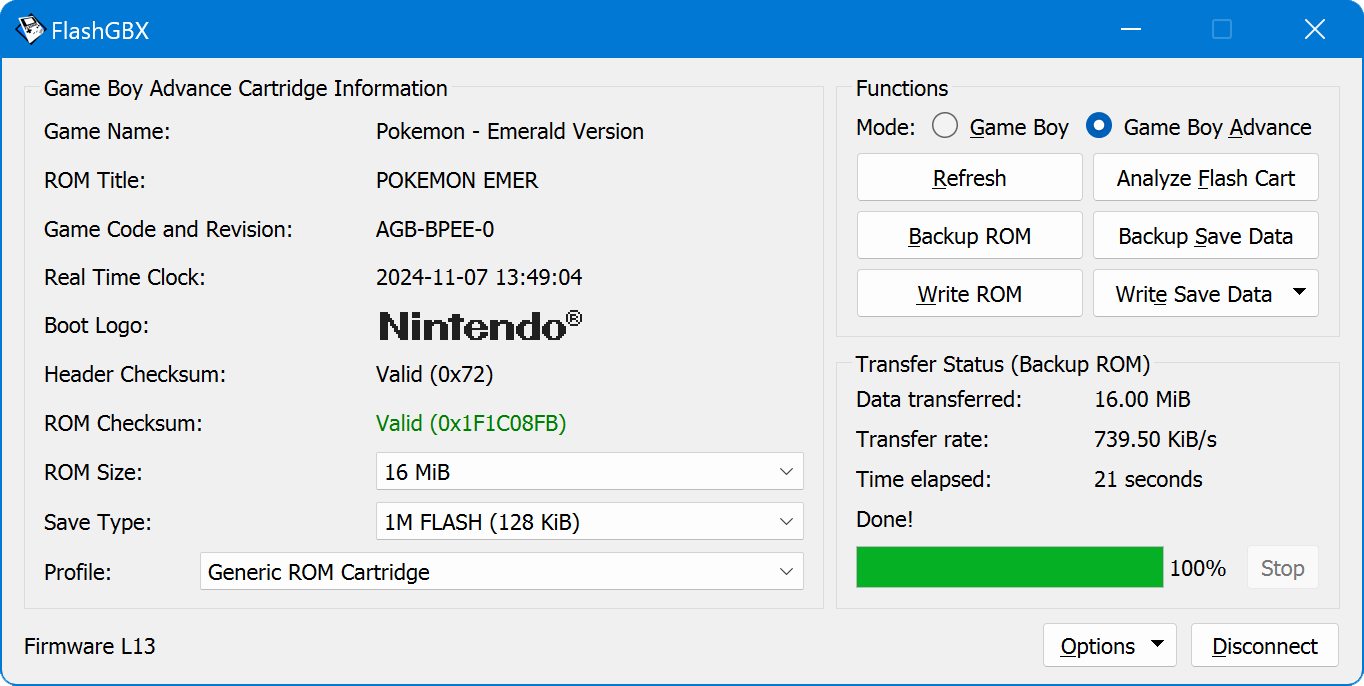
Game Boy
Game Boy Advance
Game Boy
Game Boy Advance
¹ = Cannot always be auto-detected, select cartridge type manually
Game Boy
Game Boy Advance
Many different reproduction cartridges share their flash chip command set, so even if yours is not on this list, it may still work fine or even be auto-detected as another one. Support for more cartridges can also be added by creating external config files that include the necessary flash chip commands.
¹ = Cannot always be auto-detected, select cartridge type manually
In the GitHub Releases section, downloadable packages are available for Windows, Linux and macOS.
[!NOTE] These builds require the 64-bit version of Windows 11 or Windows 10.
(Users of Windows 8 and Windows 7 can install the very old Python 3.8 and runpip install FlashGBX[qt5]+python -m FlashGBX.)
chmod +x /path/to/FlashGBX-*_Linux-*.AppImage.[!NOTE] You may need to give yourself permissions to access the cartridge reader/writer hardware using one of the following methods.
- Permanent system-wide permissions via udev rules (e.g. /etc/udev/rules.d/50-flashgbx.rules):
SUBSYSTEM=="tty", ATTRS{idVendor}=="1a86", ATTRS{idProduct}=="7523", MODE="0666"SUBSYSTEM=="tty", ATTRS{idVendor}=="0483", ATTRS{idProduct}=="5740", MODE="0666"SUBSYSTEM=="tty", ATTRS{idVendor}=="1209", ATTRS{idProduct}=="B010", MODE="0666"
Then runsudo udevadm control --reload-rules && sudo udevadm trigger.- Permanent user account permissions via user group:
sudo usermod -a -G dialout $USERorsudo usermod -a -G uucp $USER
Then logout or reboot.- Temporary permissions:
sudo chmod 0666 /dev/ttyUSB0(replace with actual device path)
[!NOTE] If you use a GBxCart RW or GBFlash, you may need to uninstall the
brlttypackage to resolve CH340/341 driver conflicts.
[!NOTE] If the application doesn’t run, it probably got quarantined due to the lack of a Apple Developer Program certificate. Extract the FlashGBX app from the .dmg file, then right-click the extracted FlashGBX icon, choose “Open Terminal at Folder” and enter this command to unquarantine it:
xattr -d com.apple.quarantine ../FlashGBX.app.
[!NOTE] If you use a Joey Jr, you will have run the separate Joey Jr Firmware Updater before using FlashGBX on macOS. Otherwise, FlashGBX will not be able to find your Joey Jr.
FlashGBX can also be run in a local Python environment like so:
python3 -m venv FlashGBXsource FlashGBX/bin/activatewget https://bootstrap.pypa.io/get-pip.pypython3 get-pip.pypython3 -m pip install "FlashGBX[qt6]" (or [qt5] if it fails)deactivatesource FlashGBX/bin/activatepython3 -m FlashGBXsource FlashGBX/bin/activatepython3 -m pip install -U FlashGBXsudo usermod -a -G uucp $USER to give yourself the necessary hardware access permissions.If some features don’t work as expected, first try to clean the game cartridge contacts (best with IPA 99.9%+ on a cotton swab) and reconnect the device. An unstable cartridge connection is the most common reason for read or write errors. Also try different USB ports and cables.
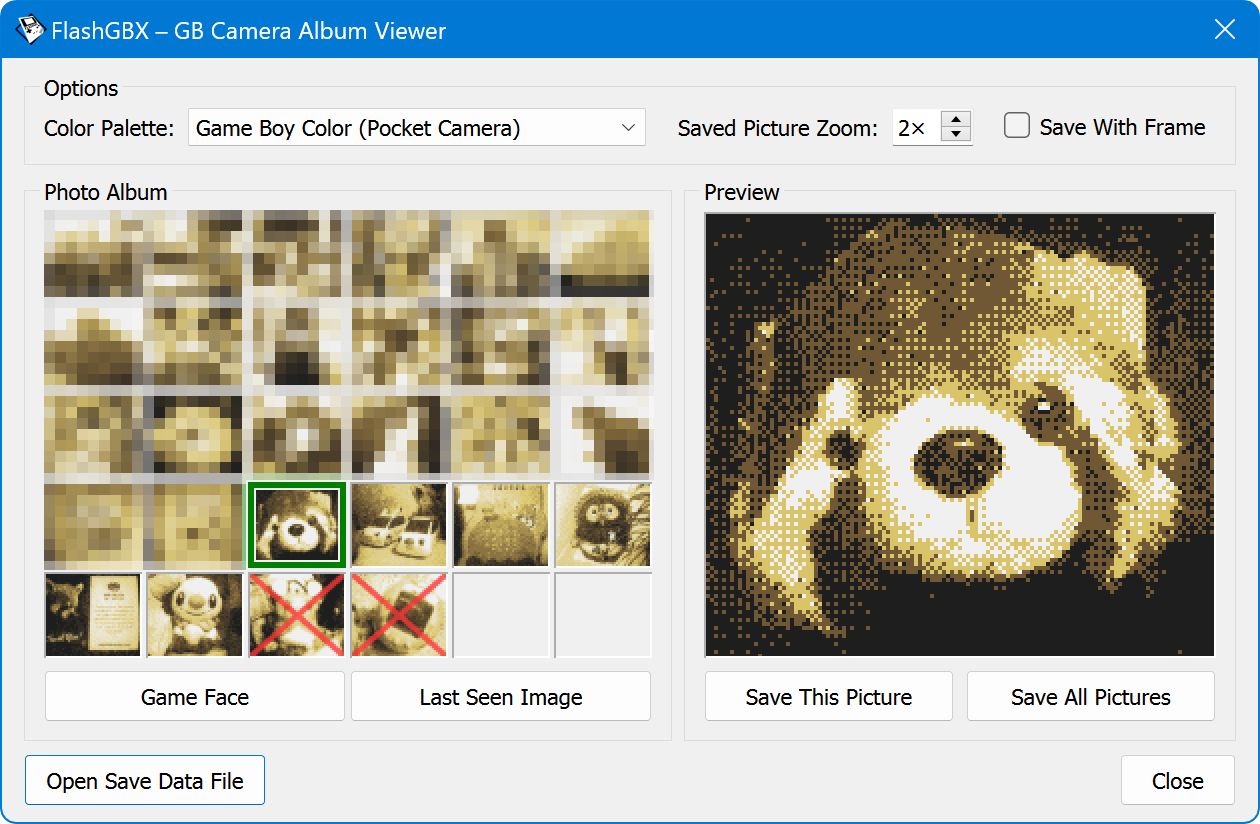
If your Game Boy Camera cartridge is not reading, make sure it’s connected the correct way around; screws go up.
Database checks will only work for genuine, unmodified game cartridges.
When using reproduction/bootleg cartridges, hit “Analyze Flash Cart” before performing Backup ROM or Save Data functions.
When you see the message “The ROM was written and verified successfully!”, that means FlashGBX’s job completed without errors. Any problems that occur when using the cartridge afterwards are linked to incompatibilities between cartridge hardware and ROM file.
In case of save type mismatch, use the “Analyze Flash Cart” feature or open up the cartridge and check for save memory chips to determine your cartridge save type, and compare with these spradsheets: GBA, GB/GBC.
If the save data detection says “512K FLASH (64 KiB) or 1M FLASH (128 KiB)”, that means the size can not be determined until actual save data is written to the cartridge.
If the save data detection says something like “1M FLASH (128 KiB) (Unlicensed ···)”, try the Custom 1M FLASH Patcher.
If your reproduction/bootleg cartridge has an SRAM memory chip but no battery, it was not designed for unmodified ROM files and you will need a “Batteryless SRAM” patch. It’s often a lost cause, but you can try the GBA ROM Patcher website.
If you use a GBxCart RW and it resets itself while connecting to some Game Boy cartridges, this can be caused by a GBxCart RW hardware issue. As a workaround, try hotplugging the cartridge: Disable the “Automatic cartridge power off” setting, then click Connect → Game Boy → Insert Cartridge → Refresh.
To use your own frame around extracted Game Boy Camera pictures, place a file called pc_frame.png (must be at least 160×144 pixels) into the config directory. (GUI mode only)
To write only the differences between two ROMs, name the original one <name>.gba and the edited one <name>.delta.gba.
Translating FlashGBX to another language is possible using the free Poedit software. Load the messages.pot file and save your translation as a <lang>.po file. Contributions and pull requests are welcome.
The author would like to thank the following very kind people for their help, contributions or documentation (in alphabetical order):
2358, 90sFlav, AcoVanConis, AdmirtheSableye, AlexiG, ALXCO-Hardware, AndehX, antPL, aronson, Ausar, bbsan, BennVenn, Boeuffy, CaptainBean, ccs21, chobby, ClassicOldSong, Cliffback, CodyWick13, Corborg, Cristóbal, crizzlycruz, Crystal, Därk, Davidish, delibird_deals, DevDavisNunez, Diddy_Kong, djedditt, Dr-InSide, Duckman, dyf2007, easthighNerd, EchelonPrime, edo999, Eldram, Eli, Ell, EmperorOfTigers, endrift, Erba Verde, ethanstrax, eveningmoose, Falknör, FerrantePescara, frarees, fredemmott, Frost Clock, Gahr, gandalf1980, gboh, gekkio, Godan, Goon, Grender, HDR, Herax, Hiccup, hiks, howie0210, iamevn, Icesythe7, ide, infinest, inYourBackline, iyatemu, Jayro, Jenetrix, JFox, joyrider3774, jrharbort, JS7457, julgr, Kaede, kane159, Kelly, KOOORAY, kscheel, kyokohunter, Leitplanke, litlemoran, LovelyA72, Lu, Luca DS, LucentW, luxkiller65, manuelcm1, marv17, Merkin, metroid-maniac, Mr_V, Mufsta, numma_cway, olDirdey, orangeglo, orzgithub, paarongiroux, Paradoxical, Pese, Rairch, Raphaël BOICHOT, redalchemy, RetroGorek, RevZ, RibShark, s1cp, Satumox, Sgt.DoudouMiel, SH, Shinichi999, Sillyhatday, simonK, Sithdown, skite2001, Smelly-Ghost, Sonikks, Squiddy, Stitch, Super Maker, t5b6_de, Tauwasser, TheNFCookie, Timville, twitnic, velipso, Veund, voltagex, Voultar, Warez Waldo, wickawack, Winter1760, Wkr, x7l7j8cc, xactoes, xukkorz, yosoo, Zeii, Zelante, zipplet, Zoo, zvxr
Thanks to the No-Intro project for their game databases which FlashGBX’s databases are partly based on.
Please view the Third Party Notices.
This software is being developed by Lesserkuma as a hobby project. There is no direct affiliation with Nintendo or any other company. This software is provided as-is and the developer is not responsible for any damage that is caused by the use of it. Use at your own risk!
457 followers · starred Nov 2025
422 followers · starred Dec 2022
24 followers · starred Jun 2024
156 followers · starred Mar 2025
Reads and writes Game Boy and Game Boy Advance cartridge data. Supported hardware: GBxCart RW, GBFlash, Joey Jr, Game Bub
Python
889
150 commits
updated Sep 8, 2026
for Windows, Linux, macOS (→ Download)
Game Boy
Game Boy Advance
Game Boy
Game Boy Advance
¹ = Cannot always be auto-detected, select cartridge type manually
Game Boy
Game Boy Advance
Many different reproduction cartridges share their flash chip command set, so even if yours is not on this list, it may still work fine or even be auto-detected as another one. Support for more cartridges can also be added by creating external config files that include the necessary flash chip commands.
¹ = Cannot always be auto-detected, select cartridge type manually
In the GitHub Releases section, downloadable packages are available for Windows, Linux and macOS.
[!NOTE] These builds require the 64-bit version of Windows 11 or Windows 10.
(Users of Windows 8 and Windows 7 can install the very old Python 3.8 and runpip install FlashGBX[qt5]+python -m FlashGBX.)
chmod +x /path/to/FlashGBX-*_Linux-*.AppImage.[!NOTE] You may need to give yourself permissions to access the cartridge reader/writer hardware using one of the following methods.
- Permanent system-wide permissions via udev rules (e.g. /etc/udev/rules.d/50-flashgbx.rules):
SUBSYSTEM=="tty", ATTRS{idVendor}=="1a86", ATTRS{idProduct}=="7523", MODE="0666"SUBSYSTEM=="tty", ATTRS{idVendor}=="0483", ATTRS{idProduct}=="5740", MODE="0666"SUBSYSTEM=="tty", ATTRS{idVendor}=="1209", ATTRS{idProduct}=="B010", MODE="0666"
Then runsudo udevadm control --reload-rules && sudo udevadm trigger.- Permanent user account permissions via user group:
sudo usermod -a -G dialout $USERorsudo usermod -a -G uucp $USER
Then logout or reboot.- Temporary permissions:
sudo chmod 0666 /dev/ttyUSB0(replace with actual device path)
[!NOTE] If you use a GBxCart RW or GBFlash, you may need to uninstall the
brlttypackage to resolve CH340/341 driver conflicts.
[!NOTE] If the application doesn’t run, it probably got quarantined due to the lack of a Apple Developer Program certificate. Extract the FlashGBX app from the .dmg file, then right-click the extracted FlashGBX icon, choose “Open Terminal at Folder” and enter this command to unquarantine it:
xattr -d com.apple.quarantine ../FlashGBX.app.
[!NOTE] If you use a Joey Jr, you will have run the separate Joey Jr Firmware Updater before using FlashGBX on macOS. Otherwise, FlashGBX will not be able to find your Joey Jr.
FlashGBX can also be run in a local Python environment like so:
python3 -m venv FlashGBXsource FlashGBX/bin/activatewget https://bootstrap.pypa.io/get-pip.pypython3 get-pip.pypython3 -m pip install "FlashGBX[qt6]" (or [qt5] if it fails)deactivatesource FlashGBX/bin/activatepython3 -m FlashGBXsource FlashGBX/bin/activatepython3 -m pip install -U FlashGBXsudo usermod -a -G uucp $USER to give yourself the necessary hardware access permissions.If some features don’t work as expected, first try to clean the game cartridge contacts (best with IPA 99.9%+ on a cotton swab) and reconnect the device. An unstable cartridge connection is the most common reason for read or write errors. Also try different USB ports and cables.
If your Game Boy Camera cartridge is not reading, make sure it’s connected the correct way around; screws go up.
Database checks will only work for genuine, unmodified game cartridges.
When using reproduction/bootleg cartridges, hit “Analyze Flash Cart” before performing Backup ROM or Save Data functions.
When you see the message “The ROM was written and verified successfully!”, that means FlashGBX’s job completed without errors. Any problems that occur when using the cartridge afterwards are linked to incompatibilities between cartridge hardware and ROM file.
In case of save type mismatch, use the “Analyze Flash Cart” feature or open up the cartridge and check for save memory chips to determine your cartridge save type, and compare with these spradsheets: GBA, GB/GBC.
If the save data detection says “512K FLASH (64 KiB) or 1M FLASH (128 KiB)”, that means the size can not be determined until actual save data is written to the cartridge.
If the save data detection says something like “1M FLASH (128 KiB) (Unlicensed ···)”, try the Custom 1M FLASH Patcher.
If your reproduction/bootleg cartridge has an SRAM memory chip but no battery, it was not designed for unmodified ROM files and you will need a “Batteryless SRAM” patch. It’s often a lost cause, but you can try the GBA ROM Patcher website.
If you use a GBxCart RW and it resets itself while connecting to some Game Boy cartridges, this can be caused by a GBxCart RW hardware issue. As a workaround, try hotplugging the cartridge: Disable the “Automatic cartridge power off” setting, then click Connect → Game Boy → Insert Cartridge → Refresh.
To use your own frame around extracted Game Boy Camera pictures, place a file called pc_frame.png (must be at least 160×144 pixels) into the config directory. (GUI mode only)
To write only the differences between two ROMs, name the original one <name>.gba and the edited one <name>.delta.gba.
Translating FlashGBX to another language is possible using the free Poedit software. Load the messages.pot file and save your translation as a <lang>.po file. Contributions and pull requests are welcome.
The author would like to thank the following very kind people for their help, contributions or documentation (in alphabetical order):
2358, 90sFlav, AcoVanConis, AdmirtheSableye, AlexiG, ALXCO-Hardware, AndehX, antPL, aronson, Ausar, bbsan, BennVenn, Boeuffy, CaptainBean, ccs21, chobby, ClassicOldSong, Cliffback, CodyWick13, Corborg, Cristóbal, crizzlycruz, Crystal, Därk, Davidish, delibird_deals, DevDavisNunez, Diddy_Kong, djedditt, Dr-InSide, Duckman, dyf2007, easthighNerd, EchelonPrime, edo999, Eldram, Eli, Ell, EmperorOfTigers, endrift, Erba Verde, ethanstrax, eveningmoose, Falknör, FerrantePescara, frarees, fredemmott, Frost Clock, Gahr, gandalf1980, gboh, gekkio, Godan, Goon, Grender, HDR, Herax, Hiccup, hiks, howie0210, iamevn, Icesythe7, ide, infinest, inYourBackline, iyatemu, Jayro, Jenetrix, JFox, joyrider3774, jrharbort, JS7457, julgr, Kaede, kane159, Kelly, KOOORAY, kscheel, kyokohunter, Leitplanke, litlemoran, LovelyA72, Lu, Luca DS, LucentW, luxkiller65, manuelcm1, marv17, Merkin, metroid-maniac, Mr_V, Mufsta, numma_cway, olDirdey, orangeglo, orzgithub, paarongiroux, Paradoxical, Pese, Rairch, Raphaël BOICHOT, redalchemy, RetroGorek, RevZ, RibShark, s1cp, Satumox, Sgt.DoudouMiel, SH, Shinichi999, Sillyhatday, simonK, Sithdown, skite2001, Smelly-Ghost, Sonikks, Squiddy, Stitch, Super Maker, t5b6_de, Tauwasser, TheNFCookie, Timville, twitnic, velipso, Veund, voltagex, Voultar, Warez Waldo, wickawack, Winter1760, Wkr, x7l7j8cc, xactoes, xukkorz, yosoo, Zeii, Zelante, zipplet, Zoo, zvxr
Thanks to the No-Intro project for their game databases which FlashGBX’s databases are partly based on.
Please view the Third Party Notices.
This software is being developed by Lesserkuma as a hobby project. There is no direct affiliation with Nintendo or any other company. This software is provided as-is and the developer is not responsible for any damage that is caused by the use of it. Use at your own risk!
457 followers · starred Nov 2025
422 followers · starred Dec 2022
24 followers · starred Jun 2024
156 followers · starred Mar 2025



