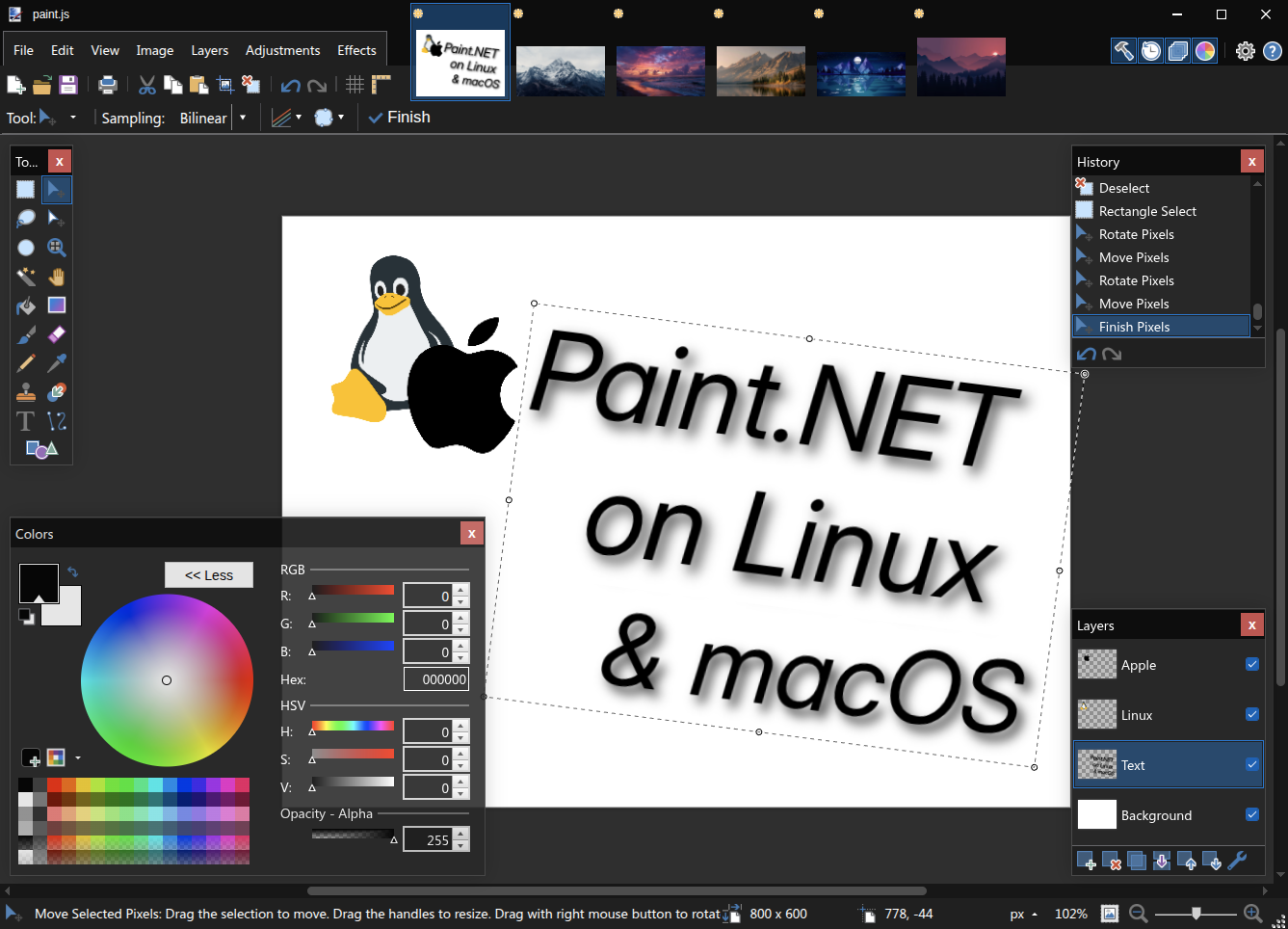
paint.js is a proof-of-concept, cross-platform raster graphics editor written in JavaScript. It’s a port of Paint.NET v3.36.7, bringing the best Windows painting tool to macOS, Linux, and the web via Electron and the browser.
See the code
paint.js is an unofficial, proof-of-concept, cross-platform JavaScript port of the Windows only raster graphics editor Paint.NET by Rick Brewster. This port is available for the web and as an Electron desktop application.
Its core editing model is based on Paint.NET 3.36.7, the last version released under the original MIT-compatible license, while the current interface and behavior follow Paint.NET v5.1.12+.
Paint.NET is one of the best image editors available on Windows, combining powerful features with a simple, intuitive interface. After switching to Linux, it became the application I missed most and one I had relied on every day. I have been developing paint.js since February 2024, with the goal of bringing that familiar editing experience to Linux, macOS, and the web.
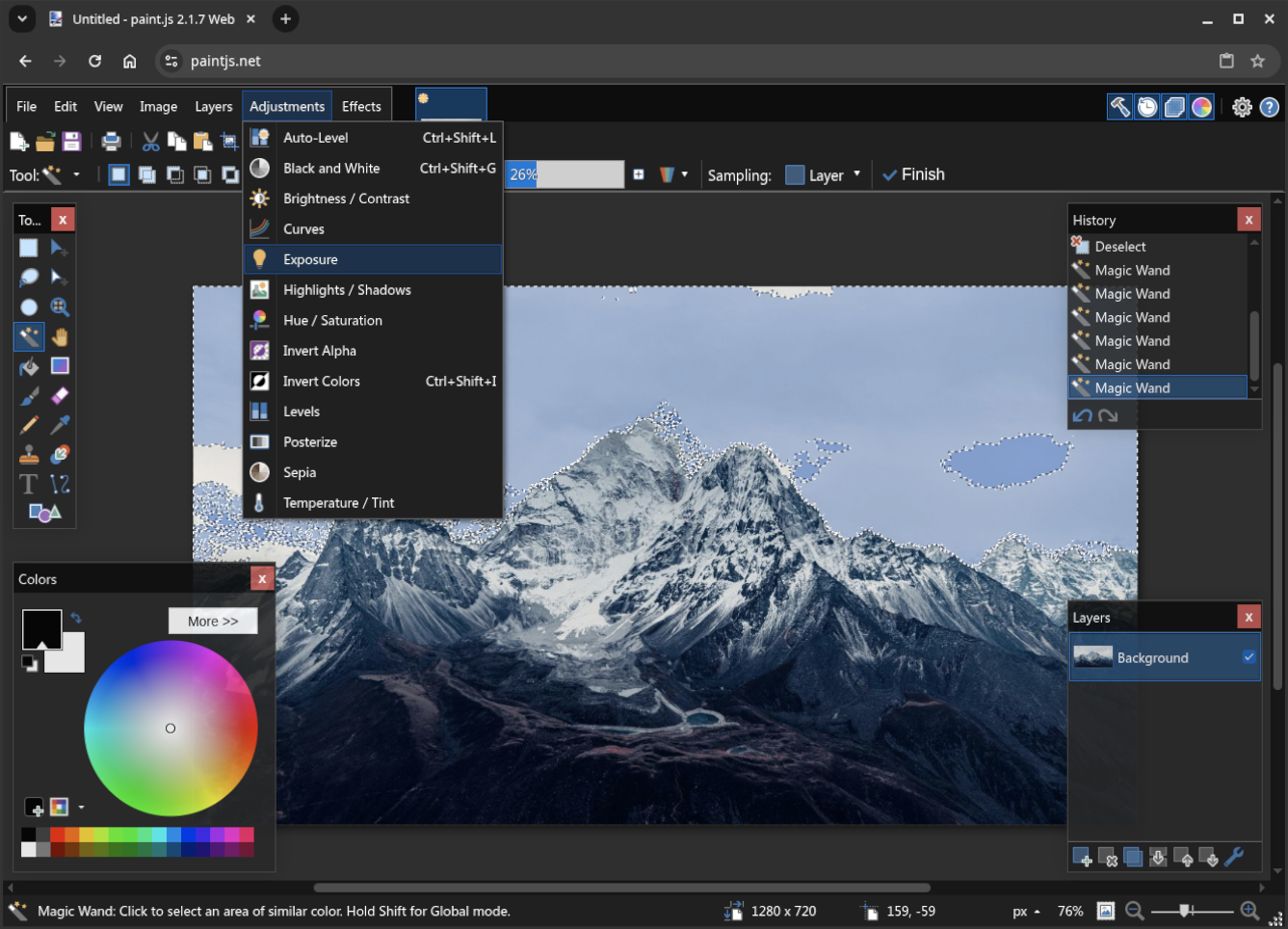
Use paint.js directly at paintjs.net. No installation is required.
Install paintdotjs-bin from the AUR with an
AUR helper, for example:
yay -S paintdotjs-bin
During installation, the AUR package fetches the required artwork and translations from the official Paint.NET download.
Download the latest .flatpak bundle from
GitHub Releases, then install it with:
flatpak install --user ./paintdotjs-*-linux-x86_64.flatpak
The bundle uses the Freedesktop runtime from Flathub, but paint.js itself is installed directly from the downloaded file.
Download the latest universal .dmg from GitHub Releases,
open it, and drag paint.js into the Applications folder.
The macOS app fetches the required artwork and translations from the official Paint.NET download on first launch.
paint.js is largely feature-complete and closely reproduces the Paint.NET experience, but there are still some additions and limitations worth noting.
| Format | Paint.NET open | Paint.NET save | paint.js open | paint.js save | Important differences |
|---|---|---|---|---|---|
Paint.NET (.pdn) | Yes | Yes | Limited | Limited | paint.js supports bitmap layers and basic layer properties, with a maximum of 64 layers when saving. History, selections, plugin data, and some newer PDN features are not preserved. |
| PNG | Yes | Yes | Yes | Yes | — |
JPEG (.jpg, .jpeg, .jpe) | Yes | Yes | Yes | Yes | — |
JPEG XL (.jxl) | Yes | Yes | Yes | Yes | — |
| AVIF | Yes | Yes | Yes | Yes | — |
| HEIC/HEIF | With the Windows codec | With the Windows codec | Yes | No | The bundled paint.js codec can decode these files but cannot encode them. |
| WebP | Yes | Yes | Yes | Yes | — |
| DDS | Yes | Yes | Yes | Yes | paint.js saves uncompressed 32-bit images only. |
TIFF (.tif, .tiff) | Yes | Yes | Yes | Yes | paint.js saves uncompressed RGBA images only. |
| GIF | Yes | Yes | Yes | Yes | paint.js saves a single static, palette-based image only. |
| BMP | Yes | Yes | Yes | Yes | paint.js saves 32-bit images with alpha only. |
| TGA | Yes | Yes | Yes | Yes | paint.js saves uncompressed 32-bit images only. |
JPEG XR (.jxr, .wdp, .wmp) | Yes | Yes | Limited | No | paint.js can open RGB images with 8-bit, 16-bit, or 32-bit floating-point channels but cannot save JPEG XR. |
Animated and multi-page files are imported and exported as a single static image in paint.js.
Development requires Node.js 22 or newer. Install the dependencies first:
npm ci
Run the development build in watch mode:
npm run web-watch
In a second terminal, start a local web server and open http://127.0.0.1:8773/:
npx http-server . -p 8773
Do not open index.html directly from the filesystem because browser security restrictions disable
required functionality.
npm run app
The repository does not redistribute Paint.NET's modern artwork and translations because they are not part of the MIT-compatible Paint.NET 3.36.7 source release on which this project is based. On the first build, paint.js fetches the required assets from the official Paint.NET download. This lets the interface follow Paint.NET v5.1.12+ without redistributing those files in this repository.
The Flatpak manifest is in flatpak/net.paintjs.Paintjs.yml.
It builds the checked-out paint.js source with pinned dependencies, bundles the assets needed for
offline use, and keeps the application inside the Flatpak sandbox.
flatpak-builder --user --install --force-clean \
  --install-deps-from=flathub flatpak-build flatpak/net.paintjs.Paintjs.yml
flatpak run net.paintjs.Paintjs
paint.js is licensed under the MIT License. See the attribution notice for details about Paint.NET and the JavaScript port.
42 followers · starred Oct 2026
paint.js is a proof-of-concept, cross-platform raster graphics editor written in JavaScript. It’s a port of Paint.NET v3.36.7, bringing the best Windows painting tool to macOS, Linux, and the web via Electron and the browser.
See the code
paint.js is an unofficial, proof-of-concept, cross-platform JavaScript port of the Windows only raster graphics editor Paint.NET by Rick Brewster. This port is available for the web and as an Electron desktop application.
Its core editing model is based on Paint.NET 3.36.7, the last version released under the original MIT-compatible license, while the current interface and behavior follow Paint.NET v5.1.12+.
Paint.NET is one of the best image editors available on Windows, combining powerful features with a simple, intuitive interface. After switching to Linux, it became the application I missed most and one I had relied on every day. I have been developing paint.js since February 2024, with the goal of bringing that familiar editing experience to Linux, macOS, and the web.
Use paint.js directly at paintjs.net. No installation is required.
Install paintdotjs-bin from the AUR with an
AUR helper, for example:
yay -S paintdotjs-bin
During installation, the AUR package fetches the required artwork and translations from the official Paint.NET download.
Download the latest .flatpak bundle from
GitHub Releases, then install it with:
flatpak install --user ./paintdotjs-*-linux-x86_64.flatpak
The bundle uses the Freedesktop runtime from Flathub, but paint.js itself is installed directly from the downloaded file.
Download the latest universal .dmg from GitHub Releases,
open it, and drag paint.js into the Applications folder.
The macOS app fetches the required artwork and translations from the official Paint.NET download on first launch.
paint.js is largely feature-complete and closely reproduces the Paint.NET experience, but there are still some additions and limitations worth noting.
| Format | Paint.NET open | Paint.NET save | paint.js open | paint.js save | Important differences |
|---|---|---|---|---|---|
Paint.NET (.pdn) | Yes | Yes | Limited | Limited | paint.js supports bitmap layers and basic layer properties, with a maximum of 64 layers when saving. History, selections, plugin data, and some newer PDN features are not preserved. |
| PNG | Yes | Yes | Yes | Yes | — |
JPEG (.jpg, .jpeg, .jpe) | Yes | Yes | Yes | Yes | — |
JPEG XL (.jxl) | Yes | Yes | Yes | Yes | — |
| AVIF | Yes | Yes | Yes | Yes | — |
| HEIC/HEIF | With the Windows codec | With the Windows codec | Yes | No | The bundled paint.js codec can decode these files but cannot encode them. |
| WebP | Yes | Yes | Yes | Yes | — |
| DDS | Yes | Yes | Yes | Yes | paint.js saves uncompressed 32-bit images only. |
TIFF (.tif, .tiff) | Yes | Yes | Yes | Yes | paint.js saves uncompressed RGBA images only. |
| GIF | Yes | Yes | Yes | Yes | paint.js saves a single static, palette-based image only. |
| BMP | Yes | Yes | Yes | Yes | paint.js saves 32-bit images with alpha only. |
| TGA | Yes | Yes | Yes | Yes | paint.js saves uncompressed 32-bit images only. |
JPEG XR (.jxr, .wdp, .wmp) | Yes | Yes | Limited | No | paint.js can open RGB images with 8-bit, 16-bit, or 32-bit floating-point channels but cannot save JPEG XR. |
Animated and multi-page files are imported and exported as a single static image in paint.js.
Development requires Node.js 22 or newer. Install the dependencies first:
npm ci
Run the development build in watch mode:
npm run web-watch
In a second terminal, start a local web server and open http://127.0.0.1:8773/:
npx http-server . -p 8773
Do not open index.html directly from the filesystem because browser security restrictions disable
required functionality.
npm run app
The repository does not redistribute Paint.NET's modern artwork and translations because they are not part of the MIT-compatible Paint.NET 3.36.7 source release on which this project is based. On the first build, paint.js fetches the required assets from the official Paint.NET download. This lets the interface follow Paint.NET v5.1.12+ without redistributing those files in this repository.
The Flatpak manifest is in flatpak/net.paintjs.Paintjs.yml.
It builds the checked-out paint.js source with pinned dependencies, bundles the assets needed for
offline use, and keeps the application inside the Flatpak sandbox.
flatpak-builder --user --install --force-clean \
  --install-deps-from=flathub flatpak-build flatpak/net.paintjs.Paintjs.yml
flatpak run net.paintjs.Paintjs
paint.js is licensed under the MIT License. See the attribution notice for details about Paint.NET and the JavaScript port.
42 followers · starred Oct 2026



