Webbased image editor, modeled after the legendary Deluxe Paint with a focus on retro Amiga file formats: read and write Amiga icon files and IFF ILBM images/animations
See the codeWebbased image editor modeled after the legendary Deluxe Paint with a focus on retro Amiga file formats. Next to modern image formats, DPaint.js can read and write Amiga icon files and IFF ILBM images.
Online version available at https://dpaint.app
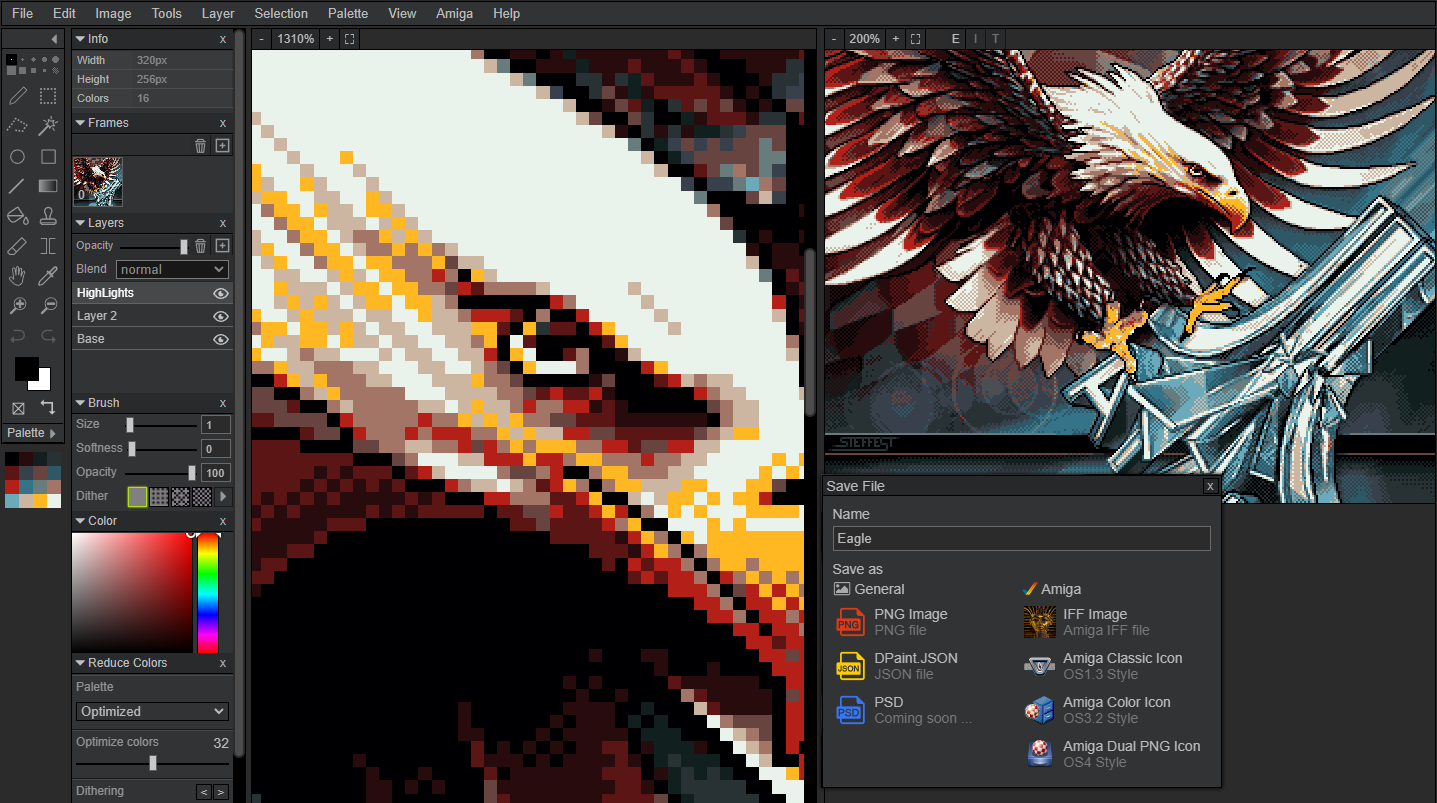
It runs in your browser, works on any system and works fine on touch-screen devices like iPads.
It is written in 100% plain JavaScript and has no dependencies.
It's 100% free, no ads, no tracking, no accounts, no nothing.
All processing is done in your browser, no data is sent to any server.
The only part that is not included in this repository is the Amiga Emulator Files. (The emulator is based on the Scripted Amiga Emulator)
DPaint.js doesn't need building.
It also has zero dependencies so there's no need to install anything.
DPaint.js is written using ES6 modules and runs out of the box in modern browsers.
Just serve "index.html" from a webserver and you're good to go.
There's an optional build step to create a compact version of DPaint.js if you like.
I'm using Vite for this.
For convenience, I've included a "package.json" file.
open a terminal and run npm install to install Vite and its dependencies.
Then run npm run build to create a compact version of DPaint.js in the "dist" folder.
Documentation can be found at https://dpaint.app/docs/
Dpaint.js is a web application, not an app that you install on your computer.
That being said: DPaint.js has no online dependencies and runs fine offline if you want.
One caveat: you have to serve the index.html file from a webserver, not just open it in your browser.
A quick way to do this is - for example - using the Spark app.
Download the binary for your platform, drop the Spark executable in the folder where you downloaded the Dpaint.js source files and run it.
If you then point your browser to http://localhost:8080/ it should work.
But any webserver will do, you can also use the one built into Python for example. ( python -m http.server )
Or - if you have the node.js runtime installed - you can use packages like:
npx serve in the DPaint.js foldernpx http-server in the DPaint.js folderIf you are using Chrome, you can also "install" dpaint.js as app.
It will then show up your Chrome apps and work offline.
Current version is still alpha.
I'm sure there are bugs and missing features.
Bug reports and pull requests are welcome.
Planned for a future release if there's a need for it.
Please note that the Brave browser is using "farbling" that introduces random image noise in certain conditions.
They claim this is to protect your privacy.
Although I totally understand the sentiment, In my opinion a browser should not actively alter the content of a webpage or intentionally break functionality.
But hey, who am I to speak, it's a free world.
Just be aware that if you are using Brave, you will run into issues, so please "lower your shields" for this app in Brave or use another browser.
Dpaint.js supports Color-Cycling - a long lost art of "animating" a static image by only rotating some colors in the palette. See an example here:
https://github.com/user-attachments/assets/427bbecc-d38f-4120-ba0d-83c7f1249722
Open the layered source file of the above image directly in Dpaint.js
305 followers · starred Jan 2026
150 followers · starred Nov 2024
694 followers · starred Dec 2025
413 followers · starred Apr 2023
Webbased image editor, modeled after the legendary Deluxe Paint with a focus on retro Amiga file formats: read and write Amiga icon files and IFF ILBM images/animations
See the codeWebbased image editor modeled after the legendary Deluxe Paint with a focus on retro Amiga file formats. Next to modern image formats, DPaint.js can read and write Amiga icon files and IFF ILBM images.
Online version available at https://dpaint.app
It runs in your browser, works on any system and works fine on touch-screen devices like iPads.
It is written in 100% plain JavaScript and has no dependencies.
It's 100% free, no ads, no tracking, no accounts, no nothing.
All processing is done in your browser, no data is sent to any server.
The only part that is not included in this repository is the Amiga Emulator Files. (The emulator is based on the Scripted Amiga Emulator)
DPaint.js doesn't need building.
It also has zero dependencies so there's no need to install anything.
DPaint.js is written using ES6 modules and runs out of the box in modern browsers.
Just serve "index.html" from a webserver and you're good to go.
There's an optional build step to create a compact version of DPaint.js if you like.
I'm using Vite for this.
For convenience, I've included a "package.json" file.
open a terminal and run npm install to install Vite and its dependencies.
Then run npm run build to create a compact version of DPaint.js in the "dist" folder.
Documentation can be found at https://dpaint.app/docs/
Dpaint.js is a web application, not an app that you install on your computer.
That being said: DPaint.js has no online dependencies and runs fine offline if you want.
One caveat: you have to serve the index.html file from a webserver, not just open it in your browser.
A quick way to do this is - for example - using the Spark app.
Download the binary for your platform, drop the Spark executable in the folder where you downloaded the Dpaint.js source files and run it.
If you then point your browser to http://localhost:8080/ it should work.
But any webserver will do, you can also use the one built into Python for example. ( python -m http.server )
Or - if you have the node.js runtime installed - you can use packages like:
npx serve in the DPaint.js foldernpx http-server in the DPaint.js folderIf you are using Chrome, you can also "install" dpaint.js as app.
It will then show up your Chrome apps and work offline.
Current version is still alpha.
I'm sure there are bugs and missing features.
Bug reports and pull requests are welcome.
Planned for a future release if there's a need for it.
Please note that the Brave browser is using "farbling" that introduces random image noise in certain conditions.
They claim this is to protect your privacy.
Although I totally understand the sentiment, In my opinion a browser should not actively alter the content of a webpage or intentionally break functionality.
But hey, who am I to speak, it's a free world.
Just be aware that if you are using Brave, you will run into issues, so please "lower your shields" for this app in Brave or use another browser.
Dpaint.js supports Color-Cycling - a long lost art of "animating" a static image by only rotating some colors in the palette. See an example here:
https://github.com/user-attachments/assets/427bbecc-d38f-4120-ba0d-83c7f1249722
Open the layered source file of the above image directly in Dpaint.js
305 followers · starred Jan 2026
150 followers · starred Nov 2024
694 followers · starred Dec 2025
413 followers · starred Apr 2023