An AI co-scientist running on your desktop. Claude Science but better.
See the code






🎥 Webinar recording: Getting Started with K-Dense BYOK
An online walkthrough of installing Kady and running your first research task, with live Q&A.
Your own AI research assistant, running on your computer, powered by the accounts and API keys you choose.
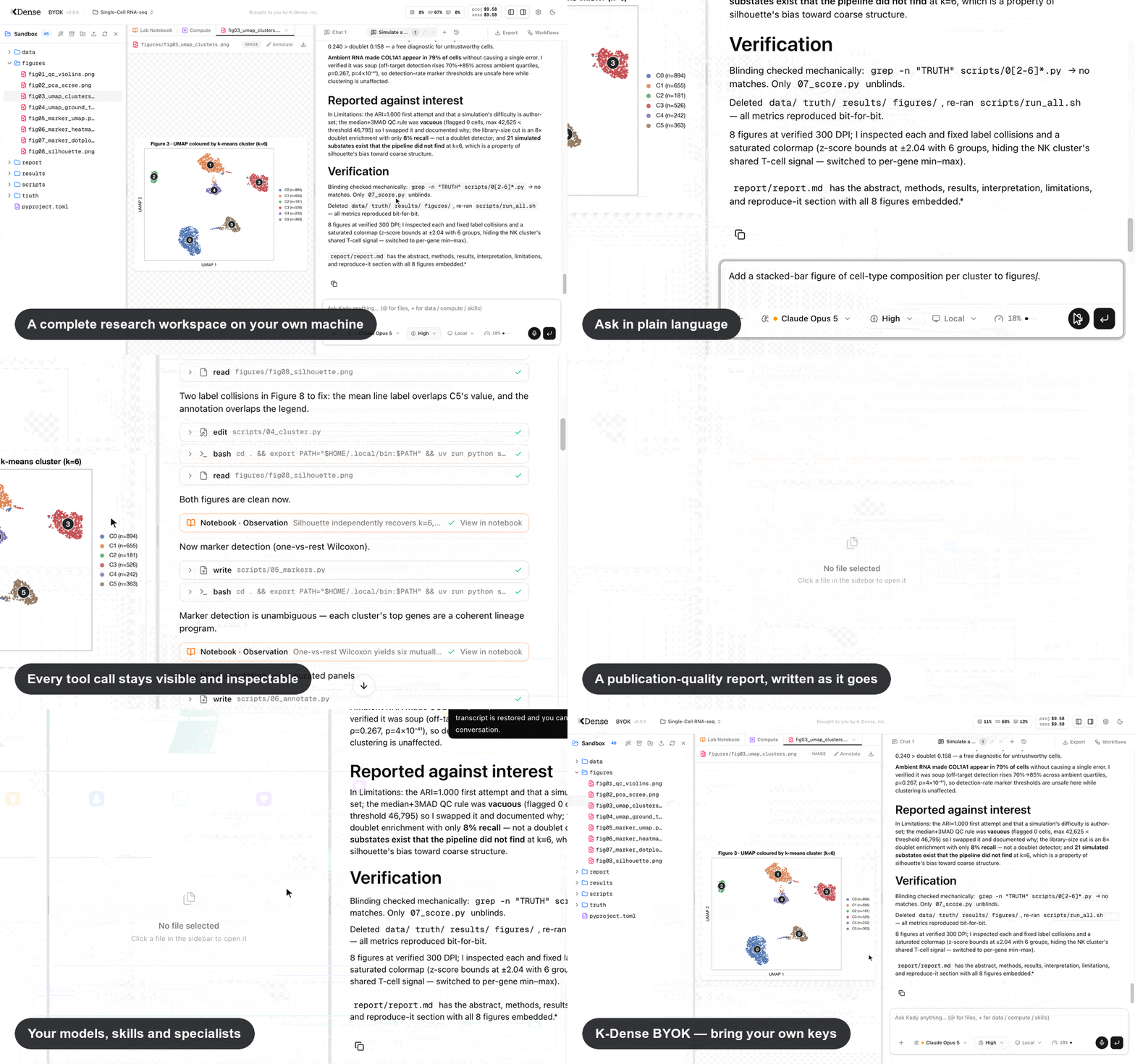
K-Dense BYOK (Bring Your Own Keys) is a free, open-source app that gives you Kady — an AI research assistant for scientists in any field. Describe a task in plain language — analyze this dataset, review my manuscript, search the literature, build this figure — and Kady works through it in a complete research workspace. It can inspect your files, write and run analysis code, search and read sources, create figures and reports, and keep a living record of what it did.
Four things to know up front:
Beta: K-Dense BYOK is currently in beta. Many features and improvements are on the way. Star us on GitHub to stay in the loop, and follow K-Dense on X, LinkedIn, YouTube, and Reddit for release notes and tutorials.
🎬 Prefer to watch first? The Future of Research is Open: Introducing K-Dense BYOK walks through what the app does and how to get set up. More walkthroughs in Tutorial videos.
📄 Read the paper: K-Dense BYOK: An Open-Source AI Research Assistant That Runs Locally and Keeps a Hash-Chained Lab Notebook (arXiv:2610.00074). If you use K-Dense BYOK in your research, please cite it.
As of September 11, 2026, K-Dense BYOK holds #2 on the public CompBioBench v1 leaderboard.
CompBioBench is a Genentech benchmark of 100 computational-biology tasks. Each task has one exact-match answer. The gold answers stay on the leaderboard, so an independent grader scores every run.
We ran the same K-Dense BYOK harness four times through OpenRouter. Each run used one model and one isolated project per question.
| Run | Model | Reasoning | Accuracy | Rank (Sept 11, 2026) |
|---|---|---|---|---|
| r4 | GPT-6 Astra | xhigh | 98% | #2 |
| r3 | Gemini 3.8 Flash | xhigh | 94% | #7 |
| r2 | GPT-5.6 SOL | xhigh | 92% | #11 |
| r1 | DeepSeek V4 Pro | high | 81% | — |
Ranks will move as new submissions arrive. For agreement, failures, and cost on the first three runs, see K-Dense BYOK on CompBioBench.
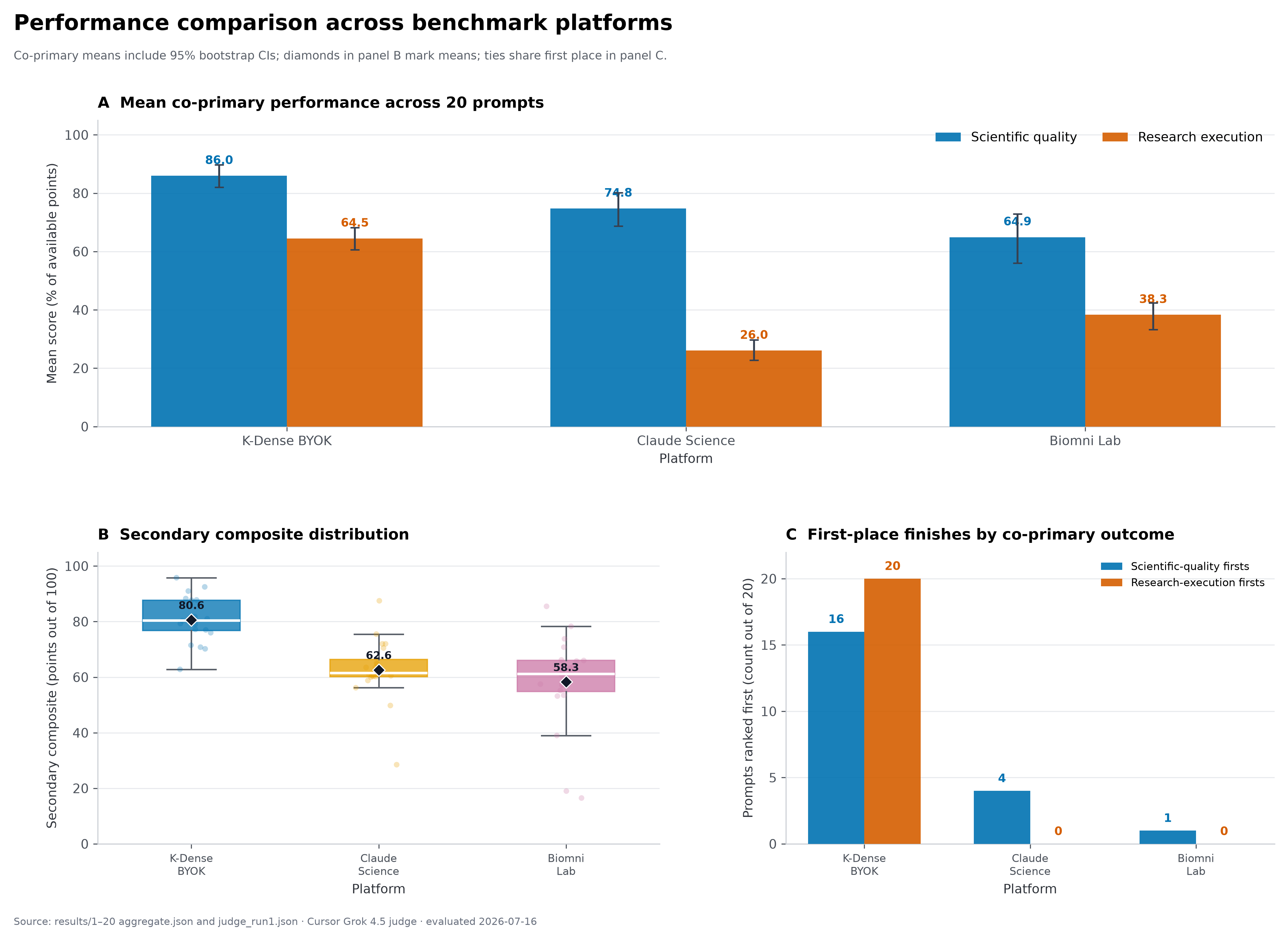
This figure compares K-Dense BYOK, Claude Science, and Biomni Lab across scientific quality and research execution in a 20-prompt benchmark. For these runs, K-Dense BYOK was configured to use Claude Opus 4.8 with the xHigh reasoning level. The benchmark was designed, run, and evaluated internally by K-Dense rather than an independent third party, so the results should be interpreted as an internal evaluation under the tested setup, not as a universal measure of platform performance.
Related reading on how we evaluate: K-Dense Web vs. Claude Science walks through the same 20-task comparison for our hosted platform, and Introducing K-Bench 01 covers our broader benchmark of nine frontier models on 178 real scientific tasks.
Kady is designed to carry out research work, not only answer questions. You remain the scientist in charge: you can watch each step, inspect the code and files it creates, redirect it while it works, and stop a run at any time.
/ in the message box for reusable prompts such as /qc (dataset quality report), /stats-check, /figure-audit, /methods-review, /replicate, and /prove-verify, or save your own. Learn more./prove-verify <question> runs rounds in which investigators pursue different directions in parallel, adversarial verifiers and a comparative reviewer check every draft, and a ledger keeps verified results and ruled-out directions for the next round, until a result passes review or the round or dollar limit is reached. Set a verifier model in Settings → Defaults so reviewers check work with a different model than the one that produced it. Learn more.Kady keeps two complementary records, so you can check what was done instead of taking the AI's word for it.
.docx, .xlsx, or .pptx for a quick preview, then choose Edit in Office for a full editor that runs inside your browser, with no Office installation required. Saves go back into the project and never silently overwrite newer changes. Learn more.user_data/ and log changes in the notebook." The project's Automation tab shows each schedule's next run, results, and spend, and lets you run, pause, or delete it. The app must stay running for schedules to fire. Learn more.user_data/ but not change or delete them; they work on copies instead. Destructive commands elsewhere, such as deleting a folder, pause and ask for your approval. Choose which folders are protected for each project. This guards against mistakes, not deliberate misuse, so keep backups of irreplaceable data. Learn more.You need a compatible computer and at least one model source:
winget install OpenJS.NodeJS.LTS) and Git for Windows first — Kady's agent runs its shell commands through the Git Bash that Git for Windows provides. (Prefer a Linux environment? WSL works too.)Open a terminal (on a Mac: press Cmd+Space, type "Terminal", press Enter) and run these four lines:
git clone https://github.com/K-Dense-AI/k-dense-byok.git
cd k-dense-byok
cp .env.example .env    # optional: add an OpenRouter key or other settings
./start.sh
On Windows (press Win, type "PowerShell" or "Terminal", press Enter):
git clone https://github.com/K-Dense-AI/k-dense-byok.git
cd k-dense-byok
copy .env.example .env    # optional: add an OpenRouter key or other settings
.\start.cmd
In plain terms: the first two lines download the app and step into its folder; the third creates an optional local settings file; the last starts the app. If you use a supported subscription instead of OpenRouter, connect it in Settings → Providers once Kady opens.
The first start installs everything automatically (it takes a few minutes); then your browser opens to http://localhost:3000 — that address is your own computer, not a website. Press Ctrl+C in the terminal to stop the app. You can connect subscriptions and model keys under Providers and add search or Modal keys under Services anytime — no restart needed. If no model is connected yet, the empty chat shows a Connect a model to get started card that takes you there.
That's it. Create a project, drop in your data, and ask Kady for what you want — for example: "Run a differential expression analysis on counts.csv comparing treated vs control, and plot a volcano plot."
➡️ Step-by-step details, optional API keys, and troubleshooting: Installation guide ➡️ Your first session and everyday features: Basic usage ➡️ Prefer to watch first? Tutorial videos
Recorded walkthroughs of Kady working through real research tasks, from the K-Dense YouTube channel:
| Video | What it covers |
|---|---|
| K-Dense BYOK Workflow Demo: Write a Review Article | Using a guided workflow to research and draft a review article |
| K-Dense BYOK in Action: End-to-End Workflow Demo | A full run from research question to results, start to finish |
| K-Dense BYOK Workflow Demo: Write a Rebuttal | Responding to reviewer comments with a point-by-point rebuttal |
| K-Dense BYOK Workflow Demo: Draft a Protocol | Turning a planned experiment into a written protocol |
| The Future of Research is Open: Introducing K-Dense BYOK | What the app is, what it does, and how to get started |
| Literature Review and Hypothesis Generation | Searching the literature and generating grounded hypotheses |
| BYOK Workflow Highlights: Write a Review Paper | Highlights from a guided review-paper run |
| Can AI Reproduce a Nature Medicine Paper? | An end-to-end reproduction attempt on a published analysis |
Start with the documentation index, or go directly to Installation, Basic usage, Model selection or Security.
Background reading on the research and evaluation work behind Kady, from the K-Dense blog:
| Post | What it covers |
|---|---|
| K-Dense BYOK on CompBioBench | Three models on the same harness: Gemini 3.8 Flash 94%, GPT-5.6 SOL 92%, DeepSeek V4 Pro 81% |
| Introducing K-Bench 01 | Our internal benchmark of nine frontier models across 178 real scientific tasks, and how often confident answers are wrong |
| K-Dense Web vs. Claude Science | A 20-task comparison focused on execution and auditable research output |
| AI Scientists Need Lab Escape Rooms, Not More Exams | Why hidden lab environments test AI scientists better than exam-style benchmarks |
| Reproduction, Not Generation, Is AI's Killer App for Science | The case for reproducing existing research over generating novel claims, and why Kady keeps a full record of its work |
| AI Co-Scientists, Answered | 20 questions from a live session with a university research center, including current limitations |
| Benchmarking NVIDIA BioNeMo Agent Toolkit Skills for NIM microservices | A controlled evaluation of ten BioNeMo skills, relevant if you run NVIDIA NIM models |
| Benchmarking Nano Banana 2 Lite for Scientific Image Generation | A 240-image benchmark of scientific image models, speed versus figure quality |
| Benchmarking Google's Omni Flash for Scientific Video | 35 case studies on scientific video generation, strong visuals but unreliable text and physics |
| K-Dense Web and Litmus Science | Closing the loop from hypothesis to experiment with lab execution |
K-Dense BYOK is great for getting started, but if you want end-to-end research workflows with managed infrastructure, team collaboration, and no setup required, check out K-Dense Web — our full platform built for professional and academic research teams.
If you run into a problem or have an idea for something new, please open a GitHub issue — a free GitHub account is all you need. We read every one.
K-Dense BYOK is open source because K-Dense believes in giving back to the community that makes this kind of work possible.
If you use K-Dense BYOK in your research, please cite the paper:
@misc{brueckner2026kdensebyokopensourceai,
      title={K-Dense BYOK: An Open-Source AI Research Assistant That Runs Locally and Keeps a Hash-Chained Lab Notebook},
      author={Aubrey M. Brueckner and Darshil Patel and Yuhuan He and Timothy Kassis},
      year={2026},
      eprint={2610.00074},
      archivePrefix={arXiv},
      primaryClass={cs.AI},
      url={https://arxiv.org/abs/2610.00074},
}
20,844 followers · starred Oct 2026
197 followers · starred Aug 2026
1,518 followers · starred Mar 2026
32 followers · starred Mar 2026
An AI co-scientist running on your desktop. Claude Science but better.
See the code
🎥 Webinar recording: Getting Started with K-Dense BYOK
An online walkthrough of installing Kady and running your first research task, with live Q&A.
Your own AI research assistant, running on your computer, powered by the accounts and API keys you choose.
K-Dense BYOK (Bring Your Own Keys) is a free, open-source app that gives you Kady — an AI research assistant for scientists in any field. Describe a task in plain language — analyze this dataset, review my manuscript, search the literature, build this figure — and Kady works through it in a complete research workspace. It can inspect your files, write and run analysis code, search and read sources, create figures and reports, and keep a living record of what it did.
Four things to know up front:
Beta: K-Dense BYOK is currently in beta. Many features and improvements are on the way. Star us on GitHub to stay in the loop, and follow K-Dense on X, LinkedIn, YouTube, and Reddit for release notes and tutorials.
🎬 Prefer to watch first? The Future of Research is Open: Introducing K-Dense BYOK walks through what the app does and how to get set up. More walkthroughs in Tutorial videos.
📄 Read the paper: K-Dense BYOK: An Open-Source AI Research Assistant That Runs Locally and Keeps a Hash-Chained Lab Notebook (arXiv:2610.00074). If you use K-Dense BYOK in your research, please cite it.
As of September 11, 2026, K-Dense BYOK holds #2 on the public CompBioBench v1 leaderboard.
CompBioBench is a Genentech benchmark of 100 computational-biology tasks. Each task has one exact-match answer. The gold answers stay on the leaderboard, so an independent grader scores every run.
We ran the same K-Dense BYOK harness four times through OpenRouter. Each run used one model and one isolated project per question.
| Run | Model | Reasoning | Accuracy | Rank (Sept 11, 2026) |
|---|---|---|---|---|
| r4 | GPT-6 Astra | xhigh | 98% | #2 |
| r3 | Gemini 3.8 Flash | xhigh | 94% | #7 |
| r2 | GPT-5.6 SOL | xhigh | 92% | #11 |
| r1 | DeepSeek V4 Pro | high | 81% | — |
Ranks will move as new submissions arrive. For agreement, failures, and cost on the first three runs, see K-Dense BYOK on CompBioBench.
This figure compares K-Dense BYOK, Claude Science, and Biomni Lab across scientific quality and research execution in a 20-prompt benchmark. For these runs, K-Dense BYOK was configured to use Claude Opus 4.8 with the xHigh reasoning level. The benchmark was designed, run, and evaluated internally by K-Dense rather than an independent third party, so the results should be interpreted as an internal evaluation under the tested setup, not as a universal measure of platform performance.
Related reading on how we evaluate: K-Dense Web vs. Claude Science walks through the same 20-task comparison for our hosted platform, and Introducing K-Bench 01 covers our broader benchmark of nine frontier models on 178 real scientific tasks.
Kady is designed to carry out research work, not only answer questions. You remain the scientist in charge: you can watch each step, inspect the code and files it creates, redirect it while it works, and stop a run at any time.
/ in the message box for reusable prompts such as /qc (dataset quality report), /stats-check, /figure-audit, /methods-review, /replicate, and /prove-verify, or save your own. Learn more./prove-verify <question> runs rounds in which investigators pursue different directions in parallel, adversarial verifiers and a comparative reviewer check every draft, and a ledger keeps verified results and ruled-out directions for the next round, until a result passes review or the round or dollar limit is reached. Set a verifier model in Settings → Defaults so reviewers check work with a different model than the one that produced it. Learn more.Kady keeps two complementary records, so you can check what was done instead of taking the AI's word for it.
.docx, .xlsx, or .pptx for a quick preview, then choose Edit in Office for a full editor that runs inside your browser, with no Office installation required. Saves go back into the project and never silently overwrite newer changes. Learn more.user_data/ and log changes in the notebook." The project's Automation tab shows each schedule's next run, results, and spend, and lets you run, pause, or delete it. The app must stay running for schedules to fire. Learn more.user_data/ but not change or delete them; they work on copies instead. Destructive commands elsewhere, such as deleting a folder, pause and ask for your approval. Choose which folders are protected for each project. This guards against mistakes, not deliberate misuse, so keep backups of irreplaceable data. Learn more.You need a compatible computer and at least one model source:
winget install OpenJS.NodeJS.LTS) and Git for Windows first — Kady's agent runs its shell commands through the Git Bash that Git for Windows provides. (Prefer a Linux environment? WSL works too.)Open a terminal (on a Mac: press Cmd+Space, type "Terminal", press Enter) and run these four lines:
git clone https://github.com/K-Dense-AI/k-dense-byok.git
cd k-dense-byok
cp .env.example .env    # optional: add an OpenRouter key or other settings
./start.sh
On Windows (press Win, type "PowerShell" or "Terminal", press Enter):
git clone https://github.com/K-Dense-AI/k-dense-byok.git
cd k-dense-byok
copy .env.example .env    # optional: add an OpenRouter key or other settings
.\start.cmd
In plain terms: the first two lines download the app and step into its folder; the third creates an optional local settings file; the last starts the app. If you use a supported subscription instead of OpenRouter, connect it in Settings → Providers once Kady opens.
The first start installs everything automatically (it takes a few minutes); then your browser opens to http://localhost:3000 — that address is your own computer, not a website. Press Ctrl+C in the terminal to stop the app. You can connect subscriptions and model keys under Providers and add search or Modal keys under Services anytime — no restart needed. If no model is connected yet, the empty chat shows a Connect a model to get started card that takes you there.
That's it. Create a project, drop in your data, and ask Kady for what you want — for example: "Run a differential expression analysis on counts.csv comparing treated vs control, and plot a volcano plot."
➡️ Step-by-step details, optional API keys, and troubleshooting: Installation guide ➡️ Your first session and everyday features: Basic usage ➡️ Prefer to watch first? Tutorial videos
Recorded walkthroughs of Kady working through real research tasks, from the K-Dense YouTube channel:
| Video | What it covers |
|---|---|
| K-Dense BYOK Workflow Demo: Write a Review Article | Using a guided workflow to research and draft a review article |
| K-Dense BYOK in Action: End-to-End Workflow Demo | A full run from research question to results, start to finish |
| K-Dense BYOK Workflow Demo: Write a Rebuttal | Responding to reviewer comments with a point-by-point rebuttal |
| K-Dense BYOK Workflow Demo: Draft a Protocol | Turning a planned experiment into a written protocol |
| The Future of Research is Open: Introducing K-Dense BYOK | What the app is, what it does, and how to get started |
| Literature Review and Hypothesis Generation | Searching the literature and generating grounded hypotheses |
| BYOK Workflow Highlights: Write a Review Paper | Highlights from a guided review-paper run |
| Can AI Reproduce a Nature Medicine Paper? | An end-to-end reproduction attempt on a published analysis |
Start with the documentation index, or go directly to Installation, Basic usage, Model selection or Security.
Background reading on the research and evaluation work behind Kady, from the K-Dense blog:
| Post | What it covers |
|---|---|
| K-Dense BYOK on CompBioBench | Three models on the same harness: Gemini 3.8 Flash 94%, GPT-5.6 SOL 92%, DeepSeek V4 Pro 81% |
| Introducing K-Bench 01 | Our internal benchmark of nine frontier models across 178 real scientific tasks, and how often confident answers are wrong |
| K-Dense Web vs. Claude Science | A 20-task comparison focused on execution and auditable research output |
| AI Scientists Need Lab Escape Rooms, Not More Exams | Why hidden lab environments test AI scientists better than exam-style benchmarks |
| Reproduction, Not Generation, Is AI's Killer App for Science | The case for reproducing existing research over generating novel claims, and why Kady keeps a full record of its work |
| AI Co-Scientists, Answered | 20 questions from a live session with a university research center, including current limitations |
| Benchmarking NVIDIA BioNeMo Agent Toolkit Skills for NIM microservices | A controlled evaluation of ten BioNeMo skills, relevant if you run NVIDIA NIM models |
| Benchmarking Nano Banana 2 Lite for Scientific Image Generation | A 240-image benchmark of scientific image models, speed versus figure quality |
| Benchmarking Google's Omni Flash for Scientific Video | 35 case studies on scientific video generation, strong visuals but unreliable text and physics |
| K-Dense Web and Litmus Science | Closing the loop from hypothesis to experiment with lab execution |
K-Dense BYOK is great for getting started, but if you want end-to-end research workflows with managed infrastructure, team collaboration, and no setup required, check out K-Dense Web — our full platform built for professional and academic research teams.
If you run into a problem or have an idea for something new, please open a GitHub issue — a free GitHub account is all you need. We read every one.
K-Dense BYOK is open source because K-Dense believes in giving back to the community that makes this kind of work possible.
If you use K-Dense BYOK in your research, please cite the paper:
@misc{brueckner2026kdensebyokopensourceai,
      title={K-Dense BYOK: An Open-Source AI Research Assistant That Runs Locally and Keeps a Hash-Chained Lab Notebook},
      author={Aubrey M. Brueckner and Darshil Patel and Yuhuan He and Timothy Kassis},
      year={2026},
      eprint={2610.00074},
      archivePrefix={arXiv},
      primaryClass={cs.AI},
      url={https://arxiv.org/abs/2610.00074},
}
20,844 followers · starred Oct 2026
197 followers · starred Aug 2026
1,518 followers · starred Mar 2026
32 followers · starred Mar 2026





