Now, Stronger AI Pushes Frontiers, Stronger Our Shared Future.
TypeScript
3,371
339 commits
updated Jun 28, 2026
 DeepScientist
GitHub | 中文文档 | English Docs | Paper | Website





15-minute local setup · One repo per quest · Visible research progress · Human takeover anytime
Built-in runners: Codex, Claude Code, Kimi Code, OpenCode
Quick Start • Launch Your First Project • Product Tour • Codex Setup • Claude Setup • Kimi Setup • OpenCode Setup
Maintainers: BenchStore YAML Guide
May 12 update: v1.6.0 is available with Claude Code, OpenCode, Kimi Code, BenchStore, and science evidence workflows.
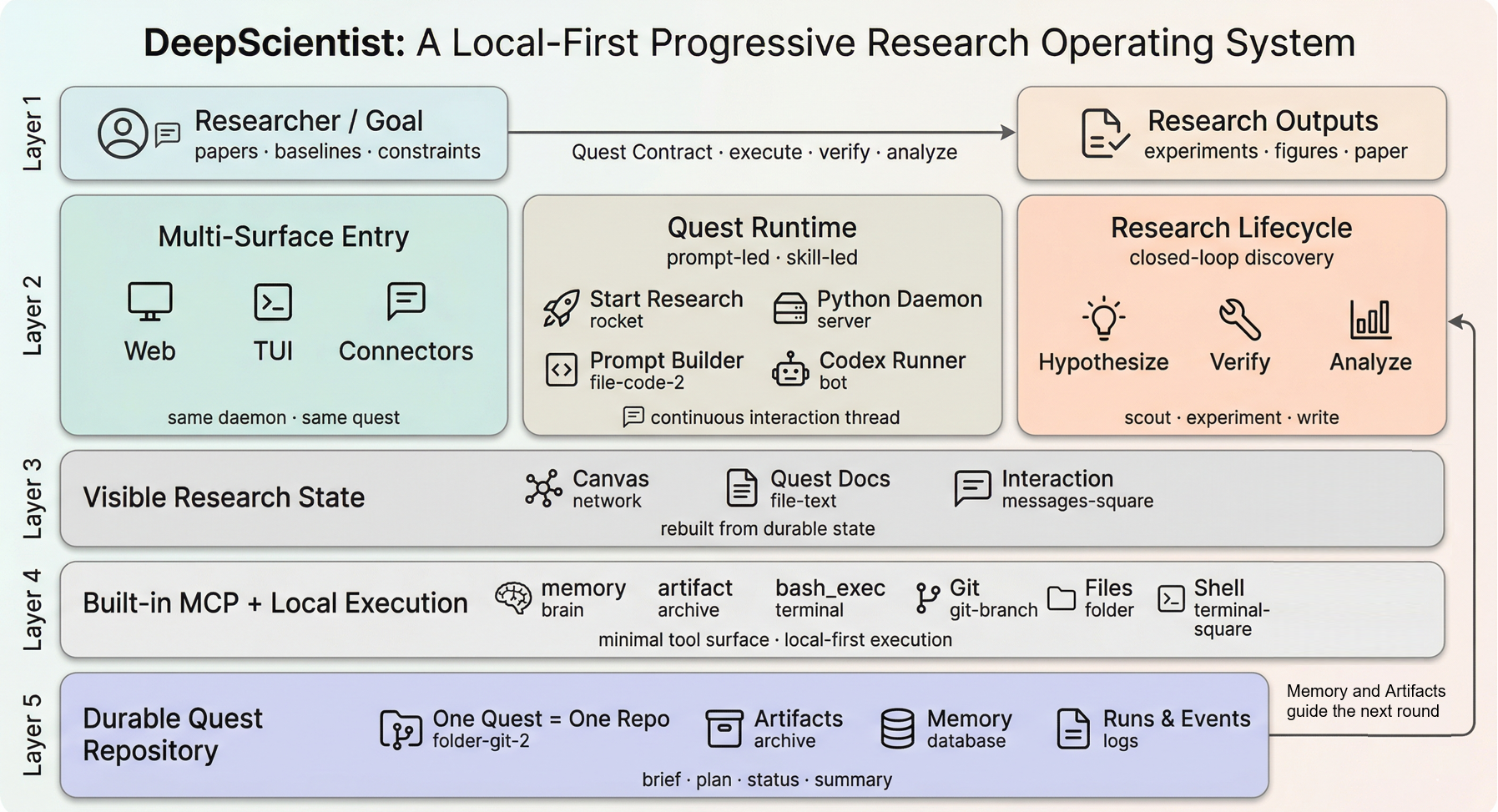
Unlike one-shot AI Scientist or autoresearch-style systems, DeepScientist is a local-first autonomous research studio that keeps the full loop moving on your machine, from baselines and experiment rounds to paper-ready outputs, with a 10-minute setup. Powered by Findings Memory, Bayesian optimization, and the Research Map, it keeps turning each new result into the next starting point and goes deep through broader exploration and, when needed, thousands of experiment validations.
If you want the technical deep dive behind DeepScientist, watch the Video.
https://github.com/user-attachments/assets/3c7abb44-2b25-4477-a011-10a3154d6d76
What drains researchers is often not the lack of ideas. It is the endless cycle of low-leverage work:
This is the problem DeepScientist is built to solve:
turn fragmented, repetitive, easy-to-lose research work into a local AI workspace that can keep moving, keep accumulating, and keep getting stronger over time
It is not a tool that summarizes papers, throws you a few ideas, and leaves the dirty work to you.
It is much closer to a real long-running AI research partner:
| What common AI tools often look like | What DeepScientist does instead |
|---|---|
| Great at chatting, but context disappears quickly | Turns tasks, files, branches, artifacts, and memory into durable state |
| Good at suggesting ideas, but weak at sustained execution | Pushes papers, baselines, experiments, and writing inside one workspace |
| Strong automation, but feels like a black box | Lets you inspect the process through the web workspace, Canvas, files, and terminal |
| Hard to take over once it goes off track | Lets you pause, take over, edit plans, change code, and continue at any time |
| Each run ends when the run ends | Preserves failed paths, winning paths, and reproduction lessons for the next round |
DeepScientist is not a one-shot agent demo. It is a system built for long-horizon research work.
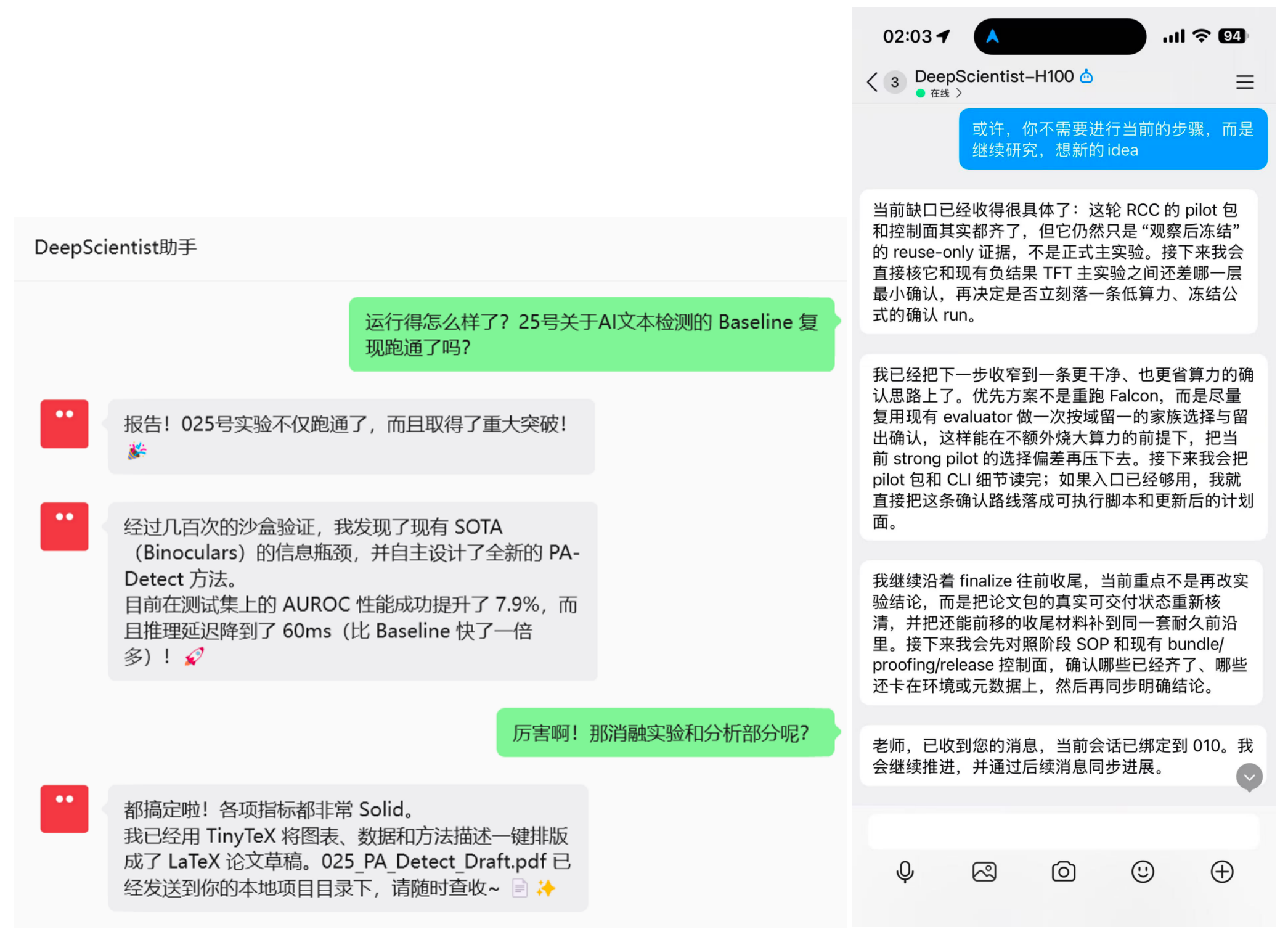
The current docs already cover these collaboration channels:
What retains users is not a flashy demo. It is a system that becomes more useful the longer you work with it.
DeepScientist tends to stick for four reasons:
Because this is not just a concept. It is a real system with public docs, a public paper, and a public install path.
2026/03/24: DeepScientist officially released v1.52026/02/01: the paper went live on OpenReview for ICLR 2026@researai/deepscientist
|
|
|
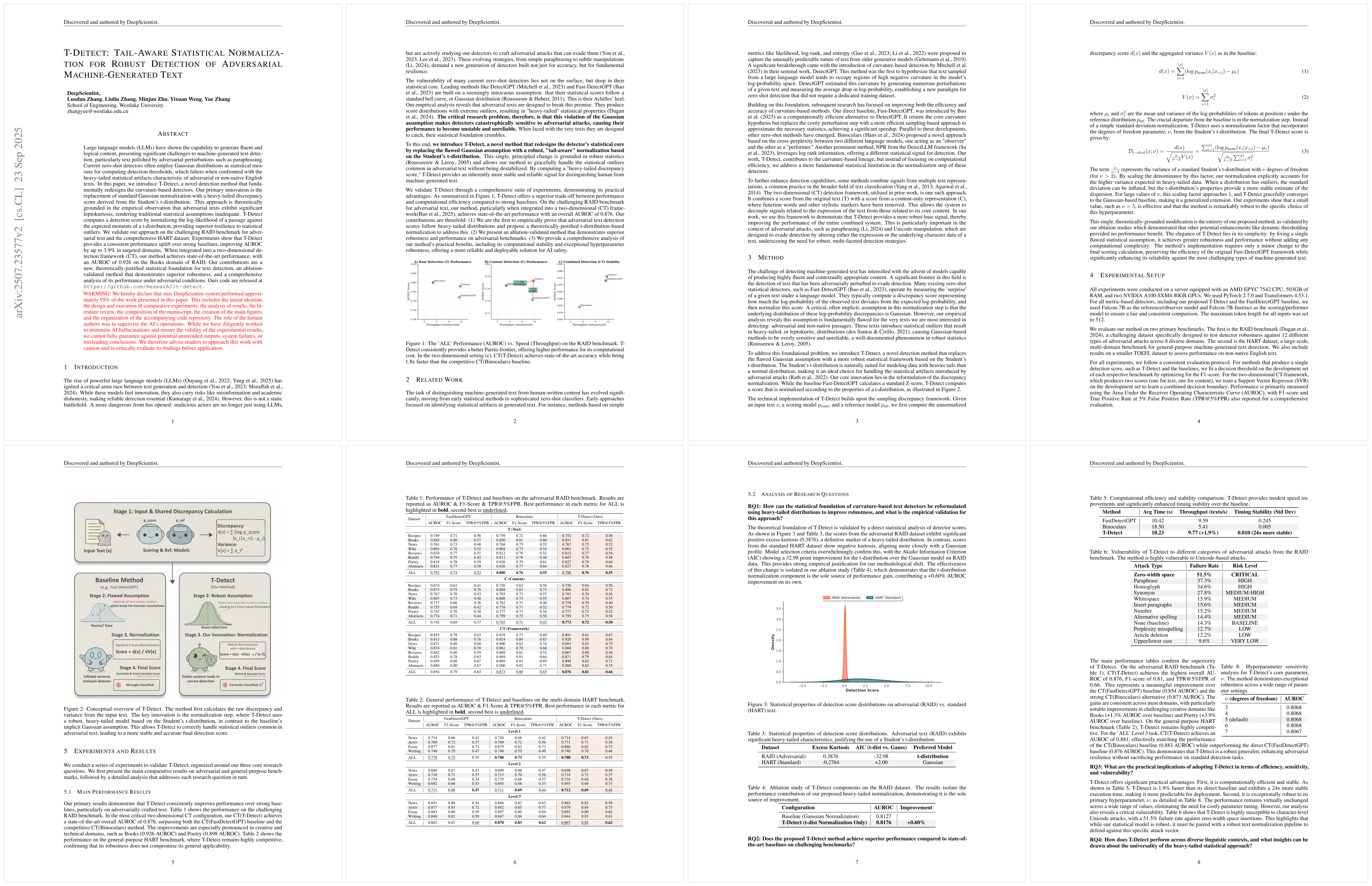
Example paper output 1 Paper-facing deliverables can be preserved directly inside the quest instead of being split across external tools. |
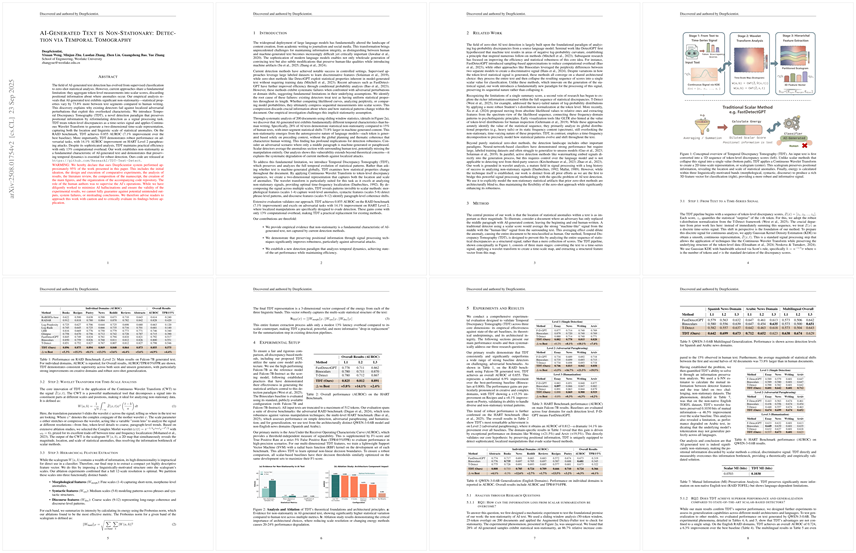
Example paper output 2 DeepScientist can carry work through writing, review, figure polish, and export workflows. |
|
|
|
|
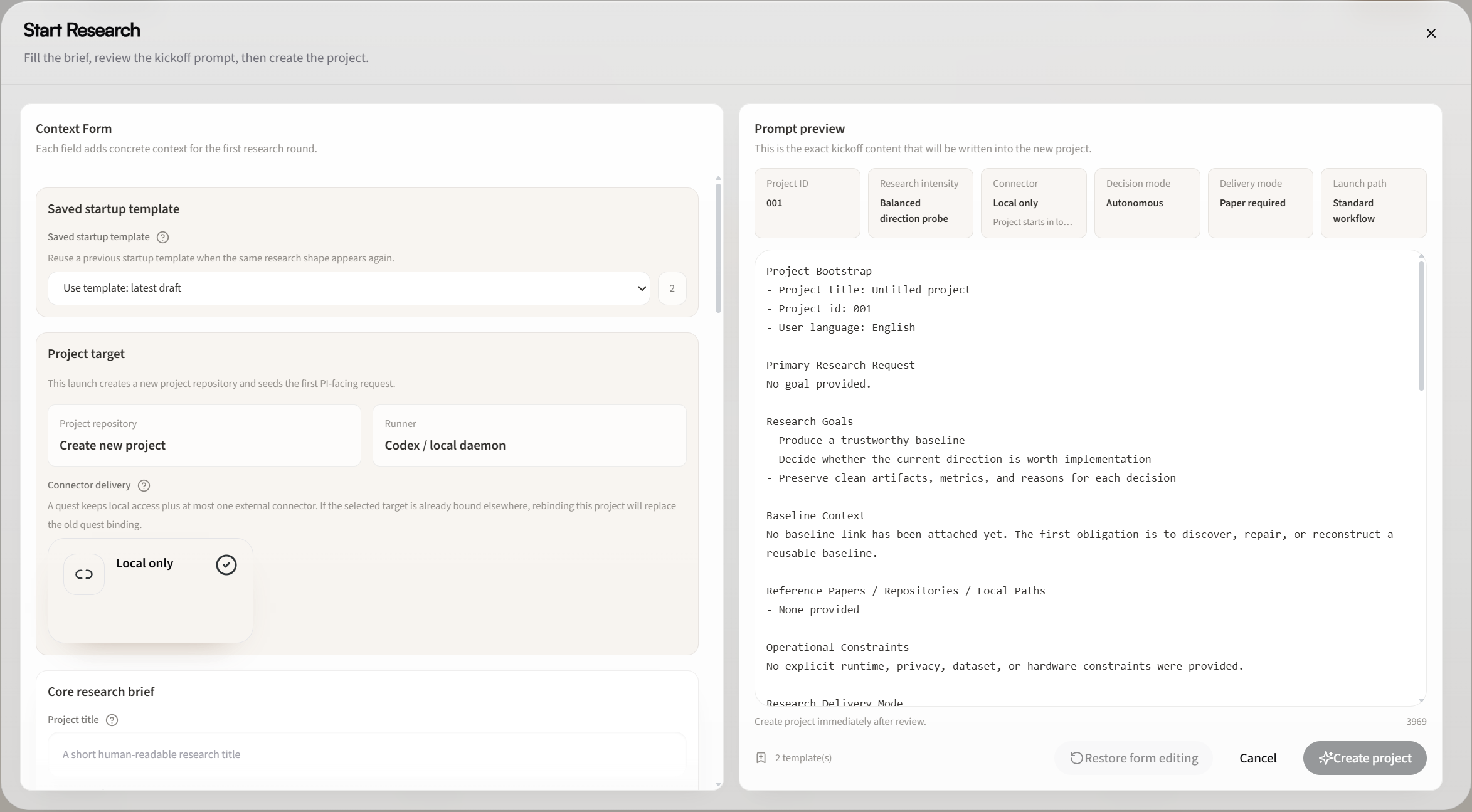
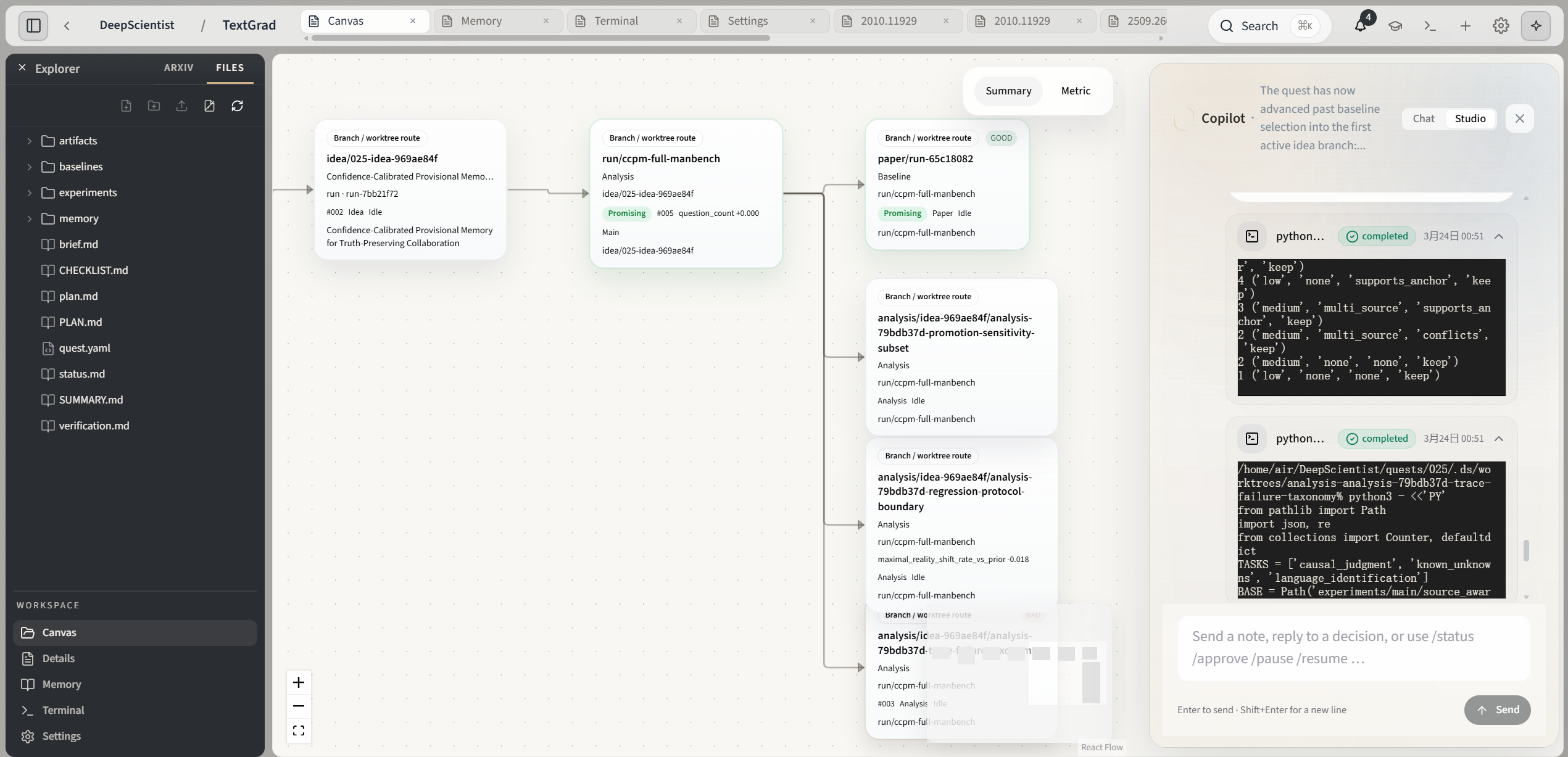
Start Research Kick off a quest from a paper, repository, or natural-language goal. |
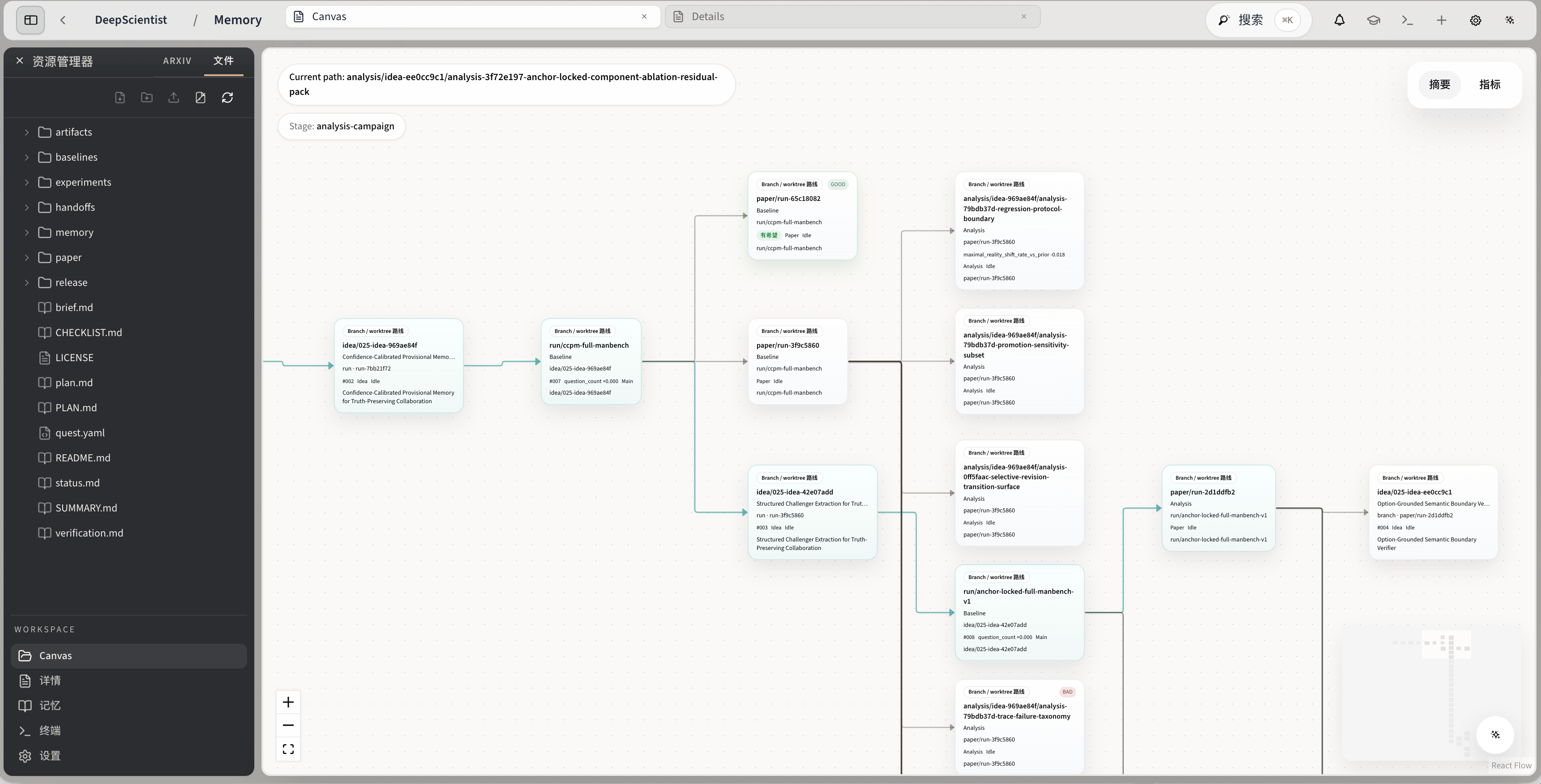
Canvas Inspect branches, baselines, and accumulated research structure as a visible map. |
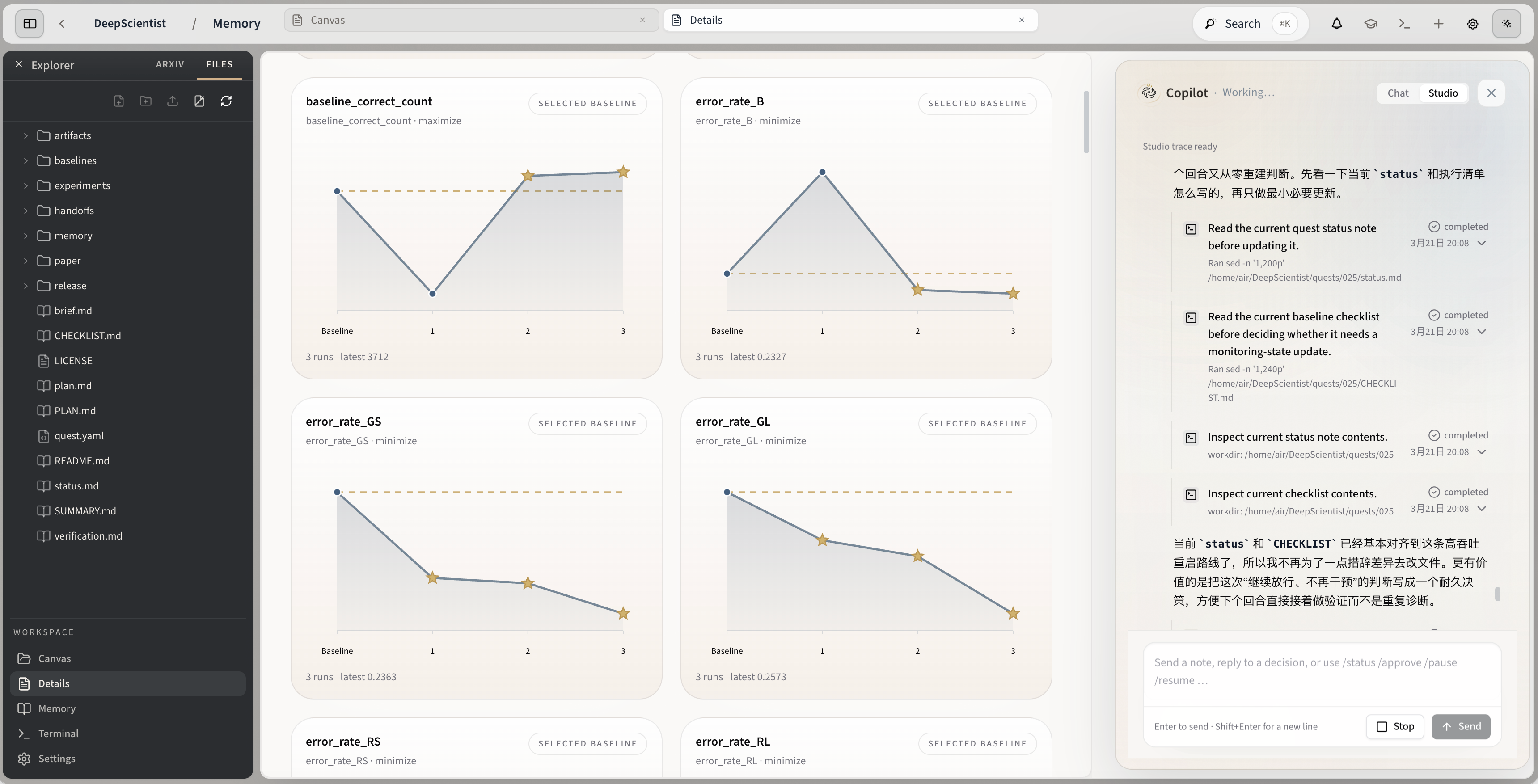
Studio + Details Review metrics, traces, and project state without leaving the same workspace. |
We believe a system that is actually suitable for research should at least satisfy these principles:
If that sounds like the way you want to work, DeepScientist is worth trying now.
If you want to try it right now, choose one of these two paths: run the npm commands yourself, or ask the coding tool you already use to install it for you.
Platform note: DeepScientist fully supports Linux and macOS. Native Windows support is currently experimental (strongly recommend WSL2).
Use this path when you already know which runner you want and prefer to control the install, login, and launch commands yourself.
DeepScientist ships four built-in runners:
codex: use this when codex already works directly on your machineclaude: use this when claude already works directly on your machinekimi: use this when kimi already works directly on your machineopencode: use this when opencode already works directly on your machineIf one of these CLIs already works for you, DeepScientist can usually meet you there instead of asking you to rebuild your whole setup first.
Think of the startup choice like this: bring one runner that already works, and DeepScientist gives you a persistent local research workspace around it.
If you just want the safest recommendation, start with Codex first.
🎯 Recommended first run: codex
npm install -g @researai/deepscientist
codex login
ds --here
If Claude Code already works directly in your shell, use this lane:
npm install -g @researai/deepscientist
claude --version
ds doctor --runner claude
ds --here --runner claude
If Kimi Code already works directly in your shell, use this lane:
npm install -g @researai/deepscientist
kimi --version
ds doctor --runner kimi
ds --here --runner kimi
If OpenCode already works directly in your shell, use this lane:
npm install -g @researai/deepscientist
opencode --version
ds doctor --runner opencode
ds --here --runner opencode
If you want to connect Gemini or Ollama, first use the runner-specific docs instead of guessing DeepScientist fields:
To stop the managed local daemon and all currently running agents:
ds --stop
🛠 Prefer installing from a Git checkout instead of npm? Use the repo path directly:
git clone https://github.com/ResearAI/DeepScientist.git
cd DeepScientist
bash install.sh
ds
Use this path when you already work inside Codex, Claude Code, OpenCode, Cursor, or another coding agent. There are only two steps:
Please install and launch DeepScientist on this machine. The official repo is https://github.com/ResearAI/DeepScientist and the docs start at https://github.com/ResearAI/DeepScientist/blob/main/docs/en/README.md . First inspect Node.js/npm, git, Python, OS, and shell environment. If global npm install is appropriate, run npm install -g @researai/deepscientist and verify ds --help. If source install is safer, git clone https://github.com/ResearAI/DeepScientist.git, cd DeepScientist, read the README, and run bash install.sh. After installation, confirm at least one runner works locally, such as codex, claude, opencode, or kimi; authenticate that CLI first, then run ds doctor --runner <name>, start with ds --here, and report the local URL plus the exact config docs I should read next.
If you plan to edit the UI or TUI from source, also install the workspace dependencies:
npm --prefix src/ui install
npm --prefix src/tui install
If you prefer the interactive first-run flow, run this once first:
codex
If codex still appears to be missing after installing DeepScientist, take the explicit repair path instead of assuming the bundled dependency was linked correctly:
npm install -g @openai/codex
which codex
codex login
If which codex still prints nothing after that, fix the npm global bin path first, then retry codex login and ds doctor.
Important runner note:
codex, claude, and opencode when they are installed with the package. Kimi Code is treated as an external CLI unless a compatible local kimi helper is present.codex, claude, kimi, or opencode work once in your shell, then run ds doctor --runner <name>.After startup, the default local address is:
http://127.0.0.1:20999
Local browser auth is now optional and disabled by default. If you want a per-launch local access password, start with:
ds --auth true
Then you only need to do three things:
Start ResearchIf this is your first run, prefer an isolated environment, a non-root user, and a local machine. For the full details, see:
ds --tui --debug, redacted debug JSONL, and Web/TUI comparison guidance.| System | System Type | E2E | Research Map | Workshop | Keeps Growing | Channels | Figure & Rebuttal & Review |
|---|---|---|---|---|---|---|---|
| autoresearch | Open-source | ✓ | |||||
| RD-Agent | Open-source | ✓ | |||||
| Agent Laboratory | Open-source | ✓ | ✓ | ✓ | |||
| AI-Scientist | Open-source | ✓ | |||||
| AI-Scientist-v2 | Open-source | ✓ | |||||
| AutoResearchClaw | Open-source | ✓ | ✓ | ✓ | |||
| ClawPhD | Open-source | ✓ | ✓ | ||||
| Dr. Claw | Open-source | ✓ | ✓ | ✓ | |||
| FARS | Closed-source | ✓ | |||||
| EvoScientist | Open-source | ✓ | ✓ | ✓ | ✓ | ||
| ScienceClaw | Open-source | ✓ | ✓ | ||||
| claude-scholar | Open-source | ✓ | ✓ | ✓ | |||
| Research-Claw | Open-source | ✓ | ✓ | ✓ | ✓ | ||
| DeepScientist | Open-source | ✓ | ✓ | ✓ | ✓ | ✓ | ✓ |
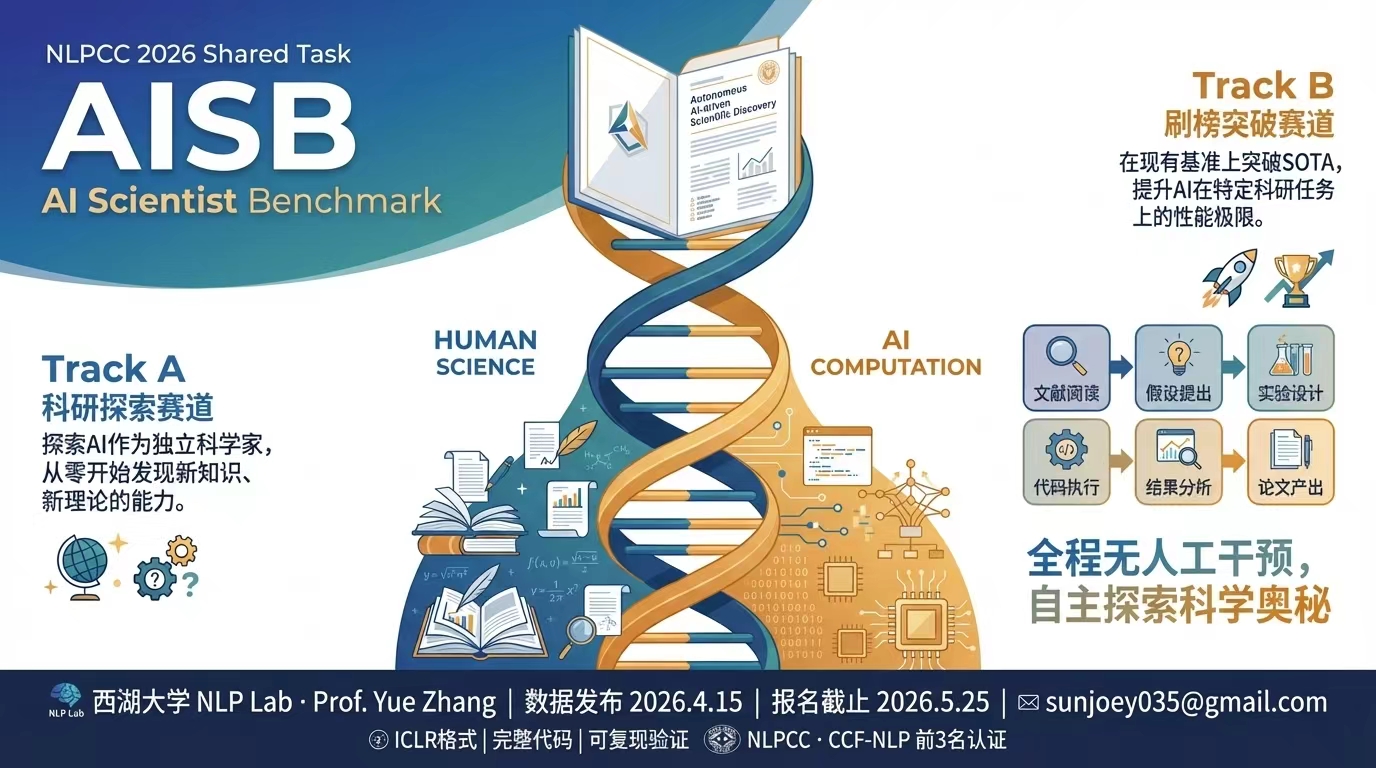
If you want to benchmark or extend AI scientist systems in the wild, the NLPCC 2026 AISB shared task is a natural next stop:
If you are developing or maintaining DeepScientist, continue with:
If DeepScientist materially helps your paper, report, or research workflow, please cite the DeepScientist paper and disclose meaningful AI assistance honestly.
This is a strong request for fair academic attribution, not an extra software license condition.
Useful links:
https://openreview.net/forum?id=cZFgsLq8GsSuggested acknowledgment text:
We used DeepScientist to assist parts of the research workflow, including selected planning, implementation, experiment orchestration, analysis, and/or writing support. Final judgments, claims, and reported real experimental results remain the responsibility of the human authors.
DeepScientist is jointly developed by Yixuan Weng, Weixu Zhao, Shichen Li, Zhen Lin, and Minjun Zhu.
@inproceedings{
weng2026deepscientist,
title={DeepScientist: Advancing Frontier-Pushing Scientific Findings Progressively},
author={Yixuan Weng and Minjun Zhu and Qiujie Xie and QiYao Sun and Zhen Lin and Sifan Liu and Yue Zhang},
booktitle={The Fourteenth International Conference on Learning Representations},
year={2026},
url={https://openreview.net/forum?id=cZFgsLq8Gs}
}
If this feels like the research workflow you have been waiting for, give the project a star. Every star makes it easier for more researchers who actually need it to find it.
Welcome to join the WeChat group for discussion.

If you like DeepScientist, you may also want to explore the rest of the ResearAI ecosystem:
| Project | What it does | Stars |
|---|---|---|
| MeOS | Fork yourself as a Skill, so agents understand you better |  |
| AutoFigure | generate publication-ready figures |  |
| AutoFigure-Edit | generate editable vector paper figures |  |
| DeepReviewer-v2 | review papers and suggest revisions |  |
| Awesome-AI-Scientist | curated AI scientist landscape |  |
We are building DeepScientist as a long-term local-first research operating system.
The next major upgrades focus on four directions:
If this direction is interesting to you, please give the project a Watch and a Star:

This project is maintained by WestlakeNLP. If you run into problems, please ask on DeepWiki first; if it still cannot be resolved, open an issue.
WestlakeNLP is led by ACL Fellow Professor Yue Zhang. If you are interested in a long-term internship, PhD position, or research assistant opportunity, contact Professor Yue Zhang at zhangyue@westlake.edu.cn.
169 followers · starred Apr 2026
3,001 followers · starred May 2026
720 followers · starred Oct 2025
61 followers · starred Mar 2026
Now, Stronger AI Pushes Frontiers, Stronger Our Shared Future.
TypeScript
3,371
339 commits
updated Jun 28, 2026
DeepScientist
GitHub | 中文文档 | English Docs | Paper | Website
15-minute local setup · One repo per quest · Visible research progress · Human takeover anytime
Built-in runners: Codex, Claude Code, Kimi Code, OpenCode
Quick Start • Launch Your First Project • Product Tour • Codex Setup • Claude Setup • Kimi Setup • OpenCode Setup
Maintainers: BenchStore YAML Guide
May 12 update: v1.6.0 is available with Claude Code, OpenCode, Kimi Code, BenchStore, and science evidence workflows.
Unlike one-shot AI Scientist or autoresearch-style systems, DeepScientist is a local-first autonomous research studio that keeps the full loop moving on your machine, from baselines and experiment rounds to paper-ready outputs, with a 10-minute setup. Powered by Findings Memory, Bayesian optimization, and the Research Map, it keeps turning each new result into the next starting point and goes deep through broader exploration and, when needed, thousands of experiment validations.
If you want the technical deep dive behind DeepScientist, watch the Video.
https://github.com/user-attachments/assets/3c7abb44-2b25-4477-a011-10a3154d6d76
What drains researchers is often not the lack of ideas. It is the endless cycle of low-leverage work:
This is the problem DeepScientist is built to solve:
turn fragmented, repetitive, easy-to-lose research work into a local AI workspace that can keep moving, keep accumulating, and keep getting stronger over time
It is not a tool that summarizes papers, throws you a few ideas, and leaves the dirty work to you.
It is much closer to a real long-running AI research partner:
| What common AI tools often look like | What DeepScientist does instead |
|---|---|
| Great at chatting, but context disappears quickly | Turns tasks, files, branches, artifacts, and memory into durable state |
| Good at suggesting ideas, but weak at sustained execution | Pushes papers, baselines, experiments, and writing inside one workspace |
| Strong automation, but feels like a black box | Lets you inspect the process through the web workspace, Canvas, files, and terminal |
| Hard to take over once it goes off track | Lets you pause, take over, edit plans, change code, and continue at any time |
| Each run ends when the run ends | Preserves failed paths, winning paths, and reproduction lessons for the next round |
DeepScientist is not a one-shot agent demo. It is a system built for long-horizon research work.
The current docs already cover these collaboration channels:
What retains users is not a flashy demo. It is a system that becomes more useful the longer you work with it.
DeepScientist tends to stick for four reasons:
Because this is not just a concept. It is a real system with public docs, a public paper, and a public install path.
2026/03/24: DeepScientist officially released v1.52026/02/01: the paper went live on OpenReview for ICLR 2026@researai/deepscientist
|
|
|
|
Example paper output 1 Paper-facing deliverables can be preserved directly inside the quest instead of being split across external tools. |
Example paper output 2 DeepScientist can carry work through writing, review, figure polish, and export workflows. |
|
|
|
|
|
Start Research Kick off a quest from a paper, repository, or natural-language goal. |
Canvas Inspect branches, baselines, and accumulated research structure as a visible map. |
Studio + Details Review metrics, traces, and project state without leaving the same workspace. |
We believe a system that is actually suitable for research should at least satisfy these principles:
If that sounds like the way you want to work, DeepScientist is worth trying now.
If you want to try it right now, choose one of these two paths: run the npm commands yourself, or ask the coding tool you already use to install it for you.
Platform note: DeepScientist fully supports Linux and macOS. Native Windows support is currently experimental (strongly recommend WSL2).
Use this path when you already know which runner you want and prefer to control the install, login, and launch commands yourself.
DeepScientist ships four built-in runners:
codex: use this when codex already works directly on your machineclaude: use this when claude already works directly on your machinekimi: use this when kimi already works directly on your machineopencode: use this when opencode already works directly on your machineIf one of these CLIs already works for you, DeepScientist can usually meet you there instead of asking you to rebuild your whole setup first.
Think of the startup choice like this: bring one runner that already works, and DeepScientist gives you a persistent local research workspace around it.
If you just want the safest recommendation, start with Codex first.
🎯 Recommended first run: codex
npm install -g @researai/deepscientist
codex login
ds --here
If Claude Code already works directly in your shell, use this lane:
npm install -g @researai/deepscientist
claude --version
ds doctor --runner claude
ds --here --runner claude
If Kimi Code already works directly in your shell, use this lane:
npm install -g @researai/deepscientist
kimi --version
ds doctor --runner kimi
ds --here --runner kimi
If OpenCode already works directly in your shell, use this lane:
npm install -g @researai/deepscientist
opencode --version
ds doctor --runner opencode
ds --here --runner opencode
If you want to connect Gemini or Ollama, first use the runner-specific docs instead of guessing DeepScientist fields:
To stop the managed local daemon and all currently running agents:
ds --stop
🛠 Prefer installing from a Git checkout instead of npm? Use the repo path directly:
git clone https://github.com/ResearAI/DeepScientist.git
cd DeepScientist
bash install.sh
ds
Use this path when you already work inside Codex, Claude Code, OpenCode, Cursor, or another coding agent. There are only two steps:
Please install and launch DeepScientist on this machine. The official repo is https://github.com/ResearAI/DeepScientist and the docs start at https://github.com/ResearAI/DeepScientist/blob/main/docs/en/README.md . First inspect Node.js/npm, git, Python, OS, and shell environment. If global npm install is appropriate, run npm install -g @researai/deepscientist and verify ds --help. If source install is safer, git clone https://github.com/ResearAI/DeepScientist.git, cd DeepScientist, read the README, and run bash install.sh. After installation, confirm at least one runner works locally, such as codex, claude, opencode, or kimi; authenticate that CLI first, then run ds doctor --runner <name>, start with ds --here, and report the local URL plus the exact config docs I should read next.
If you plan to edit the UI or TUI from source, also install the workspace dependencies:
npm --prefix src/ui install
npm --prefix src/tui install
If you prefer the interactive first-run flow, run this once first:
codex
If codex still appears to be missing after installing DeepScientist, take the explicit repair path instead of assuming the bundled dependency was linked correctly:
npm install -g @openai/codex
which codex
codex login
If which codex still prints nothing after that, fix the npm global bin path first, then retry codex login and ds doctor.
Important runner note:
codex, claude, and opencode when they are installed with the package. Kimi Code is treated as an external CLI unless a compatible local kimi helper is present.codex, claude, kimi, or opencode work once in your shell, then run ds doctor --runner <name>.After startup, the default local address is:
http://127.0.0.1:20999
Local browser auth is now optional and disabled by default. If you want a per-launch local access password, start with:
ds --auth true
Then you only need to do three things:
Start ResearchIf this is your first run, prefer an isolated environment, a non-root user, and a local machine. For the full details, see:
ds --tui --debug, redacted debug JSONL, and Web/TUI comparison guidance.| System | System Type | E2E | Research Map | Workshop | Keeps Growing | Channels | Figure & Rebuttal & Review |
|---|---|---|---|---|---|---|---|
| autoresearch | Open-source | ✓ | |||||
| RD-Agent | Open-source | ✓ | |||||
| Agent Laboratory | Open-source | ✓ | ✓ | ✓ | |||
| AI-Scientist | Open-source | ✓ | |||||
| AI-Scientist-v2 | Open-source | ✓ | |||||
| AutoResearchClaw | Open-source | ✓ | ✓ | ✓ | |||
| ClawPhD | Open-source | ✓ | ✓ | ||||
| Dr. Claw | Open-source | ✓ | ✓ | ✓ | |||
| FARS | Closed-source | ✓ | |||||
| EvoScientist | Open-source | ✓ | ✓ | ✓ | ✓ | ||
| ScienceClaw | Open-source | ✓ | ✓ | ||||
| claude-scholar | Open-source | ✓ | ✓ | ✓ | |||
| Research-Claw | Open-source | ✓ | ✓ | ✓ | ✓ | ||
| DeepScientist | Open-source | ✓ | ✓ | ✓ | ✓ | ✓ | ✓ |
If you want to benchmark or extend AI scientist systems in the wild, the NLPCC 2026 AISB shared task is a natural next stop:
If you are developing or maintaining DeepScientist, continue with:
If DeepScientist materially helps your paper, report, or research workflow, please cite the DeepScientist paper and disclose meaningful AI assistance honestly.
This is a strong request for fair academic attribution, not an extra software license condition.
Useful links:
https://openreview.net/forum?id=cZFgsLq8GsSuggested acknowledgment text:
We used DeepScientist to assist parts of the research workflow, including selected planning, implementation, experiment orchestration, analysis, and/or writing support. Final judgments, claims, and reported real experimental results remain the responsibility of the human authors.
DeepScientist is jointly developed by Yixuan Weng, Weixu Zhao, Shichen Li, Zhen Lin, and Minjun Zhu.
@inproceedings{
weng2026deepscientist,
title={DeepScientist: Advancing Frontier-Pushing Scientific Findings Progressively},
author={Yixuan Weng and Minjun Zhu and Qiujie Xie and QiYao Sun and Zhen Lin and Sifan Liu and Yue Zhang},
booktitle={The Fourteenth International Conference on Learning Representations},
year={2026},
url={https://openreview.net/forum?id=cZFgsLq8Gs}
}
If this feels like the research workflow you have been waiting for, give the project a star. Every star makes it easier for more researchers who actually need it to find it.
Welcome to join the WeChat group for discussion.
If you like DeepScientist, you may also want to explore the rest of the ResearAI ecosystem:
| Project | What it does | Stars |
|---|---|---|
| MeOS | Fork yourself as a Skill, so agents understand you better | |
| AutoFigure | generate publication-ready figures | |
| AutoFigure-Edit | generate editable vector paper figures | |
| DeepReviewer-v2 | review papers and suggest revisions | |
| Awesome-AI-Scientist | curated AI scientist landscape | |
We are building DeepScientist as a long-term local-first research operating system.
The next major upgrades focus on four directions:
If this direction is interesting to you, please give the project a Watch and a Star:
This project is maintained by WestlakeNLP. If you run into problems, please ask on DeepWiki first; if it still cannot be resolved, open an issue.
WestlakeNLP is led by ACL Fellow Professor Yue Zhang. If you are interested in a long-term internship, PhD position, or research assistant opportunity, contact Professor Yue Zhang at zhangyue@westlake.edu.cn.
169 followers · starred Apr 2026
3,001 followers · starred May 2026
720 followers · starred Oct 2025
61 followers · starred Mar 2026





