An AI research Agent for scientific innovation.
See the code
A self-hostable AI research workspace for grounded chat, paper study, scientific skills, and research execution.

%20%7C%2025%20Current-339933?logo=node.js&logoColor=white)


English · 简体中文 · 日本語 · Français · Deutsch
Documentation · Quick Start · Community
InnoClaw turns server-side folders into AI-native workspaces where you can chat over your own files, study papers, and run experiments — all in one place.
Instead of juggling separate tools for literature, notes, code, and automation, you open a folder, sync it, and work: cited answers over real documents, structured paper reviews, reusable scientific skills, and a path from reading to remote execution.
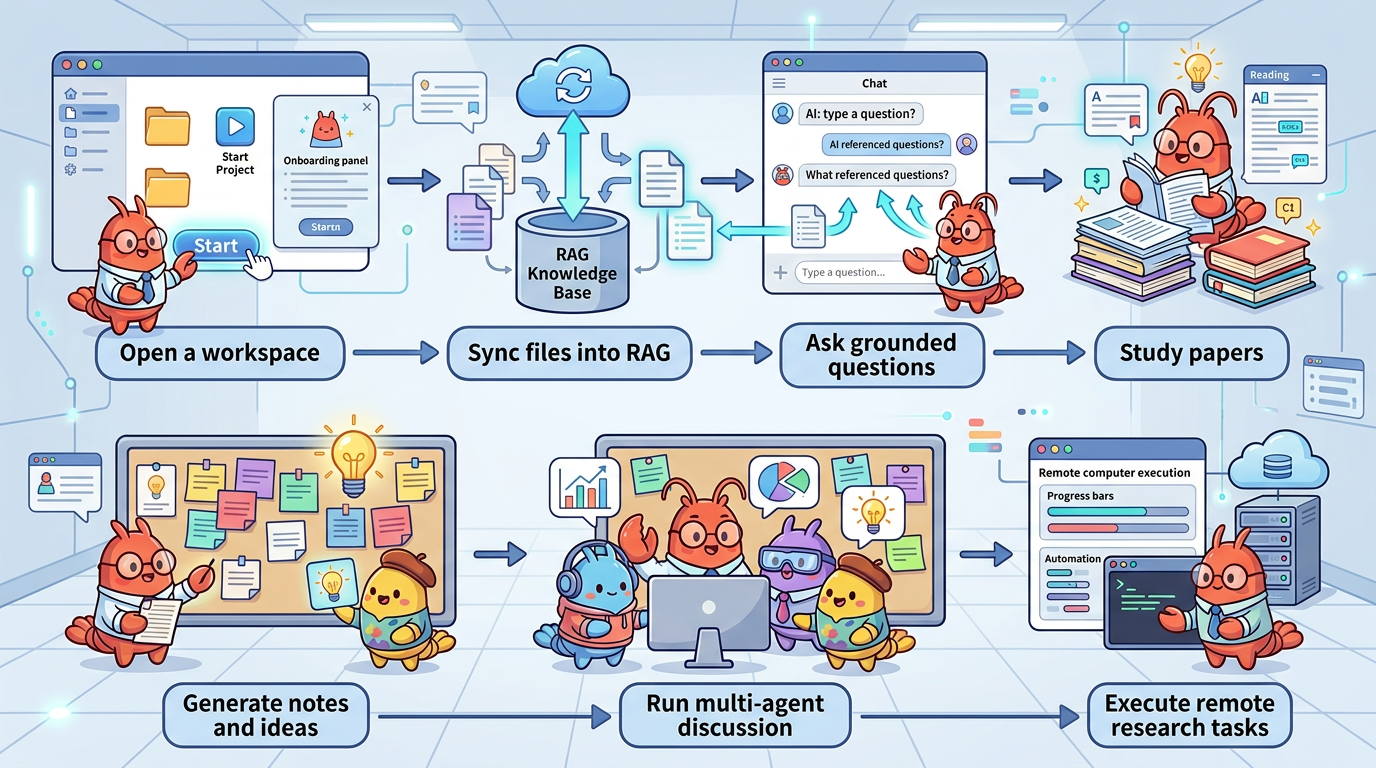
Requires Node.js 24+ (package.json is the source of truth). If you use nvm: nvm install && nvm use.
git clone https://github.com/SpectrAI-Initiative/InnoClaw.git
cd InnoClaw
npm install
cp .env.example .env.local          # then edit: set WORKSPACE_ROOTS and at least one API key
mkdir -p ./data
npx drizzle-kit migrate
npm run dev                          # open http://localhost:3000
After the UI opens: Settings → configure a model provider → open a workspace → click Sync → start chatting.
npm link
innoclaw
innoclaw run --prompt "Summarize the current workspace"
The CLI uses the same local app runtime as the web UI. When auth is enabled, it auto-starts the app, opens the browser login page on localhost, and stores a dedicated CLI session after sign-in. For trusted headless automation, start the app with authentication disabled.
Headless local run mode:
npm run dev:no-auth
Security: InnoClaw includes shell execution and remote job submission capabilities. See SECURITY.md for deployment hardening and trust boundary documentation.
Set WORKSPACE_ROOTS in .env.local to one or more absolute paths where your research folders live:
WORKSPACE_ROOTS=/absolute/path/to/workspaces
OPENAI_API_KEY=sk-...
WORKSPACE_ROOTS directories must already exist before startupnpx drizzle-kit migrate creates or upgrades the SQLite schema at ./data/innoclaw.dbnpm run dev can start. You should still set DATABASE_URL to a local disk path for SQLite. NEXT_BUILD_DIR, if used, must stay inside the repo (for example .next-local).Upgrading:
git fetch --tags
git checkout vX.Y.Z      # or: git pull (if tracking main)
npm install
npx drizzle-kit migrate
npm run build
Check CHANGELOG.md before every upgrade. Compare .env.local against .env.example for new variables.
For OS-specific prerequisites and production deployment: see Installation and Deployment.
git clone https://github.com/SpectrAI-Initiative/InnoClaw.git && cd InnoClaw
cp .env.production.example .env.production.local   # edit: set API key + WORKSPACE_ROOTS
docker compose up -d                                # open http://localhost:3000
See the full Docker Deployment Guide for volumes, reverse proxy, backups, and upgrades.
InnoClaw supports three primary workflows. Pick the one that matches what you need today — you can always explore the others later.
Search literature across ArXiv, PubMed, bioRxiv, and Semantic Scholar. Summarize papers, run structured multi-role discussions (moderator, skeptic, librarian, reproducer, scribe), and generate research ideation from what you read.
Start here: open Paper Study in any workspace.
Open a server folder as a persistent workspace. Chat over your files with RAG-backed citations. Browse, edit, and sync files. Use the agent panel to run multi-step tasks with tool calling. Import reusable scientific skills across domains like drug discovery, genomics, and protein science.
Start here: create a workspace, click Sync, and ask a question.
Go from code inspection to job submission and result analysis. Review repositories with agent assistance, gate high-risk steps with approval checkpoints, submit jobs through Shell, Slurm, or rjob, and monitor execution across clusters.
Start here: open Deep Research in a workspace with remote profiles configured.
innoclaw now supports interactive terminal mode, one-shot run, JSON batch, and browser-to-CLI session handoff.<PROVIDER>_<MODEL>_BASE_URL env vars for flexible endpoint routing<PROVIDER>_TOOLS_ENABLED=true/false without code changes| Feature | What it enables |
|---|---|
| Workspace Management | Map server folders into persistent AI workspaces |
| File Browser | Browse, upload, create, edit, preview, and sync files |
| RAG Chat | Ask grounded questions over indexed files with citations |
| Paper Study | Search, summarize, and inspect papers from ArXiv, PubMed, bioRxiv, and more |
| Discussion Mode | Run structured multi-role paper discussions |
| Research Ideation | Generate new directions and cross-disciplinary ideas |
| Skills System | Import reusable scientific and workflow skills |
| Deep Research | AI-driven multi-phase research with workflow graph and role-based execution |
| Research Execution | Orchestrate remote experiment loops with monitoring and approval gates |
| Multi-Agent Sessions | Keep separate execution contexts across tabs and projects |
| Multi-LLM Support | Use OpenAI, Anthropic, Gemini, and compatible endpoints |
| Layer | Role |
|---|---|
| Workspace | Files, notes, session context, and project state |
| Knowledge | RAG index over synced files for grounded answers |
| Paper Workbench | Literature search, summary, discussion, and ideation |
| Skills | Reusable domain workflows and tool-guided capabilities |
| Execution | Remote jobs, experiment loops, and result collection |


Scan to join our community · 扫码加入飞书/微信体验群
LICENSE416 followers · starred Mar 2026
An AI research Agent for scientific innovation.
See the code
A self-hostable AI research workspace for grounded chat, paper study, scientific skills, and research execution.
English · 简体中文 · 日本語 · Français · Deutsch
Documentation · Quick Start · Community
InnoClaw turns server-side folders into AI-native workspaces where you can chat over your own files, study papers, and run experiments — all in one place.
Instead of juggling separate tools for literature, notes, code, and automation, you open a folder, sync it, and work: cited answers over real documents, structured paper reviews, reusable scientific skills, and a path from reading to remote execution.
Requires Node.js 24+ (package.json is the source of truth). If you use nvm: nvm install && nvm use.
git clone https://github.com/SpectrAI-Initiative/InnoClaw.git
cd InnoClaw
npm install
cp .env.example .env.local          # then edit: set WORKSPACE_ROOTS and at least one API key
mkdir -p ./data
npx drizzle-kit migrate
npm run dev                          # open http://localhost:3000
After the UI opens: Settings → configure a model provider → open a workspace → click Sync → start chatting.
npm link
innoclaw
innoclaw run --prompt "Summarize the current workspace"
The CLI uses the same local app runtime as the web UI. When auth is enabled, it auto-starts the app, opens the browser login page on localhost, and stores a dedicated CLI session after sign-in. For trusted headless automation, start the app with authentication disabled.
Headless local run mode:
npm run dev:no-auth
Security: InnoClaw includes shell execution and remote job submission capabilities. See SECURITY.md for deployment hardening and trust boundary documentation.
Set WORKSPACE_ROOTS in .env.local to one or more absolute paths where your research folders live:
WORKSPACE_ROOTS=/absolute/path/to/workspaces
OPENAI_API_KEY=sk-...
WORKSPACE_ROOTS directories must already exist before startupnpx drizzle-kit migrate creates or upgrades the SQLite schema at ./data/innoclaw.dbnpm run dev can start. You should still set DATABASE_URL to a local disk path for SQLite. NEXT_BUILD_DIR, if used, must stay inside the repo (for example .next-local).Upgrading:
git fetch --tags
git checkout vX.Y.Z      # or: git pull (if tracking main)
npm install
npx drizzle-kit migrate
npm run build
Check CHANGELOG.md before every upgrade. Compare .env.local against .env.example for new variables.
For OS-specific prerequisites and production deployment: see Installation and Deployment.
git clone https://github.com/SpectrAI-Initiative/InnoClaw.git && cd InnoClaw
cp .env.production.example .env.production.local   # edit: set API key + WORKSPACE_ROOTS
docker compose up -d                                # open http://localhost:3000
See the full Docker Deployment Guide for volumes, reverse proxy, backups, and upgrades.
InnoClaw supports three primary workflows. Pick the one that matches what you need today — you can always explore the others later.
Search literature across ArXiv, PubMed, bioRxiv, and Semantic Scholar. Summarize papers, run structured multi-role discussions (moderator, skeptic, librarian, reproducer, scribe), and generate research ideation from what you read.
Start here: open Paper Study in any workspace.
Open a server folder as a persistent workspace. Chat over your files with RAG-backed citations. Browse, edit, and sync files. Use the agent panel to run multi-step tasks with tool calling. Import reusable scientific skills across domains like drug discovery, genomics, and protein science.
Start here: create a workspace, click Sync, and ask a question.
Go from code inspection to job submission and result analysis. Review repositories with agent assistance, gate high-risk steps with approval checkpoints, submit jobs through Shell, Slurm, or rjob, and monitor execution across clusters.
Start here: open Deep Research in a workspace with remote profiles configured.
innoclaw now supports interactive terminal mode, one-shot run, JSON batch, and browser-to-CLI session handoff.<PROVIDER>_<MODEL>_BASE_URL env vars for flexible endpoint routing<PROVIDER>_TOOLS_ENABLED=true/false without code changes| Feature | What it enables |
|---|---|
| Workspace Management | Map server folders into persistent AI workspaces |
| File Browser | Browse, upload, create, edit, preview, and sync files |
| RAG Chat | Ask grounded questions over indexed files with citations |
| Paper Study | Search, summarize, and inspect papers from ArXiv, PubMed, bioRxiv, and more |
| Discussion Mode | Run structured multi-role paper discussions |
| Research Ideation | Generate new directions and cross-disciplinary ideas |
| Skills System | Import reusable scientific and workflow skills |
| Deep Research | AI-driven multi-phase research with workflow graph and role-based execution |
| Research Execution | Orchestrate remote experiment loops with monitoring and approval gates |
| Multi-Agent Sessions | Keep separate execution contexts across tabs and projects |
| Multi-LLM Support | Use OpenAI, Anthropic, Gemini, and compatible endpoints |
| Layer | Role |
|---|---|
| Workspace | Files, notes, session context, and project state |
| Knowledge | RAG index over synced files for grounded answers |
| Paper Workbench | Literature search, summary, discussion, and ideation |
| Skills | Reusable domain workflows and tool-guided capabilities |
| Execution | Remote jobs, experiment loops, and result collection |
Scan to join our community · 扫码加入飞书/微信体验群
LICENSE416 followers · starred Mar 2026



