For automated installation of Hyprland on Debian 13 Trixie (Testing) and Debian SiD (Unstable)
Shell
1,408
500 commits
updated Feb 22, 2026





Trixie usersIf you later update Debian to
ForkyorSIDyou MUST recompile Hyprland!! Runupdate-hyprland.sh --install --with-depsReboot afterwards Failure to do so will prevent Hyprland from starting underForkyorSIDIt will return to the login manager
 KooL Hyprland-Dotfiles Showcase
[!IMPORTANT] install a backup tool like
snapperortimeshift. and Backup your system before installing hyprland using this script (HIGHLY RECOMMENDED).
[!CAUTION] Download this script on a directory where you have write permissions. ie. HOME. Or any directory within your home directory. Else script will fail
Note: At this time
KaliLinux is not supported. A number of users have reported issues installing and using the Dotfiles
sudo or as rootsudo privileges to install packagesGCC compiler and libs/etc/apt/sources.list and remove # on lines with deb-src to enable source packaging else will not install properly especially Hyprlandsudo nano /etc/apt/sources.list
# on the lines with deb-srcnon-free repository especially for users with NVIDIA GPUs. You can also install non-free drivers if required.
install-scripts/nvidia.sh and change the NVIDIA settings if requiredNote: For users with newer NVIDIA GPUs, especially, RTX5000 series, we strongly suggest you manually install the current
opendrivers for NVIDIA Not install them from Jak's Debian install script
10 January 2026 Update!
Debian now builds Hyprland v0.53.2!
Debian-Hyprland v2.9.4 installerTrixie, aka Stable)Forky) and Unstable (SID) - Build and run Hyprland v0.53.2 without issue10 October 2025 Update!
Hyprland-Debian nows builds 0.51.1 from source!
If you are currently running 0.49, or 0.50, you can upgrade to 0.51.1 > Note: Newer Hyprland versions (0.53.x+) may require compatibility shims on Debian 13 (Trixie). > Use the provided update/install scripts with --build-trixie if needed.
install.sh works alsoHyprland.
Hyprland or hyprlandstart-hyprland
sudo apt install network-manager-gnome See below if your network or wifi became unmanaged after installationsudo apt install --no-install-recommends -y sddm
sudo dpkg-reconfigure sddm choose sddm and then reboot.Install those first, before installing Hyprland
THIS[!IMPORTANT] If you wish to use the nouveau driver (installed by default in Debian), be sure to not select "NVIDIA" in the installation options. See note above about new NVIDIA GPUs.
If you select this option, the NVIDIA installer part will attempt to blacklist nouveau; while Hyprland will still be installed, it will skip blacklisting nouveau if you don't select the NVIDIA option.
[!CAUTION] If you are using FISH SHELL, DO NOT use this function. Clone and run
install.shinstead
curl package is required before running this commandsh <(curl -L https://raw.githubusercontent.com/JaKooLit/Debian-Hyprland/main/auto-install.sh)
clone this repo, change directory, make executable and run the script:
git clone --depth=1 https://github.com/JaKooLit/Debian-Hyprland.git ~/Debian-Hyprland
cd ~/Debian-Hyprland
chmod +x install.sh
./install.sh
SUPER H for HINT or click on the waybar HINT! Button
Head over to KooL Hyprland WIKI
if you installed in your laptop and Brightness and Keyboard brightness does not work you can execute this command sudo chmod +s $(which brightnessctl)
LINK and superfxctl LINKLINKLINK #22 Aug 2024 - still not on repoLINK #22 Aug 2024 - still not on repoLINKLINK[!TIP] To update to latest packages, re-running this script will auto update all. Script is configured to pull latest packages build for you.
uninstall.sh script. USE this with caution as it may render your system unstable.Most common question I got is, Hey Ja, Why the heck it is taking long time to install? Other distro like Arch its only a minute or two. Why here takes like forever?!?!?
[!NOTE] This script does not setup audio. Kindly set up. If you have not, I recommend pipewire.
sudo apt install -y pipewire
Head over to wiki Link WIKI
Keybinds CLICK
[!TIP] KooL Hyprland has a searchable keybind rofi menu. (
SUPER SHIFT K) or right click theHINTSwaybar button
here./install-scripts/gtk-themes.sh - to reinstall GTK Themes or./install-scripts/sddm.sh - to reinstall sddm[!IMPORTANT] DO NOT CD into
install-scriptsdirectory to run any of those scripts The scripts are designed to ran outsideinstall-scriptsdirectory. If you do the scripts will fail.
 while in sddm press ctrl+alt+F2 or F3
log into your account
`lspci -nn`, find the id of your nvidia card
`ls /dev/dri/by-path` find the matching id
`ls -l /dev/dri/by-path` to check where the symlink points to
)
add env = WLR_DRM_DEVICES,/dev/dri/cardX to the ENVvariables config ~/.config/hypr/UserConfigs/ENVariables.conf ; X being where the symlink of the gpu points to
more info from the hyprland wiki Hyprland Wiki Link
reports from a member of discord for Nvidia for additional env's
remove # from the following env's on
env = GBM_BACKEND,nvidia-drm
env = WLR_RENDERER_ALLOW_SOFTWARE,1
[!NOTE] Auto start of Hyprland after login (no SDDM or GDM or any login managers)
~/.zprofile . Remove all the # on the first linessudo apt autoremove rofi .cd ~/Debian-Hyprland
./install-scripts/rofi-wayland.sh
Rofi-wayland is compatible with x11 so no need to worry.
Does not work in Debian Bookworm
sddm blackscreen when log-out
Installing SDDM if or any other Login Manager installed. See Issue 2 - SDDM
network is down or become unmanaged This might help
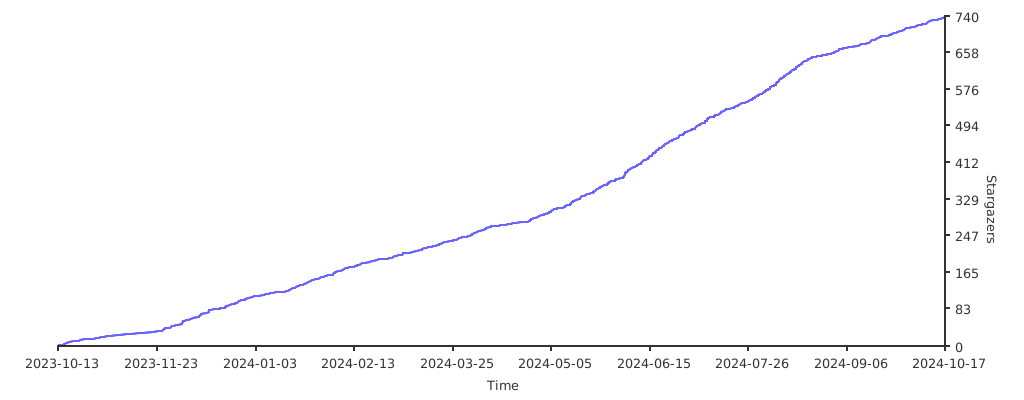
DiscordHyprland-Dots-DevelopmentHERE for a guide how to contributeHERE for a guide how to contributeHyprland Of course to Hyprland and @vaxerski for this awesome Dynamic Tiling Manager.a Star on my Github repos would be nice 🌟
Subscribe to my Youtube Channel YouTube
you can also give support through coffee's or btc 😊

or

Or you can donate cryto on my btc wallet :)
1N3MeV2dsX6gQB42HXU6MF2hAix1mqjo8i

49 followers · starred May 2024
292 followers · starred Feb 2025
166 followers · starred Jun 2024
218 followers · starred Dec 2023
For automated installation of Hyprland on Debian 13 Trixie (Testing) and Debian SiD (Unstable)
Shell
1,408
500 commits
updated Feb 22, 2026
Trixie usersIf you later update Debian to
ForkyorSIDyou MUST recompile Hyprland!! Runupdate-hyprland.sh --install --with-depsReboot afterwards Failure to do so will prevent Hyprland from starting underForkyorSIDIt will return to the login manager
KooL Hyprland-Dotfiles Showcase
[!IMPORTANT] install a backup tool like
snapperortimeshift. and Backup your system before installing hyprland using this script (HIGHLY RECOMMENDED).
[!CAUTION] Download this script on a directory where you have write permissions. ie. HOME. Or any directory within your home directory. Else script will fail
Note: At this time
KaliLinux is not supported. A number of users have reported issues installing and using the Dotfiles
sudo or as rootsudo privileges to install packagesGCC compiler and libs/etc/apt/sources.list and remove # on lines with deb-src to enable source packaging else will not install properly especially Hyprlandsudo nano /etc/apt/sources.list
# on the lines with deb-srcnon-free repository especially for users with NVIDIA GPUs. You can also install non-free drivers if required.
install-scripts/nvidia.sh and change the NVIDIA settings if requiredNote: For users with newer NVIDIA GPUs, especially, RTX5000 series, we strongly suggest you manually install the current
opendrivers for NVIDIA Not install them from Jak's Debian install script
10 January 2026 Update!
Debian now builds Hyprland v0.53.2!
Debian-Hyprland v2.9.4 installerTrixie, aka Stable)Forky) and Unstable (SID) - Build and run Hyprland v0.53.2 without issue10 October 2025 Update!
Hyprland-Debian nows builds 0.51.1 from source!
If you are currently running 0.49, or 0.50, you can upgrade to 0.51.1 > Note: Newer Hyprland versions (0.53.x+) may require compatibility shims on Debian 13 (Trixie). > Use the provided update/install scripts with --build-trixie if needed.
install.sh works alsoHyprland.
Hyprland or hyprlandstart-hyprland
sudo apt install network-manager-gnome See below if your network or wifi became unmanaged after installationsudo apt install --no-install-recommends -y sddm
sudo dpkg-reconfigure sddm choose sddm and then reboot.Install those first, before installing Hyprland
THIS[!IMPORTANT] If you wish to use the nouveau driver (installed by default in Debian), be sure to not select "NVIDIA" in the installation options. See note above about new NVIDIA GPUs.
If you select this option, the NVIDIA installer part will attempt to blacklist nouveau; while Hyprland will still be installed, it will skip blacklisting nouveau if you don't select the NVIDIA option.
[!CAUTION] If you are using FISH SHELL, DO NOT use this function. Clone and run
install.shinstead
curl package is required before running this commandsh <(curl -L https://raw.githubusercontent.com/JaKooLit/Debian-Hyprland/main/auto-install.sh)
clone this repo, change directory, make executable and run the script:
git clone --depth=1 https://github.com/JaKooLit/Debian-Hyprland.git ~/Debian-Hyprland
cd ~/Debian-Hyprland
chmod +x install.sh
./install.sh
SUPER H for HINT or click on the waybar HINT! Button
Head over to KooL Hyprland WIKI
if you installed in your laptop and Brightness and Keyboard brightness does not work you can execute this command sudo chmod +s $(which brightnessctl)
LINK and superfxctl LINKLINKLINK #22 Aug 2024 - still not on repoLINK #22 Aug 2024 - still not on repoLINKLINK[!TIP] To update to latest packages, re-running this script will auto update all. Script is configured to pull latest packages build for you.
uninstall.sh script. USE this with caution as it may render your system unstable.Most common question I got is, Hey Ja, Why the heck it is taking long time to install? Other distro like Arch its only a minute or two. Why here takes like forever?!?!?
[!NOTE] This script does not setup audio. Kindly set up. If you have not, I recommend pipewire.
sudo apt install -y pipewire
Head over to wiki Link WIKI
Keybinds CLICK
[!TIP] KooL Hyprland has a searchable keybind rofi menu. (
SUPER SHIFT K) or right click theHINTSwaybar button
here./install-scripts/gtk-themes.sh - to reinstall GTK Themes or./install-scripts/sddm.sh - to reinstall sddm[!IMPORTANT] DO NOT CD into
install-scriptsdirectory to run any of those scripts The scripts are designed to ran outsideinstall-scriptsdirectory. If you do the scripts will fail.
 while in sddm press ctrl+alt+F2 or F3
log into your account
`lspci -nn`, find the id of your nvidia card
`ls /dev/dri/by-path` find the matching id
`ls -l /dev/dri/by-path` to check where the symlink points to
)
add env = WLR_DRM_DEVICES,/dev/dri/cardX to the ENVvariables config ~/.config/hypr/UserConfigs/ENVariables.conf ; X being where the symlink of the gpu points to
more info from the hyprland wiki Hyprland Wiki Link
reports from a member of discord for Nvidia for additional env's
remove # from the following env's on
env = GBM_BACKEND,nvidia-drm
env = WLR_RENDERER_ALLOW_SOFTWARE,1
[!NOTE] Auto start of Hyprland after login (no SDDM or GDM or any login managers)
~/.zprofile . Remove all the # on the first linessudo apt autoremove rofi .cd ~/Debian-Hyprland
./install-scripts/rofi-wayland.sh
Rofi-wayland is compatible with x11 so no need to worry.
Does not work in Debian Bookworm
sddm blackscreen when log-out
Installing SDDM if or any other Login Manager installed. See Issue 2 - SDDM
network is down or become unmanaged This might help
DiscordHyprland-Dots-DevelopmentHERE for a guide how to contributeHERE for a guide how to contributeHyprland Of course to Hyprland and @vaxerski for this awesome Dynamic Tiling Manager.a Star on my Github repos would be nice 🌟
Subscribe to my Youtube Channel YouTube
you can also give support through coffee's or btc 😊
or
Or you can donate cryto on my btc wallet :)
1N3MeV2dsX6gQB42HXU6MF2hAix1mqjo8i
49 followers · starred May 2024
292 followers · starred Feb 2025
166 followers · starred Jun 2024
218 followers · starred Dec 2023



