For automated installation of Hyprland on Arch Linux or any Arch Linux-based distros
Shell
4,584
579 commits
updated Feb 22, 2026





 KooL Hyprland-Dotfiles Showcase
Hyprland-Dots . During installation, if you opt to copy pre-configured dots, it will be downloaded from that centralized repo.Hyprland-Dots-ChangelogsREPO[!IMPORTANT] install a backup tool like
snapperortimeshift. and Backup your system before installing hyprland using this script (HIGHLY RECOMMENDED)
[!CAUTION] Download this script on a directory where you have write permissions. ie. HOME. Or any directory within your home directory. Else script will fail
[!NOTE] 🔘 Pipewire and Pipewire audio
execute_script "pipewire.sh" or you can simply just delete pipewire.sh in install-scripts directory before installing.sudo systemctl disable gdm.service then reboot./install.sh and then choose SDDM and SDDM theme in the options.LINK which is a modified fork of LINKLINK. This also includes Bibata Modern Ice cursor.[!IMPORTANT] If you want to use nouveau driver, dont choose nvidia in the option. This is because the nvidia installer part, it will blacklist nouveau. Hyprland will still be installed but it will skip blacklisting nouveau.
THIS[!CAUTION] If you are using FISH SHELL, DO NOT use this function. Clone and ran install.sh instead
curl package is required before running this commandsh <(curl -L https://raw.githubusercontent.com/JaKooLit/Arch-Hyprland/main/auto-install.sh)
git clone --depth=1 https://github.com/JaKooLit/Arch-Hyprland.git ~/Arch-Hyprland
cd ~/Arch-Hyprland
chmod +x install.sh
./install.sh
uninstall.sh script. USE this with caution as it may render your system unstable.timeshift or snapperinstaller should auto change your default shell to zsh. However, if it does not, do this
chsh -s $(which zsh)
zsh
source ~/.zshrc
agnosterzak theme is installed. Which is from external oh-my-zsh theme. You can find more themes from this OH-MY-ZSH-THEMESSUPER SHIFT O , choose desired theme, and close and open terminal.~/.zshrc . Look for ZSH_THEME="desired theme"WIKICLICK[!TIP] KooL Hyprland has a searchable keybind function via rofi. (SUPER SHIFT K) or right click the
HINTSwaybar button
LINKhere./install-scripts/gtk-themes.sh - For reinstall GTK Themes or./install-scripts/sddm.sh - For reinstall sddm[!IMPORTANT] DO NOT cd into install-scripts directory as script will most likely to fail
These installer helpers will set up user-level services and install required packages automatically.
Works on Fedora, Arch, and other distributions using standard tools.
Re-run any time from the repo root (do not cd into install-scripts).
./install-scripts/battery-monitor.sh
acpi, libnotify~/.config/hypr/scripts/battery-monitor.sh and user service battery-monitor.servicesystemctl --user status|start|stop battery-monitor./install-scripts/disk-monitor.sh
libnotify~/.config/hypr/scripts/disk-monitor.sh and user service disk-monitor.servicesystemctl --user status|start|stop disk-monitor./install-scripts/temp-monitor.sh
lm_sensors, libnotifysudo sensors-detect --auto once)~/.config/hypr/scripts/temp-monitor.sh and user service temp-monitor.servicesystemctl --user status|start|stop temp-monitorPackages above are installed by the respective installer scripts; no manual action is required. If you prefer package pre-install via the main package list, ensure
acpi,lm_sensors, andlibnotifyare present in your setup.
 while in sddm press ctrl+alt+F2 or F3
log into your account
`lspci -nn`, find the id of your nvidia card
`ls /dev/dri/by-path` find the matching id
`ls -l /dev/dri/by-path` to check where the symlink points to
)
add "env = WLR_DRM_DEVICES,/dev/dri/cardX" to the ENVvariables config ~/.config/hypr/UserConfigs/ENVariables.conf ; X being where the symlink of the gpu points to
more info from the hyprland wiki Hyprland Wiki Link
reports from a member of discord for Nvidia for additional env's
remove # from the following env's on
env = GBM_BACKEND,nvidia-drm
env = WLR_RENDERER_ALLOW_SOFTWARE,1
sudo pacman -S pipewire wireplumber pipewire-audio pipewire-pulse . When prompted, remove / replace pulseaudio. After that, you can ran ./install.shyay -S cava-git or paru -S cava-git
[!NOTE] Auto start of Hyprland after login (no SDDM or GDM or any login managers)
~/.zprofile . Remove all the # on the first linessudo pacman -Rns rofi . Install rofi-wayland with sudo pacman -S rofi-wayland. Rofi-wayland is compatible with x11 so no need to worry.DiscordHyprland-Dots-DevelopmentHERE for a guide how to contributeHERE for a guide how to contributeHyprland Of course to Hyprland and @vaxerski for this awesome Dynamic Tiling Manager.a Star on my Github repos would be nice 🌟
Subscribe to my Youtube Channel YouTube
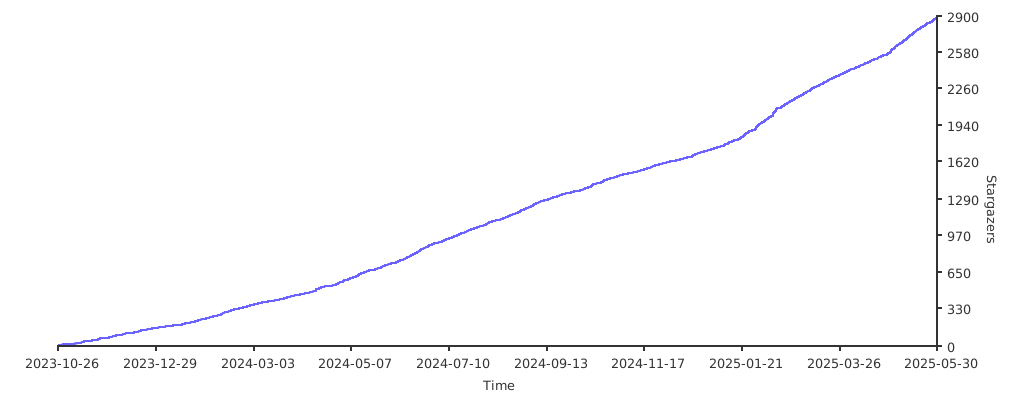
you can also give support through coffee's or btc 😊

or

Or you can donate cryto on my btc wallet :)
1N3MeV2dsX6gQB42HXU6MF2hAix1mqjo8i

1,052 followers · starred Jan 2025
117 followers · starred Nov 2025
152 followers · starred Mar 2024
42 followers · starred Apr 2024
For automated installation of Hyprland on Arch Linux or any Arch Linux-based distros
Shell
4,584
579 commits
updated Feb 22, 2026
KooL Hyprland-Dotfiles Showcase
Hyprland-Dots . During installation, if you opt to copy pre-configured dots, it will be downloaded from that centralized repo.Hyprland-Dots-ChangelogsREPO[!IMPORTANT] install a backup tool like
snapperortimeshift. and Backup your system before installing hyprland using this script (HIGHLY RECOMMENDED)
[!CAUTION] Download this script on a directory where you have write permissions. ie. HOME. Or any directory within your home directory. Else script will fail
[!NOTE] 🔘 Pipewire and Pipewire audio
execute_script "pipewire.sh" or you can simply just delete pipewire.sh in install-scripts directory before installing.sudo systemctl disable gdm.service then reboot./install.sh and then choose SDDM and SDDM theme in the options.LINK which is a modified fork of LINKLINK. This also includes Bibata Modern Ice cursor.[!IMPORTANT] If you want to use nouveau driver, dont choose nvidia in the option. This is because the nvidia installer part, it will blacklist nouveau. Hyprland will still be installed but it will skip blacklisting nouveau.
THIS[!CAUTION] If you are using FISH SHELL, DO NOT use this function. Clone and ran install.sh instead
curl package is required before running this commandsh <(curl -L https://raw.githubusercontent.com/JaKooLit/Arch-Hyprland/main/auto-install.sh)
git clone --depth=1 https://github.com/JaKooLit/Arch-Hyprland.git ~/Arch-Hyprland
cd ~/Arch-Hyprland
chmod +x install.sh
./install.sh
uninstall.sh script. USE this with caution as it may render your system unstable.timeshift or snapperinstaller should auto change your default shell to zsh. However, if it does not, do this
chsh -s $(which zsh)
zsh
source ~/.zshrc
agnosterzak theme is installed. Which is from external oh-my-zsh theme. You can find more themes from this OH-MY-ZSH-THEMESSUPER SHIFT O , choose desired theme, and close and open terminal.~/.zshrc . Look for ZSH_THEME="desired theme"WIKICLICK[!TIP] KooL Hyprland has a searchable keybind function via rofi. (SUPER SHIFT K) or right click the
HINTSwaybar button
LINKhere./install-scripts/gtk-themes.sh - For reinstall GTK Themes or./install-scripts/sddm.sh - For reinstall sddm[!IMPORTANT] DO NOT cd into install-scripts directory as script will most likely to fail
These installer helpers will set up user-level services and install required packages automatically.
Works on Fedora, Arch, and other distributions using standard tools.
Re-run any time from the repo root (do not cd into install-scripts).
./install-scripts/battery-monitor.sh
acpi, libnotify~/.config/hypr/scripts/battery-monitor.sh and user service battery-monitor.servicesystemctl --user status|start|stop battery-monitor./install-scripts/disk-monitor.sh
libnotify~/.config/hypr/scripts/disk-monitor.sh and user service disk-monitor.servicesystemctl --user status|start|stop disk-monitor./install-scripts/temp-monitor.sh
lm_sensors, libnotifysudo sensors-detect --auto once)~/.config/hypr/scripts/temp-monitor.sh and user service temp-monitor.servicesystemctl --user status|start|stop temp-monitorPackages above are installed by the respective installer scripts; no manual action is required. If you prefer package pre-install via the main package list, ensure
acpi,lm_sensors, andlibnotifyare present in your setup.
 while in sddm press ctrl+alt+F2 or F3
log into your account
`lspci -nn`, find the id of your nvidia card
`ls /dev/dri/by-path` find the matching id
`ls -l /dev/dri/by-path` to check where the symlink points to
)
add "env = WLR_DRM_DEVICES,/dev/dri/cardX" to the ENVvariables config ~/.config/hypr/UserConfigs/ENVariables.conf ; X being where the symlink of the gpu points to
more info from the hyprland wiki Hyprland Wiki Link
reports from a member of discord for Nvidia for additional env's
remove # from the following env's on
env = GBM_BACKEND,nvidia-drm
env = WLR_RENDERER_ALLOW_SOFTWARE,1
sudo pacman -S pipewire wireplumber pipewire-audio pipewire-pulse . When prompted, remove / replace pulseaudio. After that, you can ran ./install.shyay -S cava-git or paru -S cava-git
[!NOTE] Auto start of Hyprland after login (no SDDM or GDM or any login managers)
~/.zprofile . Remove all the # on the first linessudo pacman -Rns rofi . Install rofi-wayland with sudo pacman -S rofi-wayland. Rofi-wayland is compatible with x11 so no need to worry.DiscordHyprland-Dots-DevelopmentHERE for a guide how to contributeHERE for a guide how to contributeHyprland Of course to Hyprland and @vaxerski for this awesome Dynamic Tiling Manager.a Star on my Github repos would be nice 🌟
Subscribe to my Youtube Channel YouTube
you can also give support through coffee's or btc 😊
or
Or you can donate cryto on my btc wallet :)
1N3MeV2dsX6gQB42HXU6MF2hAix1mqjo8i
1,052 followers · starred Jan 2025
117 followers · starred Nov 2025
152 followers · starred Mar 2024
42 followers · starred Apr 2024



