
The high performance GitHub UI that is missing from the site
Rust
0
39 commits
updated Oct 4, 2026
See what people are saying
README

VisualHub
A native GitHub client written in Rust on GPUI (the IAmJSD fork). Its widgets are adapted from Schist's widget kit. VisualHub covers what you do on github.com, except editing code. Files, diffs, logs and gists are read-only. Everything else can be done from the app.
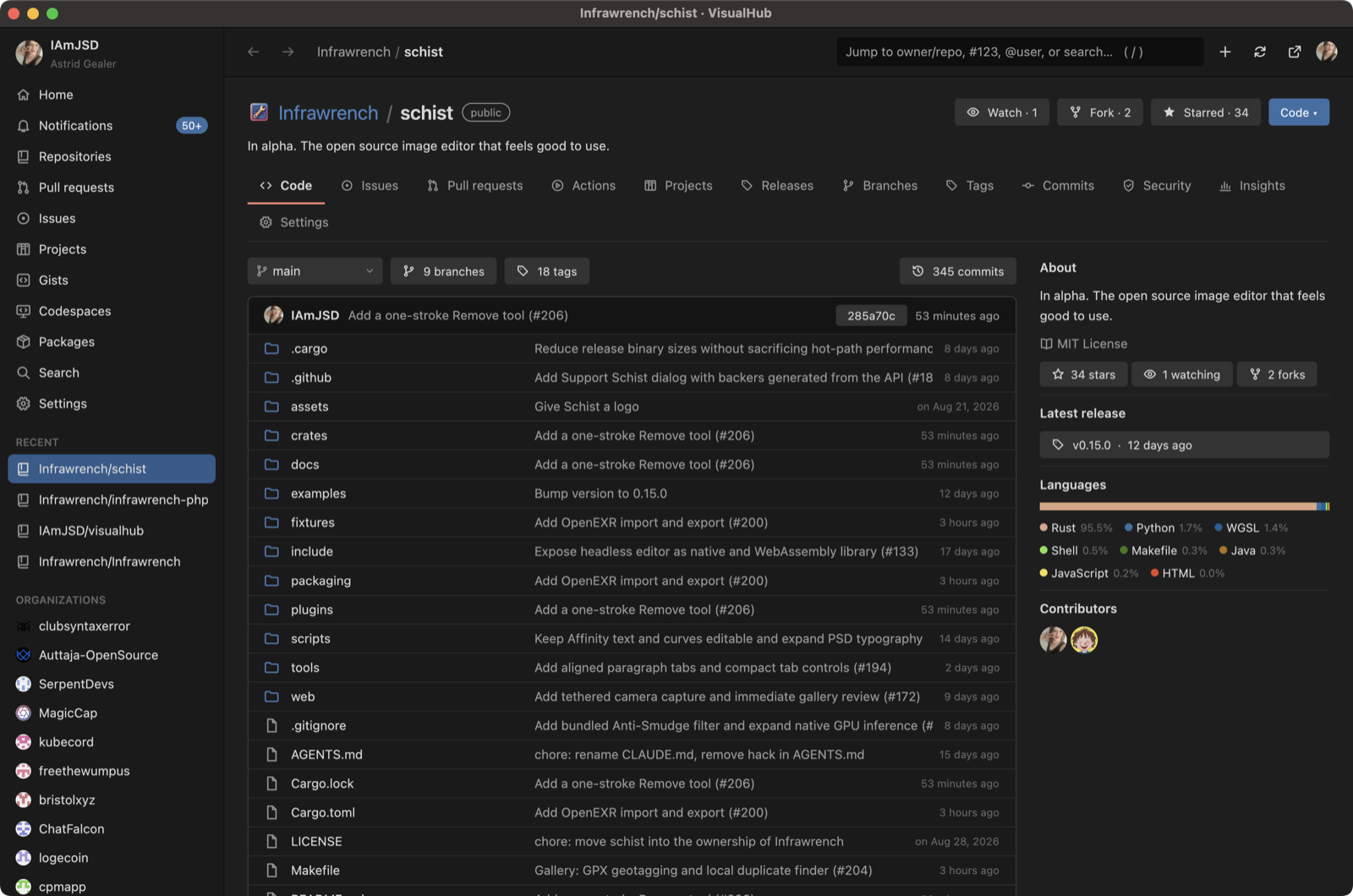
Screenshots
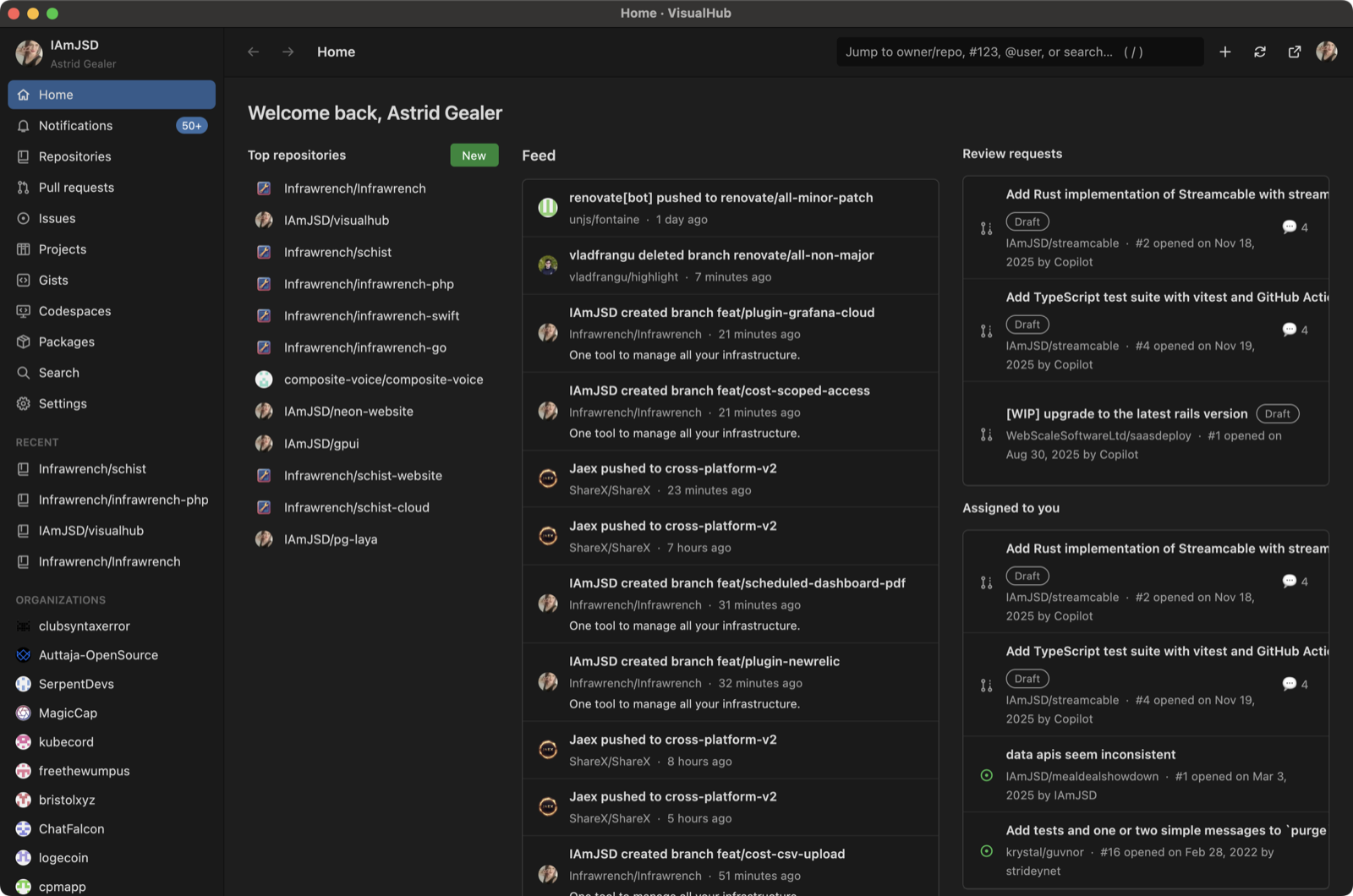 Home: feed, review requests, assigned work Home: feed, review requests, assigned work | 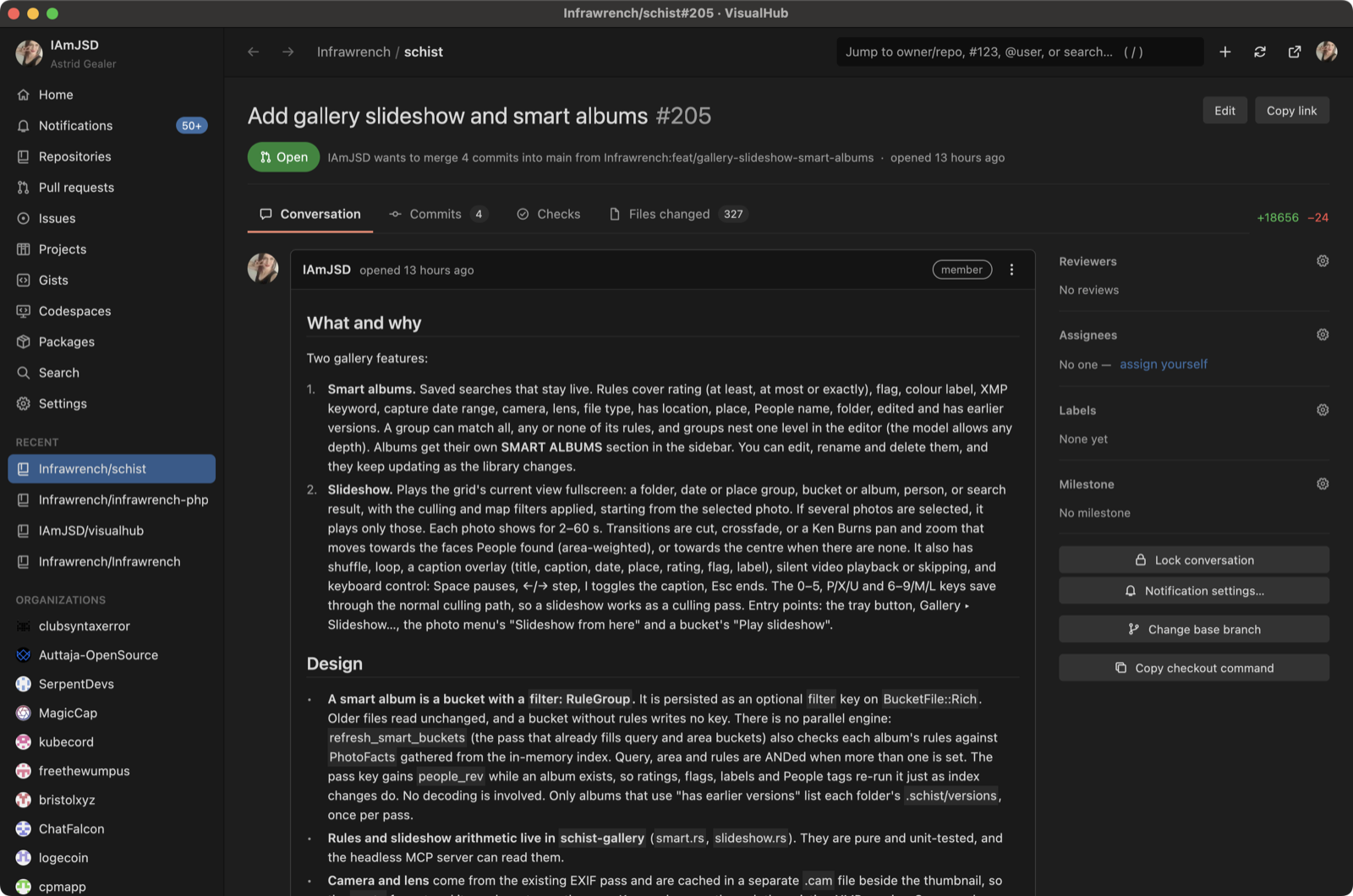 A pull request's conversation A pull request's conversation |
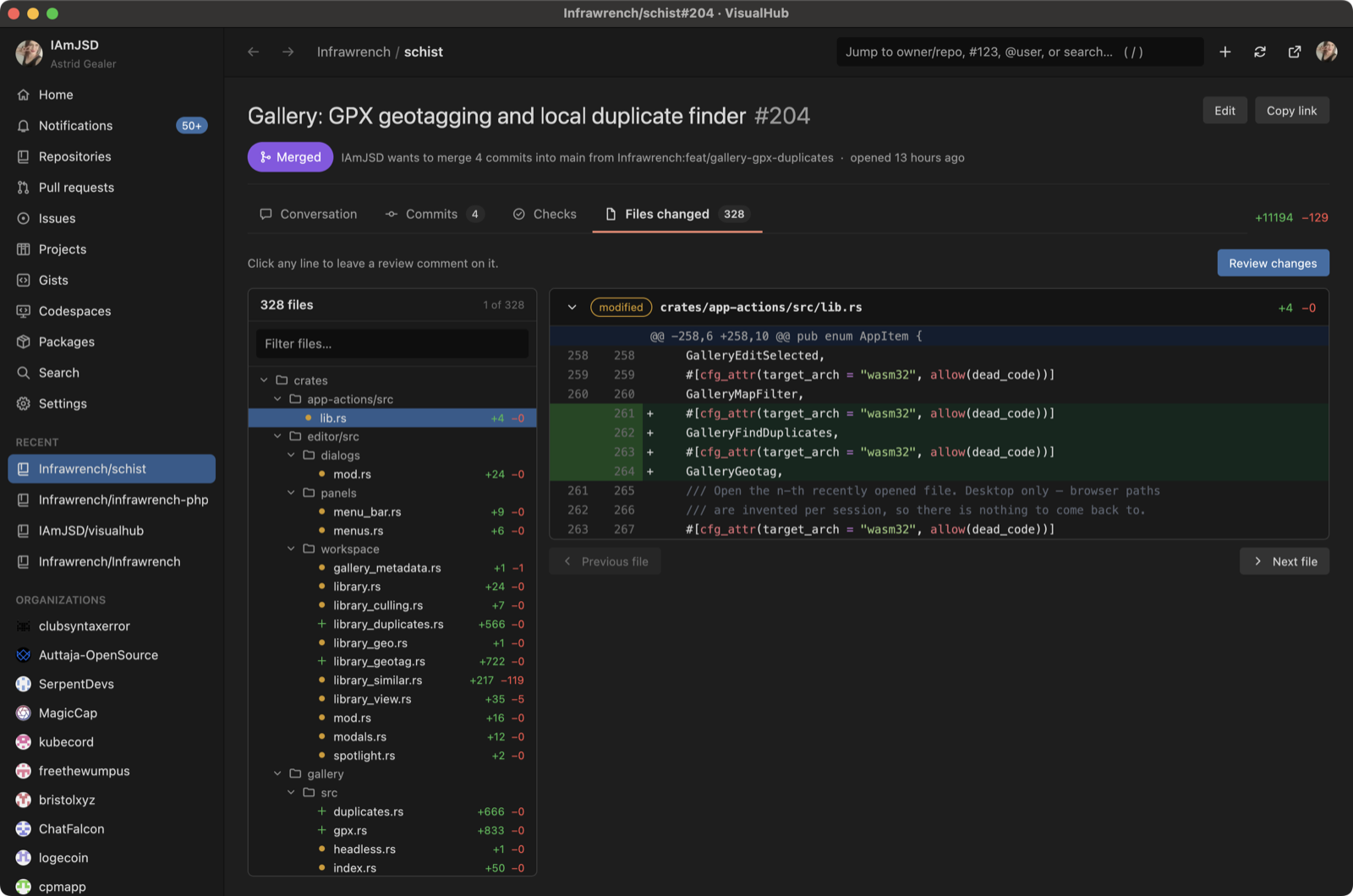 Files changed, with a searchable file tree Files changed, with a searchable file tree | 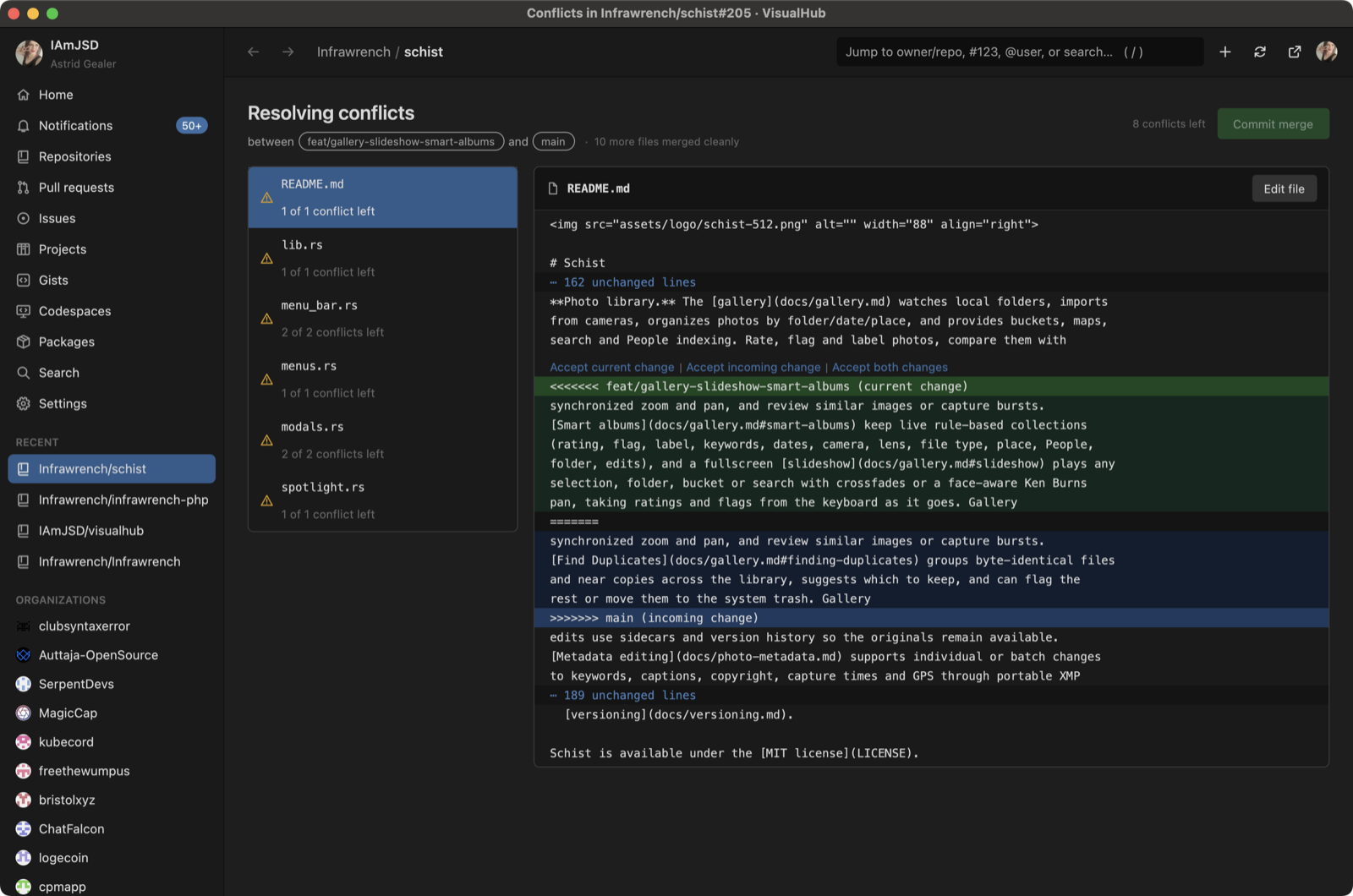 Resolving merge conflicts in the app Resolving merge conflicts in the app |
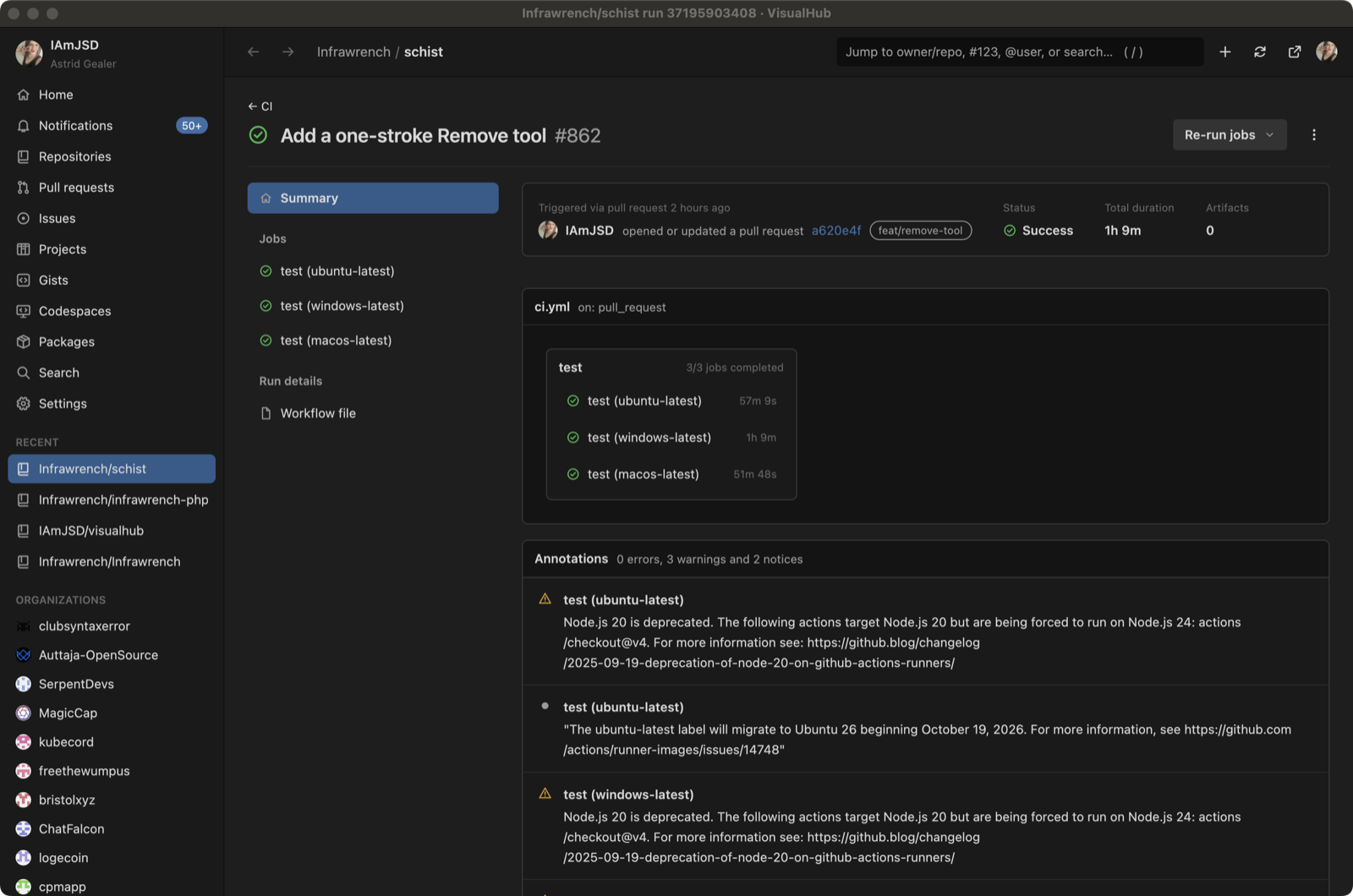 A workflow run with its graph and annotations A workflow run with its graph and annotations | 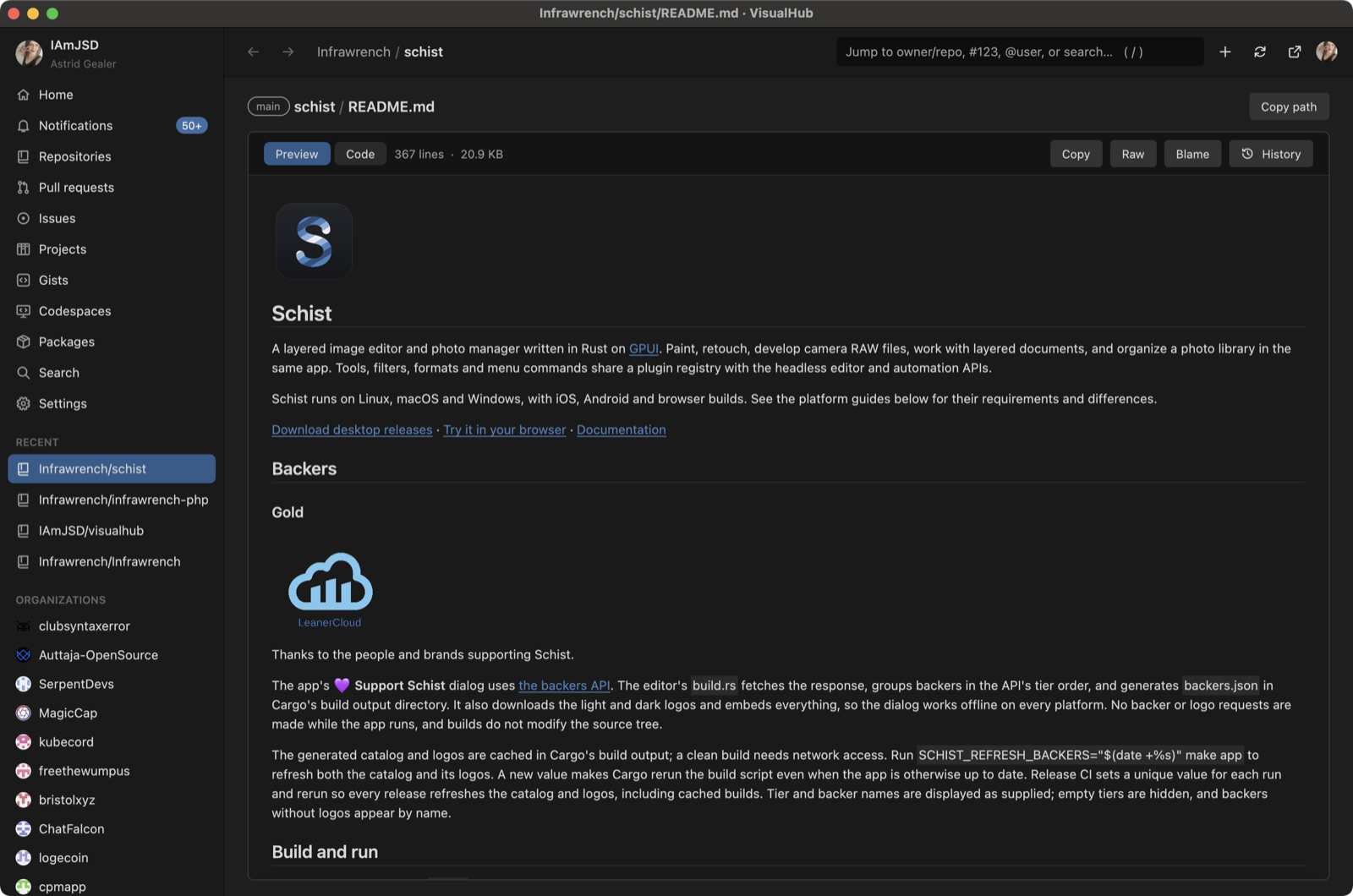 A rendered README A rendered README |
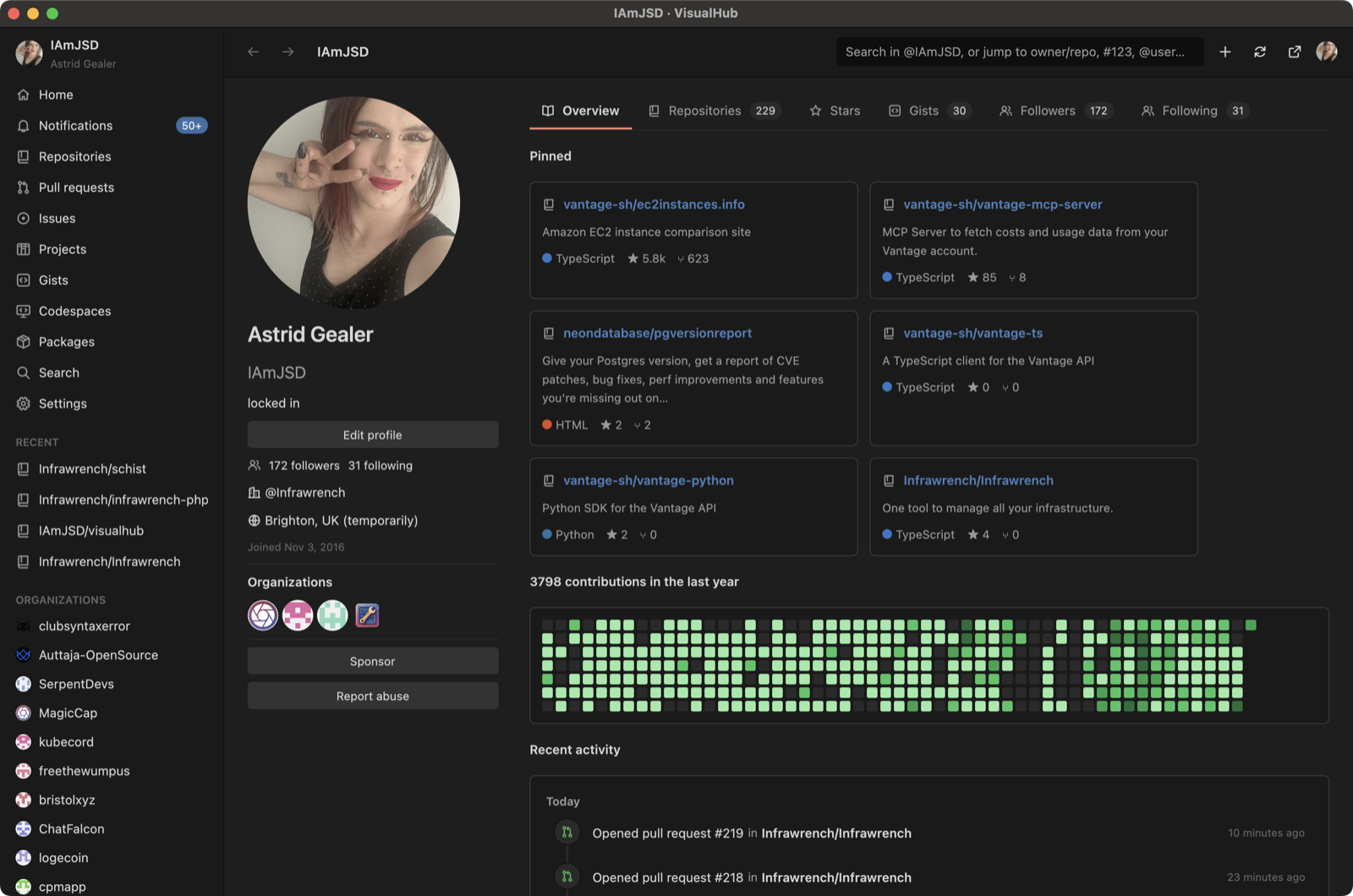 A profile, with the contribution calendar and activity A profile, with the contribution calendar and activity | 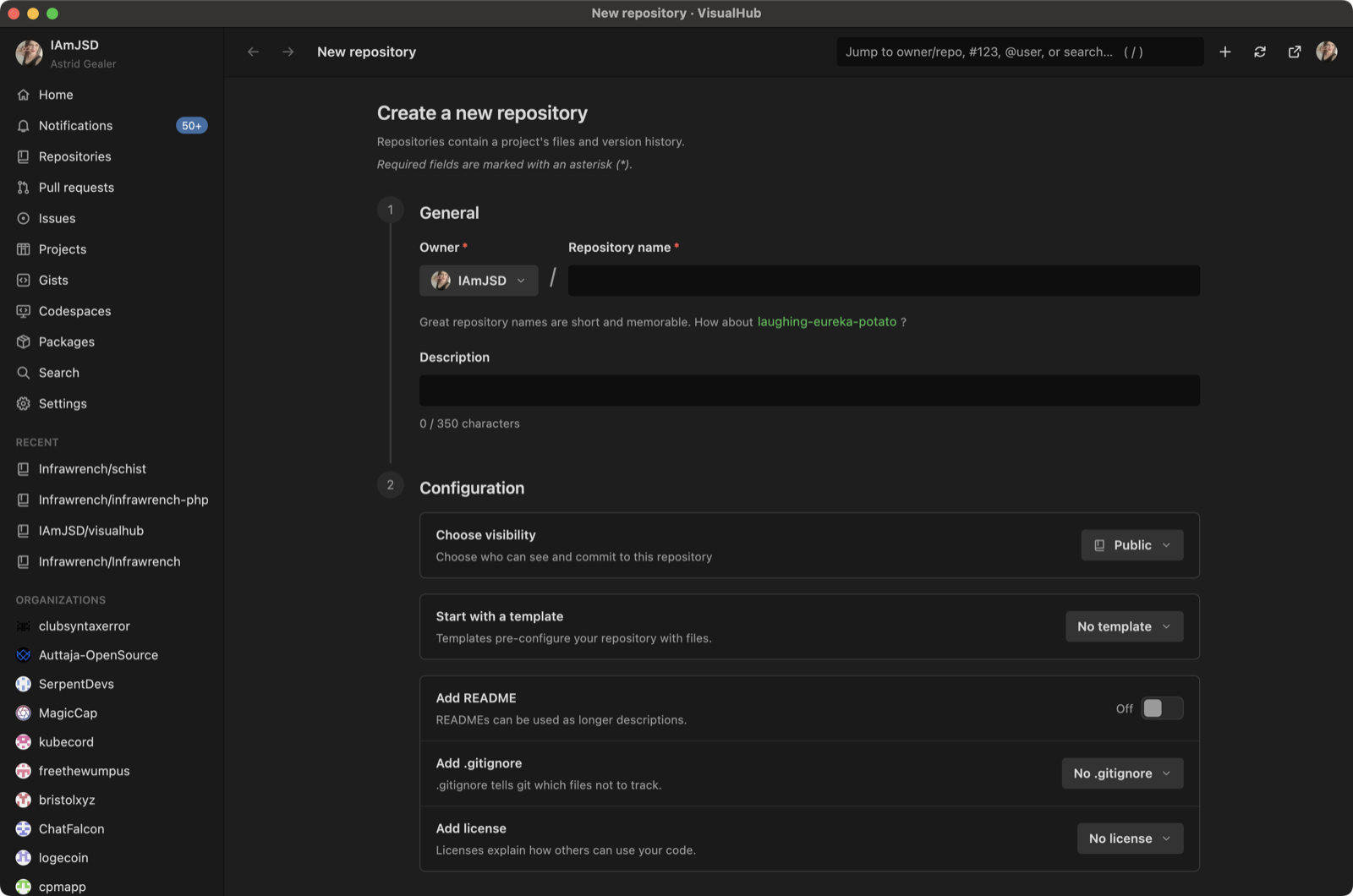 Creating a repository Creating a repository |
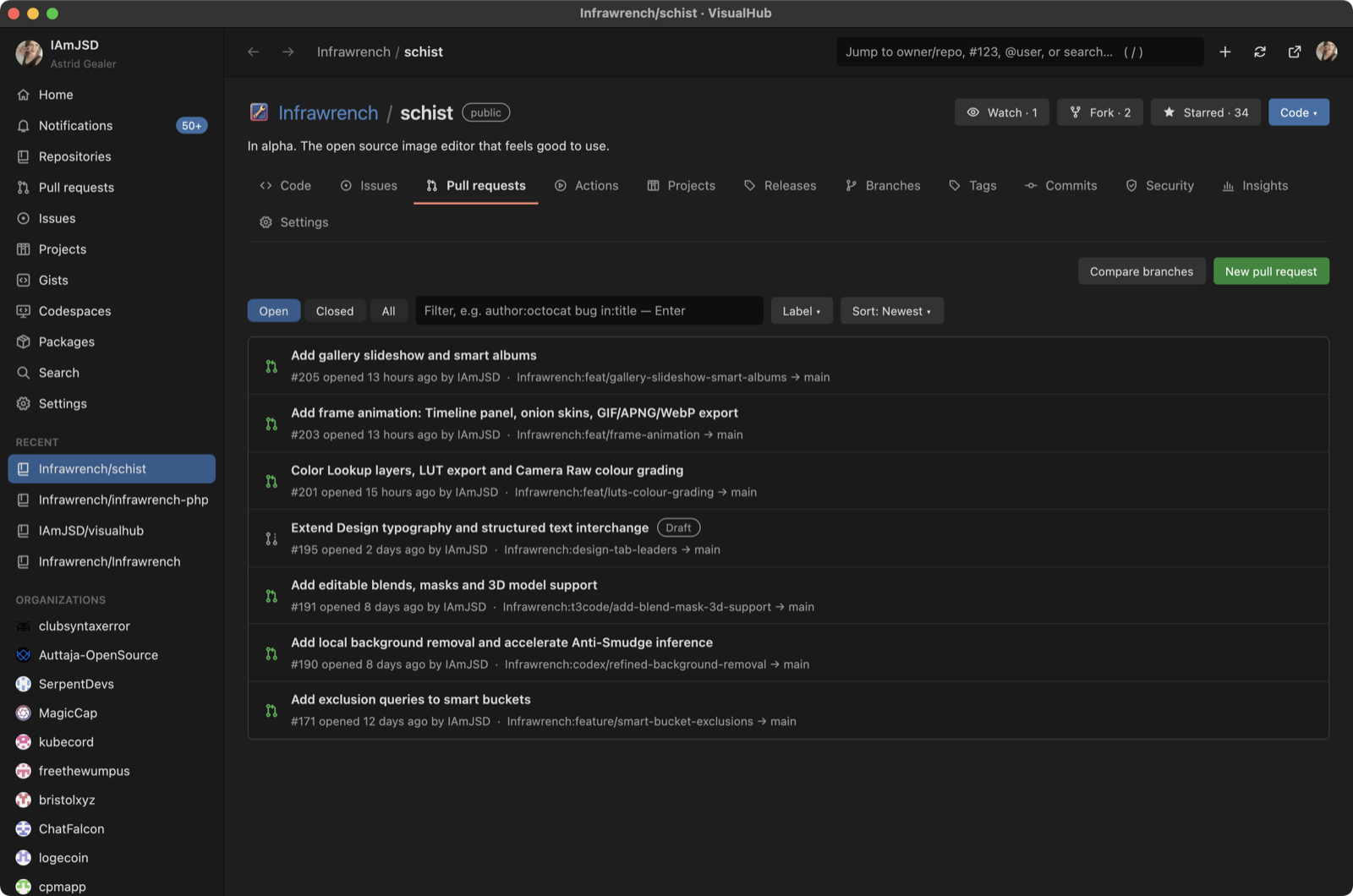 A repository's pull requests A repository's pull requests | 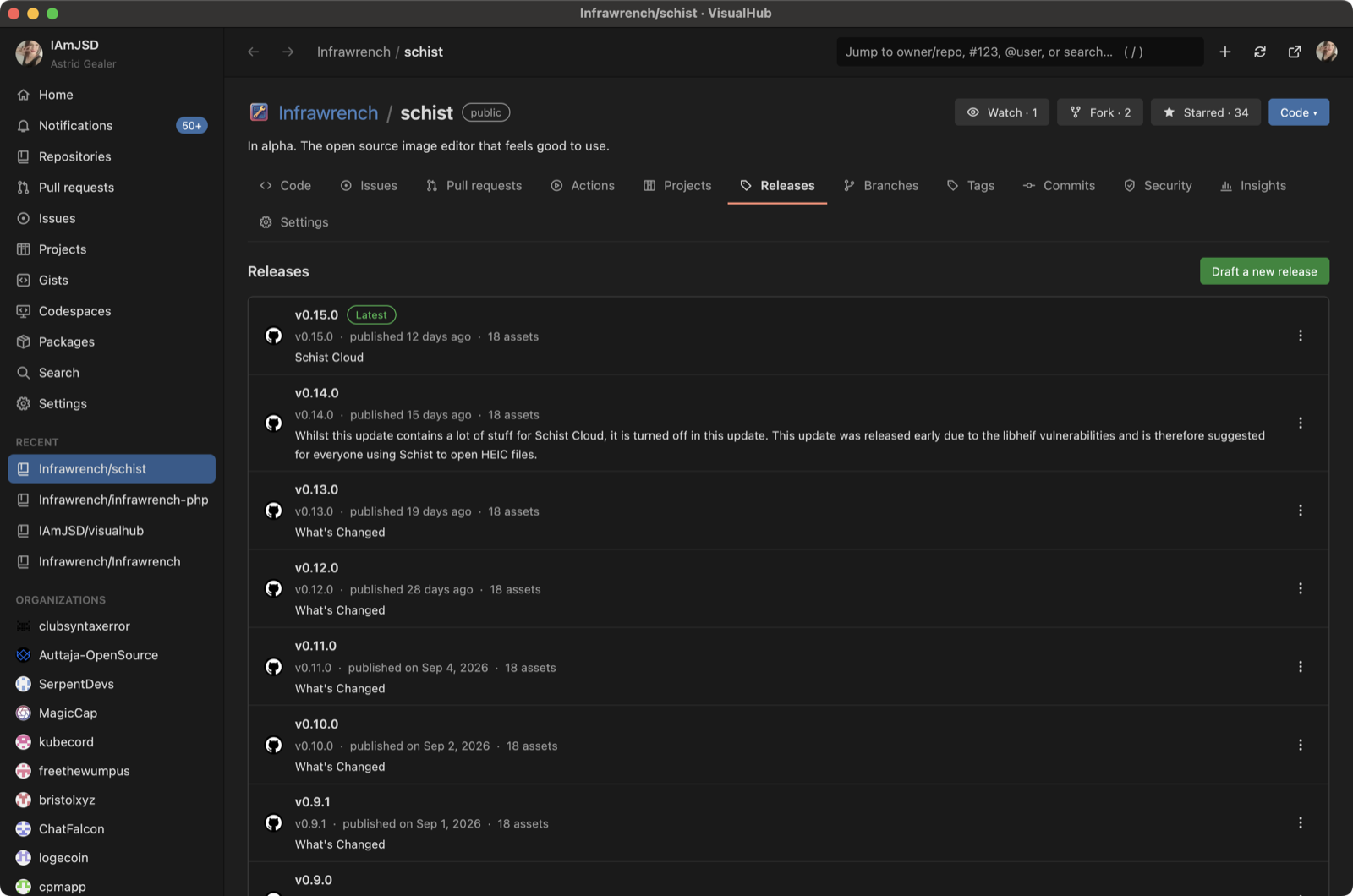 Releases Releases |
What it does
| Area | What you can do |
|---|---|
| Home | Read your activity feed, top repositories, review requests, issues assigned to you and your open pull requests |
| Notifications | Filter by unread, participating, all or repository. Mark one or all as read, mark as done, unsubscribe or mute a thread |
| Repositories | List yours, your stars and your watches. Accept or decline invitations. Create a repository (README, .gitignore, license, template) |
| Repository | Star, watch (all, participating or ignore), fork, use as a template, clone (HTTPS/SSH/CLI, Desktop, VS Code), download a ZIP and create a codespace. The Code tab has a branch/tag picker, a file browser, a rendered README, an About panel, a language bar and contributors |
| Files | Browse directories and read files with line numbers (long files scroll smoothly). Preview Markdown, show images, open raw, blame or file history, copy a path or the contents |
| Issues | Filter by state or label, search with qualifiers, sort. Open, edit, comment, quote-reply, edit or delete comments, react, and close as completed or not planned, then reopen. Assignees, labels, milestone, lock, pin, transfer, branch from an issue, delete. Full timeline. Manage labels and milestones |
| Pull requests | Conversation, commits, checks, and files changed with review comments shown on their lines (click any line to comment). Reply to or edit review comments. Review (comment, approve, request changes). Merge, squash or rebase with a message, optionally deleting the branch. Auto-merge, update branch, ready for review or back to draft, change base, request reviewers. Compare branches and open a PR |
| Commits | Filter history by branch, path or author. A commit page shows message, signature, parents, diff and comments |
| Actions | Filter runs by workflow or status. Re-run, re-run failed jobs, cancel, force-cancel, delete or approve runs. A run page with its jobs, a workflow graph built from the file's needs:, annotations and artifacts, updating live while it runs; jobs open on github.com, the only place their logs stream. Approve or reject pending deployments. Workflows: run with inputs, enable, disable. Delete artifacts and caches. Self-hosted runners and registration tokens |
| Releases | List releases, draft, publish, edit or delete them, generate notes, react, download or delete assets, and get source archives |
| Branches & tags | Create, rename, delete, set default, compare, protect (with a rules form) or unprotect branches. Create or delete tags |
| Discussions | Filter by category. Start, edit, close (resolved, outdated or duplicate), lock or delete a discussion. Comment, reply, upvote, mark an answer |
| Projects | List your projects and your organizations' projects. Show a project as a board grouped by Status or as a table. Move items, add drafts or existing issues/PRs, archive, remove, edit settings, close, delete |
| Security | Dismiss or reopen Dependabot and code scanning alerts. Close secret scanning alerts. Create, publish or close draft advisories and request a CVE. Read the security policy. Turn alerts, security updates and private reporting on or off |
| Insights | Commit activity chart, contributors, traffic (views, clones, popular paths, referrers), community checklist, dependency SBOM, forks, stargazers, watchers |
| Repo settings | General settings and merge options, topics, visibility, archive, transfer, delete. Collaborators and roles, teams, invitations, webhooks (add, edit, ping, test), deploy keys. Actions, Dependabot and Codespaces secrets (encrypted locally). Variables, environments, Pages, rulesets, autolinks, Actions permissions |
| People | Profiles with pinned repositories and the contribution calendar. Follow, unfollow, block, unblock. Repositories, stars, gists, followers, following |
| Organizations | Repositories, members (invite, change role, remove, make your membership public), teams (create, edit, members, repositories), invitations, outside collaborators, webhooks, secrets, variables, blocked users, packages, settings |
| Gists | Your gists, starred and discover. View, comment, star, fork, edit the description, delete, create |
| Search | Repositories, issues, pull requests, users, code, commits and topics, with sorting |
| Codespaces | Create, start, stop, rename, change machine type, export, delete. Codespaces secrets |
| Packages | List by type, show versions, delete a package or a version |
| Account | Profile, emails, SSH, signing and GPG keys, social accounts, blocked users, interaction limits, installed apps, theme, rate limits, sign out |
Some things GitHub only offers in the browser (billing, OAuth app approval, uploading avatars). For those, VisualHub opens the right page on github.com, and every screen has an Open on github.com button.
Keys
| Key | Action |
|---|---|
/ or Ctrl+K | Jump box: owner/repo, owner/repo#12, #12, @user, a github.com URL, or a search |
Alt+← / Alt+→ | Back / forward |
Ctrl+R | Refresh everything |
Ctrl+Enter | Send the comment you're writing |
Enter / Esc | Submit / close a dialog; Tab moves between fields |
Signing in
VisualHub looks for an existing token in this order:
- one saved by a previous sign-in (
%APPDATA%\visualhub\token, or~/.config/visualhub/token, or~/Library/Application Support/visualhub/token) GH_TOKENorGITHUB_TOKEN- the GitHub CLI (
gh auth token)
If none of those work, paste a personal access token. The sign-in screen links to a classic-token page with every scope the app uses already selected.
Building
cargo run --release
The build is self-contained: GPUI comes from the pinned fork revision, and nothing else needs to be checked out next to it.
VISUALHUB_OPEN=<a github.com URL> starts the app on that page, which is how
the screenshots above were taken.
Packaging
make release
packages for the machine it runs on, into dist/:
- Linux: an AppImage carrying its libraries, plus
.deb,.rpmand Arch.pkg.tar.zstpackages (packaging/linux/). Each native format is skipped, with a note, when its tool (rpmbuild,bsdtar) is missing. - Windows:
VisualHub-VERSION-setup.exe, an NSIS installer (packaging/windows/installer.nsi); the.execarries the app icon. - macOS: a universal
VisualHub.app(Apple Silicon and Intel, joined withlipo),VisualHub.dmgandVisualHub.zip. SetMACOS_CERT_NAME(and optionallyMACOS_KEYCHAIN) to sign it, andMACOS_NOTARY_PROFILEorAPPLE_ID,APPLE_APP_SPECIFIC_PASSWORDandAPPLE_TEAM_IDto notarize it too; seepackaging/macos/bundle.sh.make iconrebuilds the.icnsfromassets/icon.svg.
Pushing a v* tag runs all of these in CI (.github/workflows/release.yml):
macOS (signed and notarized), Linux on x86_64 and arm64, and Windows, and
attaches everything to a GitHub release.
How it's built
src/ui/: the widget kit (buttons, text fields, chips, menus, dialogs, spinners, the palette), copied from Schist'sschist-uicrate under its MIT license (src/ui/LICENSE-SCHIST). Only the components the app uses were copied.src/api.rs: one blockingureqagent for REST, GraphQL, raw content and images. It runs on GPUI's background executor.src/hub.rs: the single view. Pages callfetch(path), which returns the cached value or starts a request and redraws when it arrives. Every click is anAct. A write is aReqthat lists the cache prefixes it makes stale, so lists refresh after edits.src/form.rsandsrc/resource.rs: dialogs and paged lists are described as data. Dozens of settings screens and list screens are a field list plus a row mapping, not hand-built UI.src/markdown.rs,src/diff.rs: GitHub-flavoured Markdown (links, tables, task lists, images) and unified diffs, built from GPUI elements.src/screens/*: one module per area of GitHub.assets/icons: the app's own 16px line icons, generated fromtools/icons.txtbytools/icons.py.
Similar repos


Languages
Rust
97.4%
Shell
2.1%
The high performance GitHub UI that is missing from the site
Rust
0
39 commits
updated Oct 4, 2026
See what people are saying
README
VisualHub
A native GitHub client written in Rust on GPUI (the IAmJSD fork). Its widgets are adapted from Schist's widget kit. VisualHub covers what you do on github.com, except editing code. Files, diffs, logs and gists are read-only. Everything else can be done from the app.
Screenshots
| Home: feed, review requests, assigned work | A pull request's conversation |
| Files changed, with a searchable file tree | Resolving merge conflicts in the app |
| A workflow run with its graph and annotations | A rendered README |
| A profile, with the contribution calendar and activity | Creating a repository |
| A repository's pull requests | Releases |
What it does
| Area | What you can do |
|---|---|
| Home | Read your activity feed, top repositories, review requests, issues assigned to you and your open pull requests |
| Notifications | Filter by unread, participating, all or repository. Mark one or all as read, mark as done, unsubscribe or mute a thread |
| Repositories | List yours, your stars and your watches. Accept or decline invitations. Create a repository (README, .gitignore, license, template) |
| Repository | Star, watch (all, participating or ignore), fork, use as a template, clone (HTTPS/SSH/CLI, Desktop, VS Code), download a ZIP and create a codespace. The Code tab has a branch/tag picker, a file browser, a rendered README, an About panel, a language bar and contributors |
| Files | Browse directories and read files with line numbers (long files scroll smoothly). Preview Markdown, show images, open raw, blame or file history, copy a path or the contents |
| Issues | Filter by state or label, search with qualifiers, sort. Open, edit, comment, quote-reply, edit or delete comments, react, and close as completed or not planned, then reopen. Assignees, labels, milestone, lock, pin, transfer, branch from an issue, delete. Full timeline. Manage labels and milestones |
| Pull requests | Conversation, commits, checks, and files changed with review comments shown on their lines (click any line to comment). Reply to or edit review comments. Review (comment, approve, request changes). Merge, squash or rebase with a message, optionally deleting the branch. Auto-merge, update branch, ready for review or back to draft, change base, request reviewers. Compare branches and open a PR |
| Commits | Filter history by branch, path or author. A commit page shows message, signature, parents, diff and comments |
| Actions | Filter runs by workflow or status. Re-run, re-run failed jobs, cancel, force-cancel, delete or approve runs. A run page with its jobs, a workflow graph built from the file's needs:, annotations and artifacts, updating live while it runs; jobs open on github.com, the only place their logs stream. Approve or reject pending deployments. Workflows: run with inputs, enable, disable. Delete artifacts and caches. Self-hosted runners and registration tokens |
| Releases | List releases, draft, publish, edit or delete them, generate notes, react, download or delete assets, and get source archives |
| Branches & tags | Create, rename, delete, set default, compare, protect (with a rules form) or unprotect branches. Create or delete tags |
| Discussions | Filter by category. Start, edit, close (resolved, outdated or duplicate), lock or delete a discussion. Comment, reply, upvote, mark an answer |
| Projects | List your projects and your organizations' projects. Show a project as a board grouped by Status or as a table. Move items, add drafts or existing issues/PRs, archive, remove, edit settings, close, delete |
| Security | Dismiss or reopen Dependabot and code scanning alerts. Close secret scanning alerts. Create, publish or close draft advisories and request a CVE. Read the security policy. Turn alerts, security updates and private reporting on or off |
| Insights | Commit activity chart, contributors, traffic (views, clones, popular paths, referrers), community checklist, dependency SBOM, forks, stargazers, watchers |
| Repo settings | General settings and merge options, topics, visibility, archive, transfer, delete. Collaborators and roles, teams, invitations, webhooks (add, edit, ping, test), deploy keys. Actions, Dependabot and Codespaces secrets (encrypted locally). Variables, environments, Pages, rulesets, autolinks, Actions permissions |
| People | Profiles with pinned repositories and the contribution calendar. Follow, unfollow, block, unblock. Repositories, stars, gists, followers, following |
| Organizations | Repositories, members (invite, change role, remove, make your membership public), teams (create, edit, members, repositories), invitations, outside collaborators, webhooks, secrets, variables, blocked users, packages, settings |
| Gists | Your gists, starred and discover. View, comment, star, fork, edit the description, delete, create |
| Search | Repositories, issues, pull requests, users, code, commits and topics, with sorting |
| Codespaces | Create, start, stop, rename, change machine type, export, delete. Codespaces secrets |
| Packages | List by type, show versions, delete a package or a version |
| Account | Profile, emails, SSH, signing and GPG keys, social accounts, blocked users, interaction limits, installed apps, theme, rate limits, sign out |
Some things GitHub only offers in the browser (billing, OAuth app approval, uploading avatars). For those, VisualHub opens the right page on github.com, and every screen has an Open on github.com button.
Keys
| Key | Action |
|---|---|
/ or Ctrl+K | Jump box: owner/repo, owner/repo#12, #12, @user, a github.com URL, or a search |
Alt+← / Alt+→ | Back / forward |
Ctrl+R | Refresh everything |
Ctrl+Enter | Send the comment you're writing |
Enter / Esc | Submit / close a dialog; Tab moves between fields |
Signing in
VisualHub looks for an existing token in this order:
- one saved by a previous sign-in (
%APPDATA%\visualhub\token, or~/.config/visualhub/token, or~/Library/Application Support/visualhub/token) GH_TOKENorGITHUB_TOKEN- the GitHub CLI (
gh auth token)
If none of those work, paste a personal access token. The sign-in screen links to a classic-token page with every scope the app uses already selected.
Building
cargo run --release
The build is self-contained: GPUI comes from the pinned fork revision, and nothing else needs to be checked out next to it.
VISUALHUB_OPEN=<a github.com URL> starts the app on that page, which is how
the screenshots above were taken.
Packaging
make release
packages for the machine it runs on, into dist/:
- Linux: an AppImage carrying its libraries, plus
.deb,.rpmand Arch.pkg.tar.zstpackages (packaging/linux/). Each native format is skipped, with a note, when its tool (rpmbuild,bsdtar) is missing. - Windows:
VisualHub-VERSION-setup.exe, an NSIS installer (packaging/windows/installer.nsi); the.execarries the app icon. - macOS: a universal
VisualHub.app(Apple Silicon and Intel, joined withlipo),VisualHub.dmgandVisualHub.zip. SetMACOS_CERT_NAME(and optionallyMACOS_KEYCHAIN) to sign it, andMACOS_NOTARY_PROFILEorAPPLE_ID,APPLE_APP_SPECIFIC_PASSWORDandAPPLE_TEAM_IDto notarize it too; seepackaging/macos/bundle.sh.make iconrebuilds the.icnsfromassets/icon.svg.
Pushing a v* tag runs all of these in CI (.github/workflows/release.yml):
macOS (signed and notarized), Linux on x86_64 and arm64, and Windows, and
attaches everything to a GitHub release.
How it's built
src/ui/: the widget kit (buttons, text fields, chips, menus, dialogs, spinners, the palette), copied from Schist'sschist-uicrate under its MIT license (src/ui/LICENSE-SCHIST). Only the components the app uses were copied.src/api.rs: one blockingureqagent for REST, GraphQL, raw content and images. It runs on GPUI's background executor.src/hub.rs: the single view. Pages callfetch(path), which returns the cached value or starts a request and redraws when it arrives. Every click is anAct. A write is aReqthat lists the cache prefixes it makes stale, so lists refresh after edits.src/form.rsandsrc/resource.rs: dialogs and paged lists are described as data. Dozens of settings screens and list screens are a field list plus a row mapping, not hand-built UI.src/markdown.rs,src/diff.rs: GitHub-flavoured Markdown (links, tables, task lists, images) and unified diffs, built from GPUI elements.src/screens/*: one module per area of GitHub.assets/icons: the app's own 16px line icons, generated fromtools/icons.txtbytools/icons.py.
Similar repos
Languages
Rust
97.4%
Shell
2.1%