
A terminal UI for GitHub Actions across all the repos and orgs your account can see
Rust
0
62 commits
updated Sep 26, 2026
See what people are saying
README
actui
A terminal UI for GitHub Actions across all the repos and orgs your account can see.
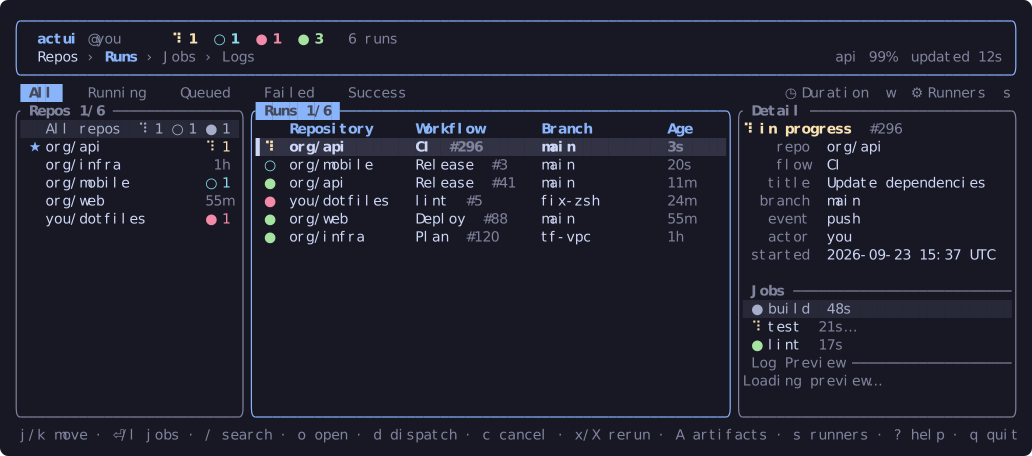
Features
- Recent runs from all your repos in one list, most recent activity first.
- A repos sidebar: pin repos to the top, limit the list to one repo (which also reads further back, 100 runs), and dispatch in repos with no recent runs.
- Each run's jobs, and the steps of a running job as they happen. Full logs load when the job finishes.
- A logs viewer with foldable steps, search, a view of just the lines near errors, and saving to a file.
- Failure annotations (
v): thefile:lineerrors of a run's failed jobs, each one opening its job's log at that line. - A duration chart (
w) of a workflow's successful runs, with the median and whether it is getting slower. - The tag or release a run made, shown with the run.
- Dispatch a workflow with a form built from its inputs, cancel and re-run runs or jobs, approve held runs, and download artifacts.
- Your orgs' self-hosted runners (
s). - A desktop notification and terminal bell when a run finishes.
- Light and dark themes, following the terminal's background.
- Pane and column widths you drag stay set between sessions.
- Light on the API: conditional requests (a
304doesn't count against the rate limit), fast polling only while runs are active, and a pause when GitHub rate-limits.
Install
Prebuilt binaries for macOS, Linux and Windows are on the releases page. Or with Cargo:
cargo binstall actui   # fetches the prebuilt binary
cargo install actui    # builds from source
Auth
actui uses the first of:
$GITHUB_TOKENor$GH_TOKENgh auth token(from the GitHub CLI, aftergh auth login)
The token needs the repo and workflow scopes.
Configuration
Optional, in ~/.config/actui/config.toml, or under $XDG_CONFIG_HOME if you set it
(Windows: %APPDATA%\actui\config.toml). actui --help prints the path it reads.
The defaults:
refresh_secs        = 60      # how often to read every repo's runs
active_refresh_secs = 15      # how often to read active runs' jobs
live_refresh_secs   = 2       # how often the live steps view updates (1-10)
runs_per_repo       = 15      # runs read per repo
scoped_runs         = 100     # runs read for the repo the sidebar is on (max 100)
concurrency         = 10      # repos read at once
max_repos           = 60      # most recently pushed repos to watch (0 = all)
skip_archived       = true
notify              = true    # desktop notification when a run finishes
bell                = true    # terminal bell when a run finishes
theme               = "auto"  # or "dark" / "light"
sidebar             = true    # show the repos sidebar
sort                = "alpha" # sidebar order after pinned repos, or "used"
pinned              = []      # e.g. ["my-org/api"]
include             = []      # only repos whose name contains one of these
exclude             = []      # skip repos whose name contains one of these
If you are in large orgs, set include or lower max_repos to stay under
GitHub's 5000 requests an hour.
Pane widths and the history behind sort = "used" are saved in state.toml
next to the config.
Keys
| Key | Action |
|---|---|
j / k | move |
Tab, ← / → | move between the Repos, Runs and Jobs panes |
Enter | open a run's jobs, or a job's logs |
1–5, / | filter by status, search |
d | dispatch a workflow |
c, x / X | cancel, re-run failed jobs / all jobs |
o | open on github.com |
? | all keys |
q | quit |
The mouse works too: click to select, scroll, and drag pane borders and column edges to resize.
License
MIT, see LICENSE.
Similar repos


Languages
Rust
100.0%
A terminal UI for GitHub Actions across all the repos and orgs your account can see
Rust
0
62 commits
updated Sep 26, 2026
See what people are saying
README
actui
A terminal UI for GitHub Actions across all the repos and orgs your account can see.
Features
- Recent runs from all your repos in one list, most recent activity first.
- A repos sidebar: pin repos to the top, limit the list to one repo (which also reads further back, 100 runs), and dispatch in repos with no recent runs.
- Each run's jobs, and the steps of a running job as they happen. Full logs load when the job finishes.
- A logs viewer with foldable steps, search, a view of just the lines near errors, and saving to a file.
- Failure annotations (
v): thefile:lineerrors of a run's failed jobs, each one opening its job's log at that line. - A duration chart (
w) of a workflow's successful runs, with the median and whether it is getting slower. - The tag or release a run made, shown with the run.
- Dispatch a workflow with a form built from its inputs, cancel and re-run runs or jobs, approve held runs, and download artifacts.
- Your orgs' self-hosted runners (
s). - A desktop notification and terminal bell when a run finishes.
- Light and dark themes, following the terminal's background.
- Pane and column widths you drag stay set between sessions.
- Light on the API: conditional requests (a
304doesn't count against the rate limit), fast polling only while runs are active, and a pause when GitHub rate-limits.
Install
Prebuilt binaries for macOS, Linux and Windows are on the releases page. Or with Cargo:
cargo binstall actui   # fetches the prebuilt binary
cargo install actui    # builds from source
Auth
actui uses the first of:
$GITHUB_TOKENor$GH_TOKENgh auth token(from the GitHub CLI, aftergh auth login)
The token needs the repo and workflow scopes.
Configuration
Optional, in ~/.config/actui/config.toml, or under $XDG_CONFIG_HOME if you set it
(Windows: %APPDATA%\actui\config.toml). actui --help prints the path it reads.
The defaults:
refresh_secs        = 60      # how often to read every repo's runs
active_refresh_secs = 15      # how often to read active runs' jobs
live_refresh_secs   = 2       # how often the live steps view updates (1-10)
runs_per_repo       = 15      # runs read per repo
scoped_runs         = 100     # runs read for the repo the sidebar is on (max 100)
concurrency         = 10      # repos read at once
max_repos           = 60      # most recently pushed repos to watch (0 = all)
skip_archived       = true
notify              = true    # desktop notification when a run finishes
bell                = true    # terminal bell when a run finishes
theme               = "auto"  # or "dark" / "light"
sidebar             = true    # show the repos sidebar
sort                = "alpha" # sidebar order after pinned repos, or "used"
pinned              = []      # e.g. ["my-org/api"]
include             = []      # only repos whose name contains one of these
exclude             = []      # skip repos whose name contains one of these
If you are in large orgs, set include or lower max_repos to stay under
GitHub's 5000 requests an hour.
Pane widths and the history behind sort = "used" are saved in state.toml
next to the config.
Keys
| Key | Action |
|---|---|
j / k | move |
Tab, ← / → | move between the Repos, Runs and Jobs panes |
Enter | open a run's jobs, or a job's logs |
1–5, / | filter by status, search |
d | dispatch a workflow |
c, x / X | cancel, re-run failed jobs / all jobs |
o | open on github.com |
? | all keys |
q | quit |
The mouse works too: click to select, scroll, and drag pane borders and column edges to resize.
License
MIT, see LICENSE.
Similar repos
Languages
Rust
100.0%