
Describe, draw or bring your own HMI screen and ship it to embedded Linux panels: a desktop Studio with AI Design and a coding agent, a Qt-free C + LVGL panel runtime, and atomic SSH deploys with automatic rollback. PySide apps deploy too, with their Qt runtime installed on demand.
Python
10
405 commits
updated Oct 5, 2026
See what people are saying
README
EmbeddedDisplay Studio
Describe it, draw it, or bring your own — and ship it to the glass.
A desktop studio for embedded Linux HMI panels. Write a brief and a model builds the screen, or draw it on a canvas the size of the panel, or open an existing Qt application — then preview it with the panel's own renderer and deploy it over SSH, atomically, with automatic rollback. The panel runs a 1.4 MB C + LVGL runtime that reads the design file directly: no Qt, no compositor, no per-design build.











Quick start · The Studio · AI Design · Simulate · Code · Deploying · The panel runtime · Qt apps · Changelog
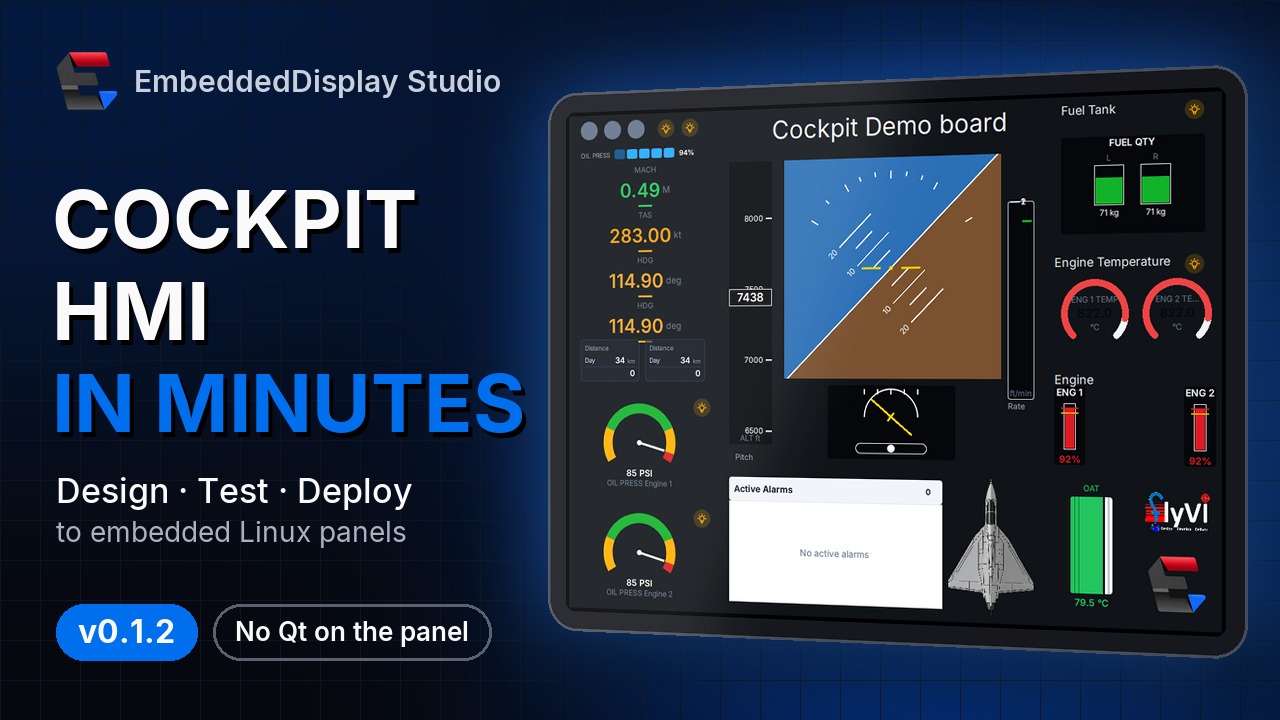
▶ Watch the two-minute tour — describe it, draw it, test it and ship it to the glass.
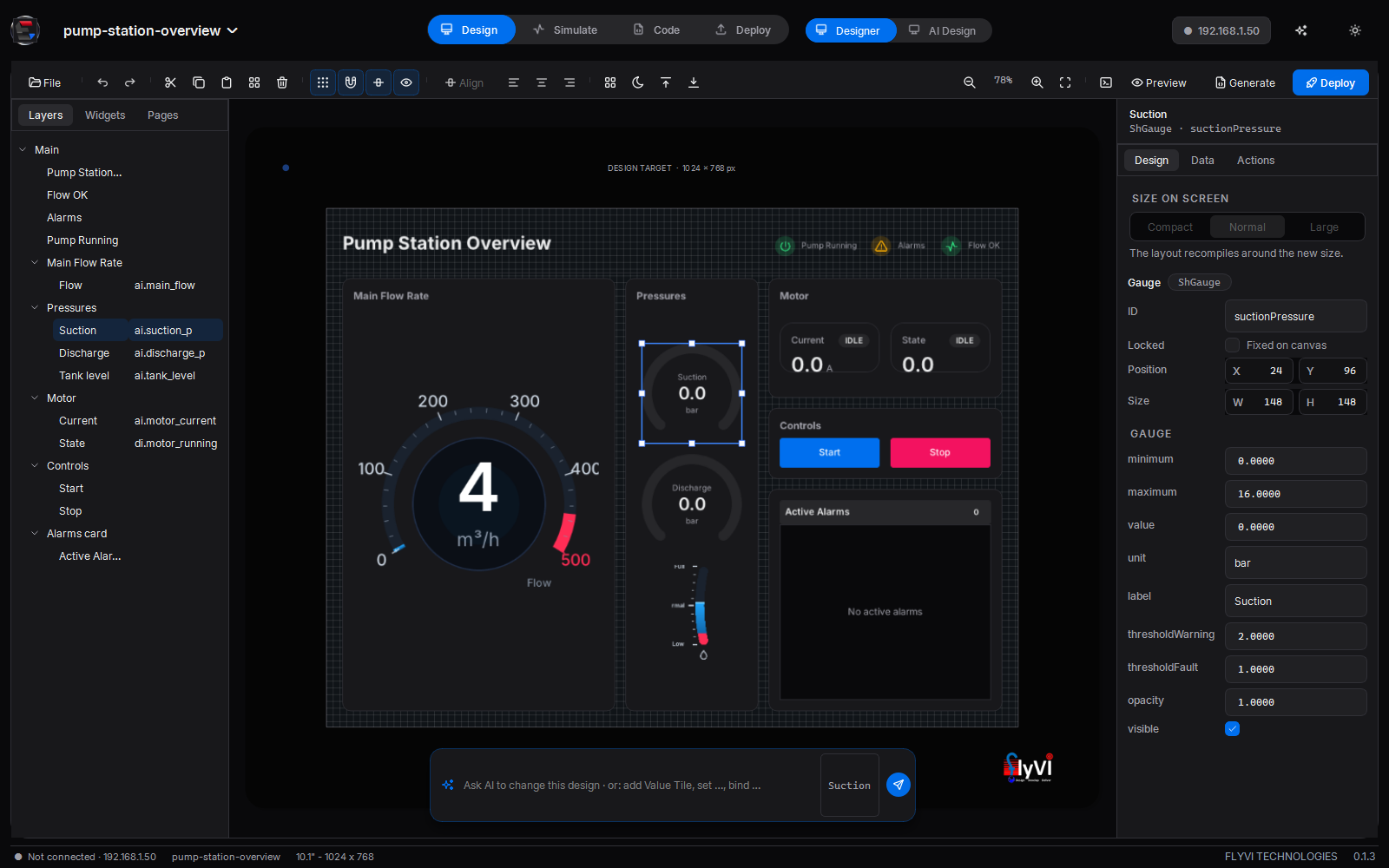
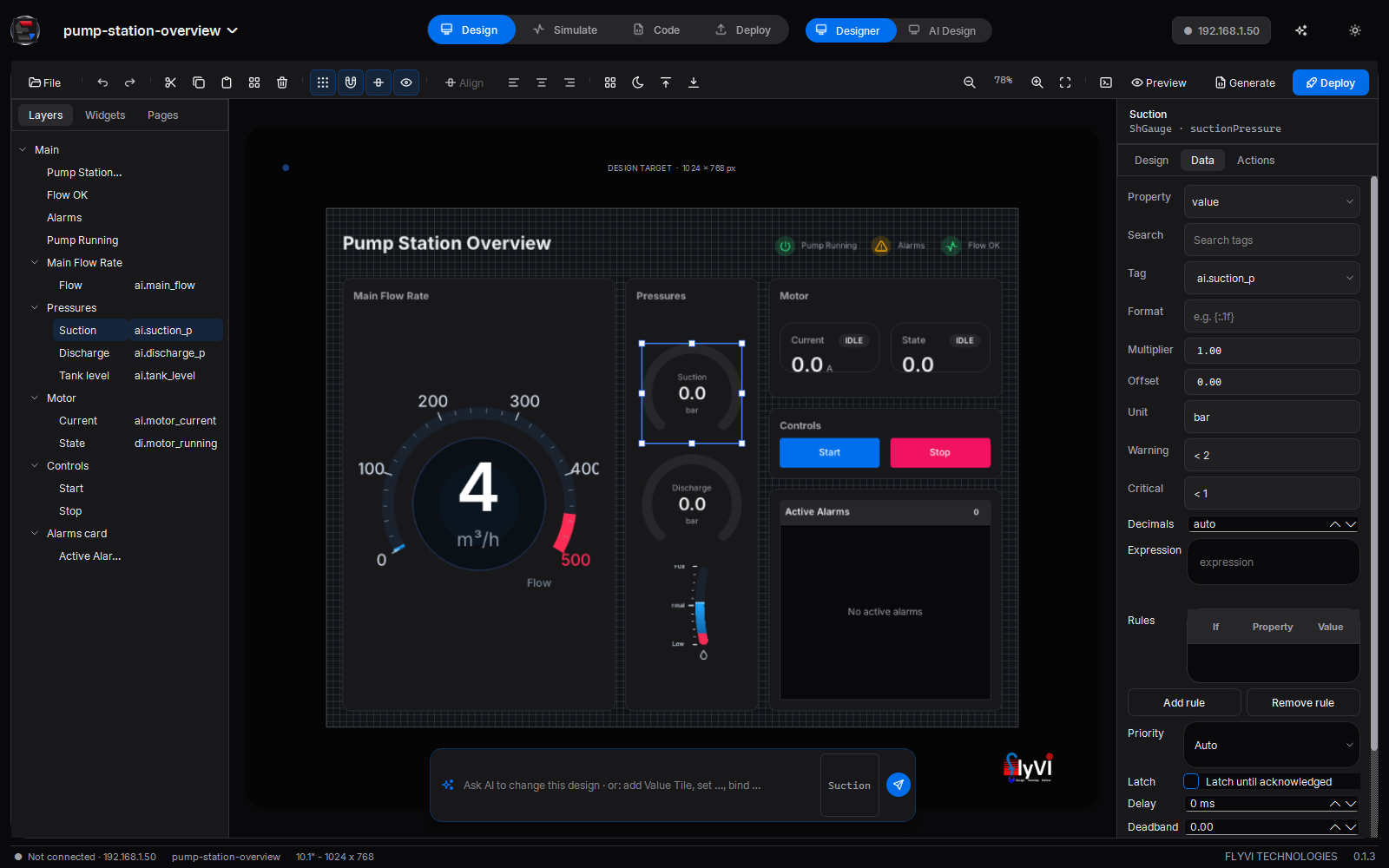
Design mode — a pump station overview the AI planned and the layout compiler laid out, drawn by the panel's own renderer. The suction gauge is selected: its layer on the left, Size on screen and its properties on the right, and the AI composer under the canvas.
Describe it |
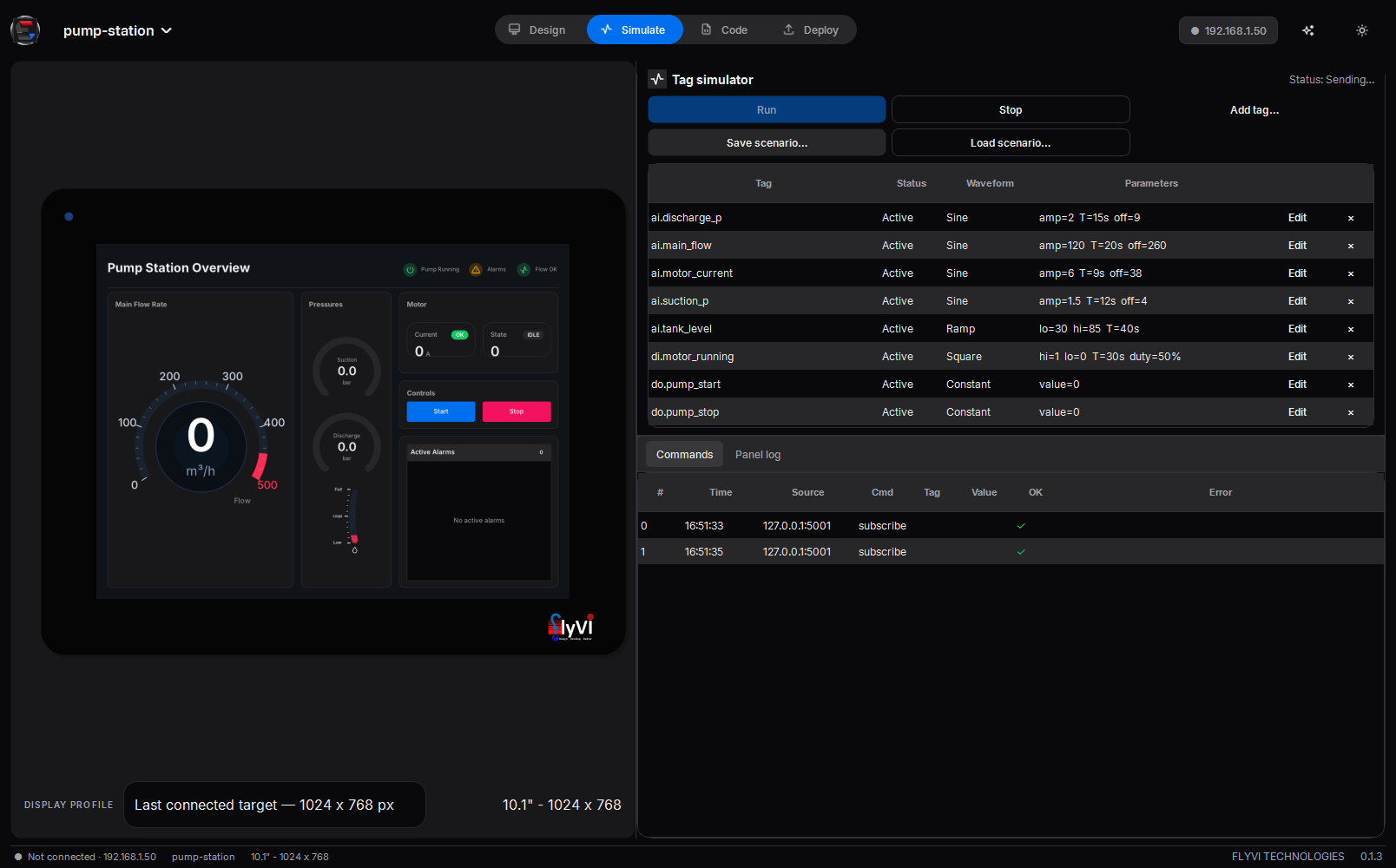
Test it |
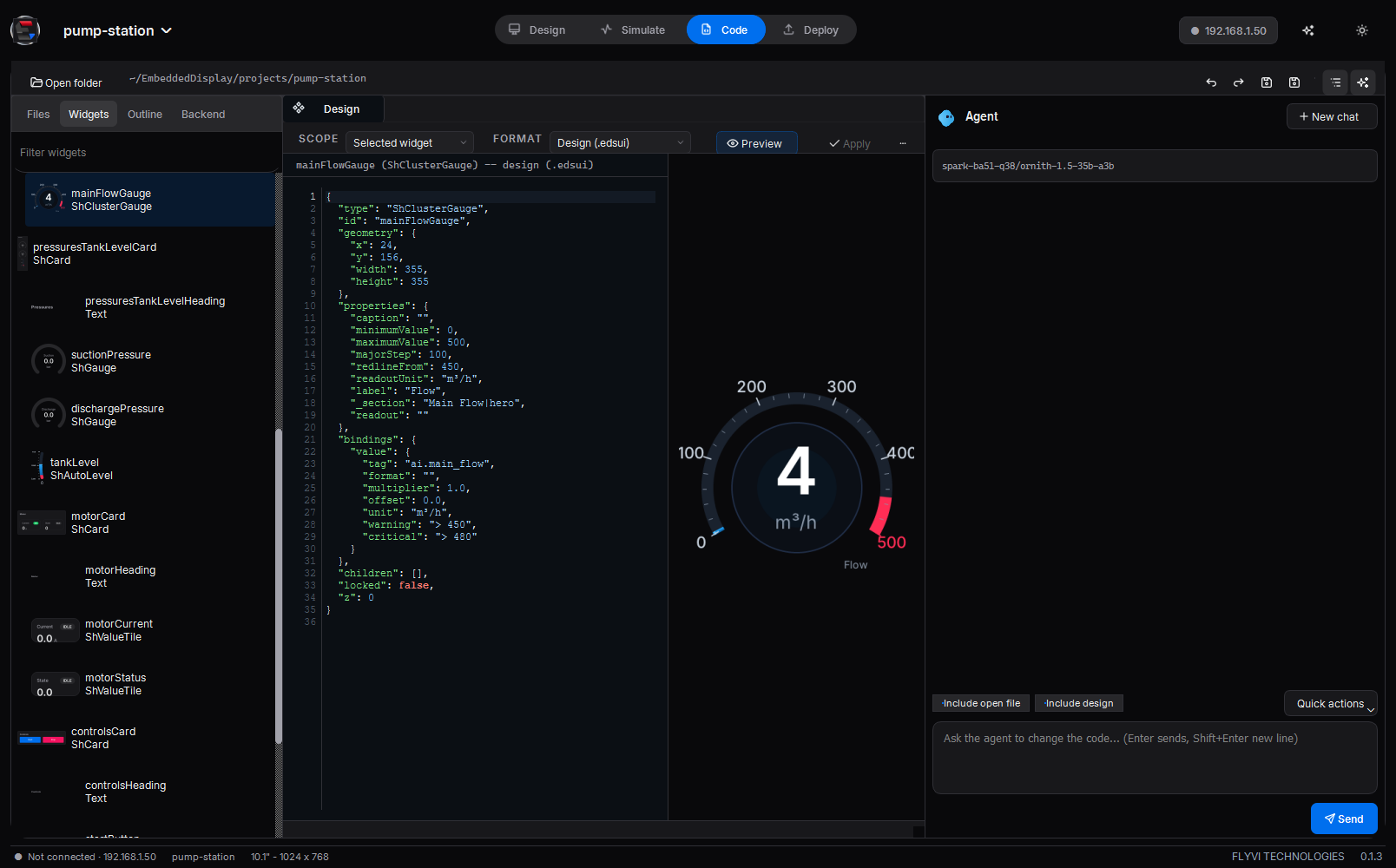
Code it |
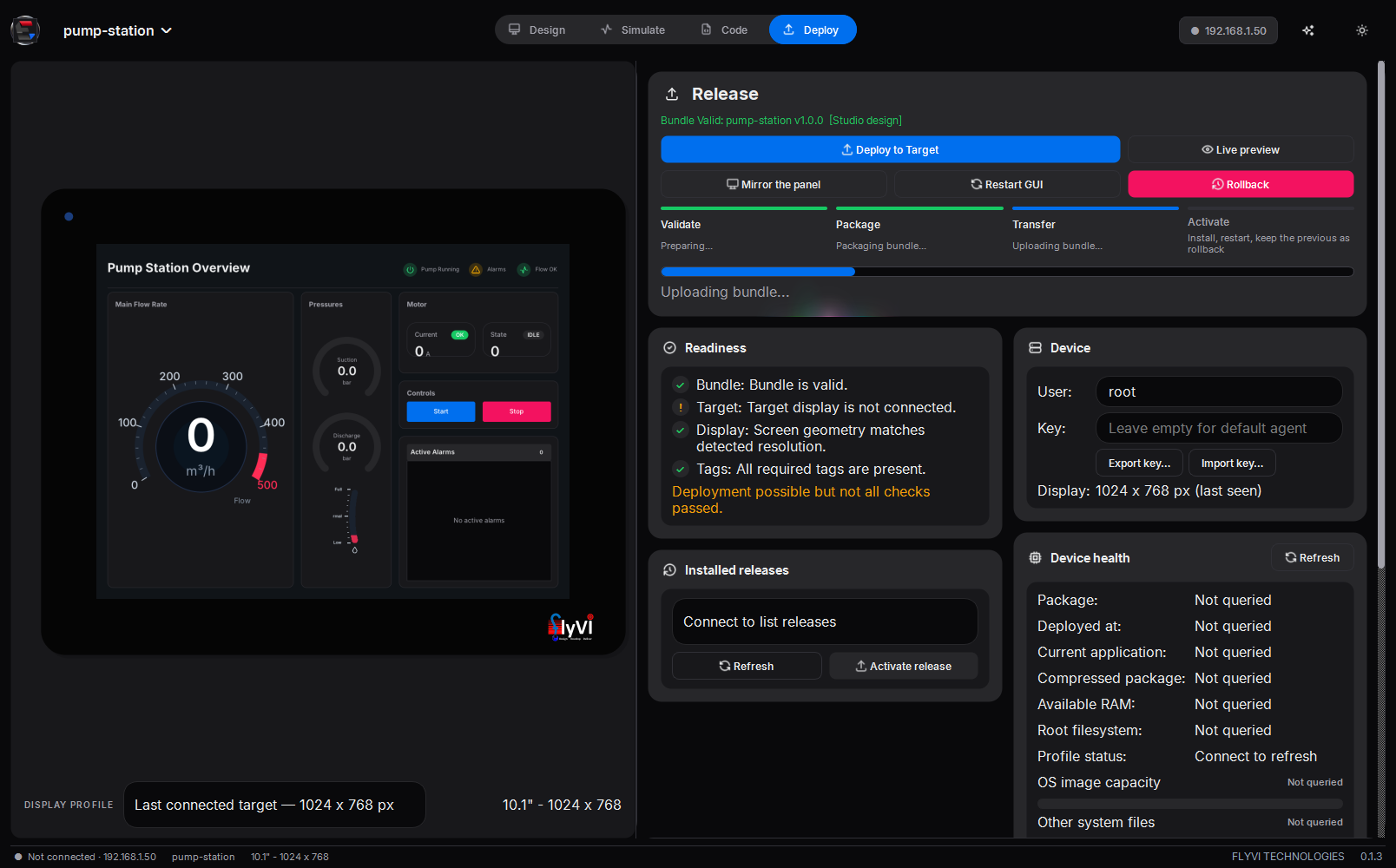
Ship it |
The idea
A machine builder ships one panel image. Their customers — or their own app team — put a screen on it and push it with one button or one command. The app never touches a GPIO line, an ADC node or a serial port: it binds to tags that arrive over a loopback socket, and the platform does the rest.

| Layer | Owns | Knows nothing about | |
|---|---|---|---|
| 1 | hmi-hwd — hardware daemon | GPIO, ADC, UART, Modbus, safe states | pixels |
| 2 | hmi-ui — panel runtime | the design file, bindings, alarms, pixels on DRM/KMS | hardware |
| 3 | deployment | atomic install, health check, rollback | either of the above |
Three ways to a screen, one pipeline after it:
| Start from | Runs on the panel as | |
|---|---|---|
| Describe it — AI Design | "An engine page for a turboprop: torque, ITT, Ng, fuel flow and an alarm list" | a Studio design, drawn by hmi-ui |
| Draw it — Designer | an empty canvas the size of the panel's glass | a Studio design, drawn by hmi-ui |
| Bring your own — Qt apps | an existing PySide6 or PySide2 application | the application itself, with a Qt runtime the Studio installs at deploy |
Quick start
[!TIP] No hardware needed to start. The hardware daemon simulates its I/O and Tag Lab drives any tag a design invents, so the whole flow runs on a desktop.
Packaged — download EmbeddedDisplayStudio.exe (Windows) or the Linux x86-64 build from the latest release. It carries its own Python, PySide6 and pip; nothing to install.
From a checkout — Python 3.12:
python -m pip install -r requirements.txt
python main.py                                            # --bundle <dir> to open one
python daemon/hmi_hwd.py --config daemon/hwd.json --sim   # optional: simulated I/O
A panel, once — key-based SSH as root, then the platform installed onto a stock image, no reflash:
ssh-copy-id root@<panel-ip>
python deploy/provision_panel.py --host <panel-ip> --check   # survey only
python deploy/provision_panel.py --host <panel-ip>
From a sentence to the glass
- Design → AI Design — pick a provider and model, describe the screen, Ctrl+Enter. Or type the brief into the composer under the Designer's canvas.
- Design → Designer — the result is an ordinary project; check each instrument's tag on the Data tab.
- Simulate — drive those tags from Tag Lab.
- The device chip — enter the panel's address and Connect; the panel's real display size retargets the canvas.
- Deploy — the panel must draw the screen within 25 s, or it rolls itself back.
The Studio
One window, four modes. A single header row carries the project menu (New app…, Open bundle…), the mode switch, a view switch where a mode has more than one view, the device chip, and the motion and theme buttons. A status bar along the foot reads the link, the open app and the display.
| Mode | Views | |
|---|---|---|
| Design | Designer · AI Design | Draw the screen on a canvas the size of the panel's glass, or describe it and let a model build it there |
| Simulate | Simulate | Tag Lab beside the panel, with its command log and the panel's journal in a drawer |
| Code | Code | Files, an outline of every widget, the tag backend, the design as the panel reads it, the C behind each widget, and a coding agent |
| Deploy | Deploy | The release, the four deploy steps, readiness, installed releases, the device and its health |
The mode remembers its last view, and follows when something else opens a view: Open in Designer from AI Design lands in Design.
The device chip. The panel's address and port, Connect and Disconnect live in the chip's popover; the chip itself shows the address and goes green when the link is up.
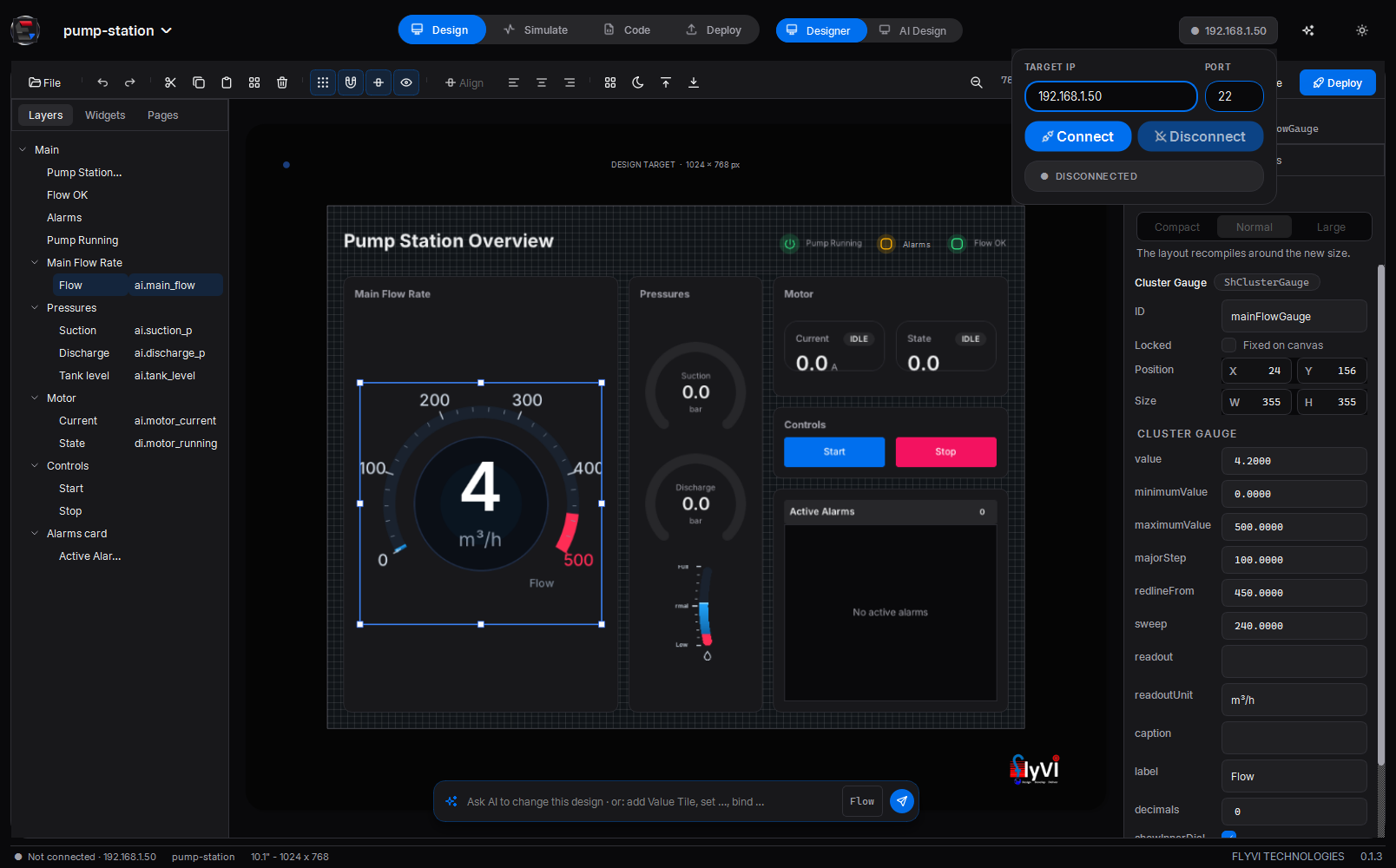
The Designer. One toolbar: a File menu, undo and redo, clipboard, grid, snap and object snap (to sibling and parent edges; Ctrl bypasses), align, Tidy up, z-order, Screen idle, zoom, then Preview, Generate and Deploy. On the left, Layers (a tree that mirrors the page), Widgets (a searchable library with favorites) and Pages. On the right, the selected widget in three tabs:
- Design — Size on screen (Compact, Normal, Large; on a compiled page the layout recompiles around it), then position, size and every property the widget registry declares.
- Data — the tag binding: format, multiplier, offset, unit, warning / critical thresholds, fixed decimals, an expression instead of a tag, rules that set another property from the reading, and the alarm's priority, latch, delay and deadband.
- Actions — what a press, toggle or change does: write, pulse, toggle, increment, navigate, back, acknowledge, shelve; any list can ask Cancel / OK first.
Resize from any of the eight handles. Align, match size and distribute act on selected free siblings only, never across parents. Tidy up runs the layout compiler again on a page it built, and composes any other page with the grid, each widget's own proportions and the style pass.
The AI composer. A prompt under the canvas, scoped to the selection or the whole page. add Value Tile, set …, bind … and remove … run offline at once; anything else goes to AI Design with the current design as context, and the answer lands back on the canvas as one undo step.
No bundle is needed to start: the first Preview, Deploy or AI result creates one under Documents/EmbeddedDisplay Studio/projects/<name>/.
The canvas follows the glass. On Connect the Studio reads the panel's real geometry from its DRM connector and retargets the canvas and the bezel to it.
46 widgets from one registry — shadcn/ui-derived basics (ShButton, ShInput, ShCard, ShTabs, …), industrial (ShGauge, ShValueTile, ShTrendChart, ShAlarmTable, …), avionics (ShAttitude, ShTape, ShCompass, ShVSI, ShFlightDirector, ShEngineGauge, ShFuelQuantity, ShAnnunciator, …) and automotive (ShClusterGauge, ShGearIndicator, ShDriveMode, ShTelltale, ShTripInfo, ShVehicleStatus, …). Every one binds to tags; interactive ones write back through actions.
 Data — the gauge's tag, its thresholds, an optional expression and rules, and how its alarm behaves. | 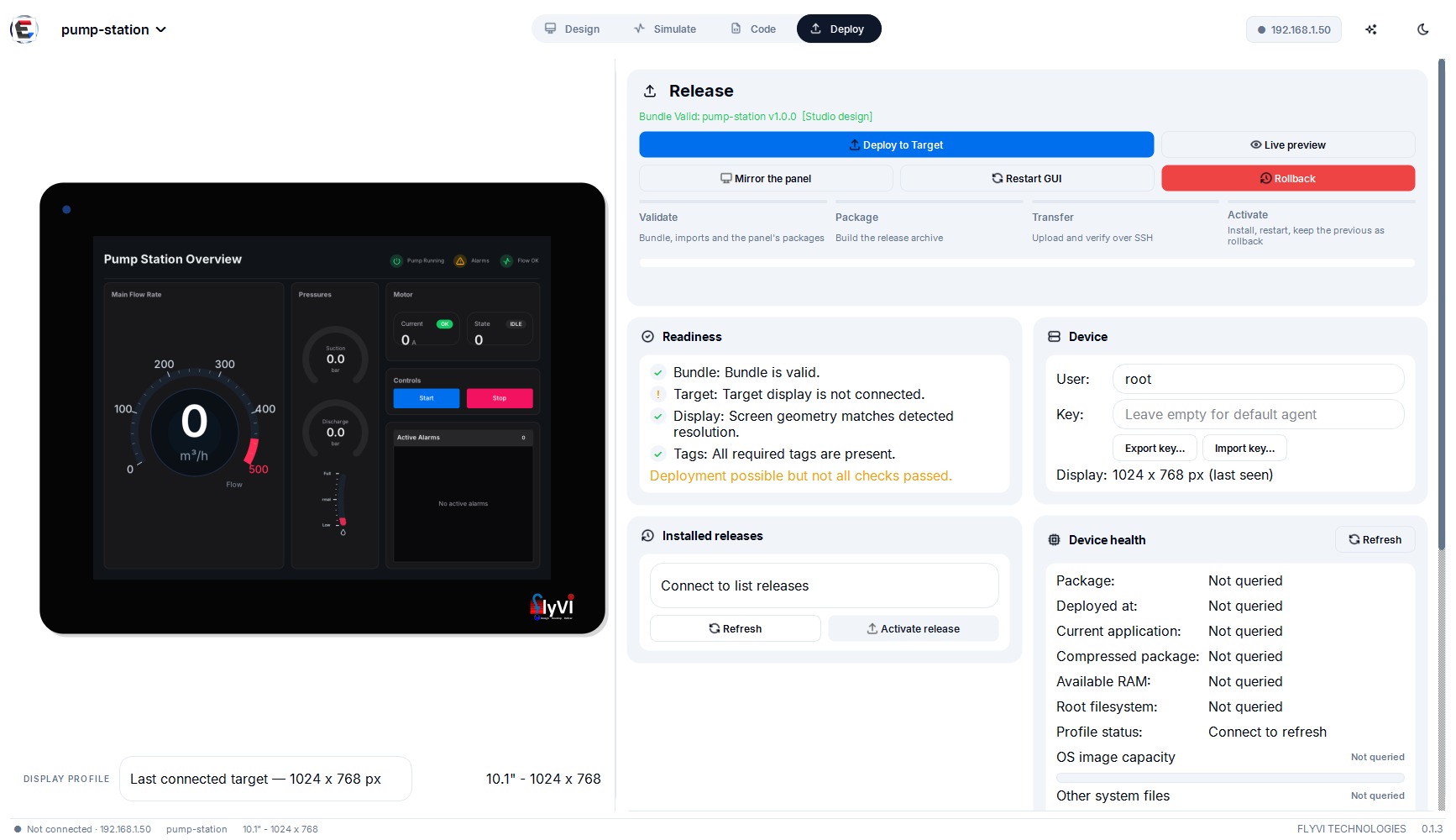 Light mode — the theme follows the operator; the design keeps its own colour mode for the panel. |
Simulate
Tag Lab lists every tag the open design binds. Drive each one with a constant, ramp, sine, square or noise waveform; scenarios save and replay. Run makes Tag Lab the Studio's tag source — what the Live Preview window shows — and it answers the preview's own commands, so a button pressed in the bezel changes a tag here. The drawer underneath holds the Commands log (subscriptions, writes, acks) and the Panel log, the journal of hmi-ui and hmi-hwd on a connected panel, followed live with a filter.
AI Design
Describe the screen; the Studio streams the model's answer, reads it as a content plan, lays it out for the panel's glass and puts it on the canvas. From there it previews and deploys exactly like a hand-drawn design.
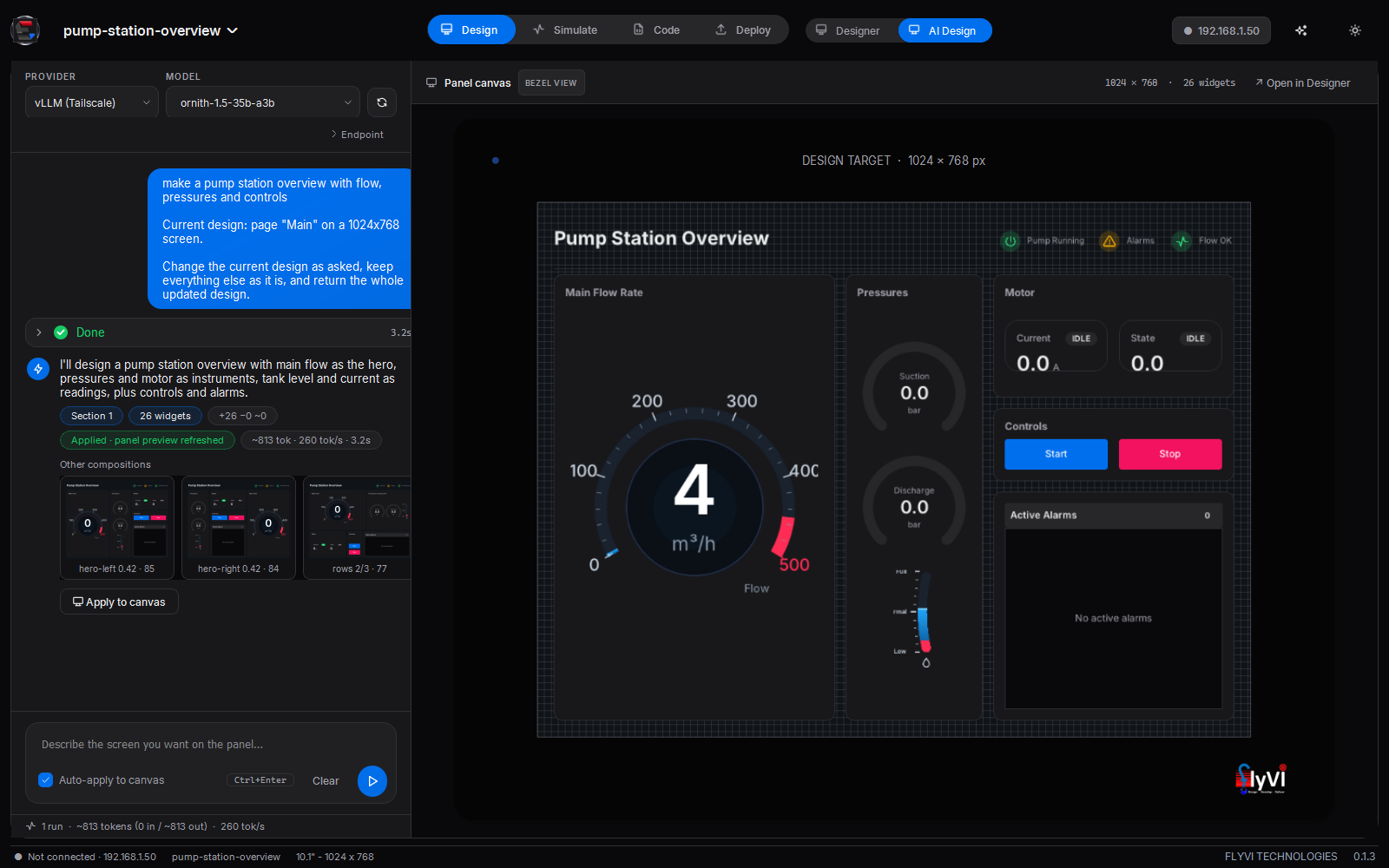
A finished turn: the brief, the execution shell (
26 widgets, +26 −0 ~0, Applied · panel preview refreshed), the runner-up layouts as thumbnails, and the compiled screen on the panel canvas.
| Provider | How | Needs |
|---|---|---|
| Ollama | local, zero configuration | ollama serve |
| OpenAI · Anthropic · Google | hosted | an API key, remembered per provider |
| vLLM | your own server on the network or tailnet — preset http://spark-ba51:8080, qwen3.8-35b-a3b | the server's API key |
| BYOK | any OpenAI-compatible server | base URL + key |
The status line tells a server that is not there (unreachable) from one that refused the key (API key required / rejected), and a saved model the server no longer serves is replaced by one it does.
How a brief becomes a screen
A language model is worst at geometry, and geometry is the longest part of its reply. So the model is not asked for any: it says what the screen shows, and a deterministic compiler decides where.
flowchart LR
    B[Brief] --> P[Plan prompt:<br/>title · header ·<br/>sections with roles]
    P --> I[Intake:<br/>repair JSON,<br/>map onto the kit]
    I --> C[Compiler:<br/>header · regions ·<br/>bands · density]
    C --> V[Best layout +<br/>runner-ups]
    V --> A[Canvas + preview]
- A content plan, not coordinates — the prompt is built from the widget registry and the target screen, so the model only names widgets the panel can draw, with their real property names. It returns a title, header lamps or navigation, and three to six sections, each with a role (
hero,instruments,readings,trend,alarms,status,controls) and its widgets' labels, units, ranges, bindings and actions. It may ask for"size": "compact" | "normal" | "large"on a section or a widget. - Intake —
designer/layout/intake.pyreads the reply the way it was meant: lenient JSON repairs missing quotes, early closers, truncation and comments; a duplicated key spills into a new object instead of overwriting a section; property synonyms, icons and invented widget types are mapped onto the kit. Undeclared properties are dropped, tags lowercased, actions on signals a widget cannot emit removed. - Compile —
designer/layout/compiler.pynever reads model geometry. A header (title left, lamps and navigation right), then the body is searched, not templated: every row and column partition and hero placement is scored by a cost model — content fit, each card's minimum, hero prominence, empty cards and slivers. Inside a card, faces share a row height, tiles a grid, controls sit at the foot. Every card gets the minimum its content needs before the rest is shared by weight. - Density — the same search runs with widgets at 100 % down to 60 % of their design size, and a crowded screen shrinks only when that lays it out clearly better. Size wishes multiply in; controls never go under 32 px.
- Semantics — Stop and Trip buttons become destructive, navigation outline; a bound gauge shows its live value; repeated names are folded (a hero's caption becomes its card's title).
- Apply — one undo step on the canvas, the preview reloads, and the runner-up layouts wait as thumbnails. The last three turns ride along, so "make the flow gauge bigger" edits rather than restarts. Every widget carries its section, so Size on screen and Tidy up recompile the same plan.
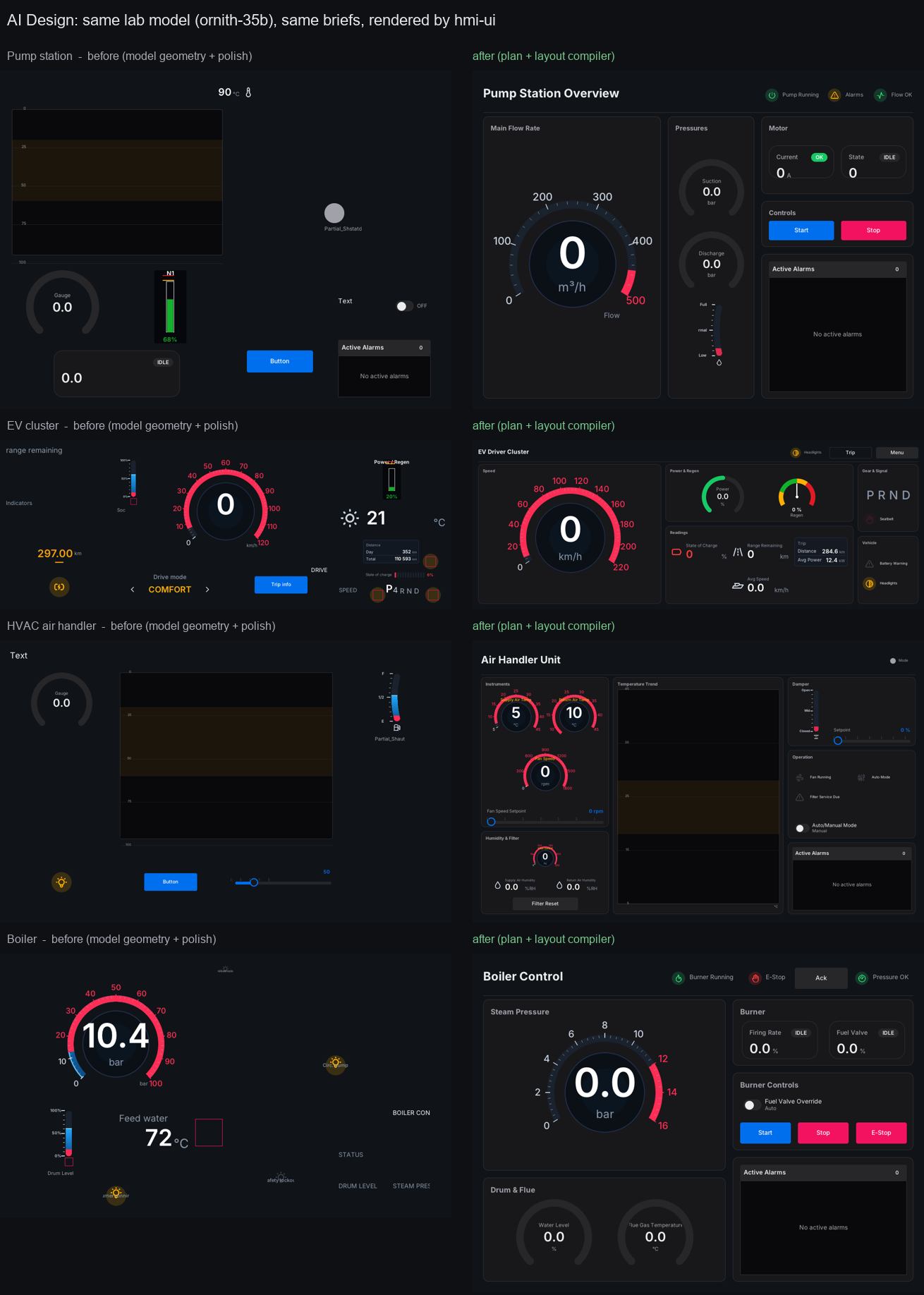
Same model, same briefs: the old geometry pipeline on the left, plan and compile on the right — every one drawn by the panel's renderer. The design notes, measurements and roadmap are in docs/AI_LAYOUT_COMPILER.md.
The older path — the model writes geometry, archetypes and a critic polish it, oversized designs split into linked pages — is still there as the fallback (ai/layoutEngine = polish).
The execution shell, presets and the self-driving cluster
Every turn is a foldable execution shell — request, thinking, response, parsed design, canvas diff (+added −removed ~changed), usage (in · out · tok/s · TTFT) — with chips such as Section 2 · Fuel, 14 widgets, Applied · panel preview refreshed. A reasoning model's thinking pass is off by default: it counts against the output budget, and a long one returns no design at all.
Design presets. On the polish path, a brief that reads like an automotive cluster or an EV dashboard gets a hand-built exemplar and a style guide appended to the prompt (python -m tools.hmi_deployer.design_presets --list).
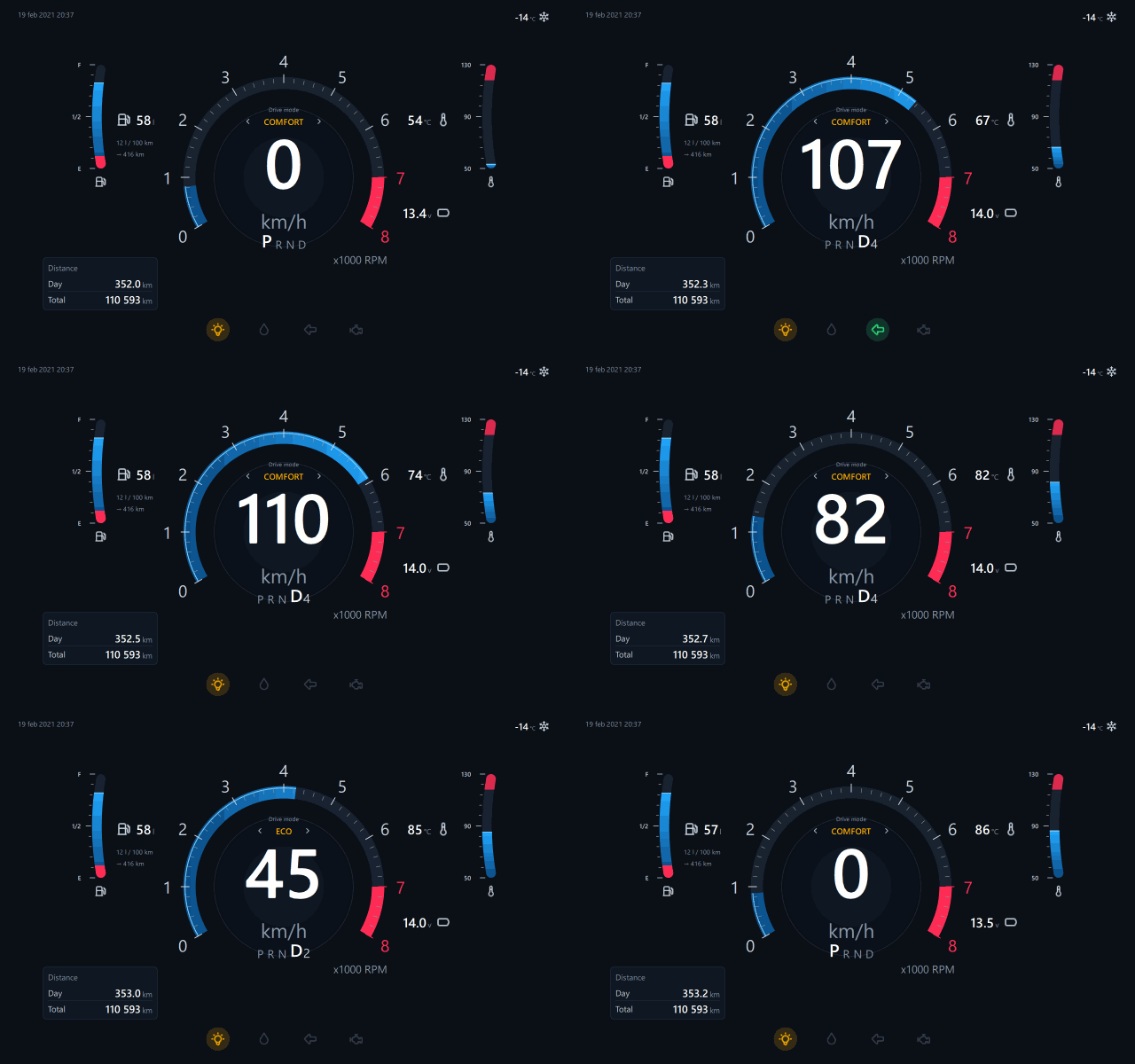
A cluster that drives itself. sim.car.* values are a sixty-second drive cycle, so a page bound to them carries its own clock on the canvas, in the Live Preview window and on the panel. designer/templates/automotive_cluster_demo.edsui is the preset wired to it.
Code
The project as code, with a coding agent beside it.
- Files, Widgets, Outline, Backend — the bundle's folder as a tree; a Widgets list with live thumbnails; an Outline of every widget on every page with its tags and binding issues (filter to bound widgets, issues or one tag); and a Backend table with one row per tag — read/write access, the widgets that use it, its live value and status. Generate backend… writes a runnable UDP backend into
backend/, with a stub per tag,tags.jsonandtags.h. - The design as the panel reads it — pick a widget and its
.edsuisits besidehmi-ui's render; edit and Apply as one undo step. Runtime C (hmi-ui) showsnative/hmi-ui/src/widgets/w_<type>.c, the file compiled into the runtime. Any file opens in a tabbed editor (C, Python, QML, JSON,.edsui). - The agent — opencode driven over its HTTP server in the project folder, on the model configured in opencode. It is told about the design — pages, the selected widget, its tags and issues — and offers quick actions; thinking, tools, file links and permission prompts show in the transcript, and an edited file reloads in its tab. Install once with
npm i -g opencode-ai. Notes in docs/CODE_SECTION.md.
Deploying
Deploy mode is one page: the Release card (Deploy to Target, Live preview, Mirror the panel, Restart GUI, Rollback), then the four steps of a deploy — Validate, Package, Transfer, Activate — each lit as the progress bar reaches it and marked failed with the reason when one goes wrong. Below: a Readiness checklist (bundle, target, display geometry, tags), the panel's Installed releases, the Device (user, key, export and import of the deploy key, the display it reported) and its Health — the active release, its footprint, the storage split and free RAM, read over SSH while a panel is connected — and the console.

- Nothing is converted. No build and no code generation for the target: the panel interprets
project.edsuias the Designer saved it. - What travels is what runs —
manifest.json,project.edsuiandassets/, packed by one packer shared with the CLI so both produce a byte-identical tarball. - Validated twice, by one implementation — the Studio, the CLI and the panel's installer all call
schema/manifest.py. - Readiness is the picture, not the process —
hmi-installstarts the bundle's GUI service and waits for/run/hmi/gui-ready, touched only once the first page is on the glass. - The swap cannot leave the panel dark — tmpfs landing, checksum, staging, validation, then
rename(2). No readiness within 25 s and the previous release comes back. - Boot default, rollback, releases, restart — a proven release boots next time; the previous one is a button away; any release the panel still holds can be activated.
[!NOTE] Seeing the glass. Mirror the panel signals the runtime, copies
/run/hmi/screen.pngand paints it at a frame a second — the panel itself, live values and all. By hand:ssh <panel> 'kill -USR1 $(pidof hmi-ui)' && scp <panel>:/run/hmi/screen.png .
From the command line, for CI or a headless machine — options in deploy/README.md:
./deploy/deploy_to_hmi.sh deploy -H <panel-ip> -b ./trip-and-maintenance
Sharing the deploy key
A panel trusts one SSH key. A deploy key bundle (.hmikey) carries the key pair and the panel's address, so a colleague can Connect and Deploy at once.

Export key… tries each candidate key on its own against the panel and packs the one it accepts, with the panel's host key. Import key… installs it under ~/.ssh/hmi-deploy/ with owner-only permissions, writes the host key into known_hosts, fills the device chip's connection fields and verifies the link — naming the problem in plain words when there is one.
python -m tools.hmi_deployer.deploy_key export --host 172.16.20.70 --out line3.hmikey
python -m tools.hmi_deployer.deploy_key import line3.hmikey
The file holds a private key: hand it over directly. Passphrase-protected keys are refused; the Studio deploys non-interactively.
The panel runtime
hmi-ui is the program that draws every Studio design on the panel: C11 on LVGL 9.3, straight to the DRM/KMS device, with no compositor. It interprets project.edsui at start — pages, all 46 widget types, bindings, actions, the alarm engine, touch — so a new screen is new data, never a new build.
How LVGL reaches the HMI
LVGL is not a package on the panel. It is compiled into hmi-ui: native/hmi-ui/lvgl is the upstream repository pinned as a git submodule (release/v9.3), configured by native/hmi-ui/lv_conf.h and linked statically, as is cJSON. What ships is one executable and a folder of assets:
| On the panel | Size | What it is |
|---|---|---|
/usr/lib/hmi/ui/hmi-ui | ~1.4 MB | the runtime: LVGL, cJSON and the widget kit's C, one aarch64 binary. Links dynamically only against libdrm, libm and libc |
/usr/lib/hmi/kit/ | ~2.2 MB | Inter fonts and Tabler icons — what the runtime draws text and icons with |
hmi-ui.service, /etc/default/hmi-ui | the unit that runs it, and its display, touch and log settings |
flowchart LR
    subgraph src[Source]
        L[lvgl submodule<br/>release/v9.3]
        W[hmi-ui C:<br/>interpreter, widgets]
        K[kit: fonts, icons]
    end
    subgraph build[Build once per runtime version]
        A[arm64/build.sh<br/>Debian bookworm arm64]
        Y[Yocto meta-hmi<br/>hmi-ui_1.0.bb]
    end
    subgraph panel[Panel]
        B["/usr/lib/hmi/ui/hmi-ui"]
        KT["/usr/lib/hmi/kit/"]
        D[project.edsui<br/>per deploy]
    end
    L --> A & Y
    W --> A & Y
    A -- provision_panel.py --> B
    Y -- image --> B
    K --> KT
    D -. read at start .-> B
There are two ways to put it on a board, and both install the same files:
- Onto a board already in the field —
native/hmi-ui/arm64/build.shbuilds the aarch64 binary inside a Debian bookworm arm64 root under qemu (from WSL on Windows). Built against bookworm's glibc 2.36, it runs on any newer glibc, such as a Toradex image's 2.39.deploy/provision_panel.py --host <ip>packs that binary, the kit, the units and the installer into one tarball, uploads it and installs it — no reflash. - Into an image —
yocto/meta-hmibuilds the same sources with bitbake:hmi-ui_1.0.bb(CMake,DEPENDS = "libdrm") andhmi-ui-kit_1.0.bb, pulled in bypackagegroup-hmi. No Qt layer is needed.
bitbake-layers add-layer /path/to/meta-hmi
bitbake <your-bsp-reference-image>
After that, deploying a design never touches the runtime: a deploy carries project.edsui, its assets and a manifest, and hmi-ui reads them on its next start. Updating the runtime itself — a new LVGL, a widget fix — is a new hmi-ui binary, shipped by provisioning again or by the next image.
The same runtime on the desktop. native/hmi-ui/win64/ cross-compiles the identical sources for Windows without the DRM backend. The Studio carries that hmi-ui.exe and uses it to draw the canvas, the bezel and the Code previews, so the desktop shows exactly what the glass will draw — win64/check.sh compares its renders with the Linux build's.
The widget kit is written twice, on purpose
| Where | Who reads it | |
|---|---|---|
| Spec | ui/qml/Shadcn/*.qml — the reference drawing | the desktop Live Preview; humans |
| Port | native/hmi-ui/src/widgets/w_*.c — the same drawing on LVGL | the panel, and every still image the Studio shows |
tests/hmi_ui/test_widget_parity.py renders both and compares them. A parity suite proves only what it renders: drawn at their defaults, four faults hid for a long time — an attitude indicator with sky and ground inverted, a tape whose scale travelled with the needle, a VSI with hard-coded labels, a gauge that ignored the design's range. hmi-ui --render-widget <Type> --props '{...}' --headless out.png draws one widget in isolation.
Qt applications
An existing PySide6 or PySide2 application deploys to the same Qt-free panel. Project → Open bundle… detects the entry point and the binding, proposes the manifest, and previews the real application in the bezel — clicks, drags and keys reach it — before anything is sent.
At deploy, the Studio asks the panel what the application needs and lacks, and installs it after one confirmation:
| Piece | What lands on the panel |
|---|---|
| Launcher | hmi-gui-launch, hmi-gui.service (under Weston), its defaults, a Weston drop-in, and an hmi-install that starts the right service per bundle |
| PySide2 | /opt/hmi-python-qt5 — CPython 3.11, PySide2 5.15 and a private Qt 5.15, assembled on the Studio's PC from Debian bookworm packages (no WSL, no dpkg-deb) and cached |
| PySide6 | PySide6-Essentials wheels into /opt/hmi-python |
| The app's packages | aarch64 or pure-Python wheels fetched on the PC and installed with pip --no-index — the panel needs no internet |
hmi-install then starts hmi-gui.service and makes it the boot default; deploying a Studio design afterwards hands the display back to hmi-ui. Both directions have been run on a Verdin i.MX8M Plus.
[!IMPORTANT] The panel image must already carry Weston for a Qt application. A Qt bundle declares its binding, because the two cannot share an interpreter:
{ "runtime": "python", "entry": "main.py", "qt_binding": "pyside2", "qt": ">=5.15" }
The packaged Studio previews PySide6 applications with no Python on the machine; a PySide2 preview needs a PySide2 interpreter on PATH or named with HMI_PREVIEW_PYTHON_QT5.
Bundles
A bundle is a directory: manifest.json plus the entry it names. Only schema, name, version and entry are required; the Designer writes the rest.
trip-and-maintenance/
├── manifest.json     runtime, screen, tags_required, alarms
├── project.edsui     the screen itself
└── assets/           images the design refers to
| runtime | entry | Runs on the panel as |
|---|---|---|
edsui | project.edsui | interpreted by hmi-ui — what the Studio writes |
python | *.py | the application under Weston, with the Qt runtime installed at deploy |
qml | *.qml | legacy: needs the retired native Qt loader |
A full manifest, and the rules it is held to
{
  "schema": 1,
  "name": "trip-and-maintenance",
  "version": "1.6.0",
  "entry": "project.edsui",
  "runtime": "edsui",
  "screen": { "width": 1024, "height": 768 },
  "theme": "dark",
  "tags_required": ["alt.current", "eng1.egt", "nav.pitch"],
  "alarms": [
    { "tag": "eng1.egt", "label": "ENG 1 TEMP", "unit": "°C",
      "warning": { "op": ">", "value": 650 },
      "critical": { "op": ">", "value": 700 } }
  ]
}
| Field | Rule | Why it is checked on the laptop |
|---|---|---|
schema | exactly 1 | a future format should fail here, not halfway through an install |
name | ^[a-z0-9][a-z0-9._-]{0,63}$ | it becomes a directory on the panel and a filename on the host |
version | 1.4, 1.4.0, 2.0.0-rc1, 1.0.0+build7 | it names artefacts |
entry | relative, no .., must exist | an escaping path resolves somewhere else on the target |
runtime | qml needs .qml, python needs .py | a mismatch would fail only on the panel |
qt_binding | must match what the sources import | the wrong one starts the wrong interpreter |
runtime defaults to qml, screen to 1280×800, qt_binding to pyside6. Bundles are capped at 500 MB; .git, __pycache__, build, dist, node_modules and similar are excluded automatically, .hmiignore adds more.
[!NOTE] The one rule for an application: never touch a GPIO line, an ADC node or a serial port — bind to tags. That is the whole contract, and it is what lets the same bundle run on a bench, in a preview and on a panel.
Architecture
Three programs and one file; the file is the deliverable and the programs are deliberately ignorant of each other. The normative interface spec is docs/CONTRACT.md.
The tag link. Tags arrive on a loopback UDP socket as JSON. hmi-hwd owns GPIO through libgpiod (1.6 and 2.x), analogue inputs through IIO, serial and Modbus, and publishes them on port 5000. hmi-ui keeps a tag map with a 2.5 s watchdog and goes visibly offline rather than showing a value that stopped arriving. Tag names are lowercase dotted.
hmi-ui  --->  {"cmd":"subscribe","ttl":5}              every 2 s
        <---  {"t":"tags","seq":41,"tags":{"eng1.n1":92.4,"gear.warning":false}}
        --->  {"id":"gui-7","cmd":"set","tag":"do.relay1","value":true}
        <---  {"t":"ack","id":"gui-7","ok":true}
Bindings, thresholds and alarms. A binding carries a unit and optional warning / critical thresholds ("> 650"). The Designer collects them into the manifest's alarms; the runtime's alarm engine raises, clears and timestamps entries that any ShAlarmTable shows. Thresholds are absolute, so the dial must be in the same units — a gauge left on 0..100 never reaches 650.
For the operator (CONTRACT §13). A binding can be an expression instead of a tag (eng1.egt > eng2.egt ? "ENG 1" : "ENG 2", round(fuel.l + fuel.r, 1)), with fixed decimals and rules that set another property from the reading. A signal runs a list of actions — write, pulse, toggle, increment / decrement within limits, navigate, back, acknowledge, shelve — and any list can ask Cancel / OK first. Alarms have priorities 1–4, latch until acknowledged, wait out an on-delay, respect a deadband and can be shelved; the panel keeps a journal (/var/lib/hmi/alarm-journal.jsonl) that an alarm table can show in history mode. hmi-hwd keeps a SQLite history of the tags it lists, trend charts fill from it when a page opens, every value carries its quality, and python -m tools.hmi_deployer.history_export pulls a CSV over SSH. On the glass: a range-checked numeric keypad, an on-screen keyboard, a No connection to controller banner, and screen dim and off after inactivity (Screen idle in the Designer).
What runs on the panel
| Unit | What it does |
|---|---|
hmi-ui.service | the runtime: design, bindings, actions, alarms, touch |
hmi-hwd.service | GPIO, ADC, UART, Modbus → tags; safe states on shutdown |
hmi-gui.service | only for a Qt bundle, installed at its first deploy |
hmi-tagsim.service | bench only, optional: flies the deployed design |
| Path | Holds |
|---|---|
/opt/hmi_apps/current | symlink to the running release — never write through it |
/opt/hmi_apps/previous | what a rollback returns to |
/opt/hmi-python | the complete CPython the installer and daemon run on |
/run/hmi/gui-ready | touched once the first page is on the glass |
/run/hmi/screen.png | what the panel shows, written on SIGUSR1 |
Bench data without an aircraft — hmi-tagsim
hmi-hwd --sim fakes the hardware channels but knows nothing of the tags a design invents. daemon/tagsim.py reads the tag list out of the deployed design and fills it from a single flight — taxi, climb, cruise, turn, descend, land — so the screen agrees with itself, and ramps that cross a binding's thresholds put real entries in the alarm table. It serves on 5010, leaving hmi-hwd on 5000:
scp daemon/tagsim.py          root@<panel>:/usr/lib/hmi/tagsim.py
scp daemon/hmi-tagsim.service root@<panel>:/etc/systemd/system/
echo 'HMI_UI_EXTRA_ARGS=--daemon-port 5010' >> /etc/default/hmi-ui
systemctl daemon-reload && systemctl enable --now hmi-tagsim && systemctl restart hmi-ui
Remove that line from /etc/default/hmi-ui to go back to the real inputs.
Built for the field. The daemon cannot be crashed by its socket — malformed JSON, oversized frames, binary noise and invalid UTF-8 are counted and answered with a typed error, or with silence where no correlation id survives, so it cannot be used as a UDP reflector. Outputs go to configured safe states on SIGTERM, with systemd watchdog keep-alives every cycle.
Hardware
Not tied to one module: a 64-bit ARM Linux board that can put pixels on a display and accept an SSH connection. Developed and exercised on a Toradex Verdin i.MX8M Plus with a 10.1" 1024 × 768 panel.

| Needed | ||
|---|---|---|
| OS | 64-bit Linux, systemd, a DRM/KMS display | hmi-ui draws to DRM itself |
| Python | a complete Python 3 — or provisioning's /opt/hmi-python | the installer and daemon run on it |
| coreutils | flock, tar, sha256sum | hmi-install serialises and verifies with them |
| Weston | only for a Qt bundle | the Qt application runs under it |
| RAM | 1 GB for Studio designs, 2 GB for Qt apps | hmi-ui runs in a few MB |
| Storage | ~2 GB free | releases are retained; the Qt5 runtime is ~300 MB |
| Network | Ethernet or Wi-Fi, SSH on 22 | the only channel the Studio uses |
| Field I/O | optional, each on its own | hmi-hwd disables what it cannot reach |
Before first power-on, confirm the board-specific parts daemon/hwd.json assumes (gpioinfo, iio_info, ls /dev/serial/by-id/*) and release the pins from their default pinmux with a device-tree overlay — daemon/README.md walks through it.
Look and feel
Every pixel comes from a port of shadcn/ui with Tabler icons vendored offline; ui/tokens.json is the single source of truth and a test fails if Theme.qml drifts from it.
The Studio's motion is Libraries.dev (MIT, © 2026 Jakub Antalik) ported to plain QPainter in ui/python/fx/ — no web engine, no OpenGL, no numpy: liquid tabs in the navigation, a border beam on whatever is working, thinking orbs for the AI run, a bot avatar for the coding agent, a liquid-metal mark, a pixel mosaic while a preview renders, and a working glow under the agent. One timer drives them all and stops when nothing moves; the sparkles button turns motion off. Notes in docs/UI_FX.md.
Repository
docs/CONTRACT.md      the normative interface spec — read this first
schema/               manifest validation, bundle packing, dependency scan
daemon/               Layer 1: hmi-hwd, the tag map, tagsim
native/hmi-ui/        Layer 2: the panel runtime — C11 + LVGL (submodule), its Windows preview build
native/hmi-gui/       the Qt application launcher and unit, and the retired native QML loader
gui/                  the retired Python QML loader; its TagEngine drives the Live Preview
designer/             the Designer: model, canvas, registry, generators, layout, the Code IDE
tools/hmi_deployer/   the Studio: window, deploy, Qt runtime on demand, AI Design, Tag Lab, mirror
ui/                   design system: tokens, QML kit, icons, QPainter effects
target/               the installer (hmi-install), units, tmpfiles
deploy/               deploy_to_hmi.sh and the provisioning scripts
packaging/            the PyInstaller spec for the packaged Studio
yocto/meta-hmi/       the bitbake layer
tests/                over 1,700 tests
Verification
python tests/run_all.py            # over 1,700 tests
native/hmi-ui/build.sh --test      # the runtime's C tests
[!NOTE] The installer and shell suites need
flock, so they skip on Windows — the runner prints how many skipped, because a skip is not a pass. CI runs the whole suite on Linux;tests/README.mdhas the WSL command.
| Area | Coverage |
|---|---|
| Daemon | error codes, silence on unparseable input, seq monotonicity, hostile frames |
| Install | atomic swap, traversal refused before extraction, rollback, the GUI service per runtime, boot default |
| Panel runtime | protocol conformance and widget parity against the QML kit, through a real hmi-ui |
| Bundles | one validator, three callers; the dependency scan and offline wheel install |
| Qt on demand | the panel check, launcher and runtime installs, the PySide2 runtime assembled from .deb streams |
| Designer | model, canvas, inspector tabs, size wishes, the AI composer, object snap, generator, Live Preview, repairs on open |
| Layout | the plan intake and compiler (regions, bands, density, size wishes, recompiles), and the polish path: grid, archetypes, fit and pages, scale repairs, the critic |
| AI Design | streaming for every provider, the key-aware probe, sections and merge, tag and action repairs |
| Code | project files, editor tabs, the opencode client on a recorded stream, the agent panel |
| Studio | the four modes and their views, the device chip, the deploy steps and readiness, connect/disconnect, deploy keys, mirror, the frozen entry points |
The release gate. Tagging builds EmbeddedDisplayStudio.exe on CI and then runs it: the binary previews a fixture whose imports were never visible to the build, grabs its bezel, and tests/verify_smoke_capture.py checks the fixture's colour is in the picture. Only a binary that passed is attached to a release.
What's new in 0.1.3
| Studio 2 Four modes — Design, Simulate, Code, Deploy — instead of seven tabs; the connection in a device chip; a status bar; an AI composer on the canvas; deploy steps you can watch. | AI Design plans, a compiler lays out The model writes content, not coordinates; the compiler searches the layout, shrinks a crowded screen, and honours Compact / Normal / Large per widget. | The panel, for an operator Expression bindings, action lists with confirm, alarm priorities, latching and shelving, tag history, keypad and keyboard, screen idle. |
Every change, and every earlier release, is in CHANGELOG.md.
MIT licensed — see LICENSE. LVGL is MIT; Tabler Icons are MIT, with their notice in ui/icons/LICENSE.tabler. The packaged Studio also carries PySide6 and Qt, redistributed unmodified under the LGPL-3.0.
FLYVI TECHNOLOGIES · EMBEDDED DISPLAY ENGINEERING
Significant stargazers

710 followers · starred Sep 2026
Similar repos


Describe, draw or bring your own HMI screen and ship it to embedded Linux panels: a desktop Studio with AI Design and a coding agent, a Qt-free C + LVGL panel runtime, and atomic SSH deploys with automatic rollback. PySide apps deploy too, with their Qt runtime installed on demand.
Python
10
405 commits
updated Oct 5, 2026
See what people are saying
README
EmbeddedDisplay Studio
Describe it, draw it, or bring your own — and ship it to the glass.
A desktop studio for embedded Linux HMI panels. Write a brief and a model builds the screen, or draw it on a canvas the size of the panel, or open an existing Qt application — then preview it with the panel's own renderer and deploy it over SSH, atomically, with automatic rollback. The panel runs a 1.4 MB C + LVGL runtime that reads the design file directly: no Qt, no compositor, no per-design build.
Quick start · The Studio · AI Design · Simulate · Code · Deploying · The panel runtime · Qt apps · Changelog
▶ Watch the two-minute tour — describe it, draw it, test it and ship it to the glass.
Design mode — a pump station overview the AI planned and the layout compiler laid out, drawn by the panel's own renderer. The suction gauge is selected: its layer on the left, Size on screen and its properties on the right, and the AI composer under the canvas.
|
Describe it |
Test it |
Code it |
Ship it |
The idea
A machine builder ships one panel image. Their customers — or their own app team — put a screen on it and push it with one button or one command. The app never touches a GPIO line, an ADC node or a serial port: it binds to tags that arrive over a loopback socket, and the platform does the rest.
| Layer | Owns | Knows nothing about | |
|---|---|---|---|
| 1 | hmi-hwd — hardware daemon | GPIO, ADC, UART, Modbus, safe states | pixels |
| 2 | hmi-ui — panel runtime | the design file, bindings, alarms, pixels on DRM/KMS | hardware |
| 3 | deployment | atomic install, health check, rollback | either of the above |
Three ways to a screen, one pipeline after it:
| Start from | Runs on the panel as | |
|---|---|---|
| Describe it — AI Design | "An engine page for a turboprop: torque, ITT, Ng, fuel flow and an alarm list" | a Studio design, drawn by hmi-ui |
| Draw it — Designer | an empty canvas the size of the panel's glass | a Studio design, drawn by hmi-ui |
| Bring your own — Qt apps | an existing PySide6 or PySide2 application | the application itself, with a Qt runtime the Studio installs at deploy |
Quick start
[!TIP] No hardware needed to start. The hardware daemon simulates its I/O and Tag Lab drives any tag a design invents, so the whole flow runs on a desktop.
Packaged — download EmbeddedDisplayStudio.exe (Windows) or the Linux x86-64 build from the latest release. It carries its own Python, PySide6 and pip; nothing to install.
From a checkout — Python 3.12:
python -m pip install -r requirements.txt
python main.py                                            # --bundle <dir> to open one
python daemon/hmi_hwd.py --config daemon/hwd.json --sim   # optional: simulated I/O
A panel, once — key-based SSH as root, then the platform installed onto a stock image, no reflash:
ssh-copy-id root@<panel-ip>
python deploy/provision_panel.py --host <panel-ip> --check   # survey only
python deploy/provision_panel.py --host <panel-ip>
From a sentence to the glass
- Design → AI Design — pick a provider and model, describe the screen, Ctrl+Enter. Or type the brief into the composer under the Designer's canvas.
- Design → Designer — the result is an ordinary project; check each instrument's tag on the Data tab.
- Simulate — drive those tags from Tag Lab.
- The device chip — enter the panel's address and Connect; the panel's real display size retargets the canvas.
- Deploy — the panel must draw the screen within 25 s, or it rolls itself back.
The Studio
One window, four modes. A single header row carries the project menu (New app…, Open bundle…), the mode switch, a view switch where a mode has more than one view, the device chip, and the motion and theme buttons. A status bar along the foot reads the link, the open app and the display.
| Mode | Views | |
|---|---|---|
| Design | Designer · AI Design | Draw the screen on a canvas the size of the panel's glass, or describe it and let a model build it there |
| Simulate | Simulate | Tag Lab beside the panel, with its command log and the panel's journal in a drawer |
| Code | Code | Files, an outline of every widget, the tag backend, the design as the panel reads it, the C behind each widget, and a coding agent |
| Deploy | Deploy | The release, the four deploy steps, readiness, installed releases, the device and its health |
The mode remembers its last view, and follows when something else opens a view: Open in Designer from AI Design lands in Design.
The device chip. The panel's address and port, Connect and Disconnect live in the chip's popover; the chip itself shows the address and goes green when the link is up.
The Designer. One toolbar: a File menu, undo and redo, clipboard, grid, snap and object snap (to sibling and parent edges; Ctrl bypasses), align, Tidy up, z-order, Screen idle, zoom, then Preview, Generate and Deploy. On the left, Layers (a tree that mirrors the page), Widgets (a searchable library with favorites) and Pages. On the right, the selected widget in three tabs:
- Design — Size on screen (Compact, Normal, Large; on a compiled page the layout recompiles around it), then position, size and every property the widget registry declares.
- Data — the tag binding: format, multiplier, offset, unit, warning / critical thresholds, fixed decimals, an expression instead of a tag, rules that set another property from the reading, and the alarm's priority, latch, delay and deadband.
- Actions — what a press, toggle or change does: write, pulse, toggle, increment, navigate, back, acknowledge, shelve; any list can ask Cancel / OK first.
Resize from any of the eight handles. Align, match size and distribute act on selected free siblings only, never across parents. Tidy up runs the layout compiler again on a page it built, and composes any other page with the grid, each widget's own proportions and the style pass.
The AI composer. A prompt under the canvas, scoped to the selection or the whole page. add Value Tile, set …, bind … and remove … run offline at once; anything else goes to AI Design with the current design as context, and the answer lands back on the canvas as one undo step.
No bundle is needed to start: the first Preview, Deploy or AI result creates one under Documents/EmbeddedDisplay Studio/projects/<name>/.
The canvas follows the glass. On Connect the Studio reads the panel's real geometry from its DRM connector and retargets the canvas and the bezel to it.
46 widgets from one registry — shadcn/ui-derived basics (ShButton, ShInput, ShCard, ShTabs, …), industrial (ShGauge, ShValueTile, ShTrendChart, ShAlarmTable, …), avionics (ShAttitude, ShTape, ShCompass, ShVSI, ShFlightDirector, ShEngineGauge, ShFuelQuantity, ShAnnunciator, …) and automotive (ShClusterGauge, ShGearIndicator, ShDriveMode, ShTelltale, ShTripInfo, ShVehicleStatus, …). Every one binds to tags; interactive ones write back through actions.
Data — the gauge's tag, its thresholds, an optional expression and rules, and how its alarm behaves. | Light mode — the theme follows the operator; the design keeps its own colour mode for the panel. |
Simulate
Tag Lab lists every tag the open design binds. Drive each one with a constant, ramp, sine, square or noise waveform; scenarios save and replay. Run makes Tag Lab the Studio's tag source — what the Live Preview window shows — and it answers the preview's own commands, so a button pressed in the bezel changes a tag here. The drawer underneath holds the Commands log (subscriptions, writes, acks) and the Panel log, the journal of hmi-ui and hmi-hwd on a connected panel, followed live with a filter.
AI Design
Describe the screen; the Studio streams the model's answer, reads it as a content plan, lays it out for the panel's glass and puts it on the canvas. From there it previews and deploys exactly like a hand-drawn design.
A finished turn: the brief, the execution shell (
26 widgets, +26 −0 ~0, Applied · panel preview refreshed), the runner-up layouts as thumbnails, and the compiled screen on the panel canvas.
| Provider | How | Needs |
|---|---|---|
| Ollama | local, zero configuration | ollama serve |
| OpenAI · Anthropic · Google | hosted | an API key, remembered per provider |
| vLLM | your own server on the network or tailnet — preset http://spark-ba51:8080, qwen3.8-35b-a3b | the server's API key |
| BYOK | any OpenAI-compatible server | base URL + key |
The status line tells a server that is not there (unreachable) from one that refused the key (API key required / rejected), and a saved model the server no longer serves is replaced by one it does.
How a brief becomes a screen
A language model is worst at geometry, and geometry is the longest part of its reply. So the model is not asked for any: it says what the screen shows, and a deterministic compiler decides where.
flowchart LR
    B[Brief] --> P[Plan prompt:<br/>title · header ·<br/>sections with roles]
    P --> I[Intake:<br/>repair JSON,<br/>map onto the kit]
    I --> C[Compiler:<br/>header · regions ·<br/>bands · density]
    C --> V[Best layout +<br/>runner-ups]
    V --> A[Canvas + preview]
- A content plan, not coordinates — the prompt is built from the widget registry and the target screen, so the model only names widgets the panel can draw, with their real property names. It returns a title, header lamps or navigation, and three to six sections, each with a role (
hero,instruments,readings,trend,alarms,status,controls) and its widgets' labels, units, ranges, bindings and actions. It may ask for"size": "compact" | "normal" | "large"on a section or a widget. - Intake —
designer/layout/intake.pyreads the reply the way it was meant: lenient JSON repairs missing quotes, early closers, truncation and comments; a duplicated key spills into a new object instead of overwriting a section; property synonyms, icons and invented widget types are mapped onto the kit. Undeclared properties are dropped, tags lowercased, actions on signals a widget cannot emit removed. - Compile —
designer/layout/compiler.pynever reads model geometry. A header (title left, lamps and navigation right), then the body is searched, not templated: every row and column partition and hero placement is scored by a cost model — content fit, each card's minimum, hero prominence, empty cards and slivers. Inside a card, faces share a row height, tiles a grid, controls sit at the foot. Every card gets the minimum its content needs before the rest is shared by weight. - Density — the same search runs with widgets at 100 % down to 60 % of their design size, and a crowded screen shrinks only when that lays it out clearly better. Size wishes multiply in; controls never go under 32 px.
- Semantics — Stop and Trip buttons become destructive, navigation outline; a bound gauge shows its live value; repeated names are folded (a hero's caption becomes its card's title).
- Apply — one undo step on the canvas, the preview reloads, and the runner-up layouts wait as thumbnails. The last three turns ride along, so "make the flow gauge bigger" edits rather than restarts. Every widget carries its section, so Size on screen and Tidy up recompile the same plan.
Same model, same briefs: the old geometry pipeline on the left, plan and compile on the right — every one drawn by the panel's renderer. The design notes, measurements and roadmap are in docs/AI_LAYOUT_COMPILER.md.
The older path — the model writes geometry, archetypes and a critic polish it, oversized designs split into linked pages — is still there as the fallback (ai/layoutEngine = polish).
The execution shell, presets and the self-driving cluster
Every turn is a foldable execution shell — request, thinking, response, parsed design, canvas diff (+added −removed ~changed), usage (in · out · tok/s · TTFT) — with chips such as Section 2 · Fuel, 14 widgets, Applied · panel preview refreshed. A reasoning model's thinking pass is off by default: it counts against the output budget, and a long one returns no design at all.
Design presets. On the polish path, a brief that reads like an automotive cluster or an EV dashboard gets a hand-built exemplar and a style guide appended to the prompt (python -m tools.hmi_deployer.design_presets --list).
A cluster that drives itself. sim.car.* values are a sixty-second drive cycle, so a page bound to them carries its own clock on the canvas, in the Live Preview window and on the panel. designer/templates/automotive_cluster_demo.edsui is the preset wired to it.
Code
The project as code, with a coding agent beside it.
- Files, Widgets, Outline, Backend — the bundle's folder as a tree; a Widgets list with live thumbnails; an Outline of every widget on every page with its tags and binding issues (filter to bound widgets, issues or one tag); and a Backend table with one row per tag — read/write access, the widgets that use it, its live value and status. Generate backend… writes a runnable UDP backend into
backend/, with a stub per tag,tags.jsonandtags.h. - The design as the panel reads it — pick a widget and its
.edsuisits besidehmi-ui's render; edit and Apply as one undo step. Runtime C (hmi-ui) showsnative/hmi-ui/src/widgets/w_<type>.c, the file compiled into the runtime. Any file opens in a tabbed editor (C, Python, QML, JSON,.edsui). - The agent — opencode driven over its HTTP server in the project folder, on the model configured in opencode. It is told about the design — pages, the selected widget, its tags and issues — and offers quick actions; thinking, tools, file links and permission prompts show in the transcript, and an edited file reloads in its tab. Install once with
npm i -g opencode-ai. Notes in docs/CODE_SECTION.md.
Deploying
Deploy mode is one page: the Release card (Deploy to Target, Live preview, Mirror the panel, Restart GUI, Rollback), then the four steps of a deploy — Validate, Package, Transfer, Activate — each lit as the progress bar reaches it and marked failed with the reason when one goes wrong. Below: a Readiness checklist (bundle, target, display geometry, tags), the panel's Installed releases, the Device (user, key, export and import of the deploy key, the display it reported) and its Health — the active release, its footprint, the storage split and free RAM, read over SSH while a panel is connected — and the console.
- Nothing is converted. No build and no code generation for the target: the panel interprets
project.edsuias the Designer saved it. - What travels is what runs —
manifest.json,project.edsuiandassets/, packed by one packer shared with the CLI so both produce a byte-identical tarball. - Validated twice, by one implementation — the Studio, the CLI and the panel's installer all call
schema/manifest.py. - Readiness is the picture, not the process —
hmi-installstarts the bundle's GUI service and waits for/run/hmi/gui-ready, touched only once the first page is on the glass. - The swap cannot leave the panel dark — tmpfs landing, checksum, staging, validation, then
rename(2). No readiness within 25 s and the previous release comes back. - Boot default, rollback, releases, restart — a proven release boots next time; the previous one is a button away; any release the panel still holds can be activated.
[!NOTE] Seeing the glass. Mirror the panel signals the runtime, copies
/run/hmi/screen.pngand paints it at a frame a second — the panel itself, live values and all. By hand:ssh <panel> 'kill -USR1 $(pidof hmi-ui)' && scp <panel>:/run/hmi/screen.png .
From the command line, for CI or a headless machine — options in deploy/README.md:
./deploy/deploy_to_hmi.sh deploy -H <panel-ip> -b ./trip-and-maintenance
Sharing the deploy key
A panel trusts one SSH key. A deploy key bundle (.hmikey) carries the key pair and the panel's address, so a colleague can Connect and Deploy at once.
Export key… tries each candidate key on its own against the panel and packs the one it accepts, with the panel's host key. Import key… installs it under ~/.ssh/hmi-deploy/ with owner-only permissions, writes the host key into known_hosts, fills the device chip's connection fields and verifies the link — naming the problem in plain words when there is one.
python -m tools.hmi_deployer.deploy_key export --host 172.16.20.70 --out line3.hmikey
python -m tools.hmi_deployer.deploy_key import line3.hmikey
The file holds a private key: hand it over directly. Passphrase-protected keys are refused; the Studio deploys non-interactively.
The panel runtime
hmi-ui is the program that draws every Studio design on the panel: C11 on LVGL 9.3, straight to the DRM/KMS device, with no compositor. It interprets project.edsui at start — pages, all 46 widget types, bindings, actions, the alarm engine, touch — so a new screen is new data, never a new build.
How LVGL reaches the HMI
LVGL is not a package on the panel. It is compiled into hmi-ui: native/hmi-ui/lvgl is the upstream repository pinned as a git submodule (release/v9.3), configured by native/hmi-ui/lv_conf.h and linked statically, as is cJSON. What ships is one executable and a folder of assets:
| On the panel | Size | What it is |
|---|---|---|
/usr/lib/hmi/ui/hmi-ui | ~1.4 MB | the runtime: LVGL, cJSON and the widget kit's C, one aarch64 binary. Links dynamically only against libdrm, libm and libc |
/usr/lib/hmi/kit/ | ~2.2 MB | Inter fonts and Tabler icons — what the runtime draws text and icons with |
hmi-ui.service, /etc/default/hmi-ui | the unit that runs it, and its display, touch and log settings |
flowchart LR
    subgraph src[Source]
        L[lvgl submodule<br/>release/v9.3]
        W[hmi-ui C:<br/>interpreter, widgets]
        K[kit: fonts, icons]
    end
    subgraph build[Build once per runtime version]
        A[arm64/build.sh<br/>Debian bookworm arm64]
        Y[Yocto meta-hmi<br/>hmi-ui_1.0.bb]
    end
    subgraph panel[Panel]
        B["/usr/lib/hmi/ui/hmi-ui"]
        KT["/usr/lib/hmi/kit/"]
        D[project.edsui<br/>per deploy]
    end
    L --> A & Y
    W --> A & Y
    A -- provision_panel.py --> B
    Y -- image --> B
    K --> KT
    D -. read at start .-> B
There are two ways to put it on a board, and both install the same files:
- Onto a board already in the field —
native/hmi-ui/arm64/build.shbuilds the aarch64 binary inside a Debian bookworm arm64 root under qemu (from WSL on Windows). Built against bookworm's glibc 2.36, it runs on any newer glibc, such as a Toradex image's 2.39.deploy/provision_panel.py --host <ip>packs that binary, the kit, the units and the installer into one tarball, uploads it and installs it — no reflash. - Into an image —
yocto/meta-hmibuilds the same sources with bitbake:hmi-ui_1.0.bb(CMake,DEPENDS = "libdrm") andhmi-ui-kit_1.0.bb, pulled in bypackagegroup-hmi. No Qt layer is needed.
bitbake-layers add-layer /path/to/meta-hmi
bitbake <your-bsp-reference-image>
After that, deploying a design never touches the runtime: a deploy carries project.edsui, its assets and a manifest, and hmi-ui reads them on its next start. Updating the runtime itself — a new LVGL, a widget fix — is a new hmi-ui binary, shipped by provisioning again or by the next image.
The same runtime on the desktop. native/hmi-ui/win64/ cross-compiles the identical sources for Windows without the DRM backend. The Studio carries that hmi-ui.exe and uses it to draw the canvas, the bezel and the Code previews, so the desktop shows exactly what the glass will draw — win64/check.sh compares its renders with the Linux build's.
The widget kit is written twice, on purpose
| Where | Who reads it | |
|---|---|---|
| Spec | ui/qml/Shadcn/*.qml — the reference drawing | the desktop Live Preview; humans |
| Port | native/hmi-ui/src/widgets/w_*.c — the same drawing on LVGL | the panel, and every still image the Studio shows |
tests/hmi_ui/test_widget_parity.py renders both and compares them. A parity suite proves only what it renders: drawn at their defaults, four faults hid for a long time — an attitude indicator with sky and ground inverted, a tape whose scale travelled with the needle, a VSI with hard-coded labels, a gauge that ignored the design's range. hmi-ui --render-widget <Type> --props '{...}' --headless out.png draws one widget in isolation.
Qt applications
An existing PySide6 or PySide2 application deploys to the same Qt-free panel. Project → Open bundle… detects the entry point and the binding, proposes the manifest, and previews the real application in the bezel — clicks, drags and keys reach it — before anything is sent.
At deploy, the Studio asks the panel what the application needs and lacks, and installs it after one confirmation:
| Piece | What lands on the panel |
|---|---|
| Launcher | hmi-gui-launch, hmi-gui.service (under Weston), its defaults, a Weston drop-in, and an hmi-install that starts the right service per bundle |
| PySide2 | /opt/hmi-python-qt5 — CPython 3.11, PySide2 5.15 and a private Qt 5.15, assembled on the Studio's PC from Debian bookworm packages (no WSL, no dpkg-deb) and cached |
| PySide6 | PySide6-Essentials wheels into /opt/hmi-python |
| The app's packages | aarch64 or pure-Python wheels fetched on the PC and installed with pip --no-index — the panel needs no internet |
hmi-install then starts hmi-gui.service and makes it the boot default; deploying a Studio design afterwards hands the display back to hmi-ui. Both directions have been run on a Verdin i.MX8M Plus.
[!IMPORTANT] The panel image must already carry Weston for a Qt application. A Qt bundle declares its binding, because the two cannot share an interpreter:
{ "runtime": "python", "entry": "main.py", "qt_binding": "pyside2", "qt": ">=5.15" }
The packaged Studio previews PySide6 applications with no Python on the machine; a PySide2 preview needs a PySide2 interpreter on PATH or named with HMI_PREVIEW_PYTHON_QT5.
Bundles
A bundle is a directory: manifest.json plus the entry it names. Only schema, name, version and entry are required; the Designer writes the rest.
trip-and-maintenance/
├── manifest.json     runtime, screen, tags_required, alarms
├── project.edsui     the screen itself
└── assets/           images the design refers to
| runtime | entry | Runs on the panel as |
|---|---|---|
edsui | project.edsui | interpreted by hmi-ui — what the Studio writes |
python | *.py | the application under Weston, with the Qt runtime installed at deploy |
qml | *.qml | legacy: needs the retired native Qt loader |
A full manifest, and the rules it is held to
{
  "schema": 1,
  "name": "trip-and-maintenance",
  "version": "1.6.0",
  "entry": "project.edsui",
  "runtime": "edsui",
  "screen": { "width": 1024, "height": 768 },
  "theme": "dark",
  "tags_required": ["alt.current", "eng1.egt", "nav.pitch"],
  "alarms": [
    { "tag": "eng1.egt", "label": "ENG 1 TEMP", "unit": "°C",
      "warning": { "op": ">", "value": 650 },
      "critical": { "op": ">", "value": 700 } }
  ]
}
| Field | Rule | Why it is checked on the laptop |
|---|---|---|
schema | exactly 1 | a future format should fail here, not halfway through an install |
name | ^[a-z0-9][a-z0-9._-]{0,63}$ | it becomes a directory on the panel and a filename on the host |
version | 1.4, 1.4.0, 2.0.0-rc1, 1.0.0+build7 | it names artefacts |
entry | relative, no .., must exist | an escaping path resolves somewhere else on the target |
runtime | qml needs .qml, python needs .py | a mismatch would fail only on the panel |
qt_binding | must match what the sources import | the wrong one starts the wrong interpreter |
runtime defaults to qml, screen to 1280×800, qt_binding to pyside6. Bundles are capped at 500 MB; .git, __pycache__, build, dist, node_modules and similar are excluded automatically, .hmiignore adds more.
[!NOTE] The one rule for an application: never touch a GPIO line, an ADC node or a serial port — bind to tags. That is the whole contract, and it is what lets the same bundle run on a bench, in a preview and on a panel.
Architecture
Three programs and one file; the file is the deliverable and the programs are deliberately ignorant of each other. The normative interface spec is docs/CONTRACT.md.
The tag link. Tags arrive on a loopback UDP socket as JSON. hmi-hwd owns GPIO through libgpiod (1.6 and 2.x), analogue inputs through IIO, serial and Modbus, and publishes them on port 5000. hmi-ui keeps a tag map with a 2.5 s watchdog and goes visibly offline rather than showing a value that stopped arriving. Tag names are lowercase dotted.
hmi-ui  --->  {"cmd":"subscribe","ttl":5}              every 2 s
        <---  {"t":"tags","seq":41,"tags":{"eng1.n1":92.4,"gear.warning":false}}
        --->  {"id":"gui-7","cmd":"set","tag":"do.relay1","value":true}
        <---  {"t":"ack","id":"gui-7","ok":true}
Bindings, thresholds and alarms. A binding carries a unit and optional warning / critical thresholds ("> 650"). The Designer collects them into the manifest's alarms; the runtime's alarm engine raises, clears and timestamps entries that any ShAlarmTable shows. Thresholds are absolute, so the dial must be in the same units — a gauge left on 0..100 never reaches 650.
For the operator (CONTRACT §13). A binding can be an expression instead of a tag (eng1.egt > eng2.egt ? "ENG 1" : "ENG 2", round(fuel.l + fuel.r, 1)), with fixed decimals and rules that set another property from the reading. A signal runs a list of actions — write, pulse, toggle, increment / decrement within limits, navigate, back, acknowledge, shelve — and any list can ask Cancel / OK first. Alarms have priorities 1–4, latch until acknowledged, wait out an on-delay, respect a deadband and can be shelved; the panel keeps a journal (/var/lib/hmi/alarm-journal.jsonl) that an alarm table can show in history mode. hmi-hwd keeps a SQLite history of the tags it lists, trend charts fill from it when a page opens, every value carries its quality, and python -m tools.hmi_deployer.history_export pulls a CSV over SSH. On the glass: a range-checked numeric keypad, an on-screen keyboard, a No connection to controller banner, and screen dim and off after inactivity (Screen idle in the Designer).
What runs on the panel
| Unit | What it does |
|---|---|
hmi-ui.service | the runtime: design, bindings, actions, alarms, touch |
hmi-hwd.service | GPIO, ADC, UART, Modbus → tags; safe states on shutdown |
hmi-gui.service | only for a Qt bundle, installed at its first deploy |
hmi-tagsim.service | bench only, optional: flies the deployed design |
| Path | Holds |
|---|---|
/opt/hmi_apps/current | symlink to the running release — never write through it |
/opt/hmi_apps/previous | what a rollback returns to |
/opt/hmi-python | the complete CPython the installer and daemon run on |
/run/hmi/gui-ready | touched once the first page is on the glass |
/run/hmi/screen.png | what the panel shows, written on SIGUSR1 |
Bench data without an aircraft — hmi-tagsim
hmi-hwd --sim fakes the hardware channels but knows nothing of the tags a design invents. daemon/tagsim.py reads the tag list out of the deployed design and fills it from a single flight — taxi, climb, cruise, turn, descend, land — so the screen agrees with itself, and ramps that cross a binding's thresholds put real entries in the alarm table. It serves on 5010, leaving hmi-hwd on 5000:
scp daemon/tagsim.py          root@<panel>:/usr/lib/hmi/tagsim.py
scp daemon/hmi-tagsim.service root@<panel>:/etc/systemd/system/
echo 'HMI_UI_EXTRA_ARGS=--daemon-port 5010' >> /etc/default/hmi-ui
systemctl daemon-reload && systemctl enable --now hmi-tagsim && systemctl restart hmi-ui
Remove that line from /etc/default/hmi-ui to go back to the real inputs.
Built for the field. The daemon cannot be crashed by its socket — malformed JSON, oversized frames, binary noise and invalid UTF-8 are counted and answered with a typed error, or with silence where no correlation id survives, so it cannot be used as a UDP reflector. Outputs go to configured safe states on SIGTERM, with systemd watchdog keep-alives every cycle.
Hardware
Not tied to one module: a 64-bit ARM Linux board that can put pixels on a display and accept an SSH connection. Developed and exercised on a Toradex Verdin i.MX8M Plus with a 10.1" 1024 × 768 panel.
| Needed | ||
|---|---|---|
| OS | 64-bit Linux, systemd, a DRM/KMS display | hmi-ui draws to DRM itself |
| Python | a complete Python 3 — or provisioning's /opt/hmi-python | the installer and daemon run on it |
| coreutils | flock, tar, sha256sum | hmi-install serialises and verifies with them |
| Weston | only for a Qt bundle | the Qt application runs under it |
| RAM | 1 GB for Studio designs, 2 GB for Qt apps | hmi-ui runs in a few MB |
| Storage | ~2 GB free | releases are retained; the Qt5 runtime is ~300 MB |
| Network | Ethernet or Wi-Fi, SSH on 22 | the only channel the Studio uses |
| Field I/O | optional, each on its own | hmi-hwd disables what it cannot reach |
Before first power-on, confirm the board-specific parts daemon/hwd.json assumes (gpioinfo, iio_info, ls /dev/serial/by-id/*) and release the pins from their default pinmux with a device-tree overlay — daemon/README.md walks through it.
Look and feel
Every pixel comes from a port of shadcn/ui with Tabler icons vendored offline; ui/tokens.json is the single source of truth and a test fails if Theme.qml drifts from it.
The Studio's motion is Libraries.dev (MIT, © 2026 Jakub Antalik) ported to plain QPainter in ui/python/fx/ — no web engine, no OpenGL, no numpy: liquid tabs in the navigation, a border beam on whatever is working, thinking orbs for the AI run, a bot avatar for the coding agent, a liquid-metal mark, a pixel mosaic while a preview renders, and a working glow under the agent. One timer drives them all and stops when nothing moves; the sparkles button turns motion off. Notes in docs/UI_FX.md.
Repository
docs/CONTRACT.md      the normative interface spec — read this first
schema/               manifest validation, bundle packing, dependency scan
daemon/               Layer 1: hmi-hwd, the tag map, tagsim
native/hmi-ui/        Layer 2: the panel runtime — C11 + LVGL (submodule), its Windows preview build
native/hmi-gui/       the Qt application launcher and unit, and the retired native QML loader
gui/                  the retired Python QML loader; its TagEngine drives the Live Preview
designer/             the Designer: model, canvas, registry, generators, layout, the Code IDE
tools/hmi_deployer/   the Studio: window, deploy, Qt runtime on demand, AI Design, Tag Lab, mirror
ui/                   design system: tokens, QML kit, icons, QPainter effects
target/               the installer (hmi-install), units, tmpfiles
deploy/               deploy_to_hmi.sh and the provisioning scripts
packaging/            the PyInstaller spec for the packaged Studio
yocto/meta-hmi/       the bitbake layer
tests/                over 1,700 tests
Verification
python tests/run_all.py            # over 1,700 tests
native/hmi-ui/build.sh --test      # the runtime's C tests
[!NOTE] The installer and shell suites need
flock, so they skip on Windows — the runner prints how many skipped, because a skip is not a pass. CI runs the whole suite on Linux;tests/README.mdhas the WSL command.
| Area | Coverage |
|---|---|
| Daemon | error codes, silence on unparseable input, seq monotonicity, hostile frames |
| Install | atomic swap, traversal refused before extraction, rollback, the GUI service per runtime, boot default |
| Panel runtime | protocol conformance and widget parity against the QML kit, through a real hmi-ui |
| Bundles | one validator, three callers; the dependency scan and offline wheel install |
| Qt on demand | the panel check, launcher and runtime installs, the PySide2 runtime assembled from .deb streams |
| Designer | model, canvas, inspector tabs, size wishes, the AI composer, object snap, generator, Live Preview, repairs on open |
| Layout | the plan intake and compiler (regions, bands, density, size wishes, recompiles), and the polish path: grid, archetypes, fit and pages, scale repairs, the critic |
| AI Design | streaming for every provider, the key-aware probe, sections and merge, tag and action repairs |
| Code | project files, editor tabs, the opencode client on a recorded stream, the agent panel |
| Studio | the four modes and their views, the device chip, the deploy steps and readiness, connect/disconnect, deploy keys, mirror, the frozen entry points |
The release gate. Tagging builds EmbeddedDisplayStudio.exe on CI and then runs it: the binary previews a fixture whose imports were never visible to the build, grabs its bezel, and tests/verify_smoke_capture.py checks the fixture's colour is in the picture. Only a binary that passed is attached to a release.
What's new in 0.1.3
| Studio 2 Four modes — Design, Simulate, Code, Deploy — instead of seven tabs; the connection in a device chip; a status bar; an AI composer on the canvas; deploy steps you can watch. | AI Design plans, a compiler lays out The model writes content, not coordinates; the compiler searches the layout, shrinks a crowded screen, and honours Compact / Normal / Large per widget. | The panel, for an operator Expression bindings, action lists with confirm, alarm priorities, latching and shelving, tag history, keypad and keyboard, screen idle. |
Every change, and every earlier release, is in CHANGELOG.md.
MIT licensed — see LICENSE. LVGL is MIT; Tabler Icons are MIT, with their notice in ui/icons/LICENSE.tabler. The packaged Studio also carries PySide6 and Qt, redistributed unmodified under the LGPL-3.0.
FLYVI TECHNOLOGIES · EMBEDDED DISPLAY ENGINEERING
Similar repos
Significant stargazers
710 followers · starred Sep 2026