
AI widget maker for linux
See the codeSee what people are saying
README

Pickit
Describe a desktop widget in plain words, and get it on your Linux desktop.


"A translucent clock with CPU and RAM bars in the bottom-right corner." Press Generate, and a few seconds later it's on your desktop.
Pickit uses an AI model to turn your description into a working widget, then pins it to your desktop like a native desklet. Use Claude, a free local model through Ollama, or any model on OpenRouter. You can refine a widget by asking for changes ("make it bigger and blue") until it looks right.
Features
- Plain-language widgets. Clocks, system meters, weather, now playing, timers, battery gauges and more.
- A gallery of ready-made widgets. Thirteen widgets you can add in one click, no AI needed: clocks, a calendar, system gauges and graphs, network speed, CPU temperature, weather and now playing.
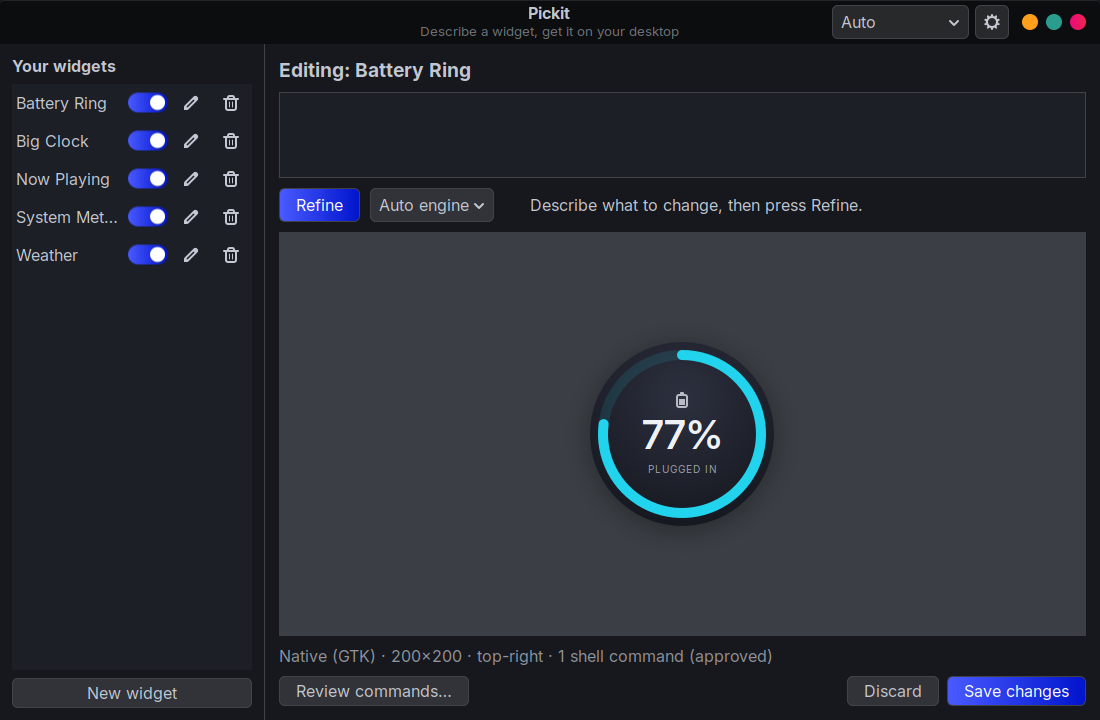
- Change any part. Press Select part, click a piece of the widget and say what to change about it, or open the Code tab and edit the widget directly.
- Share widgets. Export any widget as a
.pickitfile; others open it with a double-click and approve its commands before anything runs. - Part of the desktop. Widgets sit above the wallpaper and below every window. Show Desktop doesn't hide them, they appear on every workspace, and they stay out of the taskbar and Alt+Tab.
- Always on. Widgets keep running after you close Pickit and come back after a reboot.
- Live data, with approval. Widgets get data from shell commands that you approve before they run. Change a command and Pickit asks again.
- No setup. Download a Flatpak or AppImage; there are no libraries to install.
- Your choice of AI. Your Claude Code login, an Anthropic API key, a local model with Ollama (free, and nothing leaves your computer), or any model on OpenRouter.
- Light on memory. Most widgets are drawn natively with GTK: five typical widgets use about 25 MB in total. When a design needs more freedom (animation, SVG art), Pickit switches to HTML/CSS for that widget.
- Hackable. Every widget is a small JSON or HTML file you can open and edit yourself.
Install
⬇ Install Pickit: open the downloaded file, and your software center (Linux Mint Software Manager, GNOME Software or KDE Discover) shows an Install button. Updates then arrive through your normal software updates.
Or from a terminal:
flatpak install https://dengo07.github.io/pickit/Pickit.flatpakref
Other options: AppImage or offline bundle
| Package | Install |
|---|---|
Pickit-x86_64.AppImage | A single file, nothing installed. Browsers save downloads as non-executable, so first right-click → Properties → Permissions → Allow executing file as program, then double-click it. From a terminal: chmod +x Pickit-x86_64.AppImage && ./Pickit-x86_64.AppImage. It adds itself to your app menu. |
Pickit.flatpak | An offline bundle, for installing without internet access: flatpak install Pickit.flatpak. It doesn't update itself. |
- Flatpak works on any distro with Flatpak. It's preinstalled on Linux Mint, Fedora, Pop!_OS, Zorin, elementary and Steam Deck; on Ubuntu or Debian, run
sudo apt install flatpakfirst. - AppImage needs glibc 2.39 or newer: Ubuntu 24.04+, Mint 22+, Fedora 40+, Debian 13+, Arch, openSUSE Tumbleweed.
All versions share the same widgets and settings, so you can switch between them.
The Flatpak installs system-wide, like the apps from your software center, so it reuses the runtimes and graphics drivers you already have. The first time, it downloads anything missing: the GNOME runtime (about 400 MB, shared with every GNOME Flatpak app) and, on NVIDIA systems, Flatpak's copy of your driver version. Later updates only download Pickit itself (about 5 MB).
Connect an AI model
To generate your own widgets, Pickit needs one of these (the gallery works without any). With the backend set to Automatic, it uses the first one it finds, in this order:
| Backend | Setup | Notes |
|---|---|---|
| Claude Code | Install the claude command and log in. | Uses your Claude subscription; no key needed. |
| Anthropic API | Add a key from console.anthropic.com in Settings. | Pay per use. |
| Ollama | Install Ollama, then download a model: ollama pull qwen3.5:9b. | Free and private: the model runs on your computer. A graphics card with 8 GB of memory runs 8–9B models well; bigger models write better widgets. |
| OpenRouter | Add a key from openrouter.ai/keys in Settings and pick a model. | Hundreds of models through one key, including free ones (their IDs end in :free). |
Open Settings (the gear button) to choose a backend and model, and press Test connection to check it. You can also switch backends from the menu next to the gear.
Usage
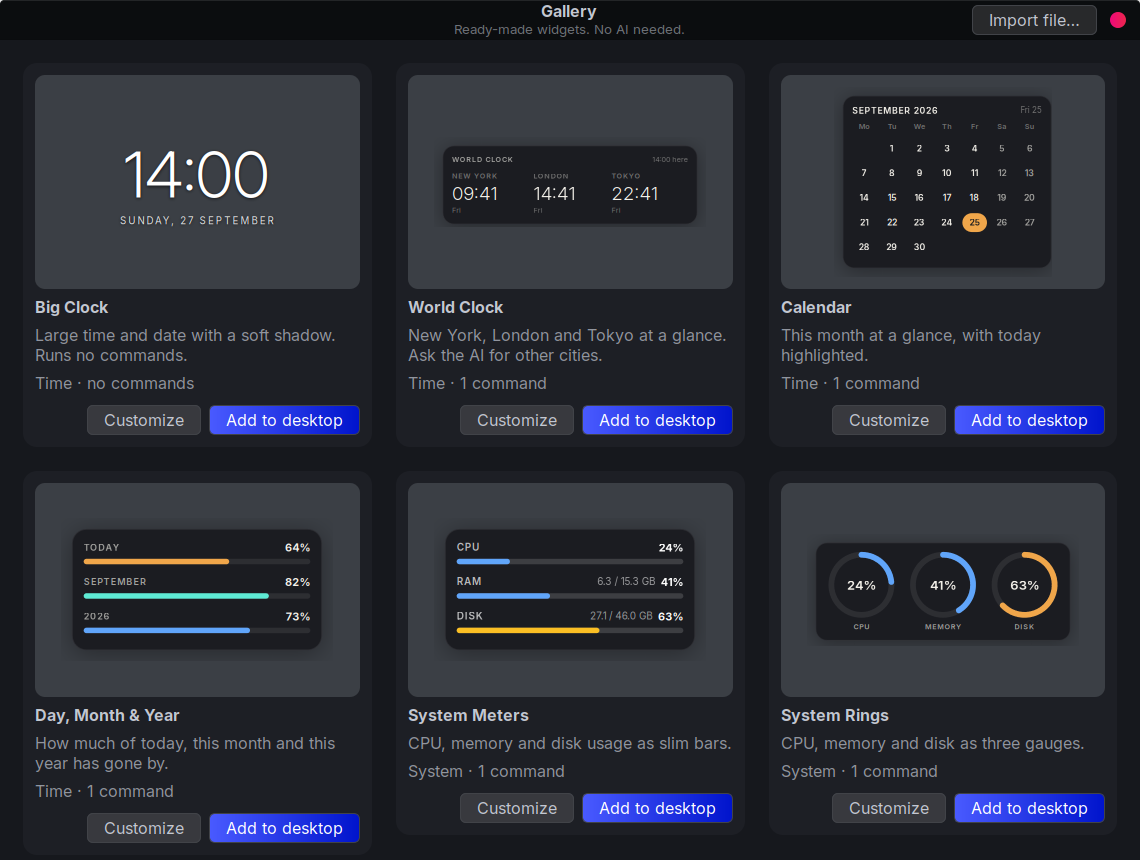
No AI set up yet? Press Gallery, pick a widget and press Add to desktop. Customize opens it in the editor first, so you can refine it with AI later.
To make your own:
- Open Pickit and describe your widget, or pick one of the examples.
- Press Generate (or Ctrl+Enter).
- If the widget needs live data, review the shell commands it wants to run and approve them.
- Refine it: "use a serif font", "add seconds", "make the ring orange".
- Press Place on desktop.
Customize a widget
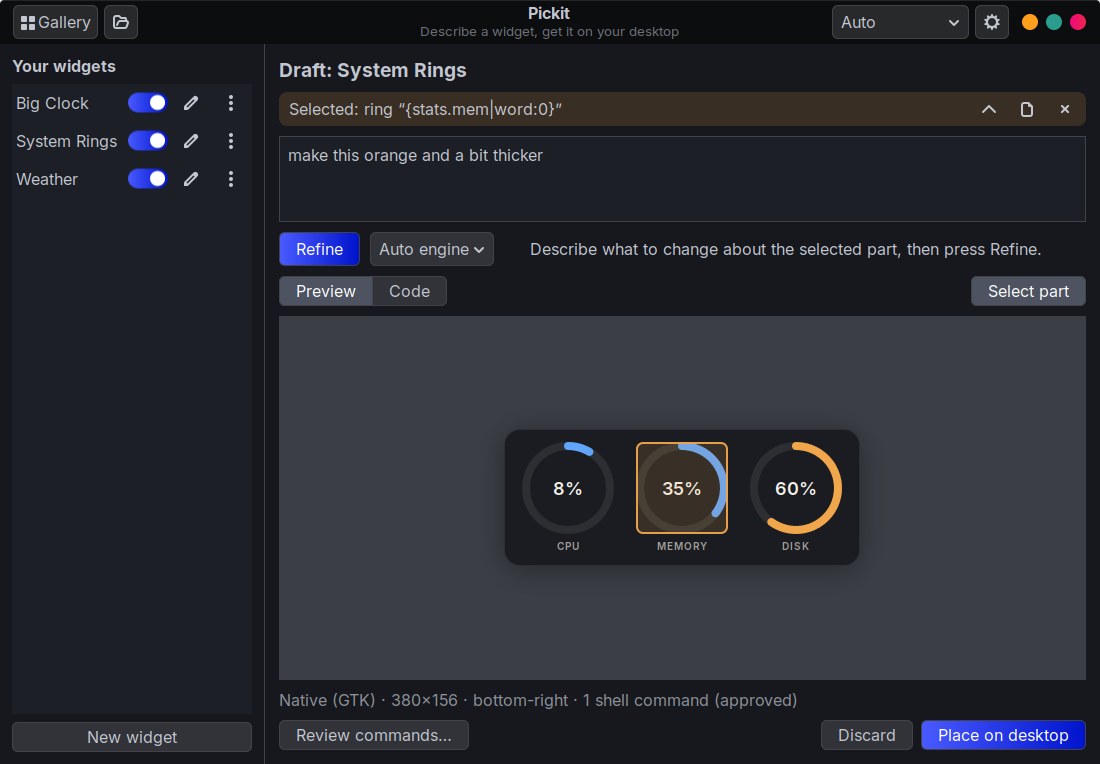
- Change one part. Press Select part and click a piece of the widget in the preview: a label, a ring, a whole card. ↑ selects the part around it. Then describe the change ("make this orange", "hide this when unplugged") and press Refine. The AI changes that part and leaves the rest alone.
- Edit the code. The Code tab shows the widget as code: its layout (the component tree, or the HTML page) and its settings and shell commands. Edit either one and press Apply (Ctrl+S). Pickit checks it like AI output and points at the problem if there is one. Changed commands need your approval again. The file icon on a selection jumps to its code.
Open any widget on your desktop with its ✎ button in the sidebar, or Edit… in its right-click menu.
On the desktop:
| Action | How |
|---|---|
| Move a widget | Alt+drag, or drag its handle area |
| Edit, reload, hide or delete | Right-click the widget |
| Show or hide widgets | The switches in Pickit's sidebar |
| Share a widget | Right-click it → Export…, or ⋮ → Export… in the sidebar |
Share widgets
Export… saves a widget as a small .pickit file. Send it to a friend, post it in an issue or a Reddit comment. To use one, double-click it (or press the open-file button in Pickit): Pickit shows a preview and asks you to approve its shell commands, just like a generated widget. Files carry no approval, no screen position and none of your prompts. See the file format.
Command line
pickit                      open the maker window
pickit new "a pomodoro timer with a progress ring"
pickit edit <id>            open a widget in the maker
pickit gallery              browse ready-made widgets
pickit list                 list your widgets
pickit export <id> [FILE]   save a widget as a .pickit file
pickit import FILE          open a .pickit file
pickit run | stop           start or stop the desktop daemon (normally automatic)
For the Flatpak, use flatpak run io.github.dengo07.Pickit <command>. The Flatpak can only read and write files you pick in a file dialog, so export and import from the Pickit window (or double-click a .pickit file) rather than with pickit export/import.
How it works
flowchart LR
  you([Your description]) --> maker[Pickit window]
  maker -- prompt --> ai[("AI model: Claude, Ollama or OpenRouter")]
  ai -- "widget spec (native UI or HTML)" --> maker
  maker -- "saves widget files" --> store[("~/.local/share/pickit")]
  store -- "file watch" --> daemon[Desktop daemon]
  daemon --> w1[Widget window]
  daemon --> w2[Widget window]
  w1 -. "approved commands" .-> host[(Your system)]
- Each widget uses one of two engines. Native widgets are a JSON component tree (cards, labels, rings, bars, images, buttons, with data bindings) that Pickit draws with GTK. HTML widgets are a web page drawn by WebKit, for designs native can't express. Either way the widget sits in a transparent window that the window manager keeps in the desktop layer.
- A separate desktop daemon owns the widget windows. It starts at login and picks up changes as soon as you save them, which is why widgets survive closing the app.
- Widgets can only run the shell commands listed in their manifest, and only after you approve them. See SECURITY.md.
More detail: architecture · widget format and JS API · packaging
Compatibility
| Desktop | Status |
|---|---|
| Cinnamon (X11) | ✅ Tested |
| MATE, Xfce, Budgie, KDE Plasma, GNOME (X11) | Expected to work; please report issues |
| Wayland sessions | Runs through XWayland automatically; untested |
Widgets need a compositing window manager for transparency. Most desktops have one enabled by default; on Xfce, turn it on in Window Manager Tweaks.
Troubleshooting
A widget is blank or invisible
Right-click where the widget should be and choose Reload. If it's still blank, look at ~/.local/share/pickit/daemon.log. Transparency needs a compositor to be running.
"Connect Pickit to an AI model"
Pickit found no AI backend: no claude command, no API key, and no Ollama with a downloaded model. Set one up (see Connect an AI model), then press Test connection in Settings.
A local model makes broken or plain widgets
Small models follow Pickit's widget format less reliably. Pickit retries twice with the error, but a bigger model (for example qwen3.5:27b if you have the memory) or a hosted one through OpenRouter works better. Generation on a CPU without a graphics card can take several minutes.
A widget shows no data
Its commands may not be approved yet (right-click → Review commands…), or a tool it relies on (for example playerctl or sensors) isn't installed. Ask Pickit to "work without playerctl", or install the tool.
Widgets don't come back after a reboot
Check that Settings → Keep widgets on the desktop after reboot is on. It creates ~/.config/autostart/pickit.desktop.
Development
Run from source on Debian, Ubuntu or Mint:
sudo apt install python3-gi python3-gi-cairo gir1.2-gtk-3.0 gir1.2-webkit2-4.1
git clone https://github.com/dengo07/pickit && cd pickit
python3 -m pickit            # optional: ./install.sh adds a menu entry
pip install anthropic        # only needed for the Anthropic API backend
Tests and lint (no display needed):
pip install pytest ruff
pytest && ruff check .
Build the release packages with make flatpak and make appimage (see docs/PACKAGING.md).
Contributions are welcome. Please read CONTRIBUTING.md.
License
MIT © 2026 Deniz Ural
Contributors

19 commits
Similar repos


Languages
Python
94.7%
Shell
3.3%
HTML
1.7%
AI widget maker for linux
See the codeSee what people are saying
README
Pickit
Describe a desktop widget in plain words, and get it on your Linux desktop.
"A translucent clock with CPU and RAM bars in the bottom-right corner." Press Generate, and a few seconds later it's on your desktop.
Pickit uses an AI model to turn your description into a working widget, then pins it to your desktop like a native desklet. Use Claude, a free local model through Ollama, or any model on OpenRouter. You can refine a widget by asking for changes ("make it bigger and blue") until it looks right.
Features
- Plain-language widgets. Clocks, system meters, weather, now playing, timers, battery gauges and more.
- A gallery of ready-made widgets. Thirteen widgets you can add in one click, no AI needed: clocks, a calendar, system gauges and graphs, network speed, CPU temperature, weather and now playing.
- Change any part. Press Select part, click a piece of the widget and say what to change about it, or open the Code tab and edit the widget directly.
- Share widgets. Export any widget as a
.pickitfile; others open it with a double-click and approve its commands before anything runs. - Part of the desktop. Widgets sit above the wallpaper and below every window. Show Desktop doesn't hide them, they appear on every workspace, and they stay out of the taskbar and Alt+Tab.
- Always on. Widgets keep running after you close Pickit and come back after a reboot.
- Live data, with approval. Widgets get data from shell commands that you approve before they run. Change a command and Pickit asks again.
- No setup. Download a Flatpak or AppImage; there are no libraries to install.
- Your choice of AI. Your Claude Code login, an Anthropic API key, a local model with Ollama (free, and nothing leaves your computer), or any model on OpenRouter.
- Light on memory. Most widgets are drawn natively with GTK: five typical widgets use about 25 MB in total. When a design needs more freedom (animation, SVG art), Pickit switches to HTML/CSS for that widget.
- Hackable. Every widget is a small JSON or HTML file you can open and edit yourself.
Install
⬇ Install Pickit: open the downloaded file, and your software center (Linux Mint Software Manager, GNOME Software or KDE Discover) shows an Install button. Updates then arrive through your normal software updates.
Or from a terminal:
flatpak install https://dengo07.github.io/pickit/Pickit.flatpakref
Other options: AppImage or offline bundle
| Package | Install |
|---|---|
Pickit-x86_64.AppImage | A single file, nothing installed. Browsers save downloads as non-executable, so first right-click → Properties → Permissions → Allow executing file as program, then double-click it. From a terminal: chmod +x Pickit-x86_64.AppImage && ./Pickit-x86_64.AppImage. It adds itself to your app menu. |
Pickit.flatpak | An offline bundle, for installing without internet access: flatpak install Pickit.flatpak. It doesn't update itself. |
- Flatpak works on any distro with Flatpak. It's preinstalled on Linux Mint, Fedora, Pop!_OS, Zorin, elementary and Steam Deck; on Ubuntu or Debian, run
sudo apt install flatpakfirst. - AppImage needs glibc 2.39 or newer: Ubuntu 24.04+, Mint 22+, Fedora 40+, Debian 13+, Arch, openSUSE Tumbleweed.
All versions share the same widgets and settings, so you can switch between them.
The Flatpak installs system-wide, like the apps from your software center, so it reuses the runtimes and graphics drivers you already have. The first time, it downloads anything missing: the GNOME runtime (about 400 MB, shared with every GNOME Flatpak app) and, on NVIDIA systems, Flatpak's copy of your driver version. Later updates only download Pickit itself (about 5 MB).
Connect an AI model
To generate your own widgets, Pickit needs one of these (the gallery works without any). With the backend set to Automatic, it uses the first one it finds, in this order:
| Backend | Setup | Notes |
|---|---|---|
| Claude Code | Install the claude command and log in. | Uses your Claude subscription; no key needed. |
| Anthropic API | Add a key from console.anthropic.com in Settings. | Pay per use. |
| Ollama | Install Ollama, then download a model: ollama pull qwen3.5:9b. | Free and private: the model runs on your computer. A graphics card with 8 GB of memory runs 8–9B models well; bigger models write better widgets. |
| OpenRouter | Add a key from openrouter.ai/keys in Settings and pick a model. | Hundreds of models through one key, including free ones (their IDs end in :free). |
Open Settings (the gear button) to choose a backend and model, and press Test connection to check it. You can also switch backends from the menu next to the gear.
Usage
No AI set up yet? Press Gallery, pick a widget and press Add to desktop. Customize opens it in the editor first, so you can refine it with AI later.
To make your own:
- Open Pickit and describe your widget, or pick one of the examples.
- Press Generate (or Ctrl+Enter).
- If the widget needs live data, review the shell commands it wants to run and approve them.
- Refine it: "use a serif font", "add seconds", "make the ring orange".
- Press Place on desktop.
Customize a widget
- Change one part. Press Select part and click a piece of the widget in the preview: a label, a ring, a whole card. ↑ selects the part around it. Then describe the change ("make this orange", "hide this when unplugged") and press Refine. The AI changes that part and leaves the rest alone.
- Edit the code. The Code tab shows the widget as code: its layout (the component tree, or the HTML page) and its settings and shell commands. Edit either one and press Apply (Ctrl+S). Pickit checks it like AI output and points at the problem if there is one. Changed commands need your approval again. The file icon on a selection jumps to its code.
Open any widget on your desktop with its ✎ button in the sidebar, or Edit… in its right-click menu.
On the desktop:
| Action | How |
|---|---|
| Move a widget | Alt+drag, or drag its handle area |
| Edit, reload, hide or delete | Right-click the widget |
| Show or hide widgets | The switches in Pickit's sidebar |
| Share a widget | Right-click it → Export…, or ⋮ → Export… in the sidebar |
Share widgets
Export… saves a widget as a small .pickit file. Send it to a friend, post it in an issue or a Reddit comment. To use one, double-click it (or press the open-file button in Pickit): Pickit shows a preview and asks you to approve its shell commands, just like a generated widget. Files carry no approval, no screen position and none of your prompts. See the file format.
Command line
pickit                      open the maker window
pickit new "a pomodoro timer with a progress ring"
pickit edit <id>            open a widget in the maker
pickit gallery              browse ready-made widgets
pickit list                 list your widgets
pickit export <id> [FILE]   save a widget as a .pickit file
pickit import FILE          open a .pickit file
pickit run | stop           start or stop the desktop daemon (normally automatic)
For the Flatpak, use flatpak run io.github.dengo07.Pickit <command>. The Flatpak can only read and write files you pick in a file dialog, so export and import from the Pickit window (or double-click a .pickit file) rather than with pickit export/import.
How it works
flowchart LR
  you([Your description]) --> maker[Pickit window]
  maker -- prompt --> ai[("AI model: Claude, Ollama or OpenRouter")]
  ai -- "widget spec (native UI or HTML)" --> maker
  maker -- "saves widget files" --> store[("~/.local/share/pickit")]
  store -- "file watch" --> daemon[Desktop daemon]
  daemon --> w1[Widget window]
  daemon --> w2[Widget window]
  w1 -. "approved commands" .-> host[(Your system)]
- Each widget uses one of two engines. Native widgets are a JSON component tree (cards, labels, rings, bars, images, buttons, with data bindings) that Pickit draws with GTK. HTML widgets are a web page drawn by WebKit, for designs native can't express. Either way the widget sits in a transparent window that the window manager keeps in the desktop layer.
- A separate desktop daemon owns the widget windows. It starts at login and picks up changes as soon as you save them, which is why widgets survive closing the app.
- Widgets can only run the shell commands listed in their manifest, and only after you approve them. See SECURITY.md.
More detail: architecture · widget format and JS API · packaging
Compatibility
| Desktop | Status |
|---|---|
| Cinnamon (X11) | ✅ Tested |
| MATE, Xfce, Budgie, KDE Plasma, GNOME (X11) | Expected to work; please report issues |
| Wayland sessions | Runs through XWayland automatically; untested |
Widgets need a compositing window manager for transparency. Most desktops have one enabled by default; on Xfce, turn it on in Window Manager Tweaks.
Troubleshooting
A widget is blank or invisible
Right-click where the widget should be and choose Reload. If it's still blank, look at ~/.local/share/pickit/daemon.log. Transparency needs a compositor to be running.
"Connect Pickit to an AI model"
Pickit found no AI backend: no claude command, no API key, and no Ollama with a downloaded model. Set one up (see Connect an AI model), then press Test connection in Settings.
A local model makes broken or plain widgets
Small models follow Pickit's widget format less reliably. Pickit retries twice with the error, but a bigger model (for example qwen3.5:27b if you have the memory) or a hosted one through OpenRouter works better. Generation on a CPU without a graphics card can take several minutes.
A widget shows no data
Its commands may not be approved yet (right-click → Review commands…), or a tool it relies on (for example playerctl or sensors) isn't installed. Ask Pickit to "work without playerctl", or install the tool.
Widgets don't come back after a reboot
Check that Settings → Keep widgets on the desktop after reboot is on. It creates ~/.config/autostart/pickit.desktop.
Development
Run from source on Debian, Ubuntu or Mint:
sudo apt install python3-gi python3-gi-cairo gir1.2-gtk-3.0 gir1.2-webkit2-4.1
git clone https://github.com/dengo07/pickit && cd pickit
python3 -m pickit            # optional: ./install.sh adds a menu entry
pip install anthropic        # only needed for the Anthropic API backend
Tests and lint (no display needed):
pip install pytest ruff
pytest && ruff check .
Build the release packages with make flatpak and make appimage (see docs/PACKAGING.md).
Contributions are welcome. Please read CONTRIBUTING.md.
License
MIT © 2026 Deniz Ural
Similar repos
Contributors
19 commits
Languages
Python
94.7%
Shell
3.3%
HTML
1.7%