
An AI code editor that checks its own work.
See the codeSee what people are saying
README
Aperture
An AI code editor that checks its own work. Composer plans a change and stages it as a diff. Every staged change is then checked before you apply it: it parses, its imports resolve, the page renders, and the tests pass. The tests run in your browser tab, free, in about a second.
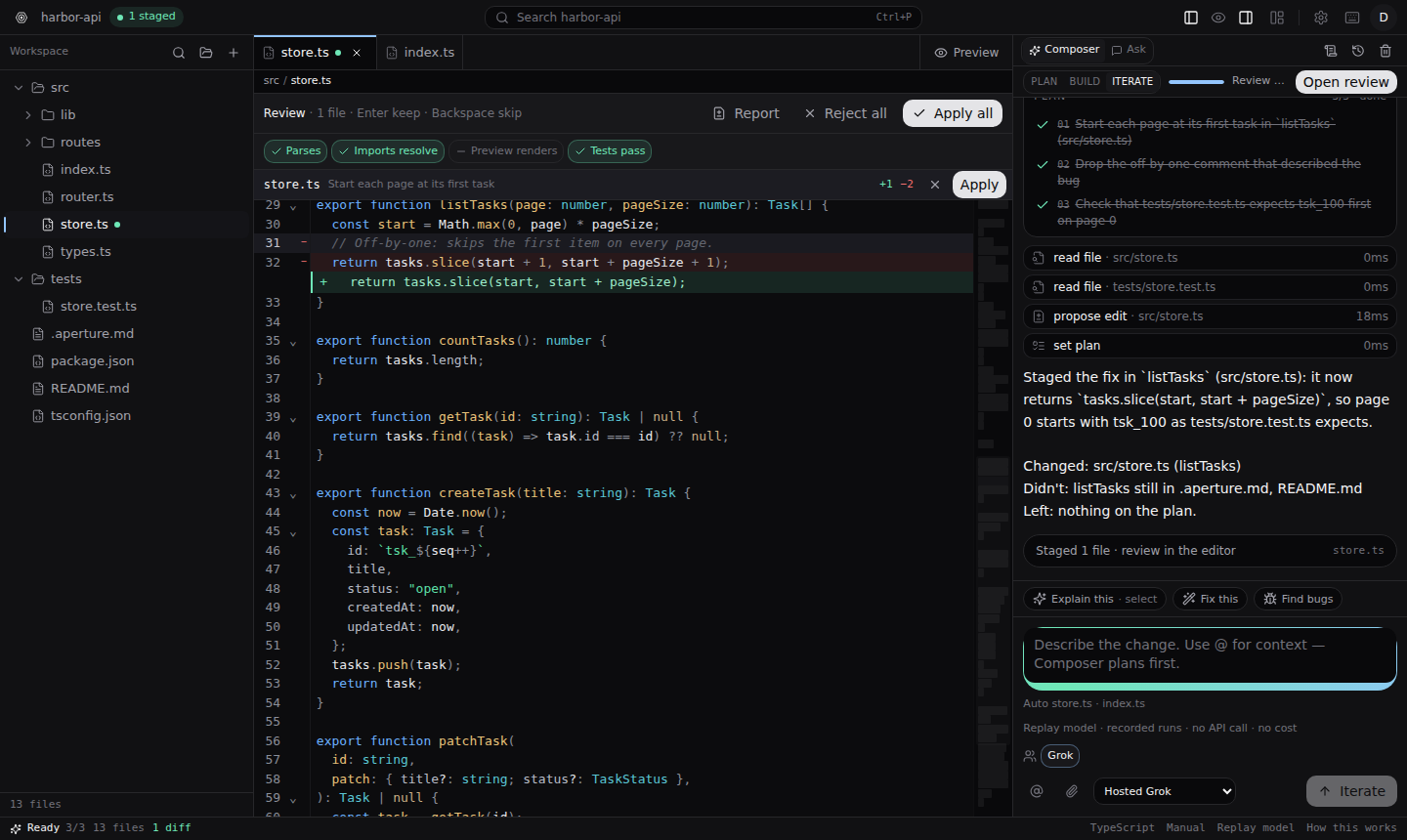
Demo: aperturesais.grok.me. It plays recorded runs. It does not call Grok, so it does not spend anyone's API quota. A key you add in Settings is yours alone.
Try it in a minute, no API key needed
Needs Node 22.6 or newer.
git clone https://github.com/Hankaws/aperture.git
cd aperture
npm ci
APERTURE_MODEL=replay VITE_AUTH_ENABLED=false npm run dev
Open http://localhost:8080/app and click Fix the off-by-one in listTasks, then Build it. Watch the plan, the staged diff and the checks. Tests pass ✓, and clicking the chip shows the run. The other two suggested tasks show a test that was already failing before the change, marked amber and not blamed on the edit.
APERTURE_MODEL=replay plays back recorded agent runs on the built-in demo
project (harbor-api) instead of calling a model. It exercises the whole
product and costs nothing. VITE_AUTH_ENABLED=false skips sign-in and uses a
local in-process database (PGlite), so nothing else needs setting up.
What it does
-
Plan, then build. Composer reads the code, posts a plan, and waits for Build it. Edits arrive as staged diffs you keep or skip file by file. Nothing touches your files until you apply.
-
Check results on every change. Four checks, each computed from the staged change itself:
- Parses: the changed files parse.
- Imports resolve: every import in the changed files resolves.
- Preview renders: the staged page renders, without errors and not blank.
- Tests: the project's tests pass.
A check that could not run says why. It never shows as a pass.
-
Tests in the browser.
npm run testruns in a sandboxed Worker in your tab. This coversnode,node --testandtsxscripts, withnode:testandnode:assert. It also covers Vitest and Jest:describe,it,expect, mock functions,vi.mockandjest.mock, and fake timers. A Vitest or Jest config is honoured when it only picks test files or turns on globals. A DOM environment, plugins, aliases, setup files and snapshots need a real Node. The sandbox blocks all network access, so code the agent just wrote cannot reach the app or anything else.- If a test fails, it is re-run on your current files. A failure that was already there is reported as such.
- A new failure goes back to the agent once to fix.
- The agent runs them too. When it calls
run_scriptfor a script the browser can run, the tests run in your tab after its turn, and the output goes straight back to it as the next turn. It can check a fix, see a failure and try again, at no cost, up to three runs per task. - Projects that need a real Node can run in Vercel Sandbox instead.
-
Design mode. Click an element in the preview to work on it. No model needed for the first two tabs:
- Style edits the CSS rule behind the element: colours (or one of the page's tokens), size, weight, spacing, corners. The change goes into your stylesheet and the preview updates at once.
- Theme edits the page's design tokens (
:root { --accent: … }) and has one-click themes. - Notes sends what you want changed to Composer, along with the rules that style the element and the page's tokens.
- Every edit session is one undo step, and the preview can be shown at phone and tablet widths.
-
Your layout. Every panel resizes and moves. The preview can dock right, below or full-screen, and the sidebars can swap sides.
-
Any model. Hosted Grok, or your own key for Grok, OpenAI, Anthropic, Gemini or DeepSeek (Settings → Models).
Using a real model
Leave out APERTURE_MODEL=replay. Then either:
- set
XAI_API_KEYin the server's environment for hosted Grok, or - sign in and add your own key under Settings → Models.
Configuration
Everything is optional for local use. Set these in your shell or your host's environment settings, never in a committed file.
| Variable | What it does |
|---|---|
APERTURE_MODEL=replay | Recorded runs instead of a model; no key, no cost |
VITE_AUTH_ENABLED=false | No sign-in. Each browser gets its own anonymous workspace, settings and keys; the plan and usage limits are shared by all anonymous visitors |
XAI_API_KEY | Server key for hosted Grok |
DATABASE_URL | Postgres for accounts and saved work. Without it, an in-process PGlite database |
BETTER_AUTH_SECRET, BETTER_AUTH_URL | Session signing and the public URL when sign-in is on |
GROK_AUTH_ISSUER, GROK_AUTH_CLIENT_ID, GROK_AUTH_CLIENT_SECRET | "Sign in with Grok". Only apps hosted by Grok App Builder have these; email and password sign-in works without them |
APERTURE_LOCAL_ENDPOINTS | 1 lets a custom model endpoint on http://127.0.0.1 (Ollama, LM Studio) be called from a production server you run yourself. On by default in local dev, off when deployed: there, loopback is the server itself, not your machine |
APERTURE_SANDBOX=vercel-oidc | Lets the agent run projects in Vercel Sandbox, when deployed on Vercel |
VERCEL_SANDBOX_TOKEN, VERCEL_TEAM_ID, VERCEL_PROJECT_ID | Vercel Sandbox from any other host |
Don't set VITE_AUTH_ENABLED=false together with DATABASE_URL. The app
refuses that combination on purpose, so a shared database is never opened
without sign-in.
Development
npm run dev        # the app on http://localhost:8080
npm test           # every *.test.ts / *.test.mjs, no build step
npm run typecheck
npm run lint
npm run build      # production build
Read AGENTS.project.md before changing things. It lists
the traps in this codebase that type-check cleanly and then fail at runtime,
and how each one is verified.
| Path | What lives there |
|---|---|
src/components/ide/ | The editor UI: panels, review strip, checks, Composer |
src/lib/agent/ | The agent loop, tools, plan/build phases and the replay model |
src/lib/runner/ | The in-browser test runner |
src/lib/workspace/ | Files, staged edits, checks, preview rendering |
src/lib/sandbox/ | Verify runs in Vercel Sandbox |
src/lib/indexer/ | Code search that the agent uses |
See CONTRIBUTING.md to send a change.
License
Aperture's code is under the MIT License. Some scaffolding comes from the Grok App Builder template and is not covered by it. See THIRD_PARTY_NOTICES.md.
Similar repos


Languages
TypeScript
82.8%
JavaScript
9.8%
Python
4.2%
HTML
1.7%
CSS
1.4%
An AI code editor that checks its own work.
See the codeSee what people are saying
README
Aperture
An AI code editor that checks its own work. Composer plans a change and stages it as a diff. Every staged change is then checked before you apply it: it parses, its imports resolve, the page renders, and the tests pass. The tests run in your browser tab, free, in about a second.
Demo: aperturesais.grok.me. It plays recorded runs. It does not call Grok, so it does not spend anyone's API quota. A key you add in Settings is yours alone.
Try it in a minute, no API key needed
Needs Node 22.6 or newer.
git clone https://github.com/Hankaws/aperture.git
cd aperture
npm ci
APERTURE_MODEL=replay VITE_AUTH_ENABLED=false npm run dev
Open http://localhost:8080/app and click Fix the off-by-one in listTasks, then Build it. Watch the plan, the staged diff and the checks. Tests pass ✓, and clicking the chip shows the run. The other two suggested tasks show a test that was already failing before the change, marked amber and not blamed on the edit.
APERTURE_MODEL=replay plays back recorded agent runs on the built-in demo
project (harbor-api) instead of calling a model. It exercises the whole
product and costs nothing. VITE_AUTH_ENABLED=false skips sign-in and uses a
local in-process database (PGlite), so nothing else needs setting up.
What it does
-
Plan, then build. Composer reads the code, posts a plan, and waits for Build it. Edits arrive as staged diffs you keep or skip file by file. Nothing touches your files until you apply.
-
Check results on every change. Four checks, each computed from the staged change itself:
- Parses: the changed files parse.
- Imports resolve: every import in the changed files resolves.
- Preview renders: the staged page renders, without errors and not blank.
- Tests: the project's tests pass.
A check that could not run says why. It never shows as a pass.
-
Tests in the browser.
npm run testruns in a sandboxed Worker in your tab. This coversnode,node --testandtsxscripts, withnode:testandnode:assert. It also covers Vitest and Jest:describe,it,expect, mock functions,vi.mockandjest.mock, and fake timers. A Vitest or Jest config is honoured when it only picks test files or turns on globals. A DOM environment, plugins, aliases, setup files and snapshots need a real Node. The sandbox blocks all network access, so code the agent just wrote cannot reach the app or anything else.- If a test fails, it is re-run on your current files. A failure that was already there is reported as such.
- A new failure goes back to the agent once to fix.
- The agent runs them too. When it calls
run_scriptfor a script the browser can run, the tests run in your tab after its turn, and the output goes straight back to it as the next turn. It can check a fix, see a failure and try again, at no cost, up to three runs per task. - Projects that need a real Node can run in Vercel Sandbox instead.
-
Design mode. Click an element in the preview to work on it. No model needed for the first two tabs:
- Style edits the CSS rule behind the element: colours (or one of the page's tokens), size, weight, spacing, corners. The change goes into your stylesheet and the preview updates at once.
- Theme edits the page's design tokens (
:root { --accent: … }) and has one-click themes. - Notes sends what you want changed to Composer, along with the rules that style the element and the page's tokens.
- Every edit session is one undo step, and the preview can be shown at phone and tablet widths.
-
Your layout. Every panel resizes and moves. The preview can dock right, below or full-screen, and the sidebars can swap sides.
-
Any model. Hosted Grok, or your own key for Grok, OpenAI, Anthropic, Gemini or DeepSeek (Settings → Models).
Using a real model
Leave out APERTURE_MODEL=replay. Then either:
- set
XAI_API_KEYin the server's environment for hosted Grok, or - sign in and add your own key under Settings → Models.
Configuration
Everything is optional for local use. Set these in your shell or your host's environment settings, never in a committed file.
| Variable | What it does |
|---|---|
APERTURE_MODEL=replay | Recorded runs instead of a model; no key, no cost |
VITE_AUTH_ENABLED=false | No sign-in. Each browser gets its own anonymous workspace, settings and keys; the plan and usage limits are shared by all anonymous visitors |
XAI_API_KEY | Server key for hosted Grok |
DATABASE_URL | Postgres for accounts and saved work. Without it, an in-process PGlite database |
BETTER_AUTH_SECRET, BETTER_AUTH_URL | Session signing and the public URL when sign-in is on |
GROK_AUTH_ISSUER, GROK_AUTH_CLIENT_ID, GROK_AUTH_CLIENT_SECRET | "Sign in with Grok". Only apps hosted by Grok App Builder have these; email and password sign-in works without them |
APERTURE_LOCAL_ENDPOINTS | 1 lets a custom model endpoint on http://127.0.0.1 (Ollama, LM Studio) be called from a production server you run yourself. On by default in local dev, off when deployed: there, loopback is the server itself, not your machine |
APERTURE_SANDBOX=vercel-oidc | Lets the agent run projects in Vercel Sandbox, when deployed on Vercel |
VERCEL_SANDBOX_TOKEN, VERCEL_TEAM_ID, VERCEL_PROJECT_ID | Vercel Sandbox from any other host |
Don't set VITE_AUTH_ENABLED=false together with DATABASE_URL. The app
refuses that combination on purpose, so a shared database is never opened
without sign-in.
Development
npm run dev        # the app on http://localhost:8080
npm test           # every *.test.ts / *.test.mjs, no build step
npm run typecheck
npm run lint
npm run build      # production build
Read AGENTS.project.md before changing things. It lists
the traps in this codebase that type-check cleanly and then fail at runtime,
and how each one is verified.
| Path | What lives there |
|---|---|
src/components/ide/ | The editor UI: panels, review strip, checks, Composer |
src/lib/agent/ | The agent loop, tools, plan/build phases and the replay model |
src/lib/runner/ | The in-browser test runner |
src/lib/workspace/ | Files, staged edits, checks, preview rendering |
src/lib/sandbox/ | Verify runs in Vercel Sandbox |
src/lib/indexer/ | Code search that the agent uses |
See CONTRIBUTING.md to send a change.
License
Aperture's code is under the MIT License. Some scaffolding comes from the Grok App Builder template and is not covered by it. See THIRD_PARTY_NOTICES.md.
Similar repos
Languages
TypeScript
82.8%
JavaScript
9.8%
Python
4.2%
HTML
1.7%
CSS
1.4%