This shell extension adds a few nice features to file browsers for managing video game ROM and disc images.





Major additions in v2.9 include:
Game Maker Studio data.win parser. (Contributed by @InvoxiPlayGames)
PlayStation PARAM.SFO parser. (Contributed by @InvoxiPlayGames)
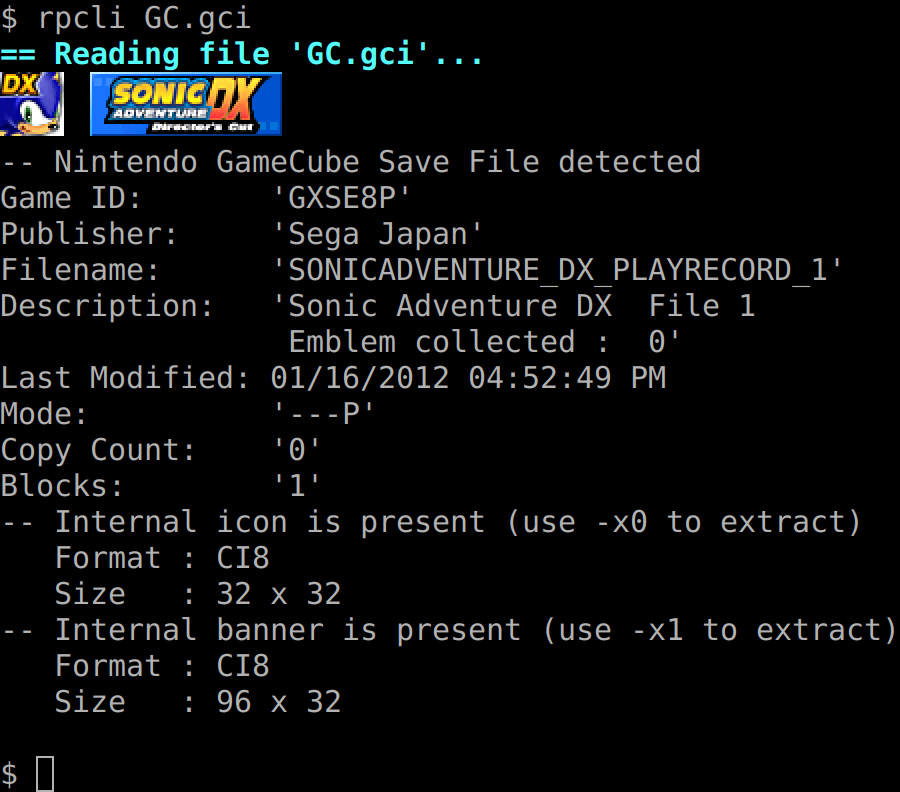
rpcli now has a -P option to list CPU features detected on the
current system. Currently supports x86 and ARM.
On Windows, the icon and banner on the ROM Properties tab can now be dragged and dropped into a folder window to extract it in PNG format.
Added Georgian translations from temuri.doghonadze .
EXE: Games for Windows Live and XNA executables now show an Xbox 360-style XDBF tab for Achievements.
KDE Frameworks 6: The system-wide file size unit dialect setting is now used instead of assuming IEC-style (KiB, MiB).
Lots and lots of tiny bug fixes and improvements.
Translators wanted; if you can translate rom-properties from English to another language, check out the Crowdin project. (If you would like to translate to a language not currently listed on the Crowdin project page, file an issue here on GitHub with the requested language.)
See NEWS.md for a full list of changes in v2.9.
This is a work in progress; feedback is encouraged. To leave feedback, you can file an issue on GitHub, or visit the Gens/GS IRC channel: irc://irc.badnik.zone/GensGS
Or use the Mibbit Web IRC client: http://mibbit.com/?server=irc.badnik.zone&channel=#GensGS
Currently, the ROM Properties Page shell extension is compatible with the following platforms and file browsers:
The following platforms are still compatible, but may not receive as much support:
On Windows 10 and later, you will need the MSVC 2015-2026 runtime:
On Windows Vista, Windows 7, and Windows 8.x, you will need the MSVC 2015-2022 runtime:
On Windows XP/2003 and earlier, you will need the MSVC 2015-2017 runtime:
For instructions on compiling from source, see doc/COMPILING.md.
Install the relevant .deb package, depending on what desktop environment you are using and what your CPU is.
After installing, the plugin needs to be enabled in the Dolphin file browser:
If installed correctly, thumbnails should be generated for the supported file type. You can also right-click a file, select Properties, then click the "ROM Properties" tab to view more information about the ROM image.
Run the installer. Currently, only system-wide installation is supported, so administrator access is required.
| Feature | Windows XP | Windows Vista/7/8/10/11 | KDE | GNOME | XFCE |
|---|---|---|---|---|---|
| Properties tab | ✅ | ✅ | ✅ | ✅ | ✅ |
| XAttrs tab | ✅ | ✅ | ✅ | ✅ | ✅ |
| Thumbnails | ✅ | ✅ | ✅ | ✅¹ | ✅ |
| "Dangerous" overlay | ❌ | ❌ | ✅ | ✅ | ⛔² |
| Metadata | ✅ | ✅ | ✅ | ✅ | ✅ |
| Columns | ✅ | ✅ | ⛔³ | ✅ | ⛔² |
| Context menu⁴ | ✅ | ✅ | ✅ | ✅ | ✅ |
| System | Properties Tab | Metadata | Internal Images | External Images |
|---|---|---|---|---|
| ColecoVision | Yes | Yes | N/A | No |
| Commodore 64/128 .CRT | Yes | Yes | N/A | Title |
| Intellivision | Yes | Yes | N/A | No |
| iQue Player ticket files | Yes | Yes | Icon, Banner | No |
| Microsoft Xbox (XBE) | Yes | Yes | Icon | No |
| Microsoft Xbox 360 (XEX) | Yes | Yes | Icon | No |
| Microsoft Xbox 360 (STFS) | Yes | Yes | Icon | No |
| Microsoft Xbox Game Discs | Yes | Yes | Icon | No |
| NES | Yes | No | N/A | Title |
| Super NES | Yes | Yes | N/A | Title |
| Nintendo 64 | Yes | Yes | N/A | No |
| Nintendo GameCube Discs | Yes | Yes | Banner | Disc, Covers |
| Nintendo GameCube Banners | Yes | Yes | Banner | No |
| Nintendo GameCube Saves | Yes | Yes | Icon | N/A |
| Nintendo Wii Banners | Yes | Yes | No | No |
| Nintendo Wii Discs | Yes | Yes | No | Disc, Covers |
| Nintendo Wii WADs | Yes | Yes | Yes¹ | Title, Covers |
| Nintendo Wii Saves | Yes | Yes | Yes | N/A |
| Nintendo Wii SETTING.TXT | Yes | No | No | N/A |
| Nintendo Wii U (Disc) | Yes | No | No | Disc, Covers |
| Nintendo Wii U (Firmware) | Yes | No | Yes² | N/A |
| Nintendo Wii U (NUS) | Yes | Yes | Icon | Disc, Covers |
| Sega 8-bit (SMS, GG) | Yes | Yes | N/A | No |
| Sega Mega Drive | Yes | Yes | N/A | Title |
| Sega Dreamcast | Yes | Yes | Media | No |
| Sega Dreamcast Saves | Yes | Yes | Icon, Banner | No |
| Sega Saturn | Yes | Yes | N/A | No |
| Sony PlayStation Discs | Yes | No | N/A | Covers |
| Sony PlayStation EXEs | Yes | No | N/A | N/A |
| Sony PlayStation Saves | Yes | Yes | Icon | N/A |
| Sony PlayStation 2 Discs | Yes | Yes | N/A | Covers |
| System | Properties Tab | Metadata | Internal Images | External Images |
|---|---|---|---|---|
| Atari Lynx | Yes | Yes | N/A | No |
| Bandai WonderSwan (Color) | Yes | Yes | N/A | Title |
| Google Android | Yes | Yes | Icon | N/A |
| J2ME | Yes | Yes | Icon | N/A |
| Neo Geo Pocket (Color) | Yes | Yes | N/A | Title |
| Nintendo Game Boy (Color) | Yes | Yes | N/A | Title |
| Nintendo Virtual Boy | Yes | Yes | N/A | No |
| Nintendo Game Boy Advance | Yes | Yes | N/A | Title |
| Nintendo DS(i) | Yes | Yes | Icon | Covers, Box |
| Nintendo DSi TADs* | Partial | No | No | No |
| Nintendo 3DS | Yes | Yes | Icon | Covers, Box |
| Palm OS | Yes | Yes | Icon | N/A |
| Pokémon Mini | Yes | Yes | N/A | No |
| Sony PlayStation Portable | Yes | Yes | Icon, Banner | No |
| Tiger game.com | Yes | Yes | Icon | No |
| Texture Format | Properties Tab | Metadata |
|---|---|---|
| ASTC container | Yes | Yes |
| Godot 3,4 .stex | Yes | Yes |
| Leapster Didj .tex | Yes | Yes |
| Khronos KTX | Yes | Yes |
| Khronos KTX2 | Yes | Yes |
| Microsoft DirectDraw DDS | Yes | Yes |
| Microsoft Xbox XPR | Yes | Yes |
| PowerVR 3.0.0 | Yes | Yes |
| Quite OK Image Format | Yes | Yes |
| Sega PVR/GVR/SVR | Yes | Yes |
| Sony PlayStation TIM | Yes | Yes |
| TrueVision TGA | Yes | Yes |
| Valve VTF | Yes | Yes |
| Valve VTF3 (PS3) | Yes | Yes |
| Windows icons/cursors¹ | Yes | Yes |
| System | Properties Tab | Metadata | Internal Images | External Scans |
|---|---|---|---|---|
| Atari 8-bit SAP audio | Yes | Yes | N/A | N/A |
| Atari ST SNDH audio | Yes | Yes | N/A | N/A |
| CRI ADX ADPCM | Yes | Yes | N/A | N/A |
| Commodore 64 SID Music | Yes | Yes | N/A | N/A |
| Game Boy Sound System | Yes | Yes | N/A | N/A |
| Game Boy Ripped | Yes | N/A | N/A | N/A |
| Nintendo 3DS BCSTM and BCWAV | Yes | Yes | N/A | N/A |
| Nintendo Sound Format | Yes | Yes | N/A | N/A |
| Nintendo Wii BRSTM | Yes | Yes | N/A | N/A |
| Nintendo Wii U BFSTM | Yes | Yes | N/A | N/A |
| Portable Sound Format | Yes | Yes | N/A | N/A |
| S98 Format | Yes | Yes | N/A | N/A |
| Super NES SPC Format | Yes | Yes | N/A | N/A |
| Video Game Music | Yes | Yes | N/A | N/A |
| System | Properties Tab | Metadata | Internal Images | External Scans |
|---|---|---|---|---|
| Commodore DOS Disk Images | Yes | Yes | GEOS* | N/A |
| ISO-9660 Disc Images | Yes | Yes | Icon | N/A |
| Windows Image (.wim) | Yes | No | N/A | N/A |
| System | Properties Tab | Metadata | Internal Images | External Scans |
|---|---|---|---|---|
| Executable and Linkable Format | Yes | No | N/A | N/A |
| GameMaker Studio data.win | Yes | Yes | N/A | N/A |
| PUC Lua binaries | Yes | No | N/A | N/A |
| Mach-O Binaries | Yes | No | N/A | N/A |
| Nintendo amiibo | Yes | No | N/A | Media |
| Nintendo Badge Arcade | Yes | Yes | Image | N/A |
| Sony PlayStation PARAM.SFO | Yes | Yes | N/A | N/A |
| Windows/DOS Executables | Yes | Yes | Icon¹ | N/A |
General notes for all formats:
A configuration program, rp-config, is available to configure rom-properties
using a graphical interface. This program allows you to configure which images
will be used for thumbnails on each system, as well as other functionality.
Certain parsers support the use of external media scans through an online
database, e.g. GameTDB.com. This is enabled by default, but you can customize
which scans are downloaded for which systems by running the configuration
program, rp-config.exe.
Downloaded images are cached to the following directory:
~/.cache/rom-properties/%LOCALAPPDATA%\rom-properties\cache%USERPROFILE%\AppData\LocalLow\rom-properties\cacheThe directory structure matches the source site, so e.g. a disc image of
Super Smash Bros. Brawl would be downloaded to
~/.cache/rom-properties/wii/disc/US/RSBE01.png. Note that if the download
fails for any reason, a 0-byte dummy file will be placed in the cache,
which tells the shell extension not to attempt to download the file again.
[FIXME: If the download fails due to no network connectivity, it shouldn't
do this.]
If you have an offline copy of the GameTDB image database, you can copy it to the ROM Properties Page cache directory to allow the extension to use the pre-downloaded version instead of downloading images as needed.
Some newer formats, including Wii disc images, have encrypted sections. The
shell extension includes decryption code for handling these images, but the
keys are not included. To install the keys, create a text file called
keys.conf in the rom-properties configuration directory:
~/.config/rom-properties/keys.conf%APPDATA%\rom-properties\keys.confThe keys.conf file uses INI format. An example file, keys.conf.example,
is included with the shell extension. This file has a list of all supported
keys, with placeholders instead of the actual key data. For example, a
keys.conf file with the supported keys for Wii looks like this:
[Keys]
rvl-common=[Wii common key]
rvl-korean=[Wii Korean key]
Replace the key placeholders with hexadecimal strings representing the key. In this example, both keys are AES-128, so the hexadecimal strings should be 32 characters long.
NOTE: If a key is incorrect, any properties dialog that uses the key to decrypt data will show an error message instead of the data in question.
To encrypt or decrypt the Nintendo DS Secure Area, the Blowfish key must be
named nds-blowfish.bin and placed in the same directory as keys.conf.
MD5sum: c08c5afd9c6d9530817cd2033e3864d7
If you have a file that you believe should be supported by ROM Propeties, or would like to see support added for a new type, file an issue on GitHub: https://github.com/GerbilSoft/rom-properties/issues
ROM Properties is licensed under the GNU General Public License v2. Some bundled components have other licenses:
GCR_CMake is only used at build time, and is only necessary for the GTK builds, so I believe it does not make the entire program GPL-3 licensed.
unice68 is linked in during compile time, but can be disabled. All builds with unice68 are therefore GPL-3+. unice68 is only used for Atari ST SNDH files, so this can be disabled if a GPL-2+ build is desired: -DENABLE_UNICE68=OFF
On Windows, the following bundled components are also used:
While the use of gettext can be disabled with -DENABLE_NLS=OFF, libwin32darkmode is currently always enabled, so Windows builds are always GPL-3+ at the moment.
The original version of the "Happy Wii U" icon used for Wii U firmware binaries was provided by Vixy under CC-BY licensing. The original icon was modified to fit in a 48x48 icon frame and to provide additional information, e.g. retail vs. development (green), and to show an SD card for sdboot.
The flag icons used for region/language selection are based on flag icons from Twemoji 12.0.1. Copyright 2019 Twitter, Inc and other contributors; licensed under CC-BY 4.0.
[This list is incomplete; if you think you should be listed here, file an issue.]
344 followers · starred Sep 2023
296 followers · starred Oct 2026
391 followers · starred Apr 2024
715 followers · starred Mar 2020
This shell extension adds a few nice features to file browsers for managing video game ROM and disc images.
Major additions in v2.9 include:
Game Maker Studio data.win parser. (Contributed by @InvoxiPlayGames)
PlayStation PARAM.SFO parser. (Contributed by @InvoxiPlayGames)
rpcli now has a -P option to list CPU features detected on the
current system. Currently supports x86 and ARM.
On Windows, the icon and banner on the ROM Properties tab can now be dragged and dropped into a folder window to extract it in PNG format.
Added Georgian translations from temuri.doghonadze .
EXE: Games for Windows Live and XNA executables now show an Xbox 360-style XDBF tab for Achievements.
KDE Frameworks 6: The system-wide file size unit dialect setting is now used instead of assuming IEC-style (KiB, MiB).
Lots and lots of tiny bug fixes and improvements.
Translators wanted; if you can translate rom-properties from English to another language, check out the Crowdin project. (If you would like to translate to a language not currently listed on the Crowdin project page, file an issue here on GitHub with the requested language.)
See NEWS.md for a full list of changes in v2.9.
This is a work in progress; feedback is encouraged. To leave feedback, you can file an issue on GitHub, or visit the Gens/GS IRC channel: irc://irc.badnik.zone/GensGS
Or use the Mibbit Web IRC client: http://mibbit.com/?server=irc.badnik.zone&channel=#GensGS
Currently, the ROM Properties Page shell extension is compatible with the following platforms and file browsers:
The following platforms are still compatible, but may not receive as much support:
On Windows 10 and later, you will need the MSVC 2015-2026 runtime:
On Windows Vista, Windows 7, and Windows 8.x, you will need the MSVC 2015-2022 runtime:
On Windows XP/2003 and earlier, you will need the MSVC 2015-2017 runtime:
For instructions on compiling from source, see doc/COMPILING.md.
Install the relevant .deb package, depending on what desktop environment you are using and what your CPU is.
After installing, the plugin needs to be enabled in the Dolphin file browser:
If installed correctly, thumbnails should be generated for the supported file type. You can also right-click a file, select Properties, then click the "ROM Properties" tab to view more information about the ROM image.
Run the installer. Currently, only system-wide installation is supported, so administrator access is required.
| Feature | Windows XP | Windows Vista/7/8/10/11 | KDE | GNOME | XFCE |
|---|---|---|---|---|---|
| Properties tab | ✅ | ✅ | ✅ | ✅ | ✅ |
| XAttrs tab | ✅ | ✅ | ✅ | ✅ | ✅ |
| Thumbnails | ✅ | ✅ | ✅ | ✅¹ | ✅ |
| "Dangerous" overlay | ❌ | ❌ | ✅ | ✅ | ⛔² |
| Metadata | ✅ | ✅ | ✅ | ✅ | ✅ |
| Columns | ✅ | ✅ | ⛔³ | ✅ | ⛔² |
| Context menu⁴ | ✅ | ✅ | ✅ | ✅ | ✅ |
| System | Properties Tab | Metadata | Internal Images | External Images |
|---|---|---|---|---|
| ColecoVision | Yes | Yes | N/A | No |
| Commodore 64/128 .CRT | Yes | Yes | N/A | Title |
| Intellivision | Yes | Yes | N/A | No |
| iQue Player ticket files | Yes | Yes | Icon, Banner | No |
| Microsoft Xbox (XBE) | Yes | Yes | Icon | No |
| Microsoft Xbox 360 (XEX) | Yes | Yes | Icon | No |
| Microsoft Xbox 360 (STFS) | Yes | Yes | Icon | No |
| Microsoft Xbox Game Discs | Yes | Yes | Icon | No |
| NES | Yes | No | N/A | Title |
| Super NES | Yes | Yes | N/A | Title |
| Nintendo 64 | Yes | Yes | N/A | No |
| Nintendo GameCube Discs | Yes | Yes | Banner | Disc, Covers |
| Nintendo GameCube Banners | Yes | Yes | Banner | No |
| Nintendo GameCube Saves | Yes | Yes | Icon | N/A |
| Nintendo Wii Banners | Yes | Yes | No | No |
| Nintendo Wii Discs | Yes | Yes | No | Disc, Covers |
| Nintendo Wii WADs | Yes | Yes | Yes¹ | Title, Covers |
| Nintendo Wii Saves | Yes | Yes | Yes | N/A |
| Nintendo Wii SETTING.TXT | Yes | No | No | N/A |
| Nintendo Wii U (Disc) | Yes | No | No | Disc, Covers |
| Nintendo Wii U (Firmware) | Yes | No | Yes² | N/A |
| Nintendo Wii U (NUS) | Yes | Yes | Icon | Disc, Covers |
| Sega 8-bit (SMS, GG) | Yes | Yes | N/A | No |
| Sega Mega Drive | Yes | Yes | N/A | Title |
| Sega Dreamcast | Yes | Yes | Media | No |
| Sega Dreamcast Saves | Yes | Yes | Icon, Banner | No |
| Sega Saturn | Yes | Yes | N/A | No |
| Sony PlayStation Discs | Yes | No | N/A | Covers |
| Sony PlayStation EXEs | Yes | No | N/A | N/A |
| Sony PlayStation Saves | Yes | Yes | Icon | N/A |
| Sony PlayStation 2 Discs | Yes | Yes | N/A | Covers |
| System | Properties Tab | Metadata | Internal Images | External Images |
|---|---|---|---|---|
| Atari Lynx | Yes | Yes | N/A | No |
| Bandai WonderSwan (Color) | Yes | Yes | N/A | Title |
| Google Android | Yes | Yes | Icon | N/A |
| J2ME | Yes | Yes | Icon | N/A |
| Neo Geo Pocket (Color) | Yes | Yes | N/A | Title |
| Nintendo Game Boy (Color) | Yes | Yes | N/A | Title |
| Nintendo Virtual Boy | Yes | Yes | N/A | No |
| Nintendo Game Boy Advance | Yes | Yes | N/A | Title |
| Nintendo DS(i) | Yes | Yes | Icon | Covers, Box |
| Nintendo DSi TADs* | Partial | No | No | No |
| Nintendo 3DS | Yes | Yes | Icon | Covers, Box |
| Palm OS | Yes | Yes | Icon | N/A |
| Pokémon Mini | Yes | Yes | N/A | No |
| Sony PlayStation Portable | Yes | Yes | Icon, Banner | No |
| Tiger game.com | Yes | Yes | Icon | No |
| Texture Format | Properties Tab | Metadata |
|---|---|---|
| ASTC container | Yes | Yes |
| Godot 3,4 .stex | Yes | Yes |
| Leapster Didj .tex | Yes | Yes |
| Khronos KTX | Yes | Yes |
| Khronos KTX2 | Yes | Yes |
| Microsoft DirectDraw DDS | Yes | Yes |
| Microsoft Xbox XPR | Yes | Yes |
| PowerVR 3.0.0 | Yes | Yes |
| Quite OK Image Format | Yes | Yes |
| Sega PVR/GVR/SVR | Yes | Yes |
| Sony PlayStation TIM | Yes | Yes |
| TrueVision TGA | Yes | Yes |
| Valve VTF | Yes | Yes |
| Valve VTF3 (PS3) | Yes | Yes |
| Windows icons/cursors¹ | Yes | Yes |
| System | Properties Tab | Metadata | Internal Images | External Scans |
|---|---|---|---|---|
| Atari 8-bit SAP audio | Yes | Yes | N/A | N/A |
| Atari ST SNDH audio | Yes | Yes | N/A | N/A |
| CRI ADX ADPCM | Yes | Yes | N/A | N/A |
| Commodore 64 SID Music | Yes | Yes | N/A | N/A |
| Game Boy Sound System | Yes | Yes | N/A | N/A |
| Game Boy Ripped | Yes | N/A | N/A | N/A |
| Nintendo 3DS BCSTM and BCWAV | Yes | Yes | N/A | N/A |
| Nintendo Sound Format | Yes | Yes | N/A | N/A |
| Nintendo Wii BRSTM | Yes | Yes | N/A | N/A |
| Nintendo Wii U BFSTM | Yes | Yes | N/A | N/A |
| Portable Sound Format | Yes | Yes | N/A | N/A |
| S98 Format | Yes | Yes | N/A | N/A |
| Super NES SPC Format | Yes | Yes | N/A | N/A |
| Video Game Music | Yes | Yes | N/A | N/A |
| System | Properties Tab | Metadata | Internal Images | External Scans |
|---|---|---|---|---|
| Commodore DOS Disk Images | Yes | Yes | GEOS* | N/A |
| ISO-9660 Disc Images | Yes | Yes | Icon | N/A |
| Windows Image (.wim) | Yes | No | N/A | N/A |
| System | Properties Tab | Metadata | Internal Images | External Scans |
|---|---|---|---|---|
| Executable and Linkable Format | Yes | No | N/A | N/A |
| GameMaker Studio data.win | Yes | Yes | N/A | N/A |
| PUC Lua binaries | Yes | No | N/A | N/A |
| Mach-O Binaries | Yes | No | N/A | N/A |
| Nintendo amiibo | Yes | No | N/A | Media |
| Nintendo Badge Arcade | Yes | Yes | Image | N/A |
| Sony PlayStation PARAM.SFO | Yes | Yes | N/A | N/A |
| Windows/DOS Executables | Yes | Yes | Icon¹ | N/A |
General notes for all formats:
A configuration program, rp-config, is available to configure rom-properties
using a graphical interface. This program allows you to configure which images
will be used for thumbnails on each system, as well as other functionality.
Certain parsers support the use of external media scans through an online
database, e.g. GameTDB.com. This is enabled by default, but you can customize
which scans are downloaded for which systems by running the configuration
program, rp-config.exe.
Downloaded images are cached to the following directory:
~/.cache/rom-properties/%LOCALAPPDATA%\rom-properties\cache%USERPROFILE%\AppData\LocalLow\rom-properties\cacheThe directory structure matches the source site, so e.g. a disc image of
Super Smash Bros. Brawl would be downloaded to
~/.cache/rom-properties/wii/disc/US/RSBE01.png. Note that if the download
fails for any reason, a 0-byte dummy file will be placed in the cache,
which tells the shell extension not to attempt to download the file again.
[FIXME: If the download fails due to no network connectivity, it shouldn't
do this.]
If you have an offline copy of the GameTDB image database, you can copy it to the ROM Properties Page cache directory to allow the extension to use the pre-downloaded version instead of downloading images as needed.
Some newer formats, including Wii disc images, have encrypted sections. The
shell extension includes decryption code for handling these images, but the
keys are not included. To install the keys, create a text file called
keys.conf in the rom-properties configuration directory:
~/.config/rom-properties/keys.conf%APPDATA%\rom-properties\keys.confThe keys.conf file uses INI format. An example file, keys.conf.example,
is included with the shell extension. This file has a list of all supported
keys, with placeholders instead of the actual key data. For example, a
keys.conf file with the supported keys for Wii looks like this:
[Keys]
rvl-common=[Wii common key]
rvl-korean=[Wii Korean key]
Replace the key placeholders with hexadecimal strings representing the key. In this example, both keys are AES-128, so the hexadecimal strings should be 32 characters long.
NOTE: If a key is incorrect, any properties dialog that uses the key to decrypt data will show an error message instead of the data in question.
To encrypt or decrypt the Nintendo DS Secure Area, the Blowfish key must be
named nds-blowfish.bin and placed in the same directory as keys.conf.
MD5sum: c08c5afd9c6d9530817cd2033e3864d7
If you have a file that you believe should be supported by ROM Propeties, or would like to see support added for a new type, file an issue on GitHub: https://github.com/GerbilSoft/rom-properties/issues
ROM Properties is licensed under the GNU General Public License v2. Some bundled components have other licenses:
GCR_CMake is only used at build time, and is only necessary for the GTK builds, so I believe it does not make the entire program GPL-3 licensed.
unice68 is linked in during compile time, but can be disabled. All builds with unice68 are therefore GPL-3+. unice68 is only used for Atari ST SNDH files, so this can be disabled if a GPL-2+ build is desired: -DENABLE_UNICE68=OFF
On Windows, the following bundled components are also used:
While the use of gettext can be disabled with -DENABLE_NLS=OFF, libwin32darkmode is currently always enabled, so Windows builds are always GPL-3+ at the moment.
The original version of the "Happy Wii U" icon used for Wii U firmware binaries was provided by Vixy under CC-BY licensing. The original icon was modified to fit in a 48x48 icon frame and to provide additional information, e.g. retail vs. development (green), and to show an SD card for sdboot.
The flag icons used for region/language selection are based on flag icons from Twemoji 12.0.1. Copyright 2019 Twitter, Inc and other contributors; licensed under CC-BY 4.0.
[This list is incomplete; if you think you should be listed here, file an issue.]
344 followers · starred Sep 2023
296 followers · starred Oct 2026
391 followers · starred Apr 2024
715 followers · starred Mar 2020