
FreshThread Free Early Access for Windows: downloads, release notes and bug reports. Open-source Codex bridge and network viewer.
See the codeSee what people are saying
README
Long Codex sessions can degrade after repeated compactions. FreshThread helps you see when a session is getting overloaded and move the important context into a fresh task without starting over.
Before: in a 372-turn session, Codex got stuck on one fix and kept repeating failed attempts.
After handoff: the same fix, in a fresh task that already knew the context, worked on the first try.
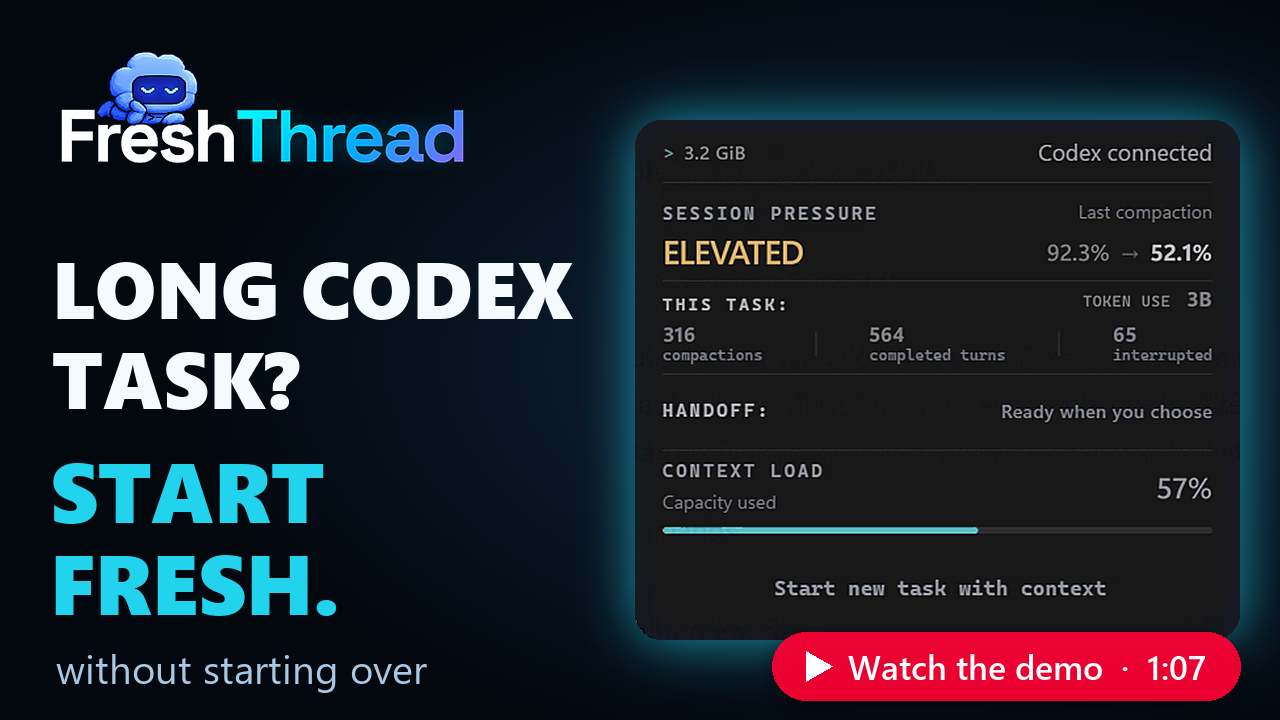
FreshThread is a Windows companion for Codex that shows task activity and helps you continue in a fresh task with your working context.
Download for Windows — Free Early Access (x64)
💡 FreshThread doesn’t yet have a Windows publisher signature. For transparency, the component that connects FreshThread to Codex and the network viewer are both open source, with independently verifiable GitHub builds. You can review their code and verify the components included in your installation.
Verify your download: The 0.2.7 release notes show how to check the installer against GitHub's immutable release. The bridge and network viewer each have build verification.
Its panel shows available context usage, completed turns, compactions and handoff readiness. A handoff summarizes your goal, constraints, completed work and next steps. You review and approve it before moving to a new task.
Privacy in short
- Runs on your computer. FreshThread reads Codex's session files locally to show the measurements and keeps its own data in a local app folder. No account needed.
- Goes online for updates and reports: checking GitHub for updates and their signed minimum-version policy, and sending a bug report when you click Send report. Handoffs run through Codex itself, and a handoff summary can include text you wrote.
- Bug reports stay in your hands. Review the diagnostics under Details, your description, choices and any optional screenshot before sending. Automatic diagnostics contain no conversations or code. Reports are kept for 30 days.
- The Codex connection is open source. The current installer routes Codex hooks and MCP through the FreshThread bridge. You can review what it passes to the private app and verify the installed bridge binary against its public release and build attestation.
- See network activity yourself. Open Network activity… from the FreshThread tray menu. A separate open-source viewer shows connections Windows reports for FreshThread and related programs. It watches only while open and unpaused, and saves or uploads nothing. Very short connections can be missed. Read how it works and verify your copy.
Reading the panel
The panel updates live as you work, following the selected session as Codex reports new activity and measurements. It follows Codex's light or dark appearance, with the same layout in both modes.
Size & context
| Indicator | What it tells you |
|---|---|
| MiB | Accumulated size on disk of this session's data, as last read. |
| Session pressure | Overall session pressure, expressed as a status. |
| Last compaction | Context usage before → after the latest compression. The right-hand value is the starting load for continued work. |
| Context load | Current context occupancy, as last measured. |
93.6% → 32.3% means work resumed with 32.3% of the context already occupied. A higher starting value leaves less room for new work. As the session grows, the model may also carry forward more details that are no longer useful to the current task.
Session activity
| Counter | What it counts |
|---|---|
| Compactions | Recorded context compressions in this session. |
| Completed turns | Completed response cycles. Each can include several tool calls. |
| Interrupted | Response cycles recorded as interrupted, such as a stopped response. |
| Token use | Recorded token usage across completed and interrupted turns—not just the current context. |
Continuing in a new task
| Status | What it tells you |
|---|---|
| Handoff | Whether the working context is ready to carry into a new task. You choose when to start. |
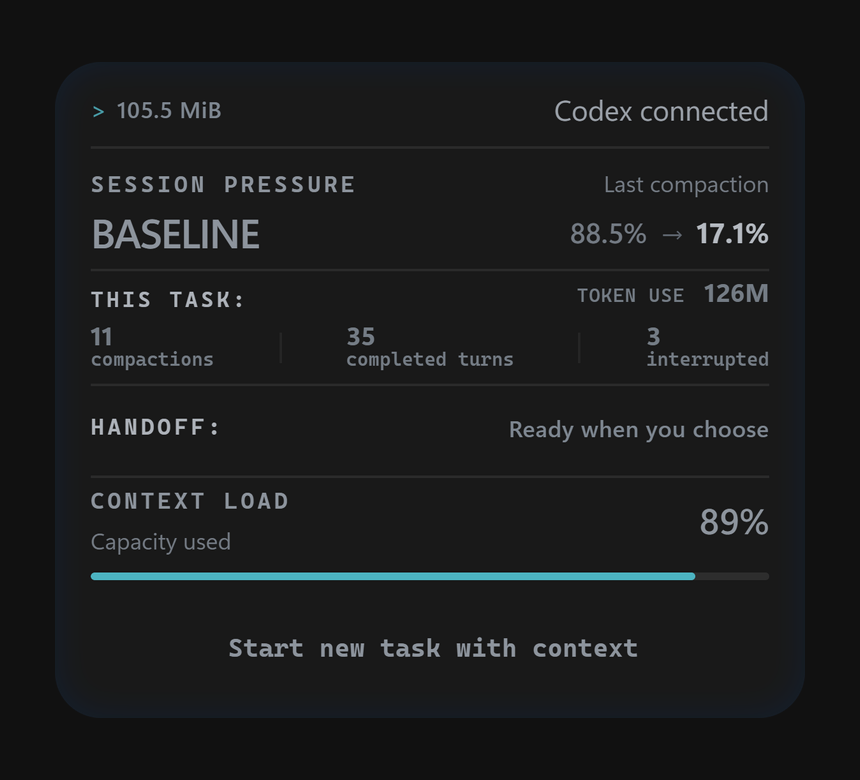
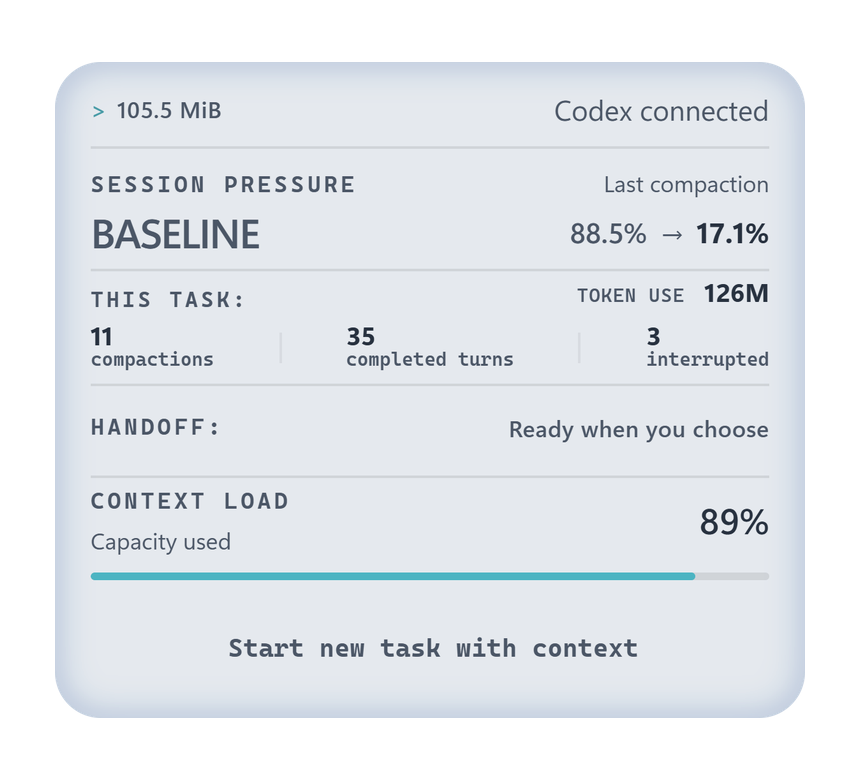
The panel follows your Codex appearance setting: light, dark, or your system theme.
Free Early Access
Free Early Access is available, with no fixed expiry date. Download the Windows x64 installer from this repository's Releases. The main app's source code remains private. Its newer Codex connection is open source: FreshThread bridge.
No FreshThread account is required. This is an early-access release, and features may still change. Free Early Access does not promise lifetime free access or include a future paid license.
Updates install automatically. A future signed minimum-version policy may require an update to continue using the main features. Download or network errors alone do not end access; an already-confirmed requirement remains in effect. Your local data, reporting and the updater remain available. Any later paid version will have its own terms. The old beta's fixed deadline does not apply to this version.
Getting started
- Download the Windows x64 installer.
- Install it in the Windows account where you use Codex.
- Review and enable the FreshThread hooks in Codex Settings → Hooks.
- Open the FreshThread panel to view task activity or start a handoff.
Use local Windows tasks in the Codex MSIX app. WSL and remote tasks are not
supported by this build. Installation needs internet access if WebView2 is
missing, and administrator policies must permit the app and its hooks. If you
use CODEX_HOME, FreshThread and Codex must receive the same absolute path.
Beta 17 changes the hook definition, so Codex may ask you to review it again.
Automatic updates require separate signature verification; a download hash alone does not prove who published a file.
The release includes SHA256SUMS.txt for checking the installer's hash and an updater signature. You can also verify the installer against GitHub's immutable release. The separate public bridge and network viewer each have a build attestation and verification instructions. On a successful uninstall, FreshThread removes its Codex integration and restores the Codex settings it changed, leaving unrelated settings in place.
What to test
- Startup and hook setup.
- Tasks opened from Projects and Recents, task switching and empty tasks.
- Panel placement and proportions across resolutions and Windows scaling.
- Measurements after a completed turn, and handoffs using a disposable task without private content.
- Whether updates preserve settings and hooks. Avoid deliberately interrupting installation on your everyday computer.
Check release notes for known limitations. Report unexpected behavior even if you find a workaround.
Report a problem
Open FreshThread tray menu → Report a bug. Choose Something broke, Too slow or Idea. Optionally describe the issue, say whether it blocks your work, or attach a screenshot. Review the image and the diagnostics under Details, then choose Send report for a private report. No account is needed, and nothing is uploaded until you send it.
Prefer GitHub? Copy diagnostics and GitHub remain available. GitHub issues are public and require a GitHub account. Search existing issues, then use Issues → New issue → Bug report. Include:
- FreshThread build, Codex version, Windows version and display scaling.
- Steps to reproduce the problem.
- What you expected and what happened.
Issues are public. Remove private information from screenshots and optional diagnostics. Never upload conversations, databases, credentials, account identifiers or raw diagnostic folders.
Report security vulnerabilities through private reporting, not public issues.
Updates
From 0.2.7-beta.1, installations check for signed updates at startup and every five minutes. Automatic activation waits for FreshThread's own operations to finish, including while Codex works. This release also preserves unsent report descriptions, choices and optional screenshots locally through an update. Older installed versions keep their existing check interval until updated. New releases also appear under Releases. Free Early Access has no fixed expiry date. A required upgrade is accepted only from a cryptographically verified minimum-version policy.
Upgrading from beta.6 or earlier needs one Codex restart to load the new bridge. After that, compatible app updates can reconnect in the background while Codex stays open. FreshThread confirms when the updated connection is ready.
FreshThread is an independent tool for OpenAI Codex, not made or endorsed by OpenAI.
The Codex pet belongs to OpenAI and only shows that FreshThread works with Codex.
Similar repos


FreshThread Free Early Access for Windows: downloads, release notes and bug reports. Open-source Codex bridge and network viewer.
See the codeSee what people are saying
README
Long Codex sessions can degrade after repeated compactions. FreshThread helps you see when a session is getting overloaded and move the important context into a fresh task without starting over.
Before: in a 372-turn session, Codex got stuck on one fix and kept repeating failed attempts.
After handoff: the same fix, in a fresh task that already knew the context, worked on the first try.
FreshThread is a Windows companion for Codex that shows task activity and helps you continue in a fresh task with your working context.
Download for Windows — Free Early Access (x64)
💡 FreshThread doesn’t yet have a Windows publisher signature. For transparency, the component that connects FreshThread to Codex and the network viewer are both open source, with independently verifiable GitHub builds. You can review their code and verify the components included in your installation.
Verify your download: The 0.2.7 release notes show how to check the installer against GitHub's immutable release. The bridge and network viewer each have build verification.
Its panel shows available context usage, completed turns, compactions and handoff readiness. A handoff summarizes your goal, constraints, completed work and next steps. You review and approve it before moving to a new task.
Privacy in short
- Runs on your computer. FreshThread reads Codex's session files locally to show the measurements and keeps its own data in a local app folder. No account needed.
- Goes online for updates and reports: checking GitHub for updates and their signed minimum-version policy, and sending a bug report when you click Send report. Handoffs run through Codex itself, and a handoff summary can include text you wrote.
- Bug reports stay in your hands. Review the diagnostics under Details, your description, choices and any optional screenshot before sending. Automatic diagnostics contain no conversations or code. Reports are kept for 30 days.
- The Codex connection is open source. The current installer routes Codex hooks and MCP through the FreshThread bridge. You can review what it passes to the private app and verify the installed bridge binary against its public release and build attestation.
- See network activity yourself. Open Network activity… from the FreshThread tray menu. A separate open-source viewer shows connections Windows reports for FreshThread and related programs. It watches only while open and unpaused, and saves or uploads nothing. Very short connections can be missed. Read how it works and verify your copy.
Reading the panel
The panel updates live as you work, following the selected session as Codex reports new activity and measurements. It follows Codex's light or dark appearance, with the same layout in both modes.
Size & context
| Indicator | What it tells you |
|---|---|
| MiB | Accumulated size on disk of this session's data, as last read. |
| Session pressure | Overall session pressure, expressed as a status. |
| Last compaction | Context usage before → after the latest compression. The right-hand value is the starting load for continued work. |
| Context load | Current context occupancy, as last measured. |
93.6% → 32.3% means work resumed with 32.3% of the context already occupied. A higher starting value leaves less room for new work. As the session grows, the model may also carry forward more details that are no longer useful to the current task.
Session activity
| Counter | What it counts |
|---|---|
| Compactions | Recorded context compressions in this session. |
| Completed turns | Completed response cycles. Each can include several tool calls. |
| Interrupted | Response cycles recorded as interrupted, such as a stopped response. |
| Token use | Recorded token usage across completed and interrupted turns—not just the current context. |
Continuing in a new task
| Status | What it tells you |
|---|---|
| Handoff | Whether the working context is ready to carry into a new task. You choose when to start. |
The panel follows your Codex appearance setting: light, dark, or your system theme.
Free Early Access
Free Early Access is available, with no fixed expiry date. Download the Windows x64 installer from this repository's Releases. The main app's source code remains private. Its newer Codex connection is open source: FreshThread bridge.
No FreshThread account is required. This is an early-access release, and features may still change. Free Early Access does not promise lifetime free access or include a future paid license.
Updates install automatically. A future signed minimum-version policy may require an update to continue using the main features. Download or network errors alone do not end access; an already-confirmed requirement remains in effect. Your local data, reporting and the updater remain available. Any later paid version will have its own terms. The old beta's fixed deadline does not apply to this version.
Getting started
- Download the Windows x64 installer.
- Install it in the Windows account where you use Codex.
- Review and enable the FreshThread hooks in Codex Settings → Hooks.
- Open the FreshThread panel to view task activity or start a handoff.
Use local Windows tasks in the Codex MSIX app. WSL and remote tasks are not
supported by this build. Installation needs internet access if WebView2 is
missing, and administrator policies must permit the app and its hooks. If you
use CODEX_HOME, FreshThread and Codex must receive the same absolute path.
Beta 17 changes the hook definition, so Codex may ask you to review it again.
Automatic updates require separate signature verification; a download hash alone does not prove who published a file.
The release includes SHA256SUMS.txt for checking the installer's hash and an updater signature. You can also verify the installer against GitHub's immutable release. The separate public bridge and network viewer each have a build attestation and verification instructions. On a successful uninstall, FreshThread removes its Codex integration and restores the Codex settings it changed, leaving unrelated settings in place.
What to test
- Startup and hook setup.
- Tasks opened from Projects and Recents, task switching and empty tasks.
- Panel placement and proportions across resolutions and Windows scaling.
- Measurements after a completed turn, and handoffs using a disposable task without private content.
- Whether updates preserve settings and hooks. Avoid deliberately interrupting installation on your everyday computer.
Check release notes for known limitations. Report unexpected behavior even if you find a workaround.
Report a problem
Open FreshThread tray menu → Report a bug. Choose Something broke, Too slow or Idea. Optionally describe the issue, say whether it blocks your work, or attach a screenshot. Review the image and the diagnostics under Details, then choose Send report for a private report. No account is needed, and nothing is uploaded until you send it.
Prefer GitHub? Copy diagnostics and GitHub remain available. GitHub issues are public and require a GitHub account. Search existing issues, then use Issues → New issue → Bug report. Include:
- FreshThread build, Codex version, Windows version and display scaling.
- Steps to reproduce the problem.
- What you expected and what happened.
Issues are public. Remove private information from screenshots and optional diagnostics. Never upload conversations, databases, credentials, account identifiers or raw diagnostic folders.
Report security vulnerabilities through private reporting, not public issues.
Updates
From 0.2.7-beta.1, installations check for signed updates at startup and every five minutes. Automatic activation waits for FreshThread's own operations to finish, including while Codex works. This release also preserves unsent report descriptions, choices and optional screenshots locally through an update. Older installed versions keep their existing check interval until updated. New releases also appear under Releases. Free Early Access has no fixed expiry date. A required upgrade is accepted only from a cryptographically verified minimum-version policy.
Upgrading from beta.6 or earlier needs one Codex restart to load the new bridge. After that, compatible app updates can reconnect in the background while Codex stays open. FreshThread confirms when the updated connection is ready.
FreshThread is an independent tool for OpenAI Codex, not made or endorsed by OpenAI.
The Codex pet belongs to OpenAI and only shows that FreshThread works with Codex.