
FreshThread BETA version: downloads, release notes and bug reports. Application source is maintained separately.
0
46 commits
updated Sep 24, 2026
See what people are saying
README
FreshThread is a Windows companion for Codex that shows task activity and helps you continue in a fresh task with your working context.
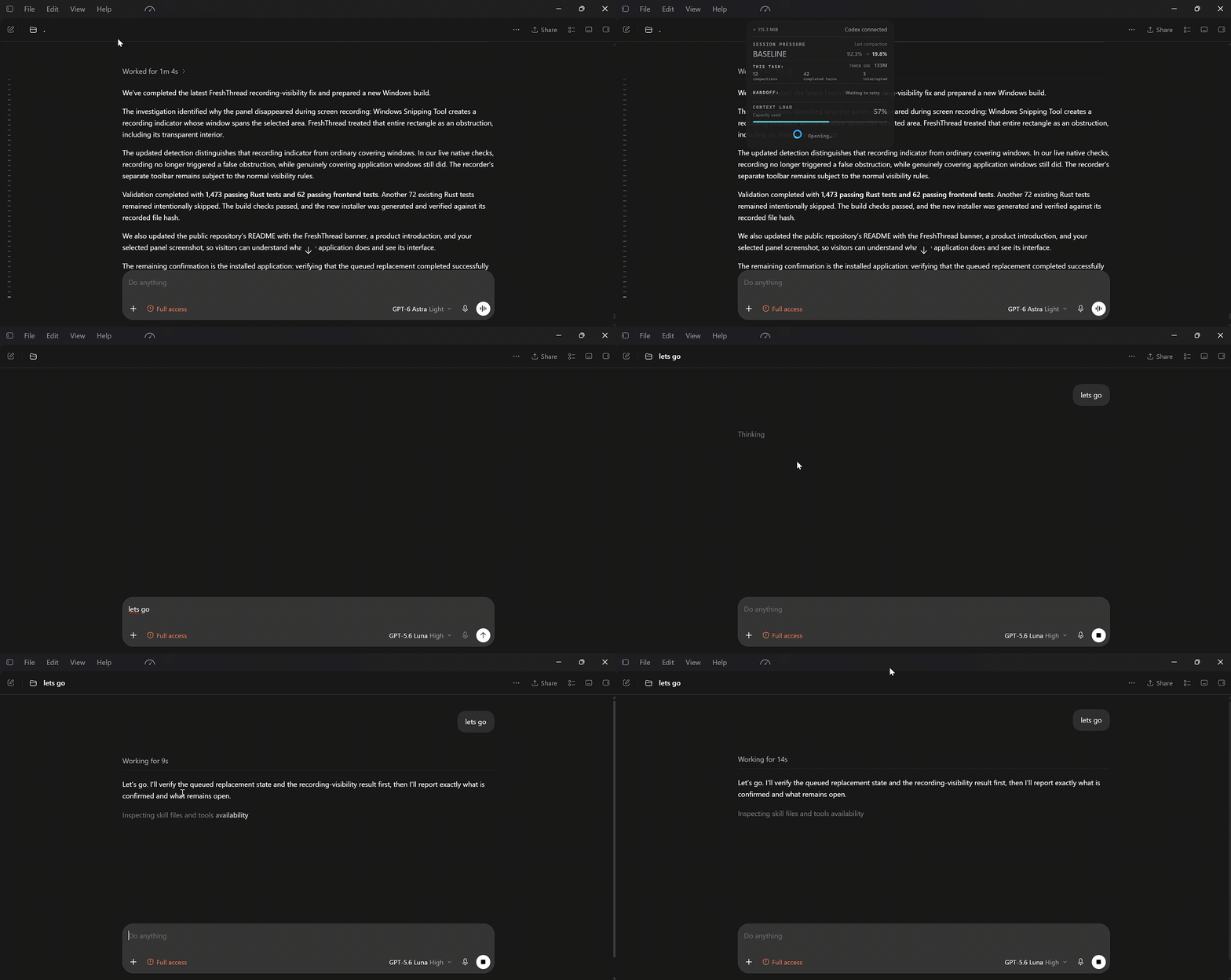
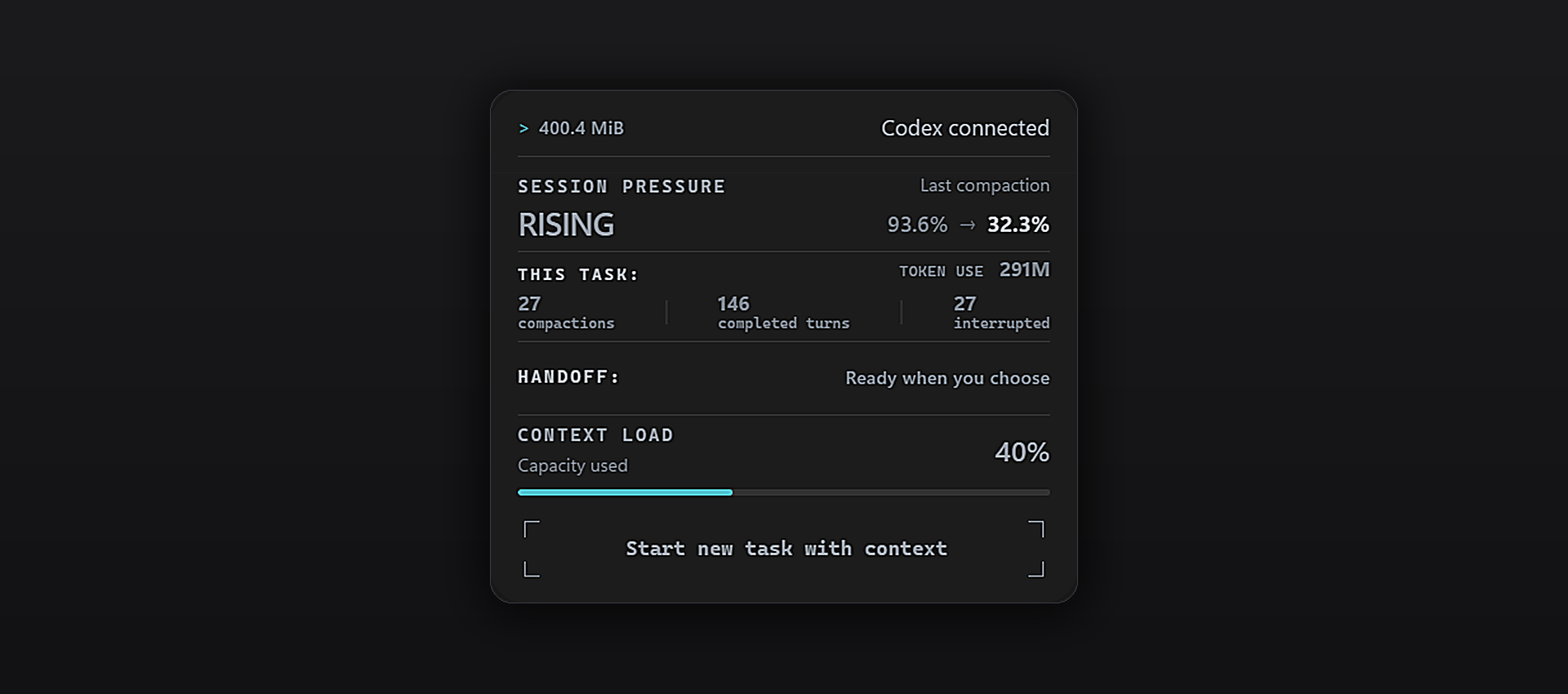
Its panel shows available context usage, completed turns, compactions and handoff readiness. A handoff summarizes your goal, constraints, completed work and next steps. You review and approve it before moving to a new task.
Reading the panel
The panel updates live as you work, following the selected session as Codex reports new activity and measurements.
Size & context
| Indicator | What it tells you |
|---|---|
| MiB | Accumulated size on disk of this session's data, as last read. |
| Session pressure | Overall session pressure, expressed as a status. |
| Last compaction | Context usage before → after the latest compression. The right-hand value is the starting load for continued work. |
| Context load | Current context occupancy, as last measured. |
88.5% → 17.1% means work resumed with 17.1% of the context already occupied. A higher starting value leaves less room for new work. As the session grows, the model may also carry forward more details that are no longer useful to the current task.
Session activity
| Counter | What it counts |
|---|---|
| Compactions | Recorded context compressions in this session. |
| Completed turns | Completed response cycles. Each can include several tool calls. |
| Interrupted | Response cycles recorded as interrupted, such as a stopped response. |
| Token use | Recorded token usage across completed and interrupted turns—not just the current context. |
Continuing in a new task
| Status | What it tells you |
|---|---|
| Handoff | Whether the working context is ready to carry into a new task. You choose when to start. |
Beta status
The seven-day public beta is available. Download the Windows x64 installer from this repository's Releases. The source code remains private.
The beta runs for 7 days from its release date, with the same deadline for everyone. Installing a patch will not extend it. No FreshThread account is required. The deadline works offline using the local clock; after expiry, user data, bug reporting and updates remain available.
The beta runs from September 24, 2026 at 11:00 to October 1, 2026 at 11:00 Budapest time. The beta has no participant limit.
Getting started
- Download the Windows x64 installer from this repository's Releases.
- Install it in the Windows account where you use Codex.
- 💡 If Codex was open during installation, fully exit through File → Quit ChatGPT, then restart Codex. Closing only the window may leave Codex running.
- Enable the FreshThread hooks in Settings → Hooks.
- Open the FreshThread panel to view task activity or start a handoff.
The installer has no Windows publisher signature (Authenticode), so Windows may show an unknown-publisher warning. Do not disable Windows protection. Automatic updates require separate signature verification; a download hash alone does not prove who published a file.
What to test
- Startup and hook setup.
- Tasks opened from Projects and Recents, task switching and empty tasks.
- Panel placement and proportions across resolutions and Windows scaling.
- Measurements after a completed turn, and handoffs using a disposable task without private content.
- Whether updates preserve settings and hooks. Avoid deliberately interrupting installation on your everyday computer.
Check release notes for known limitations. Report unexpected behavior even if you find a workaround.
Report a problem
In the beta, open FreshThread tray menu → Report a bug. Review the diagnostic preview, optionally describe the problem, then choose Send report for a private report. No account is needed, and nothing is uploaded until you send it.
Prefer GitHub? Copy diagnostics and Report on GitHub remain available. GitHub issues are public and require a GitHub account. Search existing issues, then use Issues → New issue → Bug report. Include:
- FreshThread build, Codex version, Windows version and display scaling.
- Steps to reproduce the problem.
- What you expected and what happened.
Issues are public. Remove private information from screenshots and optional diagnostics. Never upload conversations, databases, credentials, account identifiers or raw diagnostic folders.
Report security vulnerabilities through private reporting, not public issues.
Your data
FreshThread stores its context checkpoints locally and encrypts them on Windows. Handoffs run through Codex; model-based preparation may use Codex's model provider. Beta deadline checks run locally without sending data. A bug report is sent privately only after you review it and select Send report; the report can include your optional description and is retained for up to 30 days.
Updates
Beta installations check for signed updates at startup and every 15 minutes; installation waits for a safe pause in Codex work. New beta releases also appear under Releases. A patch does not restart the seven-day deadline.
Contributors

46 commits
Similar repos


FreshThread BETA version: downloads, release notes and bug reports. Application source is maintained separately.
0
46 commits
updated Sep 24, 2026
See what people are saying
README
FreshThread is a Windows companion for Codex that shows task activity and helps you continue in a fresh task with your working context.
Its panel shows available context usage, completed turns, compactions and handoff readiness. A handoff summarizes your goal, constraints, completed work and next steps. You review and approve it before moving to a new task.
Reading the panel
The panel updates live as you work, following the selected session as Codex reports new activity and measurements.
Size & context
| Indicator | What it tells you |
|---|---|
| MiB | Accumulated size on disk of this session's data, as last read. |
| Session pressure | Overall session pressure, expressed as a status. |
| Last compaction | Context usage before → after the latest compression. The right-hand value is the starting load for continued work. |
| Context load | Current context occupancy, as last measured. |
88.5% → 17.1% means work resumed with 17.1% of the context already occupied. A higher starting value leaves less room for new work. As the session grows, the model may also carry forward more details that are no longer useful to the current task.
Session activity
| Counter | What it counts |
|---|---|
| Compactions | Recorded context compressions in this session. |
| Completed turns | Completed response cycles. Each can include several tool calls. |
| Interrupted | Response cycles recorded as interrupted, such as a stopped response. |
| Token use | Recorded token usage across completed and interrupted turns—not just the current context. |
Continuing in a new task
| Status | What it tells you |
|---|---|
| Handoff | Whether the working context is ready to carry into a new task. You choose when to start. |
Beta status
The seven-day public beta is available. Download the Windows x64 installer from this repository's Releases. The source code remains private.
The beta runs for 7 days from its release date, with the same deadline for everyone. Installing a patch will not extend it. No FreshThread account is required. The deadline works offline using the local clock; after expiry, user data, bug reporting and updates remain available.
The beta runs from September 24, 2026 at 11:00 to October 1, 2026 at 11:00 Budapest time. The beta has no participant limit.
Getting started
- Download the Windows x64 installer from this repository's Releases.
- Install it in the Windows account where you use Codex.
- 💡 If Codex was open during installation, fully exit through File → Quit ChatGPT, then restart Codex. Closing only the window may leave Codex running.
- Enable the FreshThread hooks in Settings → Hooks.
- Open the FreshThread panel to view task activity or start a handoff.
The installer has no Windows publisher signature (Authenticode), so Windows may show an unknown-publisher warning. Do not disable Windows protection. Automatic updates require separate signature verification; a download hash alone does not prove who published a file.
What to test
- Startup and hook setup.
- Tasks opened from Projects and Recents, task switching and empty tasks.
- Panel placement and proportions across resolutions and Windows scaling.
- Measurements after a completed turn, and handoffs using a disposable task without private content.
- Whether updates preserve settings and hooks. Avoid deliberately interrupting installation on your everyday computer.
Check release notes for known limitations. Report unexpected behavior even if you find a workaround.
Report a problem
In the beta, open FreshThread tray menu → Report a bug. Review the diagnostic preview, optionally describe the problem, then choose Send report for a private report. No account is needed, and nothing is uploaded until you send it.
Prefer GitHub? Copy diagnostics and Report on GitHub remain available. GitHub issues are public and require a GitHub account. Search existing issues, then use Issues → New issue → Bug report. Include:
- FreshThread build, Codex version, Windows version and display scaling.
- Steps to reproduce the problem.
- What you expected and what happened.
Issues are public. Remove private information from screenshots and optional diagnostics. Never upload conversations, databases, credentials, account identifiers or raw diagnostic folders.
Report security vulnerabilities through private reporting, not public issues.
Your data
FreshThread stores its context checkpoints locally and encrypts them on Windows. Handoffs run through Codex; model-based preparation may use Codex's model provider. Beta deadline checks run locally without sending data. A bug report is sent privately only after you review it and select Send report; the report can include your optional description and is retained for up to 30 days.
Updates
Beta installations check for signed updates at startup and every 15 minutes; installation waits for a safe pause in Codex work. New beta releases also appear under Releases. A patch does not restart the seven-day deadline.
Similar repos
Contributors
46 commits