Dynamic Range Conditioned Adapters for HDR-Aware Diffusion Models
See the code
Radiance Universal Dynamic Range Adapter
Turns 8-bit SDR footage into scene-linear HDR, and tells you where it did it.








Contents: What it does · See it · Results · Install · Quick start · The Studio · Video delivery · Batch queues · Stills and sequences · Validation diagnostics · Desktop app · Roadmap · Documentation · Licence
An 8-bit frame throws away everything above the clip. RUDRA puts it back: it reads the SDR through the inverse of the curve that made it, fills the highlights the SDR clipped, and leaves the artist in control of every step, live on an HDR display.
RUDRA 1.0 ships on the analytic inverse with the artist in the loop (re-scoped 7 Oct 2026). No learned model has beaten the inverse on real SDR, so the model is optional and off by default. What the artist gets:
It ships as a native desktop app (Windows, macOS, Linux; no Python), the
browser Studio and two command lines (rudra, rudra-native).
Scope. RUDRA is one thing: SDR to HDR for any image or video, whatever made
it, whether a camera, a phone, an archive or any generative model. It works on
pixels, not on a model's latent space. The per-backbone VAE decoders (Flux,
Wan, LTX, SDXL, Qwen, Klein) and the latent-conditioning research pipeline are
paused as of 23 Sep 2026. Their code stays in rudra/ and training/ and
their results in STATUS.md, but they are not part of the product
and are not maintained.
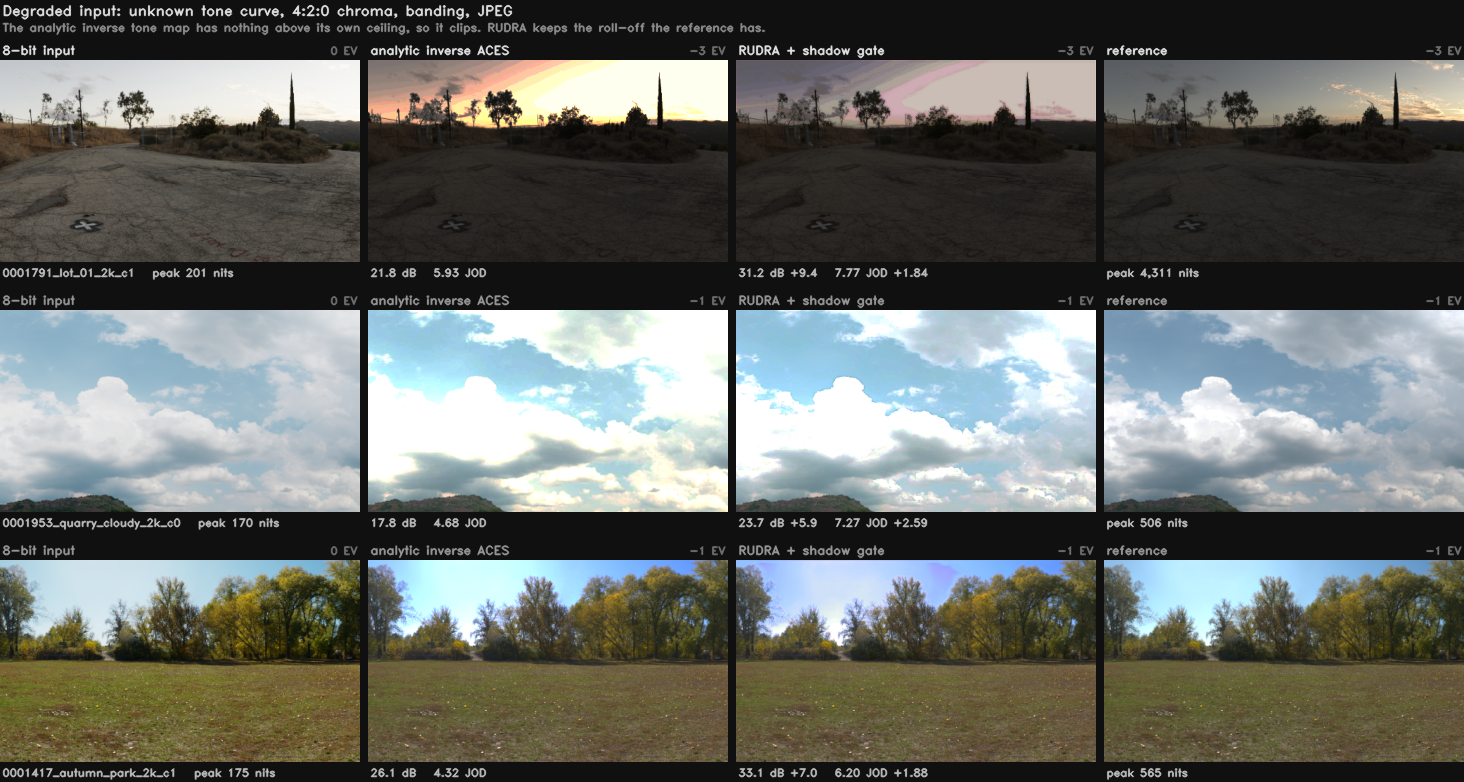
Three held-out frames. Unknown tone curve, 4:2:0 chroma, banding, JPEG: the condition real footage arrives in. The analytic inverse has a hard ceiling and clips into it, so the sky goes flat. RUDRA keeps the roll-off the reference has. HDR columns are stopped down by whole stops so a browser can show them, and the exposure comes from the reference alone, so nothing is flattered by its own output.
Real SDR video with its own graded HDR: Netflix's Meridian (287 held-out frames, 1080p) and the HDRTV1K test set (117 frames). Paired against the old default (the ACES inverse), 95 % bootstrap intervals; PU21-PSNR and CVVDP.
| Method | Meridian, vs the ACES inverse | HDRTV1K, vs the ACES inverse |
|---|---|---|
| RUDRA, Source = BT.1886 (the default) | +13.96 dB / +2.28 JOD | +4.16 dB / +2.11 JOD |
| BT.2408 direct mapping | +14.24 dB / +2.29 JOD | +4.31 dB / +2.04 JOD |
| RUDRA, Source = Rec.709 | +1.70 dB / +1.33 JOD | +0.89 dB / +0.59 JOD |
| RUDRA + model v8 | level (not significant) | not run |
| HDRTVDM (CVPR 2023) | −1.15 dB (n.s.) / −1.38 JOD | not run |
| RUDRA, ACES inverse (the old default) | 0 (21.65 dB, 6.443 JOD) | 0 |
BT.1886 is level with the best open mapping on both sets and is the default for new sessions; CG and games made with a known tone curve still want ACES, filmic or AgX in the picker. The commercial tools (Resolve, Topaz, RTX Video HDR) are run by hand before 1.0 and published whatever they say.
429 held-out frames, native 1280×720, scene-linear with diffuse white at 1.0. Whole scenes are held out, so no scene appears on both sides of a split.
| Condition | Method | PU21-PSNR | CVVDP (JOD) |
|---|---|---|---|
| hard | analytic baseline | 25.92 | 7.362 |
| hard | RUDRA + shadow gate | 27.15 | 7.751 |
| clean | analytic baseline | 45.99 | 9.448 |
| clean | RUDRA + shadow gate | 46.06 | 9.561 |
hard is degraded input (4:2:0, banding, JPEG), clean well-graded input.
These frames were rendered with ACES, so they favour the ACES inverse by
construction; on real SDR (above) no model beats the inverse, which is why
the model is optional.
Read both metrics together. The ungated model gains +1.43 dB on degraded input and loses 3.0 dB on clean input, where CVVDP puts the same gap at −0.046 JOD, far below a just-noticeable difference. Quoting the gain without the loss, or the clean PSNR without the JOD beside it, misrepresents the result in opposite directions.
Full tables, the failure analysis, and how to recompute every number:
docs/RESULTS.md; flicker on real clips:
docs/TEMPORAL_RESULTS.md.
Desktop app (no Python). From
Releases, the latest
pre-release (v1.0.0-rc.1 now, then 1.0): for Windows x64 RUDRA-<version>-windows-x64-setup.exe, which
installs for your user (no administrator prompt) with the model and the Visual
C++ runtime included, or the portable ZIP beside it; for Apple silicon
RUDRA-<version>-macos-arm64.dmg. Details: docs/BETA.md.
Python package. Requires Python 3.10 to 3.13. CUDA is optional: everything runs on CPU, slower. FFmpeg is needed for video, not for stills.
git clone https://github.com/FXTD-Studios/RUDRA.git
cd RUDRA
pip install -e .
(cd checkpoints && sha256sum -c SHA256SUMS)
Desktop app. Install it and start RUDRA. The first start opens Welcome to RUDRA: it checks your display (HDR or not, and its real peak) and, optionally, the model on your GPU or CPU; the model is not needed. Then Getting started shows the five steps once (Help > Getting started any time):
The whole guide: docs/USER_GUIDE.md (F1 in the app).
Browser Studio (Python). It loads the shipped checkpoint and opens a browser tab: It loads the shipped checkpoint and opens a browser tab:
python ui/server.py
Convert a complete SDR clip to HDR10, keeping its audio:
rudra video input.mp4 --output delivery/master_hdr10.mp4 \
    --checkpoint checkpoints/sdr2hdr_shadow_v1.pt --device cuda
Reconstruct a frame or a folder of frames:
python training/infer_sdr2hdr.py input/ --output-dir out/ \
    --image-checkpoint checkpoints/sdr2hdr_shadow_v1.pt --recovery-mode all
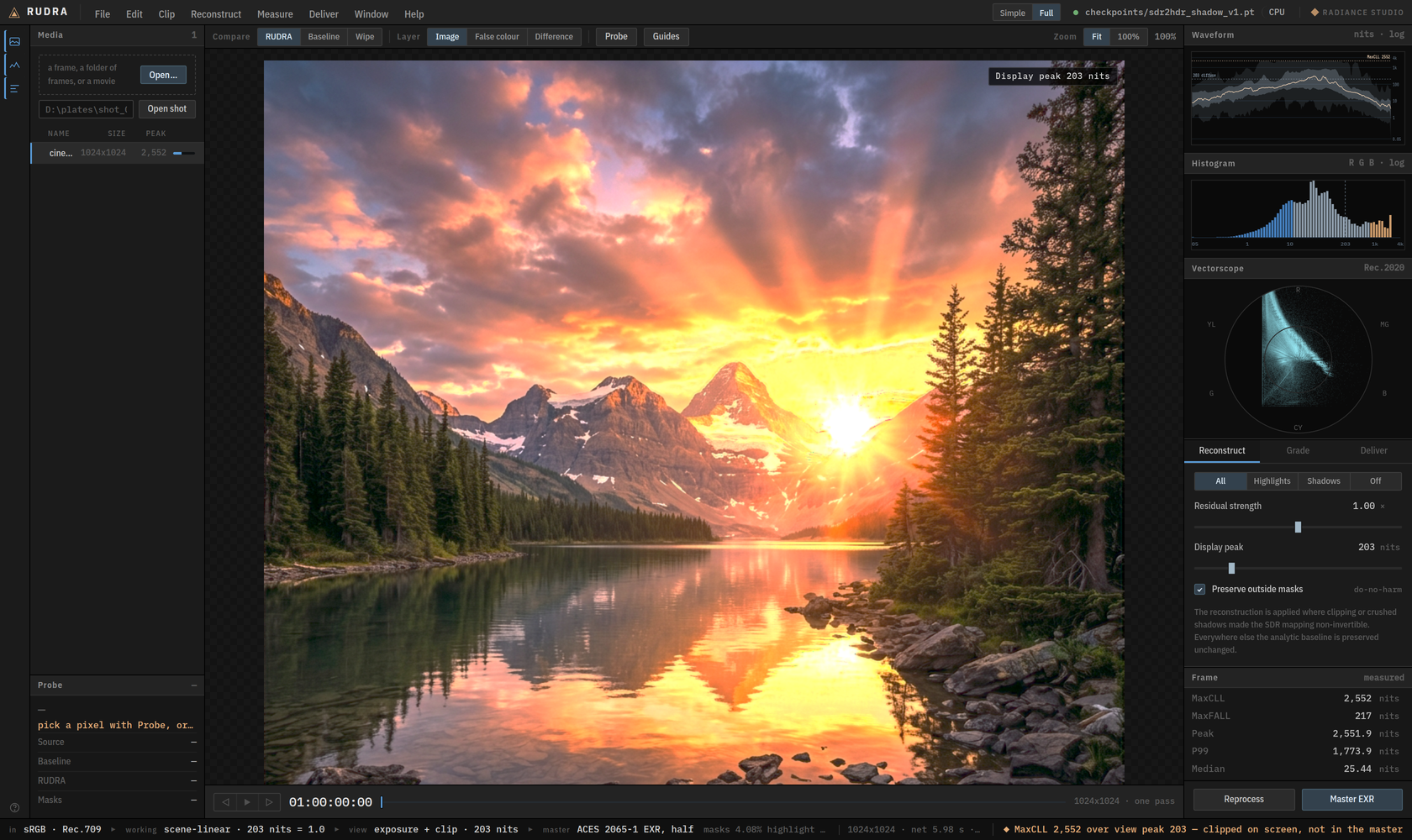
Drop a frame or a shot. The network runs once per frame on the GPU and hands the page raw fields. Everything after that composes on your own GPU, so the controls move at frame rate.
| Layer | What it shows |
|---|---|
| Compare | RUDRA, the analytic baseline, or a draggable wipe between them |
| False colour | luminance zones in nits, against a diffuse white of 203 |
| Difference | how far RUDRA moved from the baseline; black means it changed nothing there |
| Probe | one pixel: baseline, RUDRA, the delta in stops, and whether the SDR clipped there at all |
| Scopes | waveform, RGB histogram and vectorscope, all in nits on a log axis, computed from the frame's own pixels |
| Frame | what the frame contains: MaxCLL, MaxFALL, the share above 1 000 nits, and the share the SDR actually clipped |
The bar along the bottom is the colour pipeline, and it is always on: what the input is being read as, the working space, what the viewer is doing to the picture, and what the master will be written as. It warns when the frame carries pixels above the peak the viewer is showing, because an SDR monitor clipping a highlight looks exactly like a highlight that was never there.
The surround is a neutral grey on purpose, because a tinted one biases the judgement of the picture inside it.
Playback runs at the footage's frame rate, with a read-ahead in front of the playhead, and the transport reads timecode.
Master EXR writes OpenEXR in ACES 2065-1 or linear Rec.2020 directly to an
absolute Render folder on the computer running the Studio. Choose
Current image or All loaded frames (sequence), then set the render name
and starting frame. A sequence named shot starting at 1001 writes
shot.001001.exr, shot.001002.exr and matching JSON sidecars, using the
loaded frame order and one frozen copy of the current grade.
tools/measure_highlight_grain.py measures any
plate. settle_grain: false in the master parameters turns it off.rudra video converts a complete SDR clip. Run python -m rudra.video with the
same arguments if the CLI is not installed. It requires FFmpeg/ffprobe with
libx265 and zscale; ProRes also needs prores_ks.
Select a preset with --format:
| Preset | Output | Signal | Alpha |
|---|---|---|---|
hdr10 (default) | MP4/MOV/MKV, HEVC 10-bit | BT.2020 PQ, static HDR10 metadata | No |
hlg | MP4/MOV/MKV, HEVC 10-bit | BT.2020 HLG | No |
prores422 | MOV, ProRes 422 | BT.2020 PQ | No |
prores422hq | MOV, ProRes 422 HQ | BT.2020 PQ | No |
prores4444 | MOV, ProRes 4444 | BT.2020 PQ | Straight alpha |
rudra video input.mp4 --output delivery/broadcast_hlg.mp4 --format hlg \
    --checkpoint checkpoints/sdr2hdr_shadow_v1.pt --device cuda
rudra video input.mp4 --output delivery/editorial.mov --format prores422hq \
    --checkpoint checkpoints/sdr2hdr_shadow_v1.pt --device cuda
rudra video transparent.mov --output delivery/composite.mov --format prores4444 \
    --alpha-mode straight --checkpoint checkpoints/sdr2hdr_shadow_v1.pt --device cuda
Supported: progressive, square-pixel, constant-frame-rate SDR video with even
dimensions. The rational frame rate and frame count are preserved, video start
time is normalized to zero, and audio stays aligned to the video. Audio outside
the video interval is trimmed; all input audio streams are copied by default.
Use --audio aac when the input audio codec cannot be copied into MP4.
Colour tags determine the input transfer, primaries, YUV matrix and range.
Missing or unsupported tags require explicit overrides, for example
--input-transfer rec709 --input-primaries rec709 --input-matrix bt709 --input-range limited.
Only use those overrides when they describe the source.
Rejected rather than silently changed: HDR, alpha-bearing, interlaced, rotated, anamorphic and variable-frame-rate inputs. The exception is straight alpha with the ProRes 4444 preset. No preset carries subtitles.
HDR10 is 10-bit HEVC, BT.2020/PQ, with measured MaxCLL/MaxFALL and mastering
display metadata; --peak-nits 1000 selects the mastering peak. Every preset is
published only after checking dimensions, every frame timestamp, frame count,
colour tags, HDR metadata, audio alignment and a complete decode. A matching
.json sidecar records the checkpoint hash, settings, per-frame statistics and
QC results. Existing outputs are never overwritten.
HLG uses BT.2100's inverse OOTF followed by its OETF, with zero reference black, the selected peak and the corresponding system gamma (1.2 at 1000 nits). It does not merely relabel PQ pixels. Saturated values outside legal HLG scene RGB receive a common RGB gain reduction. HLG has no HDR10 static SEI.
ProRes stores PQ colour tags, while the mastering and content-light analysis
remains in the sidecar. ProRes MOV's nclc atom may omit a separate range flag;
conversion uses limited video range.
prores_ks accepts 10-bit colour and alpha input planes, so a 4444 stream
decoding to 12-bit colour or configured for 16-bit alpha storage does not
restore precision lost at its input. Alpha bypasses reconstruction and grading.
Every decoded output alpha pixel is checked against the input with a tolerance
of 128/65535 (two 10-bit steps), so arbitrary 16-bit alpha is not lossless.
Premultiplied sources must first be unpremultiplied; --alpha-mode straight
declares the supplied interpretation.
--device cuda explicitly when available.--tile-size 0 runs untiled when memory permits.--work-dir to select a disk with space.rudra video job is not resumable; use a batch queue
for per-clip resume.--shadow-smoothing 0.8 smooths the scalar shadow gate and resets it at
detected hard cuts. It does not blend image pixels and is not a validated
temporal model. Off by default.Save a queue as queue.json. Paths resolve relative to that file. Defaults and
per-job options accept the same option names as rudra video (underscores or
hyphens), without the leading --.
{
  "version": 1,
  "defaults": {
    "checkpoint": "checkpoints/sdr2hdr_shadow_v1.pt",
    "device": "cpu",
    "format": "hdr10"
  },
  "jobs": [
    {"input": "clips/shot01.mp4", "output": "masters/shot01.mp4"},
    {"input": "clips/shot02.mp4", "output": "masters/shot02.mov",
     "options": {"format": "prores422hq"}}
  ]
}
rudra batch run queue.json
rudra batch status queue.json
rudra batch run queue.json --retry-failed
grade (the export settings file the app's queues
name) runs through rudra-native video, the native app's command line, found
on PATH or through RUDRA_NATIVE; the rest of the job is as above.queue.json.state.json; a process lock prevents two runners using the same queue.run verifies the SHA-256 hashes of completed video/report pairs,
sources and weights before skipping them.--retry-failed; other jobs continue.
The command returns nonzero if any job is incomplete.python training/infer_sdr2hdr.py input/ --output-dir out/ \
--image-checkpoint checkpoints/sdr2hdr_shadow_v1.pt --recovery-mode all
Inference writes float EXR delivery masters at 203 nits per stored unit. TIFF outputs keep the network's separate 10,000-nit convention. For a nested input sequence, pass the corresponding output shot directory to delivery. No GPU is required.
Run a fixed, scene-balanced sample without consuming the final test set:
python training/quality_benchmark.py --manifest outputs/finetune_views_20260920/data/manifest.jsonl --checkpoint checkpoints/sdr2hdr_shadow_v1.pt --out outputs/quality_diagnostic_new --scenes 12
The output directory must be new. The tool freezes source and checkpoint hashes,
scores the shipped model against the analytic inverse-ACES baseline at native
resolution on CPU, and writes REPORT.md, summary.json and scores.jsonl.
It selects one frame per validation scene by a stable hash, then tests clean and
seeded degraded inputs. It reports PU21-PSNR, real ColorVideoVDP image JOD, and
shadow/highlight region errors, with paired bootstrap intervals. Missing metrics
remain unavailable; proxy values never enter the comparison.
This is an image-quality diagnostic, not a motion benchmark or an external comparison. Candidate training assessment and final held-out testing remain separate. Do not read a small validation sample as proof of general superiority.
Isolate the residual recovery paths on the exact same frozen sample:
python training/recovery_ablation.py --benchmark outputs/quality_benchmark_20260920 --out outputs/recovery_ablation_new
This verifies the original source, checkpoint and implementation hashes, reuses the original baseline and all-recovery scores, and measures highlights-only, shadows-only and recovery-off with real ColorVideoVDP. The new output directory holds paired comparisons and an ablation report. No inference defaults or training settings are changed; confirm findings on broader validation before promoting a different recovery policy.
A native RUDRA for Windows, Linux and macOS, with no Python at runtime: Qt 6
for the interface, a QRhi viewer on each OS's native GPU API (Direct3D 12,
Metal, Vulkan, OpenGL fallback) with HDR output, a C++20 core, and inference
through LibTorch (CUDA, MPS) and ONNX Runtime (DirectML, Core ML, ROCm,
OpenVINO). It lives in native/ on the native branch.
The browser Studio and the Python CLI stay as they are and remain the
reference every native module is tested against.
In it today (beta 10 and the changes since, docs/BETA.md):
the Studio's layout, actions, undo and projects; the HDR viewer with scopes,
wipe, Compare, the Changes tint and the Invented layer; Source, calibration,
reference match, exposure, peak, knee, Region EV and painted masks, live on
the GPU and held to the C++ core by rudra-gpu-parity on four backends;
stills, sequences, EXR masters, movie exports with QC, HDR10+ and Dolby
Vision metadata, a resumable queue; the shot and static holds in playback and
export; the optional model checked against its reference frames on every
device; installers for Windows (setup.exe, portable ZIP) and macOS (DMG);
CI green on all three OSes.
Still open (release row R4):
MACHINE=... scripts/native_gate_a.sh)MAC_FFMPEG_DIR) and opened on a Macdocs/MACOS_SIGNING.md), so the DMG ships notarizedWINDOWS_CERT_PFX), so the
installer has no SmartScreen promptPlan: docs/DESKTOP_APP_PLAN.md · design:
docs/NATIVE_ARCHITECTURE.md · build:
native/README.md.
Only what is left. What is done (the interactive core, phase 3; the source
curves, BT.1886 default and exposure; the clip fill; the holds; HDR10+ and
Dolby Vision metadata; the open-source half of the market comparison) is in
STATUS.md and docs/BETA.md. Release rows
R1 to R5 are in STATUS.md; the steps to 1.0 in
docs/RELEASE_V1.md.
training/compare_market.py import, then score, published in
docs/RESULTS.md whatever it saysscripts/release_v1_rc.ps1, v1.0.0-rc.N), then 1.0Measured with rudra-native bench against native/bench/latency_budgets.json.
Grading and display take 1.1 to 1.3 ms at 4K; one 1080p inference on the
RTX 4080 SUPER takes 150 to 207 ms.
rudra-studio commercial weights: the recipe without HdM data,
filtered through pipeline/licences.pydovi_tool or a licensed finishing tool)| Document | What is in it |
|---|---|
docs/RESULTS.md | every benchmark table, and how to recompute it |
docs/RELEASE_V1.md | what is left before 1.0, and the steps to ship it |
docs/BETA.md | the desktop beta: what is in it, the changes per beta, install |
docs/USER_GUIDE.md | using the desktop app, control by control |
docs/TEMPORAL_RESULTS.md | flicker and clip-mode CVVDP on real footage |
docs/TRAINING.md | training on your own footage, end to end |
docs/TRAINING_STEPS.md | the next training run, step by step, with the gate each step has to pass |
docs/RETRAIN_RUNBOOK.md | rebuilding the corpus: sources, licences, the ingest, the gates |
docs/INTERNALS.md | the composite, the units, the gate |
docs/CORPUS.md | what a training set has to contain |
docs/DEVELOPMENT.md | repo layout, how it is checked, and the decisions behind it |
docs/DESKTOP_APP_PLAN.md | the native desktop Studio: architecture, phases, acceptance |
docs/NATIVE_ARCHITECTURE.md | the native app design: layers, types, threading, patterns, numerics |
docs/composite.spec.md | the composite, master chain and measurements as a spec: every stage, precision and tolerance |
native/README.md | building the native app, the model package, what is done and what is not |
STATUS.md | what is finished, what is open, and the next steps in order |
RUDRA is non-commercial. The code is licensed under the
PolyForm Noncommercial License 1.0.0: research, teaching,
evaluation, personal projects and noncommercial organizations may use,
change and share it. The weights are non-commercial too, under their own
terms, because of their training corpus; that is a term FXTD Studios cannot
waive for you. See checkpoints/LICENSE and
NOTICE.
Commercial use of the code or the weights needs a licence from FXTD Studios. Copies of the code obtained before 24 September 2026 were released under Apache 2.0 and keep that licence.
FXTD Studios · Cairo
Dynamic Range Conditioned Adapters for HDR-Aware Diffusion Models
See the code
Radiance Universal Dynamic Range Adapter
Turns 8-bit SDR footage into scene-linear HDR, and tells you where it did it.
Contents: What it does · See it · Results · Install · Quick start · The Studio · Video delivery · Batch queues · Stills and sequences · Validation diagnostics · Desktop app · Roadmap · Documentation · Licence
An 8-bit frame throws away everything above the clip. RUDRA puts it back: it reads the SDR through the inverse of the curve that made it, fills the highlights the SDR clipped, and leaves the artist in control of every step, live on an HDR display.
RUDRA 1.0 ships on the analytic inverse with the artist in the loop (re-scoped 7 Oct 2026). No learned model has beaten the inverse on real SDR, so the model is optional and off by default. What the artist gets:
It ships as a native desktop app (Windows, macOS, Linux; no Python), the
browser Studio and two command lines (rudra, rudra-native).
Scope. RUDRA is one thing: SDR to HDR for any image or video, whatever made
it, whether a camera, a phone, an archive or any generative model. It works on
pixels, not on a model's latent space. The per-backbone VAE decoders (Flux,
Wan, LTX, SDXL, Qwen, Klein) and the latent-conditioning research pipeline are
paused as of 23 Sep 2026. Their code stays in rudra/ and training/ and
their results in STATUS.md, but they are not part of the product
and are not maintained.
Three held-out frames. Unknown tone curve, 4:2:0 chroma, banding, JPEG: the condition real footage arrives in. The analytic inverse has a hard ceiling and clips into it, so the sky goes flat. RUDRA keeps the roll-off the reference has. HDR columns are stopped down by whole stops so a browser can show them, and the exposure comes from the reference alone, so nothing is flattered by its own output.
Real SDR video with its own graded HDR: Netflix's Meridian (287 held-out frames, 1080p) and the HDRTV1K test set (117 frames). Paired against the old default (the ACES inverse), 95 % bootstrap intervals; PU21-PSNR and CVVDP.
| Method | Meridian, vs the ACES inverse | HDRTV1K, vs the ACES inverse |
|---|---|---|
| RUDRA, Source = BT.1886 (the default) | +13.96 dB / +2.28 JOD | +4.16 dB / +2.11 JOD |
| BT.2408 direct mapping | +14.24 dB / +2.29 JOD | +4.31 dB / +2.04 JOD |
| RUDRA, Source = Rec.709 | +1.70 dB / +1.33 JOD | +0.89 dB / +0.59 JOD |
| RUDRA + model v8 | level (not significant) | not run |
| HDRTVDM (CVPR 2023) | −1.15 dB (n.s.) / −1.38 JOD | not run |
| RUDRA, ACES inverse (the old default) | 0 (21.65 dB, 6.443 JOD) | 0 |
BT.1886 is level with the best open mapping on both sets and is the default for new sessions; CG and games made with a known tone curve still want ACES, filmic or AgX in the picker. The commercial tools (Resolve, Topaz, RTX Video HDR) are run by hand before 1.0 and published whatever they say.
429 held-out frames, native 1280×720, scene-linear with diffuse white at 1.0. Whole scenes are held out, so no scene appears on both sides of a split.
| Condition | Method | PU21-PSNR | CVVDP (JOD) |
|---|---|---|---|
| hard | analytic baseline | 25.92 | 7.362 |
| hard | RUDRA + shadow gate | 27.15 | 7.751 |
| clean | analytic baseline | 45.99 | 9.448 |
| clean | RUDRA + shadow gate | 46.06 | 9.561 |
hard is degraded input (4:2:0, banding, JPEG), clean well-graded input.
These frames were rendered with ACES, so they favour the ACES inverse by
construction; on real SDR (above) no model beats the inverse, which is why
the model is optional.
Read both metrics together. The ungated model gains +1.43 dB on degraded input and loses 3.0 dB on clean input, where CVVDP puts the same gap at −0.046 JOD, far below a just-noticeable difference. Quoting the gain without the loss, or the clean PSNR without the JOD beside it, misrepresents the result in opposite directions.
Full tables, the failure analysis, and how to recompute every number:
docs/RESULTS.md; flicker on real clips:
docs/TEMPORAL_RESULTS.md.
Desktop app (no Python). From
Releases, the latest
pre-release (v1.0.0-rc.1 now, then 1.0): for Windows x64 RUDRA-<version>-windows-x64-setup.exe, which
installs for your user (no administrator prompt) with the model and the Visual
C++ runtime included, or the portable ZIP beside it; for Apple silicon
RUDRA-<version>-macos-arm64.dmg. Details: docs/BETA.md.
Python package. Requires Python 3.10 to 3.13. CUDA is optional: everything runs on CPU, slower. FFmpeg is needed for video, not for stills.
git clone https://github.com/FXTD-Studios/RUDRA.git
cd RUDRA
pip install -e .
(cd checkpoints && sha256sum -c SHA256SUMS)
Desktop app. Install it and start RUDRA. The first start opens Welcome to RUDRA: it checks your display (HDR or not, and its real peak) and, optionally, the model on your GPU or CPU; the model is not needed. Then Getting started shows the five steps once (Help > Getting started any time):
The whole guide: docs/USER_GUIDE.md (F1 in the app).
Browser Studio (Python). It loads the shipped checkpoint and opens a browser tab: It loads the shipped checkpoint and opens a browser tab:
python ui/server.py
Convert a complete SDR clip to HDR10, keeping its audio:
rudra video input.mp4 --output delivery/master_hdr10.mp4 \
--checkpoint checkpoints/sdr2hdr_shadow_v1.pt --device cuda
Reconstruct a frame or a folder of frames:
python training/infer_sdr2hdr.py input/ --output-dir out/ \
    --image-checkpoint checkpoints/sdr2hdr_shadow_v1.pt --recovery-mode all
Drop a frame or a shot. The network runs once per frame on the GPU and hands the page raw fields. Everything after that composes on your own GPU, so the controls move at frame rate.
| Layer | What it shows |
|---|---|
| Compare | RUDRA, the analytic baseline, or a draggable wipe between them |
| False colour | luminance zones in nits, against a diffuse white of 203 |
| Difference | how far RUDRA moved from the baseline; black means it changed nothing there |
| Probe | one pixel: baseline, RUDRA, the delta in stops, and whether the SDR clipped there at all |
| Scopes | waveform, RGB histogram and vectorscope, all in nits on a log axis, computed from the frame's own pixels |
| Frame | what the frame contains: MaxCLL, MaxFALL, the share above 1 000 nits, and the share the SDR actually clipped |
The bar along the bottom is the colour pipeline, and it is always on: what the input is being read as, the working space, what the viewer is doing to the picture, and what the master will be written as. It warns when the frame carries pixels above the peak the viewer is showing, because an SDR monitor clipping a highlight looks exactly like a highlight that was never there.
The surround is a neutral grey on purpose, because a tinted one biases the judgement of the picture inside it.
Playback runs at the footage's frame rate, with a read-ahead in front of the playhead, and the transport reads timecode.
Master EXR writes OpenEXR in ACES 2065-1 or linear Rec.2020 directly to an
absolute Render folder on the computer running the Studio. Choose
Current image or All loaded frames (sequence), then set the render name
and starting frame. A sequence named shot starting at 1001 writes
shot.001001.exr, shot.001002.exr and matching JSON sidecars, using the
loaded frame order and one frozen copy of the current grade.
tools/measure_highlight_grain.py measures any
plate. settle_grain: false in the master parameters turns it off.rudra video converts a complete SDR clip. Run python -m rudra.video with the
same arguments if the CLI is not installed. It requires FFmpeg/ffprobe with
libx265 and zscale; ProRes also needs prores_ks.
Select a preset with --format:
| Preset | Output | Signal | Alpha |
|---|---|---|---|
hdr10 (default) | MP4/MOV/MKV, HEVC 10-bit | BT.2020 PQ, static HDR10 metadata | No |
hlg | MP4/MOV/MKV, HEVC 10-bit | BT.2020 HLG | No |
prores422 | MOV, ProRes 422 | BT.2020 PQ | No |
prores422hq | MOV, ProRes 422 HQ | BT.2020 PQ | No |
prores4444 | MOV, ProRes 4444 | BT.2020 PQ | Straight alpha |
rudra video input.mp4 --output delivery/broadcast_hlg.mp4 --format hlg \
    --checkpoint checkpoints/sdr2hdr_shadow_v1.pt --device cuda
rudra video input.mp4 --output delivery/editorial.mov --format prores422hq \
    --checkpoint checkpoints/sdr2hdr_shadow_v1.pt --device cuda
rudra video transparent.mov --output delivery/composite.mov --format prores4444 \
    --alpha-mode straight --checkpoint checkpoints/sdr2hdr_shadow_v1.pt --device cuda
Supported: progressive, square-pixel, constant-frame-rate SDR video with even
dimensions. The rational frame rate and frame count are preserved, video start
time is normalized to zero, and audio stays aligned to the video. Audio outside
the video interval is trimmed; all input audio streams are copied by default.
Use --audio aac when the input audio codec cannot be copied into MP4.
Colour tags determine the input transfer, primaries, YUV matrix and range.
Missing or unsupported tags require explicit overrides, for example
--input-transfer rec709 --input-primaries rec709 --input-matrix bt709 --input-range limited.
Only use those overrides when they describe the source.
Rejected rather than silently changed: HDR, alpha-bearing, interlaced, rotated, anamorphic and variable-frame-rate inputs. The exception is straight alpha with the ProRes 4444 preset. No preset carries subtitles.
HDR10 is 10-bit HEVC, BT.2020/PQ, with measured MaxCLL/MaxFALL and mastering
display metadata; --peak-nits 1000 selects the mastering peak. Every preset is
published only after checking dimensions, every frame timestamp, frame count,
colour tags, HDR metadata, audio alignment and a complete decode. A matching
.json sidecar records the checkpoint hash, settings, per-frame statistics and
QC results. Existing outputs are never overwritten.
HLG uses BT.2100's inverse OOTF followed by its OETF, with zero reference black, the selected peak and the corresponding system gamma (1.2 at 1000 nits). It does not merely relabel PQ pixels. Saturated values outside legal HLG scene RGB receive a common RGB gain reduction. HLG has no HDR10 static SEI.
ProRes stores PQ colour tags, while the mastering and content-light analysis
remains in the sidecar. ProRes MOV's nclc atom may omit a separate range flag;
conversion uses limited video range.
prores_ks accepts 10-bit colour and alpha input planes, so a 4444 stream
decoding to 12-bit colour or configured for 16-bit alpha storage does not
restore precision lost at its input. Alpha bypasses reconstruction and grading.
Every decoded output alpha pixel is checked against the input with a tolerance
of 128/65535 (two 10-bit steps), so arbitrary 16-bit alpha is not lossless.
Premultiplied sources must first be unpremultiplied; --alpha-mode straight
declares the supplied interpretation.
--device cuda explicitly when available.--tile-size 0 runs untiled when memory permits.--work-dir to select a disk with space.rudra video job is not resumable; use a batch queue
for per-clip resume.--shadow-smoothing 0.8 smooths the scalar shadow gate and resets it at
detected hard cuts. It does not blend image pixels and is not a validated
temporal model. Off by default.Save a queue as queue.json. Paths resolve relative to that file. Defaults and
per-job options accept the same option names as rudra video (underscores or
hyphens), without the leading --.
{
  "version": 1,
  "defaults": {
    "checkpoint": "checkpoints/sdr2hdr_shadow_v1.pt",
    "device": "cpu",
    "format": "hdr10"
  },
  "jobs": [
    {"input": "clips/shot01.mp4", "output": "masters/shot01.mp4"},
    {"input": "clips/shot02.mp4", "output": "masters/shot02.mov",
     "options": {"format": "prores422hq"}}
  ]
}
rudra batch run queue.json
rudra batch status queue.json
rudra batch run queue.json --retry-failed
grade (the export settings file the app's queues
name) runs through rudra-native video, the native app's command line, found
on PATH or through RUDRA_NATIVE; the rest of the job is as above.queue.json.state.json; a process lock prevents two runners using the same queue.run verifies the SHA-256 hashes of completed video/report pairs,
sources and weights before skipping them.--retry-failed; other jobs continue.
The command returns nonzero if any job is incomplete.python training/infer_sdr2hdr.py input/ --output-dir out/ \
--image-checkpoint checkpoints/sdr2hdr_shadow_v1.pt --recovery-mode all
Inference writes float EXR delivery masters at 203 nits per stored unit. TIFF outputs keep the network's separate 10,000-nit convention. For a nested input sequence, pass the corresponding output shot directory to delivery. No GPU is required.
Run a fixed, scene-balanced sample without consuming the final test set:
python training/quality_benchmark.py --manifest outputs/finetune_views_20260920/data/manifest.jsonl --checkpoint checkpoints/sdr2hdr_shadow_v1.pt --out outputs/quality_diagnostic_new --scenes 12
The output directory must be new. The tool freezes source and checkpoint hashes,
scores the shipped model against the analytic inverse-ACES baseline at native
resolution on CPU, and writes REPORT.md, summary.json and scores.jsonl.
It selects one frame per validation scene by a stable hash, then tests clean and
seeded degraded inputs. It reports PU21-PSNR, real ColorVideoVDP image JOD, and
shadow/highlight region errors, with paired bootstrap intervals. Missing metrics
remain unavailable; proxy values never enter the comparison.
This is an image-quality diagnostic, not a motion benchmark or an external comparison. Candidate training assessment and final held-out testing remain separate. Do not read a small validation sample as proof of general superiority.
Isolate the residual recovery paths on the exact same frozen sample:
python training/recovery_ablation.py --benchmark outputs/quality_benchmark_20260920 --out outputs/recovery_ablation_new
This verifies the original source, checkpoint and implementation hashes, reuses the original baseline and all-recovery scores, and measures highlights-only, shadows-only and recovery-off with real ColorVideoVDP. The new output directory holds paired comparisons and an ablation report. No inference defaults or training settings are changed; confirm findings on broader validation before promoting a different recovery policy.
A native RUDRA for Windows, Linux and macOS, with no Python at runtime: Qt 6
for the interface, a QRhi viewer on each OS's native GPU API (Direct3D 12,
Metal, Vulkan, OpenGL fallback) with HDR output, a C++20 core, and inference
through LibTorch (CUDA, MPS) and ONNX Runtime (DirectML, Core ML, ROCm,
OpenVINO). It lives in native/ on the native branch.
The browser Studio and the Python CLI stay as they are and remain the
reference every native module is tested against.
In it today (beta 10 and the changes since, docs/BETA.md):
the Studio's layout, actions, undo and projects; the HDR viewer with scopes,
wipe, Compare, the Changes tint and the Invented layer; Source, calibration,
reference match, exposure, peak, knee, Region EV and painted masks, live on
the GPU and held to the C++ core by rudra-gpu-parity on four backends;
stills, sequences, EXR masters, movie exports with QC, HDR10+ and Dolby
Vision metadata, a resumable queue; the shot and static holds in playback and
export; the optional model checked against its reference frames on every
device; installers for Windows (setup.exe, portable ZIP) and macOS (DMG);
CI green on all three OSes.
Still open (release row R4):
MACHINE=... scripts/native_gate_a.sh)MAC_FFMPEG_DIR) and opened on a Macdocs/MACOS_SIGNING.md), so the DMG ships notarizedWINDOWS_CERT_PFX), so the
installer has no SmartScreen promptPlan: docs/DESKTOP_APP_PLAN.md · design:
docs/NATIVE_ARCHITECTURE.md · build:
native/README.md.
Only what is left. What is done (the interactive core, phase 3; the source
curves, BT.1886 default and exposure; the clip fill; the holds; HDR10+ and
Dolby Vision metadata; the open-source half of the market comparison) is in
STATUS.md and docs/BETA.md. Release rows
R1 to R5 are in STATUS.md; the steps to 1.0 in
docs/RELEASE_V1.md.
training/compare_market.py import, then score, published in
docs/RESULTS.md whatever it saysscripts/release_v1_rc.ps1, v1.0.0-rc.N), then 1.0Measured with rudra-native bench against native/bench/latency_budgets.json.
Grading and display take 1.1 to 1.3 ms at 4K; one 1080p inference on the
RTX 4080 SUPER takes 150 to 207 ms.
rudra-studio commercial weights: the recipe without HdM data,
filtered through pipeline/licences.pydovi_tool or a licensed finishing tool)| Document | What is in it |
|---|---|
docs/RESULTS.md | every benchmark table, and how to recompute it |
docs/RELEASE_V1.md | what is left before 1.0, and the steps to ship it |
docs/BETA.md | the desktop beta: what is in it, the changes per beta, install |
docs/USER_GUIDE.md | using the desktop app, control by control |
docs/TEMPORAL_RESULTS.md | flicker and clip-mode CVVDP on real footage |
docs/TRAINING.md | training on your own footage, end to end |
docs/TRAINING_STEPS.md | the next training run, step by step, with the gate each step has to pass |
docs/RETRAIN_RUNBOOK.md | rebuilding the corpus: sources, licences, the ingest, the gates |
docs/INTERNALS.md | the composite, the units, the gate |
docs/CORPUS.md | what a training set has to contain |
docs/DEVELOPMENT.md | repo layout, how it is checked, and the decisions behind it |
docs/DESKTOP_APP_PLAN.md | the native desktop Studio: architecture, phases, acceptance |
docs/NATIVE_ARCHITECTURE.md | the native app design: layers, types, threading, patterns, numerics |
docs/composite.spec.md | the composite, master chain and measurements as a spec: every stage, precision and tolerance |
native/README.md | building the native app, the model package, what is done and what is not |
STATUS.md | what is finished, what is open, and the next steps in order |
RUDRA is non-commercial. The code is licensed under the
PolyForm Noncommercial License 1.0.0: research, teaching,
evaluation, personal projects and noncommercial organizations may use,
change and share it. The weights are non-commercial too, under their own
terms, because of their training corpus; that is a term FXTD Studios cannot
waive for you. See checkpoints/LICENSE and
NOTICE.
Commercial use of the code or the weights needs a licence from FXTD Studios. Copies of the code obtained before 24 September 2026 were released under Apache 2.0 and keep that licence.
FXTD Studios · Cairo