32-bit Ai Generation with Color Science · GPU Accelerated
See the code

HDR, colour management, VFX tools, and image review inside ComfyUI.








Radiance brings 147 visible nodes into your workflows for processing images and video, working with EXR and ACES, reviewing results, and delivering files to Nuke or DaVinci Resolve.
Install · Quick start · Models · Example workflows · Documentation · Support
| Your task | Radiance tools |
|---|---|
| Create and process HDR images | VAE Encode and Decode (HDR), SDR → HDR tools, HDR diagnostics |
| Manage colour | ACES, OpenColorIO, colour-space conversion, LUTs, and CDL |
| Review images and video | Viewer with Simple and Advanced modes, scopes, comparison, and playback |
| Prepare VFX shots | Masks, depth, optical effects, estimated passes, and relighting |
| Save and deliver results | Read and Write nodes for images, video, and EXR sequences |
| Organize your work | Project Manager, Workflow Library, Assets, and reusable Gizmos |
You can also find Radiance in the ComfyUI Registry.
Run these commands using the Python environment that runs ComfyUI:
cd ComfyUI/custom_nodes
git clone https://github.com/fxtd-studios/radiance.git
cd radiance
python -m pip install -r requirements.txt
Restart ComfyUI and refresh your browser.
Windows portable users: use ComfyUI's bundled python_embeded\python.exe when installing dependencies.
Use Update in ComfyUI Manager.
For a Git installation, run these commands inside the radiance folder:
git pull
python -m pip install -r requirements.txt
Restart ComfyUI and refresh your browser after updating.
Upgrading from an older version? Back up your workflows and check the migration notes. Some nodes and widget layouts changed in v3.5.
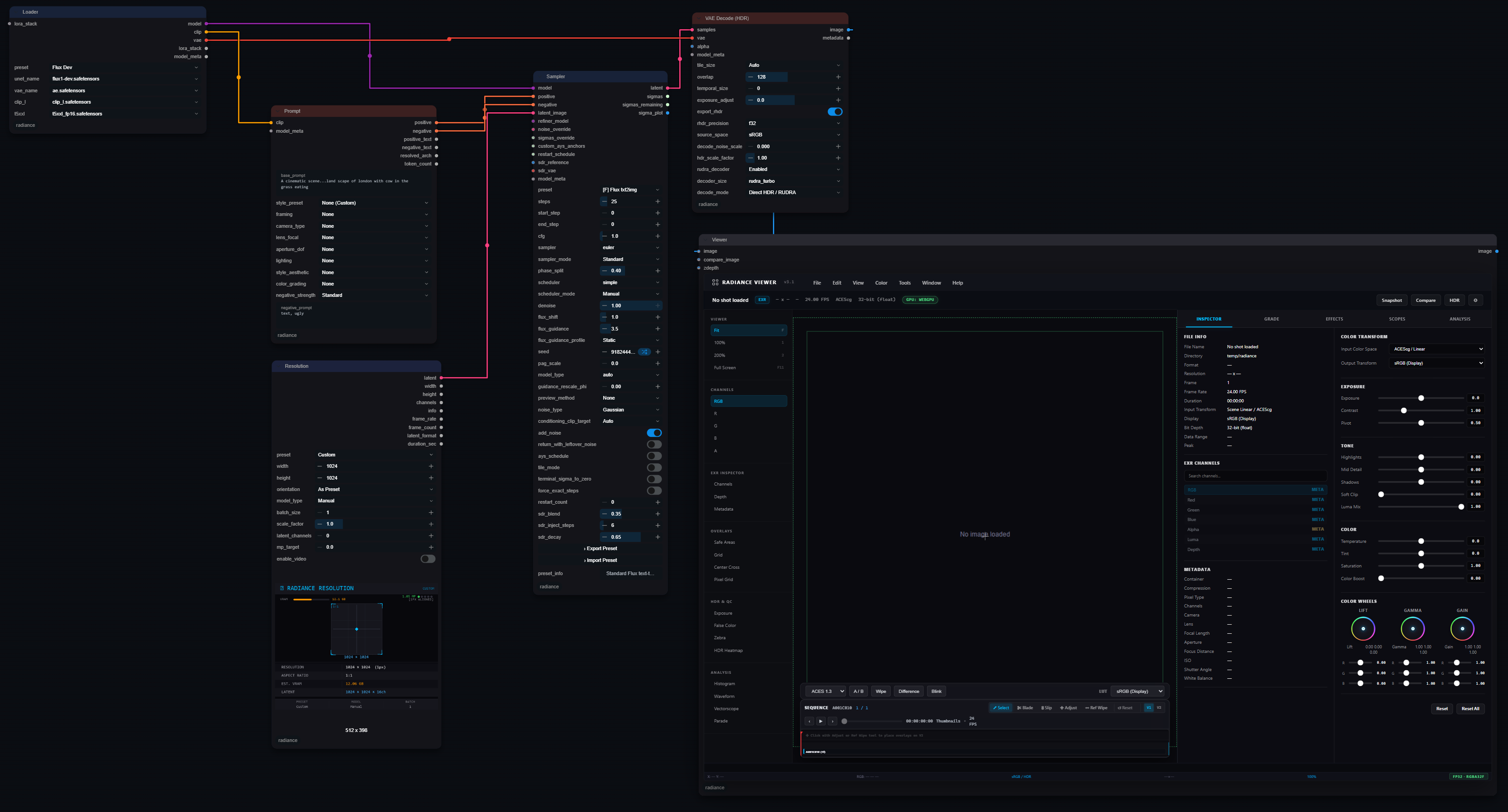
Start with this simple workflow:
Read → SDR → HDR Universal → Viewer
The SDR-to-HDR model downloads on first use when downloads are enabled.
Open the included starter workflow in ComfyUI.
Select the FLUX.2 Klein 4B distilled model, FLUX.2 VAE, and Qwen3 4B text encoder in the Loader, enter your prompt, and run the workflow. Review the result in the Viewer and connect a Write node to save the image.
The required model files are separate downloads. See Models and downloads below.
RUDRA on Hugging Face provides the learned SDR-to-HDR model used by SDR → HDR Universal and SDR → HDR Recover. The default model downloads on first use when downloads are enabled.
For manual or offline installation:
| Model | Download | Save in |
|---|---|---|
sdr2hdr_shadow_v1.safetensors | Download default model | ComfyUI/models/radiance/ |
| Alternative RUDRA image checkpoints | Browse available models | ComfyUI/models/radiance/ |
Create the radiance folder if needed. Leave pixel_checkpoint empty to use the default model. To prevent automatic model downloads, set RADIANCE_ALLOW_DOWNLOADS=0 before starting ComfyUI.
Model licence: RUDRA weights are licensed for non-commercial use. Read the RUDRA weights licence before use. This is separate from the Radiance codebase licence.
The included starter workflow uses FLUX.2 Klein 4B distilled, with 4 sampling steps at 1024 × 1024. Download these three files, place them in the folders below, and start the workflow.
| File | Hugging Face download | Save in |
|---|---|---|
flux-2-klein-4b-fp8.safetensors | FLUX.2 Klein 4B distilled | ComfyUI/models/diffusion_models/ |
flux2-vae.safetensors | FLUX.2 VAE | ComfyUI/models/vae/ |
qwen_3_4b.safetensors | Qwen3 4B text encoder | ComfyUI/models/text_encoders/ |
Use the distilled model listed above, not the base variant, which needs different sampling settings. Update ComfyUI for FLUX.2 Klein support and review each model's licence. See the official ComfyUI FLUX docs for model compatibility details.
Choose a workflow that matches your task:
| Workflow | Purpose |
|---|---|
| Starter workflow | Generate and review an image |
| SDR to HDR | Convert an existing image to HDR and save EXR |
| Colour grading | Adjust colour and save a graded image |
| HDR VAE | Encode, decode, and compare an HDR image |
| Multipass relighting | Estimate passes and relight an image |
| HDR delivery | Create EXR, HDR10, and SDR outputs |
Drag a workflow JSON file onto the ComfyUI canvas to open it.
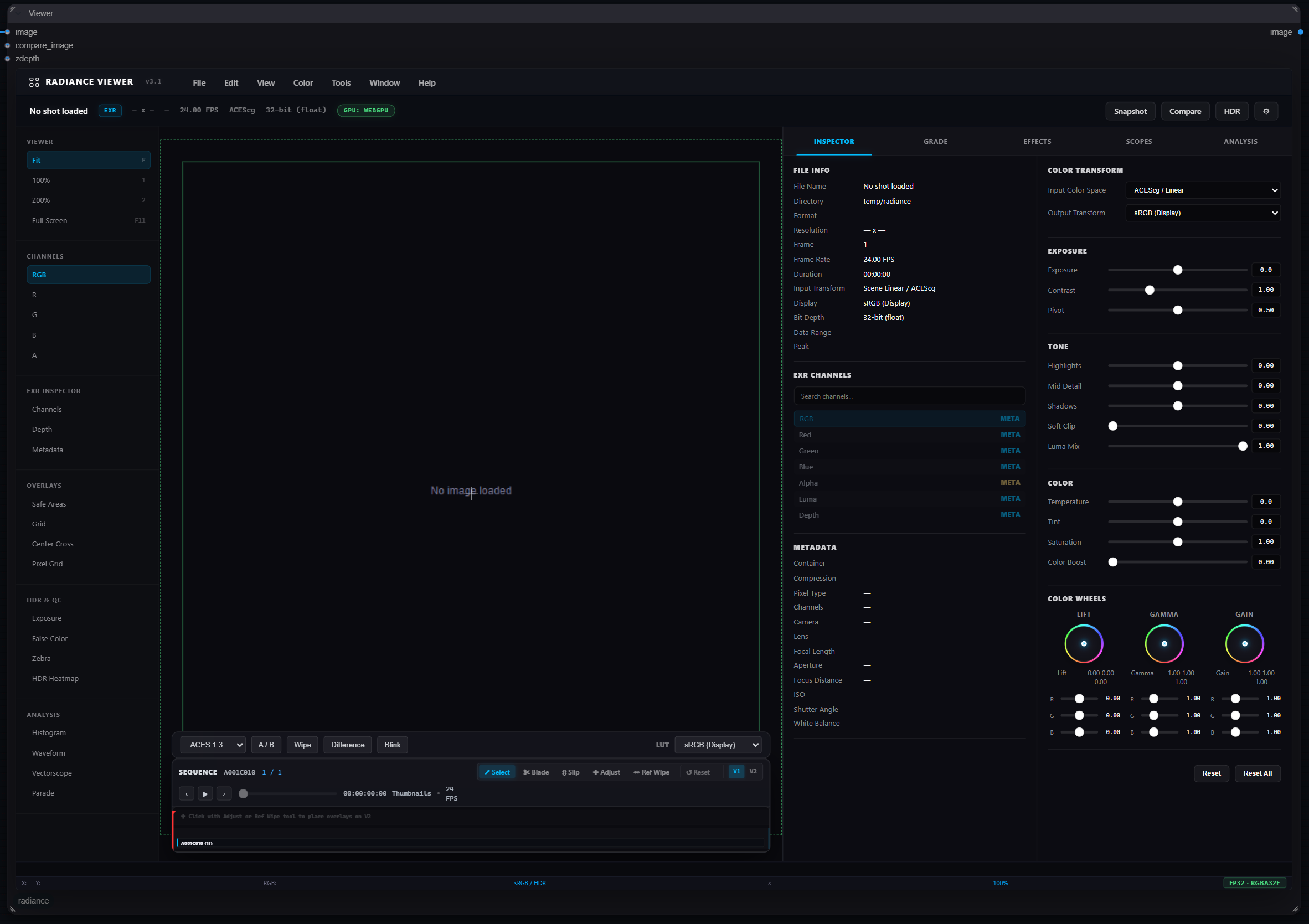
Start in Simple mode for image review, comparison, and playback. Switch to Advanced mode for scopes, colour controls, and detailed inspection.
exec hints, no flagged download links). Every P0 audit fix (FIX-001 to FIX-018) is done; see the changelog for the upgrade notes (saved ACES 2.0 Tonescale nodes, strict EXR Multi-Part, CDL Import errors).Read the full known limitations.
In ComfyUI, hover over a node or input to read its description.
If something does not work:
Report an issue with your Radiance version, ComfyUI version, operating system, error message, and a minimal workflow that reproduces the problem.
Radiance is licensed under GPL-3.0.
Downloaded model weights have their own licences. Review those terms before using or distributing them.
Built by FXTD Studios.
60 followers · starred Jan 2026
32-bit Ai Generation with Color Science · GPU Accelerated
See the code
HDR, colour management, VFX tools, and image review inside ComfyUI.
Radiance brings 147 visible nodes into your workflows for processing images and video, working with EXR and ACES, reviewing results, and delivering files to Nuke or DaVinci Resolve.
Install · Quick start · Models · Example workflows · Documentation · Support
| Your task | Radiance tools |
|---|---|
| Create and process HDR images | VAE Encode and Decode (HDR), SDR → HDR tools, HDR diagnostics |
| Manage colour | ACES, OpenColorIO, colour-space conversion, LUTs, and CDL |
| Review images and video | Viewer with Simple and Advanced modes, scopes, comparison, and playback |
| Prepare VFX shots | Masks, depth, optical effects, estimated passes, and relighting |
| Save and deliver results | Read and Write nodes for images, video, and EXR sequences |
| Organize your work | Project Manager, Workflow Library, Assets, and reusable Gizmos |
You can also find Radiance in the ComfyUI Registry.
Run these commands using the Python environment that runs ComfyUI:
cd ComfyUI/custom_nodes
git clone https://github.com/fxtd-studios/radiance.git
cd radiance
python -m pip install -r requirements.txt
Restart ComfyUI and refresh your browser.
Windows portable users: use ComfyUI's bundled python_embeded\python.exe when installing dependencies.
Use Update in ComfyUI Manager.
For a Git installation, run these commands inside the radiance folder:
git pull
python -m pip install -r requirements.txt
Restart ComfyUI and refresh your browser after updating.
Upgrading from an older version? Back up your workflows and check the migration notes. Some nodes and widget layouts changed in v3.5.
Start with this simple workflow:
Read → SDR → HDR Universal → Viewer
The SDR-to-HDR model downloads on first use when downloads are enabled.
Open the included starter workflow in ComfyUI.
Select the FLUX.2 Klein 4B distilled model, FLUX.2 VAE, and Qwen3 4B text encoder in the Loader, enter your prompt, and run the workflow. Review the result in the Viewer and connect a Write node to save the image.
The required model files are separate downloads. See Models and downloads below.
RUDRA on Hugging Face provides the learned SDR-to-HDR model used by SDR → HDR Universal and SDR → HDR Recover. The default model downloads on first use when downloads are enabled.
For manual or offline installation:
| Model | Download | Save in |
|---|---|---|
sdr2hdr_shadow_v1.safetensors | Download default model | ComfyUI/models/radiance/ |
| Alternative RUDRA image checkpoints | Browse available models | ComfyUI/models/radiance/ |
Create the radiance folder if needed. Leave pixel_checkpoint empty to use the default model. To prevent automatic model downloads, set RADIANCE_ALLOW_DOWNLOADS=0 before starting ComfyUI.
Model licence: RUDRA weights are licensed for non-commercial use. Read the RUDRA weights licence before use. This is separate from the Radiance codebase licence.
The included starter workflow uses FLUX.2 Klein 4B distilled, with 4 sampling steps at 1024 × 1024. Download these three files, place them in the folders below, and start the workflow.
| File | Hugging Face download | Save in |
|---|---|---|
flux-2-klein-4b-fp8.safetensors | FLUX.2 Klein 4B distilled | ComfyUI/models/diffusion_models/ |
flux2-vae.safetensors | FLUX.2 VAE | ComfyUI/models/vae/ |
qwen_3_4b.safetensors | Qwen3 4B text encoder | ComfyUI/models/text_encoders/ |
Use the distilled model listed above, not the base variant, which needs different sampling settings. Update ComfyUI for FLUX.2 Klein support and review each model's licence. See the official ComfyUI FLUX docs for model compatibility details.
Choose a workflow that matches your task:
| Workflow | Purpose |
|---|---|
| Starter workflow | Generate and review an image |
| SDR to HDR | Convert an existing image to HDR and save EXR |
| Colour grading | Adjust colour and save a graded image |
| HDR VAE | Encode, decode, and compare an HDR image |
| Multipass relighting | Estimate passes and relight an image |
| HDR delivery | Create EXR, HDR10, and SDR outputs |
Drag a workflow JSON file onto the ComfyUI canvas to open it.
Start in Simple mode for image review, comparison, and playback. Switch to Advanced mode for scopes, colour controls, and detailed inspection.
exec hints, no flagged download links). Every P0 audit fix (FIX-001 to FIX-018) is done; see the changelog for the upgrade notes (saved ACES 2.0 Tonescale nodes, strict EXR Multi-Part, CDL Import errors).Read the full known limitations.
In ComfyUI, hover over a node or input to read its description.
If something does not work:
Report an issue with your Radiance version, ComfyUI version, operating system, error message, and a minimal workflow that reproduces the problem.
Radiance is licensed under GPL-3.0.
Downloaded model weights have their own licences. Review those terms before using or distributing them.
Built by FXTD Studios.
60 followers · starred Jan 2026