Windows GUI and CLI for upscaling video with NVIDIA RTX Video Super Resolution (no ComfyUI or PyTorch needed). Resumable segments for long films, batch queue, before/after preview, 720p–4K presets that keep aspect ratio, H.264/HEVC/ProRes/DNxHR output, never overwrites.
Python
24
1 commits
updated Oct 5, 2026
A standalone Windows GUI for upscaling video with NVIDIA RTX Video Super Resolution. Built for long jobs: a 2-hour feature is processed as a stream of resumable segments, so a crash or a cancel costs minutes, not hours.
Calls NVIDIA's nvidia-vfx (Video Effects SDK) directly. No ComfyUI, no node
graph, no PyTorch.
name (2).mp4 beside it instead. Existing renders are safe.| GPU | NVIDIA with Tensor Cores — Turing (RTX 20-series) or newer |
| Driver | 570.65 or later on Windows |
| OS | 64-bit Windows 10 or later |
| Python | 3.10+ (only when running from source) |
| ffmpeg | on PATH, or ffmpeg.exe/ffprobe.exe in bin/ |
VRAM is not a constraint: frames are processed one at a time, so usage depends on frame size, not video length. A 1080p→4K job peaks around 1.6 GB, which leaves large headroom on an 8 GB card. A 2-hour film costs the same VRAM as a 2-second clip.
Double-click run.bat. On first run it creates the venv and installs
everything (~1.4 GB, since nvidia-vfx pulls roughly 790 MB of NVIDIA DLLs),
then launches the GUI. Afterwards it just launches.
No console window is left behind: the GUI runs under pythonw.exe and the
launcher exits immediately. Since there is then nowhere to print, everything
the app logs goes to rtxvsr.log beside the app, and an unexpected error
raises a dialog rather than vanishing. Passing any argument (such as
--self-test) keeps the console attached so you can read the output.
To build the standalone app, run build.bat. It refreshes the icon, stages
ffmpeg, runs PyInstaller, then verifies the frozen build with --self-test and
prints the report. Output lands in dist\RTX VSR Upscaler\.
build.bat onefile produces a single 869 MB .exe in dist-onefile\
instead. It works identically, but unpacks ~1.7 GB to %TEMP% on every launch,
so it takes 12–16 s to open rather than 1–4 s. Convenient to hand to someone;
the folder build is better for daily use. Numbers in
docs/PACKAGING.md.
Manual equivalents:
py -3.12 -m venv .venv; .\.venv\Scripts\python.exe -m pip install -r requirements.txt
.\.venv\Scripts\python.exe -m rtxvsr.app.main
If anything misbehaves, check rtxvsr.log, then run the diagnostics — they
check the SDK, the GPU backend, a real upscale and NVENC, and say which one is
broken:
.\run.bat --self-test
To ask the app what it makes of one specific file — useful when a single file fails and others work:
.\run.bat --probe "C:\path\to\video.mp4"
Both flags work on the built .exe too; the windowed build shows the report in a dialog, since it has no console to print to.
"could not be read" when adding a file? The commonest cause by far is
adding a video that is still downloading. MP4 stores its index (the moov
atom) at the end of the file, so a partially written download has no readable
structure at all until it completes. The app now says exactly that instead of
reporting a bare failure.
The CLI drives the same core code as the GUI.
.\.venv\Scripts\python.exe -m rtxvsr.cli input.mp4 output --preset 4K --format prores_422
Useful flags:
| Flag | Meaning |
|---|---|
--probe | print source info and exit |
-p, --preset | 720p, 1080p, 1440p, 4K — aspect ratio preserved |
-f, --format | h264, hevc, prores_lt, prores_422, prores_hq, dnxhr_hq |
-q, --quality | HIGH, ULTRA, DENOISE_HIGH, DEBLUR_MEDIUM, ... |
-s, --scale | scale factor; or --size WxH / --fit WxH for exact control |
--enc-preset | NVENC speed/quality, p1 (fastest) to p7 (best) |
--start / --end | process only a time range, in seconds |
--cq | encoder quality target, lower is better (default 21) |
--segment-frames | frames per resumable segment (default 2000) |
--tonemap | convert HDR/10-bit sources to SDR instead of refusing |
--no-resume | ignore existing progress and start over |
--overwrite | replace an existing output instead of writing name (2) |
Modes come from the SDK and fall into four groups:
BICUBIC, LOW, MEDIUM, HIGH, ULTRA. Trained on typical
compressed video; removes compression artifacts while upscaling.HIGHBITRATE_*. For clean sources (ProRes,
high-quality H.265) where artifact suppression would only soften real detail.DENOISE_*. Native resolution only.DEBLUR_*. Native resolution only.The GUI locks sizing to 1x when a denoise or deblur mode is selected, because the SDK rejects a differing output size for those.
RTX A4000, 1080p→4K:
| Stage | Rate |
|---|---|
| VSR alone, HIGH | 109 fps |
| VSR alone, ULTRA | 80 fps |
| End to end, HIGH (NVENC-bound) | ~40 fps |
VSR is not the bottleneck — NVENC is. A 2-hour 24 fps film takes roughly 1.2 hours end to end. Full numbers in docs/PHASE0_SPIKE.md.
--tonemap converts to SDR bt709 first, which visibly
changes the grade. This is deliberately opt-in rather than silent.av1_nvenc on
every build; the app probes it and hides it when the hardware cannot do it.An existing file is never overwritten. Before a job starts, the output name is
resolved against the folder: if movie_4K_high.mp4 is taken, the job writes
movie_4K_high (2).mp4, then (3), and so on. The GUI shows the name it will
actually use, and says which file it is stepping around.
Two details make this safe rather than merely usual:
(2); there is an end-to-end test for exactly that case.-n, so ffmpeg itself refuses to write over anything that
appears in the gap between the check and the write.--overwrite opts out, for scripted use where replacing the previous result is
the point. The GUI has no such control on purpose.
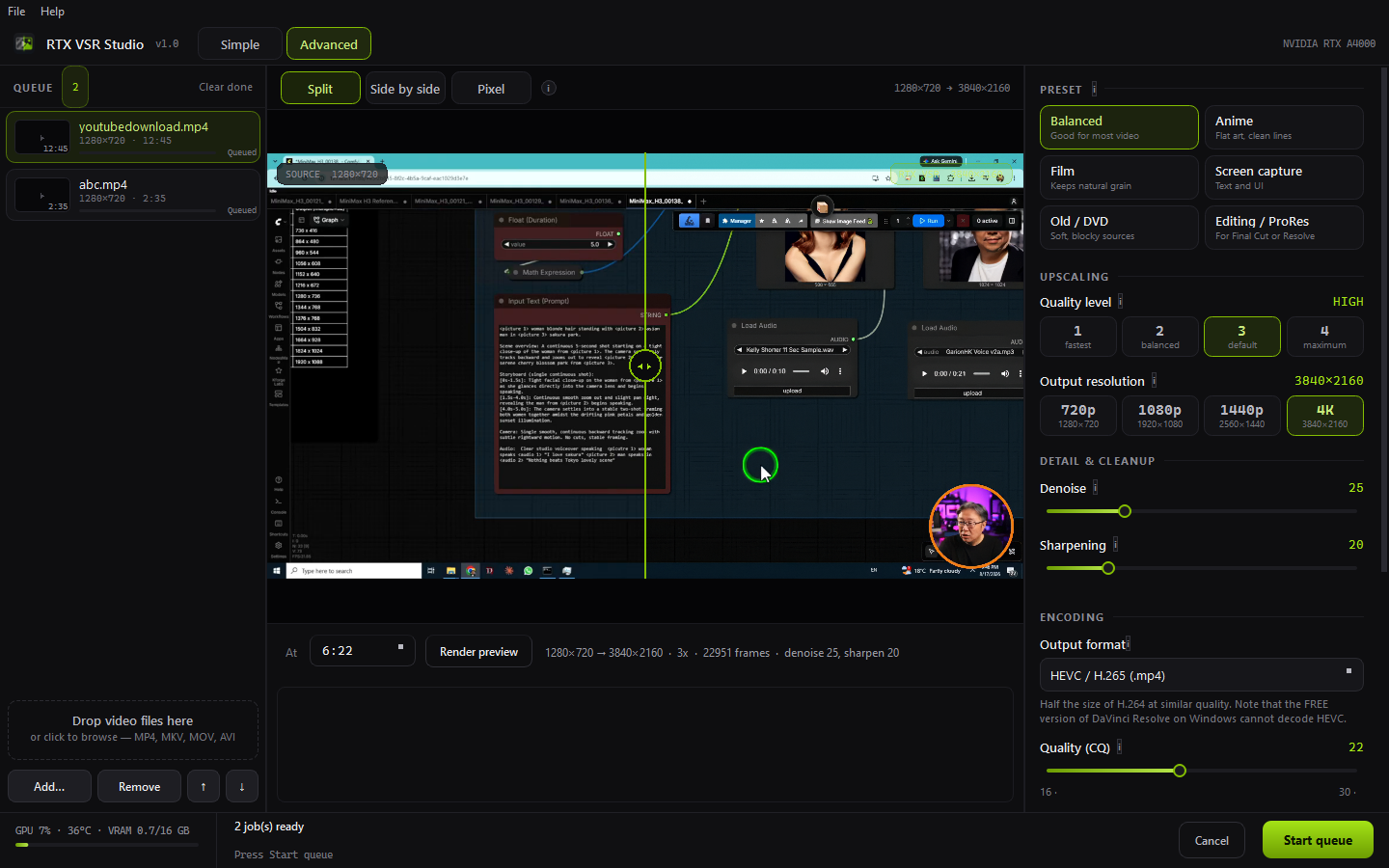
Built from the RTX VSR Studio design canvas — see docs/UI_REDESIGN.md for what was implemented, what was adapted, and what was deliberately left out.
rtxvsr/
  core/          engine, GPU-free where possible
    dimensions.py    resolution presets, alignment, the 16K workaround
    integrity.py     channel-collapse detection
    jobspec.py       job description and quality metadata
    naming.py        never-overwrite output naming
    gpu_backend.py   CuPy (default) / torch frame transfer
    vsr_engine.py    nvvfx.VideoSuperRes lifecycle
    formats.py       output codecs and containers
    filters.py       denoise / sharpen ffmpeg stages
    presets.py       content presets
    telemetry.py     GPU utilisation for the footer
    ffmpeg_io.py     probe, raw frame IO, concat, mux
    segments.py      resumable manifest
    pipeline.py      threaded decode -> VSR -> encode
  app/           PySide6 GUI (never imported by core)
    main.py          entry point, logging, --self-test / --probe
    main_window.py   the main window, Simple and Advanced modes
    preview_dialog.py  before/after split preview
    job_model.py     queue job state
    worker.py        background job thread
    queue_view.py    queue cards
    widgets.py       segmented controls, sliders, toggles, tips
    theme.py         design tokens and stylesheet
    resources.py     asset lookup (source and frozen builds)
    tips.py          help text
  cli.py
packaging/
  rtxvsr.spec      PyInstaller spec (folder or onefile via RTXVSR_ONEFILE)
  make_icon.py     regenerates icon.ico from icon.png
docs/            design notes, measurements, screenshots
tests/           unit and end-to-end tests
rtxvsr_gui.py    entry script for the frozen build
run.bat          create venv on first run, then launch
build.bat        build and self-test the standalone app
Generated and ignored by git: .venv/, bin/ (staged ffmpeg), build*/,
dist*/, testdata/ and rtxvsr.log.
.\.venv\Scripts\python.exe -m pytest tests/test_core.py -q
.\.venv\Scripts\python.exe tests\test_resume_e2e.py
.\.venv\Scripts\python.exe tests\test_gui_e2e.py
test_core.py is GPU-free: sizing, the 16K workaround, collapse detection,
manifest and resume logic.
The two end-to-end tests need an NVIDIA GPU and ffmpeg on PATH. They generate
their own clips in testdata/, so nothing needs to be checked in.
test_resume_e2e.py kills a running job partway and verifies the resumed run
produces an exact, complete output.
test_gui_e2e.py drives the real GUI with a live Qt event loop: renders a
preview, then runs a two-job queue to completion. This one matters more than
it looks. Qt worker-thread lifetime bugs kill the process outright with
STATUS_STACK_BUFFER_OVERRUN instead of raising, so only a run that finishes
and exits 0 proves the threading is sound — constructing widgets and poking
them without an event loop does not.
This project's own code is Apache-2.0, with portions derived from ComfyUI-NVIDIA-RTX-VSR-Pro — see NOTICE.
nvidia-vfx and the DLLs it installs are NVIDIA proprietary. Review
NVIDIA's terms before redistributing a frozen build.
Windows GUI and CLI for upscaling video with NVIDIA RTX Video Super Resolution (no ComfyUI or PyTorch needed). Resumable segments for long films, batch queue, before/after preview, 720p–4K presets that keep aspect ratio, H.264/HEVC/ProRes/DNxHR output, never overwrites.
Python
24
1 commits
updated Oct 5, 2026
A standalone Windows GUI for upscaling video with NVIDIA RTX Video Super Resolution. Built for long jobs: a 2-hour feature is processed as a stream of resumable segments, so a crash or a cancel costs minutes, not hours.
Calls NVIDIA's nvidia-vfx (Video Effects SDK) directly. No ComfyUI, no node
graph, no PyTorch.
name (2).mp4 beside it instead. Existing renders are safe.| GPU | NVIDIA with Tensor Cores — Turing (RTX 20-series) or newer |
| Driver | 570.65 or later on Windows |
| OS | 64-bit Windows 10 or later |
| Python | 3.10+ (only when running from source) |
| ffmpeg | on PATH, or ffmpeg.exe/ffprobe.exe in bin/ |
VRAM is not a constraint: frames are processed one at a time, so usage depends on frame size, not video length. A 1080p→4K job peaks around 1.6 GB, which leaves large headroom on an 8 GB card. A 2-hour film costs the same VRAM as a 2-second clip.
Double-click run.bat. On first run it creates the venv and installs
everything (~1.4 GB, since nvidia-vfx pulls roughly 790 MB of NVIDIA DLLs),
then launches the GUI. Afterwards it just launches.
No console window is left behind: the GUI runs under pythonw.exe and the
launcher exits immediately. Since there is then nowhere to print, everything
the app logs goes to rtxvsr.log beside the app, and an unexpected error
raises a dialog rather than vanishing. Passing any argument (such as
--self-test) keeps the console attached so you can read the output.
To build the standalone app, run build.bat. It refreshes the icon, stages
ffmpeg, runs PyInstaller, then verifies the frozen build with --self-test and
prints the report. Output lands in dist\RTX VSR Upscaler\.
build.bat onefile produces a single 869 MB .exe in dist-onefile\
instead. It works identically, but unpacks ~1.7 GB to %TEMP% on every launch,
so it takes 12–16 s to open rather than 1–4 s. Convenient to hand to someone;
the folder build is better for daily use. Numbers in
docs/PACKAGING.md.
Manual equivalents:
py -3.12 -m venv .venv; .\.venv\Scripts\python.exe -m pip install -r requirements.txt
.\.venv\Scripts\python.exe -m rtxvsr.app.main
If anything misbehaves, check rtxvsr.log, then run the diagnostics — they
check the SDK, the GPU backend, a real upscale and NVENC, and say which one is
broken:
.\run.bat --self-test
To ask the app what it makes of one specific file — useful when a single file fails and others work:
.\run.bat --probe "C:\path\to\video.mp4"
Both flags work on the built .exe too; the windowed build shows the report in a dialog, since it has no console to print to.
"could not be read" when adding a file? The commonest cause by far is
adding a video that is still downloading. MP4 stores its index (the moov
atom) at the end of the file, so a partially written download has no readable
structure at all until it completes. The app now says exactly that instead of
reporting a bare failure.
The CLI drives the same core code as the GUI.
.\.venv\Scripts\python.exe -m rtxvsr.cli input.mp4 output --preset 4K --format prores_422
Useful flags:
| Flag | Meaning |
|---|---|
--probe | print source info and exit |
-p, --preset | 720p, 1080p, 1440p, 4K — aspect ratio preserved |
-f, --format | h264, hevc, prores_lt, prores_422, prores_hq, dnxhr_hq |
-q, --quality | HIGH, ULTRA, DENOISE_HIGH, DEBLUR_MEDIUM, ... |
-s, --scale | scale factor; or --size WxH / --fit WxH for exact control |
--enc-preset | NVENC speed/quality, p1 (fastest) to p7 (best) |
--start / --end | process only a time range, in seconds |
--cq | encoder quality target, lower is better (default 21) |
--segment-frames | frames per resumable segment (default 2000) |
--tonemap | convert HDR/10-bit sources to SDR instead of refusing |
--no-resume | ignore existing progress and start over |
--overwrite | replace an existing output instead of writing name (2) |
Modes come from the SDK and fall into four groups:
BICUBIC, LOW, MEDIUM, HIGH, ULTRA. Trained on typical
compressed video; removes compression artifacts while upscaling.HIGHBITRATE_*. For clean sources (ProRes,
high-quality H.265) where artifact suppression would only soften real detail.DENOISE_*. Native resolution only.DEBLUR_*. Native resolution only.The GUI locks sizing to 1x when a denoise or deblur mode is selected, because the SDK rejects a differing output size for those.
RTX A4000, 1080p→4K:
| Stage | Rate |
|---|---|
| VSR alone, HIGH | 109 fps |
| VSR alone, ULTRA | 80 fps |
| End to end, HIGH (NVENC-bound) | ~40 fps |
VSR is not the bottleneck — NVENC is. A 2-hour 24 fps film takes roughly 1.2 hours end to end. Full numbers in docs/PHASE0_SPIKE.md.
--tonemap converts to SDR bt709 first, which visibly
changes the grade. This is deliberately opt-in rather than silent.av1_nvenc on
every build; the app probes it and hides it when the hardware cannot do it.An existing file is never overwritten. Before a job starts, the output name is
resolved against the folder: if movie_4K_high.mp4 is taken, the job writes
movie_4K_high (2).mp4, then (3), and so on. The GUI shows the name it will
actually use, and says which file it is stepping around.
Two details make this safe rather than merely usual:
(2); there is an end-to-end test for exactly that case.-n, so ffmpeg itself refuses to write over anything that
appears in the gap between the check and the write.--overwrite opts out, for scripted use where replacing the previous result is
the point. The GUI has no such control on purpose.
Built from the RTX VSR Studio design canvas — see docs/UI_REDESIGN.md for what was implemented, what was adapted, and what was deliberately left out.
rtxvsr/
  core/          engine, GPU-free where possible
    dimensions.py    resolution presets, alignment, the 16K workaround
    integrity.py     channel-collapse detection
    jobspec.py       job description and quality metadata
    naming.py        never-overwrite output naming
    gpu_backend.py   CuPy (default) / torch frame transfer
    vsr_engine.py    nvvfx.VideoSuperRes lifecycle
    formats.py       output codecs and containers
    filters.py       denoise / sharpen ffmpeg stages
    presets.py       content presets
    telemetry.py     GPU utilisation for the footer
    ffmpeg_io.py     probe, raw frame IO, concat, mux
    segments.py      resumable manifest
    pipeline.py      threaded decode -> VSR -> encode
  app/           PySide6 GUI (never imported by core)
    main.py          entry point, logging, --self-test / --probe
    main_window.py   the main window, Simple and Advanced modes
    preview_dialog.py  before/after split preview
    job_model.py     queue job state
    worker.py        background job thread
    queue_view.py    queue cards
    widgets.py       segmented controls, sliders, toggles, tips
    theme.py         design tokens and stylesheet
    resources.py     asset lookup (source and frozen builds)
    tips.py          help text
  cli.py
packaging/
  rtxvsr.spec      PyInstaller spec (folder or onefile via RTXVSR_ONEFILE)
  make_icon.py     regenerates icon.ico from icon.png
docs/            design notes, measurements, screenshots
tests/           unit and end-to-end tests
rtxvsr_gui.py    entry script for the frozen build
run.bat          create venv on first run, then launch
build.bat        build and self-test the standalone app
Generated and ignored by git: .venv/, bin/ (staged ffmpeg), build*/,
dist*/, testdata/ and rtxvsr.log.
.\.venv\Scripts\python.exe -m pytest tests/test_core.py -q
.\.venv\Scripts\python.exe tests\test_resume_e2e.py
.\.venv\Scripts\python.exe tests\test_gui_e2e.py
test_core.py is GPU-free: sizing, the 16K workaround, collapse detection,
manifest and resume logic.
The two end-to-end tests need an NVIDIA GPU and ffmpeg on PATH. They generate
their own clips in testdata/, so nothing needs to be checked in.
test_resume_e2e.py kills a running job partway and verifies the resumed run
produces an exact, complete output.
test_gui_e2e.py drives the real GUI with a live Qt event loop: renders a
preview, then runs a two-job queue to completion. This one matters more than
it looks. Qt worker-thread lifetime bugs kill the process outright with
STATUS_STACK_BUFFER_OVERRUN instead of raising, so only a run that finishes
and exits 0 proves the threading is sound — constructing widgets and poking
them without an event loop does not.
This project's own code is Apache-2.0, with portions derived from ComfyUI-NVIDIA-RTX-VSR-Pro — see NOTICE.
nvidia-vfx and the DLLs it installs are NVIDIA proprietary. Review
NVIDIA's terms before redistributing a frozen build.



