
Local desktop AI agent for voice, skills, model-flexible planning, and workstation automation.
C#
2
717 commits
updated Jul 20, 2026
README
Kam
Kam is a desktop AI agent for operating a workstation through voice, text, skills, and local context. It is designed to sit between a coding-agent style workflow and a daily assistant: it can plan with an OpenAI-compatible model, execute bounded desktop skills, inspect local context, and surface production-readiness evidence through an Avalonia UI.


Product Direction
Kam is evolving into a product-grade local agent runtime:
- Model-flexible: users can select OpenAI, OpenRouter, Ollama, or another OpenAI-compatible provider from the app.
- Skill-first: commands are planned as JSON skill plans and executed through a validated skill pipeline instead of relying on unstable provider function-calling behavior.
- Workstation-native: Windows is the first production target; the Avalonia UI and platform-service boundaries keep macOS support viable.
- Evidence-driven: Runtime Diagnostics, skill health, execution history, and local production smoke scripts make readiness visible.
- Safe by default: destructive desktop/file/shell actions are constrained by policy, validation, confirmation, and execution history.
Interface
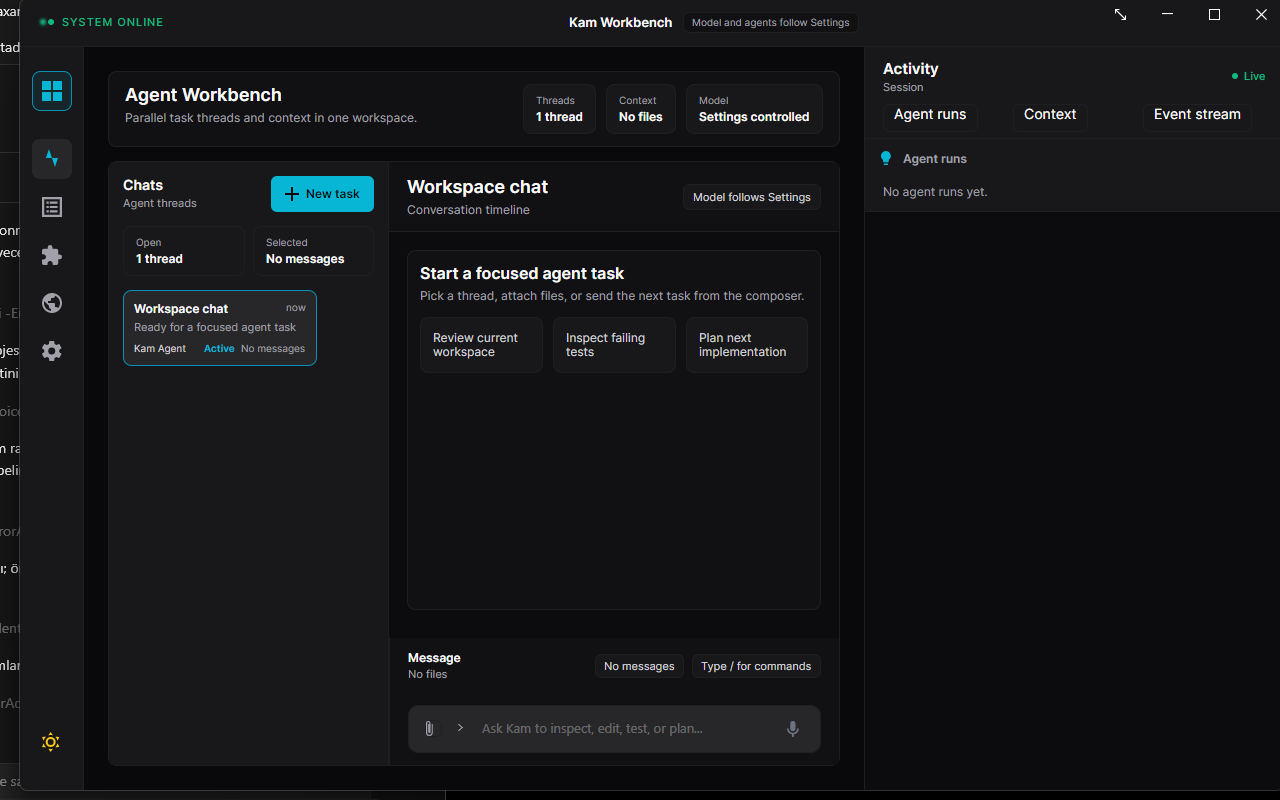
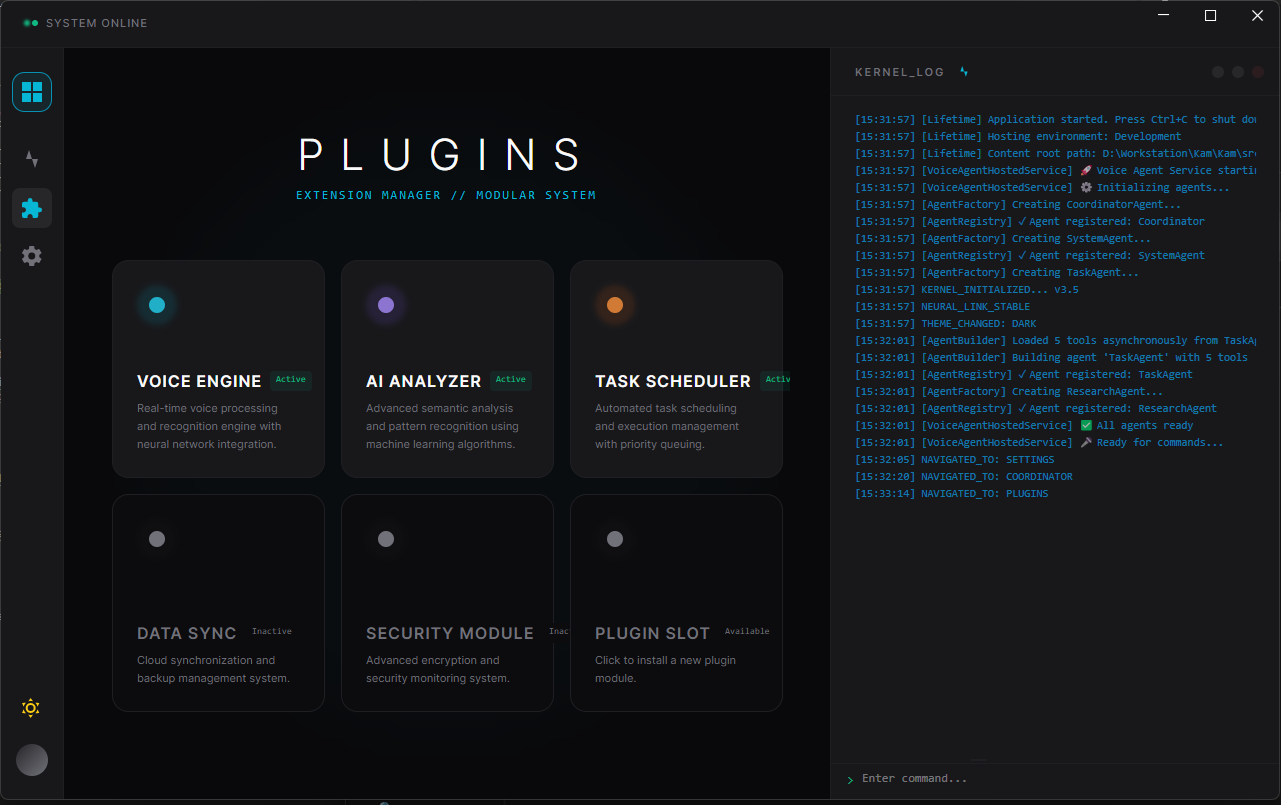
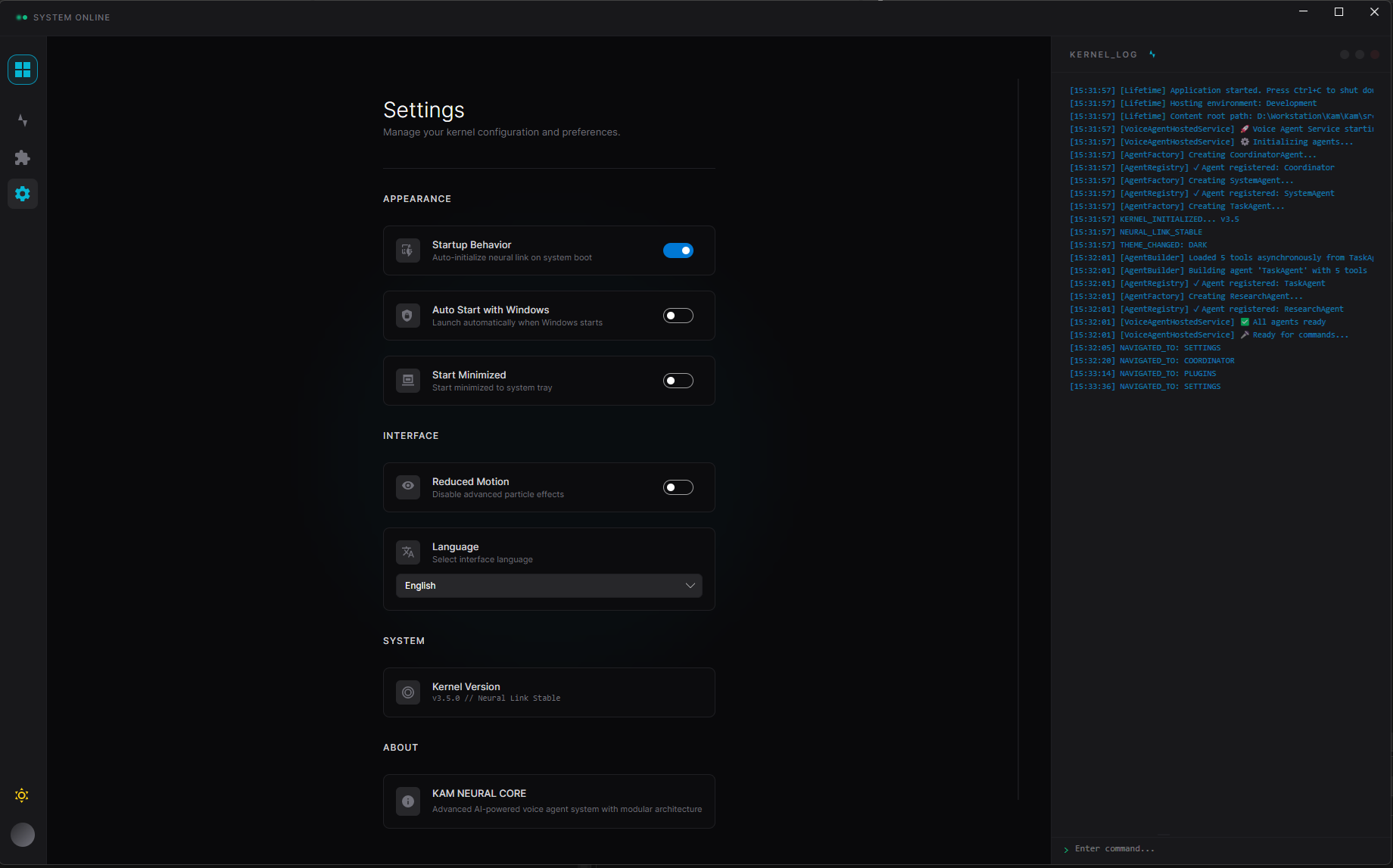
Capabilities
AI Runtime
- Planner model profile for JSON-only skill plans.
- Separate chat / skill execution profile for richer imported skills.
- Live model catalog refresh for OpenAI-compatible providers.
- Connection test feedback without exposing API keys or endpoints.
Skills And Tools
- Built-in app, file, workspace, shell, clipboard, web, window, accessibility, system, email, and SMS validation skills.
- Local skill imports from folders containing
SKILL.md. - Adapter direction for skills.sh, local skills, Codex-style skills, Claude-style skills, and MCP-backed tools.
- Skill health, smoke evals, execution history, replay controls, and policy guardrails.
Desktop Agent Runtime
- Application list/open/close/status operations.
- Window and accessibility context.
- Bounded file and workspace inspection.
- Shell execution with safety policy.
- Voice activation and microphone workflow.
- Runtime Diagnostics panel for local production checks.
Production Readiness
scripts/local-production-smoke.ps1runs restore, build, tests, AI config checks, skill smoke, publish, and optional launch.- Headless skill smoke currently covers installed apps, app status, system info, file/workspace/code search, clipboard, shell, web search, active window, window list, accessibility tree, email validation, and SMS validation.
docs/production-live-readiness.mddefines the manual local-live gate.docs/superpowers/plans/2026-04-30-kam-production-readiness-sprint.mdtracks the release-candidate sprint.
Repository Structure
Kam.sln
src/
  SmartVoiceAgent.Core/                 Domain models, interfaces, DTOs
  SmartVoiceAgent.Application/          CQRS commands, handlers, validators
  SmartVoiceAgent.Infrastructure/       agents, skills, platform services, MCP, AI integrations
  SmartVoiceAgent.CrossCuttingConcerns/ logging, exceptions, security utilities
  SmartVoiceAgent.AgentHost.ConsoleApp/ headless host and skill-smoke entrypoint
  SmartVoiceAgent.Mailing/              optional email/SMS infrastructure
  SmartVoiceAgent.Benchmarks/           performance benchmarks
  Ui/SmartVoiceAgent.Ui/                Avalonia desktop application
tests/
  SmartVoiceAgent.Tests/                unit, integration, UI metadata, and smoke tests
docs/
  local-production-smoke.md
  production-live-readiness.md
  superpowers/
scripts/
  local-production-smoke.ps1
assets/
  dashboard.png
  plugins.png
  settings.png
Requirements
- Windows 10/11 for the current production target.
- .NET 9 SDK.
- At least one planner model path:
- OpenAI API key and selected model, or
- OpenRouter API key and selected model, or
- local Ollama server at
http://localhost:11434/v1.
Optional integrations:
- Todoist MCP token for Todoist task operations.
- GitHub App installation credentials for read-only coding-agent repository discovery.
- Hugging Face API key for cloud STT / language detection.
- SMTP credentials for email sending.
- Twilio credentials for SMS sending.
- Google Custom Search key and search engine id for the legacy Google-backed web research service.
Quick Start
git clone https://github.com/Esquetta/Kam.git
cd Kam
dotnet restore Kam.sln
dotnet build Kam.sln --configuration Release
dotnet run --project src/Ui/SmartVoiceAgent.Ui/SmartVoiceAgent.Ui.csproj --configuration Release
Then open Settings > AI Runtime and configure one planner model profile. Prefer the UI for local setup because it stores user settings without exposing secret values in the repository.
Secret Configuration
Do not put API keys in committed appsettings.json files. Use the Settings UI, user secrets, or environment variables.
User-secrets example for headless smoke:
dotnet user-secrets set "AIService:Provider" "OpenAI" --project src/Ui/SmartVoiceAgent.Ui
dotnet user-secrets set "AIService:ApiKey" "your-api-key" --project src/Ui/SmartVoiceAgent.Ui
dotnet user-secrets set "AIService:ModelId" "selected-model-id" --project src/Ui/SmartVoiceAgent.Ui
dotnet user-secrets set "AIService:Endpoint" "https://api.openai.com/v1" --project src/Ui/SmartVoiceAgent.Ui
The smoke gate also accepts AIService:EndPoint for backward compatibility.
GitHub App setup for coding-agent repository discovery:
dotnet user-secrets set "GitHubApp:AppId" "<app-id>" --project src/SmartVoiceAgent.AgentHost.ConsoleApp
dotnet user-secrets set "GitHubApp:InstallationId" "<installation-id>" --project src/SmartVoiceAgent.AgentHost.ConsoleApp
dotnet user-secrets set "GitHubApp:PrivateKeyPath" "C:\secure\kam-github-app.pem" --project src/SmartVoiceAgent.AgentHost.ConsoleApp
Desktop Runtime Diagnostics reads configuration from the UI host, so set the same keys for src/Ui/SmartVoiceAgent.Ui or use environment variables such as GitHubApp__AppId, GitHubApp__InstallationId, and GitHubApp__PrivateKeyPath.
Start with read-only GitHub App permissions: Metadata, Contents, Pull requests, Issues, Actions, Checks, Commit statuses, and Dependabot alerts. Keep the PEM file outside the repository; Kam prints only configured/missing status, never PEM contents, JWTs, installation tokens, or private key paths. Runtime Diagnostics shows the repo count plus a short repository preview when list access is available.
Development Commands
dotnet restore Kam.sln
dotnet build Kam.sln --configuration Release
dotnet test Kam.sln --configuration Release
dotnet run --project src/SmartVoiceAgent.AgentHost.ConsoleApp --configuration Release -- --skill-smoke --summary artifacts/manual-skill-smoke.md
dotnet run --project src/SmartVoiceAgent.AgentHost.ConsoleApp --configuration Release -- --coding-agent --command "/github app"
dotnet run --project src/SmartVoiceAgent.AgentHost.ConsoleApp --configuration Release -- --coding-agent --command "/github repos"
Local Production Smoke
Run the full local gate before treating a build as release-candidate quality:
.\scripts\local-production-smoke.ps1 -Configuration Release -Runtime win-x64 -RequireAiConfig
Launch the published app for hands-on verification:
.\scripts\local-production-smoke.ps1 -Configuration Release -Runtime win-x64 -RequireAiConfig -Launch
Expected release-candidate signals:
- Release build has zero warnings.
- Full test suite passes.
- Skill smoke passes for required built-in skills.
- Published Avalonia app starts and responds.
- Runtime Diagnostics reports
READY_FOR_LIVE_TESTafter a simple command creates planner trace and skill result evidence.
Documentation
- Local production smoke
- Production live readiness
- Production readiness sprint
- Skill-first runtime design
- Agent guide
- Security policy
Security Model
Kam is a local automation agent, so safety is part of the core product surface:
- API keys and provider credentials stay in user settings, user secrets, or environment variables.
- Planner output is parsed and validated before skill execution.
- Skill arguments are validated before execution.
- High-risk file/shell/desktop actions require policy checks and confirmation paths.
- Runtime diagnostics and support reports must not expose API keys, bearer tokens, or passwords.
See SECURITY.md for reporting guidance and implementation notes.
Current Release Focus
The next release-candidate sprint is focused on:
- CI parity with the local production smoke gate.
- Live model profile readiness.
- Runtime Diagnostics as the release source of truth.
- Complete built-in skill smoke coverage.
- JSON planner and command-loop reliability.
- Desktop automation safety boundaries.
- Publish/launch artifact hardening.
- Product UX polish.
- Secret redaction across logs, traces, and support reports.
- Release-candidate rehearsal and checklist.
Contributing
Before sending changes:
dotnet test Kam.sln --configuration Release
.\scripts\local-production-smoke.ps1 -Configuration Release -Runtime win-x64 -RequireAiConfig
git diff --check
Keep commits scoped by product slice: runtime, UI, skills, diagnostics, docs, or release tooling.
License
Kam is released under the MIT License. See LICENSE.
Similar repos


Languages
C#
98.6%
Local desktop AI agent for voice, skills, model-flexible planning, and workstation automation.
C#
2
717 commits
updated Jul 20, 2026
README
Kam
Kam is a desktop AI agent for operating a workstation through voice, text, skills, and local context. It is designed to sit between a coding-agent style workflow and a daily assistant: it can plan with an OpenAI-compatible model, execute bounded desktop skills, inspect local context, and surface production-readiness evidence through an Avalonia UI.
Product Direction
Kam is evolving into a product-grade local agent runtime:
- Model-flexible: users can select OpenAI, OpenRouter, Ollama, or another OpenAI-compatible provider from the app.
- Skill-first: commands are planned as JSON skill plans and executed through a validated skill pipeline instead of relying on unstable provider function-calling behavior.
- Workstation-native: Windows is the first production target; the Avalonia UI and platform-service boundaries keep macOS support viable.
- Evidence-driven: Runtime Diagnostics, skill health, execution history, and local production smoke scripts make readiness visible.
- Safe by default: destructive desktop/file/shell actions are constrained by policy, validation, confirmation, and execution history.
Interface
Capabilities
AI Runtime
- Planner model profile for JSON-only skill plans.
- Separate chat / skill execution profile for richer imported skills.
- Live model catalog refresh for OpenAI-compatible providers.
- Connection test feedback without exposing API keys or endpoints.
Skills And Tools
- Built-in app, file, workspace, shell, clipboard, web, window, accessibility, system, email, and SMS validation skills.
- Local skill imports from folders containing
SKILL.md. - Adapter direction for skills.sh, local skills, Codex-style skills, Claude-style skills, and MCP-backed tools.
- Skill health, smoke evals, execution history, replay controls, and policy guardrails.
Desktop Agent Runtime
- Application list/open/close/status operations.
- Window and accessibility context.
- Bounded file and workspace inspection.
- Shell execution with safety policy.
- Voice activation and microphone workflow.
- Runtime Diagnostics panel for local production checks.
Production Readiness
scripts/local-production-smoke.ps1runs restore, build, tests, AI config checks, skill smoke, publish, and optional launch.- Headless skill smoke currently covers installed apps, app status, system info, file/workspace/code search, clipboard, shell, web search, active window, window list, accessibility tree, email validation, and SMS validation.
docs/production-live-readiness.mddefines the manual local-live gate.docs/superpowers/plans/2026-04-30-kam-production-readiness-sprint.mdtracks the release-candidate sprint.
Repository Structure
Kam.sln
src/
  SmartVoiceAgent.Core/                 Domain models, interfaces, DTOs
  SmartVoiceAgent.Application/          CQRS commands, handlers, validators
  SmartVoiceAgent.Infrastructure/       agents, skills, platform services, MCP, AI integrations
  SmartVoiceAgent.CrossCuttingConcerns/ logging, exceptions, security utilities
  SmartVoiceAgent.AgentHost.ConsoleApp/ headless host and skill-smoke entrypoint
  SmartVoiceAgent.Mailing/              optional email/SMS infrastructure
  SmartVoiceAgent.Benchmarks/           performance benchmarks
  Ui/SmartVoiceAgent.Ui/                Avalonia desktop application
tests/
  SmartVoiceAgent.Tests/                unit, integration, UI metadata, and smoke tests
docs/
  local-production-smoke.md
  production-live-readiness.md
  superpowers/
scripts/
  local-production-smoke.ps1
assets/
  dashboard.png
  plugins.png
  settings.png
Requirements
- Windows 10/11 for the current production target.
- .NET 9 SDK.
- At least one planner model path:
- OpenAI API key and selected model, or
- OpenRouter API key and selected model, or
- local Ollama server at
http://localhost:11434/v1.
Optional integrations:
- Todoist MCP token for Todoist task operations.
- GitHub App installation credentials for read-only coding-agent repository discovery.
- Hugging Face API key for cloud STT / language detection.
- SMTP credentials for email sending.
- Twilio credentials for SMS sending.
- Google Custom Search key and search engine id for the legacy Google-backed web research service.
Quick Start
git clone https://github.com/Esquetta/Kam.git
cd Kam
dotnet restore Kam.sln
dotnet build Kam.sln --configuration Release
dotnet run --project src/Ui/SmartVoiceAgent.Ui/SmartVoiceAgent.Ui.csproj --configuration Release
Then open Settings > AI Runtime and configure one planner model profile. Prefer the UI for local setup because it stores user settings without exposing secret values in the repository.
Secret Configuration
Do not put API keys in committed appsettings.json files. Use the Settings UI, user secrets, or environment variables.
User-secrets example for headless smoke:
dotnet user-secrets set "AIService:Provider" "OpenAI" --project src/Ui/SmartVoiceAgent.Ui
dotnet user-secrets set "AIService:ApiKey" "your-api-key" --project src/Ui/SmartVoiceAgent.Ui
dotnet user-secrets set "AIService:ModelId" "selected-model-id" --project src/Ui/SmartVoiceAgent.Ui
dotnet user-secrets set "AIService:Endpoint" "https://api.openai.com/v1" --project src/Ui/SmartVoiceAgent.Ui
The smoke gate also accepts AIService:EndPoint for backward compatibility.
GitHub App setup for coding-agent repository discovery:
dotnet user-secrets set "GitHubApp:AppId" "<app-id>" --project src/SmartVoiceAgent.AgentHost.ConsoleApp
dotnet user-secrets set "GitHubApp:InstallationId" "<installation-id>" --project src/SmartVoiceAgent.AgentHost.ConsoleApp
dotnet user-secrets set "GitHubApp:PrivateKeyPath" "C:\secure\kam-github-app.pem" --project src/SmartVoiceAgent.AgentHost.ConsoleApp
Desktop Runtime Diagnostics reads configuration from the UI host, so set the same keys for src/Ui/SmartVoiceAgent.Ui or use environment variables such as GitHubApp__AppId, GitHubApp__InstallationId, and GitHubApp__PrivateKeyPath.
Start with read-only GitHub App permissions: Metadata, Contents, Pull requests, Issues, Actions, Checks, Commit statuses, and Dependabot alerts. Keep the PEM file outside the repository; Kam prints only configured/missing status, never PEM contents, JWTs, installation tokens, or private key paths. Runtime Diagnostics shows the repo count plus a short repository preview when list access is available.
Development Commands
dotnet restore Kam.sln
dotnet build Kam.sln --configuration Release
dotnet test Kam.sln --configuration Release
dotnet run --project src/SmartVoiceAgent.AgentHost.ConsoleApp --configuration Release -- --skill-smoke --summary artifacts/manual-skill-smoke.md
dotnet run --project src/SmartVoiceAgent.AgentHost.ConsoleApp --configuration Release -- --coding-agent --command "/github app"
dotnet run --project src/SmartVoiceAgent.AgentHost.ConsoleApp --configuration Release -- --coding-agent --command "/github repos"
Local Production Smoke
Run the full local gate before treating a build as release-candidate quality:
.\scripts\local-production-smoke.ps1 -Configuration Release -Runtime win-x64 -RequireAiConfig
Launch the published app for hands-on verification:
.\scripts\local-production-smoke.ps1 -Configuration Release -Runtime win-x64 -RequireAiConfig -Launch
Expected release-candidate signals:
- Release build has zero warnings.
- Full test suite passes.
- Skill smoke passes for required built-in skills.
- Published Avalonia app starts and responds.
- Runtime Diagnostics reports
READY_FOR_LIVE_TESTafter a simple command creates planner trace and skill result evidence.
Documentation
- Local production smoke
- Production live readiness
- Production readiness sprint
- Skill-first runtime design
- Agent guide
- Security policy
Security Model
Kam is a local automation agent, so safety is part of the core product surface:
- API keys and provider credentials stay in user settings, user secrets, or environment variables.
- Planner output is parsed and validated before skill execution.
- Skill arguments are validated before execution.
- High-risk file/shell/desktop actions require policy checks and confirmation paths.
- Runtime diagnostics and support reports must not expose API keys, bearer tokens, or passwords.
See SECURITY.md for reporting guidance and implementation notes.
Current Release Focus
The next release-candidate sprint is focused on:
- CI parity with the local production smoke gate.
- Live model profile readiness.
- Runtime Diagnostics as the release source of truth.
- Complete built-in skill smoke coverage.
- JSON planner and command-loop reliability.
- Desktop automation safety boundaries.
- Publish/launch artifact hardening.
- Product UX polish.
- Secret redaction across logs, traces, and support reports.
- Release-candidate rehearsal and checklist.
Contributing
Before sending changes:
dotnet test Kam.sln --configuration Release
.\scripts\local-production-smoke.ps1 -Configuration Release -Runtime win-x64 -RequireAiConfig
git diff --check
Keep commits scoped by product slice: runtime, UI, skills, diagnostics, docs, or release tooling.
License
Kam is released under the MIT License. See LICENSE.
Similar repos
Languages
C#
98.6%