Real-time indoor navigation for visually impaired people, in Urdu and English.
Raahi (راہی) means "traveller". A phone camera sees the way; Raahi speaks it.
White canes sense about a metre ahead at ground level, and GPS apps stop working at the door. Indoors (universities, hospitals, offices) a visually impaired person still has to guess where the chair, the open door or the person in the corridor is.
Raahi turns any Android phone into a guide. The phone streams its camera to a Raahi server. The server recognises objects, measures how far away they are, decides the safest way forward and answers with short spoken instructions in a natural female voice, in Urdu or English:
"کرسی سامنے ہے، دو قدم پر۔ دو قدم بائیں ہٹیں۔" "Chair ahead, two steps away. Move two steps left."
The whole app can be used without looking at the screen. Say "Raahi" followed by a command to open any screen, change settings or control guidance, in Urdu, Roman Urdu or English.
Raahi complements the white cane; it does not replace it.
| Feature | What it does | |
|---|---|---|
| 🦯 | Obstacle guidance | Continuous warnings with the object's name, its distance in steps and which way to step to avoid it. Unnamed obstacles (walls, boxes) are caught by depth estimation. |
| 🛑 | Danger stop | Anything within about 0.8 m triggers an immediate spoken "Stop!", always followed by a way out (step left, right or back), plus a long vibration. |
| 🗣️ | Bilingual voice | Every instruction is recorded in Urdu and English (ElevenLabs Eleven v3, one consistent female voice), so playback starts instantly with no text-to-speech delay. Switch language at any time. |
| 🎙️ | Full voice control | "Raahi, settings kholo", "Raahi, dark mode", "Raahi, start detecting", "Raahi, English mein bolo". Speech is recognised by ElevenLabs Scribe v2 Realtime and matched on the phone with no server round trip, so commands act as soon as they are heard. Works hands-free or by long-press. |
| 🔎 | What's ahead? | A one-shot spoken description of the nearest objects with direction and distance. |
| 🚪 | Find mode | Guides the user to a door, chair, table, sofa, trash bin or person: turn left/right, steps remaining, "you have reached the door". |
| 📱 | Accessible by design | TalkBack labels on every control, high-contrast theme, adjustable text size, large controls, haptic patterns, light/dark themes, and an orientation gate that asks the user to hold the phone upright. |
| 🖥️ | Judge dashboard | Live camera with detection boxes, colour depth map, left/centre/right zone distances, the sentence being spoken and per-stage latency. |
| 🔒 | Privacy | No accounts. History is stored on the phone only. The ElevenLabs API key never leaves the server; the phone uses single-use tokens. |
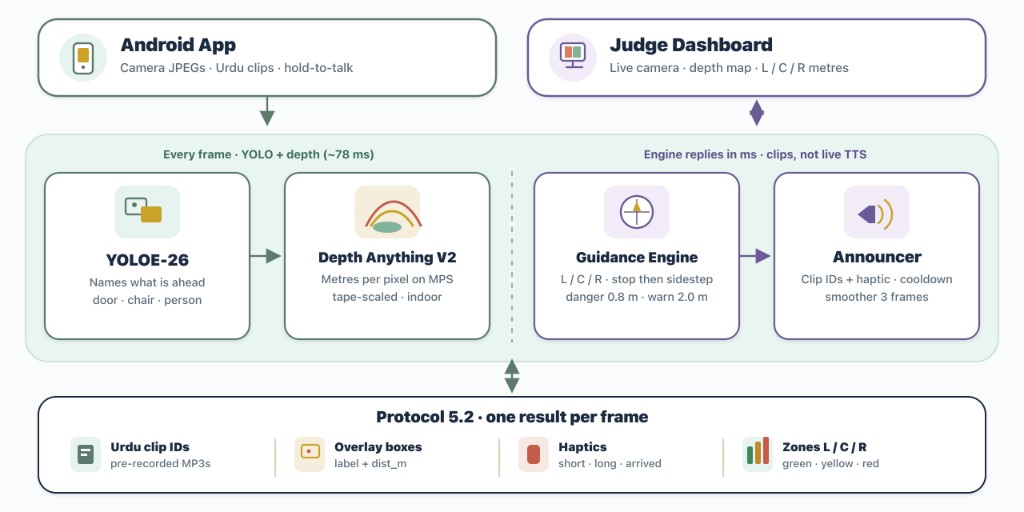
Each camera frame goes through object detection and depth, then the guidance engine and announcer. The reply is one Protocol 5.2 result: Urdu clip IDs, overlay boxes, haptics, and left / centre / right zones. The judge dashboard shows the live camera, depth map, and those distances.
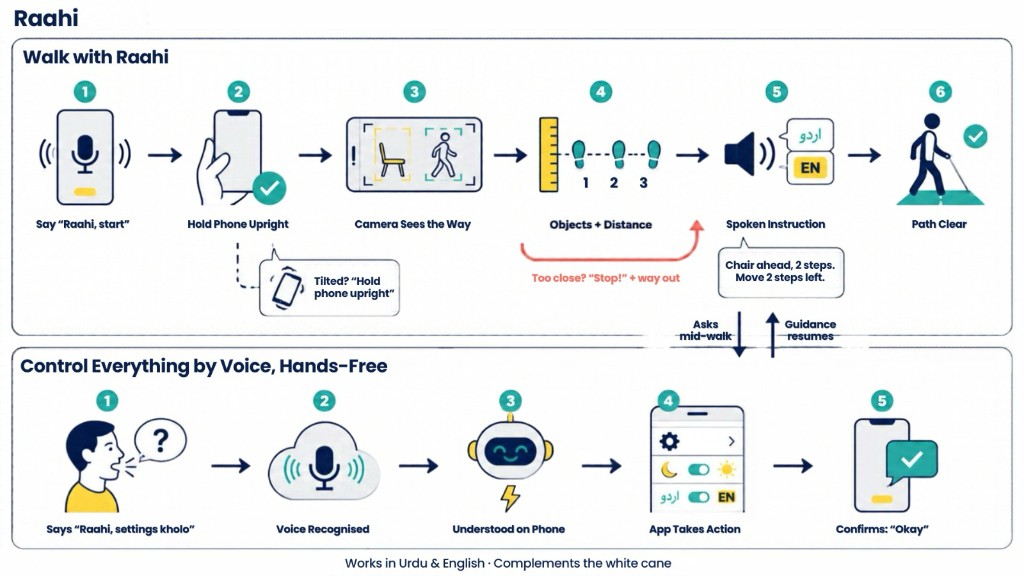
Walk with Raahi. Say "Raahi, start", hold the phone upright, and the camera names what is ahead with its distance. A spoken instruction in Urdu or English tells the user how to step aside. If something is too close, Raahi says "Stop!" and then the way out. When the path is clear, guidance confirms it. A question asked mid-walk pauses guidance, then it resumes.
Control everything by voice. "Raahi, settings kholo" is recognised, understood on the phone, and the app acts (theme, language, navigation) and confirms with "Okay". Works in Urdu and English, and complements the white cane.
 Android phone                                  Raahi server (FastAPI)
 ─────────────                                  ─────────────────────
 CameraX frame (upright, 416 px JPEG) ───WS───▶ YOLOE-26 object detection ─┐
                                                Depth Anything V2 (metres) ─┤
                                                                            ▼
                                                Guidance engine
                                                  · left / centre / right zones
                                                  · nearest obstacle, distance in steps
                                                  · safest side + steps to move
                                                  · find / describe modes
                                                  · smoother + announcer (no repeats,
                                                    stop once, then the way out)
 Plays prerecorded clips (Urdu / English) ◀──WS── clip ids: ["obj_chair","pos_ahead",
 vibrates on danger                               "steps_2","move_left_2"]
 Mic ─▶ ElevenLabs Scribe ─▶ on-device command matcher ─▶ navigation / settings / guidance
Why prerecorded clips? Guidance has to be in sync with what the camera sees. Live text-to-speech adds hundreds of milliseconds and needs the network. Raahi assembles sentences from about 100 short recorded phrases per language (object, position, distance, action), so audio starts as soon as a decision is made. A cached live-TTS fallback covers rare labels.
Why fuse depth and object size? Monocular depth is excellent at room scale but unreliable very close to the camera. Raahi combines the depth map with each detected object's known real-world size (height, or width when the object is cut off by the frame) and keeps the closer estimate, so a person standing right in front of the camera is never reported as "path clear".
| Layer | Technology |
|---|---|
| Object detection | Ultralytics YOLOE-26 (open-vocabulary), 28 indoor classes baked in and exported to ONNX / LiteRT (TFLite) / CoreML |
| Depth | Depth Anything V2 Metric Indoor Small (Hugging Face Transformers; PyTorch MPS / CPU, CoreML fallback) |
| Server | Python, FastAPI, WebSockets, OpenCV, NumPy |
| Voice | ElevenLabs Eleven v3 (Urdu + English clips), Scribe v2 Realtime (speech-to-text), live TTS fallback |
| Android | Kotlin, Jetpack Compose, CameraX, OkHttp WebSockets, DataStore, kotlinx.serialization |
| Training | Kaggle / Colab notebooks: export, plus optional fine-tuning on COCO + Open Images + venue photos |
Raahi/
├── backend/
│   ├── server/
│   │   ├── main.py              FastAPI app: /ws (phone), /dashboard, /health, /calibrate
│   │   ├── perception/          detector.py (YOLOE), depth.py (Depth Anything V2), sizes.py
│   │   ├── engine/              navigator, find mode, describe, smoother, announcer, geometry
│   │   ├── voice/               intents, Scribe token, live TTS, app command reference
│   │   ├── dashboard/           judge dashboard (HTML + live WebSocket)
│   │   └── mocks/               mock detector / server for offline development
│   ├── voice_assets/            Urdu + English clip library, batch splitter, sentence composer
│   ├── shared/classes.json      detector classes, sizes and clip mapping (single source)
│   ├── models/                  exported detector models
│   ├── training/                export + fine-tuning notebooks
│   ├── tools/                   live laptop demo, benchmarks, calibration, model export
│   └── tests/                   pytest suite (engine, voice, commands, server)
├── frontend/
│   ├── android/                 native Android app (Kotlin + Jetpack Compose)
│   └── web-prototype/           early web prototype and on-device detector plugin
└── docs/                        project plan, protocol contracts, design notes
Requires Python 3.11+.
cd backend
python -m venv .venv && source .venv/bin/activate     # Windows: .venv\Scripts\activate
pip install torch torchvision                          # CPU-only machines: add --index-url https://download.pytorch.org/whl/cpu
pip install -r requirements.txt
cp .env.example .env                                   # add ELEVENLABS_API_KEY and ELEVENLABS_VOICE_ID
python tools/download_models.py                        # depth weights (once)
python -m server                                       # phone: ws://<server-ip>:8000/ws
http://<server-ip>:8000/dashboardpython -m pytestpython -m tools.live_demo --lang en (or --lang ur)frontend/android/ in Android Studio (JDK 17).http://<server-ip>:8000, then Test connection.Start with "Raahi" (hands-free) or long-press anywhere (no wake word needed).
| Say (Urdu / Roman Urdu / English) | Action |
|---|---|
| "سیٹنگز کھولو" · "settings kholo" · "go to settings" | Open Settings (also: accessibility, voice settings, history, help, privacy, about…) |
| "واپس جاؤ" · "go back" · "go home" | Navigate back / home |
| "ڈارک موڈ" · "dark mode" · "light mode" | Change theme (also high contrast, bigger/smaller text) |
| "انگلش میں بولو" · "switch to Urdu" | Change the guidance voice language |
| "آواز تیز کرو" · "louder" · "speak slower" | Volume and speech speed |
| "شروع کرو" · "start detecting" | Start guidance |
| "رک جاؤ" · "pause" · "jari rakho" · "band karo" | Pause / resume / stop guidance |
| "سامنے کیا ہے" · "what's ahead?" | Describe the surroundings |
| "دوبارہ بولو" · "repeat" | Repeat the last instruction |
The vocabulary is a single file (frontend/android/app/src/main/assets/voice_commands.json). New phrases can be added without code changes.
| Contributor | Role | Contribution |
|---|---|---|
| Esha Shabbir | Detection & Voice AI | YOLOE-26 object detection (class design, export to ONNX/TFLite/CoreML, training notebooks); Urdu and English voice system (ElevenLabs clip library, batch recording pipeline, sentence assembly); Scribe speech recognition; bilingual voice-command and voice-navigation engine; live TTS fallback; guidance tuning and the laptop demo |
| Uswa Khan | Depth & Judge Dashboard | Depth Anything V2 metric depth (MPS/CoreML, calibration); depth-based navigation zones and server; the live judge dashboard with detections, depth map, zones and latency |
| Abeera Amir | Mobile App & Frontend | The native Android app end to end: all screens and flows (onboarding, guidance, find, what's ahead, history, settings, accessibility, diagnostics, errors), design system, camera streaming, audio playback, haptics and accessibility |
Raahi · راہی: seeing the way, together.
Real-time indoor navigation for visually impaired people, in Urdu and English.
Raahi (راہی) means "traveller". A phone camera sees the way; Raahi speaks it.
White canes sense about a metre ahead at ground level, and GPS apps stop working at the door. Indoors (universities, hospitals, offices) a visually impaired person still has to guess where the chair, the open door or the person in the corridor is.
Raahi turns any Android phone into a guide. The phone streams its camera to a Raahi server. The server recognises objects, measures how far away they are, decides the safest way forward and answers with short spoken instructions in a natural female voice, in Urdu or English:
"کرسی سامنے ہے، دو قدم پر۔ دو قدم بائیں ہٹیں۔" "Chair ahead, two steps away. Move two steps left."
The whole app can be used without looking at the screen. Say "Raahi" followed by a command to open any screen, change settings or control guidance, in Urdu, Roman Urdu or English.
Raahi complements the white cane; it does not replace it.
| Feature | What it does | |
|---|---|---|
| 🦯 | Obstacle guidance | Continuous warnings with the object's name, its distance in steps and which way to step to avoid it. Unnamed obstacles (walls, boxes) are caught by depth estimation. |
| 🛑 | Danger stop | Anything within about 0.8 m triggers an immediate spoken "Stop!", always followed by a way out (step left, right or back), plus a long vibration. |
| 🗣️ | Bilingual voice | Every instruction is recorded in Urdu and English (ElevenLabs Eleven v3, one consistent female voice), so playback starts instantly with no text-to-speech delay. Switch language at any time. |
| 🎙️ | Full voice control | "Raahi, settings kholo", "Raahi, dark mode", "Raahi, start detecting", "Raahi, English mein bolo". Speech is recognised by ElevenLabs Scribe v2 Realtime and matched on the phone with no server round trip, so commands act as soon as they are heard. Works hands-free or by long-press. |
| 🔎 | What's ahead? | A one-shot spoken description of the nearest objects with direction and distance. |
| 🚪 | Find mode | Guides the user to a door, chair, table, sofa, trash bin or person: turn left/right, steps remaining, "you have reached the door". |
| 📱 | Accessible by design | TalkBack labels on every control, high-contrast theme, adjustable text size, large controls, haptic patterns, light/dark themes, and an orientation gate that asks the user to hold the phone upright. |
| 🖥️ | Judge dashboard | Live camera with detection boxes, colour depth map, left/centre/right zone distances, the sentence being spoken and per-stage latency. |
| 🔒 | Privacy | No accounts. History is stored on the phone only. The ElevenLabs API key never leaves the server; the phone uses single-use tokens. |
Each camera frame goes through object detection and depth, then the guidance engine and announcer. The reply is one Protocol 5.2 result: Urdu clip IDs, overlay boxes, haptics, and left / centre / right zones. The judge dashboard shows the live camera, depth map, and those distances.
Walk with Raahi. Say "Raahi, start", hold the phone upright, and the camera names what is ahead with its distance. A spoken instruction in Urdu or English tells the user how to step aside. If something is too close, Raahi says "Stop!" and then the way out. When the path is clear, guidance confirms it. A question asked mid-walk pauses guidance, then it resumes.
Control everything by voice. "Raahi, settings kholo" is recognised, understood on the phone, and the app acts (theme, language, navigation) and confirms with "Okay". Works in Urdu and English, and complements the white cane.
 Android phone                                  Raahi server (FastAPI)
 ─────────────                                  ─────────────────────
 CameraX frame (upright, 416 px JPEG) ───WS───▶ YOLOE-26 object detection ─┐
                                                Depth Anything V2 (metres) ─┤
                                                                            ▼
                                                Guidance engine
                                                  · left / centre / right zones
                                                  · nearest obstacle, distance in steps
                                                  · safest side + steps to move
                                                  · find / describe modes
                                                  · smoother + announcer (no repeats,
                                                    stop once, then the way out)
 Plays prerecorded clips (Urdu / English) ◀──WS── clip ids: ["obj_chair","pos_ahead",
 vibrates on danger                               "steps_2","move_left_2"]
 Mic ─▶ ElevenLabs Scribe ─▶ on-device command matcher ─▶ navigation / settings / guidance
Why prerecorded clips? Guidance has to be in sync with what the camera sees. Live text-to-speech adds hundreds of milliseconds and needs the network. Raahi assembles sentences from about 100 short recorded phrases per language (object, position, distance, action), so audio starts as soon as a decision is made. A cached live-TTS fallback covers rare labels.
Why fuse depth and object size? Monocular depth is excellent at room scale but unreliable very close to the camera. Raahi combines the depth map with each detected object's known real-world size (height, or width when the object is cut off by the frame) and keeps the closer estimate, so a person standing right in front of the camera is never reported as "path clear".
| Layer | Technology |
|---|---|
| Object detection | Ultralytics YOLOE-26 (open-vocabulary), 28 indoor classes baked in and exported to ONNX / LiteRT (TFLite) / CoreML |
| Depth | Depth Anything V2 Metric Indoor Small (Hugging Face Transformers; PyTorch MPS / CPU, CoreML fallback) |
| Server | Python, FastAPI, WebSockets, OpenCV, NumPy |
| Voice | ElevenLabs Eleven v3 (Urdu + English clips), Scribe v2 Realtime (speech-to-text), live TTS fallback |
| Android | Kotlin, Jetpack Compose, CameraX, OkHttp WebSockets, DataStore, kotlinx.serialization |
| Training | Kaggle / Colab notebooks: export, plus optional fine-tuning on COCO + Open Images + venue photos |
Raahi/
├── backend/
│   ├── server/
│   │   ├── main.py              FastAPI app: /ws (phone), /dashboard, /health, /calibrate
│   │   ├── perception/          detector.py (YOLOE), depth.py (Depth Anything V2), sizes.py
│   │   ├── engine/              navigator, find mode, describe, smoother, announcer, geometry
│   │   ├── voice/               intents, Scribe token, live TTS, app command reference
│   │   ├── dashboard/           judge dashboard (HTML + live WebSocket)
│   │   └── mocks/               mock detector / server for offline development
│   ├── voice_assets/            Urdu + English clip library, batch splitter, sentence composer
│   ├── shared/classes.json      detector classes, sizes and clip mapping (single source)
│   ├── models/                  exported detector models
│   ├── training/                export + fine-tuning notebooks
│   ├── tools/                   live laptop demo, benchmarks, calibration, model export
│   └── tests/                   pytest suite (engine, voice, commands, server)
├── frontend/
│   ├── android/                 native Android app (Kotlin + Jetpack Compose)
│   └── web-prototype/           early web prototype and on-device detector plugin
└── docs/                        project plan, protocol contracts, design notes
Requires Python 3.11+.
cd backend
python -m venv .venv && source .venv/bin/activate     # Windows: .venv\Scripts\activate
pip install torch torchvision                          # CPU-only machines: add --index-url https://download.pytorch.org/whl/cpu
pip install -r requirements.txt
cp .env.example .env                                   # add ELEVENLABS_API_KEY and ELEVENLABS_VOICE_ID
python tools/download_models.py                        # depth weights (once)
python -m server                                       # phone: ws://<server-ip>:8000/ws
http://<server-ip>:8000/dashboardpython -m pytestpython -m tools.live_demo --lang en (or --lang ur)frontend/android/ in Android Studio (JDK 17).http://<server-ip>:8000, then Test connection.Start with "Raahi" (hands-free) or long-press anywhere (no wake word needed).
| Say (Urdu / Roman Urdu / English) | Action |
|---|---|
| "سیٹنگز کھولو" · "settings kholo" · "go to settings" | Open Settings (also: accessibility, voice settings, history, help, privacy, about…) |
| "واپس جاؤ" · "go back" · "go home" | Navigate back / home |
| "ڈارک موڈ" · "dark mode" · "light mode" | Change theme (also high contrast, bigger/smaller text) |
| "انگلش میں بولو" · "switch to Urdu" | Change the guidance voice language |
| "آواز تیز کرو" · "louder" · "speak slower" | Volume and speech speed |
| "شروع کرو" · "start detecting" | Start guidance |
| "رک جاؤ" · "pause" · "jari rakho" · "band karo" | Pause / resume / stop guidance |
| "سامنے کیا ہے" · "what's ahead?" | Describe the surroundings |
| "دوبارہ بولو" · "repeat" | Repeat the last instruction |
The vocabulary is a single file (frontend/android/app/src/main/assets/voice_commands.json). New phrases can be added without code changes.
| Contributor | Role | Contribution |
|---|---|---|
| Esha Shabbir | Detection & Voice AI | YOLOE-26 object detection (class design, export to ONNX/TFLite/CoreML, training notebooks); Urdu and English voice system (ElevenLabs clip library, batch recording pipeline, sentence assembly); Scribe speech recognition; bilingual voice-command and voice-navigation engine; live TTS fallback; guidance tuning and the laptop demo |
| Uswa Khan | Depth & Judge Dashboard | Depth Anything V2 metric depth (MPS/CoreML, calibration); depth-based navigation zones and server; the live judge dashboard with detections, depth map, zones and latency |
| Abeera Amir | Mobile App & Frontend | The native Android app end to end: all screens and flows (onboarding, guidance, find, what's ahead, history, settings, accessibility, diagnostics, errors), design system, camera streaming, audio playback, haptics and accessibility |
Raahi · راہی: seeing the way, together.



