Real-time AI assistant for Meta Ray-Ban smart glasses -- voice + vision + agentic actions via Gemini Live and OpenClaw
TypeScript
2,581
335 commits
updated Sep 26, 2026
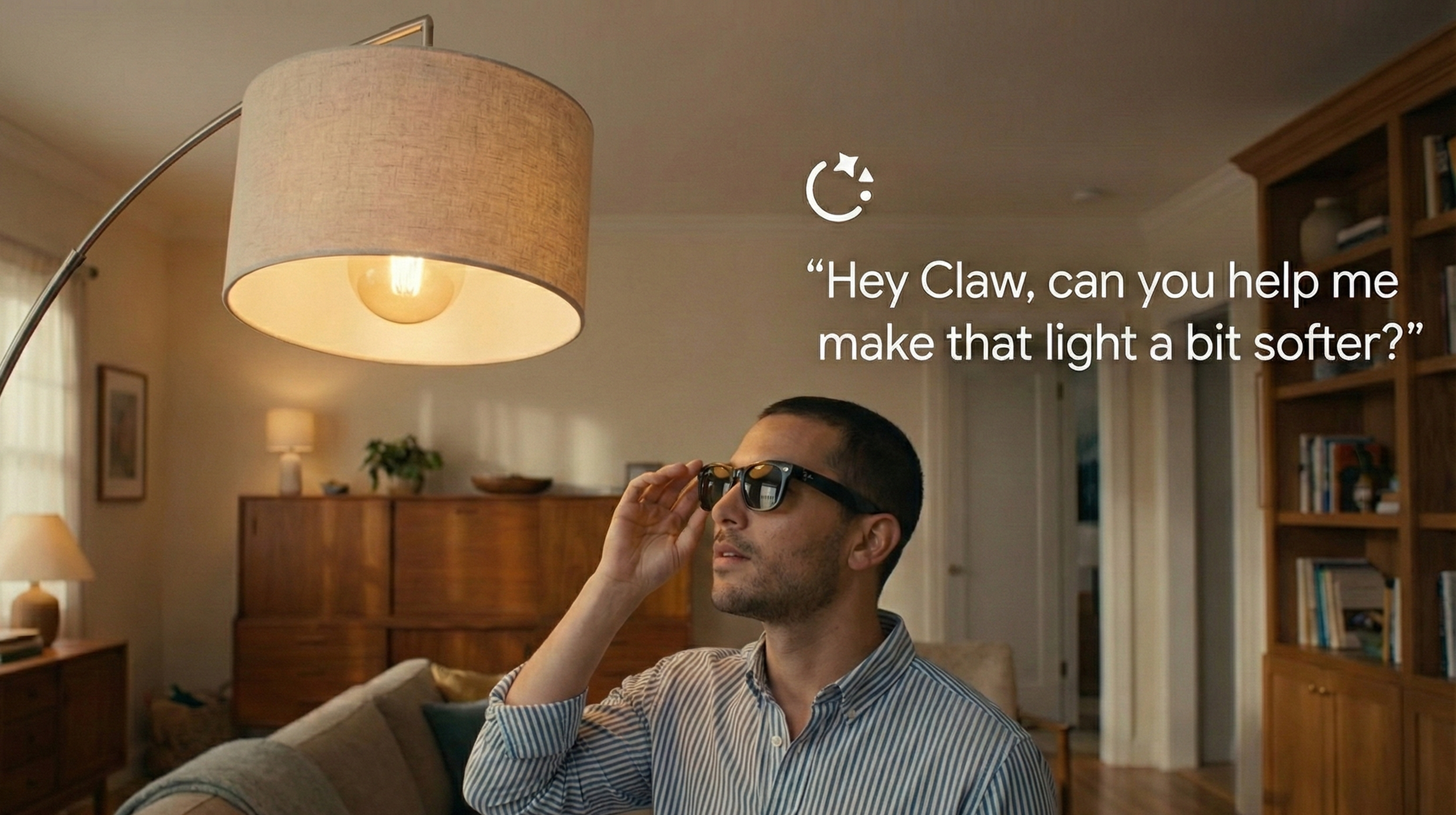
A real-time AI assistant for Meta Ray-Ban smart glasses. See what you see, hear what you say, and take actions on your behalf -- all through voice.
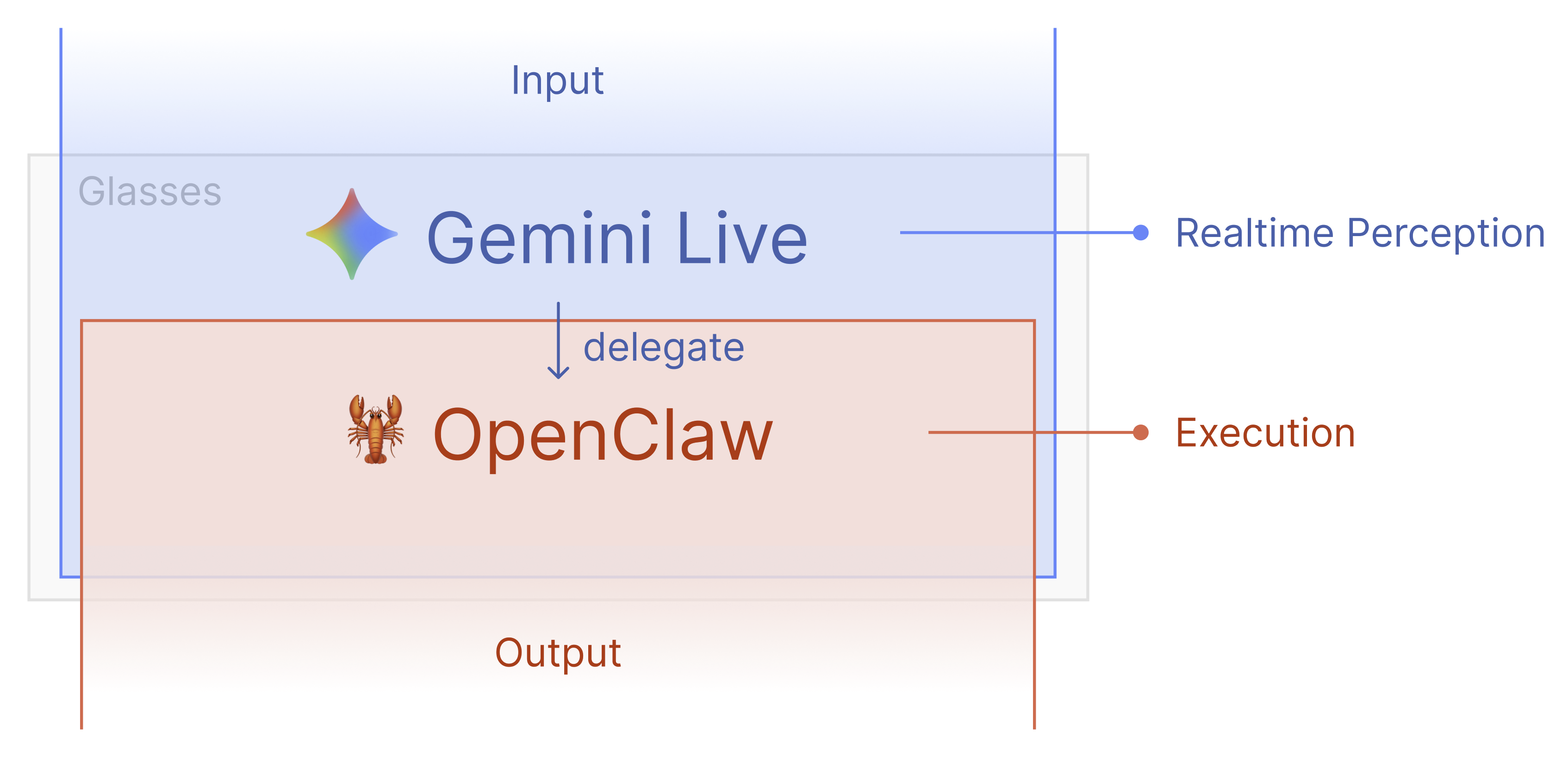
Built on Meta Wearables DAT SDK (iOS) / DAT Android SDK (Android) + Gemini Live API + OpenClaw (optional).
Supported platforms: iOS (iPhone) and Android (Pixel, Samsung, etc.)
Put on your glasses, tap the AI button, and talk:
The glasses camera streams at ~1fps to Gemini for visual context, while audio flows bidirectionally in real-time.
Meta Ray-Ban Glasses (or phone camera)
       |
       | video frames + mic audio
       v
iOS / Android App (this project)
       |
       | JPEG frames (~1fps) + PCM audio (16kHz)
       v
Gemini Live API (WebSocket)
       |
       |-- Audio response (PCM 24kHz) --> App --> Speaker
       |-- Tool calls (execute) -------> App --> OpenClaw Gateway
       |                                              |
       |                                              v
       |                                      56+ skills: web search,
       |                                      messaging, smart home,
       |                                      notes, reminders, etc.
       |                                              |
       |<---- Tool response (text) <----- App <-------+
       |
       v
  Gemini speaks the result
Key pieces:
The first screen asks for an access code. The code is not something the author issues -- it is a token from whichever gateway the app points at, and the gate verifies it against that gateway before unlocking.
api.visionagents.app) is a small private pilot instance for a user study, not a public service, so its codes are not handed out.gateway/ and set GATEWAY_TOKENS="<any-secret>:<your-name>" in its .env -- that secret is your access code. Point the app at your gateway either in Secrets.swift / Secrets.kt (gatewayBaseUrl) before building, or at runtime with "Using your own gateway?" on the access-code screen.agent/ worker running against a LiveKit Cloud project (free tier works), with the same LiveKit credentials on both the gateway and the worker -- otherwise the app connects and waits on "Waiting for agent" forever.Details for the gateway, tokens and app connections: gateway/README.md.
git clone https://github.com/sseanliu/VisionClaw.git
cd VisionClaw/samples/CameraAccess
open CameraAccess.xcodeproj
Copy the example file and fill in your values:
cp CameraAccess/Secrets.swift.example CameraAccess/Secrets.swift
Edit Secrets.swift with your Gemini API key (required) and optional OpenClaw/WebRTC config.
Select your iPhone as the target device and hit Run (Cmd+R).
Without glasses (iPhone mode):
With Meta Ray-Ban glasses:
First, enable Developer Mode in the Meta AI app:
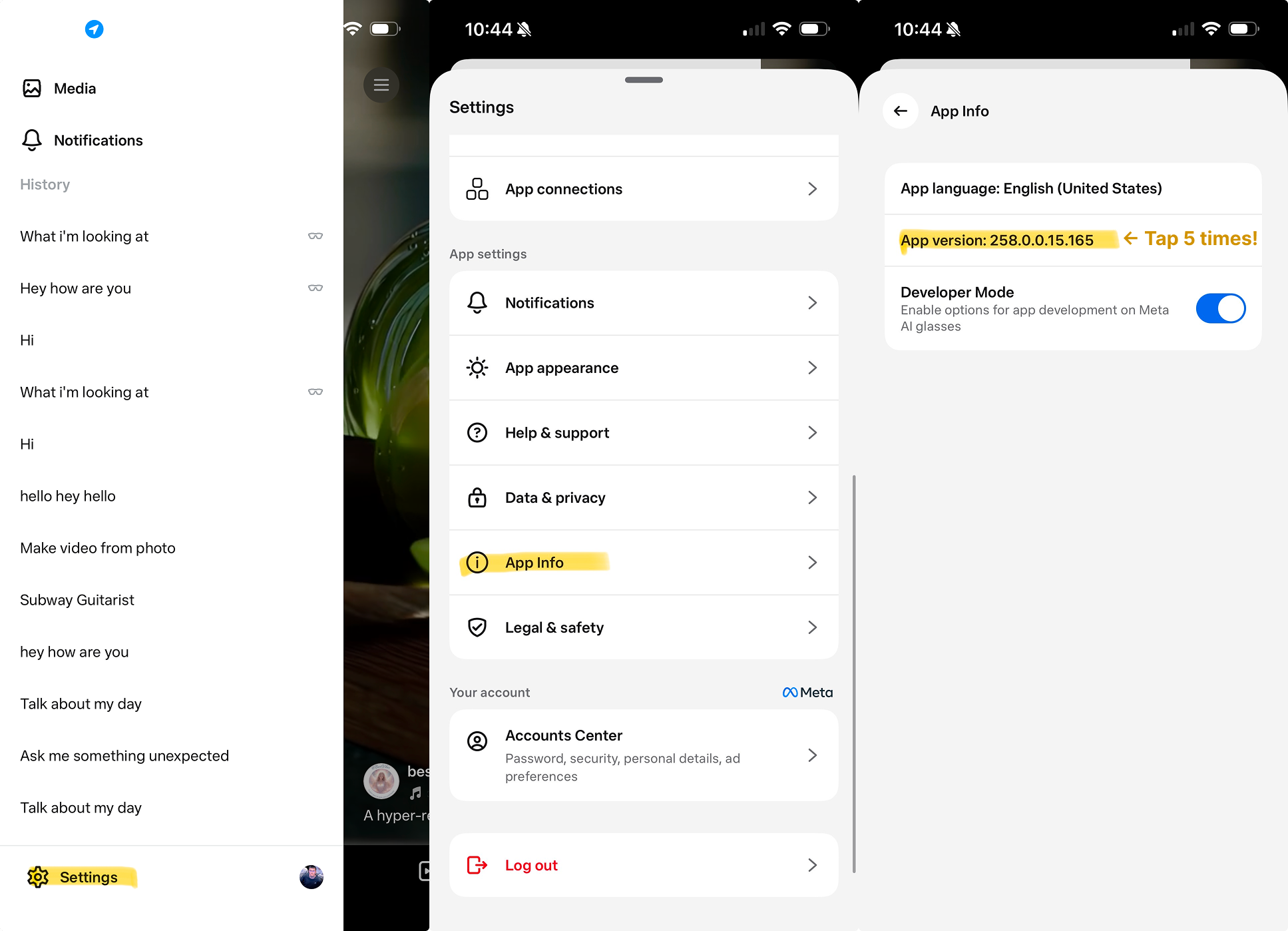
Then in VisionClaw:
git clone https://github.com/sseanliu/VisionClaw.git
Open samples/CameraAccessAndroid/ in Android Studio.
The Meta DAT Android SDK is distributed via GitHub Packages. You need a GitHub Personal Access Token with read:packages scope.
read:packages scopesamples/CameraAccessAndroid/local.properties, add:github_token=YOUR_GITHUB_TOKEN
Tip: If you have the
ghCLI installed, you can rungh auth tokento get a valid token. Make sure it hasread:packagesscope -- if not, rungh auth refresh -s read:packages.Note: GitHub Packages requires authentication even for public repositories. The 401 error means your token is missing or invalid.
cd samples/CameraAccessAndroid/app/src/main/java/com/meta/wearable/dat/externalsampleapps/cameraaccess/
cp Secrets.kt.example Secrets.kt
Edit Secrets.kt with your Gemini API key (required) and optional OpenClaw/WebRTC config.
Wireless debugging: You can also install via ADB wirelessly. Enable Wireless debugging in your phone's Developer Options, then pair with
adb pair <ip>:<port>.
Without glasses (Phone mode):
With Meta Ray-Ban glasses:
Enable Developer Mode in the Meta AI app (same steps as iOS above), then:
OpenClaw gives Gemini the ability to take real-world actions: send messages, search the web, manage lists, control smart home devices, and more. Without it, Gemini is voice + vision only.
Follow the OpenClaw setup guide. Make sure the gateway is enabled:
In ~/.openclaw/openclaw.json:
{
  "gateway": {
    "port": 18789,
    "bind": "lan",
    "auth": {
      "mode": "token",
      "token": "your-gateway-token-here"
    },
    "http": {
      "endpoints": {
        "chatCompletions": { "enabled": true }
      }
    }
  }
}
Key settings:
bind: "lan" -- exposes the gateway on your local network so your phone can reach itchatCompletions.enabled: true -- enables the /v1/chat/completions endpoint (off by default)auth.token -- the token your app will use to authenticateiOS -- In Secrets.swift:
static let openClawHost = "http://Your-Mac.local"
static let openClawPort = 18789
static let openClawGatewayToken = "your-gateway-token-here"
Android -- In Secrets.kt:
const val openClawHost = "http://Your-Mac.local"
const val openClawPort = 18789
const val openClawGatewayToken = "your-gateway-token-here"
To find your Mac's Bonjour hostname: System Settings > General > Sharing -- it's shown at the top (e.g., Johns-MacBook-Pro.local).
Both iOS and Android also have an in-app Settings screen where you can change these values at runtime without editing source code.
openclaw gateway restart
Verify it's running:
curl http://localhost:18789/health
Now when you talk to the AI, it can execute tasks through OpenClaw.
All source code is in samples/CameraAccess/CameraAccess/:
| File | Purpose |
|---|---|
Gemini/GeminiConfig.swift | API keys, model config, system prompt |
Gemini/GeminiLiveService.swift | WebSocket client for Gemini Live API |
Gemini/AudioManager.swift | Mic capture (PCM 16kHz) + audio playback (PCM 24kHz) |
Gemini/GeminiSessionViewModel.swift | Session lifecycle, tool call wiring, transcript state |
OpenClaw/ToolCallModels.swift | Tool declarations, data types |
OpenClaw/OpenClawBridge.swift | HTTP client for OpenClaw gateway |
OpenClaw/ToolCallRouter.swift | Routes Gemini tool calls to OpenClaw |
iPhone/IPhoneCameraManager.swift | AVCaptureSession wrapper for iPhone camera mode |
WebRTC/WebRTCClient.swift | WebRTC peer connection + SDP negotiation |
WebRTC/SignalingClient.swift | WebSocket signaling for WebRTC rooms |
All source code is in samples/CameraAccessAndroid/app/src/main/java/.../cameraaccess/:
| File | Purpose |
|---|---|
gemini/GeminiConfig.kt | API keys, model config, system prompt |
gemini/GeminiLiveService.kt | OkHttp WebSocket client for Gemini Live API |
gemini/AudioManager.kt | AudioRecord (16kHz) + AudioTrack (24kHz) |
gemini/GeminiSessionViewModel.kt | Session lifecycle, tool call wiring, UI state |
openclaw/ToolCallModels.kt | Tool declarations, data classes |
openclaw/OpenClawBridge.kt | OkHttp HTTP client for OpenClaw gateway |
openclaw/ToolCallRouter.kt | Routes Gemini tool calls to OpenClaw |
phone/PhoneCameraManager.kt | CameraX wrapper for phone camera mode |
webrtc/WebRTCClient.kt | WebRTC peer connection (stream-webrtc-android) |
webrtc/SignalingClient.kt | OkHttp WebSocket signaling for WebRTC rooms |
settings/SettingsManager.kt | SharedPreferences with Secrets.kt fallback |
.voiceChat audio session for echo cancellation + mic gating during AI speech.videoChat audio session (mic is on glasses, speaker is on phone -- no echo)VOICE_COMMUNICATION audio source for built-in acoustic echo cancellationGemini Live supports function calling. Both apps declare a single execute tool that routes everything through OpenClaw:
toolCall with execute(task: "Add eggs to the shopping list")ToolCallRouter sends HTTP POST to OpenClaw gatewaytoolResponseShare your glasses POV in real-time to a browser viewer with bidirectional audio and video.
Key details:
samples/CameraAccess/server/ -- serves the browser viewer and relays SDP/ICE/api/turn)For full details, see samples/CameraAccess/CameraAccess/WebRTC/README.md.
read:packages token (for DAT SDK)Gemini doesn't hear me -- Check that microphone permission is granted. The app uses aggressive voice activity detection -- speak clearly and at normal volume.
OpenClaw connection timeout -- Make sure your phone and Mac are on the same Wi-Fi network, the gateway is running (openclaw gateway restart), and the hostname matches your Mac's Bonjour name.
OpenClaw opens duplicate browser tabs -- This is a known upstream issue in OpenClaw's CDP (Chrome DevTools Protocol) connection management (#13851, #12317). Using profile: "openclaw" (managed Chrome) instead of the default extension relay may improve stability.
"Gemini API key not configured" -- Add your API key in Secrets.swift or in the in-app Settings.
Echo/feedback in iPhone mode -- The app mutes the mic while the AI is speaking. If you still hear echo, try turning down the volume.
Gradle sync fails with 401 Unauthorized -- Your GitHub token is missing or doesn't have read:packages scope. Check local.properties for gpr.user and gpr.token. Generate a new token at github.com/settings/tokens.
Gemini WebSocket times out -- The Gemini Live API sends binary WebSocket frames. If you're building a custom client, make sure to handle both text and binary frame types.
Audio not working -- Ensure RECORD_AUDIO permission is granted. On Android 13+, you may need to grant this permission manually in Settings > Apps.
Phone camera not starting -- Ensure CAMERA permission is granted. CameraX requires both the permission and a valid lifecycle.
For DAT SDK issues, see the developer documentation or the discussions forum.
If you use VisionClaw in your research, please cite our paper:
@article{liu2026visionclaw,
  title={VisionClaw: Always-On AI Agents through Smart Glasses},
  author={Liu, Xiaoan and Lee, DaeHo and Gonzalez, Eric J and Gonzalez-Franco, Mar and Suzuki, Ryo},
  journal={arXiv preprint arXiv:2604.03486},
  year={2026}
}
This source code is licensed under the license found in the LICENSE file in the root directory of this source tree.
(top 24 of 26)
10,731 followers · starred Feb 2026
267 followers · starred Apr 2026
212 followers · starred Feb 2026
277 followers · starred Mar 2026
Real-time AI assistant for Meta Ray-Ban smart glasses -- voice + vision + agentic actions via Gemini Live and OpenClaw
TypeScript
2,581
335 commits
updated Sep 26, 2026
A real-time AI assistant for Meta Ray-Ban smart glasses. See what you see, hear what you say, and take actions on your behalf -- all through voice.
Built on Meta Wearables DAT SDK (iOS) / DAT Android SDK (Android) + Gemini Live API + OpenClaw (optional).
Supported platforms: iOS (iPhone) and Android (Pixel, Samsung, etc.)
Put on your glasses, tap the AI button, and talk:
The glasses camera streams at ~1fps to Gemini for visual context, while audio flows bidirectionally in real-time.
Meta Ray-Ban Glasses (or phone camera)
       |
       | video frames + mic audio
       v
iOS / Android App (this project)
       |
       | JPEG frames (~1fps) + PCM audio (16kHz)
       v
Gemini Live API (WebSocket)
       |
       |-- Audio response (PCM 24kHz) --> App --> Speaker
       |-- Tool calls (execute) -------> App --> OpenClaw Gateway
       |                                              |
       |                                              v
       |                                      56+ skills: web search,
       |                                      messaging, smart home,
       |                                      notes, reminders, etc.
       |                                              |
       |<---- Tool response (text) <----- App <-------+
       |
       v
  Gemini speaks the result
Key pieces:
The first screen asks for an access code. The code is not something the author issues -- it is a token from whichever gateway the app points at, and the gate verifies it against that gateway before unlocking.
api.visionagents.app) is a small private pilot instance for a user study, not a public service, so its codes are not handed out.gateway/ and set GATEWAY_TOKENS="<any-secret>:<your-name>" in its .env -- that secret is your access code. Point the app at your gateway either in Secrets.swift / Secrets.kt (gatewayBaseUrl) before building, or at runtime with "Using your own gateway?" on the access-code screen.agent/ worker running against a LiveKit Cloud project (free tier works), with the same LiveKit credentials on both the gateway and the worker -- otherwise the app connects and waits on "Waiting for agent" forever.Details for the gateway, tokens and app connections: gateway/README.md.
git clone https://github.com/sseanliu/VisionClaw.git
cd VisionClaw/samples/CameraAccess
open CameraAccess.xcodeproj
Copy the example file and fill in your values:
cp CameraAccess/Secrets.swift.example CameraAccess/Secrets.swift
Edit Secrets.swift with your Gemini API key (required) and optional OpenClaw/WebRTC config.
Select your iPhone as the target device and hit Run (Cmd+R).
Without glasses (iPhone mode):
With Meta Ray-Ban glasses:
First, enable Developer Mode in the Meta AI app:
Then in VisionClaw:
git clone https://github.com/sseanliu/VisionClaw.git
Open samples/CameraAccessAndroid/ in Android Studio.
The Meta DAT Android SDK is distributed via GitHub Packages. You need a GitHub Personal Access Token with read:packages scope.
read:packages scopesamples/CameraAccessAndroid/local.properties, add:github_token=YOUR_GITHUB_TOKEN
Tip: If you have the
ghCLI installed, you can rungh auth tokento get a valid token. Make sure it hasread:packagesscope -- if not, rungh auth refresh -s read:packages.Note: GitHub Packages requires authentication even for public repositories. The 401 error means your token is missing or invalid.
cd samples/CameraAccessAndroid/app/src/main/java/com/meta/wearable/dat/externalsampleapps/cameraaccess/
cp Secrets.kt.example Secrets.kt
Edit Secrets.kt with your Gemini API key (required) and optional OpenClaw/WebRTC config.
Wireless debugging: You can also install via ADB wirelessly. Enable Wireless debugging in your phone's Developer Options, then pair with
adb pair <ip>:<port>.
Without glasses (Phone mode):
With Meta Ray-Ban glasses:
Enable Developer Mode in the Meta AI app (same steps as iOS above), then:
OpenClaw gives Gemini the ability to take real-world actions: send messages, search the web, manage lists, control smart home devices, and more. Without it, Gemini is voice + vision only.
Follow the OpenClaw setup guide. Make sure the gateway is enabled:
In ~/.openclaw/openclaw.json:
{
  "gateway": {
    "port": 18789,
    "bind": "lan",
    "auth": {
      "mode": "token",
      "token": "your-gateway-token-here"
    },
    "http": {
      "endpoints": {
        "chatCompletions": { "enabled": true }
      }
    }
  }
}
Key settings:
bind: "lan" -- exposes the gateway on your local network so your phone can reach itchatCompletions.enabled: true -- enables the /v1/chat/completions endpoint (off by default)auth.token -- the token your app will use to authenticateiOS -- In Secrets.swift:
static let openClawHost = "http://Your-Mac.local"
static let openClawPort = 18789
static let openClawGatewayToken = "your-gateway-token-here"
Android -- In Secrets.kt:
const val openClawHost = "http://Your-Mac.local"
const val openClawPort = 18789
const val openClawGatewayToken = "your-gateway-token-here"
To find your Mac's Bonjour hostname: System Settings > General > Sharing -- it's shown at the top (e.g., Johns-MacBook-Pro.local).
Both iOS and Android also have an in-app Settings screen where you can change these values at runtime without editing source code.
openclaw gateway restart
Verify it's running:
curl http://localhost:18789/health
Now when you talk to the AI, it can execute tasks through OpenClaw.
All source code is in samples/CameraAccess/CameraAccess/:
| File | Purpose |
|---|---|
Gemini/GeminiConfig.swift | API keys, model config, system prompt |
Gemini/GeminiLiveService.swift | WebSocket client for Gemini Live API |
Gemini/AudioManager.swift | Mic capture (PCM 16kHz) + audio playback (PCM 24kHz) |
Gemini/GeminiSessionViewModel.swift | Session lifecycle, tool call wiring, transcript state |
OpenClaw/ToolCallModels.swift | Tool declarations, data types |
OpenClaw/OpenClawBridge.swift | HTTP client for OpenClaw gateway |
OpenClaw/ToolCallRouter.swift | Routes Gemini tool calls to OpenClaw |
iPhone/IPhoneCameraManager.swift | AVCaptureSession wrapper for iPhone camera mode |
WebRTC/WebRTCClient.swift | WebRTC peer connection + SDP negotiation |
WebRTC/SignalingClient.swift | WebSocket signaling for WebRTC rooms |
All source code is in samples/CameraAccessAndroid/app/src/main/java/.../cameraaccess/:
| File | Purpose |
|---|---|
gemini/GeminiConfig.kt | API keys, model config, system prompt |
gemini/GeminiLiveService.kt | OkHttp WebSocket client for Gemini Live API |
gemini/AudioManager.kt | AudioRecord (16kHz) + AudioTrack (24kHz) |
gemini/GeminiSessionViewModel.kt | Session lifecycle, tool call wiring, UI state |
openclaw/ToolCallModels.kt | Tool declarations, data classes |
openclaw/OpenClawBridge.kt | OkHttp HTTP client for OpenClaw gateway |
openclaw/ToolCallRouter.kt | Routes Gemini tool calls to OpenClaw |
phone/PhoneCameraManager.kt | CameraX wrapper for phone camera mode |
webrtc/WebRTCClient.kt | WebRTC peer connection (stream-webrtc-android) |
webrtc/SignalingClient.kt | OkHttp WebSocket signaling for WebRTC rooms |
settings/SettingsManager.kt | SharedPreferences with Secrets.kt fallback |
.voiceChat audio session for echo cancellation + mic gating during AI speech.videoChat audio session (mic is on glasses, speaker is on phone -- no echo)VOICE_COMMUNICATION audio source for built-in acoustic echo cancellationGemini Live supports function calling. Both apps declare a single execute tool that routes everything through OpenClaw:
toolCall with execute(task: "Add eggs to the shopping list")ToolCallRouter sends HTTP POST to OpenClaw gatewaytoolResponseShare your glasses POV in real-time to a browser viewer with bidirectional audio and video.
Key details:
samples/CameraAccess/server/ -- serves the browser viewer and relays SDP/ICE/api/turn)For full details, see samples/CameraAccess/CameraAccess/WebRTC/README.md.
read:packages token (for DAT SDK)Gemini doesn't hear me -- Check that microphone permission is granted. The app uses aggressive voice activity detection -- speak clearly and at normal volume.
OpenClaw connection timeout -- Make sure your phone and Mac are on the same Wi-Fi network, the gateway is running (openclaw gateway restart), and the hostname matches your Mac's Bonjour name.
OpenClaw opens duplicate browser tabs -- This is a known upstream issue in OpenClaw's CDP (Chrome DevTools Protocol) connection management (#13851, #12317). Using profile: "openclaw" (managed Chrome) instead of the default extension relay may improve stability.
"Gemini API key not configured" -- Add your API key in Secrets.swift or in the in-app Settings.
Echo/feedback in iPhone mode -- The app mutes the mic while the AI is speaking. If you still hear echo, try turning down the volume.
Gradle sync fails with 401 Unauthorized -- Your GitHub token is missing or doesn't have read:packages scope. Check local.properties for gpr.user and gpr.token. Generate a new token at github.com/settings/tokens.
Gemini WebSocket times out -- The Gemini Live API sends binary WebSocket frames. If you're building a custom client, make sure to handle both text and binary frame types.
Audio not working -- Ensure RECORD_AUDIO permission is granted. On Android 13+, you may need to grant this permission manually in Settings > Apps.
Phone camera not starting -- Ensure CAMERA permission is granted. CameraX requires both the permission and a valid lifecycle.
For DAT SDK issues, see the developer documentation or the discussions forum.
If you use VisionClaw in your research, please cite our paper:
@article{liu2026visionclaw,
  title={VisionClaw: Always-On AI Agents through Smart Glasses},
  author={Liu, Xiaoan and Lee, DaeHo and Gonzalez, Eric J and Gonzalez-Franco, Mar and Suzuki, Ryo},
  journal={arXiv preprint arXiv:2604.03486},
  year={2026}
}
This source code is licensed under the license found in the LICENSE file in the root directory of this source tree.
(top 24 of 26)
10,731 followers · starred Feb 2026
267 followers · starred Apr 2026
212 followers · starred Feb 2026
277 followers · starred Mar 2026