
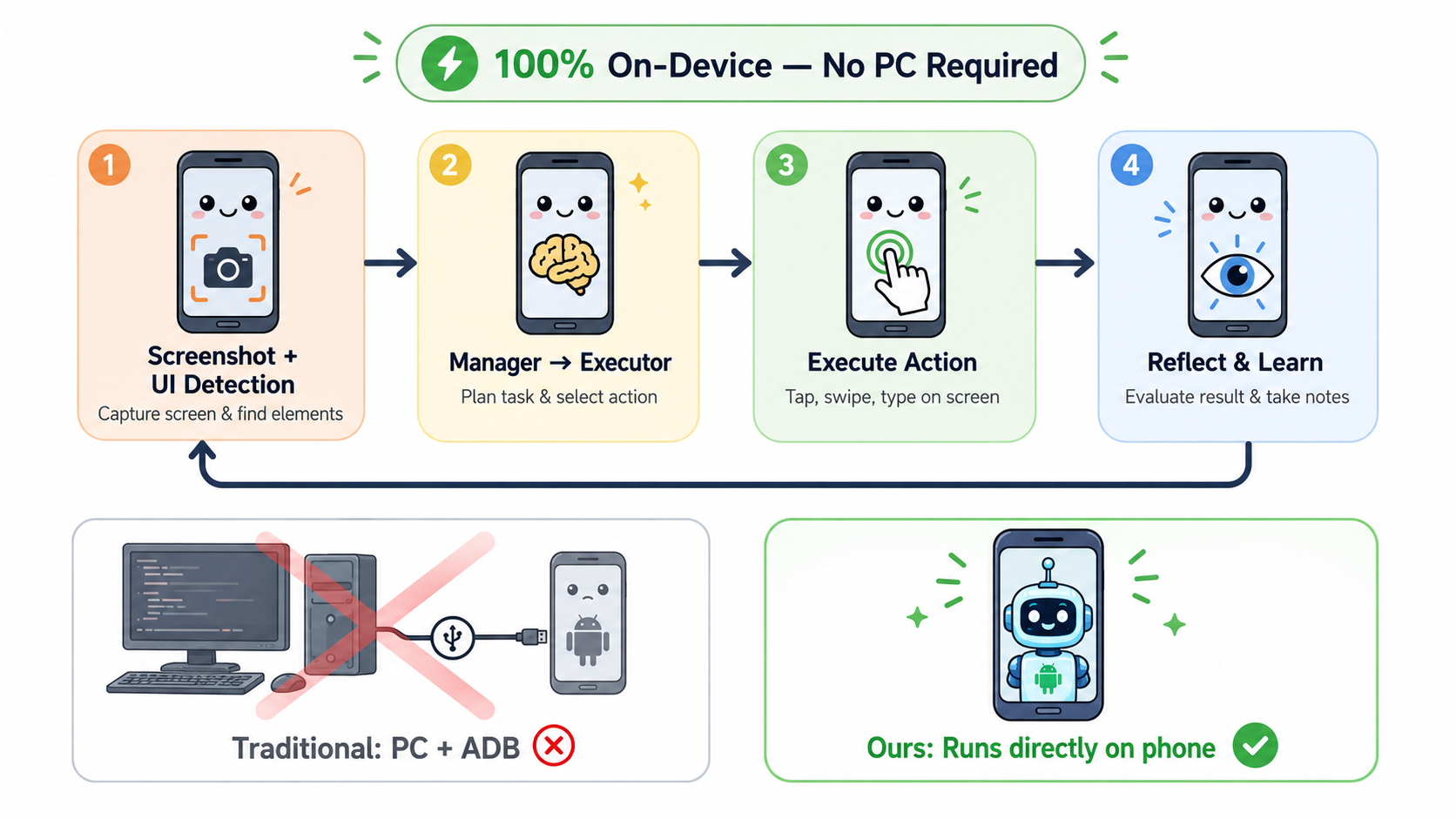
An Android-native autonomous agent that uses vision-language models to see and operate your phone — no PC or ADB required. Inspired by X-PLUG/MobileAgent.
Kotlin
55
14 commits
updated May 31, 2026
README
MobileAgent Android

Features
- Vision-driven agent loop — screenshot, plan, act, reflect, repeat
- Multi-model support — OpenAI-compatible APIs and Anthropic Claude
- 4-phase agent architecture — Manager (planning), Executor (action), Reflector (evaluation), Notetaker (memory)
- UI element detection — leverages Accessibility tree for precise element targeting
- Floating status window — real-time agent progress overlay
- Detailed execution logs — expandable step-by-step trace with prompts and responses
- Bilingual UI — English and Simplified Chinese
Demo

Architecture
User Instruction
       |
       v
  +-----------+     +------------------+     +-------------------+
  | Screenshot | --> |  Manager (Plan)  | --> | Executor (Action) |
  |  + UI Det  |     |  Create/update   |     |  Select next      |
  |            |     |  task subgoals   |     |  atomic action    |
  +-----------+     +------------------+     +-------------------+
       ^                                            |
       |                                            v
  +-----------+                              +-------------+
  | Notetaker |  <----  (on success)  <----  |  Reflector  |
  |  Extract  |                              |  Compare    |
  |  info     |                              |  before &   |
  +-----------+                              |  after      |
                                             +-------------+
Each iteration captures a screenshot, detects interactive UI elements via the Accessibility API, and feeds annotated images to a vision-language model. The agent loop runs up to a configurable number of steps (default 25) and supports automatic error recovery with replanning.
Supported Actions
| Action | Description |
|---|---|
tap | Single tap at coordinates |
long_press | Long press with configurable duration |
swipe | Swipe gesture between two points |
type | Text input to focused field |
system_button | Back / Home / Enter |
answer | Return answer to user |
wait | Pause before next action |
finished | Mark task complete |
Project Structure
app/src/main/java/com/mobileagent/app/
├── agent/          # Core agent loop & phases (Manager, Executor, Reflector, Notetaker)
├── api/            # LLM API clients (OpenAI-compatible, Anthropic Claude)
├── controller/     # Device control (Accessibility, ScreenCapture, UI detection)
├── service/        # Android services (Accessibility, Foreground, FloatingWindow)
├── data/           # Preferences (DataStore)
├── ui/             # Jetpack Compose UI (screens, navigation, theme)
└── util/           # Helpers (JSON parsing, coordinate conversion, permission checks)
Getting Started
Prerequisites
- Android Studio Hedgehog (2023.1) or later
- Android device running API 26+ (Android 8.0+)
- An API key for OpenAI-compatible or Anthropic models with vision support
Build & Install
# Clone the repository
git clone https://github.com/<your-username>/MobileAgent-Android.git
cd MobileAgent-Android

# Build
./gradlew assembleDebug

# Install on connected device
./gradlew installDebug
Setup
-
Grant permissions — Open the app and navigate to the Permissions tab. Enable:
- Accessibility Service (required for taps, swipes, and typing)
- Overlay Permission (required for floating status window)
- Notification Permission (Android 13+, for foreground service)
- Battery Optimization Exemption (prevents system from killing the accessibility service)
-
Configure API — Go to Settings and enter:
- Provider (OpenAI-compatible or Anthropic)
- API endpoint URL
- API key
- Model name (e.g.,
gpt-4o,claude-sonnet-4-20250514)
-
Run a task — On the Home screen, enter an instruction like "Open Settings and turn on Dark Mode", then tap Start.
Tech Stack
| Component | Technology |
|---|---|
| Language | Kotlin 1.9 |
| UI | Jetpack Compose + Material 3 |
| Architecture | MVVM |
| Navigation | Compose Navigation |
| Networking | OkHttp 4 |
| Serialization | kotlinx.serialization |
| Preferences | Jetpack DataStore |
| Concurrency | Kotlin Coroutines |
| Min SDK | 26 (Android 8.0) |
| Target SDK | 34 (Android 14) |
How It Works
- The user enters a natural language instruction and taps Start.
- The app requests screen capture permission (MediaProjection), then starts a foreground service.
- Screenshot & Detection — captures the screen and detects interactive UI elements via the Accessibility tree, annotating the screenshot with indexed bounding boxes.
- Manager phase — the vision-language model analyzes the annotated screenshot and creates a numbered plan of subgoals.
- Executor phase — the model selects a single atomic action (tap, swipe, type, etc.) to advance the current subgoal.
- Action execution — the app performs the action through the Accessibility Service.
- Reflector phase — the model compares before/after screenshots to evaluate the outcome (success / failed / no effect).
- Notetaker phase (optional) — extracts important on-screen information into running notes.
- Steps 3-8 repeat until the task is complete, an error threshold is reached, or max steps are exhausted.
Permissions
| Permission | Purpose |
|---|---|
INTERNET | API communication |
FOREGROUND_SERVICE | Background agent execution |
FOREGROUND_SERVICE_MEDIA_PROJECTION | Screen capture service type |
SYSTEM_ALERT_WINDOW | Floating status window |
POST_NOTIFICATIONS | Foreground service notification (Android 13+) |
REQUEST_IGNORE_BATTERY_OPTIMIZATIONS | Keep accessibility service alive |
| Accessibility Service | Perform taps, swipes, text input |
Acknowledgements
This project is an Android-native reimplementation inspired by the Mobile-Agent framework developed by Tongyi Lab, Alibaba Group.
-
Original repository: X-PLUG/MobileAgent
-
Paper (v1): Mobile-Agent: Autonomous Multi-Modal Mobile Device Agent with Visual Perception (Wang et al., 2024)
-
Paper (v2): Mobile-Agent-v2: Mobile Device Operation Assistant with Effective Navigation via Multi-Agent Collaboration (Wang et al., 2024)
-
The original Mobile-Agent runs as a Python script controlling the phone via ADB from a desktop. This project reimplements the core ideas as a standalone Android app — no PC or ADB connection required.
-
This project actively participates in and acknowledges the LINUX.DO community. Thanks to the community members for their feedback and support.
License
MIT License. See LICENSE for details.
Contributors

14 commits
Similar repos






Languages
Kotlin
92.9%
C++
5.8%
CMake
1.4%
An Android-native autonomous agent that uses vision-language models to see and operate your phone — no PC or ADB required. Inspired by X-PLUG/MobileAgent.
Kotlin
55
14 commits
updated May 31, 2026
README
MobileAgent Android
Features
- Vision-driven agent loop — screenshot, plan, act, reflect, repeat
- Multi-model support — OpenAI-compatible APIs and Anthropic Claude
- 4-phase agent architecture — Manager (planning), Executor (action), Reflector (evaluation), Notetaker (memory)
- UI element detection — leverages Accessibility tree for precise element targeting
- Floating status window — real-time agent progress overlay
- Detailed execution logs — expandable step-by-step trace with prompts and responses
- Bilingual UI — English and Simplified Chinese
Demo
Architecture
User Instruction
       |
       v
  +-----------+     +------------------+     +-------------------+
  | Screenshot | --> |  Manager (Plan)  | --> | Executor (Action) |
  |  + UI Det  |     |  Create/update   |     |  Select next      |
  |            |     |  task subgoals   |     |  atomic action    |
  +-----------+     +------------------+     +-------------------+
       ^                                            |
       |                                            v
  +-----------+                              +-------------+
  | Notetaker |  <----  (on success)  <----  |  Reflector  |
  |  Extract  |                              |  Compare    |
  |  info     |                              |  before &   |
  +-----------+                              |  after      |
                                             +-------------+
Each iteration captures a screenshot, detects interactive UI elements via the Accessibility API, and feeds annotated images to a vision-language model. The agent loop runs up to a configurable number of steps (default 25) and supports automatic error recovery with replanning.
Supported Actions
| Action | Description |
|---|---|
tap | Single tap at coordinates |
long_press | Long press with configurable duration |
swipe | Swipe gesture between two points |
type | Text input to focused field |
system_button | Back / Home / Enter |
answer | Return answer to user |
wait | Pause before next action |
finished | Mark task complete |
Project Structure
app/src/main/java/com/mobileagent/app/
├── agent/          # Core agent loop & phases (Manager, Executor, Reflector, Notetaker)
├── api/            # LLM API clients (OpenAI-compatible, Anthropic Claude)
├── controller/     # Device control (Accessibility, ScreenCapture, UI detection)
├── service/        # Android services (Accessibility, Foreground, FloatingWindow)
├── data/           # Preferences (DataStore)
├── ui/             # Jetpack Compose UI (screens, navigation, theme)
└── util/           # Helpers (JSON parsing, coordinate conversion, permission checks)
Getting Started
Prerequisites
- Android Studio Hedgehog (2023.1) or later
- Android device running API 26+ (Android 8.0+)
- An API key for OpenAI-compatible or Anthropic models with vision support
Build & Install
# Clone the repository
git clone https://github.com/<your-username>/MobileAgent-Android.git
cd MobileAgent-Android

# Build
./gradlew assembleDebug

# Install on connected device
./gradlew installDebug
Setup
-
Grant permissions — Open the app and navigate to the Permissions tab. Enable:
- Accessibility Service (required for taps, swipes, and typing)
- Overlay Permission (required for floating status window)
- Notification Permission (Android 13+, for foreground service)
- Battery Optimization Exemption (prevents system from killing the accessibility service)
-
Configure API — Go to Settings and enter:
- Provider (OpenAI-compatible or Anthropic)
- API endpoint URL
- API key
- Model name (e.g.,
gpt-4o,claude-sonnet-4-20250514)
-
Run a task — On the Home screen, enter an instruction like "Open Settings and turn on Dark Mode", then tap Start.
Tech Stack
| Component | Technology |
|---|---|
| Language | Kotlin 1.9 |
| UI | Jetpack Compose + Material 3 |
| Architecture | MVVM |
| Navigation | Compose Navigation |
| Networking | OkHttp 4 |
| Serialization | kotlinx.serialization |
| Preferences | Jetpack DataStore |
| Concurrency | Kotlin Coroutines |
| Min SDK | 26 (Android 8.0) |
| Target SDK | 34 (Android 14) |
How It Works
- The user enters a natural language instruction and taps Start.
- The app requests screen capture permission (MediaProjection), then starts a foreground service.
- Screenshot & Detection — captures the screen and detects interactive UI elements via the Accessibility tree, annotating the screenshot with indexed bounding boxes.
- Manager phase — the vision-language model analyzes the annotated screenshot and creates a numbered plan of subgoals.
- Executor phase — the model selects a single atomic action (tap, swipe, type, etc.) to advance the current subgoal.
- Action execution — the app performs the action through the Accessibility Service.
- Reflector phase — the model compares before/after screenshots to evaluate the outcome (success / failed / no effect).
- Notetaker phase (optional) — extracts important on-screen information into running notes.
- Steps 3-8 repeat until the task is complete, an error threshold is reached, or max steps are exhausted.
Permissions
| Permission | Purpose |
|---|---|
INTERNET | API communication |
FOREGROUND_SERVICE | Background agent execution |
FOREGROUND_SERVICE_MEDIA_PROJECTION | Screen capture service type |
SYSTEM_ALERT_WINDOW | Floating status window |
POST_NOTIFICATIONS | Foreground service notification (Android 13+) |
REQUEST_IGNORE_BATTERY_OPTIMIZATIONS | Keep accessibility service alive |
| Accessibility Service | Perform taps, swipes, text input |
Acknowledgements
This project is an Android-native reimplementation inspired by the Mobile-Agent framework developed by Tongyi Lab, Alibaba Group.
-
Original repository: X-PLUG/MobileAgent
-
Paper (v1): Mobile-Agent: Autonomous Multi-Modal Mobile Device Agent with Visual Perception (Wang et al., 2024)
-
Paper (v2): Mobile-Agent-v2: Mobile Device Operation Assistant with Effective Navigation via Multi-Agent Collaboration (Wang et al., 2024)
-
The original Mobile-Agent runs as a Python script controlling the phone via ADB from a desktop. This project reimplements the core ideas as a standalone Android app — no PC or ADB connection required.
-
This project actively participates in and acknowledges the LINUX.DO community. Thanks to the community members for their feedback and support.
License
MIT License. See LICENSE for details.
Similar repos
Contributors
14 commits
Languages
Kotlin
92.9%
C++
5.8%
CMake
1.4%