
Steam games you'll actually like and don't already own. Website, Windows app, or run it yourself.
See the codeSee what people are saying
README
Steam Deals



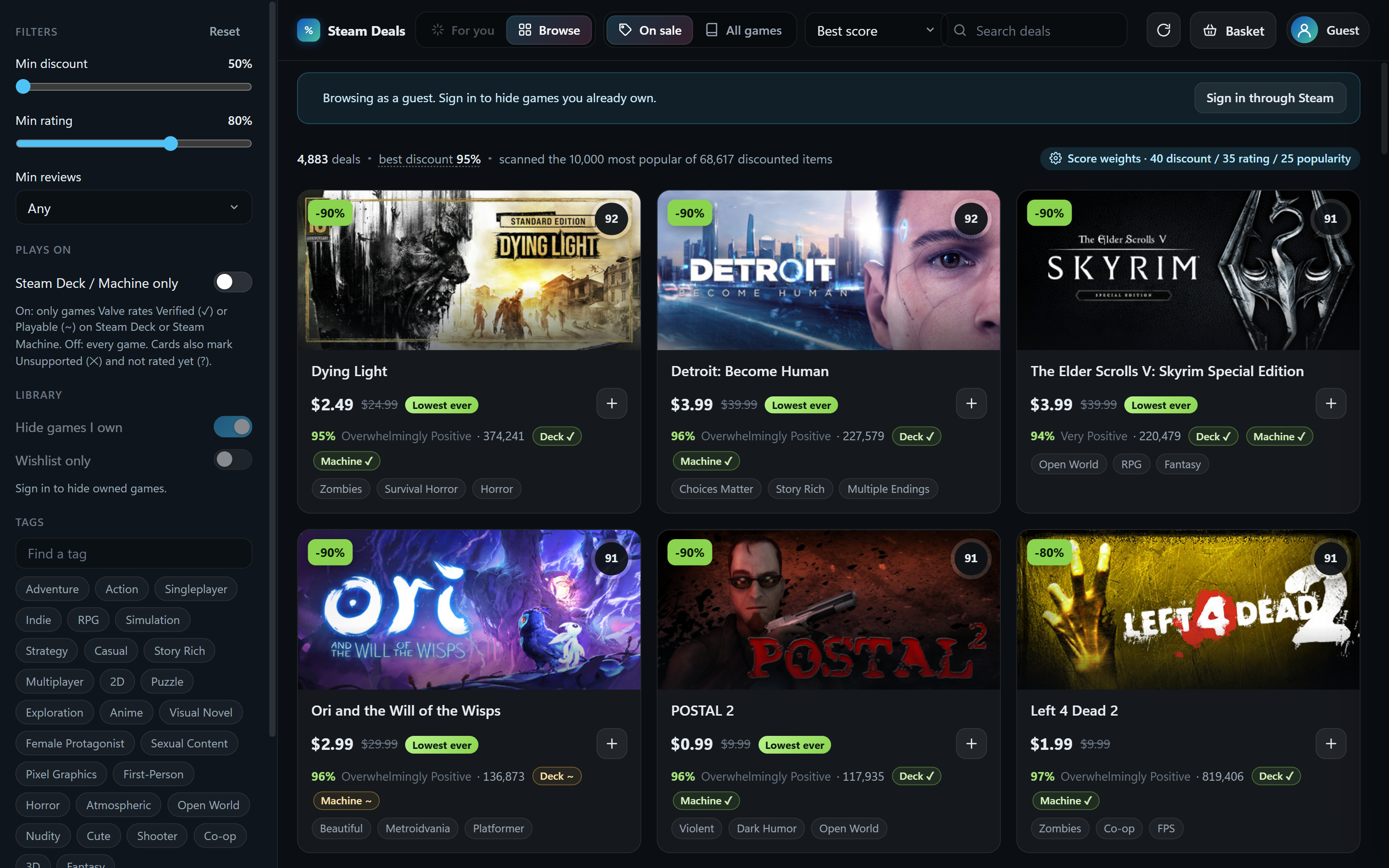
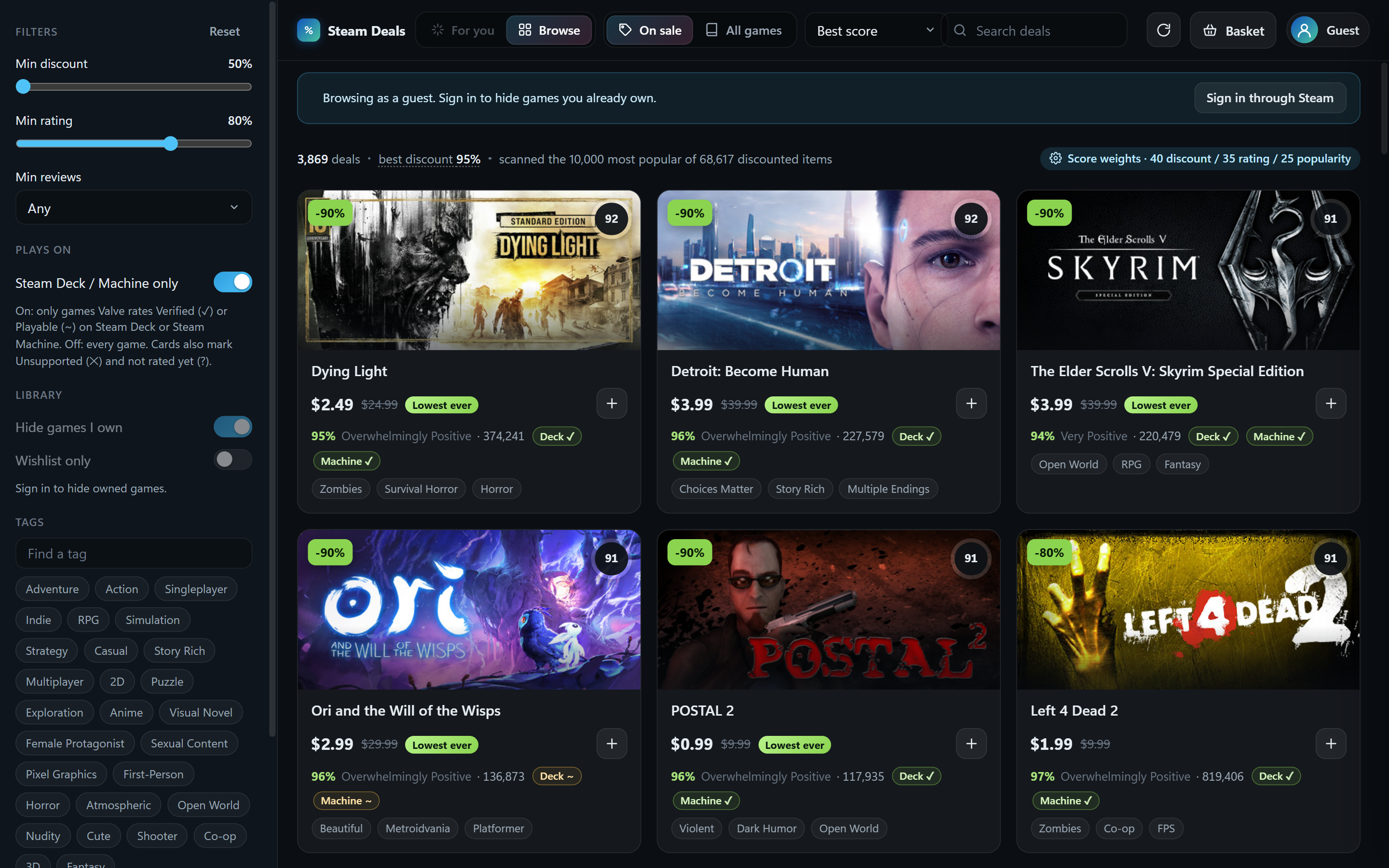
Find Steam games you'll actually like and aren't already playing. Sign in with your Steam account and it learns your taste from your library, weighted by how much you've played each game, then ranks the current sales (or the whole catalog) by how well each game matches you, with a "because you played …" explanation on every card. Everything you own is hidden. Play on a Steam Deck or Steam Machine? One switch keeps only the games Valve rates Verified or Playable there, and every card shows its rating.
 |  |
 |  |
 |  |
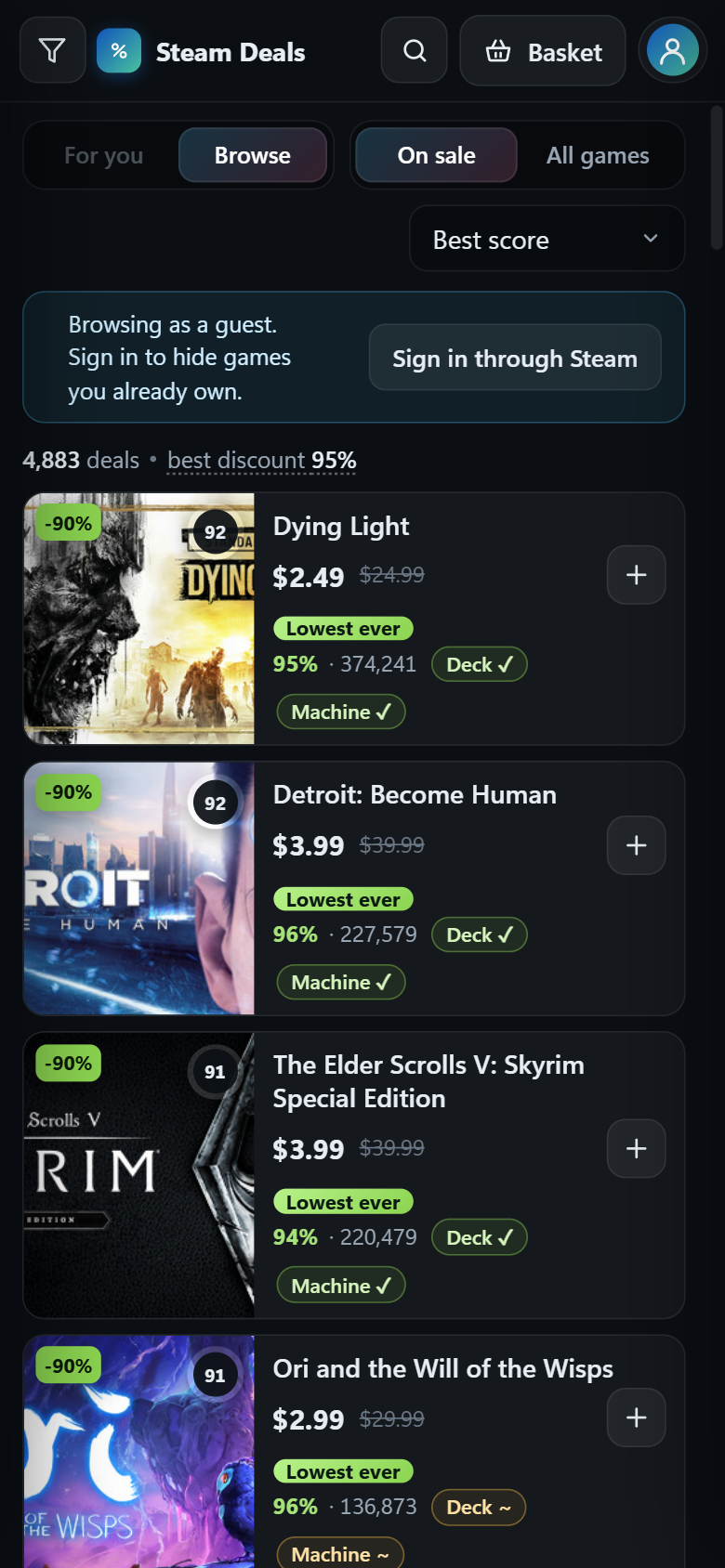
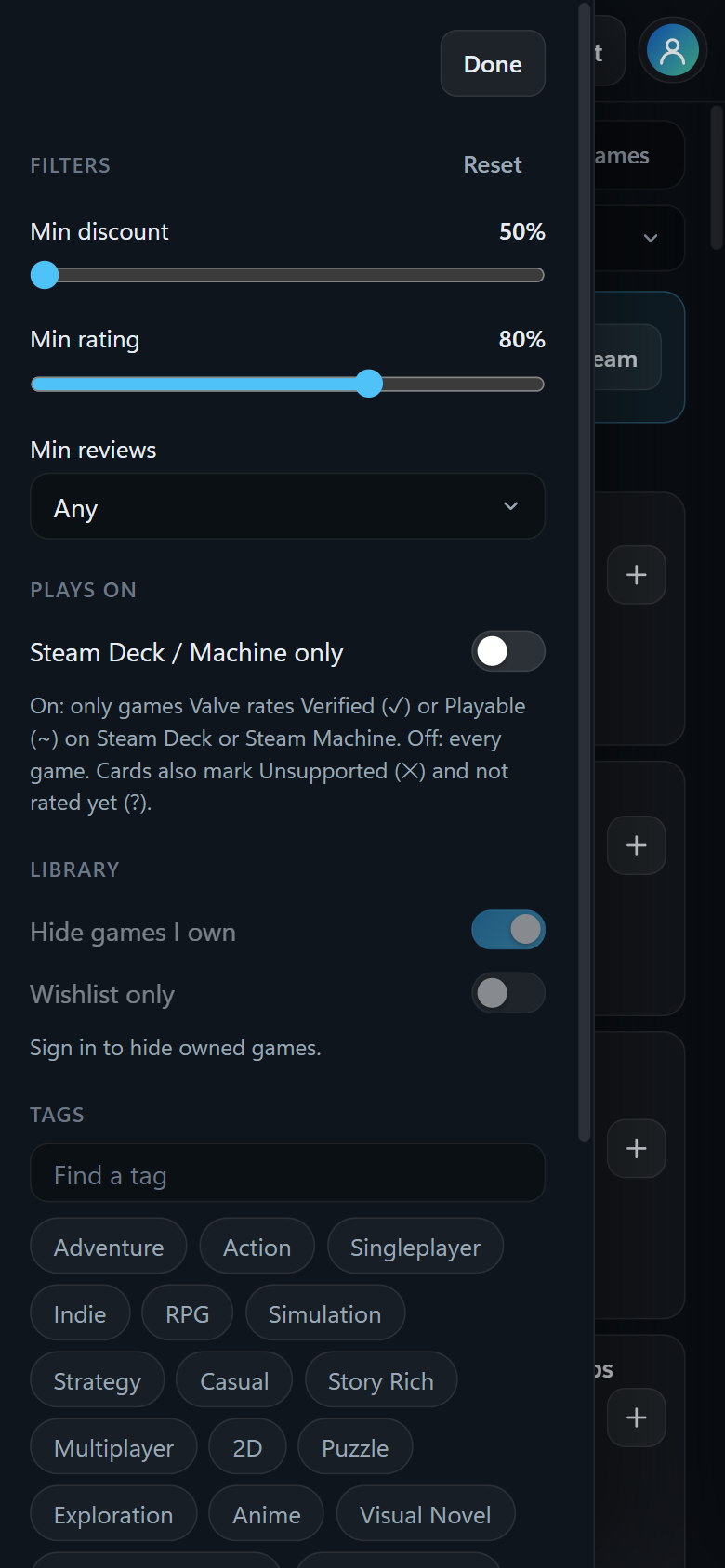
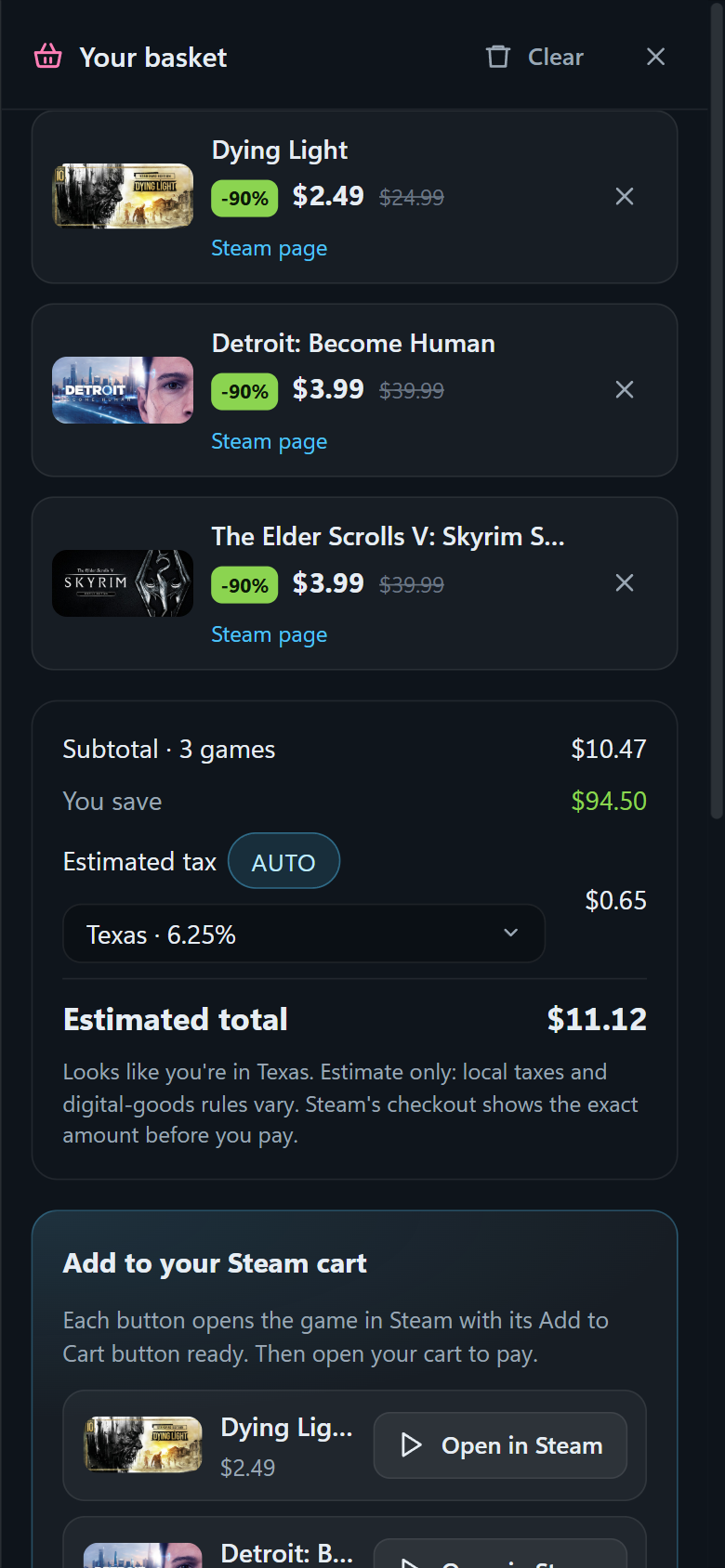
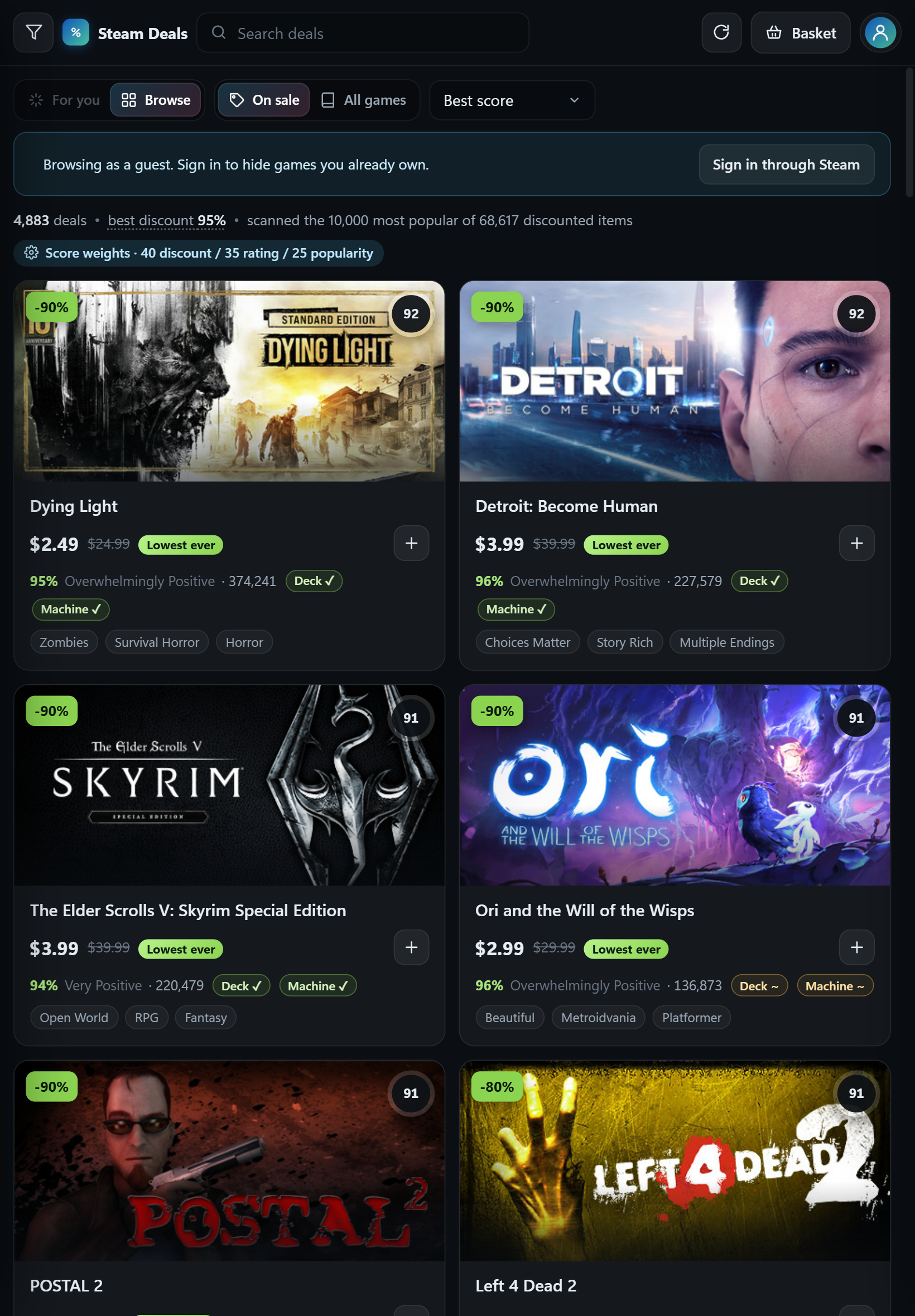
| Phone | Filters | Basket | Tablet |
|---|---|---|---|
 |  |  |  |
Three ways to use it
| What you need | Best for | |
|---|---|---|
| Website | A browser | Trying it right now, on any computer or phone |
| Windows app | Windows 10 or 11 | Everyday use; works with private Steam profiles |
| Run it yourself | Node.js 20.11+ | Running everything on your own machine, or tinkering |
Website
Open https://steamdeal.vercel.app. Nothing to install. Sign in through Steam, paste your own Steam Web API key, or browse as a guest. Signing in through Steam needs your profile's Game details set to Public. Using your own key does not. On a phone or tablet, use your browser's Add to Home Screen to keep it as an app. The layout adapts to the screen: on phones the games become a compact list under a slim top bar, the filters open as a side sheet, and the view toggles scroll away with the content.
Windows app
The app has two jobs.
- On its own it is the whole thing. Browse every sale minus what you own, get For-you picks learned from your library and playtime, collect games in a basket with a tax estimate, and have your Steam cart kept in sync with that basket: add a game and it is in your cart within seconds, remove it and it leaves the cart. Nothing is ever purchased; you pay in Steam's own checkout. Works with private Steam profiles.
- With the website it is the bridge. A browser is never allowed to touch a Steam cart, so the website (on your phone or anywhere) pairs with the app once, and from then on you share one basket: whatever you add on your phone lands in your Steam cart through the app on your PC, live, from anywhere.
- Download
Steam-Deals-Setup.exefrom the latest release and run it. Windows SmartScreen will warn that the publisher is unknown (the installer is not code-signed yet): choose More info → Run anyway. It installs for your user account; no admin rights needed. - Sign in through Steam once, on Steam's own login page inside the app.
- Optional: open the basket and pair your phone, and turn on Start with Windows in Settings (it opens full screen at sign-in; turn on Open closed to the tray if you'd rather it start quietly in the tray).
The X button hides the app to the tray so syncing keeps running; quit from the tray menu, or turn that off in Settings. Clicking the tray icon minimizes the window, or brings it back. The steamdeal.vercel.app/app page explains all of this for people who arrive from the website.
Run it yourself
Download the code (green Code button → Download ZIP, or git clone), then in that folder:
npm install
Then either:
npm start
to run the desktop app from source (built and tested on Windows; Electron should also run it on macOS and Linux), or:
npm run web:local
to run the website on your own machine at http://localhost:3000. No accounts needed. The API-key and
guest options work straight away. To turn on "Sign in through Steam" locally, create a file named .env
in the folder with your own key and any long random string:
STEAM_API_KEY=your-32-character-key
SESSION_SECRET=any-random-string-at-least-32-characters-long
Using it
- Sign in through Steam opens Steam's own login page in a window. Sign in there as usual, including Steam Guard. The app never sees your password. It only reads which games you own and what's on your wishlist. Leave Remember me ticked on Steam's page and you stay signed in for as long as the Steam website would keep you signed in (weeks to months): the app renews the session itself on launch and every few hours, the same way a browser does when you open the store. You only sign in again after changing your password or signing out.
- Browse as guest shows deals without hiding owned games.
- Use a Steam Web API key instead is for people who prefer not to sign in. Get a free key at https://steamcommunity.com/dev/apikey; your profile's Game details must be public.
Two toggles at the top:
- For you / Browse. For you ranks by how well each game matches your taste, blended with the deal score. Browse is the plain ranking by score. (For you needs a signed-in account.)
- On sale / All games. On sale shows only discounted games. All games covers the whole catalog, so For you becomes "the highest-rated games I'd probably like, whether or not they're on sale."
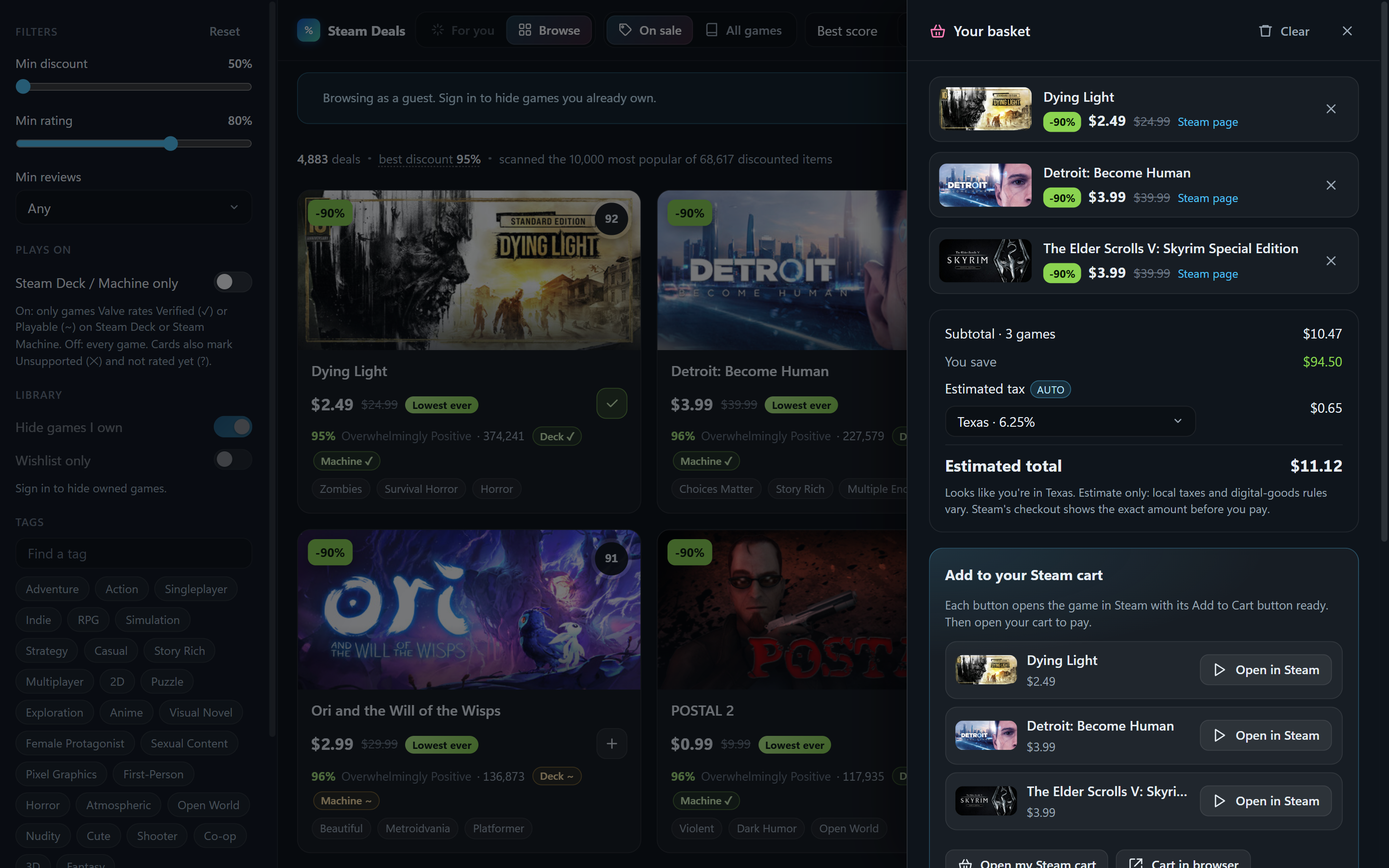
Basket. Press + on any game to collect sales. The basket shows the subtotal, what you're saving, an estimated tax for your state or province (Steam adds US and Canadian sales tax at checkout; elsewhere prices already include it), and the total. Nothing is purchased by Steam Deals: you review and pay in Steam's own checkout, in the Steam app, the website, or on your phone, since the cart belongs to your account.
- In the Windows app, the basket is your Steam cart: games you add are put in the cart within seconds and games you remove are taken out again (only ones the app added; anything you put in by hand on Steam is left alone). Each row shows "In your Steam cart" once it's there. When you check out, the games you now own drop out of the basket. If you'd rather press a button, Settings → "Keep my Steam cart in sync" switches it off and the old Send to my Steam cart button (with Undo) comes back.
- On the website, a browser can't touch your cart, so the Windows app does it as the bridge:
- Pair once. In the app's basket press Pair a phone or browser; it shows a six-letter code. On the website's basket (phone or any browser), type it under Already have it?. Pair as many devices as you like.
- From then on it's one shared basket. Add or remove a game on your phone and it appears in, or leaves, your Steam cart through the PC within seconds. No send button. The website shows your PC's status and, per game, whether it's in the cart yet. Works from anywhere, mobile data included; the PC just needs to be on with the app running (the tray is fine). If the PC is off, the basket waits and syncs when it's back.
- Pairing shares only a random key and the basket itself (game ids, names, prices). No account details.
- Without the app, each game in the basket has an Open in Steam button that opens its own Add to Cart button in the Steam client or the Steam mobile app.
It remembers.
- Not interested. The eye button on a card (or in a game's details) hides it, and games that share what you dismissed rank lower in For you. Settings lists them with Restore.
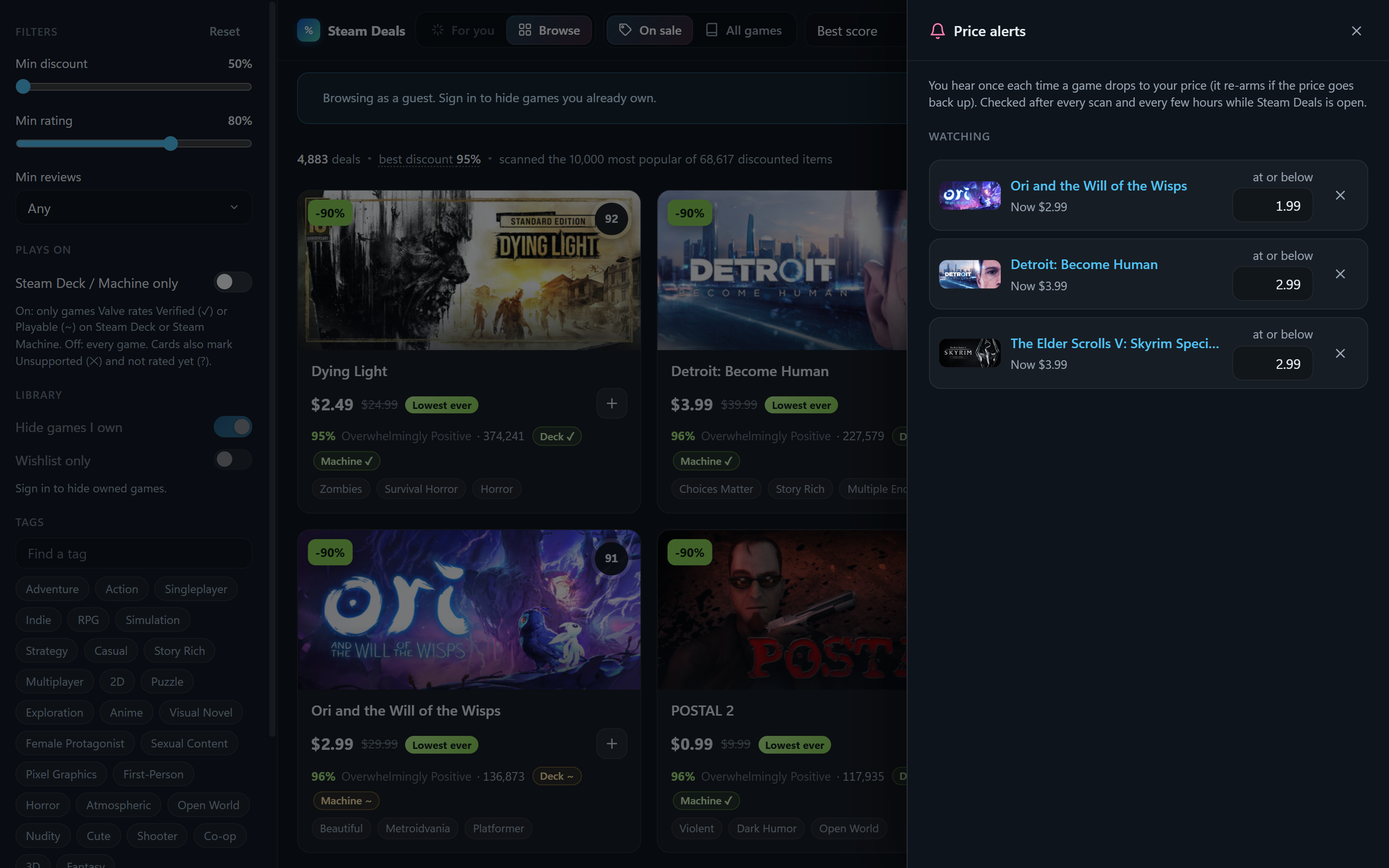
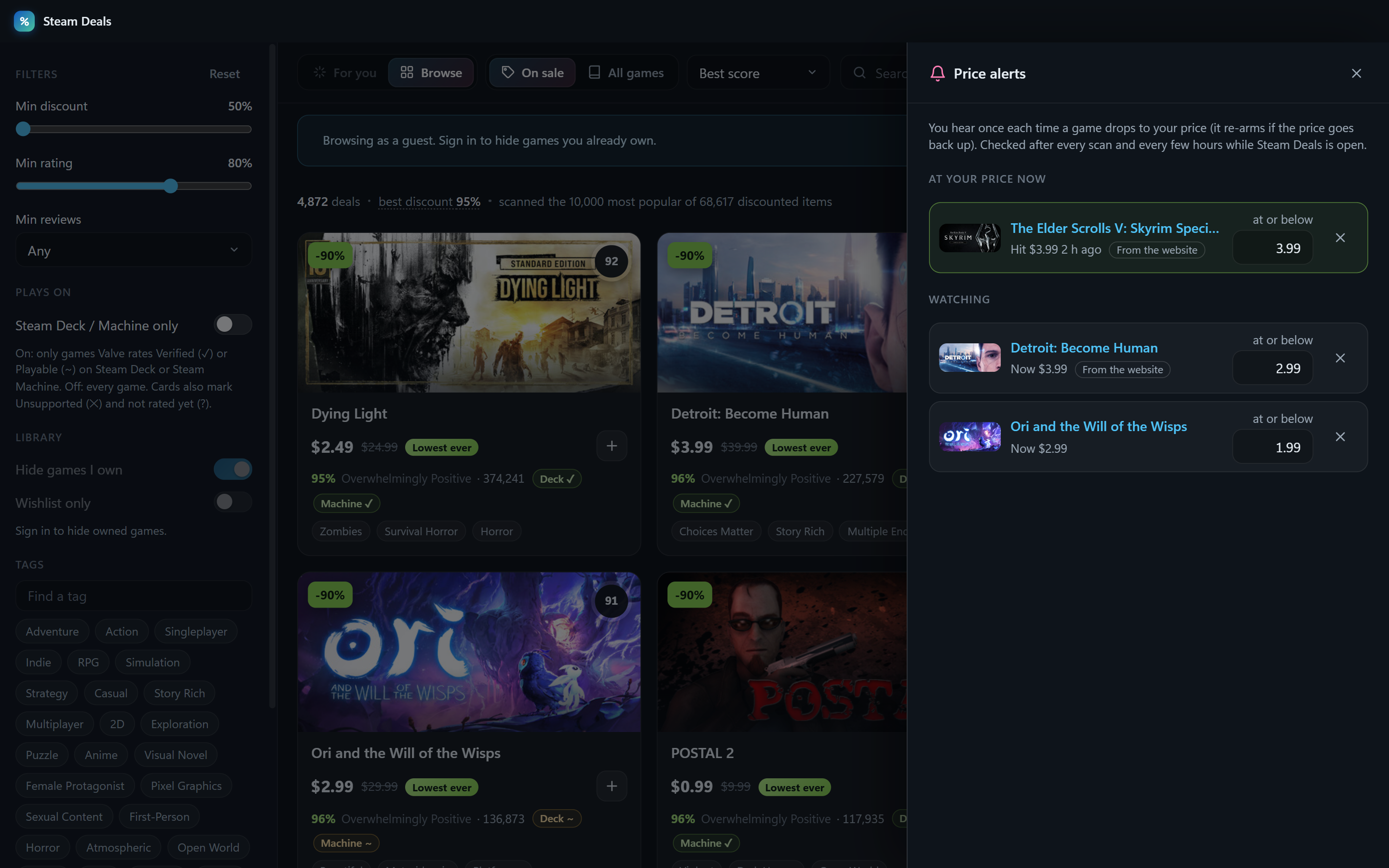
- Price alerts. “Alert me” in a game's details, or from your wishlist in the alerts panel: you hear once each time it drops to your price (a Windows notification from the app, a badge on the website). Paired with the Windows app, alerts you set on the website are checked by the app in the tray, so you get a Windows notification even with the website closed.
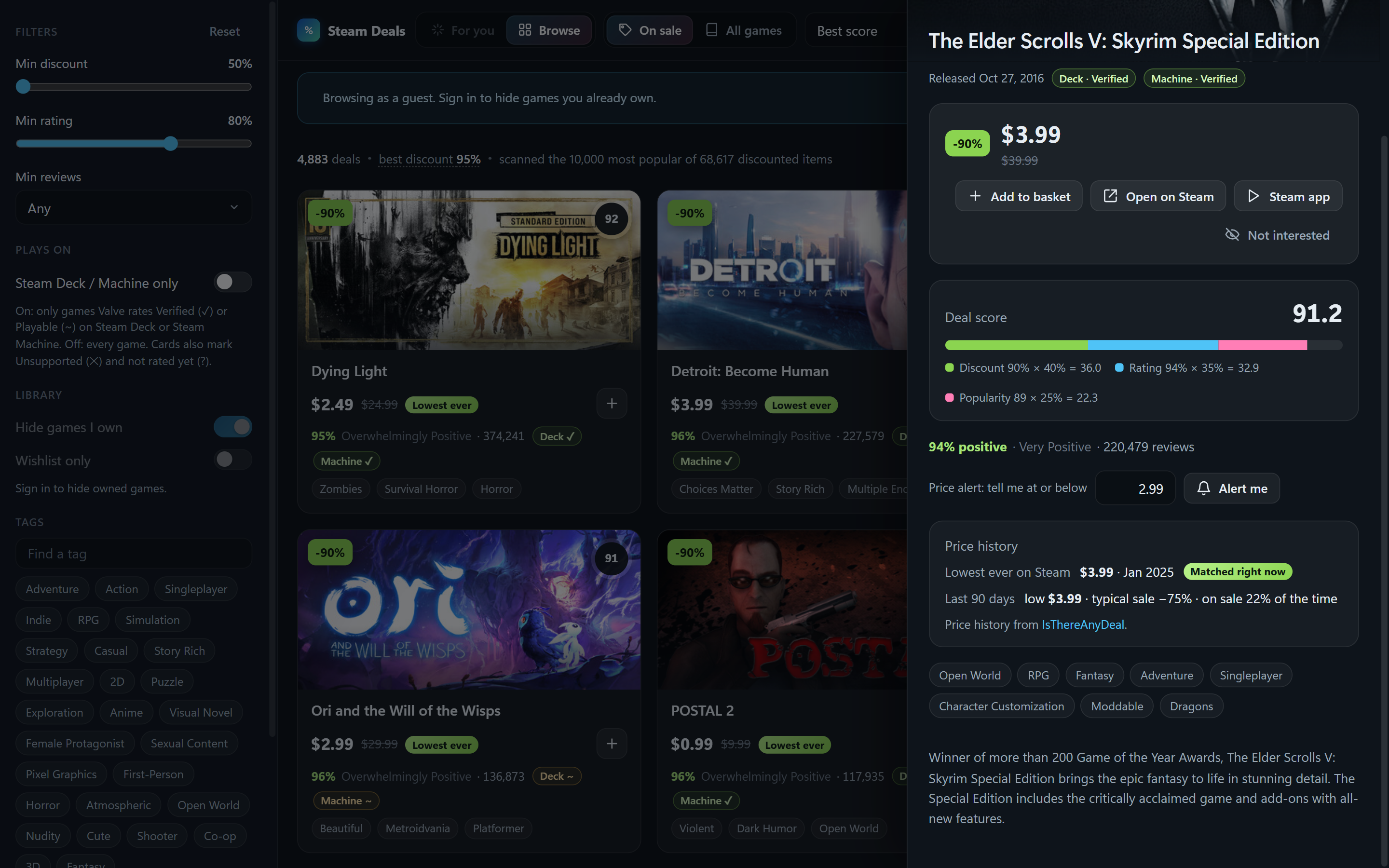
- Price history. A “Lowest ever” badge and a 90-day summary (low, typical sale) in a game's details, from IsThereAnyDeal, shown only when there's real data behind it.
- Learns from what you do. Games you open, basket, dismiss or buy fine-tune For you over time; your library always has the bigger say, and Settings has “Reset my recommendations”.
- Edit your taste. In For you, drag a tag from Tags onto “Your taste” to add it, or drag one of your taste's tags back onto Tags (or click its ×) to remove it. You can also type a tag into “Add a tag”. Removed tags can be restored with a click, Reset undoes every change, and the ? next to “Your taste” explains it all on hover.
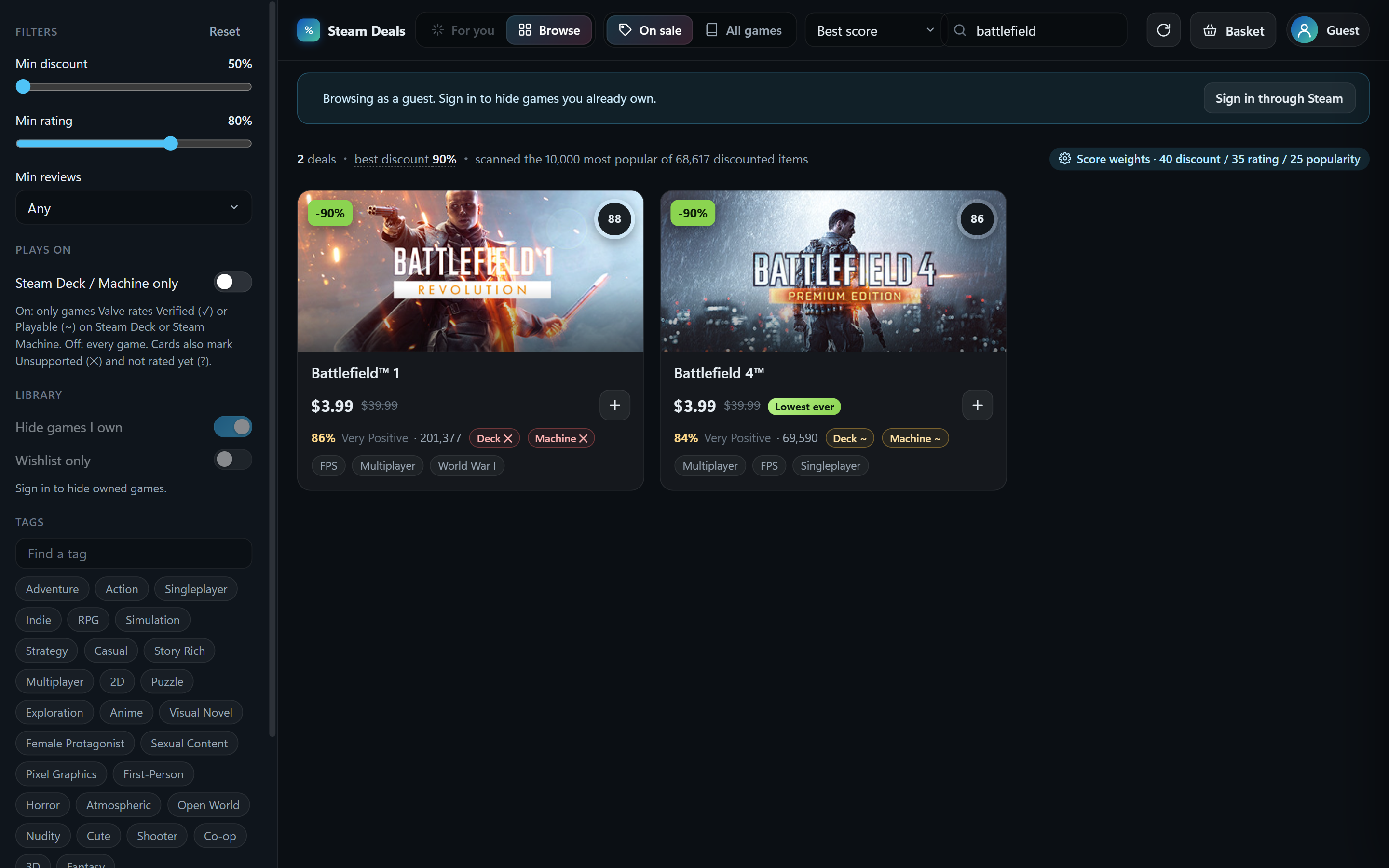
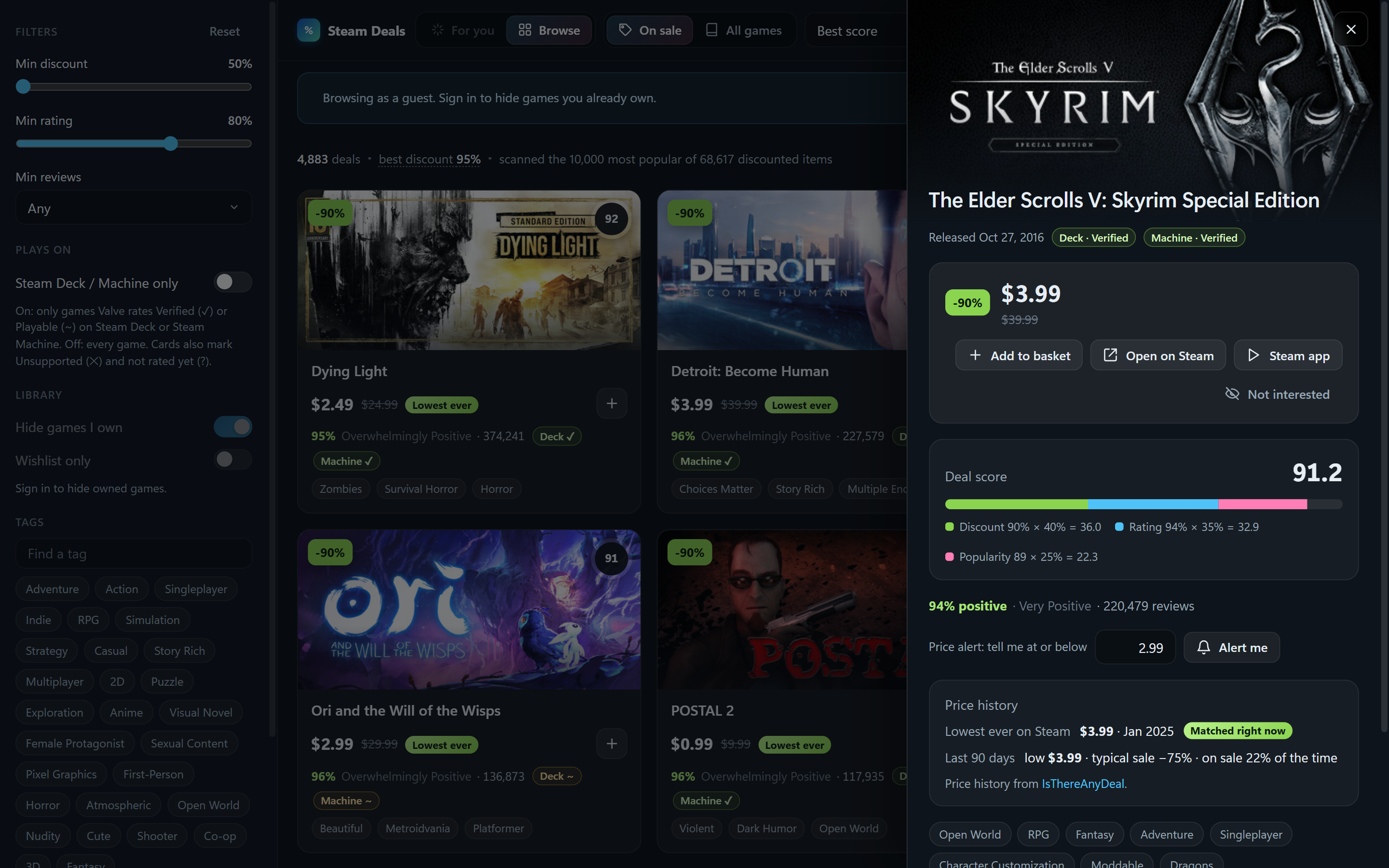
Filters live in the left sidebar: minimum discount and rating, minimum review count, Steam Deck / Machine only (on: only games Valve rates Verified or Playable on Steam Deck or Steam Machine; off: every game. Cards carry a Deck ✓ / Machine ✓ badge for Verified and ~ for Playable, and the details panel lists every published rating), tags, hide-owned and wishlist-only. Click any card for details, a score breakdown, and why it matched you, plus buttons to open the store page in your browser or in the Steam client.
How the taste profile works. The app reads your library with playtime, picks the games you've played most (plus everything played in the last two weeks), and builds a weighted profile of Steam's store tags from them. Each candidate game's tags are compared against that profile relative to the whole catalog, so ubiquitous tags like "Singleplayer" don't count for much while distinctive ones do. The profile is re-checked on every launch and refresh: when your library or hours change, it's rebuilt, so it keeps up with what you're playing now. Tags for games it has already seen are cached, so a rebuild is a handful of requests. You can collapse the "Your taste" panel with Hide.
Deal score = 40% discount + 35% positive-review percentage + 25% popularity, where popularity is the review count on a fixed log scale (1,000 reviews = 50, a million or more = 100), so a game's score doesn't change with what else is loaded. In All-games mode the discount term drops out. The For-you ranking blends taste match and deal score; the "Taste over deal" slider in Settings sets the mix. All weights are adjustable.
Settings also has the store region and language (prices follow the region) and the scan depth: 3,000, 10,000 or 25,000 most-popular items, or everything on sale (about 70,000 items, two to three minutes). Results stream in as pages arrive, so the first cards show up in about a second at any depth.
Privacy
- Sign-in always happens on Steam's own page. Neither version ever sees your password.
- Windows app: the only cookie it reads is the one that identifies your SteamID64. Your Steam session,
settings, and caches stay in
%APPDATA%\Steam Deals. Sign out wipes the session. It talks only to Steam, plus steamdeal.vercel.app for two things: one request to guess your state or province for the basket's tax estimate (nothing stored), and, only once you pair a device, the shared basket (a random pairing key, game ids, names and prices, and which of them are in your cart; never account details). "Unpair all devices" in the app deletes that shared basket from the site. - Basket tax estimate: the region is guessed from your connection's location and can be changed in the basket.
- Website: settings and any API key you add stay in your browser. Your key is passed through to Steam and never stored on the server. The visitor count is anonymous: one random id per browser, nothing tied to you or your Steam account. No ads, no tracking.
Not affiliated with Valve Corporation. Steam is a trademark of Valve Corporation.
Development
Requires Node 20.11 or newer.
npm install
npm start               # run from source
npm run check           # lint, import check and unit tests
npm run dist            # check, then build release/Steam Deals Setup x.y.z.exe
The interface is plain ES modules shared by the desktop app and the website, split into small files by
layer: pure logic (unit-tested), data loading, shared widgets and views. The Windows app's main process is
split the same way (window, tray, deep links, IPC handlers per feature, the cart-sync engine).
ARCHITECTURE.md maps every folder; SPEC.md describes the design in detail.
Website (web/): static page plus serverless functions on Vercel's free Hobby plan. web/src/web-api.js
(with web/src/browser-api/) implements the same interface the desktop preload exposes, backed by web/api/*. Deal pages are cached at
Vercel's edge for three hours, so every visitor shares one scan. "Sign in through Steam" is Steam's OpenID
login; it is enabled when the project has STEAM_API_KEY and SESSION_SECRET (32+ chars) set as
environment variables. A visitor's own API key stays in their browser and is passed through to Steam only.
npm run web:local       # run the website locally (plain Node, no accounts)
npm run web:build       # assemble web/public from the shared sources
npm run web:deploy      # check, build and deploy to production (needs `vercel login` and a linked project)
scripts/make-icon.py regenerates the icon (needs Python with Pillow). scripts/cdp.mjs drives a running
instance over the DevTools protocol for screenshots and inspection when started with --remote-debugging-port=9222.
Similar repos


Steam games you'll actually like and don't already own. Website, Windows app, or run it yourself.
See the codeSee what people are saying
README
Steam Deals
Find Steam games you'll actually like and aren't already playing. Sign in with your Steam account and it learns your taste from your library, weighted by how much you've played each game, then ranks the current sales (or the whole catalog) by how well each game matches you, with a "because you played …" explanation on every card. Everything you own is hidden. Play on a Steam Deck or Steam Machine? One switch keeps only the games Valve rates Verified or Playable there, and every card shows its rating.
| |
| |
| |
| Phone | Filters | Basket | Tablet |
|---|---|---|---|
| | | |
Three ways to use it
| What you need | Best for | |
|---|---|---|
| Website | A browser | Trying it right now, on any computer or phone |
| Windows app | Windows 10 or 11 | Everyday use; works with private Steam profiles |
| Run it yourself | Node.js 20.11+ | Running everything on your own machine, or tinkering |
Website
Open https://steamdeal.vercel.app. Nothing to install. Sign in through Steam, paste your own Steam Web API key, or browse as a guest. Signing in through Steam needs your profile's Game details set to Public. Using your own key does not. On a phone or tablet, use your browser's Add to Home Screen to keep it as an app. The layout adapts to the screen: on phones the games become a compact list under a slim top bar, the filters open as a side sheet, and the view toggles scroll away with the content.
Windows app
The app has two jobs.
- On its own it is the whole thing. Browse every sale minus what you own, get For-you picks learned from your library and playtime, collect games in a basket with a tax estimate, and have your Steam cart kept in sync with that basket: add a game and it is in your cart within seconds, remove it and it leaves the cart. Nothing is ever purchased; you pay in Steam's own checkout. Works with private Steam profiles.
- With the website it is the bridge. A browser is never allowed to touch a Steam cart, so the website (on your phone or anywhere) pairs with the app once, and from then on you share one basket: whatever you add on your phone lands in your Steam cart through the app on your PC, live, from anywhere.
- Download
Steam-Deals-Setup.exefrom the latest release and run it. Windows SmartScreen will warn that the publisher is unknown (the installer is not code-signed yet): choose More info → Run anyway. It installs for your user account; no admin rights needed. - Sign in through Steam once, on Steam's own login page inside the app.
- Optional: open the basket and pair your phone, and turn on Start with Windows in Settings (it opens full screen at sign-in; turn on Open closed to the tray if you'd rather it start quietly in the tray).
The X button hides the app to the tray so syncing keeps running; quit from the tray menu, or turn that off in Settings. Clicking the tray icon minimizes the window, or brings it back. The steamdeal.vercel.app/app page explains all of this for people who arrive from the website.
Run it yourself
Download the code (green Code button → Download ZIP, or git clone), then in that folder:
npm install
Then either:
npm start
to run the desktop app from source (built and tested on Windows; Electron should also run it on macOS and Linux), or:
npm run web:local
to run the website on your own machine at http://localhost:3000. No accounts needed. The API-key and
guest options work straight away. To turn on "Sign in through Steam" locally, create a file named .env
in the folder with your own key and any long random string:
STEAM_API_KEY=your-32-character-key
SESSION_SECRET=any-random-string-at-least-32-characters-long
Using it
- Sign in through Steam opens Steam's own login page in a window. Sign in there as usual, including Steam Guard. The app never sees your password. It only reads which games you own and what's on your wishlist. Leave Remember me ticked on Steam's page and you stay signed in for as long as the Steam website would keep you signed in (weeks to months): the app renews the session itself on launch and every few hours, the same way a browser does when you open the store. You only sign in again after changing your password or signing out.
- Browse as guest shows deals without hiding owned games.
- Use a Steam Web API key instead is for people who prefer not to sign in. Get a free key at https://steamcommunity.com/dev/apikey; your profile's Game details must be public.
Two toggles at the top:
- For you / Browse. For you ranks by how well each game matches your taste, blended with the deal score. Browse is the plain ranking by score. (For you needs a signed-in account.)
- On sale / All games. On sale shows only discounted games. All games covers the whole catalog, so For you becomes "the highest-rated games I'd probably like, whether or not they're on sale."
Basket. Press + on any game to collect sales. The basket shows the subtotal, what you're saving, an estimated tax for your state or province (Steam adds US and Canadian sales tax at checkout; elsewhere prices already include it), and the total. Nothing is purchased by Steam Deals: you review and pay in Steam's own checkout, in the Steam app, the website, or on your phone, since the cart belongs to your account.
- In the Windows app, the basket is your Steam cart: games you add are put in the cart within seconds and games you remove are taken out again (only ones the app added; anything you put in by hand on Steam is left alone). Each row shows "In your Steam cart" once it's there. When you check out, the games you now own drop out of the basket. If you'd rather press a button, Settings → "Keep my Steam cart in sync" switches it off and the old Send to my Steam cart button (with Undo) comes back.
- On the website, a browser can't touch your cart, so the Windows app does it as the bridge:
- Pair once. In the app's basket press Pair a phone or browser; it shows a six-letter code. On the website's basket (phone or any browser), type it under Already have it?. Pair as many devices as you like.
- From then on it's one shared basket. Add or remove a game on your phone and it appears in, or leaves, your Steam cart through the PC within seconds. No send button. The website shows your PC's status and, per game, whether it's in the cart yet. Works from anywhere, mobile data included; the PC just needs to be on with the app running (the tray is fine). If the PC is off, the basket waits and syncs when it's back.
- Pairing shares only a random key and the basket itself (game ids, names, prices). No account details.
- Without the app, each game in the basket has an Open in Steam button that opens its own Add to Cart button in the Steam client or the Steam mobile app.
It remembers.
- Not interested. The eye button on a card (or in a game's details) hides it, and games that share what you dismissed rank lower in For you. Settings lists them with Restore.
- Price alerts. “Alert me” in a game's details, or from your wishlist in the alerts panel: you hear once each time it drops to your price (a Windows notification from the app, a badge on the website). Paired with the Windows app, alerts you set on the website are checked by the app in the tray, so you get a Windows notification even with the website closed.
- Price history. A “Lowest ever” badge and a 90-day summary (low, typical sale) in a game's details, from IsThereAnyDeal, shown only when there's real data behind it.
- Learns from what you do. Games you open, basket, dismiss or buy fine-tune For you over time; your library always has the bigger say, and Settings has “Reset my recommendations”.
- Edit your taste. In For you, drag a tag from Tags onto “Your taste” to add it, or drag one of your taste's tags back onto Tags (or click its ×) to remove it. You can also type a tag into “Add a tag”. Removed tags can be restored with a click, Reset undoes every change, and the ? next to “Your taste” explains it all on hover.
Filters live in the left sidebar: minimum discount and rating, minimum review count, Steam Deck / Machine only (on: only games Valve rates Verified or Playable on Steam Deck or Steam Machine; off: every game. Cards carry a Deck ✓ / Machine ✓ badge for Verified and ~ for Playable, and the details panel lists every published rating), tags, hide-owned and wishlist-only. Click any card for details, a score breakdown, and why it matched you, plus buttons to open the store page in your browser or in the Steam client.
How the taste profile works. The app reads your library with playtime, picks the games you've played most (plus everything played in the last two weeks), and builds a weighted profile of Steam's store tags from them. Each candidate game's tags are compared against that profile relative to the whole catalog, so ubiquitous tags like "Singleplayer" don't count for much while distinctive ones do. The profile is re-checked on every launch and refresh: when your library or hours change, it's rebuilt, so it keeps up with what you're playing now. Tags for games it has already seen are cached, so a rebuild is a handful of requests. You can collapse the "Your taste" panel with Hide.
Deal score = 40% discount + 35% positive-review percentage + 25% popularity, where popularity is the review count on a fixed log scale (1,000 reviews = 50, a million or more = 100), so a game's score doesn't change with what else is loaded. In All-games mode the discount term drops out. The For-you ranking blends taste match and deal score; the "Taste over deal" slider in Settings sets the mix. All weights are adjustable.
Settings also has the store region and language (prices follow the region) and the scan depth: 3,000, 10,000 or 25,000 most-popular items, or everything on sale (about 70,000 items, two to three minutes). Results stream in as pages arrive, so the first cards show up in about a second at any depth.
Privacy
- Sign-in always happens on Steam's own page. Neither version ever sees your password.
- Windows app: the only cookie it reads is the one that identifies your SteamID64. Your Steam session,
settings, and caches stay in
%APPDATA%\Steam Deals. Sign out wipes the session. It talks only to Steam, plus steamdeal.vercel.app for two things: one request to guess your state or province for the basket's tax estimate (nothing stored), and, only once you pair a device, the shared basket (a random pairing key, game ids, names and prices, and which of them are in your cart; never account details). "Unpair all devices" in the app deletes that shared basket from the site. - Basket tax estimate: the region is guessed from your connection's location and can be changed in the basket.
- Website: settings and any API key you add stay in your browser. Your key is passed through to Steam and never stored on the server. The visitor count is anonymous: one random id per browser, nothing tied to you or your Steam account. No ads, no tracking.
Not affiliated with Valve Corporation. Steam is a trademark of Valve Corporation.
Development
Requires Node 20.11 or newer.
npm install
npm start               # run from source
npm run check           # lint, import check and unit tests
npm run dist            # check, then build release/Steam Deals Setup x.y.z.exe
The interface is plain ES modules shared by the desktop app and the website, split into small files by
layer: pure logic (unit-tested), data loading, shared widgets and views. The Windows app's main process is
split the same way (window, tray, deep links, IPC handlers per feature, the cart-sync engine).
ARCHITECTURE.md maps every folder; SPEC.md describes the design in detail.
Website (web/): static page plus serverless functions on Vercel's free Hobby plan. web/src/web-api.js
(with web/src/browser-api/) implements the same interface the desktop preload exposes, backed by web/api/*. Deal pages are cached at
Vercel's edge for three hours, so every visitor shares one scan. "Sign in through Steam" is Steam's OpenID
login; it is enabled when the project has STEAM_API_KEY and SESSION_SECRET (32+ chars) set as
environment variables. A visitor's own API key stays in their browser and is passed through to Steam only.
npm run web:local       # run the website locally (plain Node, no accounts)
npm run web:build       # assemble web/public from the shared sources
npm run web:deploy      # check, build and deploy to production (needs `vercel login` and a linked project)
scripts/make-icon.py regenerates the icon (needs Python with Pillow). scripts/cdp.mjs drives a running
instance over the DevTools protocol for screenshots and inspection when started with --remote-debugging-port=9222.