
Versatile emulator and developer environment for all Sinclair machines, provided as Electron application using React and TypeScript
TypeScript
131
1,106 commits
updated Sep 21, 2026
README

Klive IDE
A retro computer emulator and IDE for Z80 lovers — on Mac, Windows, and Linux




Klive IDE is a cross-platform emulator and full-featured Integrated Development Environment for
Sinclair Z80-based retro computers. It is built by retro-computing enthusiasts, for retro-computing enthusiasts.
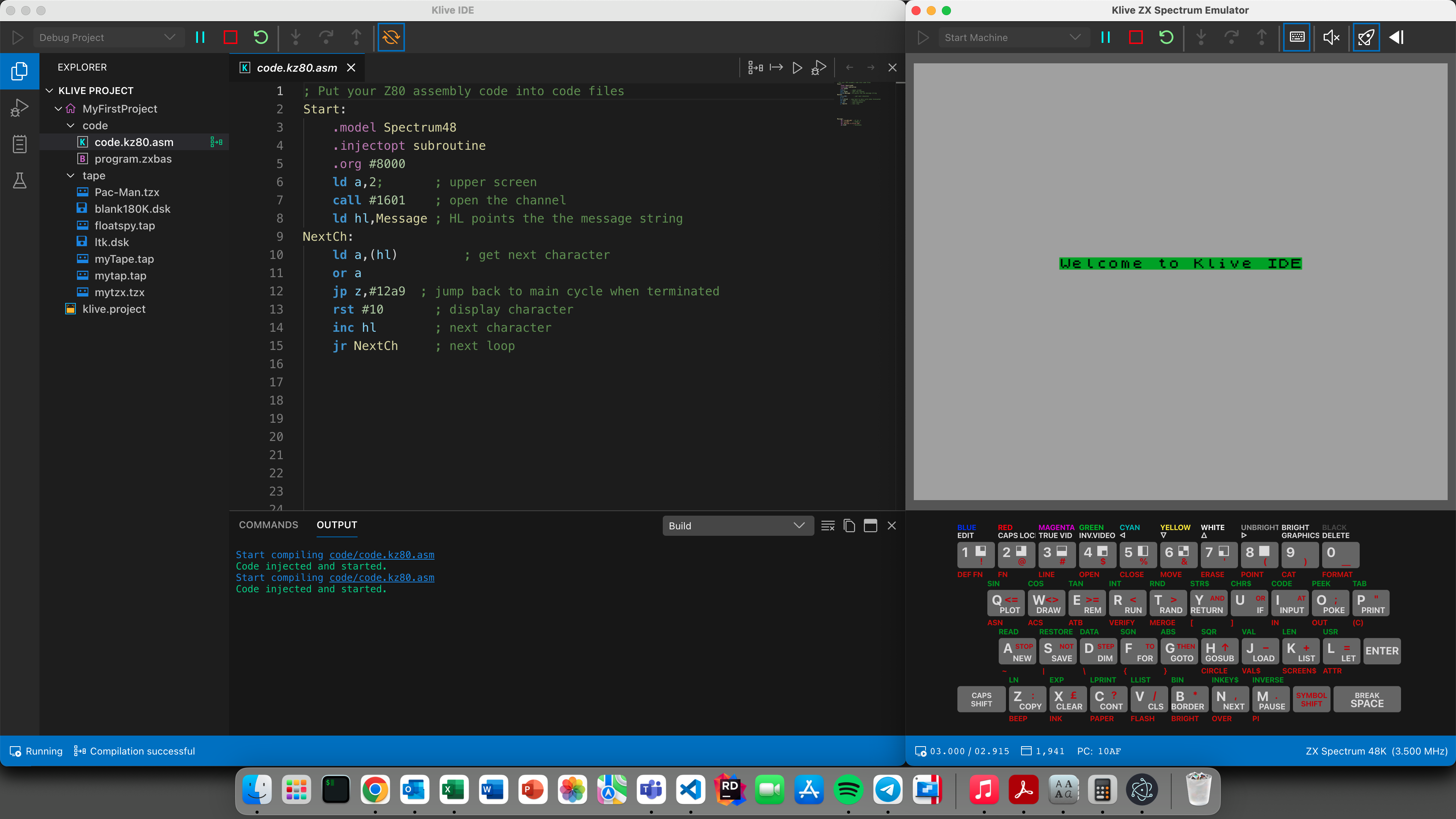
Write Z80 Assembly, ZX BASIC (Boriel's Basic), or SJASMPLUS; hit one button, and watch your code run—or step through it—right inside
the emulated machine. No setup ceremony. Just you and the pixels.
Table of Contents
- Screenshots
- Supported Machines
- Emulator Features
- Screen Recording
- IDE Features
- Programming Languages
- Scripting
- Getting Started
- Technology
- Community & Contributing
💻 Supported Machines
Klive targets retro computers built around the Z80 CPU family. Each machine is emulated cycle-accurately with its authentic ROM and hardware behaviour.
| Machine | Status | Notes |
|---|---|---|
| ZX Spectrum 48K | ✅ Active | PAL, NTSC, and 16K models |
| ZX Spectrum 128K | ✅ Active | Full 128K memory paging |
| ZX Spectrum +2E / +3E | ✅ Active | Single and dual floppy drive models |
| Cambridge Z88 | ✅ Active | Multiple OZ OS versions (3.x – 5.0), various locales |
| ZX Spectrum Next | 🔄 In progress | KS2 model; extended Z80 instruction set |
| Commodore 64 | 🧪 Experimental | Early stage; 6510 CPU |
| ZX 80 / ZX 81 | 🗓️ Planned | — |
🕹️ Emulator Features
Machine Control
Run, pause, continue, restart, and stop the emulated machine at any time—without restarting the application. Toggle between normal and debug run modes on the fly.
| Keyboard Shortcut | Action |
|---|---|
F5 | Start machine |
Shift+F5 | Pause machine |
F4 | Stop machine |
Shift+F4 | Restart machine |
Ctrl+F5 | Start with debugging |
F10 | Step Into |
F11 | Step Over |
Shift+F11 | Step Out |
- CPU clock multiplier — run at 1× to 24× native speed for rapid testing
- Sound control — enable, mute, or adjust the audio level at any time
Debugging Views
| View | What it shows |
|---|---|
| CPU View | All Z80 registers (AF, BC, DE, HL, SP, IX, IY, I, R), interrupt mode, halt state, internal WZ/MEMPTR register, T-state counter, last memory read/write and I/O addresses |
| ULA View | Full ULA state |
| Memory View | Live hex+ASCII memory explorer with bank selection; edit RAM contents while the machine is paused or running |
| Disassembly View | Live disassembly scrolling with the PC; navigate banked memory pages |
| Breakpoints Panel | All active breakpoints with type, address, resolved/unresolved status, and enable/disable toggle |
| Watch Panel | Monitor named variables with configurable data types (8-bit, 16-bit, 32-bit, flags, strings, arrays) |
| BASIC Listing Viewer | Displays the BASIC program currently in the emulator's memory; toggleable non-printable characters, ZX Spectrum font, and corruption detection |
| System Variables | Inspect live system variable values |
Loading Programs
- Tape files (
.tap,.tzx) with full format parsing - Fast load — ROM-hook technique; loads tape files in a fraction of a second instead of the real tape time
- Disk files (
.dsk) on ZX Spectrum +3E with single or dual drive models - Manual tape rewind and control
Virtual Keyboard
- ZX Spectrum 48K, ZX Spectrum 128K, Cambridge Z88, and ZX Spectrum Next keyboard overlays
- Fully clickable with a mouse; multi-key and Symbol Shift combinations supported
- Resizable to suit your screen layout
🎬 Screen Recording
Capture the emulator screen (plus stereo audio) directly to video files. Perfect for sharing gameplay, creating tutorials, or archiving your retro work.
- One-click armed recording — arm the recorder, start the machine, recording begins instantly
- Flexible output — choose MP4, WebM, or MKV; adjust quality and frame rate to balance file size
- Automatic sync — audio and video stay perfectly synchronized even during pause/resume
- Seamless integration — recordings are saved automatically; files are ready to share
FFmpeg is bundled with Klive — no separate install needed.
Full guide: Recording the Emulator Screen
🛠️ IDE Features
One-Click Compile, Inject, and Debug
Klive's signature feature: a single toolbar button takes your source code from the editor to running (or debugging) inside the emulated machine.
| Button | What it does |
|---|---|
| Compile | Checks code syntax and reports errors |
| Inject | Compiles and injects machine code into a paused machine |
| Run | Compiles, injects, and starts the code immediately |
| Debug | Compiles, injects, and starts with breakpoints active |
The automated pipeline restarts the machine, injects the compiled bytes at the correct address, sets the program counter, and begins execution—all in one click.
Monaco-Based Code Editor
Klive's editor is powered by the same Monaco engine that runs VS Code, giving you:
- Full VS Code keyboard shortcuts — multi-cursor editing, find/replace with regex, go-to-symbol, and more
- Code folding for assembly blocks (
.macro/.endm,.if/.endif, etc.) - Minimap with error and warning markers
- Auto-indentation and bracket/quote auto-closing
Semantic Syntax Highlighting
Unlike most assembler editors, Klive's syntax highlighting is driven by the compiler itself—not just regex patterns. Every token is coloured according to what it actually means:
- Labels, macros, struct names,
.equconstants, variables, and macro parameters each get distinct colours - Inline error diagnostics with red underlines and hover tooltips
- Macro expansion preview on hover—see the expanded code before it assembles
Additional Editor Intelligence
- Address & byte-count tooltips — hover over any instruction to see its assembled address and the resulting machine code bytes
- Inlay hints showing hex/decimal equivalents of numeric literals side-by-side in the source
- Color decorators for
attr(),ink(),paper()functions with an integrated colour picker - Block-pair highlighting for matching keywords
- Rename symbol (F2) with cross-file refactoring
- Go to included file navigation
Project Management
A Klive project is a folder containing a klive.project config file plus your source files. The Project Explorer gives you a tree view with:
- Build root designation — mark the main file for compilation
- Per-extension file associations — each file type opens in the right viewer automatically:
.kz80.asm→ Klive Z80 Assembly editor.zxbas→ ZX BASIC (Boriel's Basic) editor.sjasm→ SJASMPLUS Assembly editor.6510.asm→ 6510 Assembly editor.ksx→ Klive Script editor.tap/.tzx→ Tape viewer.dsk→ Disk viewer.nex→ NEX file viewer.bin/.rom→ Binary hex dump viewer.png,.jpg,.gif,.svg, … → Image viewer
Code Export
Compile your project and export it for use outside Klive or for distribution:
- Export to
.tap,.tzx, or Intel HEX format - Automatic BASIC loader generation (with optional
CLEARandPAUSE 0statements) - Customisable border colour during loading screen
- Optional loading screen (
.scr) file inclusion - Multi-bank code support for ZX Spectrum 128K and +3E
Interactive Command Panel
Press F1 (or Cmd+Shift+P) to open the built-in CLI panel. A sample of what you can do:
bp $8000          ; set a breakpoint at address $8000
bp-list           ; list all active breakpoints
w-add score:u16   ; add a 16-bit watch on the 'score' symbol
show-memory       ; display memory contents
compile           ; compile the current project
debug             ; compile and start debugging
crd +3 bootdisk   ; create a new .dsk file
Full command reference: commands-reference
💻 Programming Languages
Klive supports multiple Z80-based programming languages and assemblers, each with its own strengths:
Klive Z80 Assembler (.kz80.asm)
Klive's native assembler, purpose-built for the IDE with tight integration and one-click compile-and-debug:
Standout Features:
- Semantic highlighting driven by the compiler, not just regex patterns
- One-click debugging — compile, inject, and debug directly inside the emulator
- Compile-time control flow —
.loop,.repeat,.while,.forfor generating optimal machine code - Powerful macros with named parameter substitution (
{{paramName}}) - Address and byte-count tooltips — see assembled addresses and machine code on hover
- Fast compilation (~10,000 lines per second)
- Full Z80 and ZX Spectrum Next instruction sets including undocumented opcodes
See ⚙️ Klive Z80 Assembler below for full feature breakdown.
ZX BASIC – Boriel's Basic (.zxbas)
A modern BASIC dialect for ZX Spectrum with modern language features (pointers, arrays, custom types) while remaining true to Spectrum roots:
Features:
- Write BASIC on a modern editor (full syntax highlighting and code editing)
- Compile to efficient Z80 machine code
- Seamless one-click compile-and-run in Klive
- Rich error messages and diagnostics
- Standard Spectrum BASIC compatibility
- Extended library functions
SJASMPLUS (.sjasm)
For developers familiar with the SJASMPLUS assembler format, Klive integrates third-party SJASMPLUS compilation:
Features:
- Support for SJASMPLUS syntax and directives
- Automatic compilation and linking with Klive's build system
- One-click compile-and-debug with Klive's emulator
- Compatible with existing SJASMPLUS projects
- Rich syntax highlighting for
.sjasmfiles
Note: Both ZX BASIC and SJASMPLUS rely on external toolchains; the Klive Z80 Assembler is built-in with no external dependencies.
⚙️ Klive Z80 Assembler (Detailed)
Klive ships with a purpose-built Z80 assembler that goes well beyond basic instruction encoding.
Instruction Set
- Full Z80 instruction set including undocumented registers (
ixl,ixh,iyl,iyh) and instructions - ZX Spectrum Next extended instruction set (MULUW, NEXTREG, PIXELAD, …)
- Multiple supported syntaxes for every directive (
.org,org,.ORG,ORGall work)
Rich Literal Formats
; Decimal, hex, binary — pick your style
ld a, 42
ld a, $2A
ld a, 0x2A
ld a, 2Ah
ld a, %00101010
ld a, 0b0010_1010    ; underscores for readability
Compile-Time Control Flow
Write cleaner code using compile-time loops and conditionals that run during assembly—not at runtime:
; Unroll a loop at compile time
.loop 8
  rlca
.endl

; Conditional compilation by target model
#ifmod SPECTRUM48
  ; 48K-specific code
#endif

; Include another file
#include "macros/video.asm"
Powerful Macro System
Unlike simple text-substitution macros, Klive macros use named parameter placeholders and are expanded by the compiler with full semantic awareness:
; Define a macro
SetBorderColor .macro(color)
  ld a, {{color}}
  out ($FE), a
.endm

; Use it
SetBorderColor(2)   ; assembles as: ld a, 2 / out ($FE), a
Assembler Directives Reference
| Category | Directives |
|---|---|
| Origin & layout | .org, .xorg, .disp, .bank |
| Entry points | .ent, .xent |
| Data | .db, .dw, .dd, .defs |
| Constants & variables | .equ, .var |
| Conditional | #if, #ifdef, #ifndef, #ifmod, #define, #undef |
| Control flow | .loop, .repeat/.until, .while, .for, .if |
| Scope | .proc/.endp, .module/.endmodule, .struct/.ends |
| Model | .model (SPECTRUM48, SPECTRUM128, SPECTRUMP3, NEXT) |
📜 Scripting
Klive includes a lightweight scripting engine for automating development tasks. Script files use the .ksx extension and run JavaScript-like syntax directly within the IDE.
// build.ksx — custom build script
async function runCode() {
  await $command("compile");
  $log("Build complete, loading into emulator...");
  await $command("run");
}
Scripting API Highlights
| Function | Purpose |
|---|---|
$command(cmd) | Execute any IDE command |
$log(msg) | Write to the Output Pane |
$progress(pct, msg) | Display a progress bar |
- Full access to JavaScript built-ins:
Math,Number,String,Date,JSON, etc. - Scripting History panel showing the last 50 executed scripts
- Debug mode for scripts: set breakpoints inside
.ksxfiles - Override
buildCode(),injectCode(),runCode(),debugCode(),exportCode()inbuild.ksxto fully customise your build pipeline
🚀 Getting Started
Download and Install
| Platform | Installer |
|---|---|
| macOS | PKG installer (allow in System Settings → Privacy & Security on first launch) |
| Windows | Self-extracting EXE (x64) |
| Linux | AppImage (requires FUSE libraries) |
Latest release: GitHub Releases
Full documentation: dotneteer.github.io/kliveide
First Steps
- Launch Klive — the Emulator window opens showing the machine screen
- Open the IDE via View → Show IDE
- Create a new project: File → New Project, pick a machine and template
- Write code in the editor; mark your main file as the build root
- Click Run — your code compiles, injects, and executes immediately
- Click Debug to step through with breakpoints
Building from Source
git clone https://github.com/Dotneteer/kliveide.git
cd kliveide
npm install

# Build the emulator cores (required on a fresh clone - see the note below)
npm run build:all-wasm

npm run dev
Prerequisite: the emulator cores are written in C and compiled to WebAssembly. The resulting
.wasmfiles are build outputs and are not committed to the repository, sonpm run build:all-wasmis required on every fresh clone. It needsclangwith thewasm32target pluswasm-ld(Emscripten is not required). Skipping it makes Klive start with aWebAssembly.compile(): expected magic worderror in the emulator window. See Install the WASM toolchain for per-platform install instructions.
Testing
# Unit and component tests only
npm run test:unit

# Unit and component tests (the default test command)
npm run test

# Performance suites (*.perf.test.ts) — run these on an idle machine
npm run test:perf
The
perfsuites assert wall-clock budgets, so a busy machine fails them whatever the code does. They are kept out ofnpm testand run on demand instead. A new one needs no configuration — the.perf.test.tssuffix is what places it there.
🔧 Technology
Klive is written entirely in TypeScript and runs on:
- Electron — native desktop shell
- React — UI rendering
- Monaco Editor — the VS Code editor engine
- Vite + electron-vite — build toolchain
The Z80 emulation core, assembler, and all machine emulators are implemented from scratch in TypeScript—no C++ native modules required.
🤝 Community & Contributing
This project is a passion project, born from a love of retro computing. My first computer was a ZX81, followed by a ZX Spectrum 48K. Klive is my way of honoring that legacy—not for profit, but for the joy of creation and connection with fellow enthusiasts.
Whether you want to fix a typo, improve documentation, squash a bug, add a new machine, or propose a new feature—every contribution is welcome and appreciated.
The codebase is entirely TypeScript (Electron + React), so if you know modern JavaScript/TypeScript you already have the tools to contribute.
Feel free to reach out: dotneteer@hotmail.com
Contributors
A heartfelt thank-you to these amazing people:
| Contributor | Contribution |
|---|---|
| bits4fun | Inspired the project; helped bring Cambridge Z88 emulation to life |
| vrishe | New IDE features and bug-squashing wizardry |
| TheStruggleForAntiSpaghetti | Thoughtful suggestions, testing, and stability improvements |
| Pete-L-72 | Testing and helping shape a more stable IDE |
📋 Roadmap Highlights
- ZX 80 / ZX 81 emulation
- ZX Spectrum Next (KS2) — complete emulation
- Custom machine ROMs
- Memory read/write breakpoints with hit-count conditions
- I/O read/write breakpoints
- Integration with external assemblers (with optional source-level debug)
- Conditional breakpoints
Made with ❤️ for the retro-computing community
Contributors



Similar repos


Languages
TypeScript
50.7%
C++
26.4%
Assembly
11.0%
VHDL
4.0%
C
3.2%
HTML
1.6%
Verilog
1.0%
Versatile emulator and developer environment for all Sinclair machines, provided as Electron application using React and TypeScript
TypeScript
131
1,106 commits
updated Sep 21, 2026
README
Klive IDE
A retro computer emulator and IDE for Z80 lovers — on Mac, Windows, and Linux
Klive IDE is a cross-platform emulator and full-featured Integrated Development Environment for
Sinclair Z80-based retro computers. It is built by retro-computing enthusiasts, for retro-computing enthusiasts.
Write Z80 Assembly, ZX BASIC (Boriel's Basic), or SJASMPLUS; hit one button, and watch your code run—or step through it—right inside
the emulated machine. No setup ceremony. Just you and the pixels.
Table of Contents
- Screenshots
- Supported Machines
- Emulator Features
- Screen Recording
- IDE Features
- Programming Languages
- Scripting
- Getting Started
- Technology
- Community & Contributing
💻 Supported Machines
Klive targets retro computers built around the Z80 CPU family. Each machine is emulated cycle-accurately with its authentic ROM and hardware behaviour.
| Machine | Status | Notes |
|---|---|---|
| ZX Spectrum 48K | ✅ Active | PAL, NTSC, and 16K models |
| ZX Spectrum 128K | ✅ Active | Full 128K memory paging |
| ZX Spectrum +2E / +3E | ✅ Active | Single and dual floppy drive models |
| Cambridge Z88 | ✅ Active | Multiple OZ OS versions (3.x – 5.0), various locales |
| ZX Spectrum Next | 🔄 In progress | KS2 model; extended Z80 instruction set |
| Commodore 64 | 🧪 Experimental | Early stage; 6510 CPU |
| ZX 80 / ZX 81 | 🗓️ Planned | — |
🕹️ Emulator Features
Machine Control
Run, pause, continue, restart, and stop the emulated machine at any time—without restarting the application. Toggle between normal and debug run modes on the fly.
| Keyboard Shortcut | Action |
|---|---|
F5 | Start machine |
Shift+F5 | Pause machine |
F4 | Stop machine |
Shift+F4 | Restart machine |
Ctrl+F5 | Start with debugging |
F10 | Step Into |
F11 | Step Over |
Shift+F11 | Step Out |
- CPU clock multiplier — run at 1× to 24× native speed for rapid testing
- Sound control — enable, mute, or adjust the audio level at any time
Debugging Views
| View | What it shows |
|---|---|
| CPU View | All Z80 registers (AF, BC, DE, HL, SP, IX, IY, I, R), interrupt mode, halt state, internal WZ/MEMPTR register, T-state counter, last memory read/write and I/O addresses |
| ULA View | Full ULA state |
| Memory View | Live hex+ASCII memory explorer with bank selection; edit RAM contents while the machine is paused or running |
| Disassembly View | Live disassembly scrolling with the PC; navigate banked memory pages |
| Breakpoints Panel | All active breakpoints with type, address, resolved/unresolved status, and enable/disable toggle |
| Watch Panel | Monitor named variables with configurable data types (8-bit, 16-bit, 32-bit, flags, strings, arrays) |
| BASIC Listing Viewer | Displays the BASIC program currently in the emulator's memory; toggleable non-printable characters, ZX Spectrum font, and corruption detection |
| System Variables | Inspect live system variable values |
Loading Programs
- Tape files (
.tap,.tzx) with full format parsing - Fast load — ROM-hook technique; loads tape files in a fraction of a second instead of the real tape time
- Disk files (
.dsk) on ZX Spectrum +3E with single or dual drive models - Manual tape rewind and control
Virtual Keyboard
- ZX Spectrum 48K, ZX Spectrum 128K, Cambridge Z88, and ZX Spectrum Next keyboard overlays
- Fully clickable with a mouse; multi-key and Symbol Shift combinations supported
- Resizable to suit your screen layout
🎬 Screen Recording
Capture the emulator screen (plus stereo audio) directly to video files. Perfect for sharing gameplay, creating tutorials, or archiving your retro work.
- One-click armed recording — arm the recorder, start the machine, recording begins instantly
- Flexible output — choose MP4, WebM, or MKV; adjust quality and frame rate to balance file size
- Automatic sync — audio and video stay perfectly synchronized even during pause/resume
- Seamless integration — recordings are saved automatically; files are ready to share
FFmpeg is bundled with Klive — no separate install needed.
Full guide: Recording the Emulator Screen
🛠️ IDE Features
One-Click Compile, Inject, and Debug
Klive's signature feature: a single toolbar button takes your source code from the editor to running (or debugging) inside the emulated machine.
| Button | What it does |
|---|---|
| Compile | Checks code syntax and reports errors |
| Inject | Compiles and injects machine code into a paused machine |
| Run | Compiles, injects, and starts the code immediately |
| Debug | Compiles, injects, and starts with breakpoints active |
The automated pipeline restarts the machine, injects the compiled bytes at the correct address, sets the program counter, and begins execution—all in one click.
Monaco-Based Code Editor
Klive's editor is powered by the same Monaco engine that runs VS Code, giving you:
- Full VS Code keyboard shortcuts — multi-cursor editing, find/replace with regex, go-to-symbol, and more
- Code folding for assembly blocks (
.macro/.endm,.if/.endif, etc.) - Minimap with error and warning markers
- Auto-indentation and bracket/quote auto-closing
Semantic Syntax Highlighting
Unlike most assembler editors, Klive's syntax highlighting is driven by the compiler itself—not just regex patterns. Every token is coloured according to what it actually means:
- Labels, macros, struct names,
.equconstants, variables, and macro parameters each get distinct colours - Inline error diagnostics with red underlines and hover tooltips
- Macro expansion preview on hover—see the expanded code before it assembles
Additional Editor Intelligence
- Address & byte-count tooltips — hover over any instruction to see its assembled address and the resulting machine code bytes
- Inlay hints showing hex/decimal equivalents of numeric literals side-by-side in the source
- Color decorators for
attr(),ink(),paper()functions with an integrated colour picker - Block-pair highlighting for matching keywords
- Rename symbol (F2) with cross-file refactoring
- Go to included file navigation
Project Management
A Klive project is a folder containing a klive.project config file plus your source files. The Project Explorer gives you a tree view with:
- Build root designation — mark the main file for compilation
- Per-extension file associations — each file type opens in the right viewer automatically:
.kz80.asm→ Klive Z80 Assembly editor.zxbas→ ZX BASIC (Boriel's Basic) editor.sjasm→ SJASMPLUS Assembly editor.6510.asm→ 6510 Assembly editor.ksx→ Klive Script editor.tap/.tzx→ Tape viewer.dsk→ Disk viewer.nex→ NEX file viewer.bin/.rom→ Binary hex dump viewer.png,.jpg,.gif,.svg, … → Image viewer
Code Export
Compile your project and export it for use outside Klive or for distribution:
- Export to
.tap,.tzx, or Intel HEX format - Automatic BASIC loader generation (with optional
CLEARandPAUSE 0statements) - Customisable border colour during loading screen
- Optional loading screen (
.scr) file inclusion - Multi-bank code support for ZX Spectrum 128K and +3E
Interactive Command Panel
Press F1 (or Cmd+Shift+P) to open the built-in CLI panel. A sample of what you can do:
bp $8000          ; set a breakpoint at address $8000
bp-list           ; list all active breakpoints
w-add score:u16   ; add a 16-bit watch on the 'score' symbol
show-memory       ; display memory contents
compile           ; compile the current project
debug             ; compile and start debugging
crd +3 bootdisk   ; create a new .dsk file
Full command reference: commands-reference
💻 Programming Languages
Klive supports multiple Z80-based programming languages and assemblers, each with its own strengths:
Klive Z80 Assembler (.kz80.asm)
Klive's native assembler, purpose-built for the IDE with tight integration and one-click compile-and-debug:
Standout Features:
- Semantic highlighting driven by the compiler, not just regex patterns
- One-click debugging — compile, inject, and debug directly inside the emulator
- Compile-time control flow —
.loop,.repeat,.while,.forfor generating optimal machine code - Powerful macros with named parameter substitution (
{{paramName}}) - Address and byte-count tooltips — see assembled addresses and machine code on hover
- Fast compilation (~10,000 lines per second)
- Full Z80 and ZX Spectrum Next instruction sets including undocumented opcodes
See ⚙️ Klive Z80 Assembler below for full feature breakdown.
ZX BASIC – Boriel's Basic (.zxbas)
A modern BASIC dialect for ZX Spectrum with modern language features (pointers, arrays, custom types) while remaining true to Spectrum roots:
Features:
- Write BASIC on a modern editor (full syntax highlighting and code editing)
- Compile to efficient Z80 machine code
- Seamless one-click compile-and-run in Klive
- Rich error messages and diagnostics
- Standard Spectrum BASIC compatibility
- Extended library functions
SJASMPLUS (.sjasm)
For developers familiar with the SJASMPLUS assembler format, Klive integrates third-party SJASMPLUS compilation:
Features:
- Support for SJASMPLUS syntax and directives
- Automatic compilation and linking with Klive's build system
- One-click compile-and-debug with Klive's emulator
- Compatible with existing SJASMPLUS projects
- Rich syntax highlighting for
.sjasmfiles
Note: Both ZX BASIC and SJASMPLUS rely on external toolchains; the Klive Z80 Assembler is built-in with no external dependencies.
⚙️ Klive Z80 Assembler (Detailed)
Klive ships with a purpose-built Z80 assembler that goes well beyond basic instruction encoding.
Instruction Set
- Full Z80 instruction set including undocumented registers (
ixl,ixh,iyl,iyh) and instructions - ZX Spectrum Next extended instruction set (MULUW, NEXTREG, PIXELAD, …)
- Multiple supported syntaxes for every directive (
.org,org,.ORG,ORGall work)
Rich Literal Formats
; Decimal, hex, binary — pick your style
ld a, 42
ld a, $2A
ld a, 0x2A
ld a, 2Ah
ld a, %00101010
ld a, 0b0010_1010    ; underscores for readability
Compile-Time Control Flow
Write cleaner code using compile-time loops and conditionals that run during assembly—not at runtime:
; Unroll a loop at compile time
.loop 8
  rlca
.endl

; Conditional compilation by target model
#ifmod SPECTRUM48
  ; 48K-specific code
#endif

; Include another file
#include "macros/video.asm"
Powerful Macro System
Unlike simple text-substitution macros, Klive macros use named parameter placeholders and are expanded by the compiler with full semantic awareness:
; Define a macro
SetBorderColor .macro(color)
  ld a, {{color}}
  out ($FE), a
.endm

; Use it
SetBorderColor(2)   ; assembles as: ld a, 2 / out ($FE), a
Assembler Directives Reference
| Category | Directives |
|---|---|
| Origin & layout | .org, .xorg, .disp, .bank |
| Entry points | .ent, .xent |
| Data | .db, .dw, .dd, .defs |
| Constants & variables | .equ, .var |
| Conditional | #if, #ifdef, #ifndef, #ifmod, #define, #undef |
| Control flow | .loop, .repeat/.until, .while, .for, .if |
| Scope | .proc/.endp, .module/.endmodule, .struct/.ends |
| Model | .model (SPECTRUM48, SPECTRUM128, SPECTRUMP3, NEXT) |
📜 Scripting
Klive includes a lightweight scripting engine for automating development tasks. Script files use the .ksx extension and run JavaScript-like syntax directly within the IDE.
// build.ksx — custom build script
async function runCode() {
  await $command("compile");
  $log("Build complete, loading into emulator...");
  await $command("run");
}
Scripting API Highlights
| Function | Purpose |
|---|---|
$command(cmd) | Execute any IDE command |
$log(msg) | Write to the Output Pane |
$progress(pct, msg) | Display a progress bar |
- Full access to JavaScript built-ins:
Math,Number,String,Date,JSON, etc. - Scripting History panel showing the last 50 executed scripts
- Debug mode for scripts: set breakpoints inside
.ksxfiles - Override
buildCode(),injectCode(),runCode(),debugCode(),exportCode()inbuild.ksxto fully customise your build pipeline
🚀 Getting Started
Download and Install
| Platform | Installer |
|---|---|
| macOS | PKG installer (allow in System Settings → Privacy & Security on first launch) |
| Windows | Self-extracting EXE (x64) |
| Linux | AppImage (requires FUSE libraries) |
Latest release: GitHub Releases
Full documentation: dotneteer.github.io/kliveide
First Steps
- Launch Klive — the Emulator window opens showing the machine screen
- Open the IDE via View → Show IDE
- Create a new project: File → New Project, pick a machine and template
- Write code in the editor; mark your main file as the build root
- Click Run — your code compiles, injects, and executes immediately
- Click Debug to step through with breakpoints
Building from Source
git clone https://github.com/Dotneteer/kliveide.git
cd kliveide
npm install

# Build the emulator cores (required on a fresh clone - see the note below)
npm run build:all-wasm

npm run dev
Prerequisite: the emulator cores are written in C and compiled to WebAssembly. The resulting
.wasmfiles are build outputs and are not committed to the repository, sonpm run build:all-wasmis required on every fresh clone. It needsclangwith thewasm32target pluswasm-ld(Emscripten is not required). Skipping it makes Klive start with aWebAssembly.compile(): expected magic worderror in the emulator window. See Install the WASM toolchain for per-platform install instructions.
Testing
# Unit and component tests only
npm run test:unit

# Unit and component tests (the default test command)
npm run test

# Performance suites (*.perf.test.ts) — run these on an idle machine
npm run test:perf
The
perfsuites assert wall-clock budgets, so a busy machine fails them whatever the code does. They are kept out ofnpm testand run on demand instead. A new one needs no configuration — the.perf.test.tssuffix is what places it there.
🔧 Technology
Klive is written entirely in TypeScript and runs on:
- Electron — native desktop shell
- React — UI rendering
- Monaco Editor — the VS Code editor engine
- Vite + electron-vite — build toolchain
The Z80 emulation core, assembler, and all machine emulators are implemented from scratch in TypeScript—no C++ native modules required.
🤝 Community & Contributing
This project is a passion project, born from a love of retro computing. My first computer was a ZX81, followed by a ZX Spectrum 48K. Klive is my way of honoring that legacy—not for profit, but for the joy of creation and connection with fellow enthusiasts.
Whether you want to fix a typo, improve documentation, squash a bug, add a new machine, or propose a new feature—every contribution is welcome and appreciated.
The codebase is entirely TypeScript (Electron + React), so if you know modern JavaScript/TypeScript you already have the tools to contribute.
Feel free to reach out: dotneteer@hotmail.com
Contributors
A heartfelt thank-you to these amazing people:
| Contributor | Contribution |
|---|---|
| bits4fun | Inspired the project; helped bring Cambridge Z88 emulation to life |
| vrishe | New IDE features and bug-squashing wizardry |
| TheStruggleForAntiSpaghetti | Thoughtful suggestions, testing, and stability improvements |
| Pete-L-72 | Testing and helping shape a more stable IDE |
📋 Roadmap Highlights
- ZX 80 / ZX 81 emulation
- ZX Spectrum Next (KS2) — complete emulation
- Custom machine ROMs
- Memory read/write breakpoints with hit-count conditions
- I/O read/write breakpoints
- Integration with external assemblers (with optional source-level debug)
- Conditional breakpoints
Made with ❤️ for the retro-computing community
Similar repos
Contributors
Languages
TypeScript
50.7%
C++
26.4%
Assembly
11.0%
VHDL
4.0%
C
3.2%
HTML
1.6%
Verilog
1.0%