Run Qwen3.8-Flash-Next on ONE RTX 3090 (24 GB) + 64 GB RAM: 128K context, up to 2,100 tok/s prefill, 43–51 tok/s decode. vLLM runtime with hot MoE experts on the GPU and cold experts computed on the CPU, INT8 KV cache, Docker, OpenAI-compatible API.
See the codeOne RTX 3090 24 GB · 64 GB system RAM · vLLM · OpenAI-compatible API · Docker
One request, best of 2: a 131,099-token prompt reaches the first token in 62 s (2,106 tok/s), then decodes at 47.4 tok/s.
Download the checkpoint · Quick start · How it works · FAQ · Two GPUs?
Run Qwen3.8-Flash-Next locally on one RTX 3090 and 64 GB of RAM: one of the most common local-AI machines. The checkpoint (INT4 experts, FP8 embedding table) is 125 GB, about five times the card's memory. This runtime keeps the attention and dense weights plus the 32 busiest experts of every layer on the GPU, and the CPU computes the other experts straight from RAM during decode. During prefill it streams all experts through the GPU, so long prompts stay fast. The full 128K context fits thanks to an INT8 KV cache.
It is the same checkpoint and the same vLLM build as the 2× RTX 3090 runtime, repackaged for half the hardware. Nothing is pruned or requantized.
One RTX 3090, the machine limited to 64 GB of RAM (the server container to 56 GiB), release image, default profile, one request at a time, greedy decoding with MTP speculative decoding. Two runs on fresh server starts, one with the image built locally and one with the published image pulled by digest:
| Request (input + output tokens) | First token | Prefill | Decode |
|---|---|---|---|
| 131,099 + 512 | 62.2 / 90.3 s | 2,106 / 1,451 tok/s | 47.4 / 43.3 tok/s |
| 32,799 + 512 | 15.3 / 14.8 s | 2,141 / 2,219 tok/s | 50.3 / 49.5 tok/s |
| 8,218 + 1,024 | 5.2 / 5.7 s | 1,570 / 1,452 tok/s | 49.1 / 48.5 tok/s |
| 4,127 + 256, first request after start | 3.3 / 3.4 s | 1,258 / 1,231 tok/s | 47.8 / 50.8 tok/s |
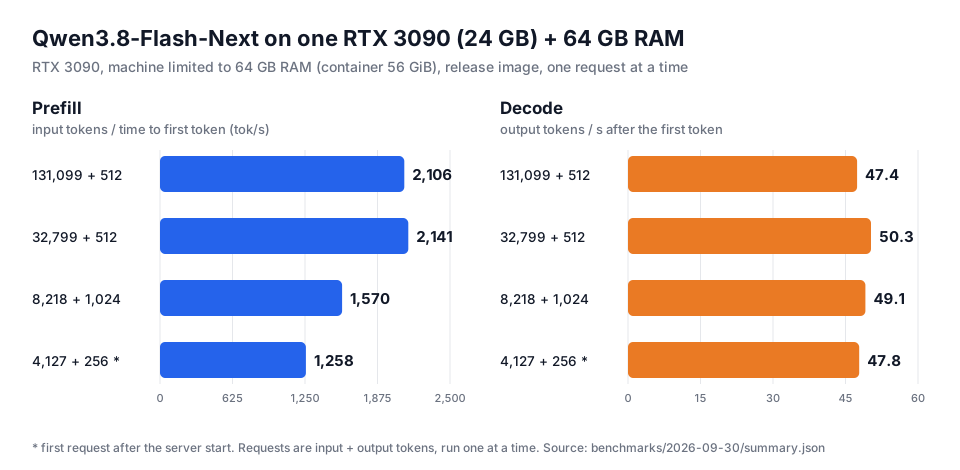
GPU memory peaked at 23.4 GB and no request was preempted. Prefill runs at 2,100–2,200 tok/s when the expert reads from NVMe overlap the GPU work; some requests take a slower path, ~1,450 tok/s (the second 131K run and both 8K requests above). See the known issue.
Decode depends mainly on RAM bandwidth, because the CPU computes the cold experts. With the server restricted to part of the 32-core benchmark CPU:
| CPU cores available | Like | Prefill, 131K prompt | Decode |
|---|---|---|---|
| 32 (4 CCDs), 2 runs | the benchmark workstation | 1,451–2,106 tok/s | 43–51 tok/s |
| 16 (2 CCDs), 2 runs | Ryzen 9 7950X / 9950X | 1,452–2,104 tok/s | 39–47 tok/s |
| 8 (1 CCD), earlier image | Ryzen 7 7800X3D / 9700X | 2,149 tok/s | 34–36 tok/s |
These are proxies on the same Zen 3 cores and DDR4 memory. Desktop Zen 4/5 and Intel CPUs with DDR5 have more memory bandwidth per core and may do better. See the benchmark report and hardware, and please share your numbers.
With a second RTX 3090, the 2× RTX 3090 runtime reaches 3,410 tok/s prefill and 84 tok/s decode with the same 64 GB of RAM (its 64 GB profile, which uses this runtime's design on both cards), or up to 4,191 tok/s prefill and 111.5 tok/s decode with 128 GB.
Download the checkpoint (about 129 GB) to an NVMe drive. hf comes with pip install -U huggingface_hub.
hf download albucino/Qwen3.8-Flash-Next-W4A16-FP8PLE \
  --revision ef554143369a706525336f6b42a09094835dc077 \
  --local-dir /models/qwen38-flash-next
Build and start the server:
git clone https://github.com/DominikBucko/qwen38-flash-next-3090.git
cd qwen38-flash-next-3090
cp .env.example .env    # set MODEL_DIR to the download directory

make build-image
make serve
make serve runs scripts/preflight.sh first, which checks the GPU, RAM, CPU, driver and disk. The server is
ready after about 4 minutes (the first start compiles kernels and takes longer) and listens on
http://127.0.0.1:8000/v1.
To skip the local build, use the published v0.1.0 image (weights stay a separate download):
IMAGE=ghcr.io/dominikbucko/qwen38-flash-next-3090@sha256:7f176605b59c462af21b1b62fd854f9f3cca96e3d11a295581297483d45490a3 make serve
Later releases list their digests in the release notes.
Check it and measure your machine:
python3 scripts/smoke_test.py   # a reasoning answer, a tool call, code
make bench                      # 4K, 32K, 131K and 8K prompts
curl http://127.0.0.1:8000/v1/chat/completions -H 'Content-Type: application/json' -d '{
  "model": "Qwen3.8-Flash-Next",
  "messages": [{"role": "user", "content": "Explain mixture-of-experts models in three sentences."}]
}'
Any OpenAI-compatible client works with the base URL http://127.0.0.1:8000/v1. Tool calls, reasoning output
(reasoning_content) and prefix caching are on.
| Where | What |
|---|---|
| GPU, 23.4 GB peak | Attention, recurrent and dense weights (9.8 GB), 32 hot experts per layer (3.9 GB), MTP draft, INT8 KV cache for 141,504 tokens (3.05 GB) |
| RAM, 56 GiB container | 19,480 of the 23,040 cold experts (46 GiB, huge pages), serving processes, page cache |
| NVMe | The FP8 per-layer embedding table (51 GB) and the 3,560 least-used experts, read in place from the checkpoint |
The runtime picks the CPU cores and the RAM arena size from your machine. Details: how it works · tuning and troubleshooting.
QWEN38_HOT_ONLY from 32 to 28 in .env (~465 MiB less), or shorten the context. See
GPU memory.MEMORY_LIMIT=auto) and sizes its expert arena to
fit. Set MEMORY_LIMIT=48g or HOST_RESERVE_GIB=12 to leave more for other programs; more experts then stay
on NVMe.The runtime code is Apache-2.0. The model keeps the upstream Qwen and third-party terms listed in
THIRD_PARTY_NOTICES.md.
Run Qwen3.8-Flash-Next on ONE RTX 3090 (24 GB) + 64 GB RAM: 128K context, up to 2,100 tok/s prefill, 43–51 tok/s decode. vLLM runtime with hot MoE experts on the GPU and cold experts computed on the CPU, INT8 KV cache, Docker, OpenAI-compatible API.
See the codeOne RTX 3090 24 GB · 64 GB system RAM · vLLM · OpenAI-compatible API · Docker
One request, best of 2: a 131,099-token prompt reaches the first token in 62 s (2,106 tok/s), then decodes at 47.4 tok/s.
Download the checkpoint · Quick start · How it works · FAQ · Two GPUs?
Run Qwen3.8-Flash-Next locally on one RTX 3090 and 64 GB of RAM: one of the most common local-AI machines. The checkpoint (INT4 experts, FP8 embedding table) is 125 GB, about five times the card's memory. This runtime keeps the attention and dense weights plus the 32 busiest experts of every layer on the GPU, and the CPU computes the other experts straight from RAM during decode. During prefill it streams all experts through the GPU, so long prompts stay fast. The full 128K context fits thanks to an INT8 KV cache.
It is the same checkpoint and the same vLLM build as the 2× RTX 3090 runtime, repackaged for half the hardware. Nothing is pruned or requantized.
One RTX 3090, the machine limited to 64 GB of RAM (the server container to 56 GiB), release image, default profile, one request at a time, greedy decoding with MTP speculative decoding. Two runs on fresh server starts, one with the image built locally and one with the published image pulled by digest:
| Request (input + output tokens) | First token | Prefill | Decode |
|---|---|---|---|
| 131,099 + 512 | 62.2 / 90.3 s | 2,106 / 1,451 tok/s | 47.4 / 43.3 tok/s |
| 32,799 + 512 | 15.3 / 14.8 s | 2,141 / 2,219 tok/s | 50.3 / 49.5 tok/s |
| 8,218 + 1,024 | 5.2 / 5.7 s | 1,570 / 1,452 tok/s | 49.1 / 48.5 tok/s |
| 4,127 + 256, first request after start | 3.3 / 3.4 s | 1,258 / 1,231 tok/s | 47.8 / 50.8 tok/s |
GPU memory peaked at 23.4 GB and no request was preempted. Prefill runs at 2,100–2,200 tok/s when the expert reads from NVMe overlap the GPU work; some requests take a slower path, ~1,450 tok/s (the second 131K run and both 8K requests above). See the known issue.
Decode depends mainly on RAM bandwidth, because the CPU computes the cold experts. With the server restricted to part of the 32-core benchmark CPU:
| CPU cores available | Like | Prefill, 131K prompt | Decode |
|---|---|---|---|
| 32 (4 CCDs), 2 runs | the benchmark workstation | 1,451–2,106 tok/s | 43–51 tok/s |
| 16 (2 CCDs), 2 runs | Ryzen 9 7950X / 9950X | 1,452–2,104 tok/s | 39–47 tok/s |
| 8 (1 CCD), earlier image | Ryzen 7 7800X3D / 9700X | 2,149 tok/s | 34–36 tok/s |
These are proxies on the same Zen 3 cores and DDR4 memory. Desktop Zen 4/5 and Intel CPUs with DDR5 have more memory bandwidth per core and may do better. See the benchmark report and hardware, and please share your numbers.
With a second RTX 3090, the 2× RTX 3090 runtime reaches 3,410 tok/s prefill and 84 tok/s decode with the same 64 GB of RAM (its 64 GB profile, which uses this runtime's design on both cards), or up to 4,191 tok/s prefill and 111.5 tok/s decode with 128 GB.
Download the checkpoint (about 129 GB) to an NVMe drive. hf comes with pip install -U huggingface_hub.
hf download albucino/Qwen3.8-Flash-Next-W4A16-FP8PLE \
  --revision ef554143369a706525336f6b42a09094835dc077 \
  --local-dir /models/qwen38-flash-next
Build and start the server:
git clone https://github.com/DominikBucko/qwen38-flash-next-3090.git
cd qwen38-flash-next-3090
cp .env.example .env    # set MODEL_DIR to the download directory

make build-image
make serve
make serve runs scripts/preflight.sh first, which checks the GPU, RAM, CPU, driver and disk. The server is
ready after about 4 minutes (the first start compiles kernels and takes longer) and listens on
http://127.0.0.1:8000/v1.
To skip the local build, use the published v0.1.0 image (weights stay a separate download):
IMAGE=ghcr.io/dominikbucko/qwen38-flash-next-3090@sha256:7f176605b59c462af21b1b62fd854f9f3cca96e3d11a295581297483d45490a3 make serve
Later releases list their digests in the release notes.
Check it and measure your machine:
python3 scripts/smoke_test.py   # a reasoning answer, a tool call, code
make bench                      # 4K, 32K, 131K and 8K prompts
curl http://127.0.0.1:8000/v1/chat/completions -H 'Content-Type: application/json' -d '{
  "model": "Qwen3.8-Flash-Next",
  "messages": [{"role": "user", "content": "Explain mixture-of-experts models in three sentences."}]
}'
Any OpenAI-compatible client works with the base URL http://127.0.0.1:8000/v1. Tool calls, reasoning output
(reasoning_content) and prefix caching are on.
| Where | What |
|---|---|
| GPU, 23.4 GB peak | Attention, recurrent and dense weights (9.8 GB), 32 hot experts per layer (3.9 GB), MTP draft, INT8 KV cache for 141,504 tokens (3.05 GB) |
| RAM, 56 GiB container | 19,480 of the 23,040 cold experts (46 GiB, huge pages), serving processes, page cache |
| NVMe | The FP8 per-layer embedding table (51 GB) and the 3,560 least-used experts, read in place from the checkpoint |
The runtime picks the CPU cores and the RAM arena size from your machine. Details: how it works · tuning and troubleshooting.
QWEN38_HOT_ONLY from 32 to 28 in .env (~465 MiB less), or shorten the context. See
GPU memory.MEMORY_LIMIT=auto) and sizes its expert arena to
fit. Set MEMORY_LIMIT=48g or HOST_RESERVE_GIB=12 to leave more for other programs; more experts then stay
on NVMe.The runtime code is Apache-2.0. The model keeps the upstream Qwen and third-party terms listed in
THIRD_PARTY_NOTICES.md.



