CoffeeMethod/KokoroGUI

An all in one text based audio editing software, built for audiobooks, podcasts, videos, and more.

Python

18

216 commits

updated Oct 10, 2026

See the code

README

KokoroGUI

Tests License: Apache-2.0 Python 3.11+

A text-based audio workflow. Edit the words and the audio follows: write or import a transcript, give each line a character, and the clips land on a timeline you can mix and export. Change a word and only that clip generates again. It runs locally on Kokoro, with Audio8 voice cloning built in as a second engine.
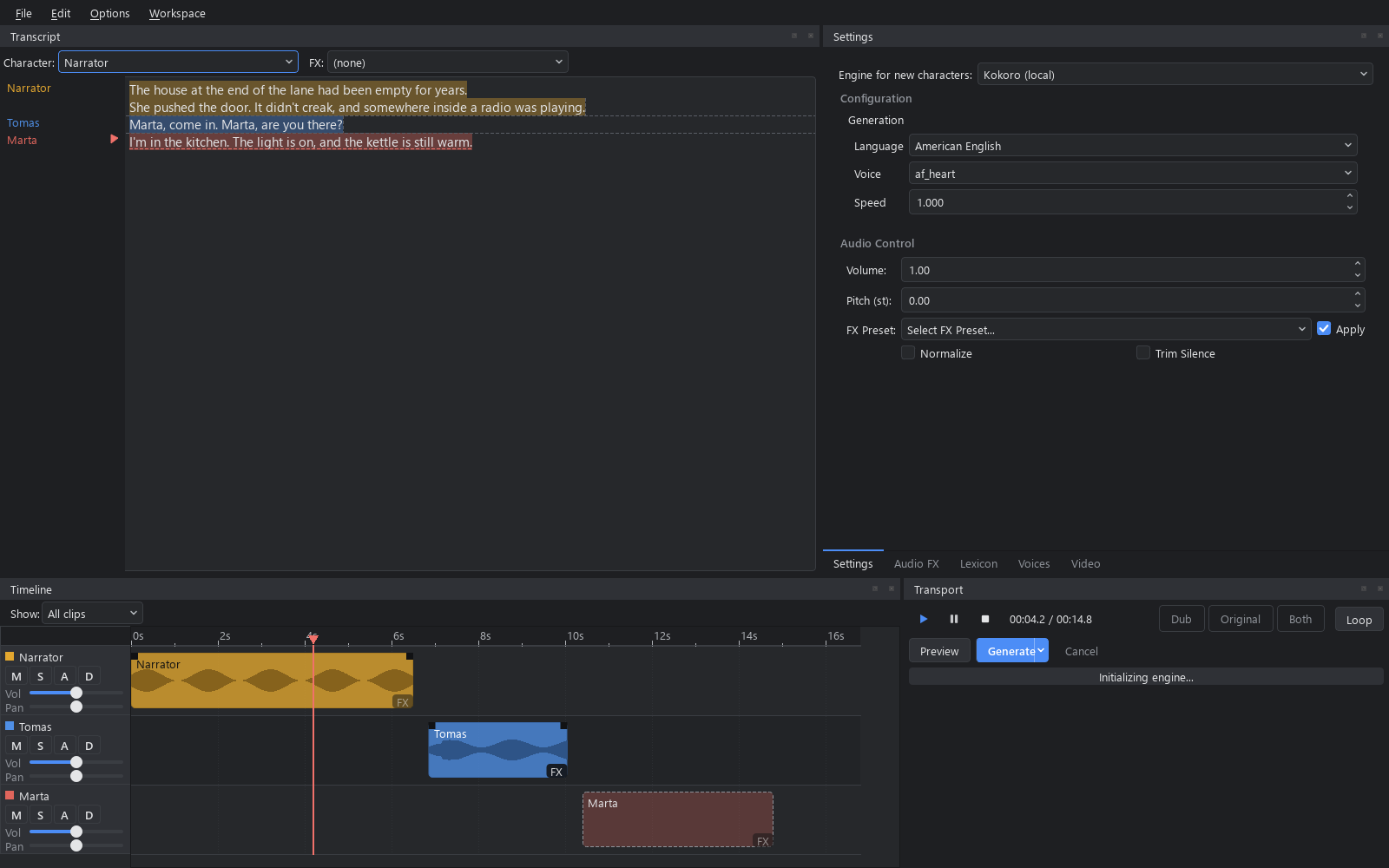
KokoroGUI 4.0: transcript and settings tabs over a seconds-axis timeline and transport, dark theme

(demo sounds better in .wav but GitHub doesn't support that so it's kinda bad)

https://github.com/user-attachments/assets/c75e7141-5d73-40f4-b182-d4f5bc49ad1e

Features

  • Transcript first. Type, paste or import .txt, .pdf, .epub or subtitles. Each run of text belongs to a character, and only the clips whose text or voice changed need generating again.
  • Timeline and mixer. One track per character, with mute, solo, fader, pan, automation, fades, markers, loops and timecode.
  • Two engines. Kokoro's named and mixable voices in 8 languages, and Audio8, which clones a voice from a short recording. Each character picks its own.
  • Non-destructive FX. A Pedalboard chain (compressor, EQ, reverb, convolution reverb, delay and more) applied on playback and export, per project, character or clip.
  • Dubbing. Subtitle import, fit-to-slot timing, the original dialogue and a reference video to play against.
  • Recordings and music. Edit a recording by editing its transcript, and add music beds that duck under speech.
  • Export. One file in wav, mp3, flac or ogg, with .srt subtitles and a cue sheet.
  • One-file projects. A .tbaw holds the text, the audio and every voice it uses, so it opens on another machine.

What's new

In 4.0.0-beta.2:

  • Subtitle import, Fit to slot, the original dialogue and a reference video, for dubbing
  • A mixer: mute, solo, faders, pan, automation, fades and crossfades, in stereo
  • Takes, pauses between clips, and ripple when a regenerated clip changes length
  • A character library shared by every project, and an engine choice per character
  • Subprojects, so a book can be one project per chapter
  • Music beds with ducking, and editing a recording as text
  • Convolution reverb, markers, loops, timecode and word-by-word highlighting
  • Whisper as the default transcriber, and text split at sentence ends near a word count
  • An Engine row in Settings, a Voices tab for any engine, and each engine's own language and model settings
  • Kokoro optional: a project whose engine isn't installed opens and plays, and engines can be plugins
  • Transcript details (Options menu): segment boundaries, lexicon rewrites, gaps, and each clip's length and status
  • Typing, scrolling and timeline updates stay fast in long projects, plus Options > Force refresh
  • A clip made from a [Speaker:FX]: line no longer reads the tag aloud, and the tag's FX is applied to the clip
  • On Windows, an impulse response name with a colon is refused instead of loading a different file
  • Options > Settings... holds the program and project settings in an OBS-style window; the Settings tab keeps only the voice
  • An FX change in a long project renders in the background instead of freezing the window, and undoing a character change or a text replace copies only what the edit touched

The changes page has the full detail for every version, including what the update does to existing projects.

Install

You need Python 3.11+ and eSpeak NG.

git clone --branch 4.0.0-beta.2 --depth 1 https://github.com/CoffeeMethod/KokoroGUI.git
cd KokoroGUI
python -m venv .venv
.venv\Scripts\activate          # Windows
source .venv/bin/activate       # macOS / Linux
pip install -r requirements.txt

4.0.0-beta.2 is the latest beta tag. --branch takes a tag name, and dropping it gets the default branch. If torch gives you trouble, follow pytorch.org for your OS and GPU.

Kokoro is optional. Without the kokoro package (and eSpeak NG) the app runs Audio8 and the test engine, and a Kokoro project opens and plays but doesn't generate.

Models download from Hugging Face the first time you use them. Whisper, the transcriber, is about 1.6 GB and the app asks first. For a smaller one, copy .env.example to .env and set WHISPER_MODEL to small, base or tiny. VOSK_MODEL_PATH there switches on the offline Vosk engine.

Looking for 3.2.0, the old one-text-box app? It's frozen. Clone the 3.2.0 tag with --branch 3.2.0 and follow the README in that checkout. Only presets/ and custom_voices/ carry over between the two.

Usage

Run python main.py, or double-click run.bat on Windows.

  1. Pick a recent project from the welcome dialog, or start a new one.
  2. Type or import text, select a range and choose a character. Or type [Marta]: at the start of a line, and Generate > Auto-split turns a tagged transcript into clips.
  3. Press Generate. Only stale clips generate.
  4. Press Space to play. Drag clips on the timeline to move them.
  5. File > Export writes the audio file. File > Save writes the .tbaw.

The docs site covers the workflows, every setting, tags and the .tbaw format.

Tests

pip install -r requirements-test.txt
pytest                                     # fast suite, mocked, no model needed
pytest -m integration tests/integration -s # real generation, needs eSpeak NG

CI runs the fast suite on Windows and Ubuntu, without the Qt widget tests. Those run locally, headless. The integration tests write each sample next to a transcript under tests/output/ for you to listen to.

Contributing

See CONTRIBUTING.md. Security reports go through the repository's Security tab, not Issues (SECURITY.md).

Built with

Kokoro, Audio8-TTS, Pedalboard, PySide6, PyTorch, SoundFile and sounddevice, PyPDF and EbookLib.

ai
ai-voice
audio
audiobook-generator
audiobooks
audio-processing
editor
epub-to-audiobook
gui
kokoro
kokoro-tts
local
offline
podcast
podcast-generator
python
speech-synthesis
text-to-speech
tts
voice-cloning

CoffeeMethod/KokoroGUI

An all in one text based audio editing software, built for audiobooks, podcasts, videos, and more.

Python

18

216 commits

updated Oct 10, 2026

See the code

README

KokoroGUI

Tests License: Apache-2.0 Python 3.11+

A text-based audio workflow. Edit the words and the audio follows: write or import a transcript, give each line a character, and the clips land on a timeline you can mix and export. Change a word and only that clip generates again. It runs locally on Kokoro, with Audio8 voice cloning built in as a second engine.

KokoroGUI 4.0: transcript and settings tabs over a seconds-axis timeline and transport, dark theme

(demo sounds better in .wav but GitHub doesn't support that so it's kinda bad)

https://github.com/user-attachments/assets/c75e7141-5d73-40f4-b182-d4f5bc49ad1e

Features

  • Transcript first. Type, paste or import .txt, .pdf, .epub or subtitles. Each run of text belongs to a character, and only the clips whose text or voice changed need generating again.
  • Timeline and mixer. One track per character, with mute, solo, fader, pan, automation, fades, markers, loops and timecode.
  • Two engines. Kokoro's named and mixable voices in 8 languages, and Audio8, which clones a voice from a short recording. Each character picks its own.
  • Non-destructive FX. A Pedalboard chain (compressor, EQ, reverb, convolution reverb, delay and more) applied on playback and export, per project, character or clip.
  • Dubbing. Subtitle import, fit-to-slot timing, the original dialogue and a reference video to play against.
  • Recordings and music. Edit a recording by editing its transcript, and add music beds that duck under speech.
  • Export. One file in wav, mp3, flac or ogg, with .srt subtitles and a cue sheet.
  • One-file projects. A .tbaw holds the text, the audio and every voice it uses, so it opens on another machine.

What's new

In 4.0.0-beta.2:

  • Subtitle import, Fit to slot, the original dialogue and a reference video, for dubbing
  • A mixer: mute, solo, faders, pan, automation, fades and crossfades, in stereo
  • Takes, pauses between clips, and ripple when a regenerated clip changes length
  • A character library shared by every project, and an engine choice per character
  • Subprojects, so a book can be one project per chapter
  • Music beds with ducking, and editing a recording as text
  • Convolution reverb, markers, loops, timecode and word-by-word highlighting
  • Whisper as the default transcriber, and text split at sentence ends near a word count
  • An Engine row in Settings, a Voices tab for any engine, and each engine's own language and model settings
  • Kokoro optional: a project whose engine isn't installed opens and plays, and engines can be plugins
  • Transcript details (Options menu): segment boundaries, lexicon rewrites, gaps, and each clip's length and status
  • Typing, scrolling and timeline updates stay fast in long projects, plus Options > Force refresh
  • A clip made from a [Speaker:FX]: line no longer reads the tag aloud, and the tag's FX is applied to the clip
  • On Windows, an impulse response name with a colon is refused instead of loading a different file
  • Options > Settings... holds the program and project settings in an OBS-style window; the Settings tab keeps only the voice
  • An FX change in a long project renders in the background instead of freezing the window, and undoing a character change or a text replace copies only what the edit touched

The changes page has the full detail for every version, including what the update does to existing projects.

Install

You need Python 3.11+ and eSpeak NG.

git clone --branch 4.0.0-beta.2 --depth 1 https://github.com/CoffeeMethod/KokoroGUI.git
cd KokoroGUI
python -m venv .venv
.venv\Scripts\activate          # Windows
source .venv/bin/activate       # macOS / Linux
pip install -r requirements.txt

4.0.0-beta.2 is the latest beta tag. --branch takes a tag name, and dropping it gets the default branch. If torch gives you trouble, follow pytorch.org for your OS and GPU.

Kokoro is optional. Without the kokoro package (and eSpeak NG) the app runs Audio8 and the test engine, and a Kokoro project opens and plays but doesn't generate.

Models download from Hugging Face the first time you use them. Whisper, the transcriber, is about 1.6 GB and the app asks first. For a smaller one, copy .env.example to .env and set WHISPER_MODEL to small, base or tiny. VOSK_MODEL_PATH there switches on the offline Vosk engine.

Looking for 3.2.0, the old one-text-box app? It's frozen. Clone the 3.2.0 tag with --branch 3.2.0 and follow the README in that checkout. Only presets/ and custom_voices/ carry over between the two.

Usage

Run python main.py, or double-click run.bat on Windows.

  1. Pick a recent project from the welcome dialog, or start a new one.
  2. Type or import text, select a range and choose a character. Or type [Marta]: at the start of a line, and Generate > Auto-split turns a tagged transcript into clips.
  3. Press Generate. Only stale clips generate.
  4. Press Space to play. Drag clips on the timeline to move them.
  5. File > Export writes the audio file. File > Save writes the .tbaw.

The docs site covers the workflows, every setting, tags and the .tbaw format.

Tests

pip install -r requirements-test.txt
pytest                                     # fast suite, mocked, no model needed
pytest -m integration tests/integration -s # real generation, needs eSpeak NG

CI runs the fast suite on Windows and Ubuntu, without the Qt widget tests. Those run locally, headless. The integration tests write each sample next to a transcript under tests/output/ for you to listen to.

Contributing

See CONTRIBUTING.md. Security reports go through the repository's Security tab, not Issues (SECURITY.md).

Built with

Kokoro, Audio8-TTS, Pedalboard, PySide6, PyTorch, SoundFile and sounddevice, PyPDF and EbookLib.

ai
ai-voice
audio
audiobook-generator
audiobooks
audio-processing
editor
epub-to-audiobook
gui
kokoro
kokoro-tts
local
offline
podcast
podcast-generator
python
speech-synthesis
text-to-speech
tts
voice-cloning
