All in one tool for creating audiobooks from text using built in AI tools. No Python or external tools required, simply extract and run
C#
1
31 commits
updated Oct 14, 2026

Turn books into audiobooks with AI voices that run on your own machine. Import a text, give each character a voice, generate, listen, fix what you don't like, and export an audiobook (M4B with chapters, or MP3). No cloud service, no account, no fees.
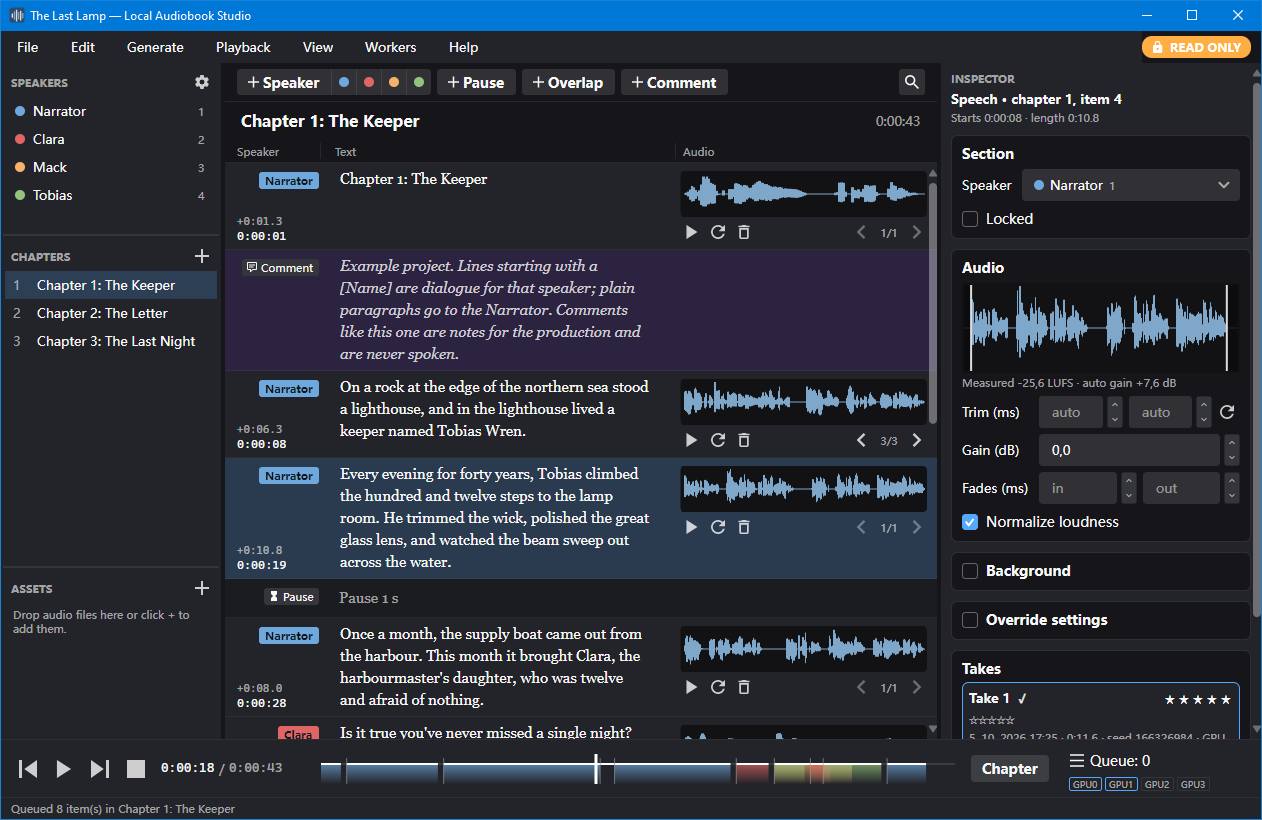
las generates speech and runs whole projects (import → generate → export) for automation in your own scripts.sudo apt install dotnet-runtime-10.0).AI inference is done by workers, each running in its own process on one of these runtimes:
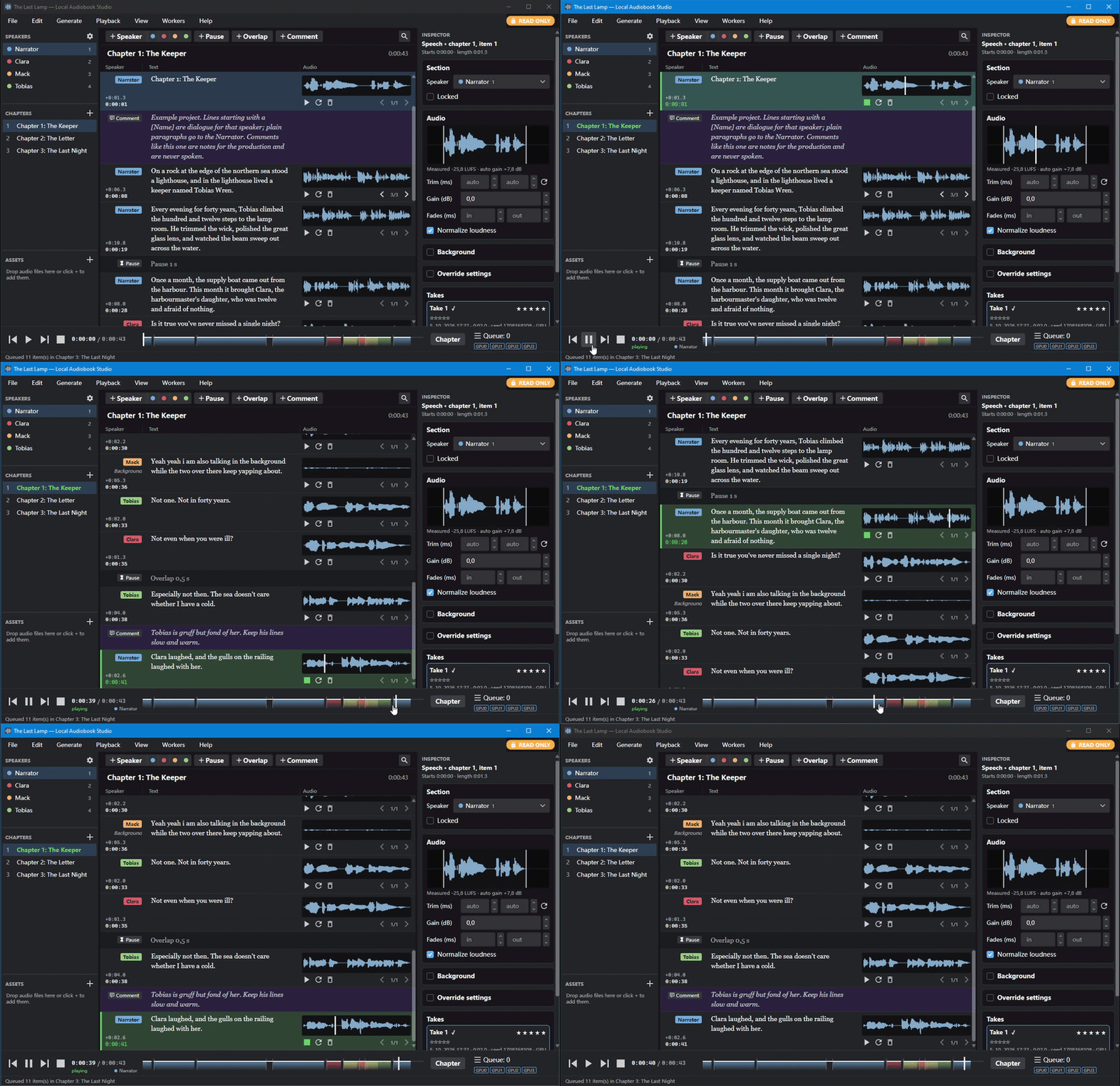 | 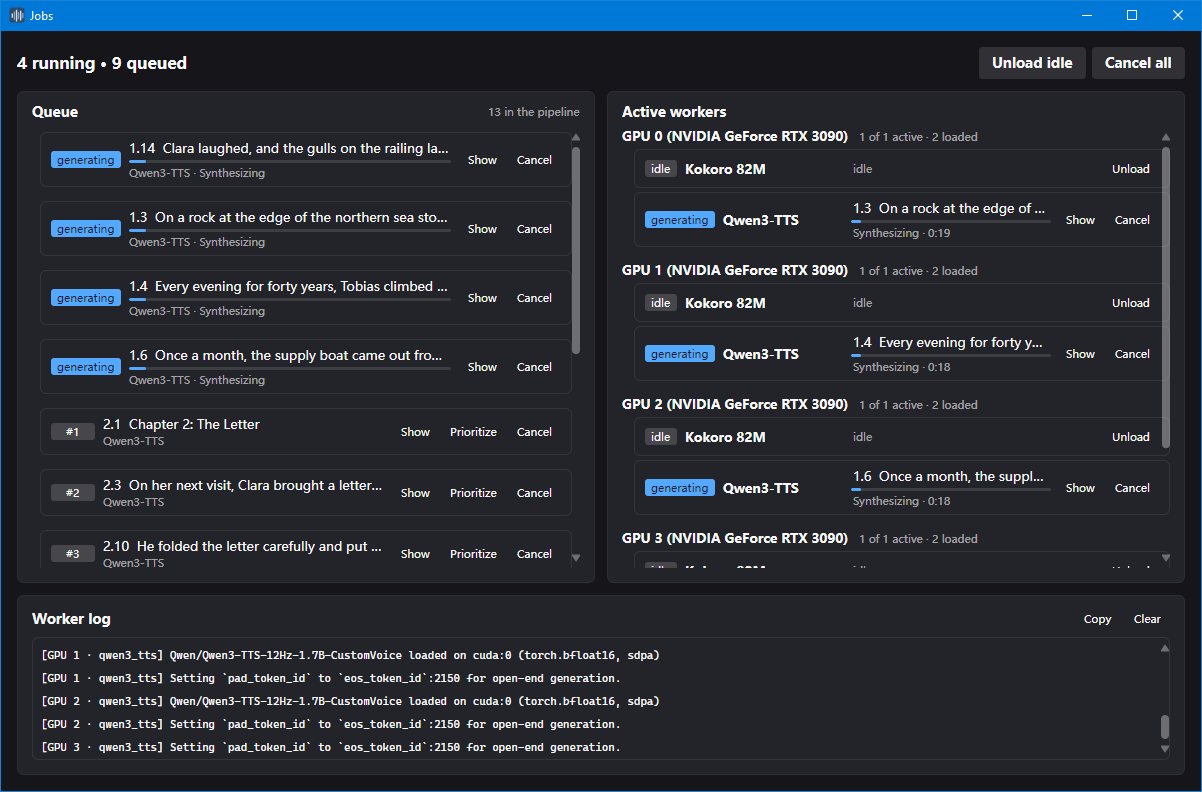 |
| Scrubbing through | Job queues |
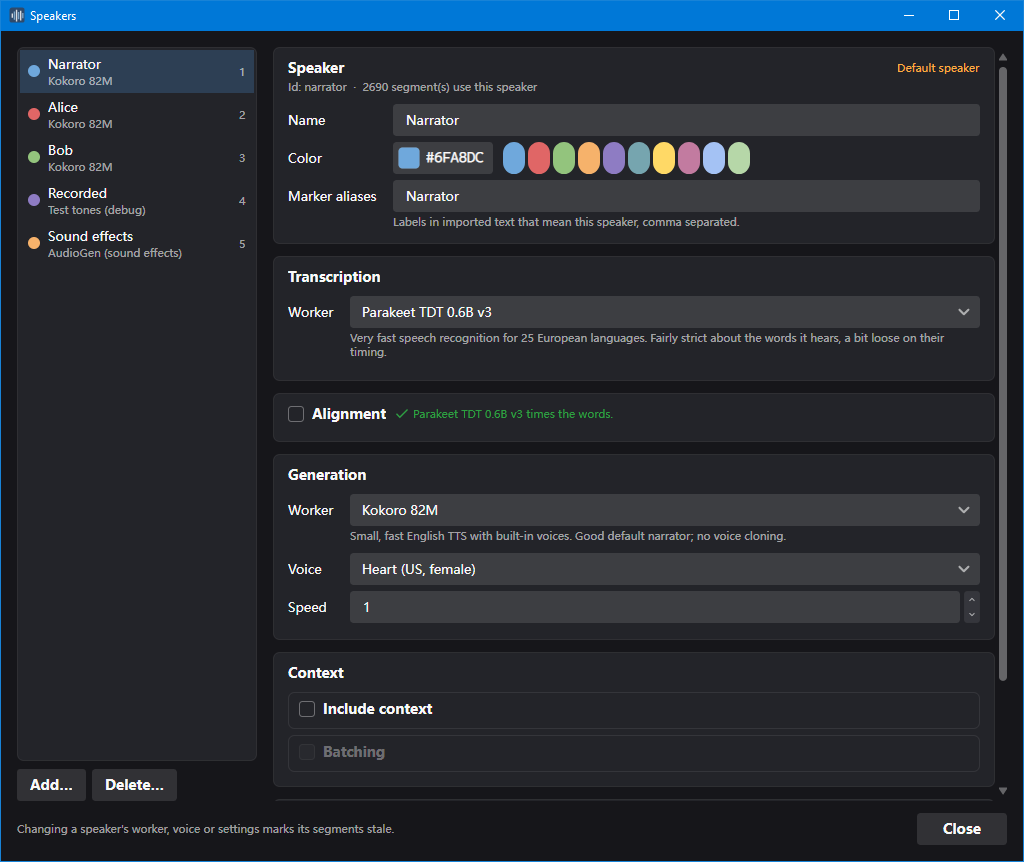 | 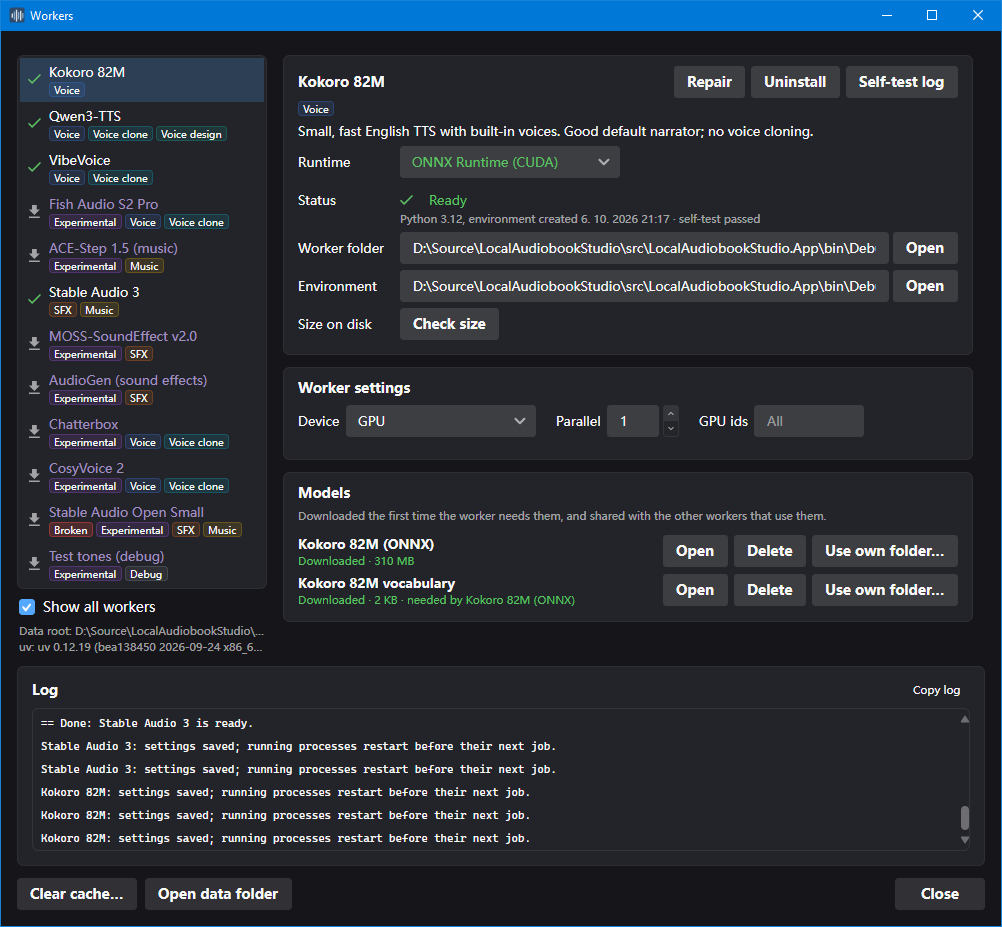 |
| Speakers | Workers |
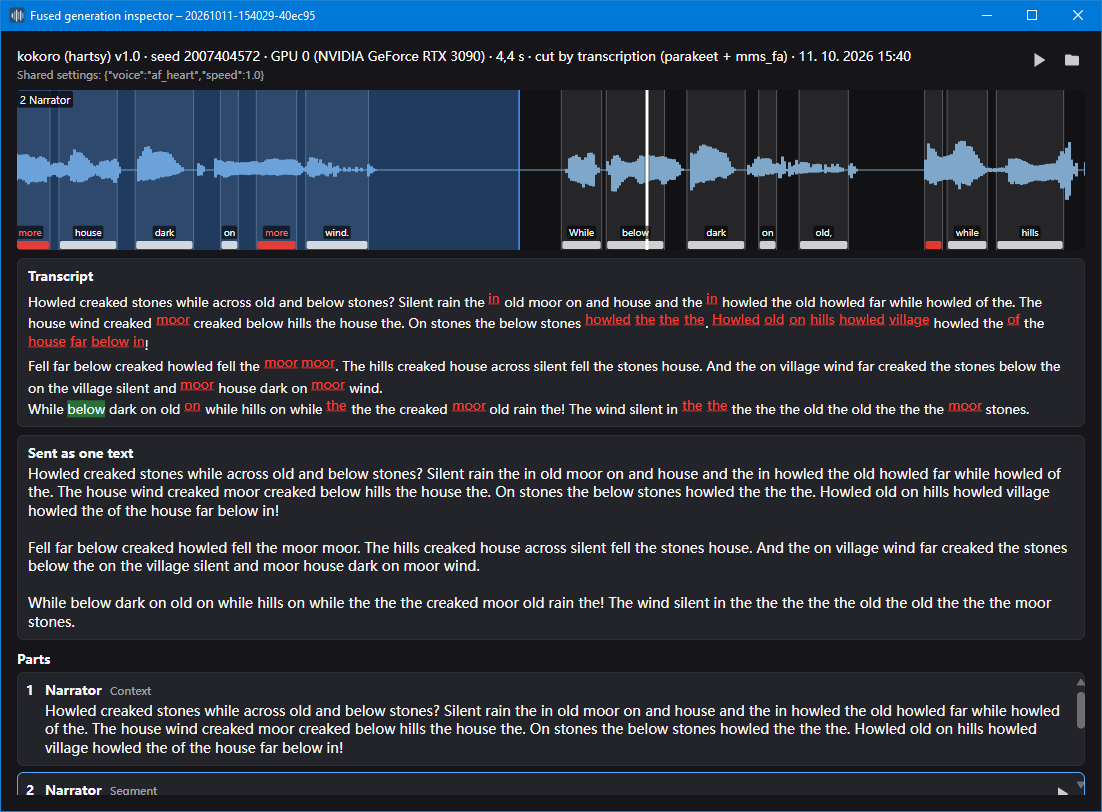 | |
| Generation inspector |
LocalAudiobookStudio.exe (on Linux: ./LocalAudiobookStudio). Windows may show a SmartScreen warning the first time, because the release isn't code-signed: choose More info → Run anyway..txt file. From there, give characters their own voices in View → Speakers, fix lines and regenerate them with R, and export with File → Export audiobook (Ctrl+E).Plain text works as-is: blank lines separate paragraphs and headings start chapters. Markers like [Alice] Hello., [pause 1.5s] and [comment: …] add speakers, pauses and notes; sound effects are lines for a speaker whose worker makes sounds ([Sounds] distant thunder). See the text format for all of them.
A worker is a model the app runs in its own process, on one of the supported runtimes. Speech, voice cloning, sound effects and music are covered; see supported models for the full list with links and licenses. The app's MIT license does not cover the models: some don't allow commercial use.
For models the app doesn't include, the ComfyUI bridge runs your own ComfyUI workflows as a worker.
A project is a folder (new ones are named <title>.audiobook):
MyBook.audiobook/
  local_audiobook_studio.json  app marker, title, author, defaults
  chapters/                    one JSON file per chapter (the segments)
  speakers/                    speaker settings and reference clips
  audio/                       generated and recorded takes per segment (Opus, or WAV)
  assets/                      imported audio files and ComfyUI workflows, in folders if you like
  export/                      exported audiobooks
  .cache/                      rebuildable caches (not packed)
New takes, recordings and imported WAV files are stored as Opus; Project properties sets the Opus quality (48, 64 or 96 kbps per channel) or switches a project to WAV, and File → Compress takes to Opus converts existing WAV takes. MP3 and Opus files you import are kept as they are; other formats are converted with ffmpeg.
File → Pack project creates a single .abproj file (a zip) for backup or sharing; File → Unpack project opens one.
las is installed next to the app and uses the app's settings, installed workers and devices.
# One-off text to speech (like the preview button; no project involved)
las tts "Hello there." -o hello.wav
echo "Piped text" | las tts -o out.wav --voice am_michael
las tts -i chapters/ -o audio/ --skip-existing          # a folder of .txt files, one WAV each

# What a transcription worker hears, compared with the text the audio should contain
las transcribe hello.wav -t "Hello there." --words

# How alike the voices in several takes are (a seed test), or how close each is to a reference clip
las compare seed1.wav seed2.wav seed3.wav seed4.wav seed5.wav
las compare takes/ --ref voice.wav

# A whole pipeline on a project: steps run in order and stop at the first failure
las project MyBook import book.txt erase-takes generate export -o book.m4b

# Change a voice, then regenerate only what became stale
las project MyBook speaker narrator --voice bf_emma generate

# Information
las workers            # installed workers; 'las workers kokoro' shows settings and voices
las models             # downloaded models and their size on disk
las doctor             # system check
las --json project MyBook status
Run las help, las help tts or las help project for all options. Exit codes: 0 ok, 1 something failed, 2 wrong usage, 3 setup needed, 130 cancelled. A project can't be open in the app and in las at the same time.
las doctor) checks the GPU, driver, uv, HartsyInference, ffmpeg, audio devices and disk space.session-*.log, and cli-*.log for las).Requires the .NET 10 SDK, Python not needed.
Run run.bat (Windows, double-click) or ./run.sh (Linux) in the repository root: they run dotnet run for the app.
Open LocalAudiobookStudio.sln in Visual Studio (or Rider) and press Build or Run. That's all, the app is the startup project.
git clone https://github.com/Berni-k/LocalAudiobookStudio.git
cd LocalAudiobookStudio
dotnet run --project src/LocalAudiobookStudio.App
The build puts the app into src/LocalAudiobookStudio.App/bin/<Configuration>/net10.0/. It also includes las (the command line), the workers folder, the HartsyInference worker (tools/hartsy/) and the internal worker (tools/internal-worker/). uv is only included if you fetched it with tools/uv/fetch-uv.ps1 (or .sh); otherwise the system check downloads it.
Run the tests with dotnet test; they need no GPU, workers or network.
| Folder | Contents |
|---|---|
src/LocalAudiobookStudio.App | The desktop app (Avalonia): views, view models, playback and recording |
src/LocalAudiobookStudio.Cli | las, the command line |
src/LocalAudiobookStudio.Engine | Everything without a UI: host, project engine, export, one-off generation, system checks |
src/LocalAudiobookStudio.Core | Project model, text import, timeline, settings |
src/LocalAudiobookStudio.Audio | Decoding, mixing, loudness and peaks |
src/LocalAudiobookStudio.Workers | Worker processes, protocol, scheduler, Python environments |
src/LocalAudiobookStudio.HartsyWorker | The HartsyInference worker (las-hartsy-worker) |
workers/ | Worker manifests and Python workers; environments.json defines the shared environments, models.json pins every model's files |
tools/uv | The pinned uv version and scripts to fetch it (not in the repository; release builds bundle it) |
tests/ | Unit tests |
docs/ | User documentation: text format, supported models, ComfyUI bridge |
examples/ | The example project, copied next to the app |
Local Audiobook Studio is free. If you find it useful, you can support its development on Ko-fi.
Local Audiobook Studio is released under the MIT License. Copyright (c) 2026 Berni.
It builds on Avalonia, Semi.Avalonia, NAudio, Concentus, NLayer, CommunityToolkit.Mvvm, HartsyInference and uv; their licenses are in THIRD-PARTY-NOTICES.md. The AI models are separate downloads under their own licenses (see supported models).
All in one tool for creating audiobooks from text using built in AI tools. No Python or external tools required, simply extract and run
C#
1
31 commits
updated Oct 14, 2026
Turn books into audiobooks with AI voices that run on your own machine. Import a text, give each character a voice, generate, listen, fix what you don't like, and export an audiobook (M4B with chapters, or MP3). No cloud service, no account, no fees.
las generates speech and runs whole projects (import → generate → export) for automation in your own scripts.sudo apt install dotnet-runtime-10.0).AI inference is done by workers, each running in its own process on one of these runtimes:
| |
| Scrubbing through | Job queues |
| |
| Speakers | Workers |
| |
| Generation inspector |
LocalAudiobookStudio.exe (on Linux: ./LocalAudiobookStudio). Windows may show a SmartScreen warning the first time, because the release isn't code-signed: choose More info → Run anyway..txt file. From there, give characters their own voices in View → Speakers, fix lines and regenerate them with R, and export with File → Export audiobook (Ctrl+E).Plain text works as-is: blank lines separate paragraphs and headings start chapters. Markers like [Alice] Hello., [pause 1.5s] and [comment: …] add speakers, pauses and notes; sound effects are lines for a speaker whose worker makes sounds ([Sounds] distant thunder). See the text format for all of them.
A worker is a model the app runs in its own process, on one of the supported runtimes. Speech, voice cloning, sound effects and music are covered; see supported models for the full list with links and licenses. The app's MIT license does not cover the models: some don't allow commercial use.
For models the app doesn't include, the ComfyUI bridge runs your own ComfyUI workflows as a worker.
A project is a folder (new ones are named <title>.audiobook):
MyBook.audiobook/
  local_audiobook_studio.json  app marker, title, author, defaults
  chapters/                    one JSON file per chapter (the segments)
  speakers/                    speaker settings and reference clips
  audio/                       generated and recorded takes per segment (Opus, or WAV)
  assets/                      imported audio files and ComfyUI workflows, in folders if you like
  export/                      exported audiobooks
  .cache/                      rebuildable caches (not packed)
New takes, recordings and imported WAV files are stored as Opus; Project properties sets the Opus quality (48, 64 or 96 kbps per channel) or switches a project to WAV, and File → Compress takes to Opus converts existing WAV takes. MP3 and Opus files you import are kept as they are; other formats are converted with ffmpeg.
File → Pack project creates a single .abproj file (a zip) for backup or sharing; File → Unpack project opens one.
las is installed next to the app and uses the app's settings, installed workers and devices.
# One-off text to speech (like the preview button; no project involved)
las tts "Hello there." -o hello.wav
echo "Piped text" | las tts -o out.wav --voice am_michael
las tts -i chapters/ -o audio/ --skip-existing          # a folder of .txt files, one WAV each

# What a transcription worker hears, compared with the text the audio should contain
las transcribe hello.wav -t "Hello there." --words

# How alike the voices in several takes are (a seed test), or how close each is to a reference clip
las compare seed1.wav seed2.wav seed3.wav seed4.wav seed5.wav
las compare takes/ --ref voice.wav

# A whole pipeline on a project: steps run in order and stop at the first failure
las project MyBook import book.txt erase-takes generate export -o book.m4b

# Change a voice, then regenerate only what became stale
las project MyBook speaker narrator --voice bf_emma generate

# Information
las workers            # installed workers; 'las workers kokoro' shows settings and voices
las models             # downloaded models and their size on disk
las doctor             # system check
las --json project MyBook status
Run las help, las help tts or las help project for all options. Exit codes: 0 ok, 1 something failed, 2 wrong usage, 3 setup needed, 130 cancelled. A project can't be open in the app and in las at the same time.
las doctor) checks the GPU, driver, uv, HartsyInference, ffmpeg, audio devices and disk space.session-*.log, and cli-*.log for las).Requires the .NET 10 SDK, Python not needed.
Run run.bat (Windows, double-click) or ./run.sh (Linux) in the repository root: they run dotnet run for the app.
Open LocalAudiobookStudio.sln in Visual Studio (or Rider) and press Build or Run. That's all, the app is the startup project.
git clone https://github.com/Berni-k/LocalAudiobookStudio.git
cd LocalAudiobookStudio
dotnet run --project src/LocalAudiobookStudio.App
The build puts the app into src/LocalAudiobookStudio.App/bin/<Configuration>/net10.0/. It also includes las (the command line), the workers folder, the HartsyInference worker (tools/hartsy/) and the internal worker (tools/internal-worker/). uv is only included if you fetched it with tools/uv/fetch-uv.ps1 (or .sh); otherwise the system check downloads it.
Run the tests with dotnet test; they need no GPU, workers or network.
| Folder | Contents |
|---|---|
src/LocalAudiobookStudio.App | The desktop app (Avalonia): views, view models, playback and recording |
src/LocalAudiobookStudio.Cli | las, the command line |
src/LocalAudiobookStudio.Engine | Everything without a UI: host, project engine, export, one-off generation, system checks |
src/LocalAudiobookStudio.Core | Project model, text import, timeline, settings |
src/LocalAudiobookStudio.Audio | Decoding, mixing, loudness and peaks |
src/LocalAudiobookStudio.Workers | Worker processes, protocol, scheduler, Python environments |
src/LocalAudiobookStudio.HartsyWorker | The HartsyInference worker (las-hartsy-worker) |
workers/ | Worker manifests and Python workers; environments.json defines the shared environments, models.json pins every model's files |
tools/uv | The pinned uv version and scripts to fetch it (not in the repository; release builds bundle it) |
tests/ | Unit tests |
docs/ | User documentation: text format, supported models, ComfyUI bridge |
examples/ | The example project, copied next to the app |
Local Audiobook Studio is free. If you find it useful, you can support its development on Ko-fi.
Local Audiobook Studio is released under the MIT License. Copyright (c) 2026 Berni.
It builds on Avalonia, Semi.Avalonia, NAudio, Concentus, NLayer, CommunityToolkit.Mvvm, HartsyInference and uv; their licenses are in THIRD-PARTY-NOTICES.md. The AI models are separate downloads under their own licenses (see supported models).



