English | 中文 | 日本語 · Listen to a sample
Alexandria Audiobook2 turns a book into an audiobook with a different voice for
every character. You give it a .txt, .md or .epub file; a language model
works out who says each line and how it should sound; a text-to-speech model
reads it; and you get an MP3 or a chaptered M4B.
| I want to… | Start here |
|---|---|
| Make an audiobook | Install, then follow your first audiobook. |
| Pick a model for my graphics card | Which model for your card, then the full guide. |
| Understand the research results | Results at a glance, then RECIPES.md and the Muse quant comparison. |
| Find a particular run or its raw data | Search the results index; each entry links to the committed artifact. |
| Browse all documentation | The documentation map lists user guides, operations notes, results and history. |
| Contribute | The project wiki, then Contributing and GOALS.md. |
You do not need to read any of the research sections to install or use the app.
It is a research fork of Alexandria. What makes it different is that every choice is measured:
The settings that won are the defaults, and every alternative stays selectable
in the Setup tab. For example, the michel2_full attribution prompt became the
default on 2026-09-19, once the last model family confirmed it was best. The
numbers, the failures and the recipes are all in this repository.
Key documents
Pinokio, or Docker / Google Colab (see Installation).
A language-model (LLM) server the app can reach through an OpenAI-compatible API. The app does not include one. Any of these works:
llama-server — every number in
this README was measured with it. It supports --lora for the attribution adapters
and --reasoning-budget for reasoning models.Recommended LLM models lists what each model size gets you.
A GPU for speech generation: 8 GB of VRAM minimum, 16 GB recommended.
RAM: 16 GB recommended.
Disk: about 20 GB for the environment and TTS weights, plus your LLM files and audio.
| GPU | OS | Speech (TTS) | Notes |
|---|---|---|---|
| NVIDIA | Windows / Linux | full | CUDA build via torch.js with flash attention; whisper.cpp built with CUDA for the Preparer |
| AMD discrete | Linux | full | ROCm; tested daily on an RX 9070 XT (RDNA4, ROCm 7.0). llama-cpp-python and whisper.cpp are built with HIP for your gfx target during install |
| AMD APU / integrated | Linux | full, slower | TTS runs in fp32 (bf16 is broken on the 660M/680M/780M class); everything else is the same |
| AMD | Windows | CPU only | ROCm is not available on Windows; use Linux for GPU |
| Apple Silicon | macOS | CPU only | Qwen3-TTS does not support MPS; whisper.cpp is built with Metal |
| Intel | macOS | CPU only |
More documentation: the upstream project's wiki still explains voice types, LoRA training and batch generation well. Where this fork behaves differently, this README and
RECIPES.mdare correct.
https://github.com/on22s/alexandria-audiobook2.app/env;torch.js) and pins it,
so no later step can swap it for a CPU-only build;Fresh Pinokio installations use CPython 3.10 for the prebuilt NVIDIA SageAttention/FlashAttention wheels. Existing environments are preserved; requesting those optional wheels from a different Python version stops before package installation with a compatibility error.

Runs the app on a free T4 GPU. You need a free ngrok account for the tunnel; the notebook walks you through it.
git clone https://github.com/on22s/alexandria-audiobook2.git
cd alexandria-audiobook2
docker compose up --build
http://localhost:4200.Security: Compose publishes the port on
127.0.0.1only. The container itself binds0.0.0.0, because Docker needs that for forwarding. If you publish the host port on0.0.0.0, also setALEXANDRIA_AUTH_PASSWORD— see Authentication.
Alexandria does not include a language model. Before you generate a script, one of these must be running and reachable from the Base URL in the Setup tab.
llama.cpp (recommended; the numbers here were measured with it):
llama-server -m Qwen3-14B-Q4_K_M.gguf --host 127.0.0.1 --port 8090 \
  -ngl 99 -c 8192 --parallel 1 --flash-attn on \
  --reasoning on --reasoning-format deepseek --reasoning-budget 1024
In Setup, use Base URL http://127.0.0.1:8090/v1, API key local, and as the model
name whatever --alias says (or the file name).
LM Studio: load a model, start its server, and use http://localhost:1234/v1.
Optimize LM Studio settings applies the app's guarded, model-specific load settings;
its local fallback is 8,192 tokens and one slot, not a universal 32k setting.
Ollama: use http://localhost:11434/v1 and the model name that ollama list shows.
A hosted API: set LLM Location to Remote, paste the URL and key (or
env:DEEPSEEK_API_KEY to read the key from an environment variable), and open
Provider request options. Set Runs on this machine's GPU? to No so audio can render while the hosted model works.
The command is a starting configuration for a small first run, not a guarantee that every request fits. Use your downloaded model's actual path. Context must hold the full prompt (including roster and surrounding text) plus the response and any reasoning tokens. Larger batches, review windows or custom prompts may need more; see choosing a context size. Attribution adapters are optional and must match their training prompt; leave them out of the first run, then follow Adapters.
Reasoning ("thinking") models work well — better, in fact. Set Reasoning effort
to low and let the server cap the budget. Do not add <think> to the banned tokens.
Click Test in Setup to confirm the connection and see what the model answers.
The Qwen3-TTS weights (about 3.4 GB per variant: CustomVoice, and Base for clone/design/LoRA voices) download the first time you render. Watch the Editor's log. A download stuck at 0% is a network problem, not a frozen app.
The model has to load, and if Compile Codec is on, torch.compile takes another
30–60 seconds. The Editor's activity line tells you which one is happening.
Speech needs about 3.4 GB plus room for batches, and an LLM on the same card needs its own space. The GPU lock therefore refuses to start audio while script generation is using the card — unless the active LLM profile is marked as not on this GPU (a hosted API or a second machine). Then annotation and rendering can run together.
logs/api/<task>-latest.log — the full log of every background task.logs/review_responses.log — every LLM request and reply during script generation and
review, with the finish reason, token counts and time taken.GET /api/status/eta and GET /api/status/<task> for anything that is running.Follow Setup → Script → Voices → Editor → Result. The screenshots show the existing interface; labels may vary by build. First success means downloading an MP3 and listening for missing lines and incorrect speakers.
.txt, .md or .epub, rather than a whole book.
Save this original two-character sample as a .txt file
to try the complete flow without finding a book first.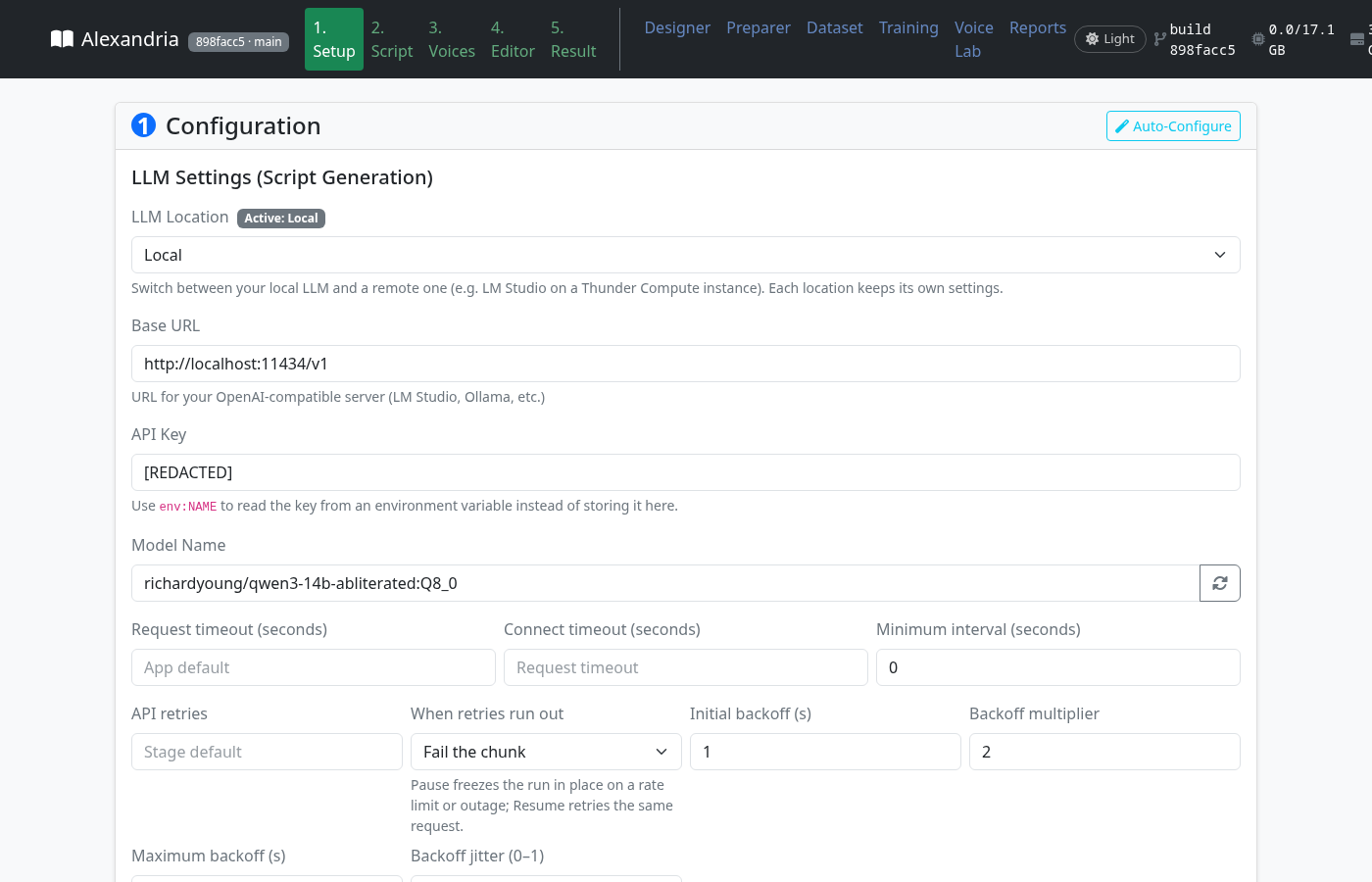
local / auto. Auto-Configure fills in the TTS batch
settings for your card.michel2_full, the project's
measured default; model-specific exceptions are in the results below.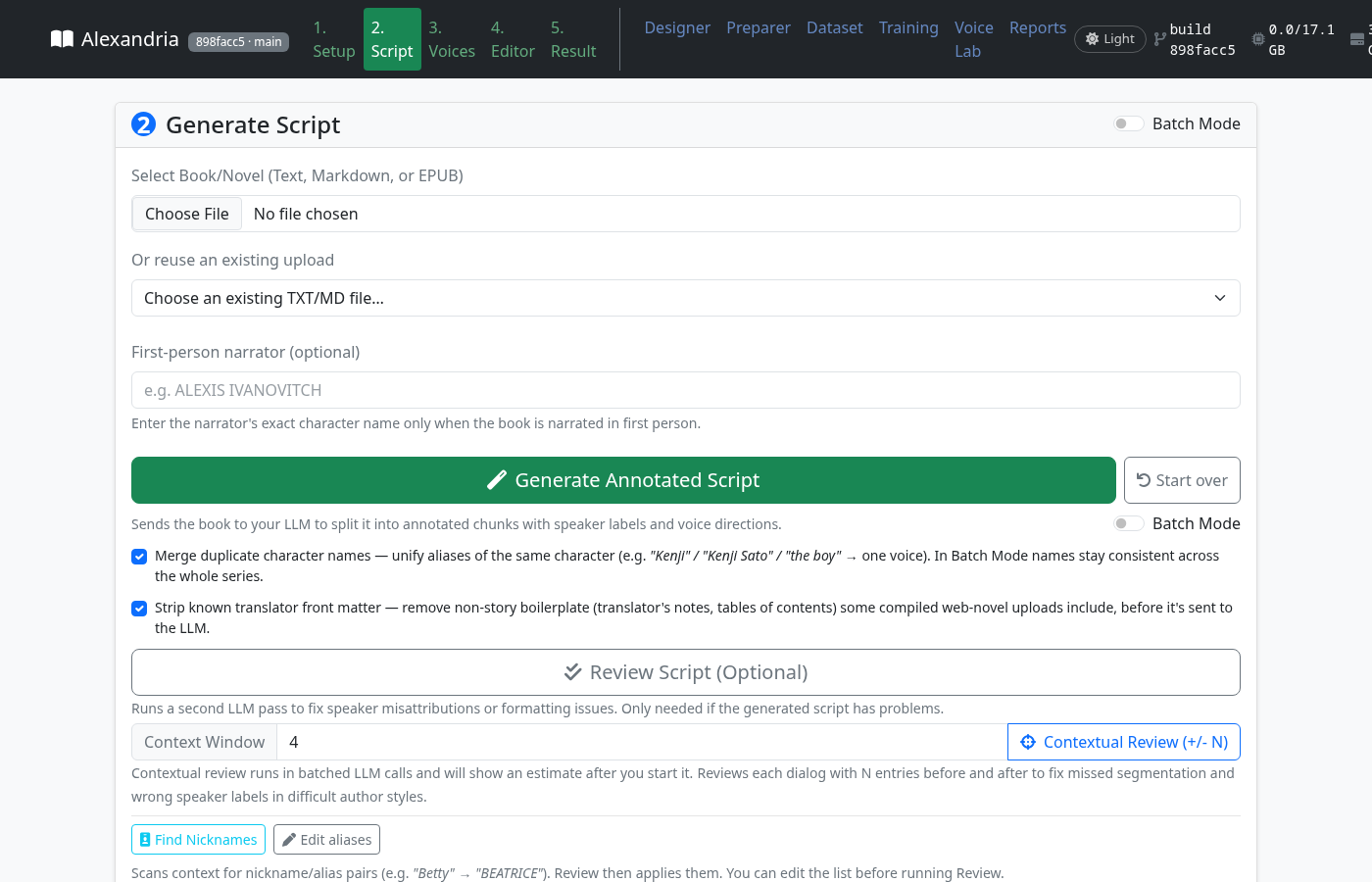
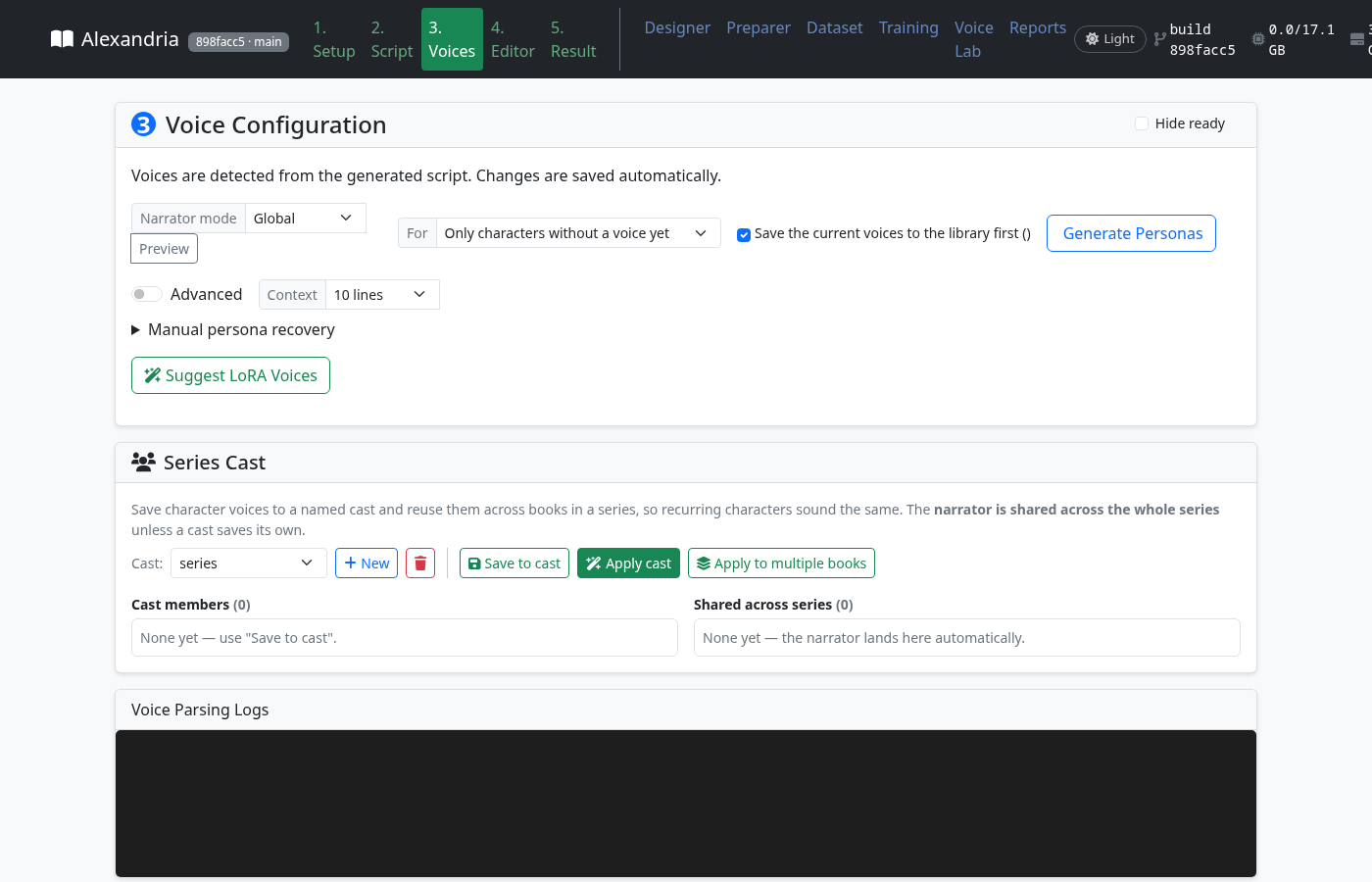
Every speaker gets a card, including the narrator. For the first run, assign a CustomVoice preset to each card and preview it. This avoids needing a reference recording or a trained adapter. Once that works, try the other options below.
For each character, either:
Other tools on this tab:
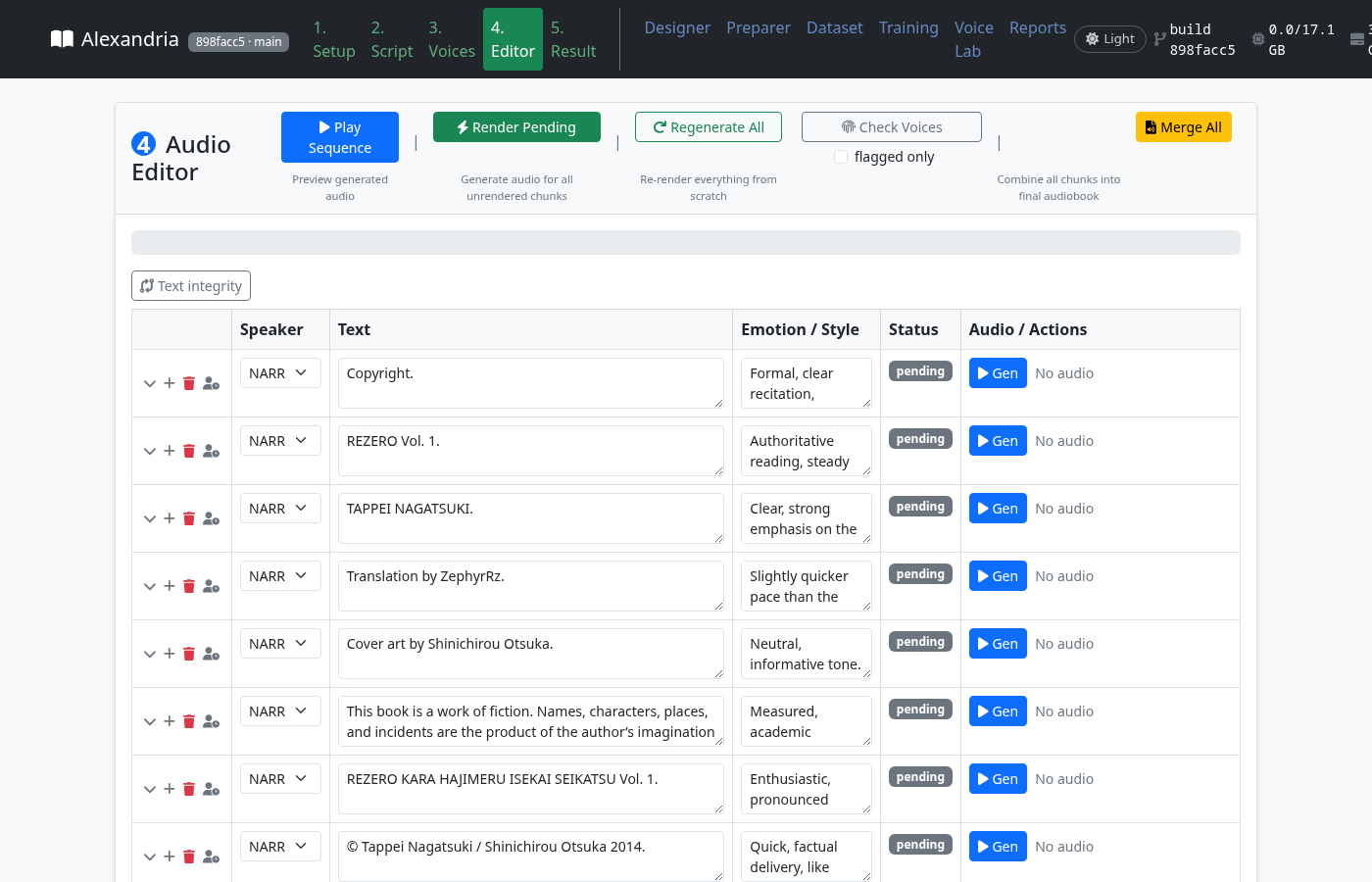
The activity line names what the run is waiting on. Check logs/api/<task>-latest.log,
then see Troubleshooting.
The interface is a five-step pipeline (the numbered tabs) plus tools: Designer, Preparer, Dataset, Training, Voice Lab and Reports. The header shows the commit of the running build, GPU memory in use, and a light/dark toggle.
LLM Settings — two profiles, Local and Remote, each remembered separately:
env:NAME), Model Name (refresh lists the server's
models). Test Connection shows the model's reply.http, or manual. In manual mode the app writes each
request to manual_llm/pending.json, and the Script tab shows a panel where you copy
the prompt and paste the reply — you act as the model.TTS Settings:
local / external), TTS Server URL, and Server pool (one URL
per line, one locked client per configured worker), External call timeout.auto / cuda / cpu / mps), TTS Language.Prompt Settings (Advanced):
michel2_full
surrounding block; 0 reproduces the scores from before 2026-09-19);{roster} and {batch}) and Worked example as editable text.
default_prompts_*.txt files without a restart.Step N (name): unit i of N — asking the model, retries by
attempt, a Plan: line with the planned model calls, and
ETA: about X left (Step k of 3, d of t model calls done).Voice Description, Sample Text, Generate Preview, Voice Name, Save Voice. Saved voices appear as clone references in the Voices tab and can be edited in place.
Turns an audiobook into aligned (audio, text) pairs for training a voice.
See PREPARER_GUIDE.md.
New Dataset, Add Row, Generate Pending / Regen All (renders each row with the Root Voice Description, Global Seed and a reference sample), Import / Export JSON, Save as Training Dataset.
The whole-library pipeline:
See lora.md and BATCH_PROCESSOR_GUIDE.md.
stage, targets,
fixtures, settings) for the environment, LLM, TTS and training benchmarks. | |
| |
Any OpenAI-compatible LLM — llama.cpp (the measured setup), LM Studio, Ollama, or DeepSeek/OpenAI-style APIs, with two saved profiles and automatic failover between them.
Three passes over the text:
Each pass has its own temperature and request size.
Measured prompt variants — choose the attribution prompt in Setup. The dropdown uses the same names as RECIPES, and the text is editable.
Review pass — a second LLM pass that:
It can look at ±N neighbouring lines, and can run across a whole series with nickname discovery and a two-pass (forward, then backward) option.
Consistent characters — merges duplicate character names, remembers every alias a character has been called, handles first-person narrators, strips translators' front matter, and repairs garbled text encodings.
Recovery — a checkpoint after every pass, resume after a power cut, pause instead of failing when API retries run out, save the finished part as a snapshot, and start over without losing your settings.
torch.compile for the codec. 3–6× faster than real time on a
mid-range card.In the order you meet them in the app:
Three-pass script generation (split, attribute, instruct). The text per request, lines per request and surrounding context of each pass are all set in Setup; each pass is checkpointed, resumable and pausable.
Attribution prompt variants in Setup (default, michel, michel2,
michel2_full, michel2_shot). Each was measured on the same labelled books, and the
prompt text you see is exactly what is sent; you can edit it and save it as a preset.
First-class reasoning models:
You no longer need to ban <think>.
LLM profiles — a local and a remote profile, each with its own URL, key (or
env:NAME), model, timeouts, retry/backoff policy, custom headers and request body.
Pass-1 dialogue detection: Auto / Quote marks only / Model only.
Script tab progress: an activity line saying what the run is waiting on, retries by attempt, and a time-left estimate from the pipeline itself; plus Start over, Save snapshot, and a Pause button that is greyed out on Windows instead of failing on every click.
Voices:
Editor: chunks are flagged when their audio drifted from the speaker's voice; dead air is trimmed when chunks are joined.
Export: 128 kbps MP3, chapter-by-chapter export with filename templates, an Audacity package, and chaptered M4B.
Voice Lab: an audiobook in, a named LoRA voice out — Preparer (alignment plus optional LLM enrichment) → dedup → batch LoRA training → profiling → naming, every stage inside the app's own environment.
Reports tab: run history, review checkpoints, and the benchmark harness (environment · LLM · TTS · training) with a manifest.
Attribution adapters served through llama-server --lora, trained on rights-clean
data, and released on Hugging Face with cards that say what was and was not measured.
Measurement discipline: GOALS.md, RECIPES.md, a results index that is rebuilt
rather than merged, provenance on every artifact, a release verifier, and about 3,400
unit tests.
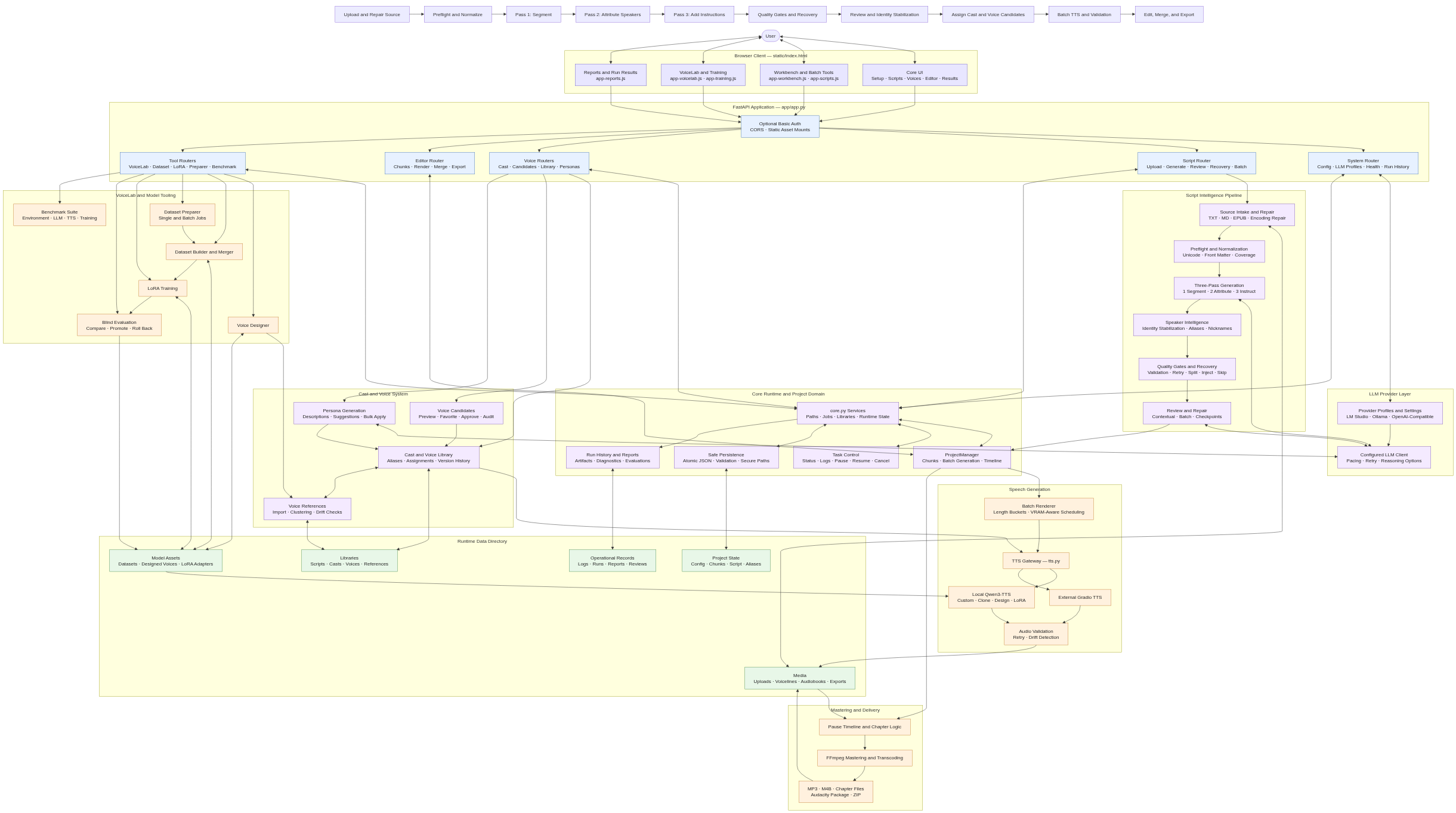
The strip along the top is the path a book takes:
The boxes below the strip are the code that does each step. The editable source is
docs/architecture.drawio.svg.
Every number here comes from a fixed test set with a paired control, and names that test set. They are benchmark results, not guarantees about your book. The full history of earlier tables is in docs/results/attribution-history.md.
The two test sets used most:
The shape of the prompt is the biggest single improvement this project found. The
michel2_full variant (after Michel et al.; it adds a block of about 2,000 characters of
surrounding text to each request) wins on every model measured. Base models, no adapter,
reasoning low, four-book fixture (RECIPES §"Prompt variants × bases", 2026-09-18):
| model | file | default prompt | michel2_full | notes |
|---|---|---|---|---|
| DeepSeek v4-pro (API, thinking off) | — | 91.1 | 94.9 | thinking low (8k): 95.4 — the cloud ceiling; about $0.50–0.75 per run of the fixture |
| Qwen3.8-27B UD-Q4_K_M | 16.5 GB | 82.9 | 89.8 | michel2 90.9 — the best local result |
| Qwen3.6-35B-A3B UD-Q4_K_XL | 22.4 GB | — | 89.6 | IQ3_XXS (13.2 GB) and IQ2_XXS (10.8 GB) score 91.6 / 90.5 on the nine novels |
| Muse-Glimmer-30B UD-Q3_K_XL | 13.4 GB | 81.5 | 90.5 | the shipped base; michel2 86.6; without reasoning 72.1 |
| Qwen3-14B Q4_K_M | 9.0 GB | 66.1 | 82.0 | +16 from the prompt alone, the largest gain of any model |
| Qwen3.5-9B / Qwen3-8B Q4_K_M | 5–6 GB | 62.6 / 60.8 | 74.9 / 77.0 | post-#616 prompt; both collapse on the hardest book |
Other reference points:
Local vs cloud (goal 4.2 — the best local model as a share of DeepSeek's score):
Nine novels, 2,655 lines, michel2_full, reasoning low. The full ladder and the
reasoning behind it: Which model for your card.
| your card | typical cards | run this | file | base accuracy | load the adapter? |
|---|---|---|---|---|---|
| 32 / 24 / 16 GB | RTX 5090, 4090, 3090, 5080, 5070 Ti, RX 9070 XT | Qwen3.8-27B UD-Q3_K_XL | 12.5 GB | 95.2% | yes — +1.0 on the novels it never trained on (p=0.004) |
| 12 GB | RTX 5070, Arc B580 | Qwen3.8-27B Q2_K_XL | 9.4 GB | 93.7% | no — no gain at this quant |
| 8 GB | RX 9060 XT 8 GB, RTX 5060 | Qwen3.8-27B UD-IQ2_XXS | 6.9 GB | 88.7% | yes — +1.3 (p=0.045) |
| 6 GB | GTX 1660, RTX 2060, laptops | Qwen3-8B Q4_K_M | 4.7 GB | 77.0% (four-book) | yes — +5.3 four-book, +6.2 on the nine novels |
| no usable GPU | — | a hosted model, or the manual transport | — | 94.9–95.4% (four-book) | n/a |
What the measurements say about choosing:
-c 4096 and 11.3 GB with -c 32768. These are
model-specific measurements, not a sizing rule. See the
context-size guide for workload
and response-budget limits; 8k is not enough for every request.LoRA adapters for the attribution task, trained only on rights-clean data: public-domain PDNC novels, RiQuA, and public-domain (CC0) play scripts rendered as prose. There is no light-novel text in them. They are public on the Hub: Om22s/alexandria-qwen3-attribution. How to load one: ATTRIBUTION_ADAPTER_SETUP.md.
An adapter helps most when the base model is struggling. Measured across four model families:
So load one where the base is visibly failing (blank replies, malformed JSON, wrong numbers of entries), not to chase a few points on a model that already works.
Current verdicts, nine held-out novels unless noted (after the 2026-09-28 rescore — RECIPES §"Rescored 2026-09-28"):
| adapter | where to load it | measured gain |
|---|---|---|
Qwen3-8B window25 (michel2v2) | Q4_K_M and Q3_K_XL | +6.2 (Q4_K_M), +9.0 (Q3_K_XL) |
Qwen3.8-27B (michel2v1) | Q4_K_M, Q3_K_XL, IQ2_XXS — not Q2_K_XL | +1.0 to +1.3 on the eight novels it did not train on |
Qwen3.6-35B-A3B window25 (michel2v2) | IQ1_M only | +1.5 at IQ1_M; flat at IQ2_XXS/IQ3_XXS; −2.1 at Q4_K_XL |
| Muse-Glimmer-30B window25 | IQ2_XXS, where the base cannot keep the JSON format | +61.9 (four-book); flat at IQ3; −1.0 at Q4_K_M |
Qwen3-14B rights-clean (attrv1) | only with the default prompt | +8.6 four-book under default; no gain under michel2_full |
attrv1 adapters with
default, and michel2 adapters with michel2_full.| goal | measure | result |
|---|---|---|
| 2.1 speaker similarity | ECAPA cosine between the generated voice and the human reading, as a % of the same narrator's own consistency | English clone 93% (LJSpeech) / 86% (a second reader); Japanese 98%; Chinese blocked until goal 2.2's anchor repair is re-measured. Target 95%. |
| 2.8 a voice stays the same voice | semitone drift of a CustomVoice narrator over 120 lines, against an anchor of its first lines | instructions as written 3.49 st; with a per-speaker identity anchor 2.53 st (ECAPA 0.737 → 0.771). A full-book run is queued. |
| 2.9 pitch-carried meaning | Japanese accent-nucleus high→low drop realised, morae aligned with CTC | human readers 72.6%, clone 74.4%, LoRA 71.2% — synthesis matches the human rate |
| dead air | leading silence on LoRA-voice lines | median 310–340 ms, 4–5% of a book; trimmed when chunks are joined (−45 dBFS, 40/80 ms kept) |
| pass 1 dialogue detection | quote-mark splitter on all 28 PDNC novels | 99.84% span recall, 94.89% precision — no model call needed to split quoted English |
Goals met and kept in place by a test (GOALS Part II): the selection gap is closed, every generated file is real audio, one character has one voice, output is reproducible, generation is faster than real time, nothing unspeakable reaches the TTS, foreign words are said as foreign words, and the measurement-integrity rules 6.1–6.4 hold.
Every row is measured on the four-book fixture (768 lines) with the app's pipeline at temperature 0 and a JSON schema, and with reasoning low (1,024-token budget) where the model reasons (RECIPES §"Prompt variants × bases", 2026-09-18). "Best variant" is the attribution prompt to pick in Setup.
| model | file size | card it fits (file + context) | best variant | score | good for |
|---|---|---|---|---|---|
| DeepSeek v4-pro (hosted API) | — | none | michel2_full, thinking low 8k | 95.4 | the ceiling; about $0.50–0.75 for a fixture-sized book |
| Qwen3.8-27B UD-Q4_K_M | 16.5 GB | 24 GB | michel2 | 90.9 | the best local model; the worked example (michel2_shot) gives the best score on the hardest book (94.4) |
| Qwen3.6-35B-A3B UD-Q4_K_XL / IQ3_XXS / IQ2_XXS | 22.4 / 13.2 / 10.8 GB | 24 / 16 / 16 GB | michel2_full | 89.6 four-book; 91.6 / 90.5 nine-novel at IQ3 / IQ2 | speed: fits a 16 GB card at IQ3 or IQ2 (with --n-cpu-moe offloading some experts) and stays within a point of Q4 |
| Muse-Glimmer-30B UD-Q3_K_XL | 13.4 GB | 16 GB | michel2_full | 90.5 | strong, but serve it with reasoning on and the deepseek reasoning format, and never with --skip-chat-parsing |
| Qwen3-14B Q4_K_M | 9.0 GB | 12 GB | michel2_full | 82.0 | +16 from the prompt; the rights-clean adapter adds +8.6 on top under the default prompt |
| Qwen3.5-9B / Qwen3-8B Q4_K_M | 5–6 GB | 8 GB | michel2_full | ~72 | the 8 GB option; both collapse on the hardest book (47 / 62) |
Rules that held on every model:
michel2_full ≥ michel2 ≥ michel ≥ default. The one exception is Qwen3.8, where
michel2 beats michel2_full by a point. The surrounding-text block is the biggest
single step.michel2_shot) never helps, except on Qwen3.8.default, and the michel2 adapters with michel2_full.<think>.Measured one job at a time under the GPU lock, on an RX 9070 XT (16 GB, ROCm), unless stated otherwise:
| work | rate |
|---|---|
| batch speech rendering, CustomVoice | 3–6× real time |
| LoRA voice retrain, one adapter (200 clips) | about 5.4 min |
| identity gate, one adapter | 2.0–2.7 min |
| three-pass attribution of a 40-window novel slice, local A3B IQ2/IQ3 at reasoning low | about 30–50 min per novel |
| Qwen3-14B Q4_K_M in llama.cpp, fully on the card | about 32 tokens/s |
| full unit-test suite (CPU) | about 20 s |
Batch settings: raise Parallel Workers as far as memory allows, Sub-batching on, and Compile Codec on for long books (30–60 s warm-up, then 3–4× faster decoding). Measured on the RX 9070 XT (48 lines, CustomVoice, production batch path, codec not compiled), speed was still rising at 16:
| Parallel Workers | 1 | 2 | 4 | 8 | 16 |
|---|---|---|---|---|---|
| × real time | 1.20 | 1.56 | 2.24 | 2.78 | 3.93 |
| peak VRAM (torch) | 4.6 GB | 5.1 GB | 5.9 GB | 5.7 GB | 6.8 GB |
The Auto-Configure button sets these from your card's memory.
ROCm notes:
device_utils.enable_rocm_optimizations).llama-cpp-python wheel over the HIP build the installer
makes. It is CPU-only and silently replaces the GPU build.An annotated script is a JSON array. Each entry is one line the TTS will speak:
[
  {"speaker": "NARRATOR", "text": "The rain had not stopped for three days.", "instruct": "Low, steady, unhurried."},
  {"speaker": "MARA", "text": "We should turn back.", "instruct": "Tense, quiet, near a whisper."},
  {"speaker": "TOMAS", "text": "Not yet.", "instruct": "Flat, resolved."}
]
speaker is NARRATOR or an uppercase character name from the cast list.
UNKNOWN means the model could not tell; the review pass and aliases clean these up.text is exactly what is spoken.
instruct is the delivery direction written by pass 3. The Voices tab's identity
anchor is added at render time, so an instruction cannot change who the voice is.Pass 3 writes sounds as pronounceable text ("Ahh!", "Mmm…", "Haha!") with a matching instruction, and the TTS speaks them. Nothing unspeakable — bare tags, pictographic kana — reaches the speech engine (goal 5.1).
Everything is stored under the app directory (or ALEXANDRIA_DATA_DIR if set):
| path | contents |
|---|---|
uploads/ | the books you uploaded (reusable) |
annotated_script.json, voice_config.json, character_aliases.json | the active book, its voices and its aliases |
scripts/<name>.json + <name>.voice_config.json | the saved-script library |
voice_library.json | casts |
chunks.json | the render state of the active book |
voicelines/ | one WAV/MP3 per chunk |
cloned_audiobook.mp3 | the merged audiobook (128 kbps) |
audiobook.m4b | the chaptered M4B |
chapter_exports/ | chapter files from the template exporter, plus a zip |
manual_llm/pending.json / response.json | the manual-transport mailbox |
lora_models/, lora_datasets/, designed_voices/, clone_voices/, builtin_lora/ | model assets (built-in adapters ship read-only in the repo) |
logs/api/, logs/review_responses.log, reports/ | operational records; run history is served by /api/runs |
ab_test_runtime/experiments/ | every measurement artifact, indexed in RESULTS_INDEX.md |
Each of the three passes reads a prompt file in app/:
default_prompts_segment.txt, default_prompts_attribute.txt,
default_prompts_instruct.txt — each is a system message, then ---SEPARATOR---,
then a user message with {roster} and {batch} placeholders.review_prompts.txt.How to change them:
app/attribution_prompt_variants.py defines how each attribution variant
reshapes the request (the michel2_full surrounding block, the michel2_shot worked
example, and so on). The Setup dropdown selects one, and the text shown is what will be
sent.config.json and survive restarts. Reset to Defaults reloads the files without a
restart.POST /api/prompts/attribution_preview).start.js waits for Alexandria to print its web address. Import errors, port conflicts,
Python tracebacks and FastAPI startup failures now stop the launcher visibly, instead of
leaving the sidebar stuck on Starting.
logs/api/start.js/latest, with timestamped runs beside it;logs/sessions/ groups related install, start and helper runs;logs/api/*-latest.log.start.js entry. Do not
launch a second copy to get around an "address already in use" error.
env_doctor.py reports the two most common causes: a missing app/env, or a torch
that a later install replaced with a CPU-only build.The launcher picks a free port through Pinokio and binds Alexandria to 127.0.0.1; you
do not need to set a port.
Read the activity line under Generate. It names the step, the unit, the attempt, and what it is waiting on (the model, a rate-limit backoff, a retry).
On Windows the app cannot suspend the worker process, so Pause is disabled instead of failing on every click. Cancel and Resume failed run still work.
logs/review_responses.log shows the exact reply.manual and answer the prompts
yourself from the Script tab panel.The TTS weights come from Hugging Face on the first render. A proxy or a half-finished
download shows up as a stall at 0%. Delete the partial file in the Hugging Face cache and
try again; download_model.py fetches the weights outside the app.
logs/api/audio-latest.log — the first traceback is the real one.bf16, remove it.Lower Parallel Workers and Max Items/Batch. The memory check refuses to start a batch it cannot fit, so an out-of-memory error in the middle of a run usually means another process took the card after the check.
ffmpeg is missing or not on the PATH. The installer builds it into the environment, so a
428-byte file means the app is running outside app/env. Every generated file is checked
(goal 3.2), and the Editor flags the chunk.
Source repair on upload fixes common encoding problems. For a book that still shows ’,
run the repair preview from Saved Scripts. Pictographic kana and other unspeakable
characters are deliberately removed before the TTS (goal 5.1).
Every action in the interface is an HTTP call. The route tables below are generated from
the route decorators in app/routers/ (181 routes).
By default the app has no authentication and binds to 127.0.0.1. If you expose it
beyond your own machine — Docker binds 0.0.0.0, or you use a tunnel or reverse proxy —
turn on HTTP Basic Auth:
export ALEXANDRIA_AUTH_PASSWORD=your-secret       # turns the password check on
export ALEXANDRIA_AUTH_USERNAME=alexandria        # optional
Every request must then carry the credentials:
curl -u alexandria:your-secret http://localhost:4200/api/config
import requests
requests.get("http://localhost:4200/api/config", auth=("alexandria", "your-secret"))
fetch("http://localhost:4200/api/config", {headers: {Authorization: "Basic " + btoa("alexandria:your-secret")}})
GET /api/config never returns API keys; they are redacted.
Whether or not auth is on, the app refuses two kinds of request a web page you visit could otherwise make to it:
403. Requests
from the app's own page, from localhost / *.localhost (Pinokio's proxy), and from
loopback or private-network IPs are allowed. So are clients that send no Origin or
Referer at all, such as curl and scripts.Host is an unknown domain name (DNS rebinding) gets 400. IP
addresses, localhost, *.localhost and names without a dot (mybox) are allowed.If you reach the app some other way, list it:
export ALEXANDRIA_ALLOWED_HOSTS=audiobooks.example.com          # a hostname you browse to
export ALEXANDRIA_ALLOWED_ORIGINS=https://audiobooks.example.com # a page that calls the API
CORS_ORIGINS origins are allowed too.
BASE=http://localhost:4200
# 1. upload a book (it becomes the active book) and start the three passes
curl -s -X POST $BASE/api/upload -F "file=@book.txt"
curl -s -X POST $BASE/api/generate_script -H 'Content-Type: application/json' -d '{}'
# 2. follow its progress
curl -s $BASE/api/status/eta            # {"task": "script", "elapsed_seconds": ..., "eta_seconds": ..., "fraction": ...}
curl -s $BASE/api/status/script | python -m json.tool | tail -20
# 3. voices
curl -s $BASE/api/voices
curl -s -X POST $BASE/api/generate_personas -H 'Content-Type: application/json' -d '{"new_only": true}'
# 4. render and merge
curl -s -X POST $BASE/api/generate_batch
curl -s -X POST $BASE/api/merge
# 5. download the result
curl -s -o audiobook.mp3 $BASE/api/audiobook
import requests, time
B = "http://localhost:4200"
requests.post(f"{B}/api/upload", files={"file": open("book.txt", "rb")})
requests.post(f"{B}/api/generate_script", json={})
while requests.get(f"{B}/api/status/script").json().get("running"):
    print(requests.get(f"{B}/api/status/eta").json().get("eta_seconds")); time.sleep(30)
requests.post(f"{B}/api/generate_personas", json={"new_only": True})
requests.post(f"{B}/api/generate_batch")
const B = "http://localhost:4200";
await fetch(`${B}/api/generate_script`, {method: "POST", headers: {"Content-Type": "application/json"}, body: "{}"});
const eta = await (await fetch(`${B}/api/status/eta`)).json();
generate_script always works on the active book — the last one uploaded, or one chosen with
POST /api/uploads/select; it takes no file name.
Request bodies are Pydantic models in app/routers/*.py — GenerateScriptRequest
(first_person_narrator, strip_front_matter, start_over), GeneratePersonasRequest
(new_only, …), LibrarySaveRequest, and so on. The OpenAPI schema is at
GET /openapi.json, and interactive docs are at /docs.
app/routers/system.py)| method | path | what it does |
|---|---|---|
POST | /api/prompts/attribution_preview | The exact system message and user message pass 2 would send for one |
GET | /api/runs | get run history |
GET | /api/runs/{run_id} | get run history entry |
GET | /api/status/version | What git commit is this running process actually executing |
GET | /api/system/stats | Return GPU memory, disk, and basic hardware statistics |
GET | /api/status/eta | Return progress/ETA for the most relevant currently-running task, if any |
GET | /api/lmstudio/status | Report whether the loaded model is using ideal settings (VRAM-safe |
POST | /api/lmstudio/optimize | Toggle the loaded model between VRAM-safe/best settings and LM Studio's |
POST | /api/llm/models | The model ids the endpoint advertises (OpenAI-compatible /models), so the |
POST | /api/llm/test | Test LLM connectivity. Uses the posted profile if given (so the Setup tab |
GET | / | read index |
GET | /favicon.ico | read favicon |
GET | /api/config | get config |
GET | /api/default_prompts | get default prompts |
POST | /api/config | save config |
app/routers/script.py)| method | path | what it does |
|---|---|---|
GET | /api/uploads | list reusable uploads |
POST | /api/uploads/select | select existing upload |
POST | /api/upload | upload file |
POST | /api/generate_script/snapshot | Save the finished part of the running generation to the library |
POST | /api/generate_script | generate script |
GET | /api/generate_script/recovery | Expose only recovery metadata; source text remains in the local checkpoint |
GET | /api/generate_script/recovery/detail | The failed chunk in full: attempts, source, prompt, retry profile |
POST | /api/generate_script/inject | Manual output injection (#522 s4.4): a pasted [{type, text}] |
POST | /api/generate_script/skip | 'Skip' that loses nothing. Pass 1: the chunk goes in split only at its |
POST | /api/generate_script/retry | Resume the current failed three-pass run from its durable checkpoint |
POST | /api/generate_script/cancel | generate script cancel |
POST | /api/generate_script/pause | generate script pause |
POST | /api/generate_script/resume | generate script resume |
POST | /api/review_script | Review the current annotated script. Accepts empty POST or JSON body |
POST | /api/review_script_contextual | review script contextual |
POST | /api/review_script/cancel | review script cancel |
POST | /api/review_script/pause | review script pause |
POST | /api/review_script/resume | review script resume |
POST | /api/find_nicknames | Scan the working script for character nicknames/aliases and write character_aliases.json |
POST | /api/find_nicknames/cancel | find nicknames cancel |
POST | /api/find_nicknames/pause | find nicknames pause |
POST | /api/find_nicknames/resume | find nicknames resume |
GET | /api/character_aliases | Return the current alias map { alias: canonical } |
POST | /api/character_aliases | Overwrite the alias map (lets the user correct discovered nicknames before review) |
POST | /api/review_script/batch/start | Review multiple saved scripts from the Scripts library, in place |
POST | /api/review_script/batch/cancel | review script batch cancel |
POST | /api/review_script/batch/pause | review script batch pause |
POST | /api/review_script/batch/resume | review script batch resume |
POST | /api/generate_script/batch/preflight | generate script batch preflight |
POST | /api/generate_script/batch/start | Process multiple text/EPUB files through three_pass_generate.py - the |
POST | /api/generate_script/batch/cancel | generate script batch cancel |
POST | /api/generate_script/batch/pause | generate script batch pause |
POST | /api/generate_script/batch/resume | generate script batch resume |
GET | /api/annotated_script | Return the current working annotated_script.json |
GET | /api/annotated_script/diff | Word-level differences between the saved source and the active script |
GET | /api/status/{task_name} | get status |
GET | /api/manual_llm/pending | The prompt to copy for the request the run is waiting on (issue #593) |
POST | /api/manual_llm/response | The user's (or their script's) answer to the pending request. Whether |
GET | /api/logs/{task_name} | Serve the complete on-disk log for a task (the in-memory status only keeps a |
app/routers/scripts_library.py)| method | path | what it does |
|---|---|---|
GET | /api/scripts | List saved scripts without blocking the FastAPI event loop on disk I/O |
POST | /api/scripts/save | Save the current annotated_script.json (and voice_config.json) under a name |
POST | /api/scripts/load | Load a saved script, replacing the current annotated_script.json and chunks |
POST | /api/scripts/{name}/preflight | Audit a saved script and optional uploaded source without changing either |
POST | /api/scripts/{name}/repair/deterministic/preview | Preview only source-proven Unicode and adjacent-duplicate repairs |
POST | /api/scripts/{name}/repair/deterministic/apply | Apply an unchanged preview, preserving the original in a timestamped backup |
GET | /api/scripts/{name}/repair/speakers/preview | preview speaker repair |
POST | /api/scripts/{name}/repair/speakers/apply | apply speaker repair |
GET | /api/scripts/{name}/repair/content/preview | preview content repair |
POST | /api/scripts/{name}/repair/content/apply | apply content repair |
DELETE | /api/scripts/{name} | Delete a saved script |
app/routers/voices.py)| method | path | what it does |
|---|---|---|
GET | /api/voices | get voices |
POST | /api/voices/{speaker}/versions | save voice version |
POST | /api/voices/{speaker}/versions/{version_id}/select | select voice version |
POST | /api/voices/{speaker}/candidates | add voice candidate |
POST | /api/voices/{speaker}/candidates/{candidate_id}/select | select voice candidate |
DELETE | /api/voices/{speaker}/candidates/{candidate_id} | delete voice candidate |
POST | /api/voices/{speaker}/candidates/{candidate_id}/favorite | favorite voice candidate |
POST | /api/narrator/strategy | save narrator strategy |
POST | /api/narrator/preview | preview narrator |
POST | /api/voices/{speaker}/style_timeline | From this line on, the character sounds like character_style (an |
DELETE | /api/voices/{speaker}/style_timeline/{from_index} | remove style point |
POST | /api/voices/{speaker}/approval | Set persona and voice approval independently for a character |
POST | /api/voices/{speaker}/persona-voice-audit | Allow a user to correct the provenance note for an assignment |
POST | /api/generate_personas | Generate LLM-derived voice persona descriptions and VoiceDesign previews |
POST | /api/cancel_persona | cancel persona |
POST | /api/persona/recover | Validate and save one externally generated persona without rerunning the batch |
POST | /api/save_voice_config | save voice config |
POST | /api/suggest_voices | Suggest the best-matching downloaded LoRA voice for each character based on |
POST | /api/suggest_voices/apply | apply voice suggestion |
POST | /api/suggest_voices/apply_bulk | apply voice suggestions bulk |
app/routers/voice_library.py)| method | path | what it does |
|---|---|---|
GET | /api/voice_library | Return the full library plus the current book's characters with line counts |
POST | /api/voice_library/casts | voice library create cast |
POST | /api/voice_library/favorites/{adapter_id} | Star or unstar one adapter; suggestions prefer compatible favorites |
DELETE | /api/voice_library/casts/{cast} | voice library delete cast |
DELETE | /api/voice_library/casts/{cast}/members/{key} | voice library delete member |
POST | /api/voice_library/save | Save selected current-book characters into a cast (NARRATOR -> shared by default) |
POST | /api/voice_library/match | Fuzzy-match the current book's characters against a cast (+shared pool) |
POST | /api/voice_library/match_bulk | Fuzzy-match the union of characters across several saved books against a |
POST | /api/voice_library/apply | Apply confirmed cast members onto the current voice_config by the given mapping |
POST | /api/voice_library/apply_bulk | Apply confirmed cast members onto several saved books' voice_config.json |
app/routers/voice_design.py)| method | path | what it does |
|---|---|---|
POST | /api/voice_design/preview | Generate a preview voice from a text description |
POST | /api/voice_design/save | Save a preview voice as a permanent designed voice |
GET | /api/voice_design/list | List all saved designed voices |
DELETE | /api/voice_design/{voice_id} | Delete a saved designed voice |
GET | /api/clone_voices/list | List all uploaded clone voices |
POST | /api/clone_voices/upload | clone voices upload |
DELETE | /api/clone_voices/{voice_id} | Delete an uploaded clone voice |
app/routers/editor.py)| method | path | what it does |
|---|---|---|
GET | /api/audiobook | get audiobook |
GET | /api/chunks | get chunks |
POST | /api/chunks/restore | Re-insert a previously deleted chunk at a specific index |
POST | /api/chunks/drift_check | Score done chunks against their speaker's reference voice (ECAPA cosine, |
POST | /api/chunks/{index} | update chunk |
POST | /api/chunks/{index}/insert | Insert an empty chunk after the given index |
DELETE | /api/chunks/{index} | Delete a chunk at the given index |
POST | /api/chunks/{index}/generate | generate chunk endpoint |
POST | /api/merge | merge audio endpoint |
POST | /api/export_audacity | export audacity endpoint |
GET | /api/export_zip | One zip of whatever exported audio exists (MP3, M4B); 404 when nothing does |
GET | /api/export_audacity | get audacity export |
POST | /api/merge_m4b | merge m4b endpoint |
POST | /api/export_chapters | Write chapters as separate MP3/WAV files (CPU only, no GPU lock) |
POST | /api/export_chapters/cancel | cancel chapter export |
GET | /api/export_chapters/preview | The filenames an export would produce, without decoding any audio |
GET | /api/chapter_exports | list chapter exports |
GET | /api/chapter_exports/file/{name} | download chapter |
GET | /api/chapter_exports/zip | All exported chapters, or the comma-separated names, in one zip |
GET | /api/audiobook_m4b | get audiobook m4b |
POST | /api/m4b_cover | Upload a cover image for M4B export |
DELETE | /api/m4b_cover | Remove the uploaded cover image |
POST | /api/generate_batch | Generate multiple chunks in parallel using configured worker count |
POST | /api/generate_batch_fast | Generate multiple chunks using batch TTS API with single seed. Faster but less flexible |
POST | /api/cancel_audio | Cancel ongoing audio generation and reset in-progress chunks |
GET | /api/reports | List all generated review reports in the reports/ directory, newest first |
GET | /api/reports/{filename} | Return the raw Markdown contents of a generated report |
GET | /api/review/checkpoints | List saved review checkpoints (what's done + where a re-run resumes), plus |
app/routers/lora.py)| method | path | what it does |
|---|---|---|
POST | /api/lora/upload_dataset | Upload a ZIP containing WAV files and metadata.jsonl |
GET | /api/lora/datasets | List uploaded LoRA training datasets |
DELETE | /api/lora/datasets/{dataset_id} | Delete an uploaded dataset |
POST | /api/lora/train/cancel | Cancel a running LoRA training subprocess (it holds the global GPU lock for |
POST | /api/lora/train | Start LoRA training as a subprocess |
GET | /api/lora/models | List all LoRA adapters (built-in + user-trained) |
GET | /api/lora/backups | Report rollback-backup storage and host free-space pressure |
GET | /api/lora/models/{adapter_id}/comparison | Return validated, paired evaluation audio for a retained candidate |
POST | /api/lora/models/{adapter_id}/review/session | Open a blind A/B human-review session (identities hidden until submit) |
GET | /api/lora/models/{adapter_id}/review/session/{session_id}/audio/{label}/{probe_id} | Stream one blind sample (A/B) without revealing which side it is |
POST | /api/lora/models/{adapter_id}/review/session/{session_id} | Record a human listening decision; rejects if evidence changed. Never promotes |
GET | /api/lora/models/{adapter_id}/reviews | Return this adapter's bounded human-review history, newest first |
POST | /api/lora/models/{adapter_id}/reviews/cleanup | Delete this adapter's human-review history, reporting count and space freed |
POST | /api/lora/models/{adapter_id}/promote | Promote the evaluated recommendation while preserving production for rollback |
POST | /api/lora/models/{adapter_id}/rollback-promotion | Restore the production checkpoint preserved by the last promotion |
POST | /api/lora/models/{adapter_id}/recover-checkpoint-swap | Restore production after a process interruption left a swap journal |
DELETE | /api/lora/models/{adapter_id}/rollback-backup | Delete the preserved production checkpoint after explicit confirmation |
DELETE | /api/lora/models/{adapter_id} | Delete a trained LoRA adapter. Built-in adapters cannot be deleted |
POST | /api/lora/download/{adapter_id} | Download a built-in LoRA adapter from HuggingFace |
POST | /api/lora/test | Generate test audio using a LoRA adapter (built-in or user-trained) |
POST | /api/lora/preview/{adapter_id} | Generate or return cached preview audio for a LoRA adapter |
app/routers/dataset_builder.py)| method | path | what it does |
|---|---|---|
GET | /api/dataset_builder/list | List existing dataset builder projects |
POST | /api/dataset_builder/create | Create a new dataset builder project |
POST | /api/dataset_builder/update_meta | Update project description and global seed without touching samples |
POST | /api/dataset_builder/update_rows | Update row definitions, preserving existing generation status/audio |
POST | /api/dataset_builder/generate_sample | Generate a single dataset sample using VoiceDesign |
POST | /api/dataset_builder/generate_batch | Batch generate dataset samples as a background task |
POST | /api/dataset_builder/cancel | Cancel ongoing batch dataset generation |
GET | /api/dataset_builder/status/{name} | Get per-sample generation status for a dataset builder project |
POST | /api/dataset_builder/save | Finalize dataset builder project as a training dataset |
DELETE | /api/dataset_builder/{name} | Discard a dataset builder working project |
app/routers/preparer.py)| method | path | what it does |
|---|---|---|
POST | /api/preparer/start | preparer start |
POST | /api/preparer/cancel | preparer cancel |
GET | /api/preparer/list | List completed dataset ZIP files available for download |
GET | /api/preparer/download/{filename:path} | Download a generated dataset ZIP |
POST | /api/preparer/batch/start | Process multiple audio files sequentially through the preparer script |
POST | /api/preparer/batch/cancel | preparer batch cancel |
app/routers/voicelab.py)| method | path | what it does |
|---|---|---|
GET | /api/voicelab/health | voicelab health |
GET | /api/voicelab/diagnostics | voicelab diagnostics |
POST | /api/voicelab/preflight | voicelab preflight |
GET | /api/voicelab/config | Return the pipeline paths plus whether each resolves on this machine |
POST | /api/voicelab/config | voicelab save config |
GET | /api/voicelab/inspect | Preview what a dedup input folder contains so the UI can show readiness |
POST | /api/voicelab/start | Run the selected pipeline stages in sequence as one cancel/pausable job |
POST | /api/voicelab/cancel | voicelab cancel |
POST | /api/voicelab/pause | voicelab pause |
POST | /api/voicelab/resume | voicelab resume |
app/routers/benchmark.py)| method | path | what it does |
|---|---|---|
POST | /api/benchmark/preflight | benchmark preflight |
POST | /api/benchmark/start | benchmark start |
POST | /api/benchmark/cancel | benchmark cancel |
GET | /api/benchmark/status | benchmark status |
alexandria-audiobook2/
├── app/
│   ├── app.py                       # FastAPI app: routers, auth, static mount
│   ├── routers/                     # system, script, scripts_library, voices, voice_library,
│   │                                #   voice_design, editor, lora, dataset_builder, preparer,
│   │                                #   voicelab, benchmark  (181 routes)
│   ├── core.py                      # process_state, GPU lock, ETA, run bookkeeping
│   ├── three_pass_generate.py       # pass 1 split · pass 2 attribute · pass 3 instruct
│   ├── attribution_prompt_variants.py, default_prompts*.txt, review_prompts.txt
│   ├── generate_script.py, review_script.py, generate_personas.py, find_nicknames.py
│   ├── llm_provider.py              # profiles, retries, reasoning shape, manual transport
│   ├── lmstudio_settings.py, llm_bench.py
│   ├── tts.py                       # TTSEngine: local Qwen3-TTS / external pool; trim, anchor
│   ├── project.py                   # chunks, batch rendering, merge, M4B, chapter export
│   ├── train_lora.py, voice_reference.py, speaker_identity.py
│   ├── experiments/                 # ~290 measurement scripts (lora_serving_eval, voice_drift,
│   │                                #   aligned_japanese_accent, quote_segmenter, …)
│   ├── tests/                       # ~3,400 unit tests + unit_test_inventory.json
│   ├── static/index.html            # the single-page app (no build step)
│   ├── static/js/app-*.js           # core, scripts, workbench, training, voicelab, reports
│   └── requirements.txt, torch-constraints.txt
├── ab_test_runtime/experiments/     # every artifact cited in GOALS/RECIPES (indexed)
├── builtin_lora/                    # shipped voice adapters
├── docs/                            # architecture diagram, screenshots, audits, results, history
├── alexandria_preparer_rocm_compatible.py, alexandria_batch_processor.py, alexandria_compare.py
├── tools/voice_lab/                 # Voice Lab stage scripts and dataset audit
├── gpu_job.sh, gpu_pause.sh         # the local experiment queue (one job per card)
├── ready.sh, verify_release.py, resolve_generated.sh
├── GOALS.md, RECIPES.md, RESULTS_INDEX.md, HF_MODEL_GUIDE.md
├── install.js, start.js, update.js, reset.js, pinokio.js, pinokio.json
└── Dockerfile, docker-compose.yml, alexandria_colab.ipynb
./ready.sh before committing. It regenerates the derived files (API contract
snapshots, the unit-test inventory, the results index, audits) and then runs the
release verifier. CI runs the same checks..gitattributes marks them merge=ours,
and the post-merge hook rebuilds them. ./ready.sh installs the hooks in a fresh
checkout.CLAUDE.md before editing either file.main of on22s/alexandria-audiobook2.instruct_lexicon.py (MIT; notice in
THIRD_PARTY_NOTICES.md).env:NAME API keys, ported in #574, and the idea of
an external TTS server pool (#532).Every licence, and what was taken under it, is listed in THIRD_PARTY_NOTICES.md.
MIT (see LICENSE). The attribution adapters on Hugging Face are Apache-2.0; see THIRD_PARTY_NOTICES.md for the rights of the data they were trained on.
English | 中文 | 日本語 · Listen to a sample
Alexandria Audiobook2 turns a book into an audiobook with a different voice for
every character. You give it a .txt, .md or .epub file; a language model
works out who says each line and how it should sound; a text-to-speech model
reads it; and you get an MP3 or a chaptered M4B.
| I want to… | Start here |
|---|---|
| Make an audiobook | Install, then follow your first audiobook. |
| Pick a model for my graphics card | Which model for your card, then the full guide. |
| Understand the research results | Results at a glance, then RECIPES.md and the Muse quant comparison. |
| Find a particular run or its raw data | Search the results index; each entry links to the committed artifact. |
| Browse all documentation | The documentation map lists user guides, operations notes, results and history. |
| Contribute | The project wiki, then Contributing and GOALS.md. |
You do not need to read any of the research sections to install or use the app.
It is a research fork of Alexandria. What makes it different is that every choice is measured:
The settings that won are the defaults, and every alternative stays selectable
in the Setup tab. For example, the michel2_full attribution prompt became the
default on 2026-09-19, once the last model family confirmed it was best. The
numbers, the failures and the recipes are all in this repository.
Key documents
Pinokio, or Docker / Google Colab (see Installation).
A language-model (LLM) server the app can reach through an OpenAI-compatible API. The app does not include one. Any of these works:
llama-server — every number in
this README was measured with it. It supports --lora for the attribution adapters
and --reasoning-budget for reasoning models.Recommended LLM models lists what each model size gets you.
A GPU for speech generation: 8 GB of VRAM minimum, 16 GB recommended.
RAM: 16 GB recommended.
Disk: about 20 GB for the environment and TTS weights, plus your LLM files and audio.
| GPU | OS | Speech (TTS) | Notes |
|---|---|---|---|
| NVIDIA | Windows / Linux | full | CUDA build via torch.js with flash attention; whisper.cpp built with CUDA for the Preparer |
| AMD discrete | Linux | full | ROCm; tested daily on an RX 9070 XT (RDNA4, ROCm 7.0). llama-cpp-python and whisper.cpp are built with HIP for your gfx target during install |
| AMD APU / integrated | Linux | full, slower | TTS runs in fp32 (bf16 is broken on the 660M/680M/780M class); everything else is the same |
| AMD | Windows | CPU only | ROCm is not available on Windows; use Linux for GPU |
| Apple Silicon | macOS | CPU only | Qwen3-TTS does not support MPS; whisper.cpp is built with Metal |
| Intel | macOS | CPU only |
More documentation: the upstream project's wiki still explains voice types, LoRA training and batch generation well. Where this fork behaves differently, this README and
RECIPES.mdare correct.
https://github.com/on22s/alexandria-audiobook2.app/env;torch.js) and pins it,
so no later step can swap it for a CPU-only build;Fresh Pinokio installations use CPython 3.10 for the prebuilt NVIDIA SageAttention/FlashAttention wheels. Existing environments are preserved; requesting those optional wheels from a different Python version stops before package installation with a compatibility error.
Runs the app on a free T4 GPU. You need a free ngrok account for the tunnel; the notebook walks you through it.
git clone https://github.com/on22s/alexandria-audiobook2.git
cd alexandria-audiobook2
docker compose up --build
http://localhost:4200.Security: Compose publishes the port on
127.0.0.1only. The container itself binds0.0.0.0, because Docker needs that for forwarding. If you publish the host port on0.0.0.0, also setALEXANDRIA_AUTH_PASSWORD— see Authentication.
Alexandria does not include a language model. Before you generate a script, one of these must be running and reachable from the Base URL in the Setup tab.
llama.cpp (recommended; the numbers here were measured with it):
llama-server -m Qwen3-14B-Q4_K_M.gguf --host 127.0.0.1 --port 8090 \
  -ngl 99 -c 8192 --parallel 1 --flash-attn on \
  --reasoning on --reasoning-format deepseek --reasoning-budget 1024
In Setup, use Base URL http://127.0.0.1:8090/v1, API key local, and as the model
name whatever --alias says (or the file name).
LM Studio: load a model, start its server, and use http://localhost:1234/v1.
Optimize LM Studio settings applies the app's guarded, model-specific load settings;
its local fallback is 8,192 tokens and one slot, not a universal 32k setting.
Ollama: use http://localhost:11434/v1 and the model name that ollama list shows.
A hosted API: set LLM Location to Remote, paste the URL and key (or
env:DEEPSEEK_API_KEY to read the key from an environment variable), and open
Provider request options. Set Runs on this machine's GPU? to No so audio can render while the hosted model works.
The command is a starting configuration for a small first run, not a guarantee that every request fits. Use your downloaded model's actual path. Context must hold the full prompt (including roster and surrounding text) plus the response and any reasoning tokens. Larger batches, review windows or custom prompts may need more; see choosing a context size. Attribution adapters are optional and must match their training prompt; leave them out of the first run, then follow Adapters.
Reasoning ("thinking") models work well — better, in fact. Set Reasoning effort
to low and let the server cap the budget. Do not add <think> to the banned tokens.
Click Test in Setup to confirm the connection and see what the model answers.
The Qwen3-TTS weights (about 3.4 GB per variant: CustomVoice, and Base for clone/design/LoRA voices) download the first time you render. Watch the Editor's log. A download stuck at 0% is a network problem, not a frozen app.
The model has to load, and if Compile Codec is on, torch.compile takes another
30–60 seconds. The Editor's activity line tells you which one is happening.
Speech needs about 3.4 GB plus room for batches, and an LLM on the same card needs its own space. The GPU lock therefore refuses to start audio while script generation is using the card — unless the active LLM profile is marked as not on this GPU (a hosted API or a second machine). Then annotation and rendering can run together.
logs/api/<task>-latest.log — the full log of every background task.logs/review_responses.log — every LLM request and reply during script generation and
review, with the finish reason, token counts and time taken.GET /api/status/eta and GET /api/status/<task> for anything that is running.Follow Setup → Script → Voices → Editor → Result. The screenshots show the existing interface; labels may vary by build. First success means downloading an MP3 and listening for missing lines and incorrect speakers.
.txt, .md or .epub, rather than a whole book.
Save this original two-character sample as a .txt file
to try the complete flow without finding a book first.
local / auto. Auto-Configure fills in the TTS batch
settings for your card.michel2_full, the project's
measured default; model-specific exceptions are in the results below.
Every speaker gets a card, including the narrator. For the first run, assign a CustomVoice preset to each card and preview it. This avoids needing a reference recording or a trained adapter. Once that works, try the other options below.
For each character, either:
Other tools on this tab:
The activity line names what the run is waiting on. Check logs/api/<task>-latest.log,
then see Troubleshooting.
The interface is a five-step pipeline (the numbered tabs) plus tools: Designer, Preparer, Dataset, Training, Voice Lab and Reports. The header shows the commit of the running build, GPU memory in use, and a light/dark toggle.
LLM Settings — two profiles, Local and Remote, each remembered separately:
env:NAME), Model Name (refresh lists the server's
models). Test Connection shows the model's reply.http, or manual. In manual mode the app writes each
request to manual_llm/pending.json, and the Script tab shows a panel where you copy
the prompt and paste the reply — you act as the model.TTS Settings:
local / external), TTS Server URL, and Server pool (one URL
per line, one locked client per configured worker), External call timeout.auto / cuda / cpu / mps), TTS Language.Prompt Settings (Advanced):
michel2_full
surrounding block; 0 reproduces the scores from before 2026-09-19);{roster} and {batch}) and Worked example as editable text.
default_prompts_*.txt files without a restart.Step N (name): unit i of N — asking the model, retries by
attempt, a Plan: line with the planned model calls, and
ETA: about X left (Step k of 3, d of t model calls done).Voice Description, Sample Text, Generate Preview, Voice Name, Save Voice. Saved voices appear as clone references in the Voices tab and can be edited in place.
Turns an audiobook into aligned (audio, text) pairs for training a voice.
See PREPARER_GUIDE.md.
New Dataset, Add Row, Generate Pending / Regen All (renders each row with the Root Voice Description, Global Seed and a reference sample), Import / Export JSON, Save as Training Dataset.
The whole-library pipeline:
See lora.md and BATCH_PROCESSOR_GUIDE.md.
stage, targets,
fixtures, settings) for the environment, LLM, TTS and training benchmarks. | |
| |
Any OpenAI-compatible LLM — llama.cpp (the measured setup), LM Studio, Ollama, or DeepSeek/OpenAI-style APIs, with two saved profiles and automatic failover between them.
Three passes over the text:
Each pass has its own temperature and request size.
Measured prompt variants — choose the attribution prompt in Setup. The dropdown uses the same names as RECIPES, and the text is editable.
Review pass — a second LLM pass that:
It can look at ±N neighbouring lines, and can run across a whole series with nickname discovery and a two-pass (forward, then backward) option.
Consistent characters — merges duplicate character names, remembers every alias a character has been called, handles first-person narrators, strips translators' front matter, and repairs garbled text encodings.
Recovery — a checkpoint after every pass, resume after a power cut, pause instead of failing when API retries run out, save the finished part as a snapshot, and start over without losing your settings.
torch.compile for the codec. 3–6× faster than real time on a
mid-range card.In the order you meet them in the app:
Three-pass script generation (split, attribute, instruct). The text per request, lines per request and surrounding context of each pass are all set in Setup; each pass is checkpointed, resumable and pausable.
Attribution prompt variants in Setup (default, michel, michel2,
michel2_full, michel2_shot). Each was measured on the same labelled books, and the
prompt text you see is exactly what is sent; you can edit it and save it as a preset.
First-class reasoning models:
You no longer need to ban <think>.
LLM profiles — a local and a remote profile, each with its own URL, key (or
env:NAME), model, timeouts, retry/backoff policy, custom headers and request body.
Pass-1 dialogue detection: Auto / Quote marks only / Model only.
Script tab progress: an activity line saying what the run is waiting on, retries by attempt, and a time-left estimate from the pipeline itself; plus Start over, Save snapshot, and a Pause button that is greyed out on Windows instead of failing on every click.
Voices:
Editor: chunks are flagged when their audio drifted from the speaker's voice; dead air is trimmed when chunks are joined.
Export: 128 kbps MP3, chapter-by-chapter export with filename templates, an Audacity package, and chaptered M4B.
Voice Lab: an audiobook in, a named LoRA voice out — Preparer (alignment plus optional LLM enrichment) → dedup → batch LoRA training → profiling → naming, every stage inside the app's own environment.
Reports tab: run history, review checkpoints, and the benchmark harness (environment · LLM · TTS · training) with a manifest.
Attribution adapters served through llama-server --lora, trained on rights-clean
data, and released on Hugging Face with cards that say what was and was not measured.
Measurement discipline: GOALS.md, RECIPES.md, a results index that is rebuilt
rather than merged, provenance on every artifact, a release verifier, and about 3,400
unit tests.
The strip along the top is the path a book takes:
The boxes below the strip are the code that does each step. The editable source is
docs/architecture.drawio.svg.
Every number here comes from a fixed test set with a paired control, and names that test set. They are benchmark results, not guarantees about your book. The full history of earlier tables is in docs/results/attribution-history.md.
The two test sets used most:
The shape of the prompt is the biggest single improvement this project found. The
michel2_full variant (after Michel et al.; it adds a block of about 2,000 characters of
surrounding text to each request) wins on every model measured. Base models, no adapter,
reasoning low, four-book fixture (RECIPES §"Prompt variants × bases", 2026-09-18):
| model | file | default prompt | michel2_full | notes |
|---|---|---|---|---|
| DeepSeek v4-pro (API, thinking off) | — | 91.1 | 94.9 | thinking low (8k): 95.4 — the cloud ceiling; about $0.50–0.75 per run of the fixture |
| Qwen3.8-27B UD-Q4_K_M | 16.5 GB | 82.9 | 89.8 | michel2 90.9 — the best local result |
| Qwen3.6-35B-A3B UD-Q4_K_XL | 22.4 GB | — | 89.6 | IQ3_XXS (13.2 GB) and IQ2_XXS (10.8 GB) score 91.6 / 90.5 on the nine novels |
| Muse-Glimmer-30B UD-Q3_K_XL | 13.4 GB | 81.5 | 90.5 | the shipped base; michel2 86.6; without reasoning 72.1 |
| Qwen3-14B Q4_K_M | 9.0 GB | 66.1 | 82.0 | +16 from the prompt alone, the largest gain of any model |
| Qwen3.5-9B / Qwen3-8B Q4_K_M | 5–6 GB | 62.6 / 60.8 | 74.9 / 77.0 | post-#616 prompt; both collapse on the hardest book |
Other reference points:
Local vs cloud (goal 4.2 — the best local model as a share of DeepSeek's score):
Nine novels, 2,655 lines, michel2_full, reasoning low. The full ladder and the
reasoning behind it: Which model for your card.
| your card | typical cards | run this | file | base accuracy | load the adapter? |
|---|---|---|---|---|---|
| 32 / 24 / 16 GB | RTX 5090, 4090, 3090, 5080, 5070 Ti, RX 9070 XT | Qwen3.8-27B UD-Q3_K_XL | 12.5 GB | 95.2% | yes — +1.0 on the novels it never trained on (p=0.004) |
| 12 GB | RTX 5070, Arc B580 | Qwen3.8-27B Q2_K_XL | 9.4 GB | 93.7% | no — no gain at this quant |
| 8 GB | RX 9060 XT 8 GB, RTX 5060 | Qwen3.8-27B UD-IQ2_XXS | 6.9 GB | 88.7% | yes — +1.3 (p=0.045) |
| 6 GB | GTX 1660, RTX 2060, laptops | Qwen3-8B Q4_K_M | 4.7 GB | 77.0% (four-book) | yes — +5.3 four-book, +6.2 on the nine novels |
| no usable GPU | — | a hosted model, or the manual transport | — | 94.9–95.4% (four-book) | n/a |
What the measurements say about choosing:
-c 4096 and 11.3 GB with -c 32768. These are
model-specific measurements, not a sizing rule. See the
context-size guide for workload
and response-budget limits; 8k is not enough for every request.LoRA adapters for the attribution task, trained only on rights-clean data: public-domain PDNC novels, RiQuA, and public-domain (CC0) play scripts rendered as prose. There is no light-novel text in them. They are public on the Hub: Om22s/alexandria-qwen3-attribution. How to load one: ATTRIBUTION_ADAPTER_SETUP.md.
An adapter helps most when the base model is struggling. Measured across four model families:
So load one where the base is visibly failing (blank replies, malformed JSON, wrong numbers of entries), not to chase a few points on a model that already works.
Current verdicts, nine held-out novels unless noted (after the 2026-09-28 rescore — RECIPES §"Rescored 2026-09-28"):
| adapter | where to load it | measured gain |
|---|---|---|
Qwen3-8B window25 (michel2v2) | Q4_K_M and Q3_K_XL | +6.2 (Q4_K_M), +9.0 (Q3_K_XL) |
Qwen3.8-27B (michel2v1) | Q4_K_M, Q3_K_XL, IQ2_XXS — not Q2_K_XL | +1.0 to +1.3 on the eight novels it did not train on |
Qwen3.6-35B-A3B window25 (michel2v2) | IQ1_M only | +1.5 at IQ1_M; flat at IQ2_XXS/IQ3_XXS; −2.1 at Q4_K_XL |
| Muse-Glimmer-30B window25 | IQ2_XXS, where the base cannot keep the JSON format | +61.9 (four-book); flat at IQ3; −1.0 at Q4_K_M |
Qwen3-14B rights-clean (attrv1) | only with the default prompt | +8.6 four-book under default; no gain under michel2_full |
attrv1 adapters with
default, and michel2 adapters with michel2_full.| goal | measure | result |
|---|---|---|
| 2.1 speaker similarity | ECAPA cosine between the generated voice and the human reading, as a % of the same narrator's own consistency | English clone 93% (LJSpeech) / 86% (a second reader); Japanese 98%; Chinese blocked until goal 2.2's anchor repair is re-measured. Target 95%. |
| 2.8 a voice stays the same voice | semitone drift of a CustomVoice narrator over 120 lines, against an anchor of its first lines | instructions as written 3.49 st; with a per-speaker identity anchor 2.53 st (ECAPA 0.737 → 0.771). A full-book run is queued. |
| 2.9 pitch-carried meaning | Japanese accent-nucleus high→low drop realised, morae aligned with CTC | human readers 72.6%, clone 74.4%, LoRA 71.2% — synthesis matches the human rate |
| dead air | leading silence on LoRA-voice lines | median 310–340 ms, 4–5% of a book; trimmed when chunks are joined (−45 dBFS, 40/80 ms kept) |
| pass 1 dialogue detection | quote-mark splitter on all 28 PDNC novels | 99.84% span recall, 94.89% precision — no model call needed to split quoted English |
Goals met and kept in place by a test (GOALS Part II): the selection gap is closed, every generated file is real audio, one character has one voice, output is reproducible, generation is faster than real time, nothing unspeakable reaches the TTS, foreign words are said as foreign words, and the measurement-integrity rules 6.1–6.4 hold.
Every row is measured on the four-book fixture (768 lines) with the app's pipeline at temperature 0 and a JSON schema, and with reasoning low (1,024-token budget) where the model reasons (RECIPES §"Prompt variants × bases", 2026-09-18). "Best variant" is the attribution prompt to pick in Setup.
| model | file size | card it fits (file + context) | best variant | score | good for |
|---|---|---|---|---|---|
| DeepSeek v4-pro (hosted API) | — | none | michel2_full, thinking low 8k | 95.4 | the ceiling; about $0.50–0.75 for a fixture-sized book |
| Qwen3.8-27B UD-Q4_K_M | 16.5 GB | 24 GB | michel2 | 90.9 | the best local model; the worked example (michel2_shot) gives the best score on the hardest book (94.4) |
| Qwen3.6-35B-A3B UD-Q4_K_XL / IQ3_XXS / IQ2_XXS | 22.4 / 13.2 / 10.8 GB | 24 / 16 / 16 GB | michel2_full | 89.6 four-book; 91.6 / 90.5 nine-novel at IQ3 / IQ2 | speed: fits a 16 GB card at IQ3 or IQ2 (with --n-cpu-moe offloading some experts) and stays within a point of Q4 |
| Muse-Glimmer-30B UD-Q3_K_XL | 13.4 GB | 16 GB | michel2_full | 90.5 | strong, but serve it with reasoning on and the deepseek reasoning format, and never with --skip-chat-parsing |
| Qwen3-14B Q4_K_M | 9.0 GB | 12 GB | michel2_full | 82.0 | +16 from the prompt; the rights-clean adapter adds +8.6 on top under the default prompt |
| Qwen3.5-9B / Qwen3-8B Q4_K_M | 5–6 GB | 8 GB | michel2_full | ~72 | the 8 GB option; both collapse on the hardest book (47 / 62) |
Rules that held on every model:
michel2_full ≥ michel2 ≥ michel ≥ default. The one exception is Qwen3.8, where
michel2 beats michel2_full by a point. The surrounding-text block is the biggest
single step.michel2_shot) never helps, except on Qwen3.8.default, and the michel2 adapters with michel2_full.<think>.Measured one job at a time under the GPU lock, on an RX 9070 XT (16 GB, ROCm), unless stated otherwise:
| work | rate |
|---|---|
| batch speech rendering, CustomVoice | 3–6× real time |
| LoRA voice retrain, one adapter (200 clips) | about 5.4 min |
| identity gate, one adapter | 2.0–2.7 min |
| three-pass attribution of a 40-window novel slice, local A3B IQ2/IQ3 at reasoning low | about 30–50 min per novel |
| Qwen3-14B Q4_K_M in llama.cpp, fully on the card | about 32 tokens/s |
| full unit-test suite (CPU) | about 20 s |
Batch settings: raise Parallel Workers as far as memory allows, Sub-batching on, and Compile Codec on for long books (30–60 s warm-up, then 3–4× faster decoding). Measured on the RX 9070 XT (48 lines, CustomVoice, production batch path, codec not compiled), speed was still rising at 16:
| Parallel Workers | 1 | 2 | 4 | 8 | 16 |
|---|---|---|---|---|---|
| × real time | 1.20 | 1.56 | 2.24 | 2.78 | 3.93 |
| peak VRAM (torch) | 4.6 GB | 5.1 GB | 5.9 GB | 5.7 GB | 6.8 GB |
The Auto-Configure button sets these from your card's memory.
ROCm notes:
device_utils.enable_rocm_optimizations).llama-cpp-python wheel over the HIP build the installer
makes. It is CPU-only and silently replaces the GPU build.An annotated script is a JSON array. Each entry is one line the TTS will speak:
[
  {"speaker": "NARRATOR", "text": "The rain had not stopped for three days.", "instruct": "Low, steady, unhurried."},
  {"speaker": "MARA", "text": "We should turn back.", "instruct": "Tense, quiet, near a whisper."},
  {"speaker": "TOMAS", "text": "Not yet.", "instruct": "Flat, resolved."}
]
speaker is NARRATOR or an uppercase character name from the cast list.
UNKNOWN means the model could not tell; the review pass and aliases clean these up.text is exactly what is spoken.
instruct is the delivery direction written by pass 3. The Voices tab's identity
anchor is added at render time, so an instruction cannot change who the voice is.Pass 3 writes sounds as pronounceable text ("Ahh!", "Mmm…", "Haha!") with a matching instruction, and the TTS speaks them. Nothing unspeakable — bare tags, pictographic kana — reaches the speech engine (goal 5.1).
Everything is stored under the app directory (or ALEXANDRIA_DATA_DIR if set):
| path | contents |
|---|---|
uploads/ | the books you uploaded (reusable) |
annotated_script.json, voice_config.json, character_aliases.json | the active book, its voices and its aliases |
scripts/<name>.json + <name>.voice_config.json | the saved-script library |
voice_library.json | casts |
chunks.json | the render state of the active book |
voicelines/ | one WAV/MP3 per chunk |
cloned_audiobook.mp3 | the merged audiobook (128 kbps) |
audiobook.m4b | the chaptered M4B |
chapter_exports/ | chapter files from the template exporter, plus a zip |
manual_llm/pending.json / response.json | the manual-transport mailbox |
lora_models/, lora_datasets/, designed_voices/, clone_voices/, builtin_lora/ | model assets (built-in adapters ship read-only in the repo) |
logs/api/, logs/review_responses.log, reports/ | operational records; run history is served by /api/runs |
ab_test_runtime/experiments/ | every measurement artifact, indexed in RESULTS_INDEX.md |
Each of the three passes reads a prompt file in app/:
default_prompts_segment.txt, default_prompts_attribute.txt,
default_prompts_instruct.txt — each is a system message, then ---SEPARATOR---,
then a user message with {roster} and {batch} placeholders.review_prompts.txt.How to change them:
app/attribution_prompt_variants.py defines how each attribution variant
reshapes the request (the michel2_full surrounding block, the michel2_shot worked
example, and so on). The Setup dropdown selects one, and the text shown is what will be
sent.config.json and survive restarts. Reset to Defaults reloads the files without a
restart.POST /api/prompts/attribution_preview).start.js waits for Alexandria to print its web address. Import errors, port conflicts,
Python tracebacks and FastAPI startup failures now stop the launcher visibly, instead of
leaving the sidebar stuck on Starting.
logs/api/start.js/latest, with timestamped runs beside it;logs/sessions/ groups related install, start and helper runs;logs/api/*-latest.log.start.js entry. Do not
launch a second copy to get around an "address already in use" error.
env_doctor.py reports the two most common causes: a missing app/env, or a torch
that a later install replaced with a CPU-only build.The launcher picks a free port through Pinokio and binds Alexandria to 127.0.0.1; you
do not need to set a port.
Read the activity line under Generate. It names the step, the unit, the attempt, and what it is waiting on (the model, a rate-limit backoff, a retry).
On Windows the app cannot suspend the worker process, so Pause is disabled instead of failing on every click. Cancel and Resume failed run still work.
logs/review_responses.log shows the exact reply.manual and answer the prompts
yourself from the Script tab panel.The TTS weights come from Hugging Face on the first render. A proxy or a half-finished
download shows up as a stall at 0%. Delete the partial file in the Hugging Face cache and
try again; download_model.py fetches the weights outside the app.
logs/api/audio-latest.log — the first traceback is the real one.bf16, remove it.Lower Parallel Workers and Max Items/Batch. The memory check refuses to start a batch it cannot fit, so an out-of-memory error in the middle of a run usually means another process took the card after the check.
ffmpeg is missing or not on the PATH. The installer builds it into the environment, so a
428-byte file means the app is running outside app/env. Every generated file is checked
(goal 3.2), and the Editor flags the chunk.
Source repair on upload fixes common encoding problems. For a book that still shows ’,
run the repair preview from Saved Scripts. Pictographic kana and other unspeakable
characters are deliberately removed before the TTS (goal 5.1).
Every action in the interface is an HTTP call. The route tables below are generated from
the route decorators in app/routers/ (181 routes).
By default the app has no authentication and binds to 127.0.0.1. If you expose it
beyond your own machine — Docker binds 0.0.0.0, or you use a tunnel or reverse proxy —
turn on HTTP Basic Auth:
export ALEXANDRIA_AUTH_PASSWORD=your-secret       # turns the password check on
export ALEXANDRIA_AUTH_USERNAME=alexandria        # optional
Every request must then carry the credentials:
curl -u alexandria:your-secret http://localhost:4200/api/config
import requests
requests.get("http://localhost:4200/api/config", auth=("alexandria", "your-secret"))
fetch("http://localhost:4200/api/config", {headers: {Authorization: "Basic " + btoa("alexandria:your-secret")}})
GET /api/config never returns API keys; they are redacted.
Whether or not auth is on, the app refuses two kinds of request a web page you visit could otherwise make to it:
403. Requests
from the app's own page, from localhost / *.localhost (Pinokio's proxy), and from
loopback or private-network IPs are allowed. So are clients that send no Origin or
Referer at all, such as curl and scripts.Host is an unknown domain name (DNS rebinding) gets 400. IP
addresses, localhost, *.localhost and names without a dot (mybox) are allowed.If you reach the app some other way, list it:
export ALEXANDRIA_ALLOWED_HOSTS=audiobooks.example.com          # a hostname you browse to
export ALEXANDRIA_ALLOWED_ORIGINS=https://audiobooks.example.com # a page that calls the API
CORS_ORIGINS origins are allowed too.
BASE=http://localhost:4200
# 1. upload a book (it becomes the active book) and start the three passes
curl -s -X POST $BASE/api/upload -F "file=@book.txt"
curl -s -X POST $BASE/api/generate_script -H 'Content-Type: application/json' -d '{}'
# 2. follow its progress
curl -s $BASE/api/status/eta            # {"task": "script", "elapsed_seconds": ..., "eta_seconds": ..., "fraction": ...}
curl -s $BASE/api/status/script | python -m json.tool | tail -20
# 3. voices
curl -s $BASE/api/voices
curl -s -X POST $BASE/api/generate_personas -H 'Content-Type: application/json' -d '{"new_only": true}'
# 4. render and merge
curl -s -X POST $BASE/api/generate_batch
curl -s -X POST $BASE/api/merge
# 5. download the result
curl -s -o audiobook.mp3 $BASE/api/audiobook
import requests, time
B = "http://localhost:4200"
requests.post(f"{B}/api/upload", files={"file": open("book.txt", "rb")})
requests.post(f"{B}/api/generate_script", json={})
while requests.get(f"{B}/api/status/script").json().get("running"):
    print(requests.get(f"{B}/api/status/eta").json().get("eta_seconds")); time.sleep(30)
requests.post(f"{B}/api/generate_personas", json={"new_only": True})
requests.post(f"{B}/api/generate_batch")
const B = "http://localhost:4200";
await fetch(`${B}/api/generate_script`, {method: "POST", headers: {"Content-Type": "application/json"}, body: "{}"});
const eta = await (await fetch(`${B}/api/status/eta`)).json();
generate_script always works on the active book — the last one uploaded, or one chosen with
POST /api/uploads/select; it takes no file name.
Request bodies are Pydantic models in app/routers/*.py — GenerateScriptRequest
(first_person_narrator, strip_front_matter, start_over), GeneratePersonasRequest
(new_only, …), LibrarySaveRequest, and so on. The OpenAPI schema is at
GET /openapi.json, and interactive docs are at /docs.
app/routers/system.py)| method | path | what it does |
|---|---|---|
POST | /api/prompts/attribution_preview | The exact system message and user message pass 2 would send for one |
GET | /api/runs | get run history |
GET | /api/runs/{run_id} | get run history entry |
GET | /api/status/version | What git commit is this running process actually executing |
GET | /api/system/stats | Return GPU memory, disk, and basic hardware statistics |
GET | /api/status/eta | Return progress/ETA for the most relevant currently-running task, if any |
GET | /api/lmstudio/status | Report whether the loaded model is using ideal settings (VRAM-safe |
POST | /api/lmstudio/optimize | Toggle the loaded model between VRAM-safe/best settings and LM Studio's |
POST | /api/llm/models | The model ids the endpoint advertises (OpenAI-compatible /models), so the |
POST | /api/llm/test | Test LLM connectivity. Uses the posted profile if given (so the Setup tab |
GET | / | read index |
GET | /favicon.ico | read favicon |
GET | /api/config | get config |
GET | /api/default_prompts | get default prompts |
POST | /api/config | save config |
app/routers/script.py)| method | path | what it does |
|---|---|---|
GET | /api/uploads | list reusable uploads |
POST | /api/uploads/select | select existing upload |
POST | /api/upload | upload file |
POST | /api/generate_script/snapshot | Save the finished part of the running generation to the library |
POST | /api/generate_script | generate script |
GET | /api/generate_script/recovery | Expose only recovery metadata; source text remains in the local checkpoint |
GET | /api/generate_script/recovery/detail | The failed chunk in full: attempts, source, prompt, retry profile |
POST | /api/generate_script/inject | Manual output injection (#522 s4.4): a pasted [{type, text}] |
POST | /api/generate_script/skip | 'Skip' that loses nothing. Pass 1: the chunk goes in split only at its |
POST | /api/generate_script/retry | Resume the current failed three-pass run from its durable checkpoint |
POST | /api/generate_script/cancel | generate script cancel |
POST | /api/generate_script/pause | generate script pause |
POST | /api/generate_script/resume | generate script resume |
POST | /api/review_script | Review the current annotated script. Accepts empty POST or JSON body |
POST | /api/review_script_contextual | review script contextual |
POST | /api/review_script/cancel | review script cancel |
POST | /api/review_script/pause | review script pause |
POST | /api/review_script/resume | review script resume |
POST | /api/find_nicknames | Scan the working script for character nicknames/aliases and write character_aliases.json |
POST | /api/find_nicknames/cancel | find nicknames cancel |
POST | /api/find_nicknames/pause | find nicknames pause |
POST | /api/find_nicknames/resume | find nicknames resume |
GET | /api/character_aliases | Return the current alias map { alias: canonical } |
POST | /api/character_aliases | Overwrite the alias map (lets the user correct discovered nicknames before review) |
POST | /api/review_script/batch/start | Review multiple saved scripts from the Scripts library, in place |
POST | /api/review_script/batch/cancel | review script batch cancel |
POST | /api/review_script/batch/pause | review script batch pause |
POST | /api/review_script/batch/resume | review script batch resume |
POST | /api/generate_script/batch/preflight | generate script batch preflight |
POST | /api/generate_script/batch/start | Process multiple text/EPUB files through three_pass_generate.py - the |
POST | /api/generate_script/batch/cancel | generate script batch cancel |
POST | /api/generate_script/batch/pause | generate script batch pause |
POST | /api/generate_script/batch/resume | generate script batch resume |
GET | /api/annotated_script | Return the current working annotated_script.json |
GET | /api/annotated_script/diff | Word-level differences between the saved source and the active script |
GET | /api/status/{task_name} | get status |
GET | /api/manual_llm/pending | The prompt to copy for the request the run is waiting on (issue #593) |
POST | /api/manual_llm/response | The user's (or their script's) answer to the pending request. Whether |
GET | /api/logs/{task_name} | Serve the complete on-disk log for a task (the in-memory status only keeps a |
app/routers/scripts_library.py)| method | path | what it does |
|---|---|---|
GET | /api/scripts | List saved scripts without blocking the FastAPI event loop on disk I/O |
POST | /api/scripts/save | Save the current annotated_script.json (and voice_config.json) under a name |
POST | /api/scripts/load | Load a saved script, replacing the current annotated_script.json and chunks |
POST | /api/scripts/{name}/preflight | Audit a saved script and optional uploaded source without changing either |
POST | /api/scripts/{name}/repair/deterministic/preview | Preview only source-proven Unicode and adjacent-duplicate repairs |
POST | /api/scripts/{name}/repair/deterministic/apply | Apply an unchanged preview, preserving the original in a timestamped backup |
GET | /api/scripts/{name}/repair/speakers/preview | preview speaker repair |
POST | /api/scripts/{name}/repair/speakers/apply | apply speaker repair |
GET | /api/scripts/{name}/repair/content/preview | preview content repair |
POST | /api/scripts/{name}/repair/content/apply | apply content repair |
DELETE | /api/scripts/{name} | Delete a saved script |
app/routers/voices.py)| method | path | what it does |
|---|---|---|
GET | /api/voices | get voices |
POST | /api/voices/{speaker}/versions | save voice version |
POST | /api/voices/{speaker}/versions/{version_id}/select | select voice version |
POST | /api/voices/{speaker}/candidates | add voice candidate |
POST | /api/voices/{speaker}/candidates/{candidate_id}/select | select voice candidate |
DELETE | /api/voices/{speaker}/candidates/{candidate_id} | delete voice candidate |
POST | /api/voices/{speaker}/candidates/{candidate_id}/favorite | favorite voice candidate |
POST | /api/narrator/strategy | save narrator strategy |
POST | /api/narrator/preview | preview narrator |
POST | /api/voices/{speaker}/style_timeline | From this line on, the character sounds like character_style (an |
DELETE | /api/voices/{speaker}/style_timeline/{from_index} | remove style point |
POST | /api/voices/{speaker}/approval | Set persona and voice approval independently for a character |
POST | /api/voices/{speaker}/persona-voice-audit | Allow a user to correct the provenance note for an assignment |
POST | /api/generate_personas | Generate LLM-derived voice persona descriptions and VoiceDesign previews |
POST | /api/cancel_persona | cancel persona |
POST | /api/persona/recover | Validate and save one externally generated persona without rerunning the batch |
POST | /api/save_voice_config | save voice config |
POST | /api/suggest_voices | Suggest the best-matching downloaded LoRA voice for each character based on |
POST | /api/suggest_voices/apply | apply voice suggestion |
POST | /api/suggest_voices/apply_bulk | apply voice suggestions bulk |
app/routers/voice_library.py)| method | path | what it does |
|---|---|---|
GET | /api/voice_library | Return the full library plus the current book's characters with line counts |
POST | /api/voice_library/casts | voice library create cast |
POST | /api/voice_library/favorites/{adapter_id} | Star or unstar one adapter; suggestions prefer compatible favorites |
DELETE | /api/voice_library/casts/{cast} | voice library delete cast |
DELETE | /api/voice_library/casts/{cast}/members/{key} | voice library delete member |
POST | /api/voice_library/save | Save selected current-book characters into a cast (NARRATOR -> shared by default) |
POST | /api/voice_library/match | Fuzzy-match the current book's characters against a cast (+shared pool) |
POST | /api/voice_library/match_bulk | Fuzzy-match the union of characters across several saved books against a |
POST | /api/voice_library/apply | Apply confirmed cast members onto the current voice_config by the given mapping |
POST | /api/voice_library/apply_bulk | Apply confirmed cast members onto several saved books' voice_config.json |
app/routers/voice_design.py)| method | path | what it does |
|---|---|---|
POST | /api/voice_design/preview | Generate a preview voice from a text description |
POST | /api/voice_design/save | Save a preview voice as a permanent designed voice |
GET | /api/voice_design/list | List all saved designed voices |
DELETE | /api/voice_design/{voice_id} | Delete a saved designed voice |
GET | /api/clone_voices/list | List all uploaded clone voices |
POST | /api/clone_voices/upload | clone voices upload |
DELETE | /api/clone_voices/{voice_id} | Delete an uploaded clone voice |
app/routers/editor.py)| method | path | what it does |
|---|---|---|
GET | /api/audiobook | get audiobook |
GET | /api/chunks | get chunks |
POST | /api/chunks/restore | Re-insert a previously deleted chunk at a specific index |
POST | /api/chunks/drift_check | Score done chunks against their speaker's reference voice (ECAPA cosine, |
POST | /api/chunks/{index} | update chunk |
POST | /api/chunks/{index}/insert | Insert an empty chunk after the given index |
DELETE | /api/chunks/{index} | Delete a chunk at the given index |
POST | /api/chunks/{index}/generate | generate chunk endpoint |
POST | /api/merge | merge audio endpoint |
POST | /api/export_audacity | export audacity endpoint |
GET | /api/export_zip | One zip of whatever exported audio exists (MP3, M4B); 404 when nothing does |
GET | /api/export_audacity | get audacity export |
POST | /api/merge_m4b | merge m4b endpoint |
POST | /api/export_chapters | Write chapters as separate MP3/WAV files (CPU only, no GPU lock) |
POST | /api/export_chapters/cancel | cancel chapter export |
GET | /api/export_chapters/preview | The filenames an export would produce, without decoding any audio |
GET | /api/chapter_exports | list chapter exports |
GET | /api/chapter_exports/file/{name} | download chapter |
GET | /api/chapter_exports/zip | All exported chapters, or the comma-separated names, in one zip |
GET | /api/audiobook_m4b | get audiobook m4b |
POST | /api/m4b_cover | Upload a cover image for M4B export |
DELETE | /api/m4b_cover | Remove the uploaded cover image |
POST | /api/generate_batch | Generate multiple chunks in parallel using configured worker count |
POST | /api/generate_batch_fast | Generate multiple chunks using batch TTS API with single seed. Faster but less flexible |
POST | /api/cancel_audio | Cancel ongoing audio generation and reset in-progress chunks |
GET | /api/reports | List all generated review reports in the reports/ directory, newest first |
GET | /api/reports/{filename} | Return the raw Markdown contents of a generated report |
GET | /api/review/checkpoints | List saved review checkpoints (what's done + where a re-run resumes), plus |
app/routers/lora.py)| method | path | what it does |
|---|---|---|
POST | /api/lora/upload_dataset | Upload a ZIP containing WAV files and metadata.jsonl |
GET | /api/lora/datasets | List uploaded LoRA training datasets |
DELETE | /api/lora/datasets/{dataset_id} | Delete an uploaded dataset |
POST | /api/lora/train/cancel | Cancel a running LoRA training subprocess (it holds the global GPU lock for |
POST | /api/lora/train | Start LoRA training as a subprocess |
GET | /api/lora/models | List all LoRA adapters (built-in + user-trained) |
GET | /api/lora/backups | Report rollback-backup storage and host free-space pressure |
GET | /api/lora/models/{adapter_id}/comparison | Return validated, paired evaluation audio for a retained candidate |
POST | /api/lora/models/{adapter_id}/review/session | Open a blind A/B human-review session (identities hidden until submit) |
GET | /api/lora/models/{adapter_id}/review/session/{session_id}/audio/{label}/{probe_id} | Stream one blind sample (A/B) without revealing which side it is |
POST | /api/lora/models/{adapter_id}/review/session/{session_id} | Record a human listening decision; rejects if evidence changed. Never promotes |
GET | /api/lora/models/{adapter_id}/reviews | Return this adapter's bounded human-review history, newest first |
POST | /api/lora/models/{adapter_id}/reviews/cleanup | Delete this adapter's human-review history, reporting count and space freed |
POST | /api/lora/models/{adapter_id}/promote | Promote the evaluated recommendation while preserving production for rollback |
POST | /api/lora/models/{adapter_id}/rollback-promotion | Restore the production checkpoint preserved by the last promotion |
POST | /api/lora/models/{adapter_id}/recover-checkpoint-swap | Restore production after a process interruption left a swap journal |
DELETE | /api/lora/models/{adapter_id}/rollback-backup | Delete the preserved production checkpoint after explicit confirmation |
DELETE | /api/lora/models/{adapter_id} | Delete a trained LoRA adapter. Built-in adapters cannot be deleted |
POST | /api/lora/download/{adapter_id} | Download a built-in LoRA adapter from HuggingFace |
POST | /api/lora/test | Generate test audio using a LoRA adapter (built-in or user-trained) |
POST | /api/lora/preview/{adapter_id} | Generate or return cached preview audio for a LoRA adapter |
app/routers/dataset_builder.py)| method | path | what it does |
|---|---|---|
GET | /api/dataset_builder/list | List existing dataset builder projects |
POST | /api/dataset_builder/create | Create a new dataset builder project |
POST | /api/dataset_builder/update_meta | Update project description and global seed without touching samples |
POST | /api/dataset_builder/update_rows | Update row definitions, preserving existing generation status/audio |
POST | /api/dataset_builder/generate_sample | Generate a single dataset sample using VoiceDesign |
POST | /api/dataset_builder/generate_batch | Batch generate dataset samples as a background task |
POST | /api/dataset_builder/cancel | Cancel ongoing batch dataset generation |
GET | /api/dataset_builder/status/{name} | Get per-sample generation status for a dataset builder project |
POST | /api/dataset_builder/save | Finalize dataset builder project as a training dataset |
DELETE | /api/dataset_builder/{name} | Discard a dataset builder working project |
app/routers/preparer.py)| method | path | what it does |
|---|---|---|
POST | /api/preparer/start | preparer start |
POST | /api/preparer/cancel | preparer cancel |
GET | /api/preparer/list | List completed dataset ZIP files available for download |
GET | /api/preparer/download/{filename:path} | Download a generated dataset ZIP |
POST | /api/preparer/batch/start | Process multiple audio files sequentially through the preparer script |
POST | /api/preparer/batch/cancel | preparer batch cancel |
app/routers/voicelab.py)| method | path | what it does |
|---|---|---|
GET | /api/voicelab/health | voicelab health |
GET | /api/voicelab/diagnostics | voicelab diagnostics |
POST | /api/voicelab/preflight | voicelab preflight |
GET | /api/voicelab/config | Return the pipeline paths plus whether each resolves on this machine |
POST | /api/voicelab/config | voicelab save config |
GET | /api/voicelab/inspect | Preview what a dedup input folder contains so the UI can show readiness |
POST | /api/voicelab/start | Run the selected pipeline stages in sequence as one cancel/pausable job |
POST | /api/voicelab/cancel | voicelab cancel |
POST | /api/voicelab/pause | voicelab pause |
POST | /api/voicelab/resume | voicelab resume |
app/routers/benchmark.py)| method | path | what it does |
|---|---|---|
POST | /api/benchmark/preflight | benchmark preflight |
POST | /api/benchmark/start | benchmark start |
POST | /api/benchmark/cancel | benchmark cancel |
GET | /api/benchmark/status | benchmark status |
alexandria-audiobook2/
├── app/
│   ├── app.py                       # FastAPI app: routers, auth, static mount
│   ├── routers/                     # system, script, scripts_library, voices, voice_library,
│   │                                #   voice_design, editor, lora, dataset_builder, preparer,
│   │                                #   voicelab, benchmark  (181 routes)
│   ├── core.py                      # process_state, GPU lock, ETA, run bookkeeping
│   ├── three_pass_generate.py       # pass 1 split · pass 2 attribute · pass 3 instruct
│   ├── attribution_prompt_variants.py, default_prompts*.txt, review_prompts.txt
│   ├── generate_script.py, review_script.py, generate_personas.py, find_nicknames.py
│   ├── llm_provider.py              # profiles, retries, reasoning shape, manual transport
│   ├── lmstudio_settings.py, llm_bench.py
│   ├── tts.py                       # TTSEngine: local Qwen3-TTS / external pool; trim, anchor
│   ├── project.py                   # chunks, batch rendering, merge, M4B, chapter export
│   ├── train_lora.py, voice_reference.py, speaker_identity.py
│   ├── experiments/                 # ~290 measurement scripts (lora_serving_eval, voice_drift,
│   │                                #   aligned_japanese_accent, quote_segmenter, …)
│   ├── tests/                       # ~3,400 unit tests + unit_test_inventory.json
│   ├── static/index.html            # the single-page app (no build step)
│   ├── static/js/app-*.js           # core, scripts, workbench, training, voicelab, reports
│   └── requirements.txt, torch-constraints.txt
├── ab_test_runtime/experiments/     # every artifact cited in GOALS/RECIPES (indexed)
├── builtin_lora/                    # shipped voice adapters
├── docs/                            # architecture diagram, screenshots, audits, results, history
├── alexandria_preparer_rocm_compatible.py, alexandria_batch_processor.py, alexandria_compare.py
├── tools/voice_lab/                 # Voice Lab stage scripts and dataset audit
├── gpu_job.sh, gpu_pause.sh         # the local experiment queue (one job per card)
├── ready.sh, verify_release.py, resolve_generated.sh
├── GOALS.md, RECIPES.md, RESULTS_INDEX.md, HF_MODEL_GUIDE.md
├── install.js, start.js, update.js, reset.js, pinokio.js, pinokio.json
└── Dockerfile, docker-compose.yml, alexandria_colab.ipynb
./ready.sh before committing. It regenerates the derived files (API contract
snapshots, the unit-test inventory, the results index, audits) and then runs the
release verifier. CI runs the same checks..gitattributes marks them merge=ours,
and the post-merge hook rebuilds them. ./ready.sh installs the hooks in a fresh
checkout.CLAUDE.md before editing either file.main of on22s/alexandria-audiobook2.instruct_lexicon.py (MIT; notice in
THIRD_PARTY_NOTICES.md).env:NAME API keys, ported in #574, and the idea of
an external TTS server pool (#532).Every licence, and what was taken under it, is listed in THIRD_PARTY_NOTICES.md.
MIT (see LICENSE). The attribution adapters on Hugging Face are Apache-2.0; see THIRD_PARTY_NOTICES.md for the rights of the data they were trained on.



