VelvetSharp — a lightweight, fast-starting Unity C# code editor. Neutralino + Monaco + custom C# analysis engine (no .NET SDK needed). Portable Windows build.
See the codeA lightweight, fast-opening Unity C# IDE — a portable alternative to Rider, Visual Studio and VS Code.
Phase 9 · build 9.0.0 — the phase is always visible in the status bar; every release bumps it by one (see VERSIONS.md).
Zero .NET runtime. Zero OmniSharp. Zero Electron. The entire C# intelligence engine ("the brain") is custom-built in TypeScript, runs off the UI thread in a Web Worker, on tree-sitter (WASM) + a Unity API database extracted straight from UnityEngine.dll by our own ECMA-335 metadata reader. The desktop shell is Neutralino 6.x — the whole portable build is a 6 MB zip that opens a Unity project in seconds.
| Editor | Call Flow |
|---|---|
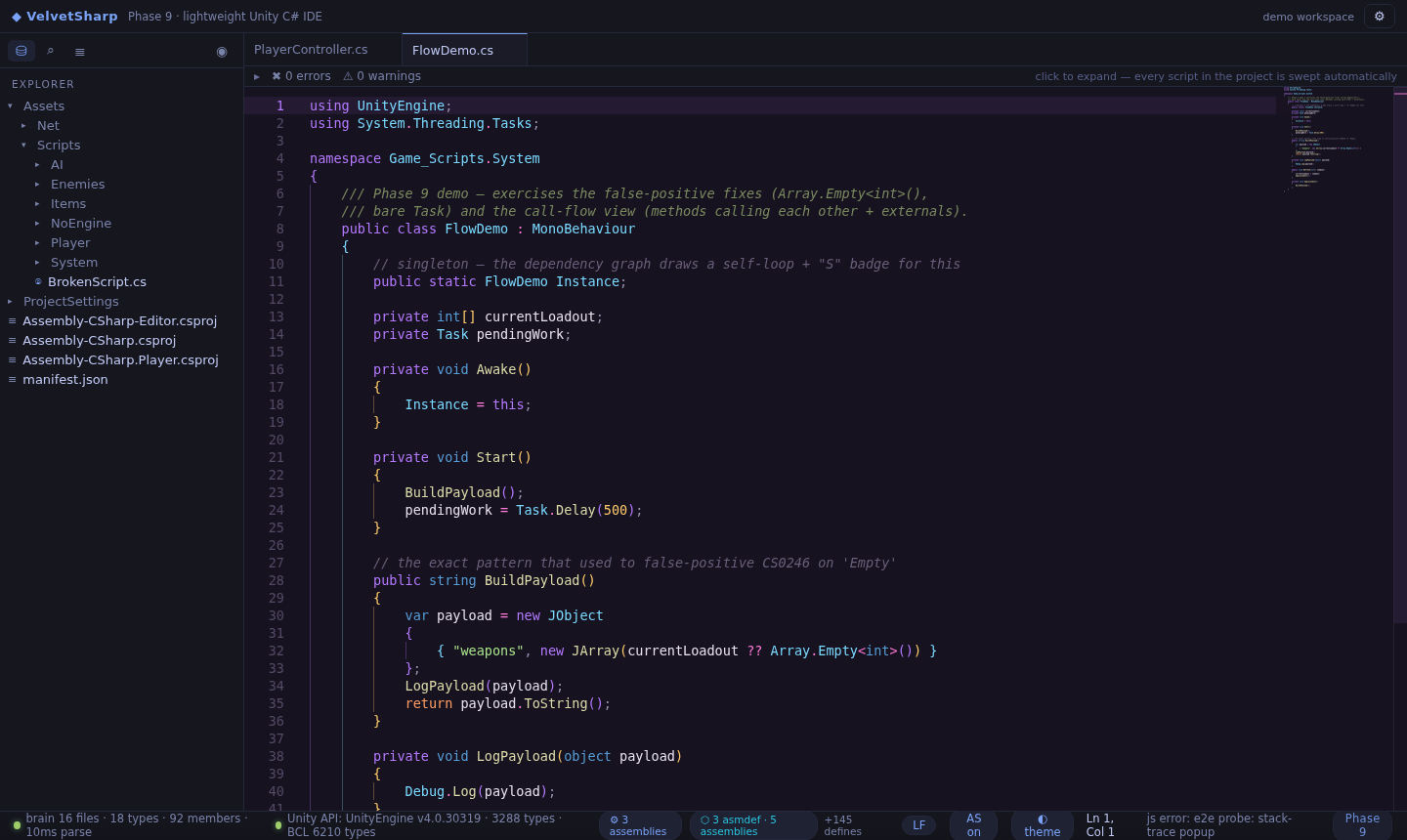 | 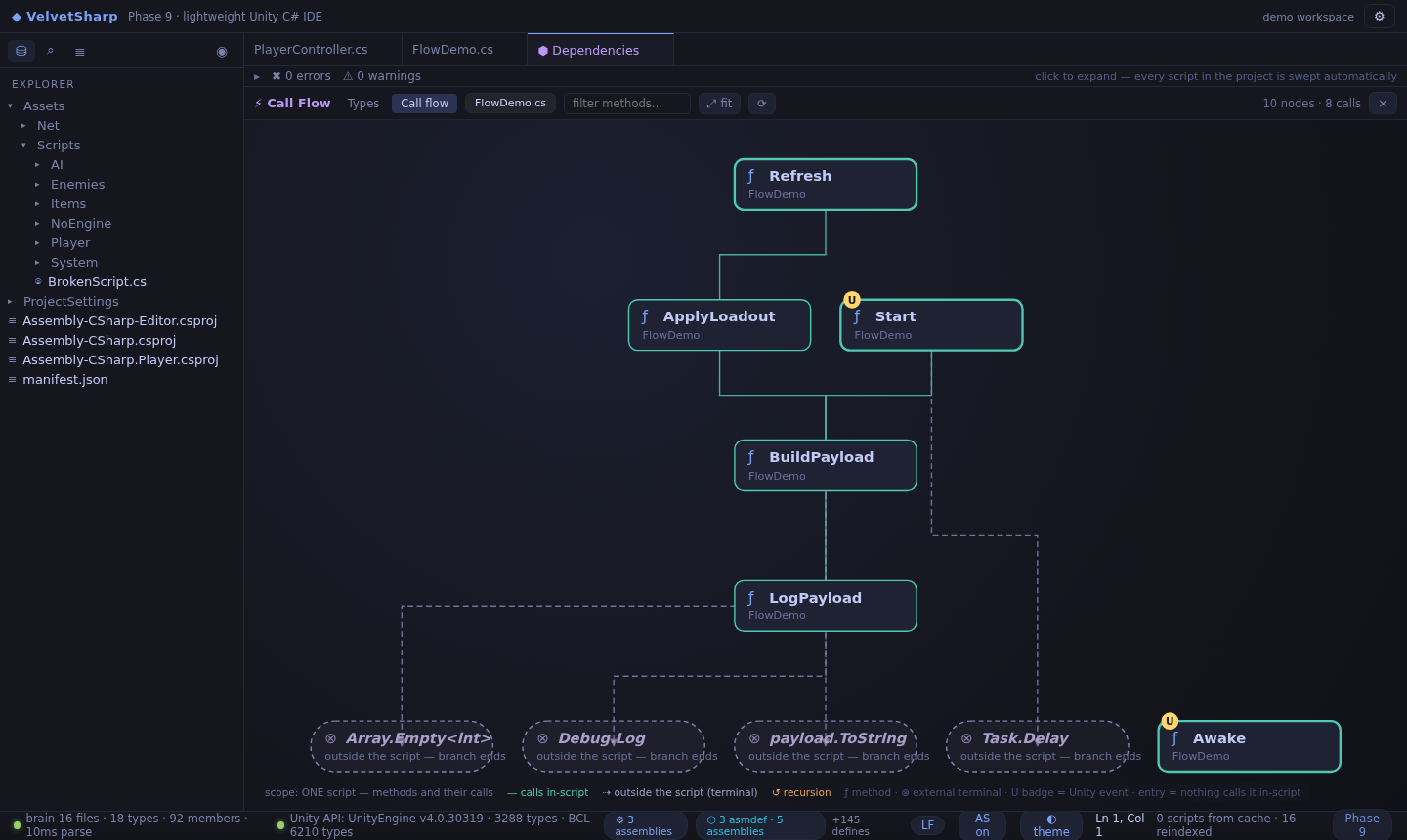 |
Unity scripts are small, but the IDEs people use for them are not. VelvetSharp starts in milliseconds, ships as a single folder, and still gives you the parts that actually matter when writing gameplay code: real completions, real diagnostics, project-wide rename, and now per-script call flow — a generated flowchart of how one script's methods travel.
var + GetComponent<T>()), cross-class and whole-file awareness — a method declared at the bottom of the file shows up at the top, in every class of the project, after instance., this. and bareusing fixes), out/ref argument checking, csproj-driven assembly + define awareness. Phase 9 killed the false-positive class: members of known types (Array.Empty<int>()) are never "missing", and ambiguous-reference noise is suppressedUnityEngine.xml and the extracted BCL/Unity databasesfield Player.jumpForce — PlayerController.cs:12 · Assembly-CSharp), click to jumpstatic OwnType Instance fields get a badge and a self-loop, "ones that link something to itself"Debug.Log, other classes, the Unity API) are drawn as dashed capsules that terminate the branch — the shape tells you where your code ends and the outside world begins. Unity event methods carry a U badge; methods nothing calls in-script are highlighted as entries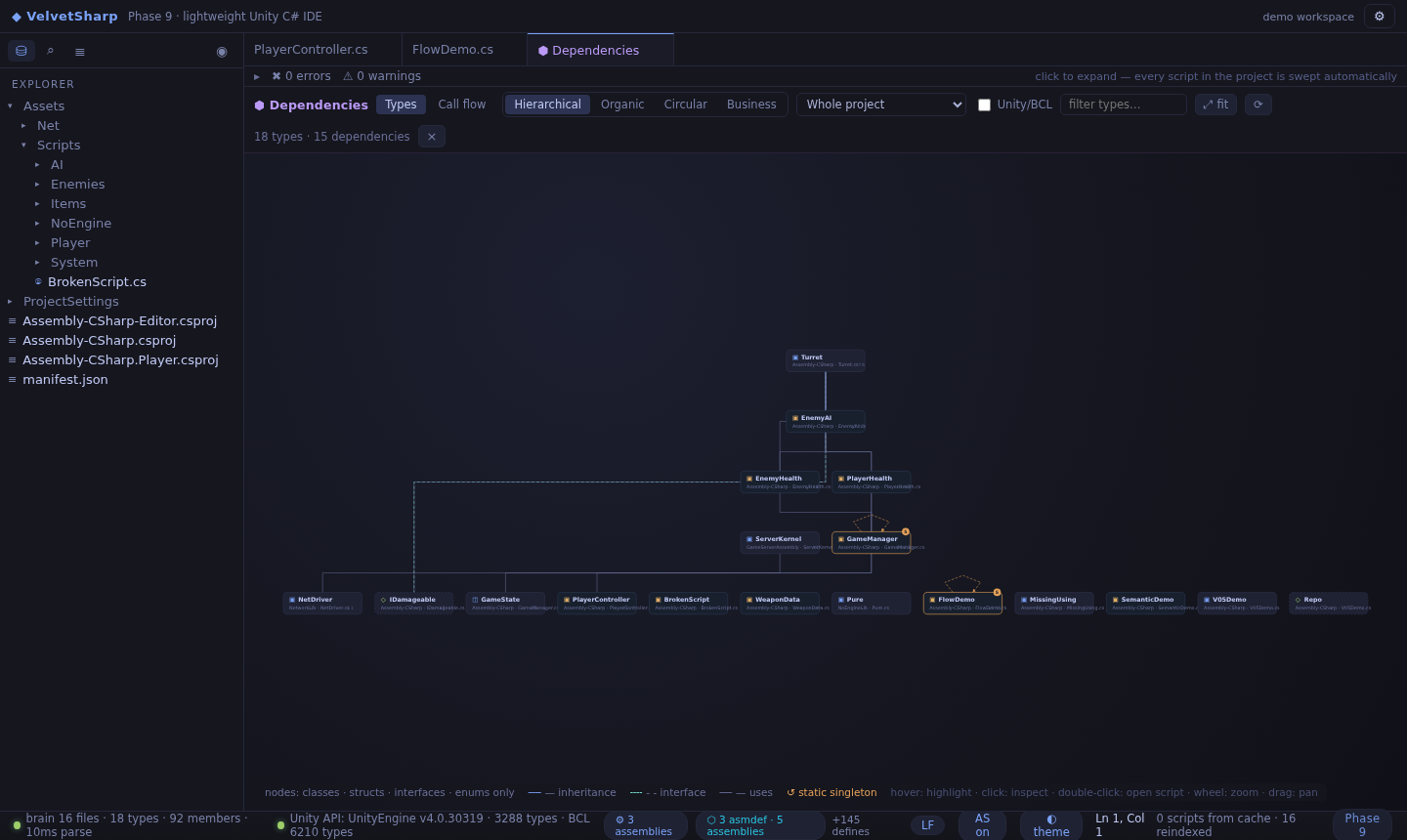
.meta handling, asmdef badges, folder context menu), search across files, outline, quick open (Ctrl+P), symbol search (Ctrl+T), commands (Ctrl+Shift+P)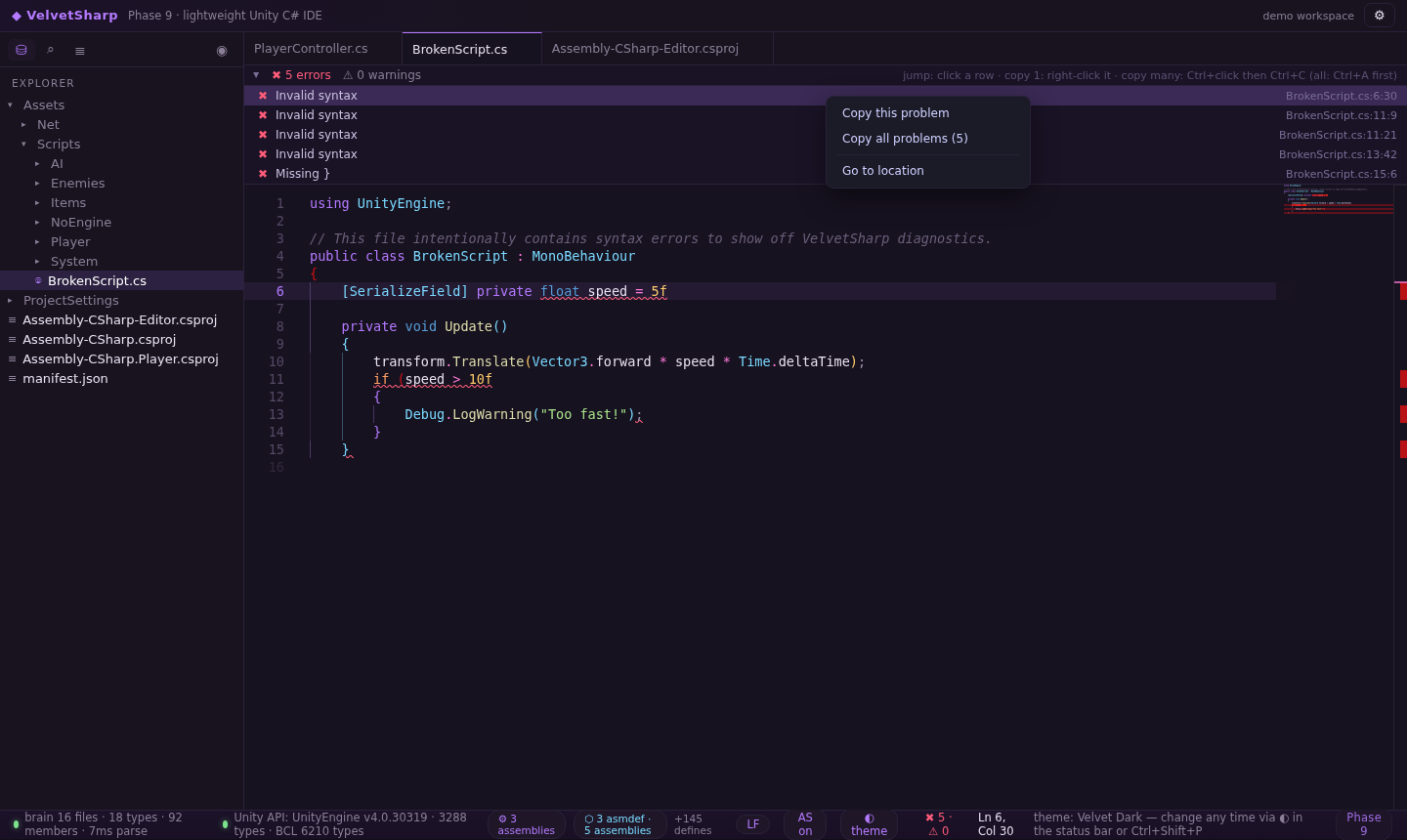
%APPDATA%/VelvetSharp/config.json)VelvetSharp-vX.Y.Z-win-x64-portable.zip from the latest releaseVelvetSharp.exe, open your Unity project folder (or drag it in), donenpm install
npm install --prefix app
npm run dev # vite dev server on :5173
Browser demo mode opens with the bundled demo workspace; the native desktop shell needs the Neutralino binaries (see BUILD-WINDOWS.md).
npm run build                                # vite build
rsync -a --delete app/dist/ desktop/app/dist # resources root
cd desktop && npx neu build --release        # resources.neu + binaries
# dist/VelvetSharp/VelvetSharp-win_x64.exe + resources.neu + README-FIRST.txt → zip
Or just push a v* tag — GitHub Actions builds and publishes the release zip automatically (see .github/workflows/release.yml); CI runs the full engine test suite on every push.
app/                  React + Monaco UI (vite)
  src/                editor, explorer, graphs, themes, workers, store
  public/api/         UnityEngine + BCL databases (extracted from DLLs)
  public/demo/        bundled demo Unity project
  demo/               the same demo workspace, used by the engine tests
packages/brain/       the C# engine: parser, index, completions, diagnostics,
                      rename, uses, dependency graph, call flow (Web Worker)
packages/metadata/    ECMA-335 / PE reader + DocXML parser (builds the API DBs)
desktop/              Neutralino 6.x shell (config + binaries)
docs/screenshots/     images used by this README
scripts/              tests, verify markers, build helpers
npm test          # engine suite (131 assertions across 7 suites) + dist markers
npm run test:brain
The engine suite covers parsing, symbol extraction, type inference, completions, hover, diagnostics, rename, uses, the dependency graph (types-only + singleton self-loops) and the call-flow graph (in-file edges, external terminals, Unity lifecycle flags). Visual E2E (Playwright + Chromium) clicks through the real UI — 34 assertions including the Phase 9 copy menu and call-flow rendering.
| Phase | Build | Highlights |
|---|---|---|
| 1–4 | 0.1–0.4 | editor, syntax lints, project open, packaging |
| 5 | 0.5.0 | semantic analysis, problems bar, project rename |
| 6 | 0.6.0 | dependency graph, explorer file ops, F2 everywhere |
| 7 | 7.0.0 | phase numbering, self-healing bridge, settings persistence |
| 8 | 8.0.0 | types-only graph, whole-file completions, Unity magic methods, uses panel |
| 9 | 9.0.0 | false-positive fixes (Array.Empty / CS0104), right-click copy problem, singleton self-loops, per-script Call Flow view |
Full details in VERSIONS.md.
MIT — see LICENSE.
VelvetSharp — a lightweight, fast-starting Unity C# code editor. Neutralino + Monaco + custom C# analysis engine (no .NET SDK needed). Portable Windows build.
See the codeA lightweight, fast-opening Unity C# IDE — a portable alternative to Rider, Visual Studio and VS Code.
Phase 9 · build 9.0.0 — the phase is always visible in the status bar; every release bumps it by one (see VERSIONS.md).
Zero .NET runtime. Zero OmniSharp. Zero Electron. The entire C# intelligence engine ("the brain") is custom-built in TypeScript, runs off the UI thread in a Web Worker, on tree-sitter (WASM) + a Unity API database extracted straight from UnityEngine.dll by our own ECMA-335 metadata reader. The desktop shell is Neutralino 6.x — the whole portable build is a 6 MB zip that opens a Unity project in seconds.
| Editor | Call Flow |
|---|---|
| |
Unity scripts are small, but the IDEs people use for them are not. VelvetSharp starts in milliseconds, ships as a single folder, and still gives you the parts that actually matter when writing gameplay code: real completions, real diagnostics, project-wide rename, and now per-script call flow — a generated flowchart of how one script's methods travel.
var + GetComponent<T>()), cross-class and whole-file awareness — a method declared at the bottom of the file shows up at the top, in every class of the project, after instance., this. and bareusing fixes), out/ref argument checking, csproj-driven assembly + define awareness. Phase 9 killed the false-positive class: members of known types (Array.Empty<int>()) are never "missing", and ambiguous-reference noise is suppressedUnityEngine.xml and the extracted BCL/Unity databasesfield Player.jumpForce — PlayerController.cs:12 · Assembly-CSharp), click to jumpstatic OwnType Instance fields get a badge and a self-loop, "ones that link something to itself"Debug.Log, other classes, the Unity API) are drawn as dashed capsules that terminate the branch — the shape tells you where your code ends and the outside world begins. Unity event methods carry a U badge; methods nothing calls in-script are highlighted as entries
.meta handling, asmdef badges, folder context menu), search across files, outline, quick open (Ctrl+P), symbol search (Ctrl+T), commands (Ctrl+Shift+P)
%APPDATA%/VelvetSharp/config.json)VelvetSharp-vX.Y.Z-win-x64-portable.zip from the latest releaseVelvetSharp.exe, open your Unity project folder (or drag it in), donenpm install
npm install --prefix app
npm run dev # vite dev server on :5173
Browser demo mode opens with the bundled demo workspace; the native desktop shell needs the Neutralino binaries (see BUILD-WINDOWS.md).
npm run build                                # vite build
rsync -a --delete app/dist/ desktop/app/dist # resources root
cd desktop && npx neu build --release        # resources.neu + binaries
# dist/VelvetSharp/VelvetSharp-win_x64.exe + resources.neu + README-FIRST.txt → zip
Or just push a v* tag — GitHub Actions builds and publishes the release zip automatically (see .github/workflows/release.yml); CI runs the full engine test suite on every push.
app/                  React + Monaco UI (vite)
  src/                editor, explorer, graphs, themes, workers, store
  public/api/         UnityEngine + BCL databases (extracted from DLLs)
  public/demo/        bundled demo Unity project
  demo/               the same demo workspace, used by the engine tests
packages/brain/       the C# engine: parser, index, completions, diagnostics,
                      rename, uses, dependency graph, call flow (Web Worker)
packages/metadata/    ECMA-335 / PE reader + DocXML parser (builds the API DBs)
desktop/              Neutralino 6.x shell (config + binaries)
docs/screenshots/     images used by this README
scripts/              tests, verify markers, build helpers
npm test          # engine suite (131 assertions across 7 suites) + dist markers
npm run test:brain
The engine suite covers parsing, symbol extraction, type inference, completions, hover, diagnostics, rename, uses, the dependency graph (types-only + singleton self-loops) and the call-flow graph (in-file edges, external terminals, Unity lifecycle flags). Visual E2E (Playwright + Chromium) clicks through the real UI — 34 assertions including the Phase 9 copy menu and call-flow rendering.
| Phase | Build | Highlights |
|---|---|---|
| 1–4 | 0.1–0.4 | editor, syntax lints, project open, packaging |
| 5 | 0.5.0 | semantic analysis, problems bar, project rename |
| 6 | 0.6.0 | dependency graph, explorer file ops, F2 everywhere |
| 7 | 7.0.0 | phase numbering, self-healing bridge, settings persistence |
| 8 | 8.0.0 | types-only graph, whole-file completions, Unity magic methods, uses panel |
| 9 | 9.0.0 | false-positive fixes (Array.Empty / CS0104), right-click copy problem, singleton self-loops, per-script Call Flow view |
Full details in VERSIONS.md.
MIT — see LICENSE.



