
Open-source music player that turns your local library and connected sources into personalised listening journeys using Flow sequencing, taste memory, rediscovery, and optional LLM control.
See the codeSee what people are saying
README
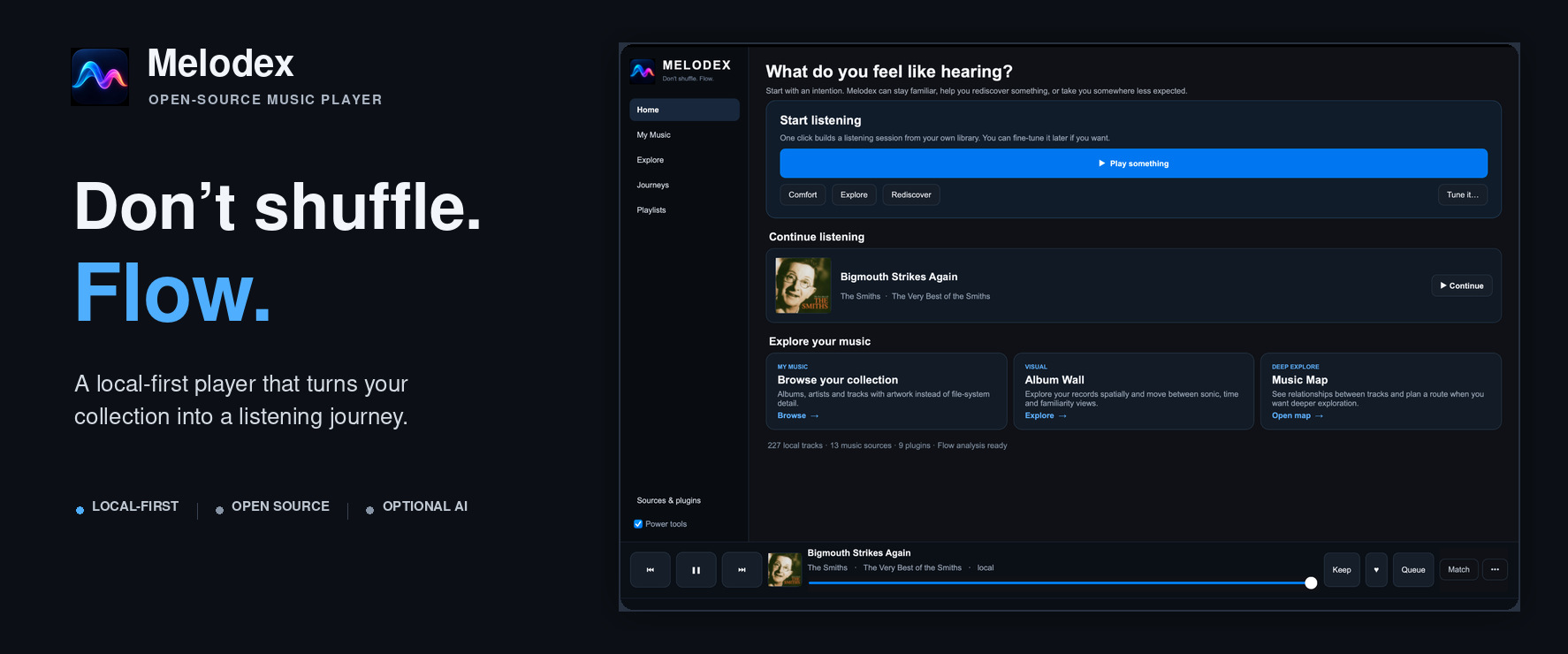
A local-first music player for your collection and connected sources.
Download · Help test Melodex · Report a bug · Request a feature · Discussions · Start here · Docs
Melodex
Don't shuffle. Flow.
Melodex is a local-first music player for your own collection and connected music sources. Use Home to start a listening session, My Music to browse your albums, and Flow to shape the queue. AI tools are optional.
🧪 Public beta — testers wanted
Melodex is being actively developed and we want feedback from people who were not involved in building it.
The macOS build has had the most hands-on testing so far. Feedback from Apple Silicon and Intel Mac users is welcome, and Windows/Linux testing is especially valuable as those builds need more real-world use.
You do not need to be technical or have a huge music collection. Tell us where you got confused, what broke, what felt good, and what would make you use Melodex again.
Take the 10-minute tester path →
Give beta feedback · Report a bug · Request a feature
Why try Melodex?
- Your music stays yours. Local-first library and listening features do not require an account.
- Steer instead of shuffle. Flow is designed to shape where a listening session goes next.
- Rediscover your collection. Album Wall, Music Map and Journeys give you different ways to move through music you already own.
- Use AI only if you want it. Paste a playlist from ChatGPT/Claude/Gemini, connect local AI, or ignore AI entirely.
- Extend it. Providers and plugins can add music sources, artwork, lyrics, metadata and other capabilities.
Start listening
- Download the latest release.
- Open My Music → + Add music and choose a folder.
- Return to Home and choose ▶ Play something.
No local collection yet? Use Explore → Search everything to search connected sources.
Choose your path
| If you want to… | Start here |
|---|---|
| Download and use Melodex | Start Here |
| Try it and help improve the beta | Tester guide · Beta feedback |
| Report a problem | Bug report |
| Suggest an improvement | Feature request |
| Explore more features or customize your setup | Tinkerer's guide |
| Build a provider, plugin, or integration | Developer Gateway · 5-minute quickstart |
| Find a specific technical detail | Complete documentation index |
Developers can check Status, stability and trust before building.
This README follows the repository's current branch. For a released build, use the download page and its matching release notes.
The developer platform
Melodex is also an open platform where independent extensions can provide music sources, artwork, lyrics, metadata, and other capabilities. The player combines those services without requiring each one to implement everything.
Melodex separates discovery/distribution from runtime capabilities and external control:
                         Plugin Directory
                               │
                  Registry + registry-verified packages
                               │
             ┌─────────────────┴─────────────────┐
             │                                   │
       .mdxprovider                         .mdxplugin
             │                                   │
      Provider Manager                    Capability Broker
             │                                   │
        catalog/playback        identity/metadata/artwork/lyrics/context
                                      local intelligence
             └─────────────────┬─────────────────┘
                               ▼
                    resolver + player + Flow
                               ▲
                               │
                REST / OpenAPI / MCP / OpenAI
The ecosystem architecture gives the detailed map.
1. MPP — music-source providers
Use the Melodex Provider Protocol when you want to connect a music source.
Current provider capabilities include:
search  browse  track  album  artist
playback  library  offline  recommendations  auth
Start with Build a provider or read the Provider SDK.
2. Capability extensions
Melodex now has a runnable Capability Broker for small enrichment extensions. The v0.1 contracts are still experimental, but .mdxplugin packages can be installed and composed today:
identity.resolve
metadata.enrich
artwork.lookup
lyrics.lookup
context.lookup
library.suggest
The aim is composition: playback from one source, canonical identity from another, artwork/context from others, and privacy-preserving local intelligence over the user's own library.
Install extensions through Sources & plugins → Explore plugins, or start with Build an enrichment plugin.
3. REST + OpenAPI
A running desktop app exposes an authenticated local control API for searching, resolving, queueing and playback control.
Key operations include:
GET  /openapi.json
GET  /v1/providers
GET  /v1/extensions
GET  /v1/search
GET  /v1/resolve
GET  /v1/resolve-candidates
GET  /v1/status
GET  /v1/openai/tools

POST /v1/play
POST /v1/queue
POST /v1/control
The platform work also defines an OpenAPI contract so external tools can discover this surface instead of reverse-engineering Melodex.
Start with Control Melodex with REST.
4. MCP + OpenAI tools
Melodex exposes high-level music actions to AI systems rather than giving models raw provider internals.
Examples:
melodex_search
melodex_resolve
melodex_extensions
melodex_play
melodex_queue
melodex_playback
melodex_flow
melodex_feedback
Use MCP with OpenWebUI or OpenAI function calling.
You can also make a playlist in ChatGPT, Claude, Gemini or another chat AI and paste it into Playlists → Paste from AI…. This is a copy-and-paste handoff: it does not require an AI connection or API key. Melodex matches the track details through your connected music sources and keeps unmatched requests in the saved playlist. See Playlist interchange.
A simpler desktop, with power underneath
The current desktop interface is organised around listener goals rather than Melodex internals: Home, My Music, Explore, Journeys, Playlists, and Sources & plugins. Artwork and recognition lead everyday browsing; advanced provider, routing and diagnostic controls remain available through Power tools. Optional plugins now surface where their features are used, while the Plugin Centre provides clear Installed / Available / Needs setup / Updates views. The design rationale is documented in UX redesign.
My Music is a collection, not a file list
My Music now leads with a visual album grid, with separate visual Artists and artwork-rich Tracks views. Local/embedded artwork is preferred; explicit online artwork lookups are cached and remembered so covers do not disappear when the page is rebuilt.
Local tracks can also be corrected inside Melodex when tags are incomplete. Artist, title, album, album artist, year and genre corrections survive rescans but do not rewrite the original audio files.
Missing album covers and artist portraits can be recovered explicitly in bounded background batches. Melodex shows completed/total, found/no-match/failed counts, and provides pause, cancel and retry-failed controls so large-library enrichment does not freeze the interface.
See My Music.
Browse the Album Wall
The desktop Album Wall turns a local collection into a stable field of record covers rather than another scrolling recommendation feed. Albums can be arranged by Sound, Familiarity, Time, or deterministic A–Z shelves; Sound reuses cached Flow analysis and keeps unanalysed records visible at stable fallback positions. Artwork loads lazily from local/embedded sources, while pan, semantic zoom, search, current-album highlighting and direct album playback keep the view practical on large libraries.
See Album Wall.
Explore your library spatially
The desktop Music Map turns cached Flow analysis into a zoomable local sonic landscape. Nearby tracks share similar combinations of tempo, energy, key, timbre, rhythmic density and mixability; colour modes can expose energy, taste strength or rediscovery potential.
The same fixed dots can switch from Sounds similar · Flow to Actually connected overlays built from cached artists/albums, production and performer credits, compositions/works, samples/remixes/versions, artist relationships and recording places. Normal listening grows that local knowledge index; explicit map enrichment can fill gaps.
A selected node can be played, queued, or used as the anchor for a new Mind + Flow journey. Pathfinder can connect two mapped tracks using Balanced, Sonic or Knowledge-first routing, drawing a numbered route and explaining every hop before it is played or queued.
Journey Designer layers transparent semantic waypoints on top: Calm, Darker, Forgotten, Energetic, Bright, Rhythmic, Familiar, Surprising, or an exact chosen track. Its first preset builds a Calm → Darker → Forgotten → Energetic arc and records the fit/reason for every selected stage.
Journey Live can then adapt only the unfinished tail while playback continues: steer calmer/more energetic/darker/brighter, ask for more rhythm/familiarity/surprise/rediscovery, avoid the current artist, or manually skip and replan. The current track and fixed destination stay anchored, and failed replans keep the existing queue.
The Journey Library separates reusable intent from personal history. Recipes save/share routing mode + ordered stages as .mdxjourney without local paths or taste data; private Runs keep the designed route, final adapted route and explicit steering/skip/avoid decisions so either route can be inspected and replayed later.
The first implementation is deterministic, local and dependency-light rather than using a remote embedding service or opaque ML model.
Reference extensions
The ecosystem is being developed with small examples built around documented, legal/open-access sources:
| Example | What it demonstrates |
|---|---|
| Radio Browser | station search + live playback |
| LibriVox | public-domain search + playback + offline |
| MusicBrainz | canonical identity + metadata provenance |
| Wikimedia Commons | artwork + per-file licence/attribution |
| MusicBrainz Song Connections | samples/remixes/works/recording-place context |
| Wikimedia Liner Notes | sourced encyclopedic context cards |
| ListenBrainz Community Pulse | aggregate community listening context |
| Sonic Neighbours | local Flow-feature “more like this” |
| Forgotten Favourites | private local rediscovery |
| Bridge Builder | local transition bridge suggestions |
The examples are designed to be copied, studied and changed. Canonical examples are packaged with exact SHA-256/size metadata and surfaced through the desktop Plugin Directory.
Community
There are useful ways to help Melodex even if you never write code.
- Try the app: follow the tester guide and tell us what happens.
- Something broke: open a bug report.
- Something is confusing: leave beta tester feedback.
- You have a concrete improvement: request a feature.
- You want to talk through an idea or ask the community: start a Discussion.
- You want to contribute: start with Your First Melodex Contribution.
Community philosophy
You do not need to understand the whole Melodex codebase to contribute.
Build one useful thing.
- Know a music API? Build a provider.
- Know a metadata or artwork source? Build one capability.
- Build AI software? Use MCP or the function schemas.
- Build another app? Use REST/OpenAPI.
- Don't code? Help with testing, documentation, accessibility, translations, source research or UX.
New to the repository? Start with Your First Melodex Contribution.
See Community for the wider set of contribution paths.
Source-neutral and rights-aware
Melodex is designed for music and media the user is authorised to access.
A public API existing does not automatically mean media may be redistributed, downloaded or commercially reused. Public/community extensions should document API terms, rate limits, caching, offline rules, attribution and per-item rights.
Download
You do not need Python or Git to use release builds.
If a feature described elsewhere in this repository is missing from your installed build, check Releases, main, and version numbers: current documentation can describe work added after the latest tagged binary.
Build Melodex itself
git clone https://github.com/Cliff-Lee/melodex.git
cd melodex
Useful starting points:
desktop/       desktop player, resolver and local API
android/       Android client
provider-sdk/  provider SDK, schemas and examples
docs/          user and developer documentation
For the shortest repository-onboarding path, read Your First Melodex Contribution, then CONTRIBUTING.md.
Licence
Melodex code is MIT licensed unless a subdirectory states otherwise. External music, artwork, lyrics and metadata retain their original licences and rights.
See LICENSE, RESPONSIBLE_USE.md, and THIRD_PARTY_NOTICES.md.
Similar repos


Languages
Python
99.2%
Open-source music player that turns your local library and connected sources into personalised listening journeys using Flow sequencing, taste memory, rediscovery, and optional LLM control.
See the codeSee what people are saying
README
A local-first music player for your collection and connected sources.
Download · Help test Melodex · Report a bug · Request a feature · Discussions · Start here · Docs
Melodex
Don't shuffle. Flow.
Melodex is a local-first music player for your own collection and connected music sources. Use Home to start a listening session, My Music to browse your albums, and Flow to shape the queue. AI tools are optional.
🧪 Public beta — testers wanted
Melodex is being actively developed and we want feedback from people who were not involved in building it.
The macOS build has had the most hands-on testing so far. Feedback from Apple Silicon and Intel Mac users is welcome, and Windows/Linux testing is especially valuable as those builds need more real-world use.
You do not need to be technical or have a huge music collection. Tell us where you got confused, what broke, what felt good, and what would make you use Melodex again.
Take the 10-minute tester path →
Give beta feedback · Report a bug · Request a feature
Why try Melodex?
- Your music stays yours. Local-first library and listening features do not require an account.
- Steer instead of shuffle. Flow is designed to shape where a listening session goes next.
- Rediscover your collection. Album Wall, Music Map and Journeys give you different ways to move through music you already own.
- Use AI only if you want it. Paste a playlist from ChatGPT/Claude/Gemini, connect local AI, or ignore AI entirely.
- Extend it. Providers and plugins can add music sources, artwork, lyrics, metadata and other capabilities.
Start listening
- Download the latest release.
- Open My Music → + Add music and choose a folder.
- Return to Home and choose ▶ Play something.
No local collection yet? Use Explore → Search everything to search connected sources.
Choose your path
| If you want to… | Start here |
|---|---|
| Download and use Melodex | Start Here |
| Try it and help improve the beta | Tester guide · Beta feedback |
| Report a problem | Bug report |
| Suggest an improvement | Feature request |
| Explore more features or customize your setup | Tinkerer's guide |
| Build a provider, plugin, or integration | Developer Gateway · 5-minute quickstart |
| Find a specific technical detail | Complete documentation index |
Developers can check Status, stability and trust before building.
This README follows the repository's current branch. For a released build, use the download page and its matching release notes.
The developer platform
Melodex is also an open platform where independent extensions can provide music sources, artwork, lyrics, metadata, and other capabilities. The player combines those services without requiring each one to implement everything.
Melodex separates discovery/distribution from runtime capabilities and external control:
                         Plugin Directory
                               │
                  Registry + registry-verified packages
                               │
             ┌─────────────────┴─────────────────┐
             │                                   │
       .mdxprovider                         .mdxplugin
             │                                   │
      Provider Manager                    Capability Broker
             │                                   │
        catalog/playback        identity/metadata/artwork/lyrics/context
                                      local intelligence
             └─────────────────┬─────────────────┘
                               ▼
                    resolver + player + Flow
                               ▲
                               │
                REST / OpenAPI / MCP / OpenAI
The ecosystem architecture gives the detailed map.
1. MPP — music-source providers
Use the Melodex Provider Protocol when you want to connect a music source.
Current provider capabilities include:
search  browse  track  album  artist
playback  library  offline  recommendations  auth
Start with Build a provider or read the Provider SDK.
2. Capability extensions
Melodex now has a runnable Capability Broker for small enrichment extensions. The v0.1 contracts are still experimental, but .mdxplugin packages can be installed and composed today:
identity.resolve
metadata.enrich
artwork.lookup
lyrics.lookup
context.lookup
library.suggest
The aim is composition: playback from one source, canonical identity from another, artwork/context from others, and privacy-preserving local intelligence over the user's own library.
Install extensions through Sources & plugins → Explore plugins, or start with Build an enrichment plugin.
3. REST + OpenAPI
A running desktop app exposes an authenticated local control API for searching, resolving, queueing and playback control.
Key operations include:
GET  /openapi.json
GET  /v1/providers
GET  /v1/extensions
GET  /v1/search
GET  /v1/resolve
GET  /v1/resolve-candidates
GET  /v1/status
GET  /v1/openai/tools

POST /v1/play
POST /v1/queue
POST /v1/control
The platform work also defines an OpenAPI contract so external tools can discover this surface instead of reverse-engineering Melodex.
Start with Control Melodex with REST.
4. MCP + OpenAI tools
Melodex exposes high-level music actions to AI systems rather than giving models raw provider internals.
Examples:
melodex_search
melodex_resolve
melodex_extensions
melodex_play
melodex_queue
melodex_playback
melodex_flow
melodex_feedback
Use MCP with OpenWebUI or OpenAI function calling.
You can also make a playlist in ChatGPT, Claude, Gemini or another chat AI and paste it into Playlists → Paste from AI…. This is a copy-and-paste handoff: it does not require an AI connection or API key. Melodex matches the track details through your connected music sources and keeps unmatched requests in the saved playlist. See Playlist interchange.
A simpler desktop, with power underneath
The current desktop interface is organised around listener goals rather than Melodex internals: Home, My Music, Explore, Journeys, Playlists, and Sources & plugins. Artwork and recognition lead everyday browsing; advanced provider, routing and diagnostic controls remain available through Power tools. Optional plugins now surface where their features are used, while the Plugin Centre provides clear Installed / Available / Needs setup / Updates views. The design rationale is documented in UX redesign.
My Music is a collection, not a file list
My Music now leads with a visual album grid, with separate visual Artists and artwork-rich Tracks views. Local/embedded artwork is preferred; explicit online artwork lookups are cached and remembered so covers do not disappear when the page is rebuilt.
Local tracks can also be corrected inside Melodex when tags are incomplete. Artist, title, album, album artist, year and genre corrections survive rescans but do not rewrite the original audio files.
Missing album covers and artist portraits can be recovered explicitly in bounded background batches. Melodex shows completed/total, found/no-match/failed counts, and provides pause, cancel and retry-failed controls so large-library enrichment does not freeze the interface.
See My Music.
Browse the Album Wall
The desktop Album Wall turns a local collection into a stable field of record covers rather than another scrolling recommendation feed. Albums can be arranged by Sound, Familiarity, Time, or deterministic A–Z shelves; Sound reuses cached Flow analysis and keeps unanalysed records visible at stable fallback positions. Artwork loads lazily from local/embedded sources, while pan, semantic zoom, search, current-album highlighting and direct album playback keep the view practical on large libraries.
See Album Wall.
Explore your library spatially
The desktop Music Map turns cached Flow analysis into a zoomable local sonic landscape. Nearby tracks share similar combinations of tempo, energy, key, timbre, rhythmic density and mixability; colour modes can expose energy, taste strength or rediscovery potential.
The same fixed dots can switch from Sounds similar · Flow to Actually connected overlays built from cached artists/albums, production and performer credits, compositions/works, samples/remixes/versions, artist relationships and recording places. Normal listening grows that local knowledge index; explicit map enrichment can fill gaps.
A selected node can be played, queued, or used as the anchor for a new Mind + Flow journey. Pathfinder can connect two mapped tracks using Balanced, Sonic or Knowledge-first routing, drawing a numbered route and explaining every hop before it is played or queued.
Journey Designer layers transparent semantic waypoints on top: Calm, Darker, Forgotten, Energetic, Bright, Rhythmic, Familiar, Surprising, or an exact chosen track. Its first preset builds a Calm → Darker → Forgotten → Energetic arc and records the fit/reason for every selected stage.
Journey Live can then adapt only the unfinished tail while playback continues: steer calmer/more energetic/darker/brighter, ask for more rhythm/familiarity/surprise/rediscovery, avoid the current artist, or manually skip and replan. The current track and fixed destination stay anchored, and failed replans keep the existing queue.
The Journey Library separates reusable intent from personal history. Recipes save/share routing mode + ordered stages as .mdxjourney without local paths or taste data; private Runs keep the designed route, final adapted route and explicit steering/skip/avoid decisions so either route can be inspected and replayed later.
The first implementation is deterministic, local and dependency-light rather than using a remote embedding service or opaque ML model.
Reference extensions
The ecosystem is being developed with small examples built around documented, legal/open-access sources:
| Example | What it demonstrates |
|---|---|
| Radio Browser | station search + live playback |
| LibriVox | public-domain search + playback + offline |
| MusicBrainz | canonical identity + metadata provenance |
| Wikimedia Commons | artwork + per-file licence/attribution |
| MusicBrainz Song Connections | samples/remixes/works/recording-place context |
| Wikimedia Liner Notes | sourced encyclopedic context cards |
| ListenBrainz Community Pulse | aggregate community listening context |
| Sonic Neighbours | local Flow-feature “more like this” |
| Forgotten Favourites | private local rediscovery |
| Bridge Builder | local transition bridge suggestions |
The examples are designed to be copied, studied and changed. Canonical examples are packaged with exact SHA-256/size metadata and surfaced through the desktop Plugin Directory.
Community
There are useful ways to help Melodex even if you never write code.
- Try the app: follow the tester guide and tell us what happens.
- Something broke: open a bug report.
- Something is confusing: leave beta tester feedback.
- You have a concrete improvement: request a feature.
- You want to talk through an idea or ask the community: start a Discussion.
- You want to contribute: start with Your First Melodex Contribution.
Community philosophy
You do not need to understand the whole Melodex codebase to contribute.
Build one useful thing.
- Know a music API? Build a provider.
- Know a metadata or artwork source? Build one capability.
- Build AI software? Use MCP or the function schemas.
- Build another app? Use REST/OpenAPI.
- Don't code? Help with testing, documentation, accessibility, translations, source research or UX.
New to the repository? Start with Your First Melodex Contribution.
See Community for the wider set of contribution paths.
Source-neutral and rights-aware
Melodex is designed for music and media the user is authorised to access.
A public API existing does not automatically mean media may be redistributed, downloaded or commercially reused. Public/community extensions should document API terms, rate limits, caching, offline rules, attribution and per-item rights.
Download
You do not need Python or Git to use release builds.
If a feature described elsewhere in this repository is missing from your installed build, check Releases, main, and version numbers: current documentation can describe work added after the latest tagged binary.
Build Melodex itself
git clone https://github.com/Cliff-Lee/melodex.git
cd melodex
Useful starting points:
desktop/       desktop player, resolver and local API
android/       Android client
provider-sdk/  provider SDK, schemas and examples
docs/          user and developer documentation
For the shortest repository-onboarding path, read Your First Melodex Contribution, then CONTRIBUTING.md.
Licence
Melodex code is MIT licensed unless a subdirectory states otherwise. External music, artwork, lyrics and metadata retain their original licences and rights.
See LICENSE, RESPONSIBLE_USE.md, and THIRD_PARTY_NOTICES.md.
Similar repos
Languages
Python
99.2%