
A CD-shaped music player for Linux, with local playback and Cider integration.
C++
432
38 commits
updated Sep 16, 2026
See what people are saying
README
Spun
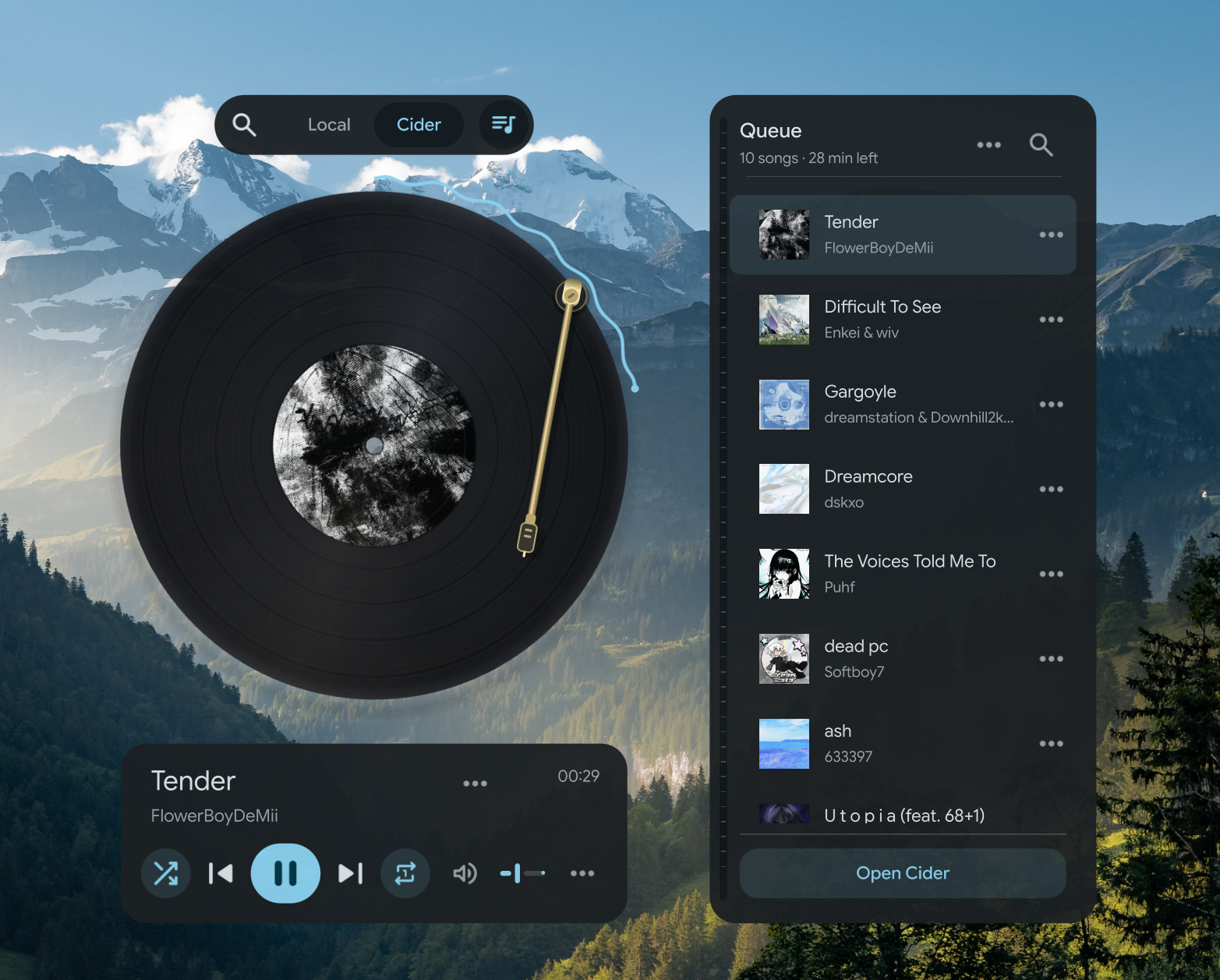
A music player for Linux with CD, vinyl, cassette and recorder views.

Optional support for Spun's development.
Install · Get started · Features · Help · License
Play local music, browse YouTube Music anonymously, connect to Jellyfin, Navidrome or Subsonic, or control Apple Music through Cider. Spun puts your album artwork on a spinning CD, vinyl record, cassette or TP-7-inspired recorder, with an interface inspired by Material Design 3. Optional 3D players add physical depth and lighting that follows Noctalia's wallpaper palette.
Source-available · PolyForm Noncommercial 1.0.0. Personal and other permitted noncommercial use is free. This is not an OSI-approved open-source license. Read the license details.
Install
Build dependencies for Arch and CachyOS
sudo pacman -S --needed base-devel git cmake ninja python qt6-base qt6-declarative qt6-multimedia qt6-svg qt6-wayland taglib qt6-quick3d
Build dependencies for Fedora
sudo dnf install gcc-c++ git cmake ninja-build pkgconf-pkg-config python3 qt6-qtbase-devel qt6-qtdeclarative-devel qt6-qtmultimedia-devel qt6-qtsvg-devel qt6-qtwayland taglib-devel qt6-qtquick3d-devel
Spun builds from source; there is no packaged installer yet. You can do so using these commands:
git clone https://github.com/yappologistic/Spun.git
cd Spun
./scripts/build.sh -DBUILD_TESTING=OFF
./scripts/install-launcher.sh
Spun includes 3D when Qt Quick 3D is available. To build without it, add -DSPUN_ENABLE_3D=OFF to the build command.
Open Spun from your application menu, or run ./scripts/run.sh from its folder. The launcher points to that folder. If you move it, run ./scripts/install-launcher.sh again.
Ubuntu 22.04 and 24.04
The default repositories do not provide the required Qt 6.8+ and TagLib 2.0+. Install a newer Qt SDK with Quick Controls, Multimedia, SVG, and optionally Quick 3D, and build TagLib 2.x using its upstream instructions.
sudo apt install build-essential git cmake ninja-build pkg-config python3 libutfcpp-dev zlib1g-dev libgl1-mesa-dev libxkbcommon-dev libxcb-cursor0
libutfcpp-dev supplies TagLib's UTF-8 dependency. libxcb-cursor0 is required by Qt's X11 platform plugin. Point CMake at the newer Qt installation rather than the distribution's older Qt:
./scripts/build.sh -DBUILD_TESTING=OFF -DCMAKE_PREFIX_PATH=/path/to/Qt/gcc_64
If TagLib was installed into a custom prefix, add its lib/pkgconfig directory to PKG_CONFIG_PATH before building. pkg-config --modversion taglib must report 2.0 or newer.
Building on another Linux distribution
You need a C++20 compiler, CMake 3.22+, Ninja, pkg-config, Python 3, Qt 6.8+ with Quick Controls, Multimedia, SVG and development files, and TagLib 2.0+ development files. Qt Quick 3D is optional. Package names differ between distributions. Spun is developed on CachyOS with Hyprland and Noctalia; desktop integration can vary elsewhere.
Nix and NixOS
With Nix flakes enabled, run from the cloned source folder:
NIXPKGS_ALLOW_UNFREE=1 nix run --impure .
# Build without launching:
NIXPKGS_ALLOW_UNFREE=1 nix build --impure .
# Development tools:
nix develop
The license is noncommercial, so Nix requires an explicit unfree-package opt-in. The flake supports x86_64 and aarch64 Linux. Wayland and X11 plugins are included; no display backend is forced.
Start listening
Local music: choose Local, then + to add tracks, or drop files and folders onto Spun. More → Add music folder includes artist and album subfolders. Imports show progress, skip songs already in the queue and can be cancelled without adding a partial import. Directory symlinks inside the folder are not followed. Your music files are not copied or modified. More → Play demo plays the included original soundcheck.
Apple Music through Cider: open Cider, sign in there, then choose Cider in Spun. Cider handles authentication and streaming and must remain running. Apple Music playback requires the appropriate access through Cider.
For search, browsing and the full queue:
- Enable Cider's local API.
- Open Spun's Queue and choose Connect to Cider.
- Approve Spun in Cider. Spun remembers the connection.
For older Cider versions, choose Use an app token instead. Create one in Cider's Settings → Connectivity → Manage External Application Access, allow playback, queue, library and audio access, then paste it into Spun.
Spun connects to the local API on port 10767. Basic playback controls use Linux's media-player interface, so working playback alone does not confirm API access. Available actions depend on your Cider version and permissions.
Inside the player
CD, vinyl, cassette and TP-7
Choose a medium in More → Preferences. All four share playback controls, album details, lyrics and Mini mode.
- CD: a DM15 R2R-inspired aluminum player with a glass lid, live display, transport buttons, shuffle and repeat selectors, and a volume knob. Stop pauses and returns to the start; the lid latch pauses before opening. In 3D, drag the housing to rotate it and double-click to reset. Gentle rotation and the optional 500 RPM setting affect the visual speed only.
- Vinyl: a record with grooves and Relaxed, 33⅓ or 45 RPM rotation. Drag the needle to seek and play. The 3D turntable has a hinged dust cover, working speed buttons and a cue lever that lifts or lowers the needle to pause or play. Drag its housing to rotate it; double-click to reset the angle. Optional effects include crackle, hiss and groove skips.
- Cassette: Clear, Smoke and Cream tapes in a CP13-inspired portable player, with moving reels and optional transport sounds. The top buttons play or pause, seek backward or forward ten seconds, and stop playback. Press Stop again to open the door. Drag the side knob to adjust volume. In 3D, the clear panels reveal the transport, flywheel and belt; drag the housing to rotate it and double-click to reset. Reels turn counterclockwise during forward playback and reverse while rewinding.
- TP-7: a metal recorder with a draggable wheel, track display and working transport, rocker and volume controls. In 3D, drag the body to rotate it horizontally or tilt it vertically; double-click to reset the angle. The lower keys are Previous, Play/Pause and Next. The rocker seeks ten seconds, and the knob controls volume. The side keys open album details, the queue and the player menu. This is a playback appearance, without microphone recording.
- Player bodies: Show player body adds a turntable, portable cassette player or CD tray with a clear lid. Album changes exchange the medium with a brief sleeve or case animation. Tracks on the same album keep it in place, and playback starts immediately.
- 3D: enable 3D player for modeled discs, reels, cases and tonearm parts, with metallic surfaces and lighting tinted by Noctalia's current palette. Playback controls stay in their familiar positions. Mini mode remains compact, and reverse-side details stay flat for reading.
- Seeking: use the disc rim, vinyl needle or optional horizontal progress bar. Their previews stay in sync. Hold Shift for finer adjustments and Esc to cancel a drag.
- Albums as records: enable Play albums as records in Vinyl preferences to give each album track a groove band. A needle drop selects the song and position. Local mode uses loaded album tracks in track-number order; Cider starts the album and verifies the track before seeking. Missing durations or unavailable tracks fall back to single-song seeking. The circular and horizontal bars share the album timeline, so either can select a track and position.
- Reverse view: press F for album details and tracks. In 2D, the disc and cassette also support double-clicking to flip. Press Y for lyrics when available. Local lyrics can come from matching
.lrcor.txtfiles or embedded metadata. View artwork opens the full cover. - Mini mode: a compact player with controls below the medium and an optional always-on-top setting. Hover or focus Next to preview the upcoming song when known.
TX-6 mixer
In the TP-7 view, toggle TX–6 beside the player. It works in 2D and 3D, with a modeled USB-C cable between the devices.
- Channel 1 carries Local, YouTube, Jellyfin or Subsonic TP-7 audio. Right-click channels 2–6 to load additional local files; all channels follow TP-7 playback and seeking.
- The knob rows adjust high, mid and low EQ. Drag a fader or click its track to set the level. Press a channel key to mute; Shift-click to solo, or press the mixer's Shift button first.
- The master knob controls player volume. FX I adds stereo delay; FX II enables compression. Hide or power off the mixer to bypass it.
- The paired 3D view expands to make controls easier to reach. Buttons press inward and spring back on release.
Mixing happens inside Spun. External USB hardware, recording, MIDI, synth mode and separate aux/cue outputs are not supported. With Cider, only master volume works because Cider plays its own audio. Additional tracks use private temporary audio caches, removed on unload or normal exit, with a 512 MiB limit per track (about 23 minutes).
YouTube Music
Choose YouTube in the source bar. Search songs, albums, artists and playlists, paste a YouTube or YouTube Music link, or use Discover music. Open an album or playlist to browse its songs; its menu offers Play all. Song menus provide queueing, radio, favorites, local playlists, album/artist navigation and link copying. Radio opens a suggested queue that you can play or edit.
No Google login, account synchronization or browser cookies are used. Favorites, playlists, listening history and queue references stay on this device, separately from the Local queue. Playlist names and contents can be edited in the browser; history can be cleared from its menu. All four 2D/3D players, Mini, media keys, seeking, lyrics (when available) and the TX-6 audio route use the same native transport. Starting a song does not change the Local or Cider queue.
YouTube support is optional and installs itself from the app. Open the YouTube panel and choose Set up YouTube support; it reports progress and says what is missing if Python 3 (with venv/pip) or Node.js is not present. The same setup can still be run from a terminal:
./scripts/setup-youtube.sh
A Python interpreter that already carries ytmusicapi and yt-dlp is used as
is, with no download. Otherwise the helper runtime is isolated in
runtime/youtube; it adds no browser engine and starts no background server.
Local and Cider playback do not need it. The Nix package does not currently
bundle the optional Python runtime; use the environment overrides below with a
separately managed runtime.
Audio is temporarily buffered before playback, with a 64 MiB limit per song and
at most one next-song buffer. Buffers are removed when replaced or on normal exit;
they are not an offline music library. Track starts depend on the network and may
pause briefly. This unofficial integration depends on ytmusicapi and yt-dlp;
YouTube changes can require dependency updates. Account-only or otherwise
restricted songs may not play anonymously. There is no guarantee of gapless
playback or parity with the official service.
Local YouTube data is in youtube/library.json beside Spun's settings file.
--config /path/to/settings.ini also isolates that library. SPUN_YOUTUBE_PYTHON
and SPUN_YOUTUBE_HELPER can point to a separately managed runtime and helper.
Connect to Jellyfin
Choose Jellyfin, then Connect. Enter your server URL (including its base path, if configured), username and password. Use HTTPS for remote servers. Remember connection stores the access token in the desktop keyring through secret-tool; passwords are never saved. Without a working keyring, sign in each time.
Browse and search albums, artists, songs and playlists. Item menus provide favorites, queueing and playlist editing, including reordering and removal. Playlist permissions come from the server. Library actions include recently played songs, genres, refresh and server settings. Settings let you select a music library, choose original quality or 128/192/320 kbps, and turn playback reporting off.
Jellyfin uses the same transport, queue, desktop media controls, timed lyrics and 2D/3D players as local music, including TX-6. Queues are saved separately for each server account and restore paused. Artwork and audio are fetched with authenticated requests; tokens are not embedded in shared links or saved queue entries.
Playback currently buffers one song to a temporary file before it starts, with a 512 MiB limit per song. Transcoding requires permission on your server. Collections are limited to 20,000 entries. This integration is for music; video, offline downloads and server administration are not included.
Connect to Navidrome or Subsonic
Choose Subsonic, then Connect. Enter the server root URL (including any base path, without /rest), username and password. Use HTTPS for remote servers. Remember connection stores the password in the desktop keyring through secret-tool; without a working keyring, sign in each time. Requests use salted token authentication.
Albums, artists, songs, genres, search, favorites, playlists, artwork and lyrics use the same library UI and native 2D/3D players as Jellyfin, including TX-6 and desktop media controls. Each account has a separate queue that restores paused. Settings offer music-folder selection, original audio or 128/192/320 kbps transcoding, and optional now-playing/listening reports. Timed lyrics use OpenSubsonic when available, with a legacy lyrics fallback. Only playlist owners can edit; stale playlist orders must be refreshed before removing or moving tracks.
The same 512 MiB temporary audio buffer and 20,000-entry collection limits apply. This is a music integration, using Subsonic 1.16.1 and supported OpenSubsonic extensions. Server capabilities and permissions determine available transcoding and lyrics; original Subsonic servers may require Premium. Listening reports count elapsed playback, not seeks; the protocol has no pause/stop session endpoint.
Browse through Cider
Use the top-left search button to browse songs, albums, playlists and artists without leaving Spun.
- Search Apple Music, browse your library or recently played tracks, and filter songs inside albums and playlists.
- Choose Recently added in Songs or Albums for newest-first browsing. Spun remembers your sorting choice.
- Open For You on the empty Search page for personalized albums, playlists and stations. Recommendations load when requested, with a manual Refresh option.
- Explore artist top songs, albums and similar artists. Filter discographies by full albums, singles and EPs, or live albums.
- Pin artists, collections and stations. Releases shows the latest available release from each pinned artist when you open it.
- Play stations, start song radio when available, or paste an Apple Music song, album, playlist or station link into Search.
- Use song menus to favorite, save to your library, copy a public song link or adjust song recommendations where Cider supports the action. Writing to Apple Music playlists is not currently supported.
Queue and listening tools
- Queue: view artwork, search, reorder and remove tracks. The header estimates remaining listening time. Scrolling away keeps your place; Current song returns to playback.
- Multiple tracks: Ctrl-click individual tracks or Shift-click a range. Use the selection menu to queue or move them. Drag artwork sideways to reveal Queue and drop at a position among upcoming tracks.
- Queue from here: append a song and the rest of its album, playlist or saved queue in collection order, including tracks hidden by search. Spun loads remaining pages first; navigating away cancels loading.
- Cleanup and Undo: review duplicate removal or clearing upcoming songs before confirming. Removing a queued song offers a brief Undo when the queue has not changed. The current song and playback history are protected during cleanup.
- Saved queues: save the current and upcoming tracks as a local snapshot. Rename it, reorder or remove songs, append more tracks, and undo the last edit. Snapshots contain track references, not downloaded audio or Apple Music playlists.
- Already queued: a check beside browsing results marks current or upcoming songs. You can still add intentional repeats.
- Quick jump: press Ctrl+K to find queue tracks, pins, saved queues and listening bookmarks. Selecting a queue track plays it. It also works in Mini mode.
- Bookmarks: choose Bookmark this moment from the current Cider song's menu. Open it in Quick jump to resume at that position.
- Session recovery: optionally enable Remember Cider session in Preferences. After a crash or an empty queue, choose Recover session… from Queue or Quick jump. Recovery asks for confirmation and only restores into an empty Cider queue. Turning the preference off removes the checkpoint.
Cider changes refresh the visible queue and relevant details. Temporary connection failures preserve browsing results and offer reconnection when needed. Batch operations stop and report partial progress when Cider cannot confirm a change; uncertain playback actions are not retried automatically.
Preferences and desktop integration
Choose your font, interface size, background blur, animations and media appearance in More → Preferences. Spun follows Noctalia's colors and reduced-motion setting when available. Reduced motion also skips loading sequences and perspective tilt.
Spun's desktop media entry follows the selected Local, Cider, YouTube, Jellyfin or Subsonic source, including artwork, playback state, volume and seeking. Cider may also expose its own entry. Hyprland integration depends on the compositor's supported interfaces.
Audio settings contains crossfade and, where supported by Cider, Automix and listening modes. Audio quality in the current song's menu shows what Cider reports and labels device output separately.
Fonts
Spun uses your system font by default. Choose any installed family in Preferences → Font. Fonts are not bundled or downloaded automatically.
For the intended appearance, we recommend Google Sans Flex. Install the TTF with your desktop's font installer, reopen Spun and select it in Preferences. The font has its own SIL Open Font License.
Keyboard shortcuts
Immersive mode hides controls after inactivity; move the pointer or use the keyboard to reveal them. Press Y for lyrics or Escape to leave.
| Action | Shortcut |
|---|---|
| Play / pause | Space |
| Previous / next track | Ctrl + Left / Right |
| Seek backward / forward | Left / Right |
| Add files / folder | Ctrl + O / Ctrl + Shift + O |
| Queue | Ctrl + L |
| Cider browser | Ctrl + B |
| Search the current panel | Ctrl + F |
| Quick jump | Ctrl + K |
| Select browser / upcoming queue tracks | Ctrl + A (track list focused) |
| Toggle focused browser track | Space (track list focused) |
| Select tracks / range | Ctrl-click / Shift-click |
| Mini mode | Ctrl + M |
| Immersive mode | Ctrl + I |
| Flip medium / switch lyrics | F / Y |
| Mute | M |
| Keyboard help | F1 |
| Back / dismiss | Escape |
| Quit | Ctrl + Q |
Update or remove
To update, open a terminal in your Spun folder:
git pull --ff-only
./scripts/build.sh -DBUILD_TESTING=OFF
To remove the application-menu entry:
rm "${XDG_DATA_HOME:-$HOME/.local/share}/applications/spun.desktop"
You can then delete the Spun source folder. Your music stays where it was. Preferences remain in ~/.config/spun/ unless you remove them separately.
Troubleshooting and privacy
- Cider plays, but search or the queue fails: check that its local API is enabled and Spun's token has the required permissions. Playback and API connections are separate.
- Qt cannot load the
xcbplatform plugin on Ubuntu: installlibxcb-cursor0. If it still fails, run withQT_DEBUG_PLUGINS=1to identify other missing libraries. - 3D is unavailable: install Qt Quick 3D and rebuild. Qt's software scenegraph backend does not support the 3D view; the regular player remains available.
- A font is missing: install it, reopen Spun and select it again. An unavailable saved font falls back to the system font.
- An audio file will not play: supported formats depend on the codecs available to Qt Multimedia on your distribution.
Spun does not ask for your Apple Music password. Its Cider token is stored with owner-only file permissions in ~/.config/spun/cider-connection.json. Preferences and local listening data also stay in ~/.config/spun/. Artwork and music metadata may be fetched during playback and browsing. Do not include tokens, private configuration, listening history or personal logs in issue reports.
Development
Build, test and benchmark
Build the diagnostic companion and run the registered tests:
./scripts/build.sh -DBUILD_TESTING=ON
ctest --test-dir build --output-on-failure
Tests use temporary preferences and synthetic local API fixtures. Audio checks need a working user audio session, and API fixtures need permission to listen on loopback. Desktop-control tests use a private D-Bus session. Diagnostics are separate from the normal player.
The registered YouTube test uses local fixtures and needs no network or provider runtime. Run python3 tests/test_youtube.py for helper parsing checks. After setting up the optional runtime, ./build/spun --test-youtube-live checks anonymous browsing, playback, seeking and artwork against the live service with temporary settings. ./scripts/preview-youtube.sh opens a separate local preview profile with Cider and desktop media registration disabled.
For focused player, artwork, lighting, geometry and media checks:
./scripts/test-3d.sh
The default uses offscreen CPU rendering through Mesa and requires an available X display for its OpenGL context. It does not create visible windows. It checks CD, cassette, recorder, turntable and TX-6 controls, mixer audio processing, physical rotation, seeking, rendered artwork and palette changes without exercising the full native window lifecycle.
Jellyfin protocol tests run with CTest. For real-server integration checks, install a Jellyfin server binary and FFmpeg, then run:
python3 scripts/test-jellyfin-server.py --server-binary /path/to/jellyfin \
  --test-binary build/spun-diagnostics --output /tmp/spun-jellyfin-test
This creates a private, disposable server with generated FLAC, MP3 and Opus music, two libraries and test accounts. It tests authentication, browsing, pagination, playlists, favorites, playback, seeking, lyrics, artwork, reporting and source isolation, then stops the server. Add --renderer 3d for software-rendered 3D checks, or --renderer native in a separate Wayland test session. Test output contains temporary credentials and must not be committed or shared. Jellyfin 10.11 and 12 are tested; other server versions and plugins may behave differently.
For Navidrome integration checks, use a Navidrome server binary with the same disposable fixture workflow:
python3 scripts/test-subsonic-server.py --server-binary /path/to/navidrome \
  --test-binary ./build/spun --output /tmp/spun-subsonic-test
The fixture generates 105 tracks and owner/reader accounts, tests the full music workflow, and stops the server afterward. --renderer native belongs in a separate Wayland test session. Protocol tests cover classic Subsonic responses, OpenSubsonic extensions, authentication, permissions, cancellation and stale playlist edits. Keep fixture output private; it contains temporary test credentials.
For the complete 3D interaction and Cider-fixture suites, run SPUN_TEST_RENDERER=native ./scripts/test-3d.sh in a separate Wayland or X11 test session. This includes projected seeking, tonearm gestures, lid transitions, scaling and mode combinations. Set SPUN_TEST_SCREEN to the dedicated output name and SPUN_TEST_OUTPUT to a local capture directory. Missing 3D rendering fails the checks instead of silently skipping them.
For large imports, run QT_QPA_PLATFORM=offscreen QT_QPA_PLATFORMTHEME= ./build/spun-import-test --stress. This creates 20,000 temporary sparse WAV files representing 625 GiB of audio without allocating that much disk space, then removes them.
--inspect-cider and --inspect-library inspect a live Cider connection without changing playback. The opt-in --verify-cider-writes changes playback, queue and audio settings and leaves song radio playing after restoring its temporary edits. Use a privately paired test profile with --config /path/to/test/settings.ini; never share its connection file or captured library data.
Run python3 scripts/benchmark.py --output /tmp/spun-performance for isolated performance comparisons. Offscreen results are not whole-desktop GPU measurements. python3 scripts/make-demo.py regenerates the original soundcheck after building and additionally requires FFmpeg.
Use python3 scripts/benchmark.py --three-d --media cd vinyl cassette tp7 tx6 --scenes idle playing --output /tmp/spun-3d-performance to measure all five 3D assets. On supported Qt versions the report also includes draw calls, mesh and texture memory. Materials use small generated maps, a wallpaper-tinted studio probe and one 1024px shadow map; there are no downloaded texture packs. Render targets account for UI scaling and are capped at 1536px per side.
./build/spun --test-performance measures mode-switch presentation latency and process memory with isolated, muted fixtures. Add SPUN_PERF_PACING=1 in a native display session to measure animation updates and presented frames against that screen's refresh rate. SPUN_PERF_MEDIA=cd,tx6 restricts the views, and --capture-dir /tmp/spun-frames saves the rendered results. Refresh-rate measurements require a visible, exposed window; offscreen frame counts do not measure display cadence.
Motion uses Qt's frame clock and elapsed time. Hardware rendering on Wayland defaults to a threaded, vsync-driven render loop; QSG_RENDER_LOOP can override it. Actual frame rate depends on the scene and hardware. The CTest motion check verifies timing at simulated 60, 120, 165 and 240 Hz; it does not test physical displays at those rates.
SPUN_TEST_REVERSE_ONLY=1 ./build/spun --test-media-ui --capture-dir /tmp/spun-reverse checks the rendered album reverse against both light and dark theme palettes, including text contrast and keyboard focus. It uses an isolated profile and does not change the desktop theme.
Before submitting substantial code contributions, open an issue to discuss scope and contributor licensing. A patch does not transfer its copyright; future commercial distribution needs appropriate rights to contributed code and compliance with third-party licenses.
License
Spun's original code and assets use the PolyForm Noncommercial License 1.0.0, with required notices and third-party credits.
The license permits noncommercial use, specified personal uses, modification and redistribution under its terms. It also permits use by certain charitable, educational, public research, public safety, health, environmental and government institutions, regardless of funding. It is broader than personal use only. Uses outside its permissions require a separate license from the relevant rights holder. The full license controls.
The author may offer separate commercial terms for code they own in the future. No paid edition is offered here.
Material Symbols Rounded icons retain their Apache 2.0 license. Qt, TagLib and optional fonts retain their respective licenses. Spun is an independent project and is not endorsed by Google, Apple, Cider or Noctalia.
Significant stargazers

120 followers · starred Sep 2026

34 followers · starred Sep 2026
Similar repos


Languages
C++
67.7%
QML
29.3%
Python
2.0%
A CD-shaped music player for Linux, with local playback and Cider integration.
C++
432
38 commits
updated Sep 16, 2026
See what people are saying
README
Spun
A music player for Linux with CD, vinyl, cassette and recorder views.
Optional support for Spun's development.
Install · Get started · Features · Help · License
Play local music, browse YouTube Music anonymously, connect to Jellyfin, Navidrome or Subsonic, or control Apple Music through Cider. Spun puts your album artwork on a spinning CD, vinyl record, cassette or TP-7-inspired recorder, with an interface inspired by Material Design 3. Optional 3D players add physical depth and lighting that follows Noctalia's wallpaper palette.
Source-available · PolyForm Noncommercial 1.0.0. Personal and other permitted noncommercial use is free. This is not an OSI-approved open-source license. Read the license details.
Install
Build dependencies for Arch and CachyOS
sudo pacman -S --needed base-devel git cmake ninja python qt6-base qt6-declarative qt6-multimedia qt6-svg qt6-wayland taglib qt6-quick3d
Build dependencies for Fedora
sudo dnf install gcc-c++ git cmake ninja-build pkgconf-pkg-config python3 qt6-qtbase-devel qt6-qtdeclarative-devel qt6-qtmultimedia-devel qt6-qtsvg-devel qt6-qtwayland taglib-devel qt6-qtquick3d-devel
Spun builds from source; there is no packaged installer yet. You can do so using these commands:
git clone https://github.com/yappologistic/Spun.git
cd Spun
./scripts/build.sh -DBUILD_TESTING=OFF
./scripts/install-launcher.sh
Spun includes 3D when Qt Quick 3D is available. To build without it, add -DSPUN_ENABLE_3D=OFF to the build command.
Open Spun from your application menu, or run ./scripts/run.sh from its folder. The launcher points to that folder. If you move it, run ./scripts/install-launcher.sh again.
Ubuntu 22.04 and 24.04
The default repositories do not provide the required Qt 6.8+ and TagLib 2.0+. Install a newer Qt SDK with Quick Controls, Multimedia, SVG, and optionally Quick 3D, and build TagLib 2.x using its upstream instructions.
sudo apt install build-essential git cmake ninja-build pkg-config python3 libutfcpp-dev zlib1g-dev libgl1-mesa-dev libxkbcommon-dev libxcb-cursor0
libutfcpp-dev supplies TagLib's UTF-8 dependency. libxcb-cursor0 is required by Qt's X11 platform plugin. Point CMake at the newer Qt installation rather than the distribution's older Qt:
./scripts/build.sh -DBUILD_TESTING=OFF -DCMAKE_PREFIX_PATH=/path/to/Qt/gcc_64
If TagLib was installed into a custom prefix, add its lib/pkgconfig directory to PKG_CONFIG_PATH before building. pkg-config --modversion taglib must report 2.0 or newer.
Building on another Linux distribution
You need a C++20 compiler, CMake 3.22+, Ninja, pkg-config, Python 3, Qt 6.8+ with Quick Controls, Multimedia, SVG and development files, and TagLib 2.0+ development files. Qt Quick 3D is optional. Package names differ between distributions. Spun is developed on CachyOS with Hyprland and Noctalia; desktop integration can vary elsewhere.
Nix and NixOS
With Nix flakes enabled, run from the cloned source folder:
NIXPKGS_ALLOW_UNFREE=1 nix run --impure .
# Build without launching:
NIXPKGS_ALLOW_UNFREE=1 nix build --impure .
# Development tools:
nix develop
The license is noncommercial, so Nix requires an explicit unfree-package opt-in. The flake supports x86_64 and aarch64 Linux. Wayland and X11 plugins are included; no display backend is forced.
Start listening
Local music: choose Local, then + to add tracks, or drop files and folders onto Spun. More → Add music folder includes artist and album subfolders. Imports show progress, skip songs already in the queue and can be cancelled without adding a partial import. Directory symlinks inside the folder are not followed. Your music files are not copied or modified. More → Play demo plays the included original soundcheck.
Apple Music through Cider: open Cider, sign in there, then choose Cider in Spun. Cider handles authentication and streaming and must remain running. Apple Music playback requires the appropriate access through Cider.
For search, browsing and the full queue:
- Enable Cider's local API.
- Open Spun's Queue and choose Connect to Cider.
- Approve Spun in Cider. Spun remembers the connection.
For older Cider versions, choose Use an app token instead. Create one in Cider's Settings → Connectivity → Manage External Application Access, allow playback, queue, library and audio access, then paste it into Spun.
Spun connects to the local API on port 10767. Basic playback controls use Linux's media-player interface, so working playback alone does not confirm API access. Available actions depend on your Cider version and permissions.
Inside the player
CD, vinyl, cassette and TP-7
Choose a medium in More → Preferences. All four share playback controls, album details, lyrics and Mini mode.
- CD: a DM15 R2R-inspired aluminum player with a glass lid, live display, transport buttons, shuffle and repeat selectors, and a volume knob. Stop pauses and returns to the start; the lid latch pauses before opening. In 3D, drag the housing to rotate it and double-click to reset. Gentle rotation and the optional 500 RPM setting affect the visual speed only.
- Vinyl: a record with grooves and Relaxed, 33⅓ or 45 RPM rotation. Drag the needle to seek and play. The 3D turntable has a hinged dust cover, working speed buttons and a cue lever that lifts or lowers the needle to pause or play. Drag its housing to rotate it; double-click to reset the angle. Optional effects include crackle, hiss and groove skips.
- Cassette: Clear, Smoke and Cream tapes in a CP13-inspired portable player, with moving reels and optional transport sounds. The top buttons play or pause, seek backward or forward ten seconds, and stop playback. Press Stop again to open the door. Drag the side knob to adjust volume. In 3D, the clear panels reveal the transport, flywheel and belt; drag the housing to rotate it and double-click to reset. Reels turn counterclockwise during forward playback and reverse while rewinding.
- TP-7: a metal recorder with a draggable wheel, track display and working transport, rocker and volume controls. In 3D, drag the body to rotate it horizontally or tilt it vertically; double-click to reset the angle. The lower keys are Previous, Play/Pause and Next. The rocker seeks ten seconds, and the knob controls volume. The side keys open album details, the queue and the player menu. This is a playback appearance, without microphone recording.
- Player bodies: Show player body adds a turntable, portable cassette player or CD tray with a clear lid. Album changes exchange the medium with a brief sleeve or case animation. Tracks on the same album keep it in place, and playback starts immediately.
- 3D: enable 3D player for modeled discs, reels, cases and tonearm parts, with metallic surfaces and lighting tinted by Noctalia's current palette. Playback controls stay in their familiar positions. Mini mode remains compact, and reverse-side details stay flat for reading.
- Seeking: use the disc rim, vinyl needle or optional horizontal progress bar. Their previews stay in sync. Hold Shift for finer adjustments and Esc to cancel a drag.
- Albums as records: enable Play albums as records in Vinyl preferences to give each album track a groove band. A needle drop selects the song and position. Local mode uses loaded album tracks in track-number order; Cider starts the album and verifies the track before seeking. Missing durations or unavailable tracks fall back to single-song seeking. The circular and horizontal bars share the album timeline, so either can select a track and position.
- Reverse view: press F for album details and tracks. In 2D, the disc and cassette also support double-clicking to flip. Press Y for lyrics when available. Local lyrics can come from matching
.lrcor.txtfiles or embedded metadata. View artwork opens the full cover. - Mini mode: a compact player with controls below the medium and an optional always-on-top setting. Hover or focus Next to preview the upcoming song when known.
TX-6 mixer
In the TP-7 view, toggle TX–6 beside the player. It works in 2D and 3D, with a modeled USB-C cable between the devices.
- Channel 1 carries Local, YouTube, Jellyfin or Subsonic TP-7 audio. Right-click channels 2–6 to load additional local files; all channels follow TP-7 playback and seeking.
- The knob rows adjust high, mid and low EQ. Drag a fader or click its track to set the level. Press a channel key to mute; Shift-click to solo, or press the mixer's Shift button first.
- The master knob controls player volume. FX I adds stereo delay; FX II enables compression. Hide or power off the mixer to bypass it.
- The paired 3D view expands to make controls easier to reach. Buttons press inward and spring back on release.
Mixing happens inside Spun. External USB hardware, recording, MIDI, synth mode and separate aux/cue outputs are not supported. With Cider, only master volume works because Cider plays its own audio. Additional tracks use private temporary audio caches, removed on unload or normal exit, with a 512 MiB limit per track (about 23 minutes).
YouTube Music
Choose YouTube in the source bar. Search songs, albums, artists and playlists, paste a YouTube or YouTube Music link, or use Discover music. Open an album or playlist to browse its songs; its menu offers Play all. Song menus provide queueing, radio, favorites, local playlists, album/artist navigation and link copying. Radio opens a suggested queue that you can play or edit.
No Google login, account synchronization or browser cookies are used. Favorites, playlists, listening history and queue references stay on this device, separately from the Local queue. Playlist names and contents can be edited in the browser; history can be cleared from its menu. All four 2D/3D players, Mini, media keys, seeking, lyrics (when available) and the TX-6 audio route use the same native transport. Starting a song does not change the Local or Cider queue.
YouTube support is optional and installs itself from the app. Open the YouTube panel and choose Set up YouTube support; it reports progress and says what is missing if Python 3 (with venv/pip) or Node.js is not present. The same setup can still be run from a terminal:
./scripts/setup-youtube.sh
A Python interpreter that already carries ytmusicapi and yt-dlp is used as
is, with no download. Otherwise the helper runtime is isolated in
runtime/youtube; it adds no browser engine and starts no background server.
Local and Cider playback do not need it. The Nix package does not currently
bundle the optional Python runtime; use the environment overrides below with a
separately managed runtime.
Audio is temporarily buffered before playback, with a 64 MiB limit per song and
at most one next-song buffer. Buffers are removed when replaced or on normal exit;
they are not an offline music library. Track starts depend on the network and may
pause briefly. This unofficial integration depends on ytmusicapi and yt-dlp;
YouTube changes can require dependency updates. Account-only or otherwise
restricted songs may not play anonymously. There is no guarantee of gapless
playback or parity with the official service.
Local YouTube data is in youtube/library.json beside Spun's settings file.
--config /path/to/settings.ini also isolates that library. SPUN_YOUTUBE_PYTHON
and SPUN_YOUTUBE_HELPER can point to a separately managed runtime and helper.
Connect to Jellyfin
Choose Jellyfin, then Connect. Enter your server URL (including its base path, if configured), username and password. Use HTTPS for remote servers. Remember connection stores the access token in the desktop keyring through secret-tool; passwords are never saved. Without a working keyring, sign in each time.
Browse and search albums, artists, songs and playlists. Item menus provide favorites, queueing and playlist editing, including reordering and removal. Playlist permissions come from the server. Library actions include recently played songs, genres, refresh and server settings. Settings let you select a music library, choose original quality or 128/192/320 kbps, and turn playback reporting off.
Jellyfin uses the same transport, queue, desktop media controls, timed lyrics and 2D/3D players as local music, including TX-6. Queues are saved separately for each server account and restore paused. Artwork and audio are fetched with authenticated requests; tokens are not embedded in shared links or saved queue entries.
Playback currently buffers one song to a temporary file before it starts, with a 512 MiB limit per song. Transcoding requires permission on your server. Collections are limited to 20,000 entries. This integration is for music; video, offline downloads and server administration are not included.
Connect to Navidrome or Subsonic
Choose Subsonic, then Connect. Enter the server root URL (including any base path, without /rest), username and password. Use HTTPS for remote servers. Remember connection stores the password in the desktop keyring through secret-tool; without a working keyring, sign in each time. Requests use salted token authentication.
Albums, artists, songs, genres, search, favorites, playlists, artwork and lyrics use the same library UI and native 2D/3D players as Jellyfin, including TX-6 and desktop media controls. Each account has a separate queue that restores paused. Settings offer music-folder selection, original audio or 128/192/320 kbps transcoding, and optional now-playing/listening reports. Timed lyrics use OpenSubsonic when available, with a legacy lyrics fallback. Only playlist owners can edit; stale playlist orders must be refreshed before removing or moving tracks.
The same 512 MiB temporary audio buffer and 20,000-entry collection limits apply. This is a music integration, using Subsonic 1.16.1 and supported OpenSubsonic extensions. Server capabilities and permissions determine available transcoding and lyrics; original Subsonic servers may require Premium. Listening reports count elapsed playback, not seeks; the protocol has no pause/stop session endpoint.
Browse through Cider
Use the top-left search button to browse songs, albums, playlists and artists without leaving Spun.
- Search Apple Music, browse your library or recently played tracks, and filter songs inside albums and playlists.
- Choose Recently added in Songs or Albums for newest-first browsing. Spun remembers your sorting choice.
- Open For You on the empty Search page for personalized albums, playlists and stations. Recommendations load when requested, with a manual Refresh option.
- Explore artist top songs, albums and similar artists. Filter discographies by full albums, singles and EPs, or live albums.
- Pin artists, collections and stations. Releases shows the latest available release from each pinned artist when you open it.
- Play stations, start song radio when available, or paste an Apple Music song, album, playlist or station link into Search.
- Use song menus to favorite, save to your library, copy a public song link or adjust song recommendations where Cider supports the action. Writing to Apple Music playlists is not currently supported.
Queue and listening tools
- Queue: view artwork, search, reorder and remove tracks. The header estimates remaining listening time. Scrolling away keeps your place; Current song returns to playback.
- Multiple tracks: Ctrl-click individual tracks or Shift-click a range. Use the selection menu to queue or move them. Drag artwork sideways to reveal Queue and drop at a position among upcoming tracks.
- Queue from here: append a song and the rest of its album, playlist or saved queue in collection order, including tracks hidden by search. Spun loads remaining pages first; navigating away cancels loading.
- Cleanup and Undo: review duplicate removal or clearing upcoming songs before confirming. Removing a queued song offers a brief Undo when the queue has not changed. The current song and playback history are protected during cleanup.
- Saved queues: save the current and upcoming tracks as a local snapshot. Rename it, reorder or remove songs, append more tracks, and undo the last edit. Snapshots contain track references, not downloaded audio or Apple Music playlists.
- Already queued: a check beside browsing results marks current or upcoming songs. You can still add intentional repeats.
- Quick jump: press Ctrl+K to find queue tracks, pins, saved queues and listening bookmarks. Selecting a queue track plays it. It also works in Mini mode.
- Bookmarks: choose Bookmark this moment from the current Cider song's menu. Open it in Quick jump to resume at that position.
- Session recovery: optionally enable Remember Cider session in Preferences. After a crash or an empty queue, choose Recover session… from Queue or Quick jump. Recovery asks for confirmation and only restores into an empty Cider queue. Turning the preference off removes the checkpoint.
Cider changes refresh the visible queue and relevant details. Temporary connection failures preserve browsing results and offer reconnection when needed. Batch operations stop and report partial progress when Cider cannot confirm a change; uncertain playback actions are not retried automatically.
Preferences and desktop integration
Choose your font, interface size, background blur, animations and media appearance in More → Preferences. Spun follows Noctalia's colors and reduced-motion setting when available. Reduced motion also skips loading sequences and perspective tilt.
Spun's desktop media entry follows the selected Local, Cider, YouTube, Jellyfin or Subsonic source, including artwork, playback state, volume and seeking. Cider may also expose its own entry. Hyprland integration depends on the compositor's supported interfaces.
Audio settings contains crossfade and, where supported by Cider, Automix and listening modes. Audio quality in the current song's menu shows what Cider reports and labels device output separately.
Fonts
Spun uses your system font by default. Choose any installed family in Preferences → Font. Fonts are not bundled or downloaded automatically.
For the intended appearance, we recommend Google Sans Flex. Install the TTF with your desktop's font installer, reopen Spun and select it in Preferences. The font has its own SIL Open Font License.
Keyboard shortcuts
Immersive mode hides controls after inactivity; move the pointer or use the keyboard to reveal them. Press Y for lyrics or Escape to leave.
| Action | Shortcut |
|---|---|
| Play / pause | Space |
| Previous / next track | Ctrl + Left / Right |
| Seek backward / forward | Left / Right |
| Add files / folder | Ctrl + O / Ctrl + Shift + O |
| Queue | Ctrl + L |
| Cider browser | Ctrl + B |
| Search the current panel | Ctrl + F |
| Quick jump | Ctrl + K |
| Select browser / upcoming queue tracks | Ctrl + A (track list focused) |
| Toggle focused browser track | Space (track list focused) |
| Select tracks / range | Ctrl-click / Shift-click |
| Mini mode | Ctrl + M |
| Immersive mode | Ctrl + I |
| Flip medium / switch lyrics | F / Y |
| Mute | M |
| Keyboard help | F1 |
| Back / dismiss | Escape |
| Quit | Ctrl + Q |
Update or remove
To update, open a terminal in your Spun folder:
git pull --ff-only
./scripts/build.sh -DBUILD_TESTING=OFF
To remove the application-menu entry:
rm "${XDG_DATA_HOME:-$HOME/.local/share}/applications/spun.desktop"
You can then delete the Spun source folder. Your music stays where it was. Preferences remain in ~/.config/spun/ unless you remove them separately.
Troubleshooting and privacy
- Cider plays, but search or the queue fails: check that its local API is enabled and Spun's token has the required permissions. Playback and API connections are separate.
- Qt cannot load the
xcbplatform plugin on Ubuntu: installlibxcb-cursor0. If it still fails, run withQT_DEBUG_PLUGINS=1to identify other missing libraries. - 3D is unavailable: install Qt Quick 3D and rebuild. Qt's software scenegraph backend does not support the 3D view; the regular player remains available.
- A font is missing: install it, reopen Spun and select it again. An unavailable saved font falls back to the system font.
- An audio file will not play: supported formats depend on the codecs available to Qt Multimedia on your distribution.
Spun does not ask for your Apple Music password. Its Cider token is stored with owner-only file permissions in ~/.config/spun/cider-connection.json. Preferences and local listening data also stay in ~/.config/spun/. Artwork and music metadata may be fetched during playback and browsing. Do not include tokens, private configuration, listening history or personal logs in issue reports.
Development
Build, test and benchmark
Build the diagnostic companion and run the registered tests:
./scripts/build.sh -DBUILD_TESTING=ON
ctest --test-dir build --output-on-failure
Tests use temporary preferences and synthetic local API fixtures. Audio checks need a working user audio session, and API fixtures need permission to listen on loopback. Desktop-control tests use a private D-Bus session. Diagnostics are separate from the normal player.
The registered YouTube test uses local fixtures and needs no network or provider runtime. Run python3 tests/test_youtube.py for helper parsing checks. After setting up the optional runtime, ./build/spun --test-youtube-live checks anonymous browsing, playback, seeking and artwork against the live service with temporary settings. ./scripts/preview-youtube.sh opens a separate local preview profile with Cider and desktop media registration disabled.
For focused player, artwork, lighting, geometry and media checks:
./scripts/test-3d.sh
The default uses offscreen CPU rendering through Mesa and requires an available X display for its OpenGL context. It does not create visible windows. It checks CD, cassette, recorder, turntable and TX-6 controls, mixer audio processing, physical rotation, seeking, rendered artwork and palette changes without exercising the full native window lifecycle.
Jellyfin protocol tests run with CTest. For real-server integration checks, install a Jellyfin server binary and FFmpeg, then run:
python3 scripts/test-jellyfin-server.py --server-binary /path/to/jellyfin \
  --test-binary build/spun-diagnostics --output /tmp/spun-jellyfin-test
This creates a private, disposable server with generated FLAC, MP3 and Opus music, two libraries and test accounts. It tests authentication, browsing, pagination, playlists, favorites, playback, seeking, lyrics, artwork, reporting and source isolation, then stops the server. Add --renderer 3d for software-rendered 3D checks, or --renderer native in a separate Wayland test session. Test output contains temporary credentials and must not be committed or shared. Jellyfin 10.11 and 12 are tested; other server versions and plugins may behave differently.
For Navidrome integration checks, use a Navidrome server binary with the same disposable fixture workflow:
python3 scripts/test-subsonic-server.py --server-binary /path/to/navidrome \
  --test-binary ./build/spun --output /tmp/spun-subsonic-test
The fixture generates 105 tracks and owner/reader accounts, tests the full music workflow, and stops the server afterward. --renderer native belongs in a separate Wayland test session. Protocol tests cover classic Subsonic responses, OpenSubsonic extensions, authentication, permissions, cancellation and stale playlist edits. Keep fixture output private; it contains temporary test credentials.
For the complete 3D interaction and Cider-fixture suites, run SPUN_TEST_RENDERER=native ./scripts/test-3d.sh in a separate Wayland or X11 test session. This includes projected seeking, tonearm gestures, lid transitions, scaling and mode combinations. Set SPUN_TEST_SCREEN to the dedicated output name and SPUN_TEST_OUTPUT to a local capture directory. Missing 3D rendering fails the checks instead of silently skipping them.
For large imports, run QT_QPA_PLATFORM=offscreen QT_QPA_PLATFORMTHEME= ./build/spun-import-test --stress. This creates 20,000 temporary sparse WAV files representing 625 GiB of audio without allocating that much disk space, then removes them.
--inspect-cider and --inspect-library inspect a live Cider connection without changing playback. The opt-in --verify-cider-writes changes playback, queue and audio settings and leaves song radio playing after restoring its temporary edits. Use a privately paired test profile with --config /path/to/test/settings.ini; never share its connection file or captured library data.
Run python3 scripts/benchmark.py --output /tmp/spun-performance for isolated performance comparisons. Offscreen results are not whole-desktop GPU measurements. python3 scripts/make-demo.py regenerates the original soundcheck after building and additionally requires FFmpeg.
Use python3 scripts/benchmark.py --three-d --media cd vinyl cassette tp7 tx6 --scenes idle playing --output /tmp/spun-3d-performance to measure all five 3D assets. On supported Qt versions the report also includes draw calls, mesh and texture memory. Materials use small generated maps, a wallpaper-tinted studio probe and one 1024px shadow map; there are no downloaded texture packs. Render targets account for UI scaling and are capped at 1536px per side.
./build/spun --test-performance measures mode-switch presentation latency and process memory with isolated, muted fixtures. Add SPUN_PERF_PACING=1 in a native display session to measure animation updates and presented frames against that screen's refresh rate. SPUN_PERF_MEDIA=cd,tx6 restricts the views, and --capture-dir /tmp/spun-frames saves the rendered results. Refresh-rate measurements require a visible, exposed window; offscreen frame counts do not measure display cadence.
Motion uses Qt's frame clock and elapsed time. Hardware rendering on Wayland defaults to a threaded, vsync-driven render loop; QSG_RENDER_LOOP can override it. Actual frame rate depends on the scene and hardware. The CTest motion check verifies timing at simulated 60, 120, 165 and 240 Hz; it does not test physical displays at those rates.
SPUN_TEST_REVERSE_ONLY=1 ./build/spun --test-media-ui --capture-dir /tmp/spun-reverse checks the rendered album reverse against both light and dark theme palettes, including text contrast and keyboard focus. It uses an isolated profile and does not change the desktop theme.
Before submitting substantial code contributions, open an issue to discuss scope and contributor licensing. A patch does not transfer its copyright; future commercial distribution needs appropriate rights to contributed code and compliance with third-party licenses.
License
Spun's original code and assets use the PolyForm Noncommercial License 1.0.0, with required notices and third-party credits.
The license permits noncommercial use, specified personal uses, modification and redistribution under its terms. It also permits use by certain charitable, educational, public research, public safety, health, environmental and government institutions, regardless of funding. It is broader than personal use only. Uses outside its permissions require a separate license from the relevant rights holder. The full license controls.
The author may offer separate commercial terms for code they own in the future. No paid edition is offered here.
Material Symbols Rounded icons retain their Apache 2.0 license. Qt, TagLib and optional fonts retain their respective licenses. Spun is an independent project and is not endorsed by Google, Apple, Cider or Noctalia.
Similar repos
Significant stargazers
120 followers · starred Sep 2026
34 followers · starred Sep 2026
Languages
C++
67.7%
QML
29.3%
Python
2.0%