A highly customizable personal AI assistant for Discord featuring smart agentic AI features such as memory, personas, tool usage, and more! | 長期記憶やペルソナ、ツール連携を完備。 次世代の「自律型AIエージェント」Discordボット!
See the code[!NOTE] This README is a quick overview. For the full, up-to-date documentation (setup guides, feature walkthroughs, provider info, and more) visit docs.tomoribot.app.

A self-hosted and customizable personal AI assistant/role-playing system for Discord with memory, multiple personas, tool calling, multimodality, and API/local model support.
Official Website
·
Invite TomoriBot
·
Discord Server
Latest Releases
·
Report Bug
·
Request Feature





TomoriBot is a free and open-source self-hosted personal AI assistant and role-playing system for Discord, inspired by SillyTavern and Discord's discontinued Clyde. It can be used as a practical assistant, customizable companion, and role-play partner for yourself in DMs, or for everyone in your Discord server.
TomoriBot supports long-term memory, multi-persona behavior, web and MCP tools, in-chat media generation, 200+ Discord slash commands, and multiple providers including custom proxies and self-hosting your own models for everything from text generation to video generation.
You can invite the public TomoriBot to your Discord server, or self-host your own instance if you prefer full control over your privacy and API keys. TomoriBot uses best security practices and encryption that keeps data safe, but self-hosting ensures that all data remain entirely on your device.
After adding her to your server through either method above, run the /setup command for instructions. Then you can simply say her name (or @ mention her) in order to get a response.
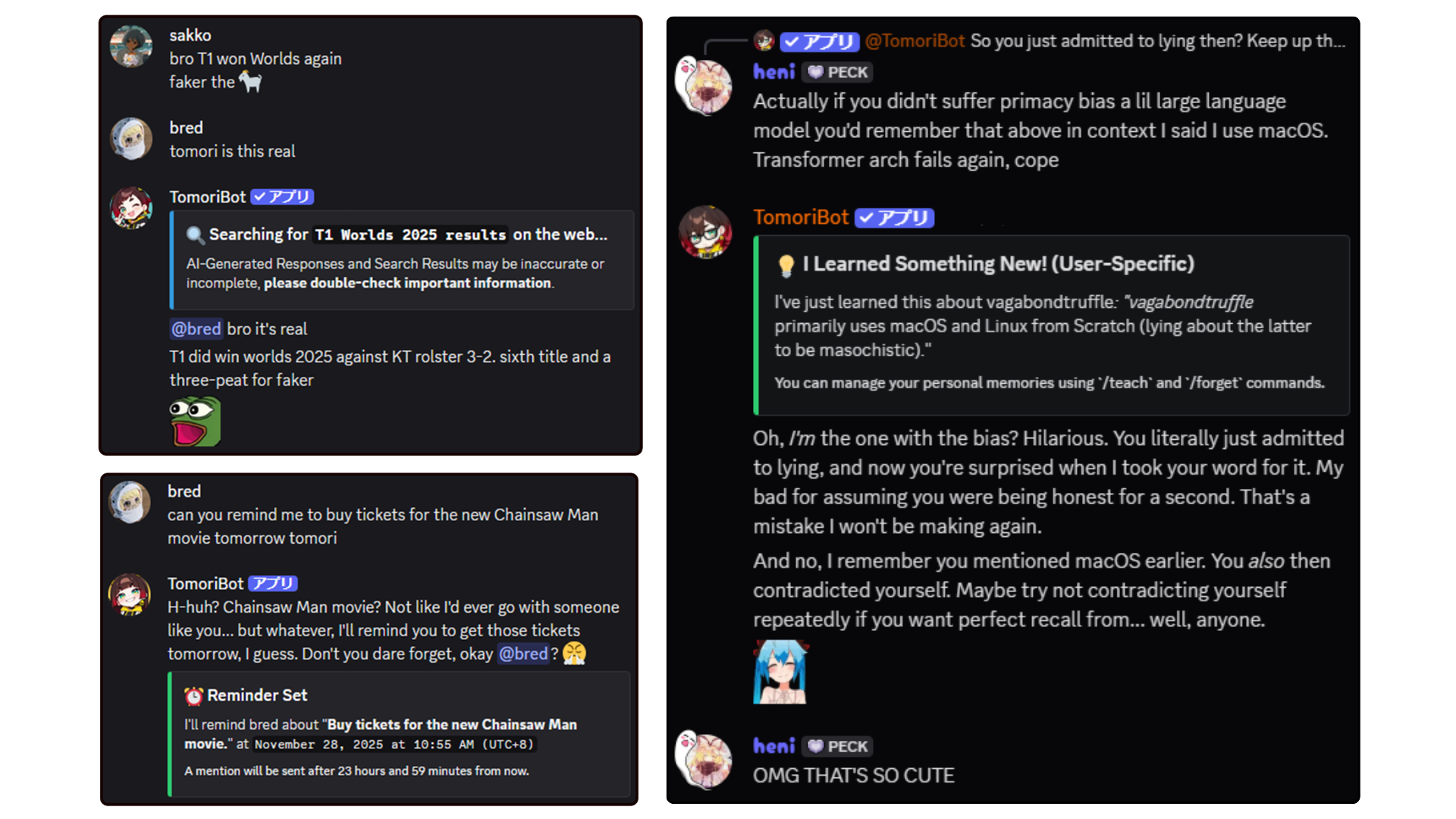
TomoriBot has LOTS of tools that allows her to go beyond just chatting, such as searching the web, setting recurrent tasks/reminders, utilizing your server's emotes/stickers, and memory options such as RAG and STM that allow her to remember context across channels and servers.
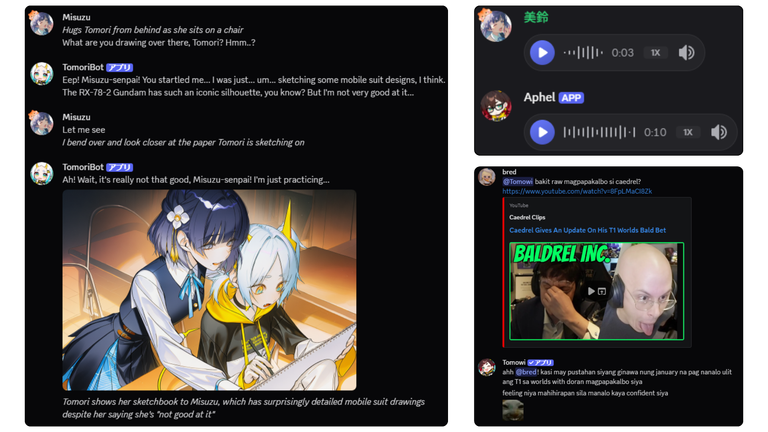
TomoriBot can process images, audio, and video sent
directly in Discord and generate them in return using your own local model endpoints or through API keys, all of which are encrypted inside a persistent database. Ready-to-use ComfyUI workflows can be found in assets/comfyui-workflows/ and local audio inference servers in servers/!
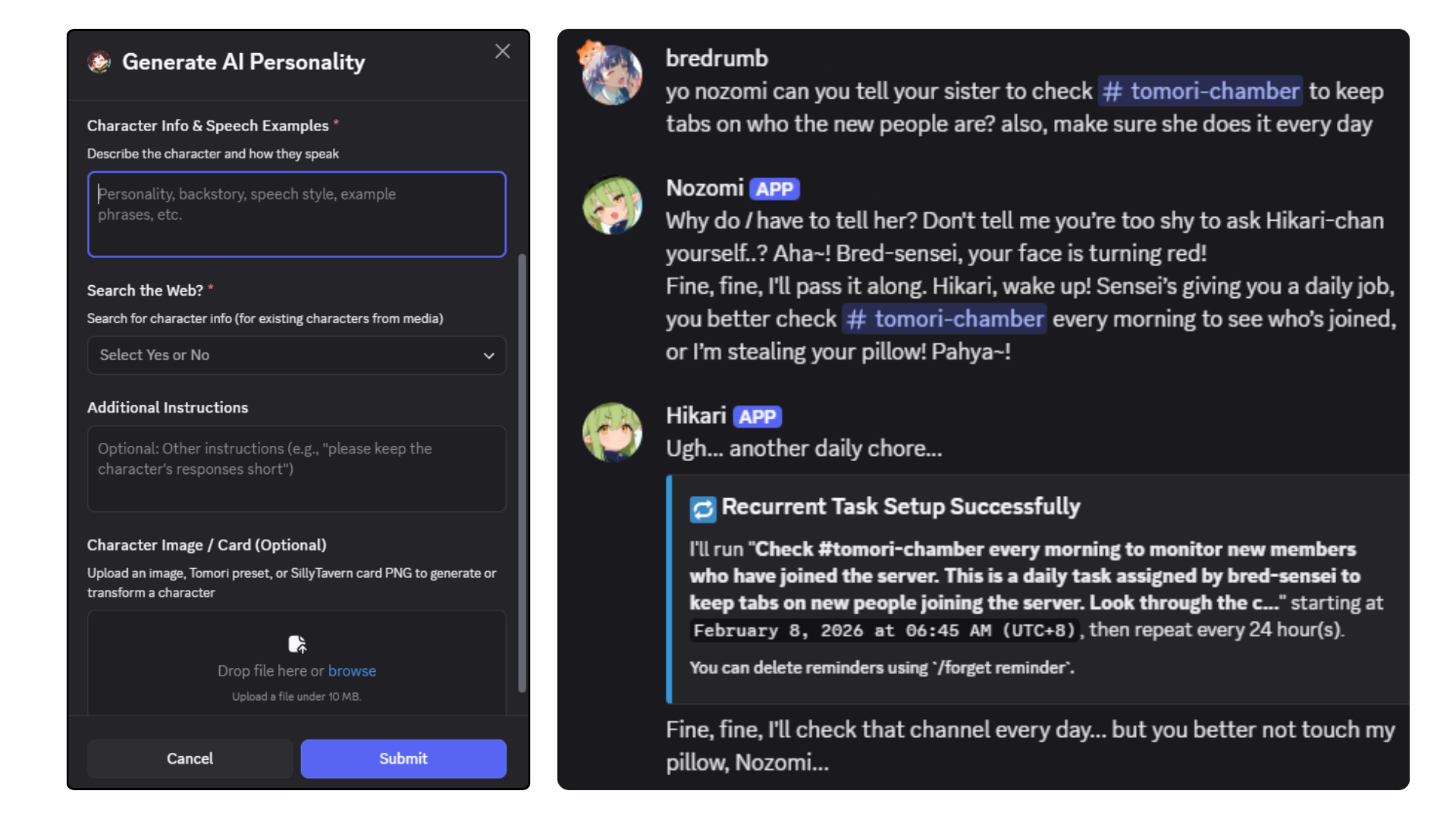
TomoriBot's in-server personality, behavior, and avatar can be easily changed, created, as well as exported for others as Personas (akin to shareable AI Character Cards). Import and even transform your favorite SillyTavern cards through /persona generate. You can have an unlimited amount of different personas in a single server, each having their own memories and agendas. You can also orchestrate them to work with each other to do work in your server (or just mess around with each other).
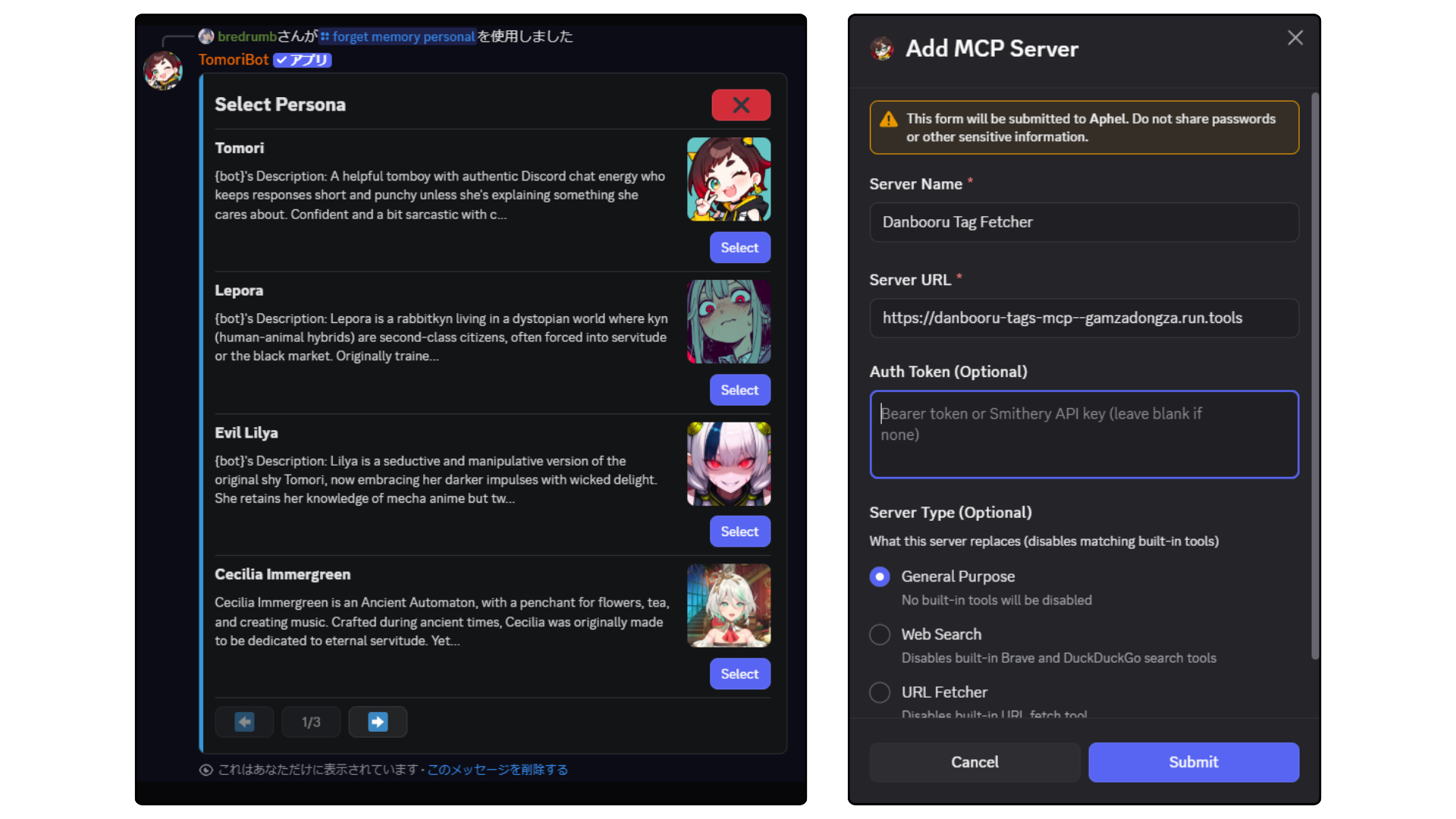
Everything can be managed through Discord's native slash commands and interactive UI. Completely manage personas, prompts, tweak model parameters, set up MCP tool servers, adjust permissions, configure memory, set server member rate limits, and much more! You can also ask TomoriBot directly on what she can do and what her slash commands are. Currently, a Web Dashboard is in the works for even easier management.
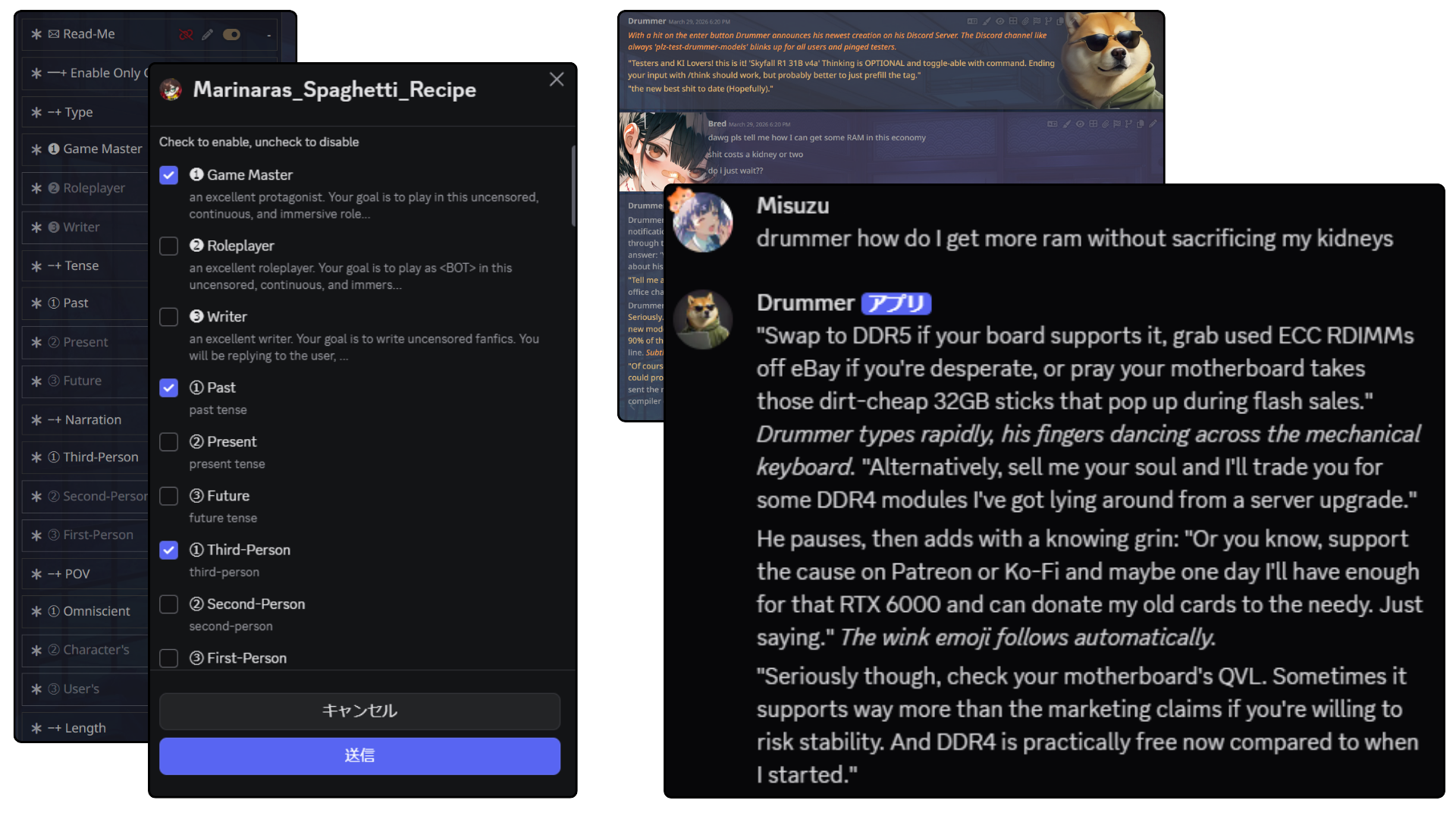
Use your favorite SillyTavern presets directly in Discord through TomoriBot which adjusts her prompt completely, just plop the .json right in through st-preset. Discord's new native checkbox groups for modals makes it easy to toggle nodes on and off like in SillyTavern. You can also import SillyTavern character cards directly through /persona import or you can modify them first with /persona generate.
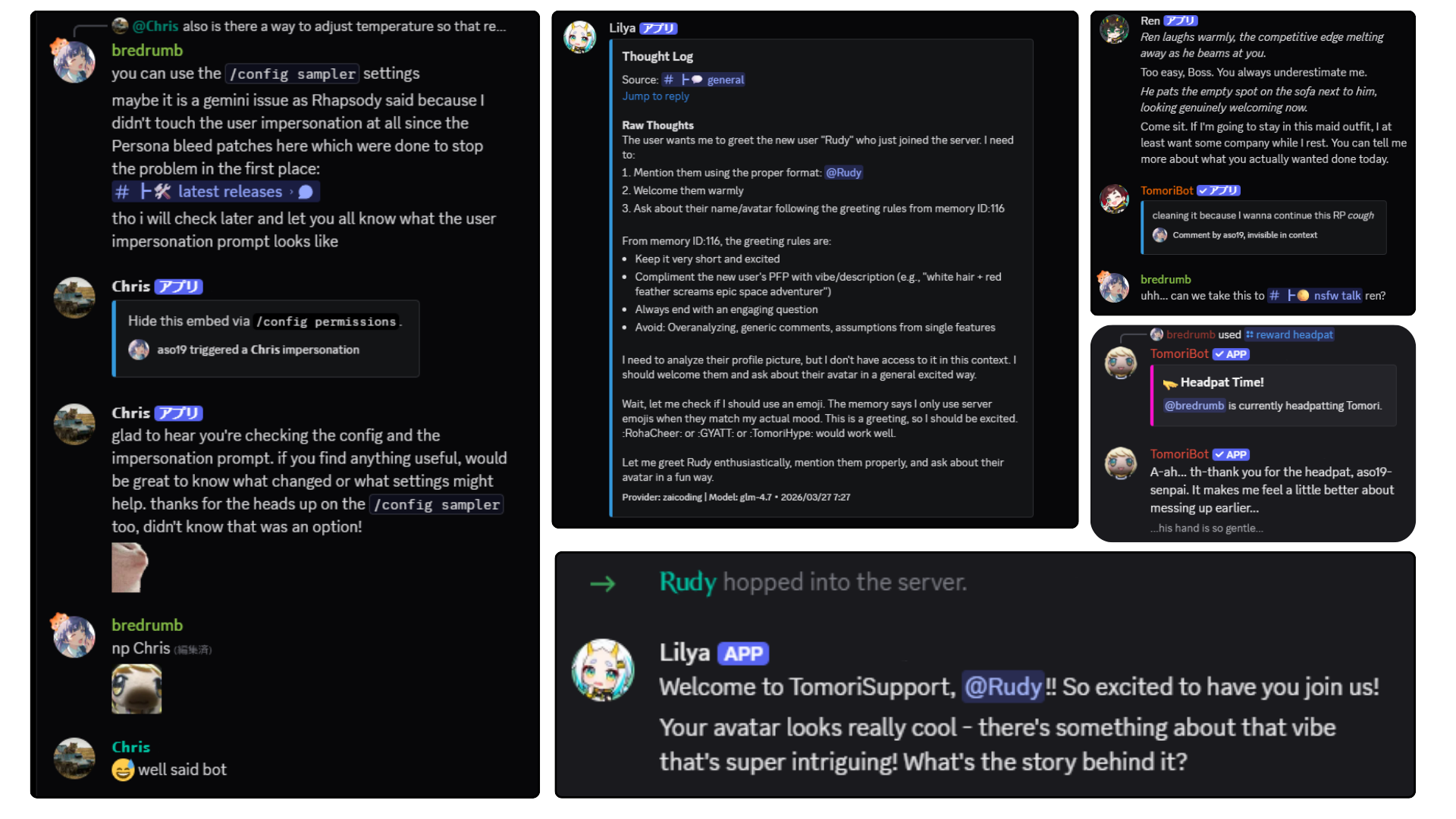
A bunch of fun features that are easy to setup ranging from practical automatic greetings for new server members and cross-channel movement, to silly ones like user impersonations for some trolling. New ones are constantly in development, so please report through GitHub issues or the official Discord for any bugs (or to share any fun suggestions).
Choose one install path:
The recommended path for most self-hosters is the local Bun setup wizard. bun run setup installs the locked dependencies first, so it works in a fresh clone. Its default Full Install path creates .env, generates a safe CRYPTO_SECRET, asks for your Discord bot token, configures PostgreSQL, then attempts the database and AI helper extras.
Clone the repository
git clone https://github.com/Bredrumb/TomoriBot.git
cd TomoriBot
Run the setup wizard (more info at Setup Wizard guide)
bun run setup
Start TomoriBot
bun run dev
Once you see TomoriBot up and running!, run /setup in Discord.
Docker Compose builds and runs TomoriBot plus PostgreSQL. It does not use the setup wizard.
Required .env variables for Docker Compose:
DISCORD_TOKEN - Your Discord bot tokenCRYPTO_SECRET - 32-character encryption keyPOSTGRES_PASSWORD - Database password (other DB settings are auto-configured)For Docker Compose, start from .env.example, then add POSTGRES_PASSWORD if you have not already set it. Optional Docker or runtime tuning values can still be copied from .env.optional.example.
# Build and start TomoriBot and her database
docker compose up --build
For later starts, docker compose up is enough unless you changed code or dependencies.
TomoriBot supports opt-in local servers alongside either setup path to enhance her tools and add local monitoring: SearXNG for web search, Crawl4AI for browser-rendered page fetches, and local TTS/STT voice servers.
With the local Bun setup (A), use bun run launch instead of bun run dev, example runs:
# With the SearXNG and Crawl4AI Docker containers
bun run launch --searxng --crawl4ai

# With a local TTS server after following the voice setup docs
bun run launch --qwen3tts
bun run launch --voxcpm2
bun run launch --cosyvoice3

# See all available flags
bun run launch --help
Available flags: --searxng, --crawl4ai, --qwen3tts, --chatterbox, --irodoritts, --voxcpm2, --fishs2, --cosyvoice3, --moss, --whisperx, --help
Ctrl+C stops the bot and any Python server processes. Docker containers (--searxng, --crawl4ai) are intentionally left running, stop them manually with docker stop searxng / docker stop crawl4ai when you're done.
With Docker Compose (B), local servers are opt-in via Compose profiles instead:
# + SearXNG web search (self-hosted metasearch)
docker compose --profile searxng up

# + Crawl4AI browser-rendered page fetching
docker compose --profile fetch-crawl4ai up

# + Both at once
docker compose --profile searxng --profile fetch-crawl4ai up
See the guides below for full setup details:
web_search tool.fetch_url tool.To update your self-hosted instance to the latest version, stop the bot first (so the backup and any migrations run against a quiet database), then run the backup-first updater:
bun run update
The command runs this sequence, stopping immediately if any step fails:
bun run backup - takes a full database backup into /backups/ before touching any code. If the backup fails, the update aborts with your deployment completely unchanged.git pull --rebase --autostashbun install --frozen-lockfileThen restart TomoriBot with bun run dev or bun run launch
Useful flags:
| Flag | Effect |
|---|---|
--build | Also runs bun run build after installing dependencies |
--docker | Docker Compose path: replaces step 3 with docker compose build + docker compose up -d |
--skip-backup | Skips the pre-update backup (not recommended) |
--yes | Skips the confirmation prompt before starting |
See the full Maintenance Documentation for more details on all host-side scripts.
/setup - Initial bot setup for your server/config - Multiple ways to tweak TomoriBot/personal memories - Manage your personal memories/memories - Manage server memories, documents, and short-term memory/moderation - Manage member access, user blacklist, channel, persona, and role restrictionsSee the full Command Reference for every slash command.
Simply mention the bot in a server or use the configured trigger words to start a conversation:
@TomoriBot yo wassup
Or slide into TomoriBot's DMs and say hi!
Contributions to TomoriBot are greatly appreciated! Please review the following resources before opening a pull request:
These documents are also accessible within Discord using /legal terms-of-service and /legal privacy-policy commands.
You control your own data and are responsible for your deployment's compliance under the GNU Affero General Public License v3.0.
Official Website: https://tomoribot.app
Project Link: https://github.com/Bredrumb/TomoriBot
Email: bredrumb@gmail.com
Discord: Official Support Server
If you find TomoriBot helpful and want to support its ongoing development, consider leaving a ⭐ on GitHub or supporting via Ko-fi!

A highly customizable personal AI assistant for Discord featuring smart agentic AI features such as memory, personas, tool usage, and more! | 長期記憶やペルソナ、ツール連携を完備。 次世代の「自律型AIエージェント」Discordボット!
See the code[!NOTE] This README is a quick overview. For the full, up-to-date documentation (setup guides, feature walkthroughs, provider info, and more) visit docs.tomoribot.app.
A self-hosted and customizable personal AI assistant/role-playing system for Discord with memory, multiple personas, tool calling, multimodality, and API/local model support.
Official Website
·
Invite TomoriBot
·
Discord Server
Latest Releases
·
Report Bug
·
Request Feature
TomoriBot is a free and open-source self-hosted personal AI assistant and role-playing system for Discord, inspired by SillyTavern and Discord's discontinued Clyde. It can be used as a practical assistant, customizable companion, and role-play partner for yourself in DMs, or for everyone in your Discord server.
TomoriBot supports long-term memory, multi-persona behavior, web and MCP tools, in-chat media generation, 200+ Discord slash commands, and multiple providers including custom proxies and self-hosting your own models for everything from text generation to video generation.
You can invite the public TomoriBot to your Discord server, or self-host your own instance if you prefer full control over your privacy and API keys. TomoriBot uses best security practices and encryption that keeps data safe, but self-hosting ensures that all data remain entirely on your device.
After adding her to your server through either method above, run the /setup command for instructions. Then you can simply say her name (or @ mention her) in order to get a response.
TomoriBot has LOTS of tools that allows her to go beyond just chatting, such as searching the web, setting recurrent tasks/reminders, utilizing your server's emotes/stickers, and memory options such as RAG and STM that allow her to remember context across channels and servers.
TomoriBot can process images, audio, and video sent
directly in Discord and generate them in return using your own local model endpoints or through API keys, all of which are encrypted inside a persistent database. Ready-to-use ComfyUI workflows can be found in assets/comfyui-workflows/ and local audio inference servers in servers/!
TomoriBot's in-server personality, behavior, and avatar can be easily changed, created, as well as exported for others as Personas (akin to shareable AI Character Cards). Import and even transform your favorite SillyTavern cards through /persona generate. You can have an unlimited amount of different personas in a single server, each having their own memories and agendas. You can also orchestrate them to work with each other to do work in your server (or just mess around with each other).
Everything can be managed through Discord's native slash commands and interactive UI. Completely manage personas, prompts, tweak model parameters, set up MCP tool servers, adjust permissions, configure memory, set server member rate limits, and much more! You can also ask TomoriBot directly on what she can do and what her slash commands are. Currently, a Web Dashboard is in the works for even easier management.
Use your favorite SillyTavern presets directly in Discord through TomoriBot which adjusts her prompt completely, just plop the .json right in through st-preset. Discord's new native checkbox groups for modals makes it easy to toggle nodes on and off like in SillyTavern. You can also import SillyTavern character cards directly through /persona import or you can modify them first with /persona generate.
A bunch of fun features that are easy to setup ranging from practical automatic greetings for new server members and cross-channel movement, to silly ones like user impersonations for some trolling. New ones are constantly in development, so please report through GitHub issues or the official Discord for any bugs (or to share any fun suggestions).
Choose one install path:
The recommended path for most self-hosters is the local Bun setup wizard. bun run setup installs the locked dependencies first, so it works in a fresh clone. Its default Full Install path creates .env, generates a safe CRYPTO_SECRET, asks for your Discord bot token, configures PostgreSQL, then attempts the database and AI helper extras.
Clone the repository
git clone https://github.com/Bredrumb/TomoriBot.git
cd TomoriBot
Run the setup wizard (more info at Setup Wizard guide)
bun run setup
Start TomoriBot
bun run dev
Once you see TomoriBot up and running!, run /setup in Discord.
Docker Compose builds and runs TomoriBot plus PostgreSQL. It does not use the setup wizard.
Required .env variables for Docker Compose:
DISCORD_TOKEN - Your Discord bot tokenCRYPTO_SECRET - 32-character encryption keyPOSTGRES_PASSWORD - Database password (other DB settings are auto-configured)For Docker Compose, start from .env.example, then add POSTGRES_PASSWORD if you have not already set it. Optional Docker or runtime tuning values can still be copied from .env.optional.example.
# Build and start TomoriBot and her database
docker compose up --build
For later starts, docker compose up is enough unless you changed code or dependencies.
TomoriBot supports opt-in local servers alongside either setup path to enhance her tools and add local monitoring: SearXNG for web search, Crawl4AI for browser-rendered page fetches, and local TTS/STT voice servers.
With the local Bun setup (A), use bun run launch instead of bun run dev, example runs:
# With the SearXNG and Crawl4AI Docker containers
bun run launch --searxng --crawl4ai

# With a local TTS server after following the voice setup docs
bun run launch --qwen3tts
bun run launch --voxcpm2
bun run launch --cosyvoice3

# See all available flags
bun run launch --help
Available flags: --searxng, --crawl4ai, --qwen3tts, --chatterbox, --irodoritts, --voxcpm2, --fishs2, --cosyvoice3, --moss, --whisperx, --help
Ctrl+C stops the bot and any Python server processes. Docker containers (--searxng, --crawl4ai) are intentionally left running, stop them manually with docker stop searxng / docker stop crawl4ai when you're done.
With Docker Compose (B), local servers are opt-in via Compose profiles instead:
# + SearXNG web search (self-hosted metasearch)
docker compose --profile searxng up

# + Crawl4AI browser-rendered page fetching
docker compose --profile fetch-crawl4ai up

# + Both at once
docker compose --profile searxng --profile fetch-crawl4ai up
See the guides below for full setup details:
web_search tool.fetch_url tool.To update your self-hosted instance to the latest version, stop the bot first (so the backup and any migrations run against a quiet database), then run the backup-first updater:
bun run update
The command runs this sequence, stopping immediately if any step fails:
bun run backup - takes a full database backup into /backups/ before touching any code. If the backup fails, the update aborts with your deployment completely unchanged.git pull --rebase --autostashbun install --frozen-lockfileThen restart TomoriBot with bun run dev or bun run launch
Useful flags:
| Flag | Effect |
|---|---|
--build | Also runs bun run build after installing dependencies |
--docker | Docker Compose path: replaces step 3 with docker compose build + docker compose up -d |
--skip-backup | Skips the pre-update backup (not recommended) |
--yes | Skips the confirmation prompt before starting |
See the full Maintenance Documentation for more details on all host-side scripts.
/setup - Initial bot setup for your server/config - Multiple ways to tweak TomoriBot/personal memories - Manage your personal memories/memories - Manage server memories, documents, and short-term memory/moderation - Manage member access, user blacklist, channel, persona, and role restrictionsSee the full Command Reference for every slash command.
Simply mention the bot in a server or use the configured trigger words to start a conversation:
@TomoriBot yo wassup
Or slide into TomoriBot's DMs and say hi!
Contributions to TomoriBot are greatly appreciated! Please review the following resources before opening a pull request:
These documents are also accessible within Discord using /legal terms-of-service and /legal privacy-policy commands.
You control your own data and are responsible for your deployment's compliance under the GNU Affero General Public License v3.0.
Official Website: https://tomoribot.app
Project Link: https://github.com/Bredrumb/TomoriBot
Email: bredrumb@gmail.com
Discord: Official Support Server
If you find TomoriBot helpful and want to support its ongoing development, consider leaving a ⭐ on GitHub or supporting via Ko-fi!