A High-Fidelity Simulation Platform for Aerial-Ground Collaborative Robotics Based on AirSim
C++
78
12 commits
updated Apr 9, 2026
Air–Ground Cooperative Simulation Platform




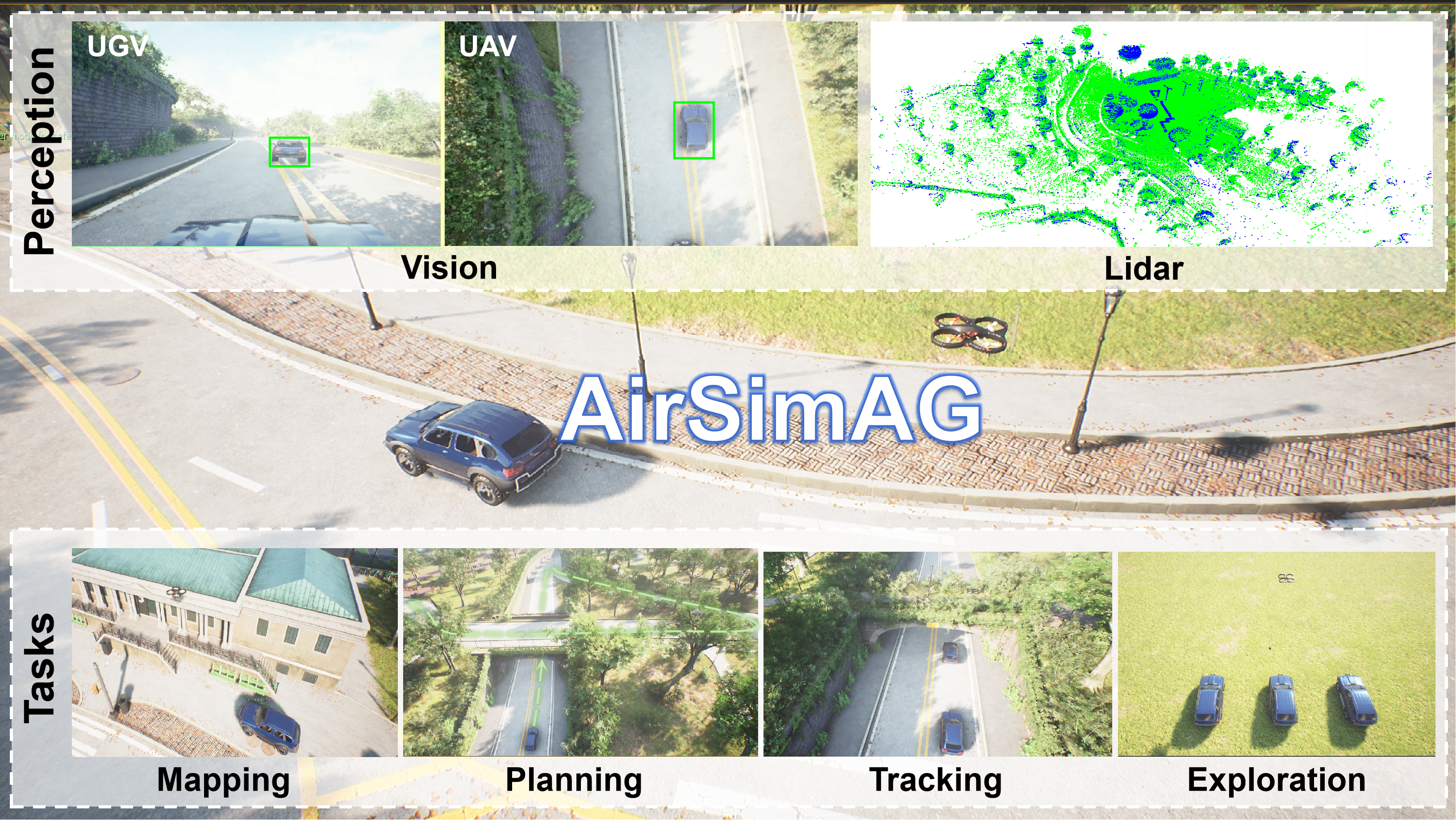
AirSimAG is a high-fidelity simulator for cooperative air–ground robotics. It lets you simulate UAVs (drones) + UGVs (ground vehicles) together, with:
Perfect for RL, vision-based planning, and cooperative control experiments!
| § | |
|---|---|
| 1 | ✨ Key Features |
| 2 | 🎮 Simulation Capabilities |
| 3 | 🎬 Task Demos |
| 4 | 🧰 Getting Started |
| 5 | 🚀 Quick Start |
| 6 | 📖 Citation |
| 7 | 📜 License |
| 🤖 Air–ground coordination | Tight coupling between UAVs & UGVs with shared state & coordinated control |
| 🧩 Unified ROS interface | RPC + ROS wrapper; synchronized topics & services for multi-agent experiments |
| 🛰️ Sensors | RGB, depth, segmentation, LiDAR, IMU; multi-camera & multi-vehicle support |
| 🌍 Space–time consistency | Globally aligned coordinates + synchronized timestamps for multi-agent fusion |
| ⚙️ Task-oriented workflows | Pipelines & hooks for mapping, planning, tracking, formation control |
AirSimAG inherits AirSim features:
settings.json| Modality | Description |
|---|---|
| RGB / Scene | Color cameras for learning & perception |
| Depth | Planar / perspective depth |
| Segmentation | Semantic / instance masks |
| Extras | Optical flow, surface normals, IR-style view (optional) |
| Sensor | Description |
|---|---|
| LiDAR | 3D point cloud scans |
| IMU | Linear acceleration + angular velocity |
| GPS / GNSS | Global positioning & navigation |
| Other | Barometer, magnetometer, distance sensors |
| Odometry / Kinematics | Pose, velocity, acceleration; ROS-friendly |
| Clock / Time stepping | Simulation time, pause/step for repeatable experiments |
| Weather | Rain, snow, dust, wind |
| Collision & World | Meshes, ray casts, collision detection |
🎥 Demo video: fig_airsimag/AirSimAG.mp4
Cooperative mapping with UAV + UGV, synchronized scene & point clouds.
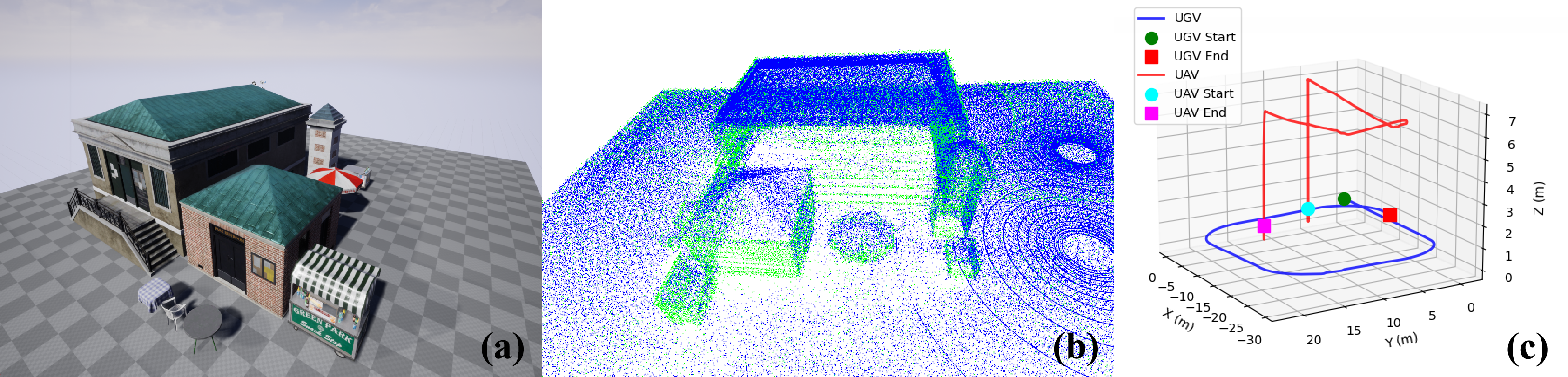
(a) Mapping scene. (b) Fused point cloud map: UAV points in blue, UGV points in green. (c) UAV and UGV trajectories during the mapping task.
Multi-level path planning: overpasses, tunnels, obstacles.
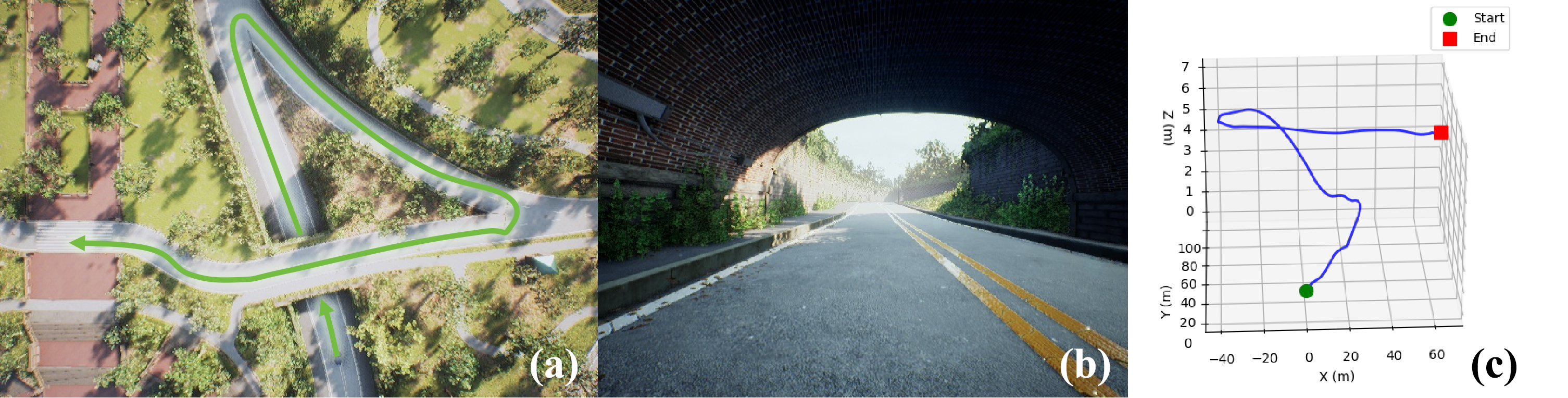
UAV: aerial global view
UGV: local ground view
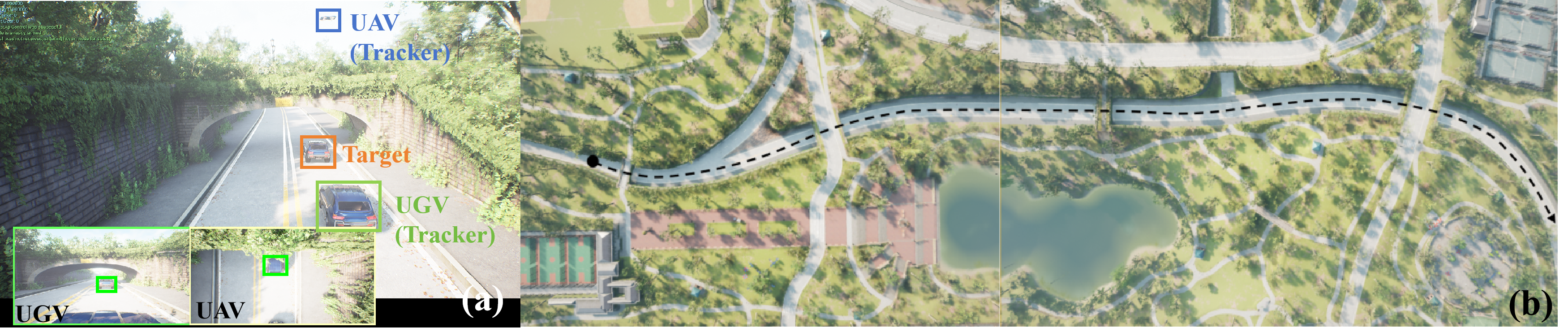
(a) Unreal Engine scene showing the third-person view, UAV first-person view, and UGV first-person view. (b) Tracking map.
4 UAVs (square) + 3 UGVs (circle)
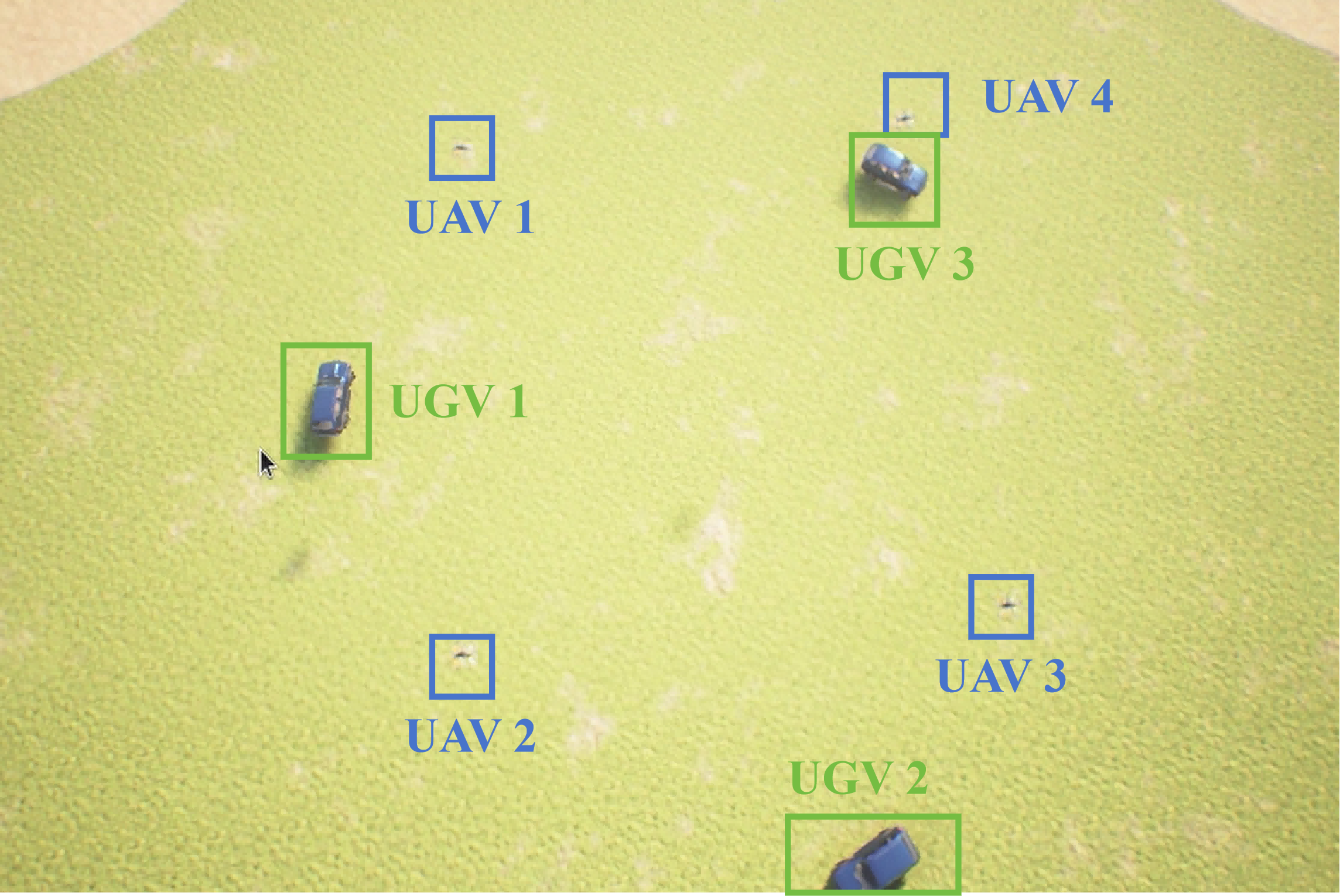
Hardware: RTX 4090 + Intel i7-14700KF + 62GB RAM
| Metric | Value |
|---|---|
| Num. UAV | 4 |
| Num. UGV | 3 |
| Odometry ROS Topic (Hz) | >25 |
| Image ROS Topic (Hz) | >5 |
| UE4 FPS | 45–60 |
| Memory Usage (MB) | ~14,852 |
💾 Download pre-recorded rosbags: Baidu Netdisk (password:
e7jx)
Dependencies:
Documentation & Build:
APIs: Python / C++ for images, LiDAR, IMU, vehicle control, ROS integration.
git clone https://github.com/BIULab-BUAA/AirSimAG
cd AirSimAG
# Linux
./build.sh
Copy compiled Plugins folder to your environment project (e.g., CityParkEnvironmentCollection 4.27).
# Linux
cd ~/UnrealEngine-4.27.0-files
./Engine/Binaries/Linux/UE4Editor
Set GameMode to AirSimGameMode.
Copy fig_airsimag/settings.json to your AirSim settings.json (Documents on Windows, ~/Documents/AirSim on Linux). This example configures an air–ground setup with LiDAR and cameras; sensor options are described in the AirSim documentation.
Click Play in the Unreal Editor.
cd AirSimAG/ros
python src/example/camera_record_ag.py
cd AirSimAG/ros
python src/example/lidar_record_ag.py
cd AirSimAG/ros
catkin_make
source devel/setup.bash
roslaunch airsim_ros_pkgs airsim_all.launch
Use rostopic list to inspect odometry, images, and control topics.
cd AirSimAG/ros
source devel/setup.bash
python src/example/keyboard_ctrl.py
This node publishes body-frame velocity commands for the UAV and car control commands for the UGV. If no key is pressed in the polling window, both vehicles are commanded to stop (UAV zero velocity, UGV brake applied). Key bindings for ros/src/example/keyboard_ctrl.py:
🚁 UAV (multirotor)
| Key | Action |
|---|---|
| W | Move forward (positive body-frame forward velocity) |
| S | Move backward |
| A | Strafe left |
| D | Strafe right |
| F | Ascend (negative vertical velocity in NED; “up” in world frame) |
| B | Descend (positive vertical velocity in NED; “down” in world frame) |
| Y | Yaw (positive angular rate about the body vertical axis) |
🚗 UGV (ground vehicle)
Keys 8, 2, 4, 6, and 5 follow a numeric keypad layout (8 = up, 2 = down, 4 = left, 6 = right, 5 = center).
| Key | Action |
|---|---|
| 8 | Drive forward (throttle, straight) |
| 2 | Drive backward (reverse throttle, straight) |
| 4 | Forward motion with steering to the left |
| 6 | Forward motion with steering to the right |
| 5 | Release throttle and steering (coast / stop maneuver; brake command cleared in this example) |
🔑 Common
| Key | Action |
|---|---|
| Q | Quit the keyboard control node |
💡 Note: Ensure Num Lock is on if you use a keyboard where the number keys share the numpad; otherwise use the dedicated digit keys that produce
8,2,4,6,5in the terminal.
If you use this platform in academic work, please cite AirSim and AirSimAG:
@misc{airsimag2026cui,
      title={AirSimAG: A High-Fidelity Simulation Platform for Air-Ground Collaborative Robotics},
      author={Yangjie Cui and Xin Dong and Boyang Gao and Jinwu Xiang and Daochun Li and Zhan Tu},
      year={2026},
      eprint={2603.23079},
      archivePrefix={arXiv},
      primaryClass={cs.RO},
      url={https://arxiv.org/abs/2603.23079},
}

@inproceedings{airsim2017fsr,
  author = {Shital Shah and Debadeepta Dey and Chris Lovett and Ashish Kapoor},
  title = {AirSim: High-Fidelity Visual and Physical Simulation for Autonomous Vehicles},
  year = {2017},
  booktitle = {Field and Service Robotics},
  eprint = {arXiv:1705.05065},
  url = {https://arxiv.org/abs/1705.05065}
}
All rights reserved.
A High-Fidelity Simulation Platform for Aerial-Ground Collaborative Robotics Based on AirSim
C++
78
12 commits
updated Apr 9, 2026
Air–Ground Cooperative Simulation Platform
AirSimAG is a high-fidelity simulator for cooperative air–ground robotics. It lets you simulate UAVs (drones) + UGVs (ground vehicles) together, with:
Perfect for RL, vision-based planning, and cooperative control experiments!
| § | |
|---|---|
| 1 | ✨ Key Features |
| 2 | 🎮 Simulation Capabilities |
| 3 | 🎬 Task Demos |
| 4 | 🧰 Getting Started |
| 5 | 🚀 Quick Start |
| 6 | 📖 Citation |
| 7 | 📜 License |
| 🤖 Air–ground coordination | Tight coupling between UAVs & UGVs with shared state & coordinated control |
| 🧩 Unified ROS interface | RPC + ROS wrapper; synchronized topics & services for multi-agent experiments |
| 🛰️ Sensors | RGB, depth, segmentation, LiDAR, IMU; multi-camera & multi-vehicle support |
| 🌍 Space–time consistency | Globally aligned coordinates + synchronized timestamps for multi-agent fusion |
| ⚙️ Task-oriented workflows | Pipelines & hooks for mapping, planning, tracking, formation control |
AirSimAG inherits AirSim features:
settings.json| Modality | Description |
|---|---|
| RGB / Scene | Color cameras for learning & perception |
| Depth | Planar / perspective depth |
| Segmentation | Semantic / instance masks |
| Extras | Optical flow, surface normals, IR-style view (optional) |
| Sensor | Description |
|---|---|
| LiDAR | 3D point cloud scans |
| IMU | Linear acceleration + angular velocity |
| GPS / GNSS | Global positioning & navigation |
| Other | Barometer, magnetometer, distance sensors |
| Odometry / Kinematics | Pose, velocity, acceleration; ROS-friendly |
| Clock / Time stepping | Simulation time, pause/step for repeatable experiments |
| Weather | Rain, snow, dust, wind |
| Collision & World | Meshes, ray casts, collision detection |
🎥 Demo video: fig_airsimag/AirSimAG.mp4
Cooperative mapping with UAV + UGV, synchronized scene & point clouds.
(a) Mapping scene. (b) Fused point cloud map: UAV points in blue, UGV points in green. (c) UAV and UGV trajectories during the mapping task.
Multi-level path planning: overpasses, tunnels, obstacles.
UAV: aerial global view
UGV: local ground view
(a) Unreal Engine scene showing the third-person view, UAV first-person view, and UGV first-person view. (b) Tracking map.
4 UAVs (square) + 3 UGVs (circle)
Hardware: RTX 4090 + Intel i7-14700KF + 62GB RAM
| Metric | Value |
|---|---|
| Num. UAV | 4 |
| Num. UGV | 3 |
| Odometry ROS Topic (Hz) | >25 |
| Image ROS Topic (Hz) | >5 |
| UE4 FPS | 45–60 |
| Memory Usage (MB) | ~14,852 |
💾 Download pre-recorded rosbags: Baidu Netdisk (password:
e7jx)
Dependencies:
Documentation & Build:
APIs: Python / C++ for images, LiDAR, IMU, vehicle control, ROS integration.
git clone https://github.com/BIULab-BUAA/AirSimAG
cd AirSimAG
# Linux
./build.sh
Copy compiled Plugins folder to your environment project (e.g., CityParkEnvironmentCollection 4.27).
# Linux
cd ~/UnrealEngine-4.27.0-files
./Engine/Binaries/Linux/UE4Editor
Set GameMode to AirSimGameMode.
Copy fig_airsimag/settings.json to your AirSim settings.json (Documents on Windows, ~/Documents/AirSim on Linux). This example configures an air–ground setup with LiDAR and cameras; sensor options are described in the AirSim documentation.
Click Play in the Unreal Editor.
cd AirSimAG/ros
python src/example/camera_record_ag.py
cd AirSimAG/ros
python src/example/lidar_record_ag.py
cd AirSimAG/ros
catkin_make
source devel/setup.bash
roslaunch airsim_ros_pkgs airsim_all.launch
Use rostopic list to inspect odometry, images, and control topics.
cd AirSimAG/ros
source devel/setup.bash
python src/example/keyboard_ctrl.py
This node publishes body-frame velocity commands for the UAV and car control commands for the UGV. If no key is pressed in the polling window, both vehicles are commanded to stop (UAV zero velocity, UGV brake applied). Key bindings for ros/src/example/keyboard_ctrl.py:
🚁 UAV (multirotor)
| Key | Action |
|---|---|
| W | Move forward (positive body-frame forward velocity) |
| S | Move backward |
| A | Strafe left |
| D | Strafe right |
| F | Ascend (negative vertical velocity in NED; “up” in world frame) |
| B | Descend (positive vertical velocity in NED; “down” in world frame) |
| Y | Yaw (positive angular rate about the body vertical axis) |
🚗 UGV (ground vehicle)
Keys 8, 2, 4, 6, and 5 follow a numeric keypad layout (8 = up, 2 = down, 4 = left, 6 = right, 5 = center).
| Key | Action |
|---|---|
| 8 | Drive forward (throttle, straight) |
| 2 | Drive backward (reverse throttle, straight) |
| 4 | Forward motion with steering to the left |
| 6 | Forward motion with steering to the right |
| 5 | Release throttle and steering (coast / stop maneuver; brake command cleared in this example) |
🔑 Common
| Key | Action |
|---|---|
| Q | Quit the keyboard control node |
💡 Note: Ensure Num Lock is on if you use a keyboard where the number keys share the numpad; otherwise use the dedicated digit keys that produce
8,2,4,6,5in the terminal.
If you use this platform in academic work, please cite AirSim and AirSimAG:
@misc{airsimag2026cui,
      title={AirSimAG: A High-Fidelity Simulation Platform for Air-Ground Collaborative Robotics},
      author={Yangjie Cui and Xin Dong and Boyang Gao and Jinwu Xiang and Daochun Li and Zhan Tu},
      year={2026},
      eprint={2603.23079},
      archivePrefix={arXiv},
      primaryClass={cs.RO},
      url={https://arxiv.org/abs/2603.23079},
}

@inproceedings{airsim2017fsr,
  author = {Shital Shah and Debadeepta Dey and Chris Lovett and Ashish Kapoor},
  title = {AirSim: High-Fidelity Visual and Physical Simulation for Autonomous Vehicles},
  year = {2017},
  booktitle = {Field and Service Robotics},
  eprint = {arXiv:1705.05065},
  url = {https://arxiv.org/abs/1705.05065}
}
All rights reserved.



