
Securely encrypt and decrypt files locally from a web browser
TypeScript
18
56 commits
updated Dec 24, 2025
See what people are saying
README
🔒 Secure File Sharing Utility 🔒


Welcome to our secure file sharing utility! This HTML-based tool allows you to easily encrypt, share, and decrypt files using the CMS (Cryptographic Message Syntax) standard, PWRI (password recipient info) and AES-256-GCM encryption.
🔐 Features
- Encrypt Files: Select a file, enter a password, and the tool will generate a standalone HTML file that contains the encrypted data.
- Share Securely: Share the generated HTML file with your recipient, who can then decrypt the file using the same password.
- Decrypt Files: The recipient can use the standalone HTML file to decrypt the CMS payload and access the original file.
- Local Processing: All encryption and decryption operations are performed locally in the browser, ensuring your data never leaves your device.
- Standalone HTML: The encrypted and decrypted files are self-contained HTML files, making them easy to share and use.
- AES-256-GCM: The utility uses the secure AES-256-GCM cipher to encrypt your files, providing strong protection for your data.
- Standards-based: By using the CMS standard, this tool avoids "reinventing the wheel" and allows interoperability with other file encryption tools.
- No Installation Required: This utility can be used directly in your web browser, without the need for any additional software installation.
🚀 Getting Started
Using this secure file sharing utility is simple:
-
Encrypt a File:
- Open the HTML file in your browser.
- Select the file you want to encrypt.
- Enter a password to protect the file.
- Click the "💾︎ Save" button.
- The tool will generate a new HTML file containing the encrypted data.
-
Share the Encrypted File:
- Share the generated HTML file with your recipient.
-
Decrypt the File:
- Your recipient can open the HTML file in their browser.
- They will be prompted to enter the password you provided and will need to click on the "Next →" button to decrypt the file and confirm details before downloading.
- Clicking on the "💾︎ Download" button will download the original file.
That's it! Your file is now securely shared, and the recipient can access the decrypted content.
🎥 Demo
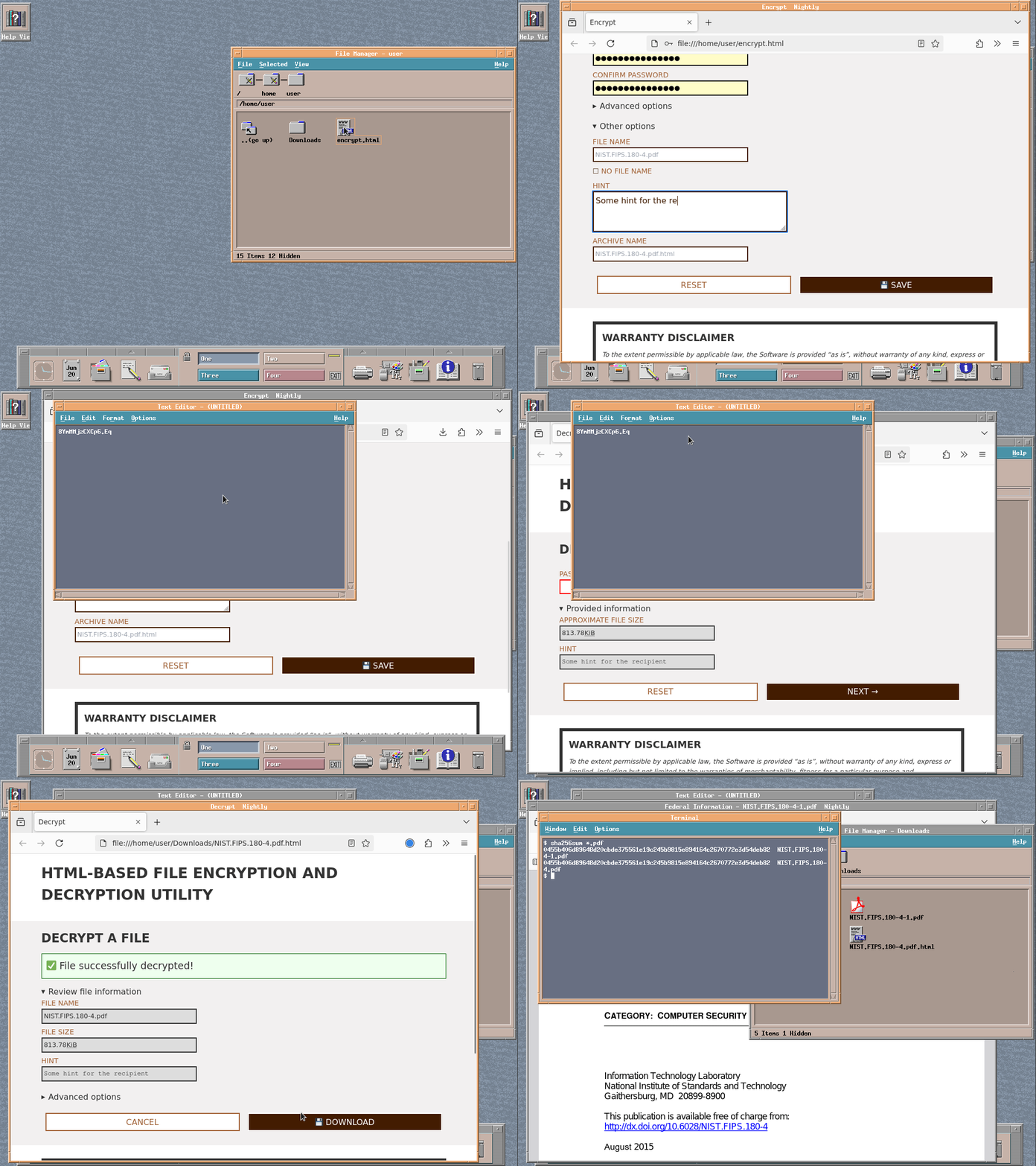
Want to see how it works? Check out the live demo at https://cms-sfx-demo.apeleg.com.
🌐 Browser Support
The following is a non-comprehensive list of browsers that have been tested. Even though we have tested with older versions for compatibility support and reporting, we strongly recommend using up-to-date browsers that still receive security updates.
- 360安全浏览器: ✅️ 12.1.2103.0–
- Brave: ✅️ 0.62.30–
- Chrome: ✅️ 73–
- Dillo: ❌ Not supported
- Edge: ✅️ 79–
- Falkon: ✅️ 22.03.80–
- Firefox: ✅️ 65–
- GNOME Web: ✅️ 43.0–
- Internet Explorer: ❌ Not supported
- NetSurf: ❌ Not supported
- Opera: ✅️ 60–
- Pale Moon: ✅️ 33.3.0–
- Tor Browser: ✅️ 9.0–
- Safari: ✅️ 15–
- SeaMonkey: ✅️ 2.53.18–
- Vivaldi: ✅️ 2.4–
Other platforms
In addition to working on a web browser as a self-extracting file, the resulting encrypted file can also be decrypted by tools that support PEM-encoded CMS, such as OpenSSL.
Example:
openssl cms \
  -decrypt \
  -pwri_password MyPassword \
  -inform PEM \
  -in encrypted.html \
  -out decrypted.example.zip
unzip decrypted.example.zip
⚡ Performance
Note that this tool works by creating a self-contained HTML file. As a result, it may not be the best fit for very large files, for two main reasons:
- A large file will produce a correpondingly larger HTML document. Since this is atypical, browsers may not be optimised for parsing such large files.
- Because of the file being embedded in the DOM tree (in encrypted form), the need to encrypt / decrypt it, and some design constraints, the entire content may need to fit into memory several times over. Ultimately, the amount of RAM available is a hard limit to how big a file this tool can support.
🔒 Security Considerations
This utility is designed with security in mind. By using the CMS standard, PWRI, and AES-256-GCM encryption, your files are protected during the sharing process. Additionally, all encryption and decryption operations are performed locally in the browser, so your data never leaves your device.
Password Strength Matters: The strength of the encryption and overall security of this tool greatly depend on the strength of the password you choose. We recommend using a strong, unique password to protect your files. Weak or compromised passwords can put your data at risk.
For more detailed information about the security of this tool and how it works,
see AUDITING.md.
❗️ Disclaimer
This tool is provided in the hope that it will be helpful, but it comes with absolutely no warranty, to the maximum extent permitted by law. While we have taken great care to design this utility with security in mind, the responsibility for the security and proper use of this tool lies entirely with the user.
We cannot guarantee that this tool will be free from bugs, vulnerabilities, or other issues that could compromise the security of your data. The strength of the encryption and the overall security of this tool ultimately depend on factors outside of our control, such as the strength of the password you choose, the security of your web browser, and the overall security of your computing environment.
By using this tool, you acknowledge and agree that, to the maximum extent permitted by law, we make no representations or warranties, express or implied, including but not limited to the warranties of merchantability, fitness for a particular purpose and noninfringement. Please refer to the license for additional details.
It is your responsibility to thoroughly evaluate the risks and benefits of using this tool, and to take appropriate measures to ensure the security of your data. We strongly recommend that you carefully review the source code, perform your own security audits, and seek the advice of security professionals before relying on this tool for any sensitive or critical data.
📝 Contributing
We welcome contributions to this project! If you have any ideas, bug reports, or feature requests, please feel free to submit them.
🧪 Testing
This project is tested with BrowserStack.
📜 License
This project is licensed under the Apache 2.0 License with the LLVM exception.
You are free to use this package in compliance with the terms of the license.
For more information, see the LICENSE file.
We hope you find this secure file sharing utility useful! If you have any questions or feedback, please don't hesitate to reach out.
Contributors

56 commits
Similar repos


Languages
TypeScript
67.0%
Svelte
22.0%
JavaScript
7.1%
CSS
3.2%
Securely encrypt and decrypt files locally from a web browser
TypeScript
18
56 commits
updated Dec 24, 2025
See what people are saying
README
🔒 Secure File Sharing Utility 🔒
Welcome to our secure file sharing utility! This HTML-based tool allows you to easily encrypt, share, and decrypt files using the CMS (Cryptographic Message Syntax) standard, PWRI (password recipient info) and AES-256-GCM encryption.
🔐 Features
- Encrypt Files: Select a file, enter a password, and the tool will generate a standalone HTML file that contains the encrypted data.
- Share Securely: Share the generated HTML file with your recipient, who can then decrypt the file using the same password.
- Decrypt Files: The recipient can use the standalone HTML file to decrypt the CMS payload and access the original file.
- Local Processing: All encryption and decryption operations are performed locally in the browser, ensuring your data never leaves your device.
- Standalone HTML: The encrypted and decrypted files are self-contained HTML files, making them easy to share and use.
- AES-256-GCM: The utility uses the secure AES-256-GCM cipher to encrypt your files, providing strong protection for your data.
- Standards-based: By using the CMS standard, this tool avoids "reinventing the wheel" and allows interoperability with other file encryption tools.
- No Installation Required: This utility can be used directly in your web browser, without the need for any additional software installation.
🚀 Getting Started
Using this secure file sharing utility is simple:
-
Encrypt a File:
- Open the HTML file in your browser.
- Select the file you want to encrypt.
- Enter a password to protect the file.
- Click the "💾︎ Save" button.
- The tool will generate a new HTML file containing the encrypted data.
-
Share the Encrypted File:
- Share the generated HTML file with your recipient.
-
Decrypt the File:
- Your recipient can open the HTML file in their browser.
- They will be prompted to enter the password you provided and will need to click on the "Next →" button to decrypt the file and confirm details before downloading.
- Clicking on the "💾︎ Download" button will download the original file.
That's it! Your file is now securely shared, and the recipient can access the decrypted content.
🎥 Demo
Want to see how it works? Check out the live demo at https://cms-sfx-demo.apeleg.com.
🌐 Browser Support
The following is a non-comprehensive list of browsers that have been tested. Even though we have tested with older versions for compatibility support and reporting, we strongly recommend using up-to-date browsers that still receive security updates.
- 360安全浏览器: ✅️ 12.1.2103.0–
- Brave: ✅️ 0.62.30–
- Chrome: ✅️ 73–
- Dillo: ❌ Not supported
- Edge: ✅️ 79–
- Falkon: ✅️ 22.03.80–
- Firefox: ✅️ 65–
- GNOME Web: ✅️ 43.0–
- Internet Explorer: ❌ Not supported
- NetSurf: ❌ Not supported
- Opera: ✅️ 60–
- Pale Moon: ✅️ 33.3.0–
- Tor Browser: ✅️ 9.0–
- Safari: ✅️ 15–
- SeaMonkey: ✅️ 2.53.18–
- Vivaldi: ✅️ 2.4–
Other platforms
In addition to working on a web browser as a self-extracting file, the resulting encrypted file can also be decrypted by tools that support PEM-encoded CMS, such as OpenSSL.
Example:
openssl cms \
  -decrypt \
  -pwri_password MyPassword \
  -inform PEM \
  -in encrypted.html \
  -out decrypted.example.zip
unzip decrypted.example.zip
⚡ Performance
Note that this tool works by creating a self-contained HTML file. As a result, it may not be the best fit for very large files, for two main reasons:
- A large file will produce a correpondingly larger HTML document. Since this is atypical, browsers may not be optimised for parsing such large files.
- Because of the file being embedded in the DOM tree (in encrypted form), the need to encrypt / decrypt it, and some design constraints, the entire content may need to fit into memory several times over. Ultimately, the amount of RAM available is a hard limit to how big a file this tool can support.
🔒 Security Considerations
This utility is designed with security in mind. By using the CMS standard, PWRI, and AES-256-GCM encryption, your files are protected during the sharing process. Additionally, all encryption and decryption operations are performed locally in the browser, so your data never leaves your device.
Password Strength Matters: The strength of the encryption and overall security of this tool greatly depend on the strength of the password you choose. We recommend using a strong, unique password to protect your files. Weak or compromised passwords can put your data at risk.
For more detailed information about the security of this tool and how it works,
see AUDITING.md.
❗️ Disclaimer
This tool is provided in the hope that it will be helpful, but it comes with absolutely no warranty, to the maximum extent permitted by law. While we have taken great care to design this utility with security in mind, the responsibility for the security and proper use of this tool lies entirely with the user.
We cannot guarantee that this tool will be free from bugs, vulnerabilities, or other issues that could compromise the security of your data. The strength of the encryption and the overall security of this tool ultimately depend on factors outside of our control, such as the strength of the password you choose, the security of your web browser, and the overall security of your computing environment.
By using this tool, you acknowledge and agree that, to the maximum extent permitted by law, we make no representations or warranties, express or implied, including but not limited to the warranties of merchantability, fitness for a particular purpose and noninfringement. Please refer to the license for additional details.
It is your responsibility to thoroughly evaluate the risks and benefits of using this tool, and to take appropriate measures to ensure the security of your data. We strongly recommend that you carefully review the source code, perform your own security audits, and seek the advice of security professionals before relying on this tool for any sensitive or critical data.
📝 Contributing
We welcome contributions to this project! If you have any ideas, bug reports, or feature requests, please feel free to submit them.
🧪 Testing
This project is tested with BrowserStack.
📜 License
This project is licensed under the Apache 2.0 License with the LLVM exception.
You are free to use this package in compliance with the terms of the license.
For more information, see the LICENSE file.
We hope you find this secure file sharing utility useful! If you have any questions or feedback, please don't hesitate to reach out.
Similar repos
Contributors
56 commits
Languages
TypeScript
67.0%
Svelte
22.0%
JavaScript
7.1%
CSS
3.2%