
FastFileLink CLI - Turn any file or folder into a secure, sharable HTTPS link. 🔄 Direct transfer (P2P) .⚡ Absolute privacy (E2EE).🔒 Single File, Run Anywhere
105
stars
194
commits
Python
primary language
Sep 12, 2026
updated
README
FastFileLink CLI (ffl)




FastFileLink CLI (ffl) is an Actually Portable secure file-delivery tool that turns files, folders, or streams into browser-ready HTTPS links with WebRTC P2P and relay fallback.
AFAIK, ffl is the only CLI file-transfer tool that does all of the following:
- 📡 Instant P2P WebRTC sharing — Auto-fallback and cross-mode resume guarantees delivery.
- 🧑💻 Zero-install for recipients — Download instantly via modern browsers,
curl, orffl, etc. - 📁 Folder & batch transfers — Stream TB-scale data or
stdindirectly without zip/encrypt first. - 🔐 Zero-trust End-to-end encryption — Ensures all relays and storage remain strictly zero-knowledge.
- 🚀 Smart Delivery & AI-Ready — Verify recipients via OTP/PubKey, or empower AI agents via MCP.
- 🧱 Actually Portable Executable (APE) + native builds for Windows, Linux, macOS. Embeddable.
- 🧰 Built-in & pluggable tunnels (Cloudflare, ngrok, self-hosted) — Supports proxies like Tor.
- ☁️ Optional temporary upload to server (account required) when both sides can’t be online simultaneously.
⚡ At a glance: Think croc or magic-wormhole, but the recipient uses a standard browser/HTTPS link — no software installation required.
📊 How does it compare to other tools? See our Comparison Guide
👉 Official site: https://fastfilelink.com
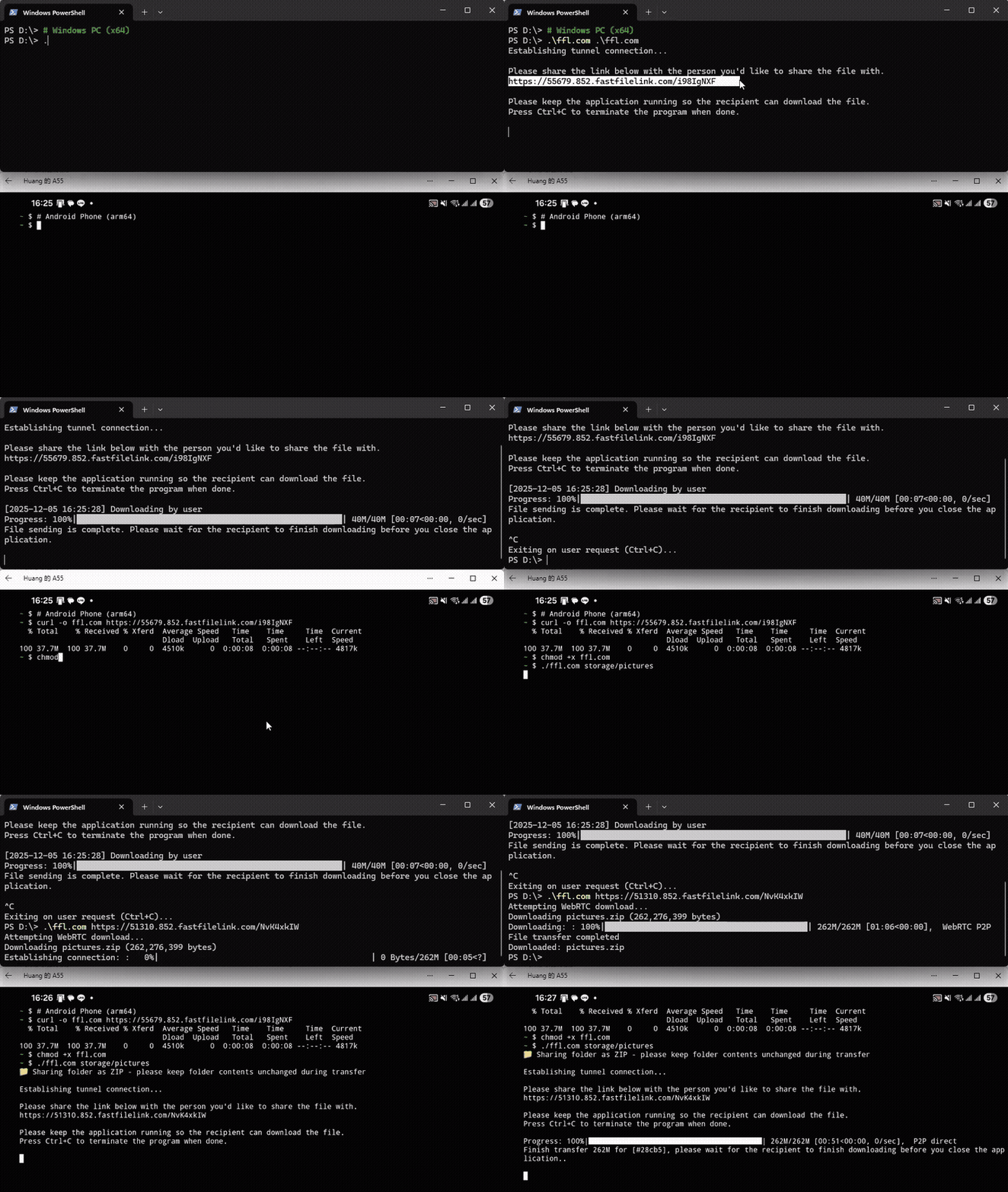
This simple demo shows how I sent ffl.com from Windows (x64) to Android (arm64) and used it directly to transfer photos back.
🌐 Want to see a browser download? (Click to expand)
The recipient doesn't need to install anything!
Verify the P2P connection and download speed in a modern browser:
https://github.com/user-attachments/assets/fe0d6bc6-3116-4633-9c42-41566fe5fd30
Workflows like this also pair naturally with tools such as llamafile.
Table of Contents
- Installation
- Why APE and Native?
- Quickstart
- CLI Reference
- Features & Advanced Usage
- Privacy & Security
- How it Works & Motivation
- Open Source & Contributing
- Acknowledgements
Installation
You can download the latest release for your system, or install a release from the command-line:
⚡ Short URLs for convenience
We provide short domains for easier typing (or copy-pasting).
- Linux/macOS Install:
curl -fsSL https://fastfilelink.com/install.sh | bash- Windows Install:
iwr -useb https://fastfilelink.com/install.ps1 | iex- APE Binary:
curl -fL https://fastfilelink.com/ffl.com -o ffl.com && chmod +x ffl.com- Docker (Quick Run):
docker run --rm --network host -v $(pwd):/data fastfilelink/ffl🔒 Security Note:
fastfilelink.com/*is only a redirect to GitHub. If you prefer, use the direct GitHub URLs below (checksums & GPG signatures available at the bottom).
Option 1: Native Installs
Note: Native builds are currently x86_64 only for Windows and Linux. macOS builds support both Intel and Apple Silicon (ARM64).
If you are on Linux ARM64 (e.g., Raspberry Pi), please use Option 2 (APE).
Linux / macOS
curl -fsSL https://raw.githubusercontent.com/nuwainfo/ffl/refs/heads/main/dist/install.sh | bash
Install for current user only:
FFL_PREFIX=$HOME/.local curl -fsSL https://raw.githubusercontent.com/nuwainfo/ffl/refs/heads/main/dist/install.sh | bash
Windows (PowerShell)
iwr -useb https://raw.githubusercontent.com/nuwainfo/ffl/refs/heads/main/dist/install.ps1 | iex
After installation, you should have ffl on your $PATH:
ffl --version
Option 2: The APE (Actually Portable Executable)
If you prefer a single-file binary that runs almost anywhere with zero dependencies:
Linux / macOS
curl -fL https://github.com/nuwainfo/ffl/releases/latest/download/ffl.com -o ffl.com
chmod +x ffl.com
# You can now run it directly: ./ffl.com
# Tip: mv ffl.com ~/.local/bin/ffl to run it as 'ffl' from anywhere
Windows (CMD / PowerShell)
curl.exe "https://github.com/nuwainfo/ffl/releases/latest/download/ffl.com" -o "ffl.com"
# Run as: .\ffl.com
# Tip: Move to a folder in your PATH to run from anywhere
Option 3: Build from source
If you prefer to build from source (requires conda and cargo):
# Linux
./BuildCLI.sh linux

# Mac
./BuildCLI.sh darwin

# Windows
conda create -n ffl python=3.12
conda activate ffl
pip install -r requirements.txt
.\BuildCLI.bat ffl
🔐 Verifying Integrity (Optional)
For security-conscious users, we provide GPG signatures and checksums for all release artifacts.
Verifying Integrity (GPG)
These steps verify that the downloaded binary (e.g., ffl.com) matches the official release signed by our GPG key.
# 1. Import the public key
curl -sL https://raw.githubusercontent.com/nuwainfo/ffl/refs/heads/main/dist/ffl-release.signing.pub | gpg --import

# 2. Download checksums and signature
curl -LO https://github.com/nuwainfo/ffl/releases/latest/download/SHA256SUMS
curl -LO https://github.com/nuwainfo/ffl/releases/latest/download/SHA256SUMS.sig

# 3. Verify the checksum file itself
gpg --verify SHA256SUMS.sig SHA256SUMS

# 4. Verify the binary
# (Replace 'ffl.com' with your filename if you downloaded a native build)

# Linux:
grep "ffl.com" SHA256SUMS | sha256sum -c -

# macOS:
grep "ffl.com" SHA256SUMS | shasum -a 256 -c -
🆙 Keeping ffl Updated
You don't need to visit GitHub to get the latest features. ffl handles updates automatically, respecting your current build type (Native or APE).
ffl upgrade
Note: If you installed ffl to a system directory (like /usr/local/bin), you may need to run this with sudo
Why Both APE and Native Executables Exist
The APE (Actually Portable Executable) build is cross-platform and runs on many OSes by emulating a POSIX environment (via Cosmopolitan Libc). This is powerful but makes platform-specific optimizations harder.
So ffl also ships native builds:
- Windows native build includes
winloop - Linux/macOS builds use
uvloop - Native builds can be smaller (e.g. no ARM64 inside x86_64 binary)
- In rare cases where the APE build has issues, native builds are a good fallback
If you just want “runs everywhere with zero setup”, use APE.
If you care about maximum performance and smaller size on a specific platform, use native.
Don't worry too much about speed. In most cases, APE and native builds run almost equally fast. The main difference is binary size and platform-specific polish.
Quickstart
🔁 Share a file, folder, or stream
# Share a file or folder
ffl myfile.zip
ffl /path/to/folder

# Share multiple items at once
# (use @files.txt for lists, or --exclude to filter files)
ffl file1.mp4 file2.jpg my_folder/

# Pipe data from stdin, --name is optional
mysqldump my_db | ffl - --name "db_backup.sql"
You’ll get a shareable link like:
https://4567.81.fastfilelink.com/abcd1234
- Recipient: Can download via Browser or CLI (e.g.,
curl -o file.zip <URL>). - Method: Prefers WebRTC P2P. If P2P fails, it automatically falls back to HTTPS relay via a tunnel (third‑party or our free unlimited tunnel).
Note: Standard CLI tools like
curlorwgetuse HTTPS only (Relay mode). If you want P2P speed on the receiving CLI, usefflto download.
💡Tip: Use
curl -JLOorwget --content-dispositionto automatically save with the correct filename.
💡Pro Tip: Piped streams (ffl -) cache to disk by default for resume support, but safely abort caching if space runs low. To completely bypass disk I/O for massive transfers, add
--stdin-cache off.
🔁 Receive using ffl
ffl https://4567.81.fastfilelink.com/abcd1234
- Tries WebRTC P2P first.
- If NAT traversal fails, automatically resumes via HTTPS relay.
🐳Docker:
# -v mounts your current dir to /data inside the container
docker run --rm --network host -v "$(pwd):/data" ffl myfile
Note:
- The command prints a public HTTPS link. Keep the container running until the recipient downloads.
--max-downloads 1will stop after one download.--network hostis not strictly required, but adding it can greatly improve the success rate of WebRTC connections. Otherwise, the transfer may fall back to Relay, which is slower.
💡 Tip: Using Docker is ideal for environments where you cannot or do not want to execute external binaries. Just remember to mount your volumes.
For the complete command usage, please see https://hub.docker.com/r/fastfilelink/ffl
CLI Reference (short version)
For full help: ffl --help or ffl download --help
🌐 Common Options
These options work for both sharing and downloading:
  --proxy PROXY         Proxy server for all outbound connections.
                        Supports SOCKS5 (default) and HTTP/HTTPS.
                        Formats:
                        - 127.0.0.1:9050 (defaults to SOCKS5, e.g., for Tor)
                        - socks5://user:pass@host:port
                        - http://user:pass@host:port
  --hook WEBHOOK_URL    Webhook URL or file path (e.g., events.jsonl) to monitor real-time transfer events.
  --log-level LEVEL     Set logging level (DEBUG, INFO, WARNING, ERROR) or path to config file.
  --enable-reporting    Enable error reporting to FastFileLink server for diagnostics. *Disabled by default.*
  --version             Show version information and enabled addons.
💡 Pro Tip (Tor Support): You can route traffic through Tor using
--proxy 127.0.0.1:9050.
📤 Sharing (Default)
Turn files, folders, or streams into a secure link.
ffl [options] [FILE_OR_FOLDER ...]

Options (most useful ones):

  --exclude PATTERNS        Exclude files/folders by name, glob, or regex (e.g., '*.log,re:\.env$').
  --max-downloads N        Auto-shutdown after N downloads (P2P mode). 0 = unlimited
  --timeout SECONDS        Auto-shutdown after idle timeout (P2P mode). 0 = no timeout
  --auth-user USERNAME     HTTP Basic Auth for downloads
  --auth-password PASSWORD HTTP Basic Auth for downloads
  --recipient-auth MODE    Recipient verification mode ('pickup', 'pubkey', 'pubkey+pickup', or 'email').
  --alias ALIAS            Use custom alias as UID for sharing link
  --e2ee                   Enable end-to-end encryption
  --preferred-tunnel {cloudflare,default,...} Set preferred tunnel for future runs
  --invite                 Open invite page in browser with the sharing link
  --qr [FILE]              Display QR code in terminal (default) or save to FILE (e.g., qr.png)
  --name FILENAME          Specify custom download filename
  --upload {3 hours,6 hours,12 hours,24 hours,72 hours,...} Upload to FastFileLink server and share via temporary storage
  --resume                 Resume a previously interrupted upload
  --pause PERCENTAGE       Pause upload at specific percentage (1–99, requires --upload)
  --json FILE              Output link and settings to a JSON file
📥 Downloading
Download a file from an ffl link.
ffl download [options] <URL>
# or simply:
ffl <URL>

Options:
  --output PATH, -o PATH  Output file path (default: use filename from server)
  --resume                Resume incomplete download (like curl -C), otherwise overwrite existing file
  --auth-user USERNAME    Username for HTTP Basic Authentication (default: 'ffl')
  --auth-password PASSWORD Password for HTTP Basic Authentication
  --recipient-auth MODE   Recipient verification mode ('pickup', 'pubkey', 'pubkey+pickup', or 'email').
  --stdout                Write downloaded content to stdout instead of a file (useful for piping: | tar -xf -).
Features & Advanced Usage
1. 🔒 End-to-end Encryption & Authentication
Think of the tunnel as a “dumb pipe”: it just forwards traffic without keeping logs or peeking inside.
Enable E2EE if you want an extra layer of assurance — especially useful when falling back to relay mode (i.e. using a relay tunnel) or when using the optional server upload feature.
Enable E2EE so even the relay server cannot see your data:
ffl myfile.bin --e2ee
Example output:
🔐 End-to-end encryption enabled

Establishing tunnel connection...

Please share the link below with the person you'd like to share the file with.
https://53969.852.fastfilelink.com/MZoWzhPl

Please keep the application running so the recipient can download the file.
Press Ctrl+C to terminate the program when done.
In this mode, every chunk is encrypted with a unique IV, tag and AAD.
Even though WebRTC already uses DTLS, if ffl falls back to HTTPS relay, the tunnel server still cannot decrypt the data, because:
- Key exchange happens between peers
- Relay only sees encrypted chunks (zero-knowledge)
Add HTTP Basic Auth on top (with or without --e2ee):
ffl myfile.bin --auth-user tom --auth-password mypassword
This prevents anonymous downloads even if the link leaks.
💡 Pro Tip: You can set the
FFL_AUTH_PASSWORDenvironment variable. This keeps your password completely out of your shell history and the system's process list!
🕵️ Ultimate Privacy & Anonymity (Tor + E2EE)
You can chain options to achieve a Zero-Knowledge, Zero-Trust transfer profile. This ensures that neither the relay server nor the recipient can trace your identity or access your data.
ffl --proxy "socks5h://127.0.0.1:9050" --auth-user tom --auth-password secret --e2ee myfile.bin
What this achieves (🧅 Tor Mode):
- Relay Server is Blind:
- No Data Access: Thanks to
--e2ee, the server only sees encrypted blobs. - No IP Access: Thanks to
--proxy(Tor), the server only sees the Tor exit node's IP, not yours.
- No Data Access: Thanks to
- Recipient is Blind:
- No IP Access: The app automatically disables local P2P initiation (
--force-relayis implied), so the transfer happens via the relay tunnel, hiding your real IP address from the recipient. - Full WebRTC Block: WebRTC signaling is completely blocked at the application level. Even if the recipient manually appends
?webrtc=onto the URL, the connection will never upgrade to P2P. Your real IP is strictly hidden. - No Unauthorized Access: Protected by HTTP Basic Auth.
- No IP Access: The app automatically disables local P2P initiation (
ℹ️ Note for Standard (Non-Tor) Proxies: When using a standard proxy (e.g., corporate VPN),
fflprioritizes WebRTC for maximum transfer speed.
- Hide IP by default: You can add
--force-relayto route traffic via the relay. This effectively hides your IP for a normal session.- The Caveat: This is a "soft" privacy preference. The P2P capability remains active in the background, so a knowledgeable recipient could manually force a P2P connection (
?webrtc=on).- Need Tor-level strictness? If you require absolute server-side blocking of WebRTC on standard networks (making P2P impossible regardless of recipient actions), please check the Licensed Version. (We provide this strict blocking for free specifically for Tor connections to ensure user safety.)
🛡️ MITM Protection & Relay Trust
fflguarantees Zero-Knowledge against passive relays. regarding Active MITM resistance, this feature is already standard in our Enterprise GUI and is currently being ported to this open-source CLI.
- Track progress: Issue #4: Port Active MITM Resistance to CLI
Don't trust us? You don't have to. While we guarantee the strict security and integrity of our default tunnel infrastructure,
fflis designed to be infrastructure-agnostic. If you have specific compliance requirements or prefer a different trust anchor, you can switch to third-party tunnels (like Cloudflare, Ngrok, etc.) at any time.ffl myfile.txt --preferred-tunnel cloudflare --e2ee
2. 📦 The "Digital Courier" (Secure Delivery Suite)
Moving beyond standard group passwords, ffl acts as a dedicated digital courier. It ensures your file is delivered only to the exact intended person, verified upon arrival, and guarantees package integrity.
1. Require a Signature (Recipient Verification)
Use the --recipient-auth flag to choose how the recipient proves their identity before downloading:
pickup(One-Time PIN): Require a 6-digit code. If you don't set a custom--pickup-code,fflwill automatically generate a random one for you. Perfect for single, verified client deliveries.email(OTP Verification): The recipient must enter a One-Time Password sent to their inbox. (This mode is automatically implied if you provide a--recipient-email).pubkey(Zero-Trust Identity): Verify using a long-term RSA Public Key (.fflpub). Only the person holding the corresponding private key can unlock the download.
# Example 1: Require a PIN (ffl will auto-generate a random 6-digit code for you)
ffl confidential.pdf --recipient-auth pickup

# Example 2: Require an Email OTP (--recipient-auth email is implied)
ffl confidential.pdf --recipient-email client@example.com,client2@example.com
2. Key Generation & Instant Secure Share
You can generate RSA keypairs directly via the CLI. Even better, you can use --share to instantly send the newly generated private key to your recipient securely (e.g., protected by a pickup code) so they are ready to receive your encrypted files.
# Generate a keypair named "clientA" and securely share the private key via a custom PIN
ffl keygen --name clientA --share --pickup-code 123456
3. Proof of Delivery & Package Integrity Want to know exactly when your file lands and ensure it wasn't tampered with?
- Receipts: Use
--receiptto get an automatic email notification the moment the download finishes. Add--receipt-confirmto prompt the receiver with a dialog to explicitly acknowledge receipt. - Auto-Checksum: Upon completion, a strict checksum verification is automatically performed on the receiver's end—whether they download via the
fflCLI or a standard web browser—guaranteeing the file wasn't corrupted in transit. - Manual Verification: For advanced automation, you can query the file's metadata via the
/checksumendpoint and verify it manually using standard tools likeb2sum.
# 1. Fetch the expected Blake2b checksum from the API
curl https://<link>/<uid>/checksum

# 2. Verify your downloaded file manually
echo "<checksum_from_api>  myfile.zip" | b2sum -c -
4. White-label Delivery Experience Customize the entire delivery experience to match your brand. You can use our White-label features to display your own company logo and branding on the recipient's download page, providing a highly professional and seamless file-receiving experience for your clients. 📖 Learn more: White-label Configuration
3. 🤖 Automation Tips
ffl is designed for many downloaders; you can always stop sharing with Ctrl+C.
But for automation / CI/CD or scripts, these flags help:
Lifecycle Control & JSON Output
Use --max-downloads to auto-close the server after success:
ffl myfile.bin --max-downloads 1
# Automatically terminate after one successful download
Generate JSON for parsing in scripts (useful for dynamic pipelines):
ffl myfile.bin --json ffl.json --max-downloads 1 &
# ... logic to wait for file ...
LINK=$(jq -r .link ffl.json)
echo "Download link: $LINK"
💡 Real-time Event Hooks: If parsing a static JSON file isn't enough, you can use the
--hookflag to stream real-time transfer events (progress, connection states, errors) directly to a local JSONL file or a Webhook. 👉 See For Developers: Embedded Mode for details.
Best Practice: Predictable URLs
The biggest challenge in automation is often passing the generated URL to the receiver. You can solve this by creating a Static URL using a fixed tunnel and an alias.
- Fixed Tunnel: Ensure your tunnel domain is constant and points to a specific local port (see Using Tunnels).
- Fixed Alias: Use
--aliasto set a fixed path.
Sender (CI Server):
# Assumes 'my-fixed-tunnel' forwards traffic to localhost:8080
# URL will always be: https://my-fixed-tunnel.com/nightly-build
ffl --alias nightly-build --preferred-tunnel my-fixed-tunnel --port 8080 ./dist/app_v1.0.zip
Receiver (Client/Deploy Server):
# No need to parse logs or emails - the link is fixed!
ffl download https://my-fixed-tunnel.com/nightly-build
🔒 Security Note: Since the URL is fixed/predictable, anyone who knows the alias can attempt to download the file. If you are concerned about the link leaking, always add password protection:
ffl --alias nightly-build --auth-user dev --auth-password secret ...
4. 🚀 Using Tunnels
ffl supports various tunnels for NAT traversal. By default, ffl comes with a built-in tunnel called default.
-
🌐 Supported Tunnels
We currently support the following tunnel types:
- Cloudflare
- Ngrok
- Localtunnel
- Loophole
- Dev Tunnel
- Bore
- sish (Public or Self-hosted)
If you want to use any of these tunnels, make sure the tunnel program is already installed on your system. Once installed, no additional configuration is needed — simply set your preferred tunnel once using:
ffl --preferred-tunnel cloudflareAfter setting it, you won’t need to modify the configuration file or add --preferred-tunnel in future commands — it will be remembered until you change it again.
-
➕ Adding or Modifying Tunnels
If you want to add a new tunnel or modify an existing one, edit the configuration file located in your home directory:
~/.fastfilelink/tunnels.jsonA full example configuration file:
Click to view example
tunnels.json{ "tunnels": { "cloudflare": { "name": "Cloudflare Tunnel", "binary": "cloudflared", "args": ["tunnel", "--url", "http://127.0.0.1:{port}"], "url_pattern": "https://[^\\s]+\\.trycloudflare\\.com", "timeout": 30, "enabled": true }, "cloudflare-fixed": { "name": "Cloudflare Fixed Domain", "url": "https://my-tunnel.example.com", "enabled": false, "_comment": "Example of fixed URL tunnel, just specify the URL. Enable and set your own domain." }, "ngrok": { "name": "ngrok", "binary": "ngrok", "args": ["http", "{port}", "--log", "stdout"], "url_pattern": "https://[^\\s]+\\.ngrok[^\\s]*", "timeout": 30, "enabled": true }, "localtunnel": { "name": "LocalTunnel", "binary": "lt", "args": ["--port", "{port}"], "url_pattern": "https://[^\\s]+\\.loca\\.lt", "timeout": 30, "enabled": true }, "loophole": { "name": "loophole", "binary": "loophole", "args": ["http", "{port}"], "url_pattern": "https://[^\\s]+\\.loophole\\.site", "timeout": 30, "enabled": true }, "devtunnel": { "name": "Dev Tunnel", "binary": "devtunnel", "args": ["host", "-p", "{port}"], "url_pattern": "https://[^\\s]+\\.asse\\.devtunnels\\.ms", "timeout": 30, "enabled": true }, "bore": { "name": "bore", "binary": "bore", "args": ["local", "{port}", "--to", "bore.pub"], "url_pattern": "bore\\.pub:\\d+", "timeout": 30, "enabled": true } }, "settings": { "preferred_tunnel": "cloudflare", "fallback_order": ["cloudflare", "ngrok", "localtunnel", "loophole", "devtunnel", "bore", "default"] } }About Fixed Tunnels:
A fixed tunnel always uses the same URL instead of generating a new one each time. If you own a custom domain or a permanent Cloudflare tunnel address, you can add it to the config (as in cloudflare-fixed above), set
"enabled": true,and replace the URL with your own. Once enabled, ffl will always use that fixed address. Note: When using a fixed tunnel, you must also specify the listening port, for example:
ffl myfile.bin --port 8080⚠️ Performance Note
ffl's default tunnel is maintained to be as fast, stable, and unrestricted as possible. However, during heavy usage by multiple users, you may still experience lag or slowdowns.If this happens, we recommend switching to Cloudflare tunnel for better performance - in fact, we suggest using Cloudflare from the start, especially in fixed mode, for the most stable and fastest experience.
🛡️ Self-Host Your Own Relay / Tunnel
For ultimate privacy or corporate compliance, you can self-host your own relay infrastructure using sish. This allows you to:
- Full Data Control: No traffic passes through any third-party infrastructure.
- Custom Branding: Use your own domain (e.g.,
https://share.yourcompany.com). - Enhanced Security: Control your own TLS certificates and access policies.
👉 Check out the guide: How to self-host a sish tunnel for ffl
5. 🔌 For Developers: Embedded Mode
ffl is designed not just as a standalone tool, but as a robust engine that can be embedded into other applications. Our "Embedded Mode" provides the necessary plumbing to integrate secure P2P transfers into your own software.
- Virtual File System (
--vfs): Map abstract sources (like Android'scontent://providers) to internalvfs://URIs. This allowsfflto serve content from non-standard sources as if they were regular local files. - Event Hooks (
--hook): Monitor transfer progress, connection status, and errors in real-time. While the standard usage takes a Webhook URL to POST events, you can also provide a local file path to stream events as JSON Lines (JSONL)—perfect if you want to parse logs directly without setting up a dedicated server.
# Example: Stream real-time events to a local JSONL file instead of a Webhook
ffl --hook events.jsonl
Real-world Validation: This architecture powers both our Official Android App and our MCP Server (ffl-mcp).
Both implementations bundle the APE version (ffl.com) as their core engine and utilize --hook to precisely track sharing and download progress, ensuring a seamless and responsive user experience even in complex mobile or AI-driven environments.
📖 Developer Resources:
6. 📥 Downloading with ffl (wget replacement)
ffl can also act like an HTTP download tool:
ffl https://zh.wikipedia.org/static/images/icons/wikipedia.png
# Saved as wikipedia.png
For any URL, you can use --resume to continue an interrupted download:
ffl https://zh.wikipedia.org/static/images/icons/wikipedia.png -o wikipedia.png --resume
If the URL is a FastFileLink link, ffl adds extra benefits:
- Uses WebRTC when possible
- Falls back to HTTPS relay if needed
- Supports resume via
--resumejust like normal downloads
ffl https://53969.852.fastfilelink.com/MZoWzhPl -o myfile.bin
# If interrupted:
ffl https://53969.852.fastfilelink.com/MZoWzhPl -o myfile.bin --resume
Piping & Zero Disk Footprint (--stdout)
For DevOps, server migrations, or automated workflows, you can redirect the downloaded payload directly to standard output. This bypasses local disk I/O entirely, allowing you to process data on the fly.
# Download and extract an archive directly into a specific folder
ffl https://<link> --stdout | tar -xf - -C /restore/path

# Stream a downloaded database backup directly into MySQL
ffl https://<link> --stdout | mysql -u root my_database
7. ☁️ Upload and share via server (account required)
If you can't keep your device online or both sides cannot be online at the same time, you can upload once and share a server-hosted link.
ffl myfile.zip --upload "1 day"
- File is temporarily uploaded to our server.
- Download link is valid for the chosen duration (e.g.,
"1 day").
🔐 Zero-Knowledge Encryption (E2EE)
When using --upload combined with --e2ee, our Zero-Knowledge policy is strictly enforced.
Unlike P2P mode where keys are exchanged transparently, the server cannot store the decryption key for uploaded files. If we did, we could read your data.
Therefore, you will receive a separate Encryption Key that you must share securely offline:
[2025-11-27 08:18:21] All chunks uploaded successfully, waiting for server verification...

===================================================================
⚠️  IMPORTANT: ENCRYPTION KEY
===================================================================
This file has been encrypted. You MUST share the encryption key below
with recipients via a SECURE CHANNEL (not the same as the download link).

Without this key, the file CANNOT be decrypted.
Note: Appending #<key> to the URL works but is less secure and not recommended.
===================================================================
Encryption Key: UWanqCFbbQ6vaH0GkK/yEGFNFpj6vFxho4ChSkRR2v8=
===================================================================
🛠️ Advanced Link Management
Uploading to the server unlocks additional management features via a dedicated settings link (e.g., https://.../settings):
- Traffic Logs: View download history and stats.
- Live Control: Change the password or disable the link instantly without re-uploading.
- Redirect Rules: Modify where the link points to.
- White-label UI: Customize your company logo and branding for the recipient's download page directly from the server dashboard.
...and more! For a complete list of server-side features, please visit the this article.
Requirements & Access
This upload feature requires a registered account. You can claim a Free Account here to get started immediately, or view our Pricing for advanced usage and higher-tier plans.
ffl register  # Register a new account / Get license
ffl login     # Login with email and OTP
ffl status    # Check account status & points
ffl logout    # Logout and clear credentials
Privacy & Security
We believe privacy should be the default, not an option you have to dig for.
🔒 Zero Telemetry by Default
ffl does not collect usage data, hardware stats, or “phone home” in the background.
While Sentry (error tracking) is included in the binary, error reporting is strictly disabled by default for the CLI. No crash logs or diagnostic data are sent to us unless you explicitly run with --enable-reporting to help debug a specific issue.
If you prefer a clean binary, please refer to Open Source & Contributing.
🌐 Decentralized by Design
By default, ffl uses our community relay for WebRTC signaling. But you're not locked in.
If you use a third-party tunnel provider (Cloudflare, ngrok, bore, etc.), your connection happens entirely through that provider’s infrastructure:
- No traffic is routed through FastFileLink’s servers
- We do not log or see your usage
- You can verify that
fflcontinues to work even if fastfilelink.com goes offline
Your overall privacy will then depend on the tunnel provider, your network/ISP, and your local system configuration.
🏠 Self-Hosted Infrastructure
If you require maximum privacy or need to comply with strict corporate policies, ffl supports using your own infrastructure:
- Self-Hosted Tunnel: You can run your own relay server using sish. This ensures that even the encrypted metadata and traffic do not pass through any third-party tunnel services (like Cloudflare or ngrok).
- Private Relay: Control your own domain, TLS certificates, and access logs.
👉 Step-by-step guide: Self-host a sish tunnel for ffl
🛡️ Additional Security Controls
For maximum privacy and security, ffl provides:
- End-to-End Encryption — Relays (ours or third-party) cannot read your data
- Password Protection — HTTP Basic Auth for download links
- Tor Support — Route traffic through Tor via SOCKS5 for IP-level anonymity
See Features & Advanced Usage for complete details.
How it works & Motivation
In short, ffl starts a small HTTP server on your machine, which also acts as a WebRTC signaling server.
Then it exposes that local server through a tunnel so that the outside world can reach it.
Why build this?
Every time I needed to move files in and out of a container, it was painful:
- The container usually has almost nothing installed.
- It sits behind the host’s NAT and other layers of isolation.
- I don't always have convenient shared volumes, and SFTP is typically only available on the server side, not inside the container.
- Even
docker/podman cpis a hassle, it requires host access and multiple steps just to get a file to my local machine.
The most practical trick I kept using (without extra infrastructure) was:
- Install a tunnel tool inside the container (e.g.
bore,cloudflared, etc.). - Run a simple HTTP file server like
python -m http.server. - Use the tunnel URL from outside to pull the files out.
It's not the only solution, and definitely not the "most elegant", but it works extremely well in my environment.
The reverse direction (sending files into the container) is similarly clumsy, because my development machines are usually desktops or laptops sitting behind various layers of NAT.
This makes pushing files into the container just as inconvenient as pulling them out. In practice you often need to rely on shared volumes or indirect tunnels instead of a simple, direct transfer.
I wanted a one-command solution that bundles these pieces together. That’s how ffl was born.
Why WebRTC, and why not just tunnel everything?
Sending large files purely through tunnels isn't ideal. For example, a database dump or log archive can easily reach multiple gigabytes. If the relay server is in the US, transferring from Taiwan to Japan would inefficiently detour through the US, slowing things down. In addition:
- Server storage is expensive.
- Zipping/tarring first is slow, and requires extra disk space.
- Pushing everything through a relay path is often unnecessary and inefficient.
If we can use WebRTC to stream files directly between peers, that's much better, especially because browsers can talk WebRTC natively.
Another motivation: this tool is genuinely useful day-to-day, especially when you need to send tens or hundreds of gigabytes (see blog: How FastFileLink Was Born).
But real life is messy: sometimes the other side cannot be online at the same time as you. In that case, the temporary upload to server feature becomes necessary (see blog: How Do You Send a 50GB Holiday Photo Album?).
Traditional cloud drives like Google Drive aren't ideal here, since they require long-term storage plans for what is often just a one-time transfer.
Porting to Cosmopolitan Libc (APE)
A big driver behind the Cosmopolitan Libc / APE work was very simple:
I wanted a way to send my phone photos to my family easily, on almost any device 😅
To get ffl running as an APE:
- I removed all C-extension dependencies on
libffi/ctypesand compiled them directly into the Python core. - I added abstraction layers around all crypto logic so that I can switch between
cryptographyandpython-mbedtlscleanly. - The
cryptographypackage depends on Rust, which is fundamentally incompatible with Cosmopolitan Libc, so I switched to an mbedTLS-based approach instead. - I replaced aiortc's DTLS implementation (originally based on
cryptography) withpython-mbedtlsto ensure compatibility. - On Android, I ran the APE-flavored Python inside Termux and fixed a few strange networking behaviors.
- After that, I could finally bundle the entire Python project into a single APE executable, thanks to cosmofy 0.1 which simplified the process.
PS: Building a CLI with Python on Linux turned out to be surprisingly difficult. Glibc issues made it nearly impossible to package a truly small and reliable binary. Cosmopolitan Libc (APE) solved this perfectly: fast, portable, and lightweight.
🛠️ A Note on Building APE: You might notice that the source code for the APE build process (e.g.,
BuildAPE.sh) is currently missing from this repo. This is because the current build environment involves a lot of complex customizations, and the DTLS implementation is still a bit "hacky" and not elegant enough to share just yet. I need some time to refactor and clean these parts up, and I plan to open-source the build tools gradually in the future.
Open Source & Contributing
This repository provides the open-source FastFileLink CLI, licensed under the Apache License 2.0.
The following components are not open source (at least for now):
- GUI and Upload addons
- Upload server and APIs
You may notice that even though these parts are not present in this open-source repo, the executable you download might still show that certain addons are "loaded". That's because:
- I want you to be able to turn on upload features at any time.
- If you already have an account, you can use them immediately.
- And honestly, if you like the tool, I hope you'll consider supporting the project 🙂
If you prefer an executable that behaves strictly identical to what is in this open-source repo, you have a few options:
- Download
fflo.com(a CLI-only APE build), or - Build a native version yourself directly from this source.
You can also control addons via configuration. For example:
echo '{"disabled": ["API"]}' > ~/.fastfilelink/addons.json
Without the API addon, other addons that depend on it cannot load either.
This gives you an executable whose behavior matches the open-source version exactly.
If you are not interested in anything beyond the free version, but still want to support the project, you can also sponsor it on GitHub.
Either way, I'll keep maintaining and improving ffl. 💙
Acknowledgements
FastFileLink has gone through many iterations and stands on the shoulders of a lot of great work. Special thanks to:
...and everyone who has tested the tool, reported bugs, suggested improvements, or simply used it in creative ways. 🙏
I also relied on many other excellent libraries along the way. They’re all very cool and deserve credit here too.
Contributors

189 commits

5 commits
See what people are saying
Similar repos


Languages
Python
73.8%
JavaScript
18.3%
CSS
6.3%
HTML
1.5%
FastFileLink CLI - Turn any file or folder into a secure, sharable HTTPS link. 🔄 Direct transfer (P2P) .⚡ Absolute privacy (E2EE).🔒 Single File, Run Anywhere
105
stars
194
commits
Python
primary language
Sep 12, 2026
updated
README
FastFileLink CLI (ffl)
FastFileLink CLI (ffl) is an Actually Portable secure file-delivery tool that turns files, folders, or streams into browser-ready HTTPS links with WebRTC P2P and relay fallback.
AFAIK, ffl is the only CLI file-transfer tool that does all of the following:
- 📡 Instant P2P WebRTC sharing — Auto-fallback and cross-mode resume guarantees delivery.
- 🧑💻 Zero-install for recipients — Download instantly via modern browsers,
curl, orffl, etc. - 📁 Folder & batch transfers — Stream TB-scale data or
stdindirectly without zip/encrypt first. - 🔐 Zero-trust End-to-end encryption — Ensures all relays and storage remain strictly zero-knowledge.
- 🚀 Smart Delivery & AI-Ready — Verify recipients via OTP/PubKey, or empower AI agents via MCP.
- 🧱 Actually Portable Executable (APE) + native builds for Windows, Linux, macOS. Embeddable.
- 🧰 Built-in & pluggable tunnels (Cloudflare, ngrok, self-hosted) — Supports proxies like Tor.
- ☁️ Optional temporary upload to server (account required) when both sides can’t be online simultaneously.
⚡ At a glance: Think croc or magic-wormhole, but the recipient uses a standard browser/HTTPS link — no software installation required.
📊 How does it compare to other tools? See our Comparison Guide
👉 Official site: https://fastfilelink.com
This simple demo shows how I sent ffl.com from Windows (x64) to Android (arm64) and used it directly to transfer photos back.
🌐 Want to see a browser download? (Click to expand)
The recipient doesn't need to install anything!
Verify the P2P connection and download speed in a modern browser:
https://github.com/user-attachments/assets/fe0d6bc6-3116-4633-9c42-41566fe5fd30
Workflows like this also pair naturally with tools such as llamafile.
Table of Contents
- Installation
- Why APE and Native?
- Quickstart
- CLI Reference
- Features & Advanced Usage
- Privacy & Security
- How it Works & Motivation
- Open Source & Contributing
- Acknowledgements
Installation
You can download the latest release for your system, or install a release from the command-line:
⚡ Short URLs for convenience
We provide short domains for easier typing (or copy-pasting).
- Linux/macOS Install:
curl -fsSL https://fastfilelink.com/install.sh | bash- Windows Install:
iwr -useb https://fastfilelink.com/install.ps1 | iex- APE Binary:
curl -fL https://fastfilelink.com/ffl.com -o ffl.com && chmod +x ffl.com- Docker (Quick Run):
docker run --rm --network host -v $(pwd):/data fastfilelink/ffl🔒 Security Note:
fastfilelink.com/*is only a redirect to GitHub. If you prefer, use the direct GitHub URLs below (checksums & GPG signatures available at the bottom).
Option 1: Native Installs
Note: Native builds are currently x86_64 only for Windows and Linux. macOS builds support both Intel and Apple Silicon (ARM64).
If you are on Linux ARM64 (e.g., Raspberry Pi), please use Option 2 (APE).
Linux / macOS
curl -fsSL https://raw.githubusercontent.com/nuwainfo/ffl/refs/heads/main/dist/install.sh | bash
Install for current user only:
FFL_PREFIX=$HOME/.local curl -fsSL https://raw.githubusercontent.com/nuwainfo/ffl/refs/heads/main/dist/install.sh | bash
Windows (PowerShell)
iwr -useb https://raw.githubusercontent.com/nuwainfo/ffl/refs/heads/main/dist/install.ps1 | iex
After installation, you should have ffl on your $PATH:
ffl --version
Option 2: The APE (Actually Portable Executable)
If you prefer a single-file binary that runs almost anywhere with zero dependencies:
Linux / macOS
curl -fL https://github.com/nuwainfo/ffl/releases/latest/download/ffl.com -o ffl.com
chmod +x ffl.com
# You can now run it directly: ./ffl.com
# Tip: mv ffl.com ~/.local/bin/ffl to run it as 'ffl' from anywhere
Windows (CMD / PowerShell)
curl.exe "https://github.com/nuwainfo/ffl/releases/latest/download/ffl.com" -o "ffl.com"
# Run as: .\ffl.com
# Tip: Move to a folder in your PATH to run from anywhere
Option 3: Build from source
If you prefer to build from source (requires conda and cargo):
# Linux
./BuildCLI.sh linux

# Mac
./BuildCLI.sh darwin

# Windows
conda create -n ffl python=3.12
conda activate ffl
pip install -r requirements.txt
.\BuildCLI.bat ffl
🔐 Verifying Integrity (Optional)
For security-conscious users, we provide GPG signatures and checksums for all release artifacts.
Verifying Integrity (GPG)
These steps verify that the downloaded binary (e.g., ffl.com) matches the official release signed by our GPG key.
# 1. Import the public key
curl -sL https://raw.githubusercontent.com/nuwainfo/ffl/refs/heads/main/dist/ffl-release.signing.pub | gpg --import

# 2. Download checksums and signature
curl -LO https://github.com/nuwainfo/ffl/releases/latest/download/SHA256SUMS
curl -LO https://github.com/nuwainfo/ffl/releases/latest/download/SHA256SUMS.sig

# 3. Verify the checksum file itself
gpg --verify SHA256SUMS.sig SHA256SUMS

# 4. Verify the binary
# (Replace 'ffl.com' with your filename if you downloaded a native build)

# Linux:
grep "ffl.com" SHA256SUMS | sha256sum -c -

# macOS:
grep "ffl.com" SHA256SUMS | shasum -a 256 -c -
🆙 Keeping ffl Updated
You don't need to visit GitHub to get the latest features. ffl handles updates automatically, respecting your current build type (Native or APE).
ffl upgrade
Note: If you installed ffl to a system directory (like /usr/local/bin), you may need to run this with sudo
Why Both APE and Native Executables Exist
The APE (Actually Portable Executable) build is cross-platform and runs on many OSes by emulating a POSIX environment (via Cosmopolitan Libc). This is powerful but makes platform-specific optimizations harder.
So ffl also ships native builds:
- Windows native build includes
winloop - Linux/macOS builds use
uvloop - Native builds can be smaller (e.g. no ARM64 inside x86_64 binary)
- In rare cases where the APE build has issues, native builds are a good fallback
If you just want “runs everywhere with zero setup”, use APE.
If you care about maximum performance and smaller size on a specific platform, use native.
Don't worry too much about speed. In most cases, APE and native builds run almost equally fast. The main difference is binary size and platform-specific polish.
Quickstart
🔁 Share a file, folder, or stream
# Share a file or folder
ffl myfile.zip
ffl /path/to/folder

# Share multiple items at once
# (use @files.txt for lists, or --exclude to filter files)
ffl file1.mp4 file2.jpg my_folder/

# Pipe data from stdin, --name is optional
mysqldump my_db | ffl - --name "db_backup.sql"
You’ll get a shareable link like:
https://4567.81.fastfilelink.com/abcd1234
- Recipient: Can download via Browser or CLI (e.g.,
curl -o file.zip <URL>). - Method: Prefers WebRTC P2P. If P2P fails, it automatically falls back to HTTPS relay via a tunnel (third‑party or our free unlimited tunnel).
Note: Standard CLI tools like
curlorwgetuse HTTPS only (Relay mode). If you want P2P speed on the receiving CLI, usefflto download.
💡Tip: Use
curl -JLOorwget --content-dispositionto automatically save with the correct filename.
💡Pro Tip: Piped streams (ffl -) cache to disk by default for resume support, but safely abort caching if space runs low. To completely bypass disk I/O for massive transfers, add
--stdin-cache off.
🔁 Receive using ffl
ffl https://4567.81.fastfilelink.com/abcd1234
- Tries WebRTC P2P first.
- If NAT traversal fails, automatically resumes via HTTPS relay.
🐳Docker:
# -v mounts your current dir to /data inside the container
docker run --rm --network host -v "$(pwd):/data" ffl myfile
Note:
- The command prints a public HTTPS link. Keep the container running until the recipient downloads.
--max-downloads 1will stop after one download.--network hostis not strictly required, but adding it can greatly improve the success rate of WebRTC connections. Otherwise, the transfer may fall back to Relay, which is slower.
💡 Tip: Using Docker is ideal for environments where you cannot or do not want to execute external binaries. Just remember to mount your volumes.
For the complete command usage, please see https://hub.docker.com/r/fastfilelink/ffl
CLI Reference (short version)
For full help: ffl --help or ffl download --help
🌐 Common Options
These options work for both sharing and downloading:
  --proxy PROXY         Proxy server for all outbound connections.
                        Supports SOCKS5 (default) and HTTP/HTTPS.
                        Formats:
                        - 127.0.0.1:9050 (defaults to SOCKS5, e.g., for Tor)
                        - socks5://user:pass@host:port
                        - http://user:pass@host:port
  --hook WEBHOOK_URL    Webhook URL or file path (e.g., events.jsonl) to monitor real-time transfer events.
  --log-level LEVEL     Set logging level (DEBUG, INFO, WARNING, ERROR) or path to config file.
  --enable-reporting    Enable error reporting to FastFileLink server for diagnostics. *Disabled by default.*
  --version             Show version information and enabled addons.
💡 Pro Tip (Tor Support): You can route traffic through Tor using
--proxy 127.0.0.1:9050.
📤 Sharing (Default)
Turn files, folders, or streams into a secure link.
ffl [options] [FILE_OR_FOLDER ...]

Options (most useful ones):

  --exclude PATTERNS        Exclude files/folders by name, glob, or regex (e.g., '*.log,re:\.env$').
  --max-downloads N        Auto-shutdown after N downloads (P2P mode). 0 = unlimited
  --timeout SECONDS        Auto-shutdown after idle timeout (P2P mode). 0 = no timeout
  --auth-user USERNAME     HTTP Basic Auth for downloads
  --auth-password PASSWORD HTTP Basic Auth for downloads
  --recipient-auth MODE    Recipient verification mode ('pickup', 'pubkey', 'pubkey+pickup', or 'email').
  --alias ALIAS            Use custom alias as UID for sharing link
  --e2ee                   Enable end-to-end encryption
  --preferred-tunnel {cloudflare,default,...} Set preferred tunnel for future runs
  --invite                 Open invite page in browser with the sharing link
  --qr [FILE]              Display QR code in terminal (default) or save to FILE (e.g., qr.png)
  --name FILENAME          Specify custom download filename
  --upload {3 hours,6 hours,12 hours,24 hours,72 hours,...} Upload to FastFileLink server and share via temporary storage
  --resume                 Resume a previously interrupted upload
  --pause PERCENTAGE       Pause upload at specific percentage (1–99, requires --upload)
  --json FILE              Output link and settings to a JSON file
📥 Downloading
Download a file from an ffl link.
ffl download [options] <URL>
# or simply:
ffl <URL>

Options:
  --output PATH, -o PATH  Output file path (default: use filename from server)
  --resume                Resume incomplete download (like curl -C), otherwise overwrite existing file
  --auth-user USERNAME    Username for HTTP Basic Authentication (default: 'ffl')
  --auth-password PASSWORD Password for HTTP Basic Authentication
  --recipient-auth MODE   Recipient verification mode ('pickup', 'pubkey', 'pubkey+pickup', or 'email').
  --stdout                Write downloaded content to stdout instead of a file (useful for piping: | tar -xf -).
Features & Advanced Usage
1. 🔒 End-to-end Encryption & Authentication
Think of the tunnel as a “dumb pipe”: it just forwards traffic without keeping logs or peeking inside.
Enable E2EE if you want an extra layer of assurance — especially useful when falling back to relay mode (i.e. using a relay tunnel) or when using the optional server upload feature.
Enable E2EE so even the relay server cannot see your data:
ffl myfile.bin --e2ee
Example output:
🔐 End-to-end encryption enabled

Establishing tunnel connection...

Please share the link below with the person you'd like to share the file with.
https://53969.852.fastfilelink.com/MZoWzhPl

Please keep the application running so the recipient can download the file.
Press Ctrl+C to terminate the program when done.
In this mode, every chunk is encrypted with a unique IV, tag and AAD.
Even though WebRTC already uses DTLS, if ffl falls back to HTTPS relay, the tunnel server still cannot decrypt the data, because:
- Key exchange happens between peers
- Relay only sees encrypted chunks (zero-knowledge)
Add HTTP Basic Auth on top (with or without --e2ee):
ffl myfile.bin --auth-user tom --auth-password mypassword
This prevents anonymous downloads even if the link leaks.
💡 Pro Tip: You can set the
FFL_AUTH_PASSWORDenvironment variable. This keeps your password completely out of your shell history and the system's process list!
🕵️ Ultimate Privacy & Anonymity (Tor + E2EE)
You can chain options to achieve a Zero-Knowledge, Zero-Trust transfer profile. This ensures that neither the relay server nor the recipient can trace your identity or access your data.
ffl --proxy "socks5h://127.0.0.1:9050" --auth-user tom --auth-password secret --e2ee myfile.bin
What this achieves (🧅 Tor Mode):
- Relay Server is Blind:
- No Data Access: Thanks to
--e2ee, the server only sees encrypted blobs. - No IP Access: Thanks to
--proxy(Tor), the server only sees the Tor exit node's IP, not yours.
- No Data Access: Thanks to
- Recipient is Blind:
- No IP Access: The app automatically disables local P2P initiation (
--force-relayis implied), so the transfer happens via the relay tunnel, hiding your real IP address from the recipient. - Full WebRTC Block: WebRTC signaling is completely blocked at the application level. Even if the recipient manually appends
?webrtc=onto the URL, the connection will never upgrade to P2P. Your real IP is strictly hidden. - No Unauthorized Access: Protected by HTTP Basic Auth.
- No IP Access: The app automatically disables local P2P initiation (
ℹ️ Note for Standard (Non-Tor) Proxies: When using a standard proxy (e.g., corporate VPN),
fflprioritizes WebRTC for maximum transfer speed.
- Hide IP by default: You can add
--force-relayto route traffic via the relay. This effectively hides your IP for a normal session.- The Caveat: This is a "soft" privacy preference. The P2P capability remains active in the background, so a knowledgeable recipient could manually force a P2P connection (
?webrtc=on).- Need Tor-level strictness? If you require absolute server-side blocking of WebRTC on standard networks (making P2P impossible regardless of recipient actions), please check the Licensed Version. (We provide this strict blocking for free specifically for Tor connections to ensure user safety.)
🛡️ MITM Protection & Relay Trust
fflguarantees Zero-Knowledge against passive relays. regarding Active MITM resistance, this feature is already standard in our Enterprise GUI and is currently being ported to this open-source CLI.
- Track progress: Issue #4: Port Active MITM Resistance to CLI
Don't trust us? You don't have to. While we guarantee the strict security and integrity of our default tunnel infrastructure,
fflis designed to be infrastructure-agnostic. If you have specific compliance requirements or prefer a different trust anchor, you can switch to third-party tunnels (like Cloudflare, Ngrok, etc.) at any time.ffl myfile.txt --preferred-tunnel cloudflare --e2ee
2. 📦 The "Digital Courier" (Secure Delivery Suite)
Moving beyond standard group passwords, ffl acts as a dedicated digital courier. It ensures your file is delivered only to the exact intended person, verified upon arrival, and guarantees package integrity.
1. Require a Signature (Recipient Verification)
Use the --recipient-auth flag to choose how the recipient proves their identity before downloading:
pickup(One-Time PIN): Require a 6-digit code. If you don't set a custom--pickup-code,fflwill automatically generate a random one for you. Perfect for single, verified client deliveries.email(OTP Verification): The recipient must enter a One-Time Password sent to their inbox. (This mode is automatically implied if you provide a--recipient-email).pubkey(Zero-Trust Identity): Verify using a long-term RSA Public Key (.fflpub). Only the person holding the corresponding private key can unlock the download.
# Example 1: Require a PIN (ffl will auto-generate a random 6-digit code for you)
ffl confidential.pdf --recipient-auth pickup

# Example 2: Require an Email OTP (--recipient-auth email is implied)
ffl confidential.pdf --recipient-email client@example.com,client2@example.com
2. Key Generation & Instant Secure Share
You can generate RSA keypairs directly via the CLI. Even better, you can use --share to instantly send the newly generated private key to your recipient securely (e.g., protected by a pickup code) so they are ready to receive your encrypted files.
# Generate a keypair named "clientA" and securely share the private key via a custom PIN
ffl keygen --name clientA --share --pickup-code 123456
3. Proof of Delivery & Package Integrity Want to know exactly when your file lands and ensure it wasn't tampered with?
- Receipts: Use
--receiptto get an automatic email notification the moment the download finishes. Add--receipt-confirmto prompt the receiver with a dialog to explicitly acknowledge receipt. - Auto-Checksum: Upon completion, a strict checksum verification is automatically performed on the receiver's end—whether they download via the
fflCLI or a standard web browser—guaranteeing the file wasn't corrupted in transit. - Manual Verification: For advanced automation, you can query the file's metadata via the
/checksumendpoint and verify it manually using standard tools likeb2sum.
# 1. Fetch the expected Blake2b checksum from the API
curl https://<link>/<uid>/checksum

# 2. Verify your downloaded file manually
echo "<checksum_from_api>  myfile.zip" | b2sum -c -
4. White-label Delivery Experience Customize the entire delivery experience to match your brand. You can use our White-label features to display your own company logo and branding on the recipient's download page, providing a highly professional and seamless file-receiving experience for your clients. 📖 Learn more: White-label Configuration
3. 🤖 Automation Tips
ffl is designed for many downloaders; you can always stop sharing with Ctrl+C.
But for automation / CI/CD or scripts, these flags help:
Lifecycle Control & JSON Output
Use --max-downloads to auto-close the server after success:
ffl myfile.bin --max-downloads 1
# Automatically terminate after one successful download
Generate JSON for parsing in scripts (useful for dynamic pipelines):
ffl myfile.bin --json ffl.json --max-downloads 1 &
# ... logic to wait for file ...
LINK=$(jq -r .link ffl.json)
echo "Download link: $LINK"
💡 Real-time Event Hooks: If parsing a static JSON file isn't enough, you can use the
--hookflag to stream real-time transfer events (progress, connection states, errors) directly to a local JSONL file or a Webhook. 👉 See For Developers: Embedded Mode for details.
Best Practice: Predictable URLs
The biggest challenge in automation is often passing the generated URL to the receiver. You can solve this by creating a Static URL using a fixed tunnel and an alias.
- Fixed Tunnel: Ensure your tunnel domain is constant and points to a specific local port (see Using Tunnels).
- Fixed Alias: Use
--aliasto set a fixed path.
Sender (CI Server):
# Assumes 'my-fixed-tunnel' forwards traffic to localhost:8080
# URL will always be: https://my-fixed-tunnel.com/nightly-build
ffl --alias nightly-build --preferred-tunnel my-fixed-tunnel --port 8080 ./dist/app_v1.0.zip
Receiver (Client/Deploy Server):
# No need to parse logs or emails - the link is fixed!
ffl download https://my-fixed-tunnel.com/nightly-build
🔒 Security Note: Since the URL is fixed/predictable, anyone who knows the alias can attempt to download the file. If you are concerned about the link leaking, always add password protection:
ffl --alias nightly-build --auth-user dev --auth-password secret ...
4. 🚀 Using Tunnels
ffl supports various tunnels for NAT traversal. By default, ffl comes with a built-in tunnel called default.
-
🌐 Supported Tunnels
We currently support the following tunnel types:
- Cloudflare
- Ngrok
- Localtunnel
- Loophole
- Dev Tunnel
- Bore
- sish (Public or Self-hosted)
If you want to use any of these tunnels, make sure the tunnel program is already installed on your system. Once installed, no additional configuration is needed — simply set your preferred tunnel once using:
ffl --preferred-tunnel cloudflareAfter setting it, you won’t need to modify the configuration file or add --preferred-tunnel in future commands — it will be remembered until you change it again.
-
➕ Adding or Modifying Tunnels
If you want to add a new tunnel or modify an existing one, edit the configuration file located in your home directory:
~/.fastfilelink/tunnels.jsonA full example configuration file:
Click to view example
tunnels.json{ "tunnels": { "cloudflare": { "name": "Cloudflare Tunnel", "binary": "cloudflared", "args": ["tunnel", "--url", "http://127.0.0.1:{port}"], "url_pattern": "https://[^\\s]+\\.trycloudflare\\.com", "timeout": 30, "enabled": true }, "cloudflare-fixed": { "name": "Cloudflare Fixed Domain", "url": "https://my-tunnel.example.com", "enabled": false, "_comment": "Example of fixed URL tunnel, just specify the URL. Enable and set your own domain." }, "ngrok": { "name": "ngrok", "binary": "ngrok", "args": ["http", "{port}", "--log", "stdout"], "url_pattern": "https://[^\\s]+\\.ngrok[^\\s]*", "timeout": 30, "enabled": true }, "localtunnel": { "name": "LocalTunnel", "binary": "lt", "args": ["--port", "{port}"], "url_pattern": "https://[^\\s]+\\.loca\\.lt", "timeout": 30, "enabled": true }, "loophole": { "name": "loophole", "binary": "loophole", "args": ["http", "{port}"], "url_pattern": "https://[^\\s]+\\.loophole\\.site", "timeout": 30, "enabled": true }, "devtunnel": { "name": "Dev Tunnel", "binary": "devtunnel", "args": ["host", "-p", "{port}"], "url_pattern": "https://[^\\s]+\\.asse\\.devtunnels\\.ms", "timeout": 30, "enabled": true }, "bore": { "name": "bore", "binary": "bore", "args": ["local", "{port}", "--to", "bore.pub"], "url_pattern": "bore\\.pub:\\d+", "timeout": 30, "enabled": true } }, "settings": { "preferred_tunnel": "cloudflare", "fallback_order": ["cloudflare", "ngrok", "localtunnel", "loophole", "devtunnel", "bore", "default"] } }About Fixed Tunnels:
A fixed tunnel always uses the same URL instead of generating a new one each time. If you own a custom domain or a permanent Cloudflare tunnel address, you can add it to the config (as in cloudflare-fixed above), set
"enabled": true,and replace the URL with your own. Once enabled, ffl will always use that fixed address. Note: When using a fixed tunnel, you must also specify the listening port, for example:
ffl myfile.bin --port 8080⚠️ Performance Note
ffl's default tunnel is maintained to be as fast, stable, and unrestricted as possible. However, during heavy usage by multiple users, you may still experience lag or slowdowns.If this happens, we recommend switching to Cloudflare tunnel for better performance - in fact, we suggest using Cloudflare from the start, especially in fixed mode, for the most stable and fastest experience.
🛡️ Self-Host Your Own Relay / Tunnel
For ultimate privacy or corporate compliance, you can self-host your own relay infrastructure using sish. This allows you to:
- Full Data Control: No traffic passes through any third-party infrastructure.
- Custom Branding: Use your own domain (e.g.,
https://share.yourcompany.com). - Enhanced Security: Control your own TLS certificates and access policies.
👉 Check out the guide: How to self-host a sish tunnel for ffl
5. 🔌 For Developers: Embedded Mode
ffl is designed not just as a standalone tool, but as a robust engine that can be embedded into other applications. Our "Embedded Mode" provides the necessary plumbing to integrate secure P2P transfers into your own software.
- Virtual File System (
--vfs): Map abstract sources (like Android'scontent://providers) to internalvfs://URIs. This allowsfflto serve content from non-standard sources as if they were regular local files. - Event Hooks (
--hook): Monitor transfer progress, connection status, and errors in real-time. While the standard usage takes a Webhook URL to POST events, you can also provide a local file path to stream events as JSON Lines (JSONL)—perfect if you want to parse logs directly without setting up a dedicated server.
# Example: Stream real-time events to a local JSONL file instead of a Webhook
ffl --hook events.jsonl
Real-world Validation: This architecture powers both our Official Android App and our MCP Server (ffl-mcp).
Both implementations bundle the APE version (ffl.com) as their core engine and utilize --hook to precisely track sharing and download progress, ensuring a seamless and responsive user experience even in complex mobile or AI-driven environments.
📖 Developer Resources:
6. 📥 Downloading with ffl (wget replacement)
ffl can also act like an HTTP download tool:
ffl https://zh.wikipedia.org/static/images/icons/wikipedia.png
# Saved as wikipedia.png
For any URL, you can use --resume to continue an interrupted download:
ffl https://zh.wikipedia.org/static/images/icons/wikipedia.png -o wikipedia.png --resume
If the URL is a FastFileLink link, ffl adds extra benefits:
- Uses WebRTC when possible
- Falls back to HTTPS relay if needed
- Supports resume via
--resumejust like normal downloads
ffl https://53969.852.fastfilelink.com/MZoWzhPl -o myfile.bin
# If interrupted:
ffl https://53969.852.fastfilelink.com/MZoWzhPl -o myfile.bin --resume
Piping & Zero Disk Footprint (--stdout)
For DevOps, server migrations, or automated workflows, you can redirect the downloaded payload directly to standard output. This bypasses local disk I/O entirely, allowing you to process data on the fly.
# Download and extract an archive directly into a specific folder
ffl https://<link> --stdout | tar -xf - -C /restore/path

# Stream a downloaded database backup directly into MySQL
ffl https://<link> --stdout | mysql -u root my_database
7. ☁️ Upload and share via server (account required)
If you can't keep your device online or both sides cannot be online at the same time, you can upload once and share a server-hosted link.
ffl myfile.zip --upload "1 day"
- File is temporarily uploaded to our server.
- Download link is valid for the chosen duration (e.g.,
"1 day").
🔐 Zero-Knowledge Encryption (E2EE)
When using --upload combined with --e2ee, our Zero-Knowledge policy is strictly enforced.
Unlike P2P mode where keys are exchanged transparently, the server cannot store the decryption key for uploaded files. If we did, we could read your data.
Therefore, you will receive a separate Encryption Key that you must share securely offline:
[2025-11-27 08:18:21] All chunks uploaded successfully, waiting for server verification...

===================================================================
⚠️  IMPORTANT: ENCRYPTION KEY
===================================================================
This file has been encrypted. You MUST share the encryption key below
with recipients via a SECURE CHANNEL (not the same as the download link).

Without this key, the file CANNOT be decrypted.
Note: Appending #<key> to the URL works but is less secure and not recommended.
===================================================================
Encryption Key: UWanqCFbbQ6vaH0GkK/yEGFNFpj6vFxho4ChSkRR2v8=
===================================================================
🛠️ Advanced Link Management
Uploading to the server unlocks additional management features via a dedicated settings link (e.g., https://.../settings):
- Traffic Logs: View download history and stats.
- Live Control: Change the password or disable the link instantly without re-uploading.
- Redirect Rules: Modify where the link points to.
- White-label UI: Customize your company logo and branding for the recipient's download page directly from the server dashboard.
...and more! For a complete list of server-side features, please visit the this article.
Requirements & Access
This upload feature requires a registered account. You can claim a Free Account here to get started immediately, or view our Pricing for advanced usage and higher-tier plans.
ffl register  # Register a new account / Get license
ffl login     # Login with email and OTP
ffl status    # Check account status & points
ffl logout    # Logout and clear credentials
Privacy & Security
We believe privacy should be the default, not an option you have to dig for.
🔒 Zero Telemetry by Default
ffl does not collect usage data, hardware stats, or “phone home” in the background.
While Sentry (error tracking) is included in the binary, error reporting is strictly disabled by default for the CLI. No crash logs or diagnostic data are sent to us unless you explicitly run with --enable-reporting to help debug a specific issue.
If you prefer a clean binary, please refer to Open Source & Contributing.
🌐 Decentralized by Design
By default, ffl uses our community relay for WebRTC signaling. But you're not locked in.
If you use a third-party tunnel provider (Cloudflare, ngrok, bore, etc.), your connection happens entirely through that provider’s infrastructure:
- No traffic is routed through FastFileLink’s servers
- We do not log or see your usage
- You can verify that
fflcontinues to work even if fastfilelink.com goes offline
Your overall privacy will then depend on the tunnel provider, your network/ISP, and your local system configuration.
🏠 Self-Hosted Infrastructure
If you require maximum privacy or need to comply with strict corporate policies, ffl supports using your own infrastructure:
- Self-Hosted Tunnel: You can run your own relay server using sish. This ensures that even the encrypted metadata and traffic do not pass through any third-party tunnel services (like Cloudflare or ngrok).
- Private Relay: Control your own domain, TLS certificates, and access logs.
👉 Step-by-step guide: Self-host a sish tunnel for ffl
🛡️ Additional Security Controls
For maximum privacy and security, ffl provides:
- End-to-End Encryption — Relays (ours or third-party) cannot read your data
- Password Protection — HTTP Basic Auth for download links
- Tor Support — Route traffic through Tor via SOCKS5 for IP-level anonymity
See Features & Advanced Usage for complete details.
How it works & Motivation
In short, ffl starts a small HTTP server on your machine, which also acts as a WebRTC signaling server.
Then it exposes that local server through a tunnel so that the outside world can reach it.
Why build this?
Every time I needed to move files in and out of a container, it was painful:
- The container usually has almost nothing installed.
- It sits behind the host’s NAT and other layers of isolation.
- I don't always have convenient shared volumes, and SFTP is typically only available on the server side, not inside the container.
- Even
docker/podman cpis a hassle, it requires host access and multiple steps just to get a file to my local machine.
The most practical trick I kept using (without extra infrastructure) was:
- Install a tunnel tool inside the container (e.g.
bore,cloudflared, etc.). - Run a simple HTTP file server like
python -m http.server. - Use the tunnel URL from outside to pull the files out.
It's not the only solution, and definitely not the "most elegant", but it works extremely well in my environment.
The reverse direction (sending files into the container) is similarly clumsy, because my development machines are usually desktops or laptops sitting behind various layers of NAT.
This makes pushing files into the container just as inconvenient as pulling them out. In practice you often need to rely on shared volumes or indirect tunnels instead of a simple, direct transfer.
I wanted a one-command solution that bundles these pieces together. That’s how ffl was born.
Why WebRTC, and why not just tunnel everything?
Sending large files purely through tunnels isn't ideal. For example, a database dump or log archive can easily reach multiple gigabytes. If the relay server is in the US, transferring from Taiwan to Japan would inefficiently detour through the US, slowing things down. In addition:
- Server storage is expensive.
- Zipping/tarring first is slow, and requires extra disk space.
- Pushing everything through a relay path is often unnecessary and inefficient.
If we can use WebRTC to stream files directly between peers, that's much better, especially because browsers can talk WebRTC natively.
Another motivation: this tool is genuinely useful day-to-day, especially when you need to send tens or hundreds of gigabytes (see blog: How FastFileLink Was Born).
But real life is messy: sometimes the other side cannot be online at the same time as you. In that case, the temporary upload to server feature becomes necessary (see blog: How Do You Send a 50GB Holiday Photo Album?).
Traditional cloud drives like Google Drive aren't ideal here, since they require long-term storage plans for what is often just a one-time transfer.
Porting to Cosmopolitan Libc (APE)
A big driver behind the Cosmopolitan Libc / APE work was very simple:
I wanted a way to send my phone photos to my family easily, on almost any device 😅
To get ffl running as an APE:
- I removed all C-extension dependencies on
libffi/ctypesand compiled them directly into the Python core. - I added abstraction layers around all crypto logic so that I can switch between
cryptographyandpython-mbedtlscleanly. - The
cryptographypackage depends on Rust, which is fundamentally incompatible with Cosmopolitan Libc, so I switched to an mbedTLS-based approach instead. - I replaced aiortc's DTLS implementation (originally based on
cryptography) withpython-mbedtlsto ensure compatibility. - On Android, I ran the APE-flavored Python inside Termux and fixed a few strange networking behaviors.
- After that, I could finally bundle the entire Python project into a single APE executable, thanks to cosmofy 0.1 which simplified the process.
PS: Building a CLI with Python on Linux turned out to be surprisingly difficult. Glibc issues made it nearly impossible to package a truly small and reliable binary. Cosmopolitan Libc (APE) solved this perfectly: fast, portable, and lightweight.
🛠️ A Note on Building APE: You might notice that the source code for the APE build process (e.g.,
BuildAPE.sh) is currently missing from this repo. This is because the current build environment involves a lot of complex customizations, and the DTLS implementation is still a bit "hacky" and not elegant enough to share just yet. I need some time to refactor and clean these parts up, and I plan to open-source the build tools gradually in the future.
Open Source & Contributing
This repository provides the open-source FastFileLink CLI, licensed under the Apache License 2.0.
The following components are not open source (at least for now):
- GUI and Upload addons
- Upload server and APIs
You may notice that even though these parts are not present in this open-source repo, the executable you download might still show that certain addons are "loaded". That's because:
- I want you to be able to turn on upload features at any time.
- If you already have an account, you can use them immediately.
- And honestly, if you like the tool, I hope you'll consider supporting the project 🙂
If you prefer an executable that behaves strictly identical to what is in this open-source repo, you have a few options:
- Download
fflo.com(a CLI-only APE build), or - Build a native version yourself directly from this source.
You can also control addons via configuration. For example:
echo '{"disabled": ["API"]}' > ~/.fastfilelink/addons.json
Without the API addon, other addons that depend on it cannot load either.
This gives you an executable whose behavior matches the open-source version exactly.
If you are not interested in anything beyond the free version, but still want to support the project, you can also sponsor it on GitHub.
Either way, I'll keep maintaining and improving ffl. 💙
Acknowledgements
FastFileLink has gone through many iterations and stands on the shoulders of a lot of great work. Special thanks to:
...and everyone who has tested the tool, reported bugs, suggested improvements, or simply used it in creative ways. 🙏
I also relied on many other excellent libraries along the way. They’re all very cool and deserve credit here too.
See what people are saying
Similar repos
Contributors
189 commits
5 commits
Languages
Python
73.8%
JavaScript
18.3%
CSS
6.3%
HTML
1.5%