Play chess with Local AI on a physical chessboard using a camera. Local board recognition and spoken moves on Apple Silicon Mac.
Python
3
20 commits
updated Oct 11, 2026
Fast recognition. Accurate board tracking. Spoken moves. All on your Mac.
Apple Silicon macOS · English | 简体中文 | Русский
Turn an ordinary chessboard into a local AI chess experience with just a camera and your Mac. Move real pieces, watch the digital board follow, and hear your opponent's next move. The chess AI is powered by Stockfish.
Powered by ChessQ Lite V4, enhanced with decision models I trained for Camera Chess. ChessQ reads the pieces; my decision layer combines those readings with the previous position and chess rules. Together with automatic perspective correction, this pipeline delivered significantly improved recognition accuracy and reliability in our latest hands-on session.
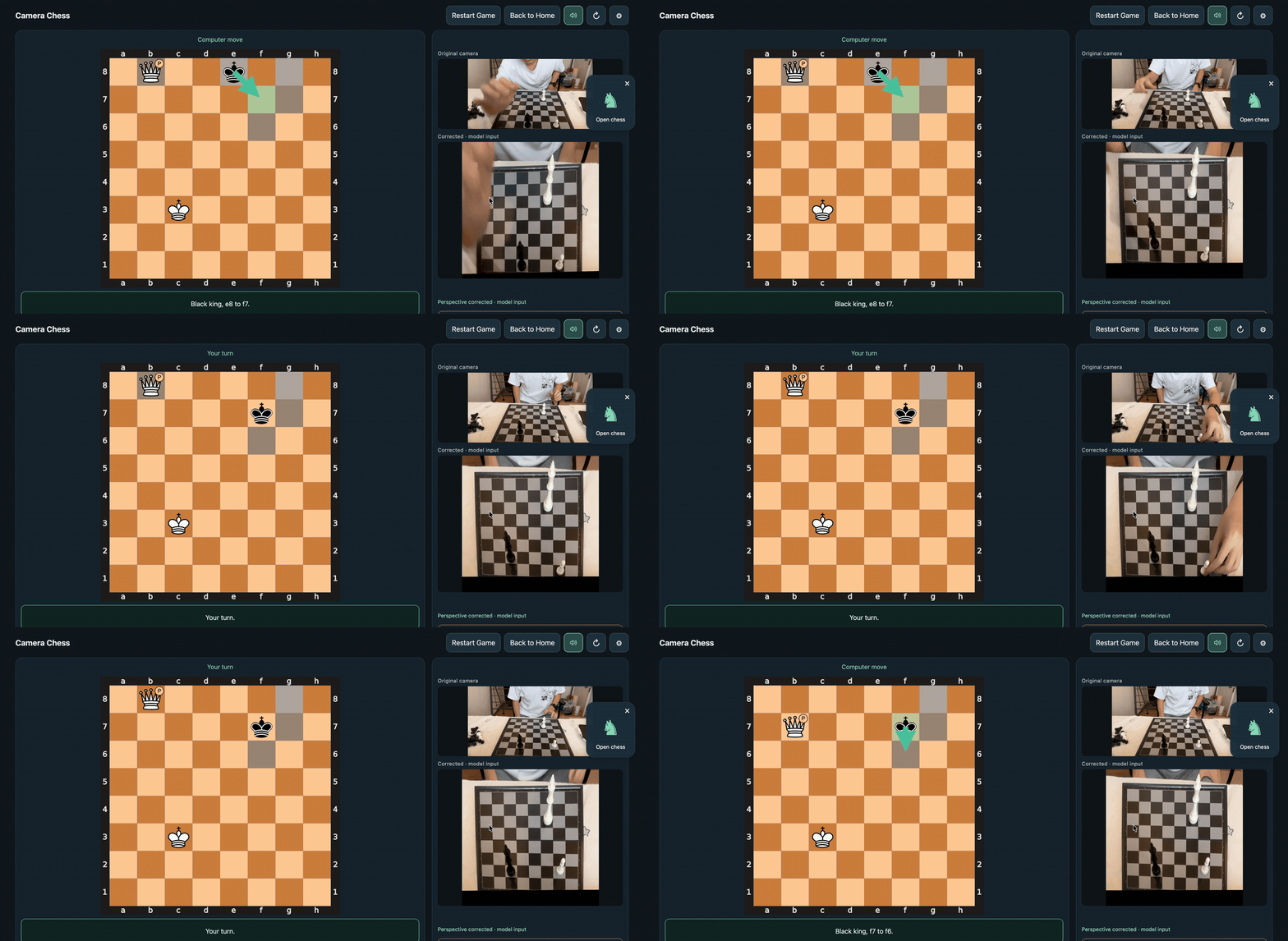
Keep playing after promotion—the physical pawn represents your queen. Source: 00:37.0–00:47.5, original speed.
Watch the full demo · 73 seconds · 1.23 MB · Get started · Recognition and speed
Set up your pieces, open Endgame, choose your color and let the camera scan. Confirm the position and who moves next, then play against the AI.
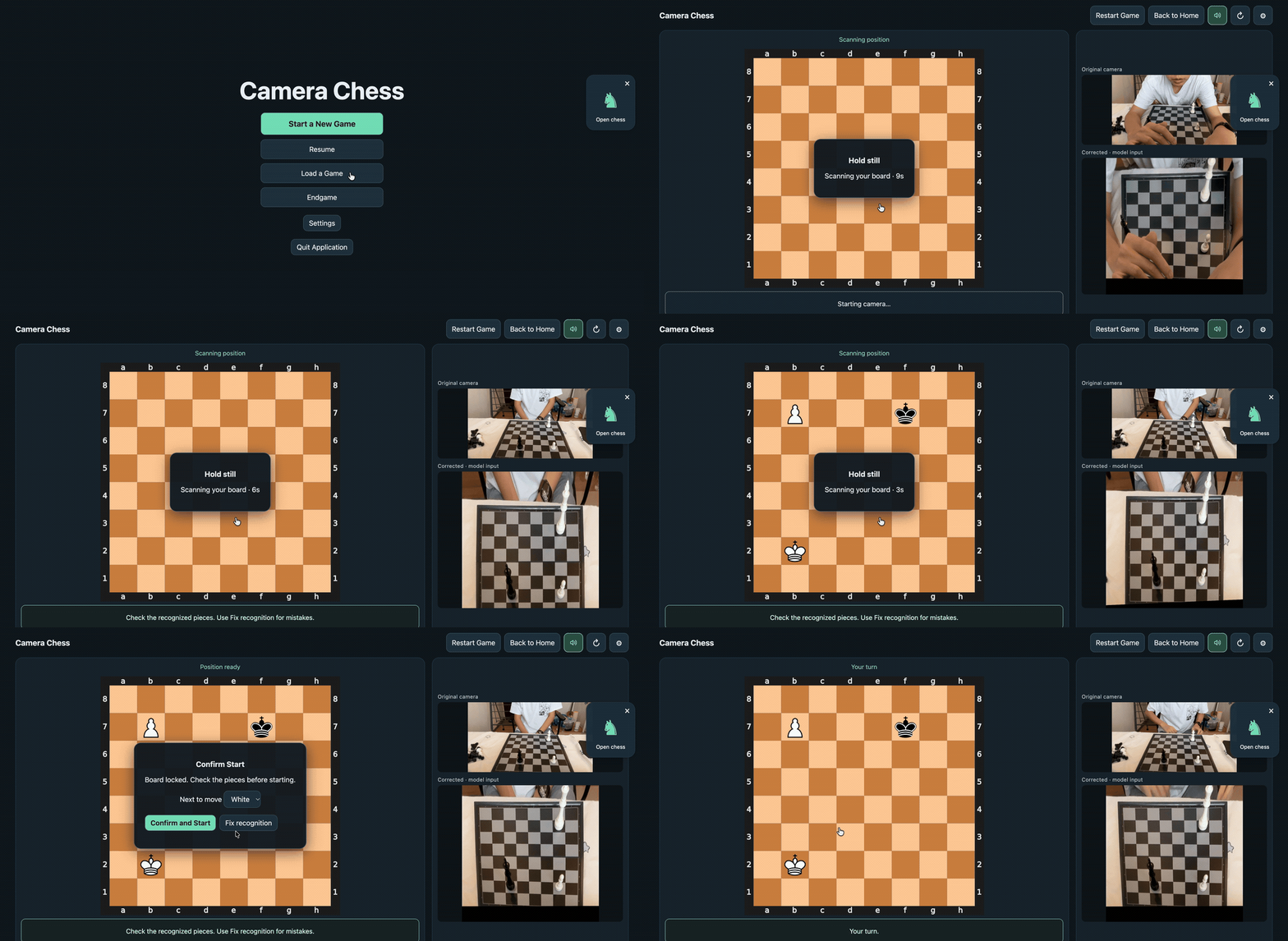
Source: 00:00.8–00:01.8 + 00:07.8–00:21.8. The home screen appears for one second; the color-selection pause is cut. The scan countdown and confirmation play at original speed.
Choose your new piece, keep the pawn as a physical substitute or replace it, and confirm. The P badge tracks substitutes on the digital board while they move according to their promoted role.
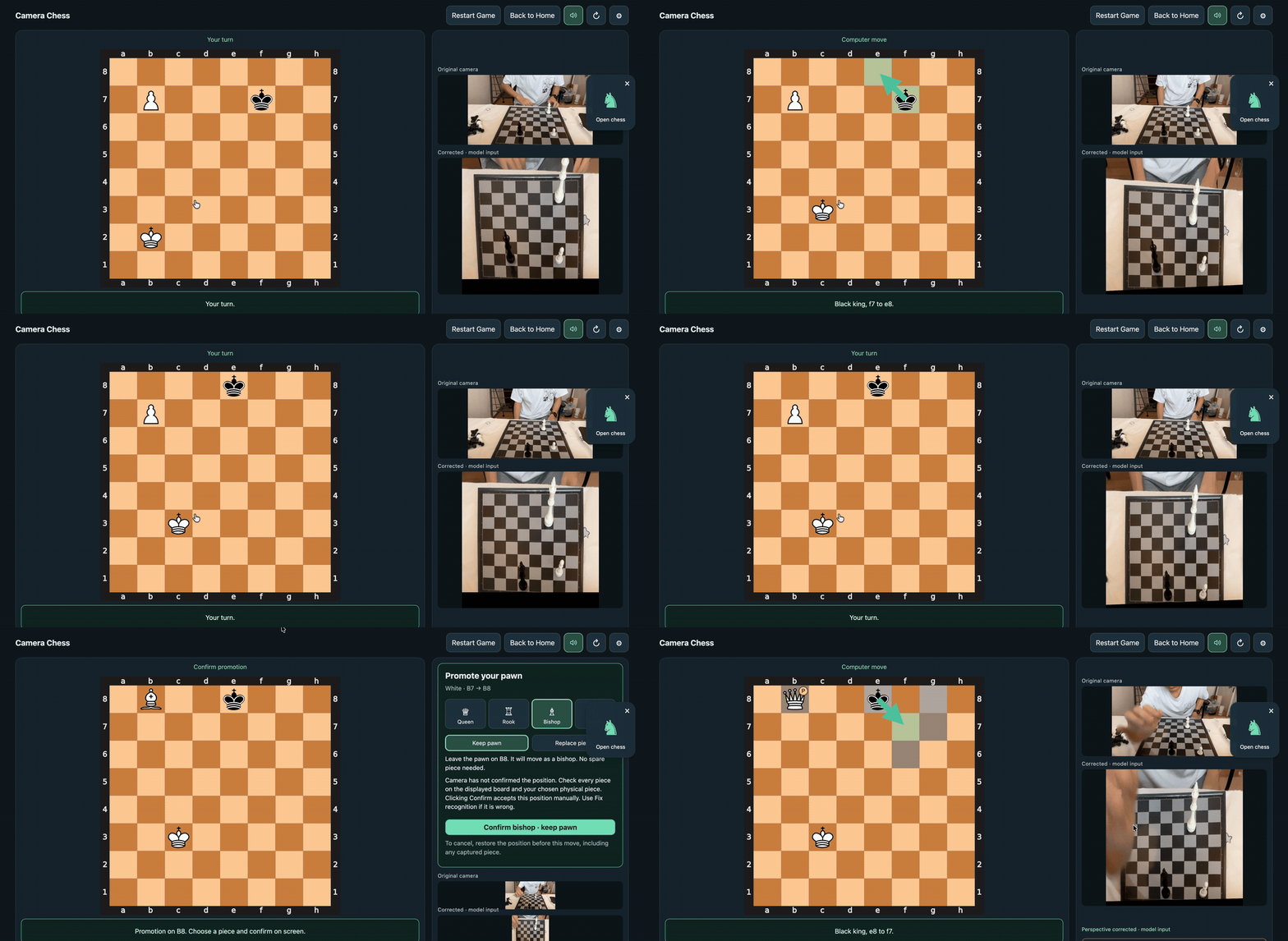
Source: 00:21.8–00:37.0, original speed. This demo uses Queen / Keep pawn with manual confirmation. Check the displayed position before confirming; Fix recognition lets you correct it when needed.
All demo exports are silent; the app provides spoken moves. The GIFs end before the later wait in the full recording. Clip and export details · Earlier gameplay demo · Demo shot by phone.
Requires Apple Silicon macOS, Python 3.12, Xcode Command Line Tools and Stockfish. Installation is currently from source.
git clone https://github.com/AmethystineAlpaca/camera_chess.git
cd camera_chess
# Install prerequisites if needed: brew install python@3.12 stockfish
# Install Apple's tools if needed: xcode-select --install
./setup.sh
./start.sh
Setup downloads the dependencies and model once; recognition and gameplay then run locally. Click the floating chess piece, allow camera access and keep all 64 squares visible. Move both sides' physical pieces by hand, following the AI's arrows and voice prompts.
| Control | What you can do |
|---|---|
| Start a New Game | Play from the starting position; the AI takes the color nearest the camera. |
| Endgame | Scan a custom position, choose your color and confirm who moves next. |
| Save / Load | Save named positions and return to them after restarting, with player colors preserved. |
| Resume | Continue the current game while the service is running. |
| Settings | Choose among four difficulty levels, adjust voice and switch recognition models. |
| Fix recognition | Correct multiple squares together, with a before/after comparison and recovery from misread moves. |
| Back to Home / Quit Application | Leave the game and stop the camera, or close all background components. |
ChessQ Lite V4 + our own trained models + perspective correction. The image model reads piece probabilities; a separately trained postprocessor uses the previous position to resolve uncertain readings. Eight postprocessors include CRF, MLP, CNN and Attention, with the two-layer changed-square MLP selected by default. Perspective correction locates and tracks the board, straightens the camera view and falls back to the original image when necessary. Settings shows both views side by side.
Consecutive-frame checks and chess rules decide when to accept a position. The model weights in ChessQ Lite remain unchanged; the additional postprocessors are trained for this project. Model evaluation · Perspective correction · Training data.
Fast frame processing: the earlier V1 measurement on the development Mac recorded a 387 ms median processing time and 487 ms median capture-to-result latency across 426 warm-running frames, before CRF integration. These are per-frame timings; startup, stable-position confirmation and the full move-to-voice response take additional time.
Accuracy: the latest physical-board session shows a substantial practical improvement. In the separate 176-photo evaluation with constructed previous positions, the default MLP reached 72.73% exact boards, versus 71.02% for v1 CRF. That incremental model difference is not statistically established; continuous-video accuracy and the separate contribution of perspective correction have not been quantified. Lighting, camera angle and occlusion still matter. Evaluation scope and results.
Technical experiment log · Promotion details. Broader testing across boards, underpromotion and physical piece replacement is ongoing.
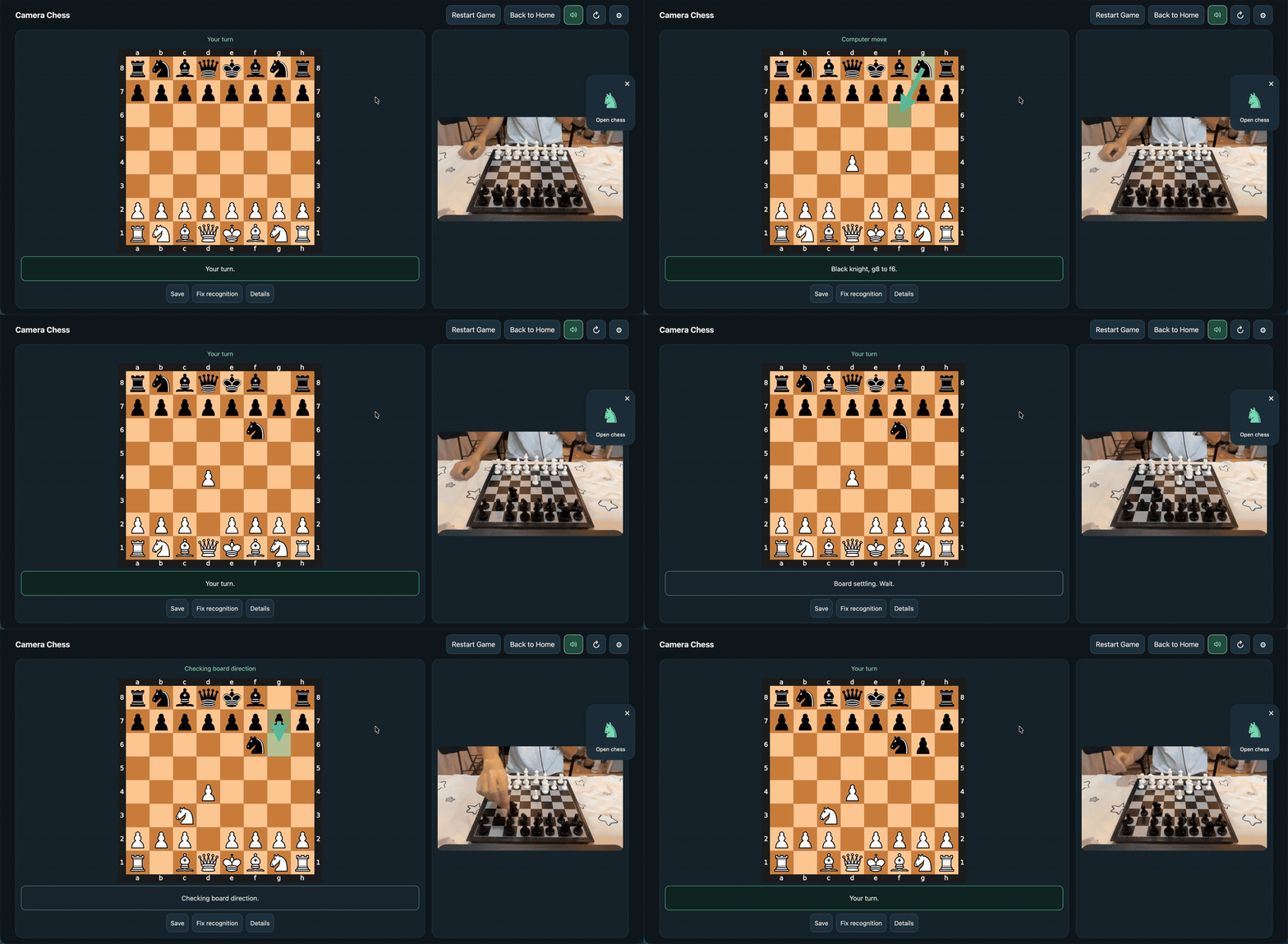
Watch the screen recording · 55 seconds.
Watch the video shot by phone · 29 seconds.
Camera frames, saved games, corrections and improvement logs remain on your machine and are excluded from Git. Log Data for potential improvements is enabled by default in Settings; switch it off to stop new archival writes. Open Log Folder opens the existing archive. Disabling recording keeps earlier files, and nothing is uploaded automatically. Storage and privacy controls.
Report a problem or share feedback · Contributing
V1 supports local play on Apple Silicon macOS. A signed installer, other platforms and online game integration are not currently available.
research/edgetam-env/bin/python -m unittest discover -s validation -p 'test_*.py'
for test in validation/test_ui_*.cjs; do node "$test" || exit; done
Application code lives in validation/; the browser UI is validation/results/lite-live/index.html. start.sh builds the Swift launcher.
Recognition uses ChessQueries / ChessQ Lite, ViT-S/14 V4 FP16, under PolyForm Noncommercial 1.0.0. The chess AI uses Stockfish, under GPLv3. Third-party licenses apply separately.
Play chess with Local AI on a physical chessboard using a camera. Local board recognition and spoken moves on Apple Silicon Mac.
Python
3
20 commits
updated Oct 11, 2026
Fast recognition. Accurate board tracking. Spoken moves. All on your Mac.
Apple Silicon macOS · English | 简体中文 | Русский
Turn an ordinary chessboard into a local AI chess experience with just a camera and your Mac. Move real pieces, watch the digital board follow, and hear your opponent's next move. The chess AI is powered by Stockfish.
Powered by ChessQ Lite V4, enhanced with decision models I trained for Camera Chess. ChessQ reads the pieces; my decision layer combines those readings with the previous position and chess rules. Together with automatic perspective correction, this pipeline delivered significantly improved recognition accuracy and reliability in our latest hands-on session.
Keep playing after promotion—the physical pawn represents your queen. Source: 00:37.0–00:47.5, original speed.
Watch the full demo · 73 seconds · 1.23 MB · Get started · Recognition and speed
Set up your pieces, open Endgame, choose your color and let the camera scan. Confirm the position and who moves next, then play against the AI.
Source: 00:00.8–00:01.8 + 00:07.8–00:21.8. The home screen appears for one second; the color-selection pause is cut. The scan countdown and confirmation play at original speed.
Choose your new piece, keep the pawn as a physical substitute or replace it, and confirm. The P badge tracks substitutes on the digital board while they move according to their promoted role.
Source: 00:21.8–00:37.0, original speed. This demo uses Queen / Keep pawn with manual confirmation. Check the displayed position before confirming; Fix recognition lets you correct it when needed.
All demo exports are silent; the app provides spoken moves. The GIFs end before the later wait in the full recording. Clip and export details · Earlier gameplay demo · Demo shot by phone.
Requires Apple Silicon macOS, Python 3.12, Xcode Command Line Tools and Stockfish. Installation is currently from source.
git clone https://github.com/AmethystineAlpaca/camera_chess.git
cd camera_chess
# Install prerequisites if needed: brew install python@3.12 stockfish
# Install Apple's tools if needed: xcode-select --install
./setup.sh
./start.sh
Setup downloads the dependencies and model once; recognition and gameplay then run locally. Click the floating chess piece, allow camera access and keep all 64 squares visible. Move both sides' physical pieces by hand, following the AI's arrows and voice prompts.
| Control | What you can do |
|---|---|
| Start a New Game | Play from the starting position; the AI takes the color nearest the camera. |
| Endgame | Scan a custom position, choose your color and confirm who moves next. |
| Save / Load | Save named positions and return to them after restarting, with player colors preserved. |
| Resume | Continue the current game while the service is running. |
| Settings | Choose among four difficulty levels, adjust voice and switch recognition models. |
| Fix recognition | Correct multiple squares together, with a before/after comparison and recovery from misread moves. |
| Back to Home / Quit Application | Leave the game and stop the camera, or close all background components. |
ChessQ Lite V4 + our own trained models + perspective correction. The image model reads piece probabilities; a separately trained postprocessor uses the previous position to resolve uncertain readings. Eight postprocessors include CRF, MLP, CNN and Attention, with the two-layer changed-square MLP selected by default. Perspective correction locates and tracks the board, straightens the camera view and falls back to the original image when necessary. Settings shows both views side by side.
Consecutive-frame checks and chess rules decide when to accept a position. The model weights in ChessQ Lite remain unchanged; the additional postprocessors are trained for this project. Model evaluation · Perspective correction · Training data.
Fast frame processing: the earlier V1 measurement on the development Mac recorded a 387 ms median processing time and 487 ms median capture-to-result latency across 426 warm-running frames, before CRF integration. These are per-frame timings; startup, stable-position confirmation and the full move-to-voice response take additional time.
Accuracy: the latest physical-board session shows a substantial practical improvement. In the separate 176-photo evaluation with constructed previous positions, the default MLP reached 72.73% exact boards, versus 71.02% for v1 CRF. That incremental model difference is not statistically established; continuous-video accuracy and the separate contribution of perspective correction have not been quantified. Lighting, camera angle and occlusion still matter. Evaluation scope and results.
Technical experiment log · Promotion details. Broader testing across boards, underpromotion and physical piece replacement is ongoing.
Watch the screen recording · 55 seconds.
Watch the video shot by phone · 29 seconds.
Camera frames, saved games, corrections and improvement logs remain on your machine and are excluded from Git. Log Data for potential improvements is enabled by default in Settings; switch it off to stop new archival writes. Open Log Folder opens the existing archive. Disabling recording keeps earlier files, and nothing is uploaded automatically. Storage and privacy controls.
Report a problem or share feedback · Contributing
V1 supports local play on Apple Silicon macOS. A signed installer, other platforms and online game integration are not currently available.
research/edgetam-env/bin/python -m unittest discover -s validation -p 'test_*.py'
for test in validation/test_ui_*.cjs; do node "$test" || exit; done
Application code lives in validation/; the browser UI is validation/results/lite-live/index.html. start.sh builds the Swift launcher.
Recognition uses ChessQueries / ChessQ Lite, ViT-S/14 V4 FP16, under PolyForm Noncommercial 1.0.0. The chess AI uses Stockfish, under GPLv3. Third-party licenses apply separately.



