
Zotero CLI for Claude Code — SQLite reads + Web API writes
See the codeREADME
zot — A Zotero CLI for Any AI Agent





zotero-cli is a Zotero CLI for any AI agent.
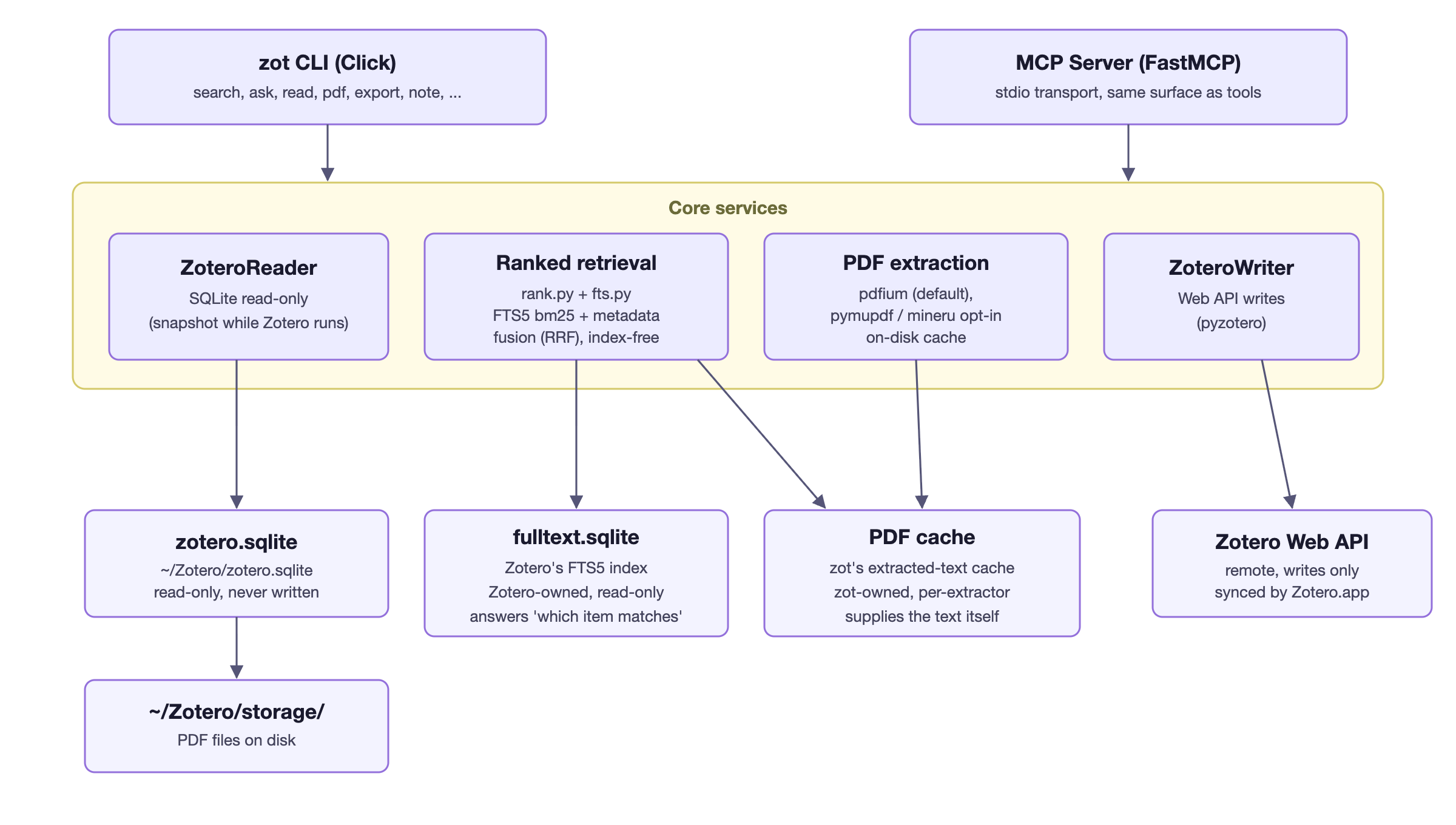
- Reads — direct local SQLite, zero-config, offline, millisecond response
- Writes — safe via Zotero Web API, Zotero stays in sync
- PDF + ranked search — extract full text with caching; index-free ranked retrieval scored with FTS5 bm25 against Zotero 10's own full-text index (
fulltext.sqlite), library-wide or scoped to a collection - Agent-native — stable JSON envelope, typed exit codes,
zot schema,--dry-run,--idempotency-key, NDJSON streaming - MCP server — exposes 39 tools to Claude Desktop / LM Studio / Cursor via
zot mcp serve
You never need to learn these commands. Install the bundled skill once, and the AI does the rest: ask in natural language — "summarize this collection", "what have I read about X?", "organize these papers" — and the skill maps each request to the right
zotcalls, chains multi-step workflows, and writes per-paper summaries for you. The commands in this README are what happens under the hood, not what you have to type. → Install the skill
Architecture
Install
uv tool install zotero-cli-ai      # recommended
pipx install zotero-cli-ai         # or
pip install zotero-cli-ai          # or
Note: the PyPI package is
zotero-cli-ai(zotero-cliis an unrelated older project); the installed command iszot.
60-second quickstart
# Reads work out of the box — no API key, Zotero data dir auto-detected
zot search "transformer attention"
zot read ABC123
zot export ABC123                  # BibTeX

# Writes need a Web API key (https://www.zotero.org/settings/keys)
zot config init
zot add --doi "10.1038/s41586-023-06139-9"
One install, then just talk to your AI (Claude Code or any skill-aware agent):
cp -r skill/zotero-cli ~/.claude/skills/
Make it yours. The skill is plain Markdown — edit your installed copy or write
your own skill on top of it: swap in your own workflows
(skill/zotero-cli/references/workflows.md) and adapt the per-type summary
templates to your discipline (skill/zotero-cli/references/summary-templates.md).
Everything the AI does is readable, modifiable text; nothing is hidden in a binary.
When stdout is not a TTY, zot automatically emits a stable JSON envelope so agents never need --json:
{ "ok": true, "data": { ... }, "meta": { "schema_version": "1.11.0", "cli_version": "0.14.0", "request_id": "..." } }
Workflow: topic → collection → summary & QA
You never run any of this by hand. With the skill installed, describe the goal in natural language and the AI drives these commands for you. They are documented here so you can see — or run manually, if you prefer — what happens under the hood.
From a keyword or topic to a curated collection with grounded summaries and cited Q&A:
# 1. Collect literature — import by DOI list, or rank what the library already has
zot add --from-file dois.txt                            # Crossref-resolved metadata per DOI
zot search "T cell metabolic reprogramming" --ranked    # or score what is already in the library

# 2. Build a collection and file the items into it
zot collection create "T-cell metabolism"               # returns the collection key
zot collection move ITEMKEY COLLECTIONKEY               # repeat per item

# 3. Summary — one item, or export abstracts for triage
zot summarize ITEMKEY                                   # structured summary of one item
zot summarize-all > abstracts.json                      # key + title + abstract, library-wide

# 4. QA scoped to the collection
zot search "checkpoint resistance" --ranked --collection "T-cell metabolism"
zot ask "which studies report exhausted T cell states?" --collection "T-cell metabolism"
zot ask runs ranked retrieval over the collection and returns a citation-keyed evidence pack; your agent (Claude Code, Codex, Gemini CLI, ...) synthesizes the grounded answer. In Claude Code, the bundled skill runs this whole pipeline from a single natural-language request.
Documentation
Full docs live at https://agents365-ai.github.io/zotero-cli-ai/.
| Topic | Link |
|---|---|
| Installation & setup | Getting started |
| Search, list, read | Search guide |
| Notes, tags, citations | Notes & tags, Citations |
| Add / update / delete items | Item management |
| Collections | Collections |
| Ranked search & ask (collections) | Search guide |
| PDF extraction | |
| Preprint → published | update-status |
| MCP setup & tools | MCP |
| Full CLI reference | CLI reference |
| Agent contract (envelope, exit codes, schema) | docs/agent-interface.md |
| Comparison with similar tools | Comparison |
| Roadmap | ROADMAP.md |
Why zotero-cli? The only actively maintained Python CLI that reads Zotero's local SQLite database directly, with a clean read/write split: SQLite for fast offline reads, Web API for safe writes that Zotero stays aware of. See the comparison page for a feature-by-feature breakdown against similar tools.
Support
If zot helps you, consider supporting the author:

WeChat Pay |

Alipay |
Buy Me a Coffee |

Give a Reward |
Author
Agents365-ai
- Bilibili: https://space.bilibili.com/441831884
- GitHub: https://github.com/Agents365-ai
License
zotero-cli is dual-licensed:
- Open source: GNU AGPL-3.0-or-later (see LICENSE).
- Commercial: a separate commercial license is available for use in closed-source or commercial products without the AGPL's copyleft obligations (see LICENSE-COMMERCIAL).
Contributions are accepted under the project's Developer Certificate of Origin.
Contributors


Similar repos


Languages
Python
100.0%
Zotero CLI for Claude Code — SQLite reads + Web API writes
See the codeREADME
zot — A Zotero CLI for Any AI Agent
zotero-cli is a Zotero CLI for any AI agent.
- Reads — direct local SQLite, zero-config, offline, millisecond response
- Writes — safe via Zotero Web API, Zotero stays in sync
- PDF + ranked search — extract full text with caching; index-free ranked retrieval scored with FTS5 bm25 against Zotero 10's own full-text index (
fulltext.sqlite), library-wide or scoped to a collection - Agent-native — stable JSON envelope, typed exit codes,
zot schema,--dry-run,--idempotency-key, NDJSON streaming - MCP server — exposes 39 tools to Claude Desktop / LM Studio / Cursor via
zot mcp serve
You never need to learn these commands. Install the bundled skill once, and the AI does the rest: ask in natural language — "summarize this collection", "what have I read about X?", "organize these papers" — and the skill maps each request to the right
zotcalls, chains multi-step workflows, and writes per-paper summaries for you. The commands in this README are what happens under the hood, not what you have to type. → Install the skill
Architecture
Install
uv tool install zotero-cli-ai      # recommended
pipx install zotero-cli-ai         # or
pip install zotero-cli-ai          # or
Note: the PyPI package is
zotero-cli-ai(zotero-cliis an unrelated older project); the installed command iszot.
60-second quickstart
# Reads work out of the box — no API key, Zotero data dir auto-detected
zot search "transformer attention"
zot read ABC123
zot export ABC123                  # BibTeX

# Writes need a Web API key (https://www.zotero.org/settings/keys)
zot config init
zot add --doi "10.1038/s41586-023-06139-9"
One install, then just talk to your AI (Claude Code or any skill-aware agent):
cp -r skill/zotero-cli ~/.claude/skills/
Make it yours. The skill is plain Markdown — edit your installed copy or write
your own skill on top of it: swap in your own workflows
(skill/zotero-cli/references/workflows.md) and adapt the per-type summary
templates to your discipline (skill/zotero-cli/references/summary-templates.md).
Everything the AI does is readable, modifiable text; nothing is hidden in a binary.
When stdout is not a TTY, zot automatically emits a stable JSON envelope so agents never need --json:
{ "ok": true, "data": { ... }, "meta": { "schema_version": "1.11.0", "cli_version": "0.14.0", "request_id": "..." } }
Workflow: topic → collection → summary & QA
You never run any of this by hand. With the skill installed, describe the goal in natural language and the AI drives these commands for you. They are documented here so you can see — or run manually, if you prefer — what happens under the hood.
From a keyword or topic to a curated collection with grounded summaries and cited Q&A:
# 1. Collect literature — import by DOI list, or rank what the library already has
zot add --from-file dois.txt                            # Crossref-resolved metadata per DOI
zot search "T cell metabolic reprogramming" --ranked    # or score what is already in the library

# 2. Build a collection and file the items into it
zot collection create "T-cell metabolism"               # returns the collection key
zot collection move ITEMKEY COLLECTIONKEY               # repeat per item

# 3. Summary — one item, or export abstracts for triage
zot summarize ITEMKEY                                   # structured summary of one item
zot summarize-all > abstracts.json                      # key + title + abstract, library-wide

# 4. QA scoped to the collection
zot search "checkpoint resistance" --ranked --collection "T-cell metabolism"
zot ask "which studies report exhausted T cell states?" --collection "T-cell metabolism"
zot ask runs ranked retrieval over the collection and returns a citation-keyed evidence pack; your agent (Claude Code, Codex, Gemini CLI, ...) synthesizes the grounded answer. In Claude Code, the bundled skill runs this whole pipeline from a single natural-language request.
Documentation
Full docs live at https://agents365-ai.github.io/zotero-cli-ai/.
| Topic | Link |
|---|---|
| Installation & setup | Getting started |
| Search, list, read | Search guide |
| Notes, tags, citations | Notes & tags, Citations |
| Add / update / delete items | Item management |
| Collections | Collections |
| Ranked search & ask (collections) | Search guide |
| PDF extraction | |
| Preprint → published | update-status |
| MCP setup & tools | MCP |
| Full CLI reference | CLI reference |
| Agent contract (envelope, exit codes, schema) | docs/agent-interface.md |
| Comparison with similar tools | Comparison |
| Roadmap | ROADMAP.md |
Why zotero-cli? The only actively maintained Python CLI that reads Zotero's local SQLite database directly, with a clean read/write split: SQLite for fast offline reads, Web API for safe writes that Zotero stays aware of. See the comparison page for a feature-by-feature breakdown against similar tools.
Support
If zot helps you, consider supporting the author:
|
WeChat Pay |
Alipay |
Buy Me a Coffee |
Give a Reward |
Author
Agents365-ai
- Bilibili: https://space.bilibili.com/441831884
- GitHub: https://github.com/Agents365-ai
License
zotero-cli is dual-licensed:
- Open source: GNU AGPL-3.0-or-later (see LICENSE).
- Commercial: a separate commercial license is available for use in closed-source or commercial products without the AGPL's copyleft obligations (see LICENSE-COMMERCIAL).
Contributions are accepted under the project's Developer Certificate of Origin.
Similar repos
Contributors
Languages
Python
100.0%