
See what people are saying
README
Zotero Semantic Search
Find the passages in your PDFs that mean what you are looking for — not just the ones that contain your keywords.



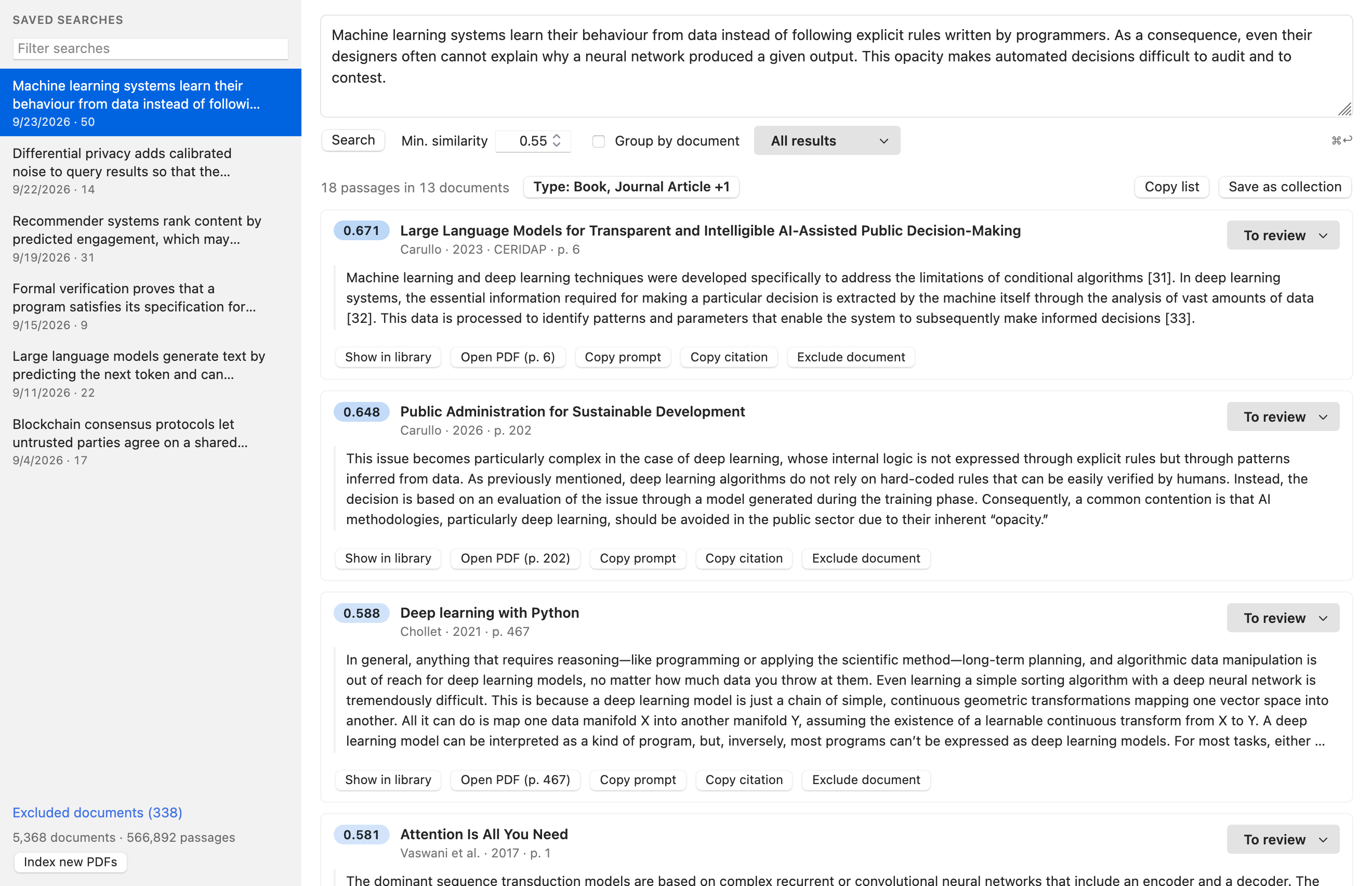
Paste a paragraph from your draft and get back the pages of your library that support it, ranked by how close they are in meaning — in any language, straight inside Zotero. It also works for your AI assistant, through a built-in MCP server.
Why semantic search?
Keyword search only finds the words you type. If your source says "deep learning models cannot be inspected" and you search for "opacity of neural networks", it finds nothing.
Semantic search compares meanings. Every passage of every PDF in your library is turned into a vector that captures what it says, and your query is compared against all of them. You get relevant passages even when they use different words, or a different language.
Features
- 🔎 Search by meaning across the full text of all your PDFs. Queries can be a phrase, a sentence or a whole paragraph.
- 🌍 Multilingual: 109 languages, including across languages (an English query finds Italian, Spanish or German passages).
- ⚡ Fast: searching half a million passages takes about 0.15 s.
- 📌 Wired into Zotero: every result is linked to its Zotero item. Open the PDF at the right page, jump to the item in your library, copy a formatted citation, or save the results as a collection.
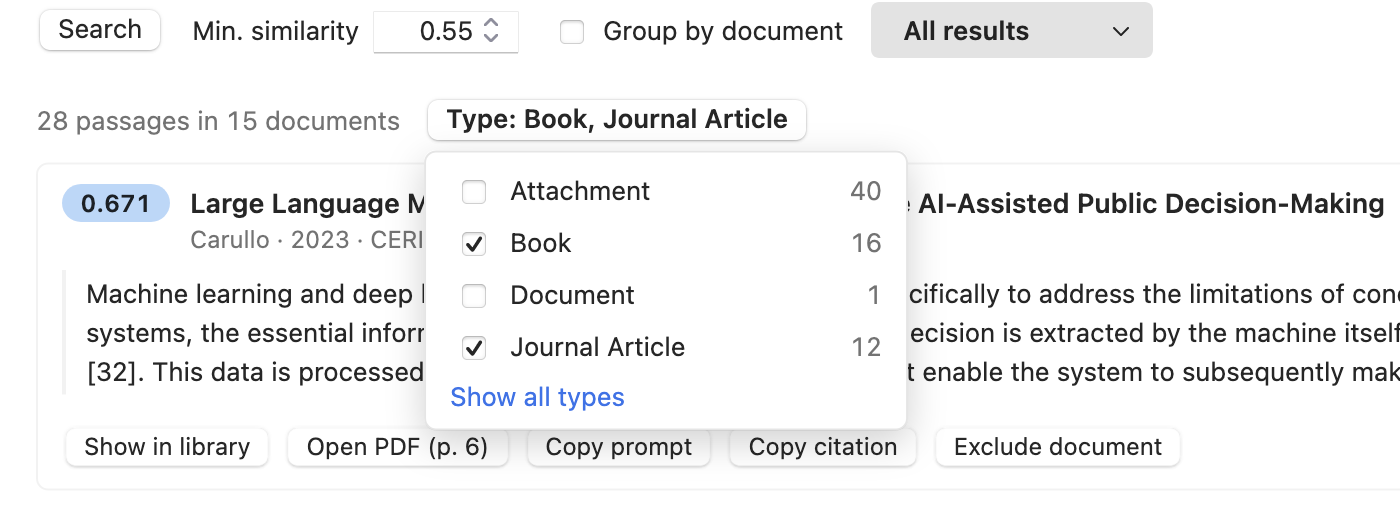
- 🏷️ Filter by item type: books, journal articles, book sections, theses… any combination, on new and saved searches.
- 🗂️ Saved searches and review workflow: every search is kept in the sidebar and reopens instantly. Mark each passage as To review, Cited or Irrelevant.
- 🔄 Always up to date: new PDFs are indexed automatically in the background.
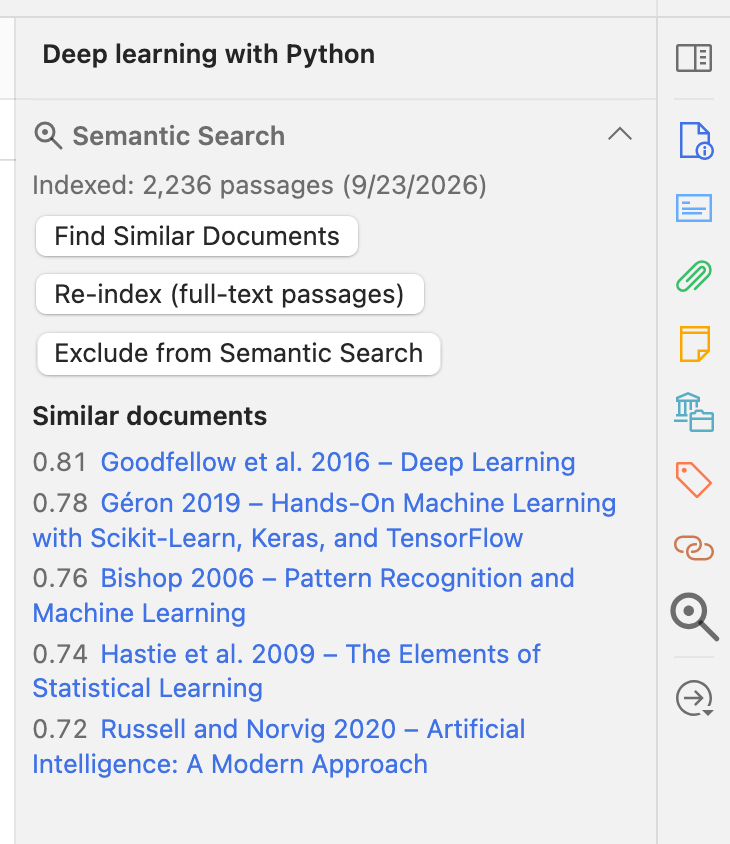
- 🧭 Similar documents: the item pane shows which documents in your library are closest in content to the selected one.
- 📄 OCR for scanned PDFs: PDFs without a text layer can be OCRed with one click (via ocrmypdf) and then indexed.
- 🤖 For AI assistants: a local MCP server lets Claude Code, Claude Desktop or any MCP client search your library and cite from it.
- 🔒 Private: the model runs inside Zotero. Your PDFs and queries never leave your computer.
- ⬆️ Updates itself from GitHub releases.
Getting started
- Install: download the
.xpifrom the latest release. In Zotero go to Tools → Plugins, click the gear icon, choose Install Plugin From File… and select the file. - Open Tools → Semantic Search… (⌘⇧E on macOS, Ctrl⇧E on Windows/Linux).
- Download the model when asked. This happens once: about 590 MB from Hugging Face, checksum-verified, stored in your Zotero profile.
- Let it index. All your PDFs are indexed in the background; progress appears at the bottom of the sidebar. A journal article takes a few seconds, a long book a minute or two. You can search while it runs, and later PDFs are picked up automatically.
- Search. Type or paste your text and press ⌘/Ctrl+Enter.
Writing good queries
- Write sentences, not keywords. The best query is often a sentence or a paragraph from what you are writing: the plugin finds the passages that make, support or discuss the same point.
- Long paragraphs are fine. Each sentence is matched on its own. When a result matches one specific part of your text, it says which one (matches: "…").
- Use any language. Your query and your sources do not need to be in the same language.
- Adjust the minimum similarity. Similarity goes from 0 to 1. The default of 0.60 suits paragraph-long queries; for a single short sentence, 0.45–0.55 usually gives better results. Scores above ~0.7 are very close matches.
Working with results
| Action | What it does |
|---|---|
| Open PDF (p. N) | Opens the PDF in Zotero's reader at the passage's page and searches for the passage |
| Show in library | Selects the item in the main Zotero window |
| Copy citation | Copies a formatted citation in your Quick Copy style, with the page |
| Copy prompt | Copies a ready-made prompt asking an LLM how the passage supports your text |
| To review / Cited / Irrelevant | Marks the passage; marks are saved with the search |
| Type filter | Keeps only the selected item types; nothing selected = everything |
| Group by document | Shows one card per document, with all its matching passages |
| Save as collection | Creates a Zotero collection with the items in the results |
| Copy list | Copies the list of documents, with pages and scores |
| Exclude document | Removes a document from the index (you can include it again later) |
Inside Zotero
The item pane has a Semantic Search section. It shows whether the selected PDF is indexed and which documents in your library are most similar to it, and lets you index, re-index or exclude it. The same actions are in the item context menu, together with Find Similar Documents and Search Passages Like This Abstract.
Use it from your AI assistant (MCP)
The plugin includes a Model Context Protocol server, so an AI assistant on your computer can search your library, read the passages and cite them properly. Zotero must be running.
Claude Code
claude mcp add --scope user --transport http zotero http://127.0.0.1:23119/semantic-search/mcp
Claude Desktop (claude_desktop_config.json, via mcp-remote)
{
  "mcpServers": {
    "zotero": { "command": "npx", "args": ["-y", "mcp-remote", "http://127.0.0.1:23119/semantic-search/mcp"] }
  }
}
Any other MCP client can use the same URL (Streamable HTTP transport). The exact snippets are also shown in the plugin's preferences.
Then just ask, for example:
"Find sources in my Zotero library that support this paragraph, and give me the citations with page numbers."
"Which books in my library discuss the explainability of machine learning models? Quote the most relevant passages."
| Tool | Description |
|---|---|
semantic_search | Passages closest in meaning to a query, with item metadata, item type, page and text. Optional filters: min_similarity, item_types, group_by_item |
get_passage | The text around a result, for more context |
get_item | Full bibliographic data and a formatted citation |
find_similar_items | Documents most similar to a given one |
index_status | Size and state of the index |
list_saved_searches | Your saved searches |
Searches made through MCP do not end up in your search history. The endpoint only accepts local, non-browser connections and can be turned off in the preferences.
OCR for scanned PDFs
PDFs that have no text layer (typically scans) cannot be searched, so they are listed under Excluded documents with the reason no text. Click Run OCR there, or in the item pane. A terminal window opens and runs ocrmypdf; when it finishes, the PDF is replaced in place by its OCRed version and indexed automatically.
ocrmypdf must be installed (brew install ocrmypdf on macOS; see its docs for Windows and Linux). OCR languages are set in the preferences (tesseract codes, default ita+eng).
Settings
Zotero → Settings → Semantic Search
- Minimum similarity and maximum number of results
- Automatically index new PDFs, and the number of parallel indexing workers (more workers index faster but use more memory, ~150 MB each while indexing)
- OCR languages
- MCP server on/off, with ready-to-copy configuration for Claude Code and Claude Desktop
- Model status, and maintenance actions
Privacy
Everything happens on your computer: text extraction, embeddings, search and the MCP server. The only network requests are:
- the one-time model download from Hugging Face (pinned version, checksum-verified);
- Zotero's periodic check for plugin updates on GitHub.
FAQ
Where is the index stored?
In file_embeddings.db, next to zotero.sqlite in your Zotero data directory. The model and a small cache live in your Zotero profile. If you sync your data directory (e.g. with Dropbox), the index goes with it.
Why is one of my PDFs not in the results? Look at the item pane or at Excluded documents. PDFs without text (scans) can be fixed with Run OCR; encrypted PDFs cannot be read.
What model does it use? LEALLA-large, a compact multilingual sentence encoder from Google (109 languages). It runs inside Zotero via WebAssembly, with no Python, server or GPU needed.
I used the original Python version of this project. Do I lose my index?
No. The plugin reads the existing file_embeddings.db as is, including the saved searches and excluded documents, and only indexes PDFs added since.
For developers
npm test                        # unit tests (tokenizer and encoder vs. the reference model, chunker, MCP, scan kernel)
node scripts/build.mjs          # build build/zotero-semantic-search-<version>.xpi
node scripts/build.mjs --wasm   # also rebuild the WebAssembly encoder (Rust, wasm32-unknown-unknown)
addon/is the plugin:content/lib/holds the services (indexing, vector index, search, MCP),content/ui/the windows,locale/the English and Italian strings.wasm/is the LEALLA-large forward pass and the int8 vector scan in Rust, compiled to WebAssembly SIMD.tools/has the scripts used to check the encoder against the original TensorFlow model.- Model-dependent tests need
.model/model.safetensorsand.model/vocab.txt(orMODEL_DIR). - To run from source, put a file named
semantic-search@ildon.github.io, containing the absolute path ofaddon/, in your Zotero profile'sextensions/folder.
Releasing: push a tag vX.Y.Z on a commit of master. The Release workflow runs the tests, builds the XPI with that version and publishes a GitHub release with the XPI and updates.json, from which installed copies update themselves.
git tag v2.3.0 && git push origin v2.3.0
Contributors

96 commits
Similar repos


Languages
JavaScript
78.9%
Rust
6.9%
Fluent
5.9%
CSS
4.3%
HTML
2.7%
Python
1.2%
See what people are saying
README
Zotero Semantic Search
Find the passages in your PDFs that mean what you are looking for — not just the ones that contain your keywords.
Paste a paragraph from your draft and get back the pages of your library that support it, ranked by how close they are in meaning — in any language, straight inside Zotero. It also works for your AI assistant, through a built-in MCP server.
Why semantic search?
Keyword search only finds the words you type. If your source says "deep learning models cannot be inspected" and you search for "opacity of neural networks", it finds nothing.
Semantic search compares meanings. Every passage of every PDF in your library is turned into a vector that captures what it says, and your query is compared against all of them. You get relevant passages even when they use different words, or a different language.
Features
- 🔎 Search by meaning across the full text of all your PDFs. Queries can be a phrase, a sentence or a whole paragraph.
- 🌍 Multilingual: 109 languages, including across languages (an English query finds Italian, Spanish or German passages).
- ⚡ Fast: searching half a million passages takes about 0.15 s.
- 📌 Wired into Zotero: every result is linked to its Zotero item. Open the PDF at the right page, jump to the item in your library, copy a formatted citation, or save the results as a collection.
- 🏷️ Filter by item type: books, journal articles, book sections, theses… any combination, on new and saved searches.
- 🗂️ Saved searches and review workflow: every search is kept in the sidebar and reopens instantly. Mark each passage as To review, Cited or Irrelevant.
- 🔄 Always up to date: new PDFs are indexed automatically in the background.
- 🧭 Similar documents: the item pane shows which documents in your library are closest in content to the selected one.
- 📄 OCR for scanned PDFs: PDFs without a text layer can be OCRed with one click (via ocrmypdf) and then indexed.
- 🤖 For AI assistants: a local MCP server lets Claude Code, Claude Desktop or any MCP client search your library and cite from it.
- 🔒 Private: the model runs inside Zotero. Your PDFs and queries never leave your computer.
- ⬆️ Updates itself from GitHub releases.
Getting started
- Install: download the
.xpifrom the latest release. In Zotero go to Tools → Plugins, click the gear icon, choose Install Plugin From File… and select the file. - Open Tools → Semantic Search… (⌘⇧E on macOS, Ctrl⇧E on Windows/Linux).
- Download the model when asked. This happens once: about 590 MB from Hugging Face, checksum-verified, stored in your Zotero profile.
- Let it index. All your PDFs are indexed in the background; progress appears at the bottom of the sidebar. A journal article takes a few seconds, a long book a minute or two. You can search while it runs, and later PDFs are picked up automatically.
- Search. Type or paste your text and press ⌘/Ctrl+Enter.
Writing good queries
- Write sentences, not keywords. The best query is often a sentence or a paragraph from what you are writing: the plugin finds the passages that make, support or discuss the same point.
- Long paragraphs are fine. Each sentence is matched on its own. When a result matches one specific part of your text, it says which one (matches: "…").
- Use any language. Your query and your sources do not need to be in the same language.
- Adjust the minimum similarity. Similarity goes from 0 to 1. The default of 0.60 suits paragraph-long queries; for a single short sentence, 0.45–0.55 usually gives better results. Scores above ~0.7 are very close matches.
Working with results
| Action | What it does |
|---|---|
| Open PDF (p. N) | Opens the PDF in Zotero's reader at the passage's page and searches for the passage |
| Show in library | Selects the item in the main Zotero window |
| Copy citation | Copies a formatted citation in your Quick Copy style, with the page |
| Copy prompt | Copies a ready-made prompt asking an LLM how the passage supports your text |
| To review / Cited / Irrelevant | Marks the passage; marks are saved with the search |
| Type filter | Keeps only the selected item types; nothing selected = everything |
| Group by document | Shows one card per document, with all its matching passages |
| Save as collection | Creates a Zotero collection with the items in the results |
| Copy list | Copies the list of documents, with pages and scores |
| Exclude document | Removes a document from the index (you can include it again later) |
Inside Zotero
The item pane has a Semantic Search section. It shows whether the selected PDF is indexed and which documents in your library are most similar to it, and lets you index, re-index or exclude it. The same actions are in the item context menu, together with Find Similar Documents and Search Passages Like This Abstract.
Use it from your AI assistant (MCP)
The plugin includes a Model Context Protocol server, so an AI assistant on your computer can search your library, read the passages and cite them properly. Zotero must be running.
Claude Code
claude mcp add --scope user --transport http zotero http://127.0.0.1:23119/semantic-search/mcp
Claude Desktop (claude_desktop_config.json, via mcp-remote)
{
  "mcpServers": {
    "zotero": { "command": "npx", "args": ["-y", "mcp-remote", "http://127.0.0.1:23119/semantic-search/mcp"] }
  }
}
Any other MCP client can use the same URL (Streamable HTTP transport). The exact snippets are also shown in the plugin's preferences.
Then just ask, for example:
"Find sources in my Zotero library that support this paragraph, and give me the citations with page numbers."
"Which books in my library discuss the explainability of machine learning models? Quote the most relevant passages."
| Tool | Description |
|---|---|
semantic_search | Passages closest in meaning to a query, with item metadata, item type, page and text. Optional filters: min_similarity, item_types, group_by_item |
get_passage | The text around a result, for more context |
get_item | Full bibliographic data and a formatted citation |
find_similar_items | Documents most similar to a given one |
index_status | Size and state of the index |
list_saved_searches | Your saved searches |
Searches made through MCP do not end up in your search history. The endpoint only accepts local, non-browser connections and can be turned off in the preferences.
OCR for scanned PDFs
PDFs that have no text layer (typically scans) cannot be searched, so they are listed under Excluded documents with the reason no text. Click Run OCR there, or in the item pane. A terminal window opens and runs ocrmypdf; when it finishes, the PDF is replaced in place by its OCRed version and indexed automatically.
ocrmypdf must be installed (brew install ocrmypdf on macOS; see its docs for Windows and Linux). OCR languages are set in the preferences (tesseract codes, default ita+eng).
Settings
Zotero → Settings → Semantic Search
- Minimum similarity and maximum number of results
- Automatically index new PDFs, and the number of parallel indexing workers (more workers index faster but use more memory, ~150 MB each while indexing)
- OCR languages
- MCP server on/off, with ready-to-copy configuration for Claude Code and Claude Desktop
- Model status, and maintenance actions
Privacy
Everything happens on your computer: text extraction, embeddings, search and the MCP server. The only network requests are:
- the one-time model download from Hugging Face (pinned version, checksum-verified);
- Zotero's periodic check for plugin updates on GitHub.
FAQ
Where is the index stored?
In file_embeddings.db, next to zotero.sqlite in your Zotero data directory. The model and a small cache live in your Zotero profile. If you sync your data directory (e.g. with Dropbox), the index goes with it.
Why is one of my PDFs not in the results? Look at the item pane or at Excluded documents. PDFs without text (scans) can be fixed with Run OCR; encrypted PDFs cannot be read.
What model does it use? LEALLA-large, a compact multilingual sentence encoder from Google (109 languages). It runs inside Zotero via WebAssembly, with no Python, server or GPU needed.
I used the original Python version of this project. Do I lose my index?
No. The plugin reads the existing file_embeddings.db as is, including the saved searches and excluded documents, and only indexes PDFs added since.
For developers
npm test                        # unit tests (tokenizer and encoder vs. the reference model, chunker, MCP, scan kernel)
node scripts/build.mjs          # build build/zotero-semantic-search-<version>.xpi
node scripts/build.mjs --wasm   # also rebuild the WebAssembly encoder (Rust, wasm32-unknown-unknown)
addon/is the plugin:content/lib/holds the services (indexing, vector index, search, MCP),content/ui/the windows,locale/the English and Italian strings.wasm/is the LEALLA-large forward pass and the int8 vector scan in Rust, compiled to WebAssembly SIMD.tools/has the scripts used to check the encoder against the original TensorFlow model.- Model-dependent tests need
.model/model.safetensorsand.model/vocab.txt(orMODEL_DIR). - To run from source, put a file named
semantic-search@ildon.github.io, containing the absolute path ofaddon/, in your Zotero profile'sextensions/folder.
Releasing: push a tag vX.Y.Z on a commit of master. The Release workflow runs the tests, builds the XPI with that version and publishes a GitHub release with the XPI and updates.json, from which installed copies update themselves.
git tag v2.3.0 && git push origin v2.3.0
Similar repos
Contributors
96 commits
Languages
JavaScript
78.9%
Rust
6.9%
Fluent
5.9%
CSS
4.3%
HTML
2.7%
Python
1.2%