Interactive Wikipedia knowledge graph - crawl topics, visualize connections, and explore unexpected paths.
See the codeTurn Wikipedia into an interactive map of knowledge.
WikiCrawl transforms the links surrounding a Wikipedia article into an interactive, explorable graph. Search for a topic, watch the crawl unfold in real time, and discover how articles connect across Wikipedia.
Try WikiCrawl · Report a Bug · View Source

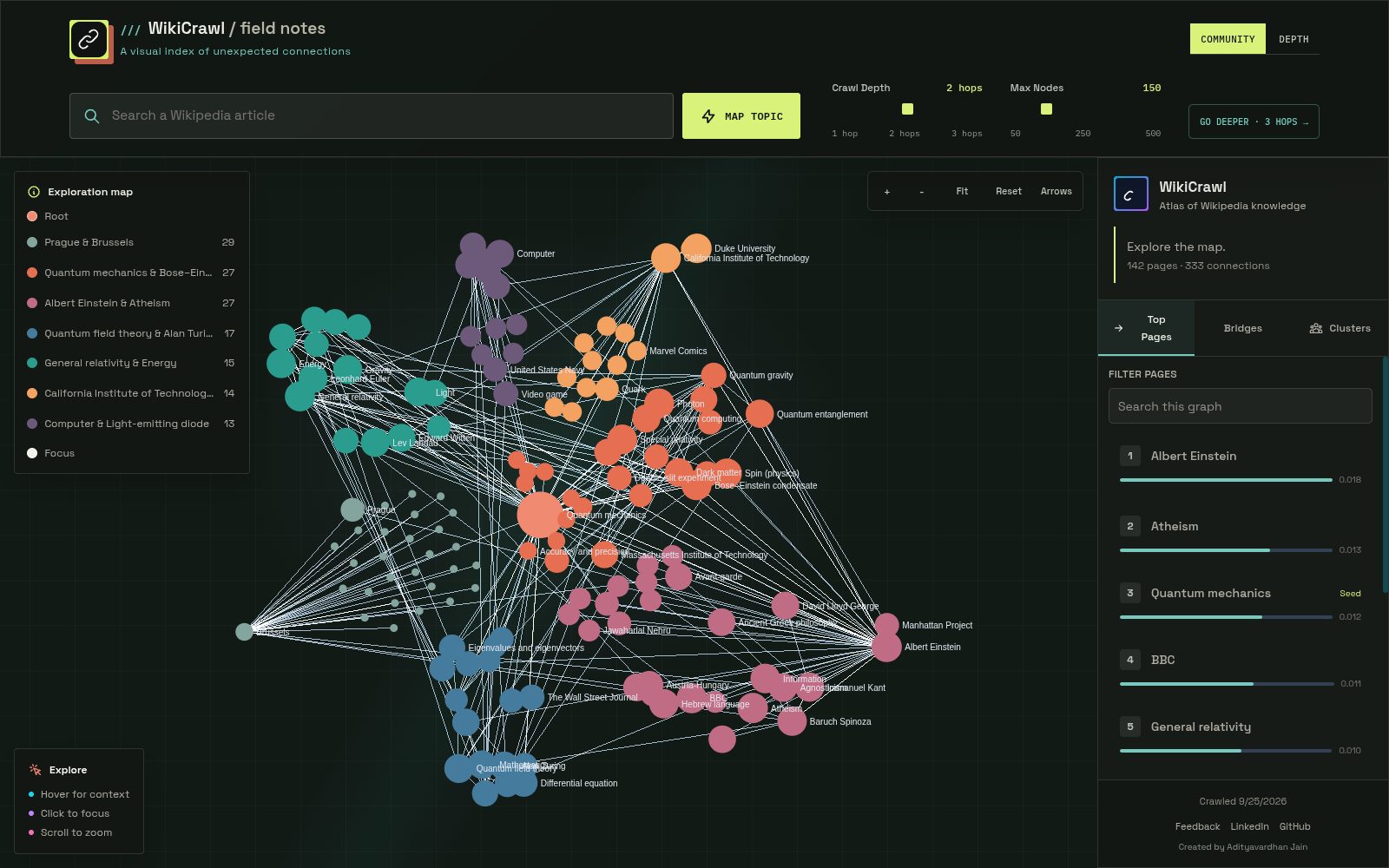
Wikipedia contains millions of interconnected articles. WikiCrawl makes those connections tangible by turning article links into a graph you can navigate, analyze, and explore.
Starting from a Wikipedia article, WikiCrawl follows outgoing links up to a configurable depth, constructs a directed graph, and streams results to the browser as the crawl progresses.
Graph metrics and community assignments are calculated over the crawled subgraph, not the entirety of Wikipedia. Although crawl edges preserve link direction, shortest-path search treats connections as undirected.
WikiCrawl combines a bounded Wikipedia crawler, graph analysis, server-sent events, and an interactive graph renderer.
flowchart LR
    U[Browser] --> S[Wikipedia Search Route]
    U --> C[Crawl Route]
    U --> RR[Relationship Route]

    S --> W[MediaWiki API]
    C --> BC[Bounded Crawler]
    RR --> W
    BC --> W
    BC --> A[Graphology Analysis]
    A --> E[Server-Sent Events]
    E --> U

    U --> G[Sigma Graph Renderer]
    G --> F[ForceAtlas2 Worker]
1. Search and discovery
The browser sends a search request to the search API, which queries the MediaWiki API to find matching Wikipedia articles.
2. Bounded crawling
The crawler retrieves article links in batches and follows MediaWiki continuation tokens. It normalizes titles, resolves redirects, avoids duplicate nodes, filters noisy titles, and enforces request and concurrency limits.
When available, pageview data helps prioritize candidate pages. If pageview data is unavailable, the crawler uses a deterministic ordering based on the seed.
3. Graph construction and analysis
Discovered articles and their connections form a directed graph. Graphology is used to calculate graph metrics and community assignments over the resulting subgraph.
4. Live streaming
During an initial crawl, nodes, edges, progress, and analysis results are streamed to the browser using server-sent events (SSE). The client applies updates incrementally to its Graphology graph.
5. Interactive visualization
Sigma renders the graph in the browser. ForceAtlas2 runs in a worker, keeping graph layout computation off the main UI thread.
6. Relationship and source-context inspection
Relationship context is fetched only when a user opens a connection in the node details panel. WikiCrawl reads the source article's wikitext once, identifies whether the link is in the lead, article body, or See also section, and applies a small set of explicit phrase rules to supporting prose. The passage is evidence; the relationship label is WikiCrawl's interpretation; the location is a separate source context. A See also listing defaults to Related to unless its own prose supports a more specific interpretation. Results are cached separately from crawl data so analysis never delays crawling, streaming, or initial graph rendering.
Expanding a selected node is a separate operation from increasing the depth of the original crawl.
The expansion request sends known node IDs and edges as index pairs. This avoids resending a verbose list of edge objects and allows the server to recalculate graph metrics for the combined graph.
The server returns the newly discovered graph data as a delta, which the client merges into the existing graph.
WikiCrawl places explicit limits on crawling and API usage to keep requests bounded and protect the application from excessive resource consumption.
| Resource | Limit |
|---|---|
| Crawl depth | 1–3 hops |
| Requested page limit | 50–500 |
| Crawler traversal request budget | 500 upstream requests |
| Crawler concurrency | 3 |
| Wikipedia link request timeout | 10 seconds |
| Browser summary request timeout | 8 seconds |
| Expansion payload | 500 nodes and 50,000 edges |
| Search API rate limit | 120 requests per client address per 10 minutes |
| Concurrent upstream searches | 100 per server process |
| Crawl API throttle | 60 requests per client address per rolling 10-minute window |
The crawler's request budget applies after the crawl route's separate seed-page validation request.
A crawl can return a partial graph if Wikipedia is unavailable, rate-limits requests, or the crawler exhausts its request budget. Where known, the UI reports unavailable pages.
Unexpected rendering errors display a route-level retry screen. Errors in the root layout have a separate global fallback. Expected crawl and network errors are handled through the application's normal inline error states.
The crawl throttle uses an in-process sliding-window counter. Client addresses are determined using x-real-ip, followed by the last address in x-forwarded-for.
Reverse proxies must overwrite or correctly append these headers. Since counters are maintained separately by each server process or serverless instance, this mechanism provides basic abuse protection rather than a globally enforced quota.
For deployments requiring distributed rate limiting, use a shared store at the edge or a service such as Redis.
The search route uses the same client-address precedence and per-process limitations. Identical in-flight queries share a single upstream request. When the 100-search concurrency limit is reached, the route returns 503 Service Unavailable with a Retry-After header.
WikiCrawl caches page links, pageview data, and completed crawl results to reduce repeated work and upstream API requests.
better-sqlite3 native binding loads successfully and the configured database path is writable.A cache failure should not prevent crawling when the memory-cache fallback is available.
Memory-cache entries are local to a process and are lost when that process stops.
| Environment | Default database path |
|---|---|
| Local development | ./wiki-crawl.db |
| Vercel | /tmp/wiki-crawl.db |
On Vercel, the /tmp filesystem is ephemeral and is not shared between function instances.
Important: Caches are performance optimizations, not durable storage. WikiCrawl does not rely on cached data as permanent application state.
Clone the repository and install its dependencies:
git clone https://github.com/Adityavardhanjain/WikiCrawl.git
cd WikiCrawl
npm ci
Start the development server:
npm run dev
Open http://localhost:3000 in your browser.
To test the production build locally:
npm run build
npm start
The application will be available at http://localhost:3000.
All environment variables are optional.
| Variable | Description | Default |
|---|---|---|
WIKI_CONTACT | Contact information included in the Wikimedia API user agent | Not set |
CRAWL_CONCURRENCY | Requested crawler concurrency, capped by the server at 3 | 3 |
WIKICRAWL_DB_PATH | SQLite database location | ./wiki-crawl.db locally; /tmp/wiki-crawl.db on Vercel |
NEXT_PUBLIC_SITE_URL | Public origin used for canonical metadata, sitemap discovery, and share-image URLs | https://wiki-crawl.vercel.app |
Create a .env.local file in the project root:
[email protected]
WIKICRAWL_DB_PATH=./wiki-crawl.db
NEXT_PUBLIC_SITE_URL=http://localhost:3000
Replace the contact value with your own contact information if you wish to provide it to Wikimedia.
The favicon, Open Graph image, and Twitter image are generated by Next.js from files in app/. The project does not require a public/ directory or checked-in image binaries for these assets.
Run the following commands before submitting changes or preparing a release:
npm test
npm run typecheck
npm run lint
npm run build
npm run bench            # Crawl and performance benchmarks
npm run probe:wikipedia  # Inspect live Wikipedia API behavior
The test suite includes crawler, API route, graph, component, and UI behavior tests.
SQLite-specific tests require the better-sqlite3 native binding to load. In environments where the binding cannot load, those tests may fail even though the application can fall back to its in-memory cache.
GitHub Actions runs the following checks on pushes to main and pull requests:
npm ci.Workflow: .github/workflows/ci.yml
WikiCrawl/
├── app/       # Next.js UI, API routes, error fallbacks, and metadata images
├── lib/       # Wikipedia client, crawler, graph analysis, cache, and utilities
├── types/     # Shared graph types
├── tests/     # API, crawler, component, and performance tests
├── docs/      # Wikipedia API investigation notes and preview assets
├── scripts/   # Wikipedia API probe and related scripts
└── README.md
Contributions, bug reports, and suggestions are welcome!
If you encounter a bug or have an idea for improving WikiCrawl:
Please run the project's tests and quality checks before submitting a pull request.
WikiCrawl is released under the MIT License. See LICENSE for details.
Interactive Wikipedia knowledge graph - crawl topics, visualize connections, and explore unexpected paths.
See the codeTurn Wikipedia into an interactive map of knowledge.
WikiCrawl transforms the links surrounding a Wikipedia article into an interactive, explorable graph. Search for a topic, watch the crawl unfold in real time, and discover how articles connect across Wikipedia.
Try WikiCrawl · Report a Bug · View Source
Wikipedia contains millions of interconnected articles. WikiCrawl makes those connections tangible by turning article links into a graph you can navigate, analyze, and explore.
Starting from a Wikipedia article, WikiCrawl follows outgoing links up to a configurable depth, constructs a directed graph, and streams results to the browser as the crawl progresses.
Graph metrics and community assignments are calculated over the crawled subgraph, not the entirety of Wikipedia. Although crawl edges preserve link direction, shortest-path search treats connections as undirected.
WikiCrawl combines a bounded Wikipedia crawler, graph analysis, server-sent events, and an interactive graph renderer.
flowchart LR
    U[Browser] --> S[Wikipedia Search Route]
    U --> C[Crawl Route]
    U --> RR[Relationship Route]

    S --> W[MediaWiki API]
    C --> BC[Bounded Crawler]
    RR --> W
    BC --> W
    BC --> A[Graphology Analysis]
    A --> E[Server-Sent Events]
    E --> U

    U --> G[Sigma Graph Renderer]
    G --> F[ForceAtlas2 Worker]
1. Search and discovery
The browser sends a search request to the search API, which queries the MediaWiki API to find matching Wikipedia articles.
2. Bounded crawling
The crawler retrieves article links in batches and follows MediaWiki continuation tokens. It normalizes titles, resolves redirects, avoids duplicate nodes, filters noisy titles, and enforces request and concurrency limits.
When available, pageview data helps prioritize candidate pages. If pageview data is unavailable, the crawler uses a deterministic ordering based on the seed.
3. Graph construction and analysis
Discovered articles and their connections form a directed graph. Graphology is used to calculate graph metrics and community assignments over the resulting subgraph.
4. Live streaming
During an initial crawl, nodes, edges, progress, and analysis results are streamed to the browser using server-sent events (SSE). The client applies updates incrementally to its Graphology graph.
5. Interactive visualization
Sigma renders the graph in the browser. ForceAtlas2 runs in a worker, keeping graph layout computation off the main UI thread.
6. Relationship and source-context inspection
Relationship context is fetched only when a user opens a connection in the node details panel. WikiCrawl reads the source article's wikitext once, identifies whether the link is in the lead, article body, or See also section, and applies a small set of explicit phrase rules to supporting prose. The passage is evidence; the relationship label is WikiCrawl's interpretation; the location is a separate source context. A See also listing defaults to Related to unless its own prose supports a more specific interpretation. Results are cached separately from crawl data so analysis never delays crawling, streaming, or initial graph rendering.
Expanding a selected node is a separate operation from increasing the depth of the original crawl.
The expansion request sends known node IDs and edges as index pairs. This avoids resending a verbose list of edge objects and allows the server to recalculate graph metrics for the combined graph.
The server returns the newly discovered graph data as a delta, which the client merges into the existing graph.
WikiCrawl places explicit limits on crawling and API usage to keep requests bounded and protect the application from excessive resource consumption.
| Resource | Limit |
|---|---|
| Crawl depth | 1–3 hops |
| Requested page limit | 50–500 |
| Crawler traversal request budget | 500 upstream requests |
| Crawler concurrency | 3 |
| Wikipedia link request timeout | 10 seconds |
| Browser summary request timeout | 8 seconds |
| Expansion payload | 500 nodes and 50,000 edges |
| Search API rate limit | 120 requests per client address per 10 minutes |
| Concurrent upstream searches | 100 per server process |
| Crawl API throttle | 60 requests per client address per rolling 10-minute window |
The crawler's request budget applies after the crawl route's separate seed-page validation request.
A crawl can return a partial graph if Wikipedia is unavailable, rate-limits requests, or the crawler exhausts its request budget. Where known, the UI reports unavailable pages.
Unexpected rendering errors display a route-level retry screen. Errors in the root layout have a separate global fallback. Expected crawl and network errors are handled through the application's normal inline error states.
The crawl throttle uses an in-process sliding-window counter. Client addresses are determined using x-real-ip, followed by the last address in x-forwarded-for.
Reverse proxies must overwrite or correctly append these headers. Since counters are maintained separately by each server process or serverless instance, this mechanism provides basic abuse protection rather than a globally enforced quota.
For deployments requiring distributed rate limiting, use a shared store at the edge or a service such as Redis.
The search route uses the same client-address precedence and per-process limitations. Identical in-flight queries share a single upstream request. When the 100-search concurrency limit is reached, the route returns 503 Service Unavailable with a Retry-After header.
WikiCrawl caches page links, pageview data, and completed crawl results to reduce repeated work and upstream API requests.
better-sqlite3 native binding loads successfully and the configured database path is writable.A cache failure should not prevent crawling when the memory-cache fallback is available.
Memory-cache entries are local to a process and are lost when that process stops.
| Environment | Default database path |
|---|---|
| Local development | ./wiki-crawl.db |
| Vercel | /tmp/wiki-crawl.db |
On Vercel, the /tmp filesystem is ephemeral and is not shared between function instances.
Important: Caches are performance optimizations, not durable storage. WikiCrawl does not rely on cached data as permanent application state.
Clone the repository and install its dependencies:
git clone https://github.com/Adityavardhanjain/WikiCrawl.git
cd WikiCrawl
npm ci
Start the development server:
npm run dev
Open http://localhost:3000 in your browser.
To test the production build locally:
npm run build
npm start
The application will be available at http://localhost:3000.
All environment variables are optional.
| Variable | Description | Default |
|---|---|---|
WIKI_CONTACT | Contact information included in the Wikimedia API user agent | Not set |
CRAWL_CONCURRENCY | Requested crawler concurrency, capped by the server at 3 | 3 |
WIKICRAWL_DB_PATH | SQLite database location | ./wiki-crawl.db locally; /tmp/wiki-crawl.db on Vercel |
NEXT_PUBLIC_SITE_URL | Public origin used for canonical metadata, sitemap discovery, and share-image URLs | https://wiki-crawl.vercel.app |
Create a .env.local file in the project root:
[email protected]
WIKICRAWL_DB_PATH=./wiki-crawl.db
NEXT_PUBLIC_SITE_URL=http://localhost:3000
Replace the contact value with your own contact information if you wish to provide it to Wikimedia.
The favicon, Open Graph image, and Twitter image are generated by Next.js from files in app/. The project does not require a public/ directory or checked-in image binaries for these assets.
Run the following commands before submitting changes or preparing a release:
npm test
npm run typecheck
npm run lint
npm run build
npm run bench            # Crawl and performance benchmarks
npm run probe:wikipedia  # Inspect live Wikipedia API behavior
The test suite includes crawler, API route, graph, component, and UI behavior tests.
SQLite-specific tests require the better-sqlite3 native binding to load. In environments where the binding cannot load, those tests may fail even though the application can fall back to its in-memory cache.
GitHub Actions runs the following checks on pushes to main and pull requests:
npm ci.Workflow: .github/workflows/ci.yml
WikiCrawl/
├── app/       # Next.js UI, API routes, error fallbacks, and metadata images
├── lib/       # Wikipedia client, crawler, graph analysis, cache, and utilities
├── types/     # Shared graph types
├── tests/     # API, crawler, component, and performance tests
├── docs/      # Wikipedia API investigation notes and preview assets
├── scripts/   # Wikipedia API probe and related scripts
└── README.md
Contributions, bug reports, and suggestions are welcome!
If you encounter a bug or have an idea for improving WikiCrawl:
Please run the project's tests and quality checks before submitting a pull request.
WikiCrawl is released under the MIT License. See LICENSE for details.



