
iPad app: write anything with Apple Pencil, underline it three times, and get an AI answer handwritten below.
See the codeSee what people are saying
README
Scrbbl AI
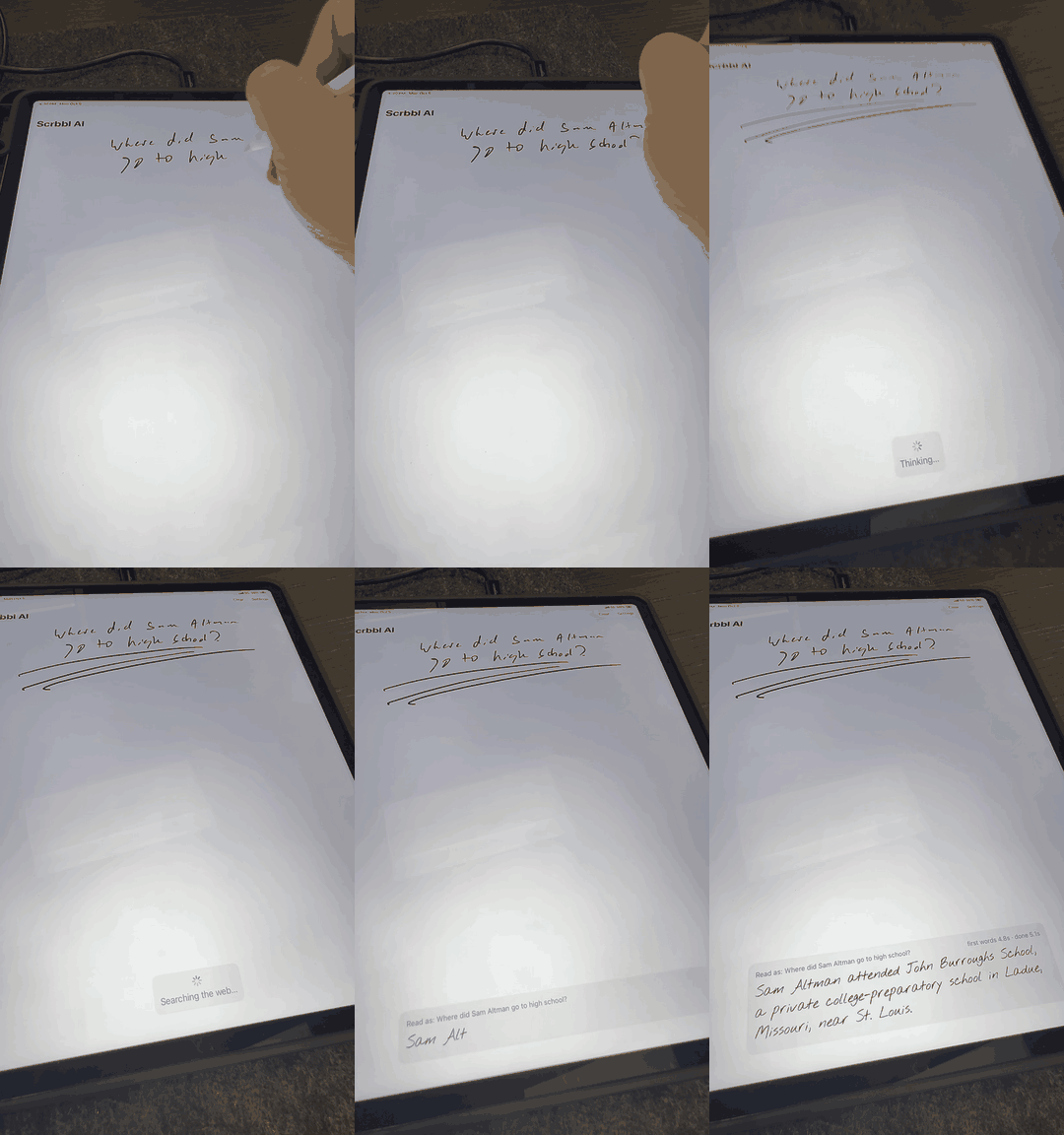
Write anything on your iPad with an Apple Pencil, underline it three times, and the answer appears handwritten below.
Try the beta: Join on TestFlight (iPad, bring your own OpenAI API key)
Website: scrbbl.ai
Watch the full 1-minute demo (underline, then circle for a longer answer)
https://github.com/user-attachments/assets/557c5f08-59ed-41bb-8fe6-ea68be49425b
How it works
- Write it down. Any question or text, anywhere on the page.
- Underline it three times for a quick AI answer. It searches the web when the question needs current information.
- Or circle it for a fuller answer with examples.
The app sends a picture of your handwriting to the AI, so it reads messy writing well. Answers stream in word by word and are shown in a handwriting font.
Requirements
- An iPad running iPadOS 17 or later, and an Apple Pencil
- A Mac with Xcode 26 or later
- An OpenAI API key with credits
Run it
- Open
Scrbbl.xcodeprojin Xcode. - Under Signing & Capabilities, choose your own team and, if needed, change the bundle identifier (
ai.scrbbl.app) to one you own. - Pick your iPad (or an iPad simulator) and press Run.
- In the app, open Settings, paste your OpenAI API key, and tap Save API key.
In the simulator there's no Apple Pencil, so the canvas also accepts mouse and trackpad input. On a real iPad it accepts only Pencil input, so your fingers can scroll.
For simulator testing, scripts/launch-with-key.command passes a key to a Debug build without typing it into the app.
Settings
- Fast (default): GPT-6 Luna with reasoning off and OpenAI's fast processing tier.
- Smart: GPT-6.1 Sol with light reasoning. Slower, deeper answers.
Both can use web search for time-sensitive questions.
Project layout
| Path | What it is |
|---|---|
Scrbbl/TripleUnderlineDetector.swift | Recognizes the triple underline and circle gestures, and finds the handwriting they point at |
Scrbbl/NoteCanvasModel.swift | Renders the handwriting, calls the OpenAI Responses API with streaming, stores the key in the Keychain |
Scrbbl/NoteCanvasView.swift | The PencilKit canvas and the handwritten answer box |
Scrbbl/SettingsView.swift | API key, answer speed, and gesture help |
Scrbbl/Fonts | Nothing You Could Do, the handwriting font used for answers (SIL Open Font License) |
design/make_icon.py | Generates the app icon |
design/make_social_preview.py | Generates the social preview card (docs/social-preview.png) |
Privacy and security
Your API key is stored in the iPad's Keychain and never leaves the device except to call OpenAI. Images of the handwriting you underline or circle are sent to OpenAI to produce answers.
The app calls OpenAI directly from the iPad, which is fine for personal use. A public App Store release should route requests through a backend instead, because a key inside an app can be extracted.
Contributing
Issues and pull requests are welcome. See CONTRIBUTING.md, and look for issues labeled good first issue to get started.
License
MIT, see LICENSE. The bundled font is licensed separately under the SIL Open Font License (Scrbbl/Fonts/OFL.txt).
An open source project by Adam Probolsky.


iPad app: write anything with Apple Pencil, underline it three times, and get an AI answer handwritten below.
See the codeSee what people are saying
README
Scrbbl AI
Write anything on your iPad with an Apple Pencil, underline it three times, and the answer appears handwritten below.
Try the beta: Join on TestFlight (iPad, bring your own OpenAI API key)
Website: scrbbl.ai
Watch the full 1-minute demo (underline, then circle for a longer answer)
https://github.com/user-attachments/assets/557c5f08-59ed-41bb-8fe6-ea68be49425b
How it works
- Write it down. Any question or text, anywhere on the page.
- Underline it three times for a quick AI answer. It searches the web when the question needs current information.
- Or circle it for a fuller answer with examples.
The app sends a picture of your handwriting to the AI, so it reads messy writing well. Answers stream in word by word and are shown in a handwriting font.
Requirements
- An iPad running iPadOS 17 or later, and an Apple Pencil
- A Mac with Xcode 26 or later
- An OpenAI API key with credits
Run it
- Open
Scrbbl.xcodeprojin Xcode. - Under Signing & Capabilities, choose your own team and, if needed, change the bundle identifier (
ai.scrbbl.app) to one you own. - Pick your iPad (or an iPad simulator) and press Run.
- In the app, open Settings, paste your OpenAI API key, and tap Save API key.
In the simulator there's no Apple Pencil, so the canvas also accepts mouse and trackpad input. On a real iPad it accepts only Pencil input, so your fingers can scroll.
For simulator testing, scripts/launch-with-key.command passes a key to a Debug build without typing it into the app.
Settings
- Fast (default): GPT-6 Luna with reasoning off and OpenAI's fast processing tier.
- Smart: GPT-6.1 Sol with light reasoning. Slower, deeper answers.
Both can use web search for time-sensitive questions.
Project layout
| Path | What it is |
|---|---|
Scrbbl/TripleUnderlineDetector.swift | Recognizes the triple underline and circle gestures, and finds the handwriting they point at |
Scrbbl/NoteCanvasModel.swift | Renders the handwriting, calls the OpenAI Responses API with streaming, stores the key in the Keychain |
Scrbbl/NoteCanvasView.swift | The PencilKit canvas and the handwritten answer box |
Scrbbl/SettingsView.swift | API key, answer speed, and gesture help |
Scrbbl/Fonts | Nothing You Could Do, the handwriting font used for answers (SIL Open Font License) |
design/make_icon.py | Generates the app icon |
design/make_social_preview.py | Generates the social preview card (docs/social-preview.png) |
Privacy and security
Your API key is stored in the iPad's Keychain and never leaves the device except to call OpenAI. Images of the handwriting you underline or circle are sent to OpenAI to produce answers.
The app calls OpenAI directly from the iPad, which is fine for personal use. A public App Store release should route requests through a backend instead, because a key inside an app can be extracted.
Contributing
Issues and pull requests are welcome. See CONTRIBUTING.md, and look for issues labeled good first issue to get started.
License
MIT, see LICENSE. The bundled font is licensed separately under the SIL Open Font License (Scrbbl/Fonts/OFL.txt).
An open source project by Adam Probolsky.