
See what people are saying
README
Claude Sentinel
Know the instant your Claude usage window resets — even with your laptop closed.




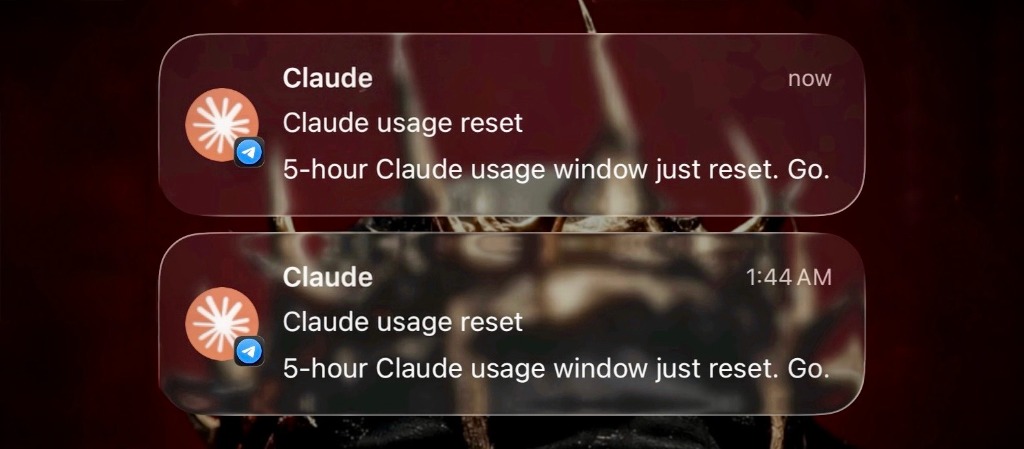
Sentinel watches Claude Code activity on this machine, computes exactly when your 5-hour usage window resets, and hands delivery off to the cloud the instant it knows — so the notification arrives on time whether your laptop is open, asleep, or off.
./install.sh
[!TIP] The in-app/CLI countdown is always the source of truth, not Sentinel. If they ever disagree, run
correct five_hour <timestamp>to reconcile.
Why use Sentinel?
Anthropic doesn't publish a "your limit just reset" webhook — the only ground truth is built for humans to read, not machines to poll. Sentinel closes that gap:
- Event-driven, not polling — a Claude Code hook computes the reset time the instant a new window opens; nothing runs continuously.
- Cloud-delivered — Upstash QStash fires the push straight to Telegram at the exact second; your laptop is out of the loop the moment the alarm is scheduled.
- Delivery-confirmed — verifies the message actually reached Telegram before considering the job done, with an automatic fallback if it didn't.
- Self-correcting — one command reconciles drift the moment you spot it against the real countdown.
- Zero dependencies — one Python file, standard library only, nothing
to
pip install, ever.
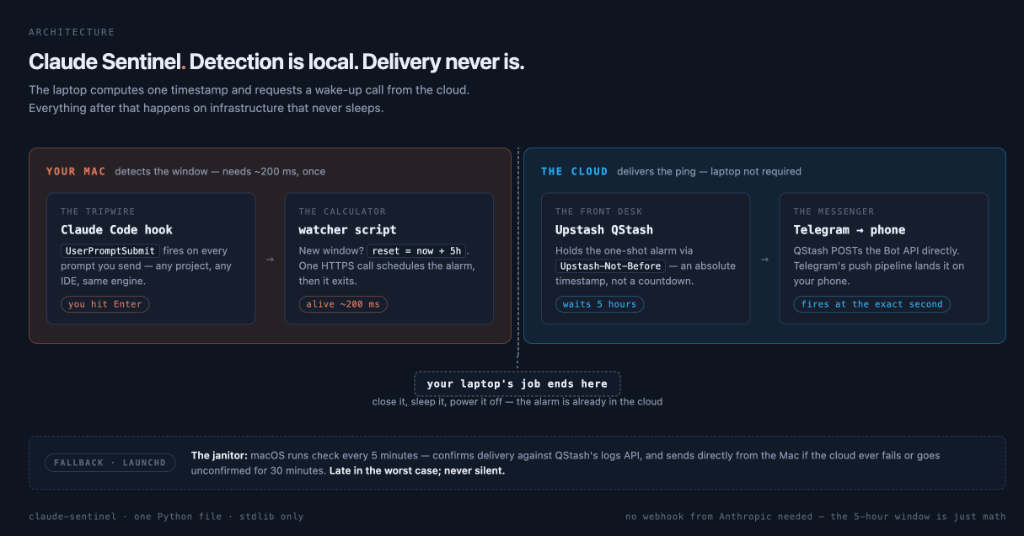
Claude Code hook  →  claude_usage_watcher.py  →  Upstash QStash  →  Telegram
   (this Mac)          (computes reset_at)        (cloud alarm)      (your phone)
Documentation
- SYSTEMDESIGN.md — every design decision, every real bug this hit, and exactly how the QStash/Telegram wiring works
- FUTUREWORK.md — possible extensions, roughly ranked by effort vs. value
- Setup, usage, and troubleshooting — below
Directory layout
Claude-Efficiency/
├── README.md                            this file
├── SYSTEMDESIGN.md                       in-depth technical explanation of how this was built
├── FUTUREWORK.md                         possible future improvements/integrations
├── .gitignore
├── claude_usage_watcher.py              the tool itself (record / hit-limit / check / correct / status)
├── install.sh                           deploys the script to ~/bin (see "Why two copies" below)
├── test.sh                              local, side-effect-free test pass (no real network calls)
├── hooks.snippet.json                   the two hook entries to merge into ~/.claude/settings.json
├── claude_usage_watcher_HANDOFF.md      original planning brief this tool was built from, kept for reference
└── launchd/
    └── com.claude-usage-watcher.plist   LaunchAgent that runs `check` every 5 min (fallback only)
All commands below are run from the repo root.
Why two copies of the script exist
This repo is the source of truth and where you edit the script. But the
hooks and the launchd job don't execute it from here — they execute a
deployed copy at ~/bin/claude_usage_watcher.py. Reason: ~/Desktop (and
~/Documents, ~/Downloads) are TCC-protected on macOS. A background
launchd process trying to read a script under ~/Desktop/... fails with
a silent Operation not permitted, even though your interactive Terminal
reads the same path fine — this bit us once already setting this up.
~/bin isn't a protected location, so it sidesteps the issue entirely.
After editing claude_usage_watcher.py, run ./install.sh to redeploy
it to ~/bin — the two copies are not auto-synced.
Secrets live in one local file, not the repo or the plist
All four credentials (Telegram bot token, Telegram chat ID, QStash token,
QStash base URL) load from ~/.claude-usage-watcher/secrets.env
(chmod 600), read by the script itself at startup — not from
environment variables set in the plist or hooks. Reason: Claude Code hooks
and launchd don't reliably share the same environment, so relying on
either one to carry secrets is fragile. A fixed local file the script reads
directly works the same way no matter what invoked it.
# ~/.claude-usage-watcher/secrets.env
CLAUDE_NOTIFIER_TELEGRAM_BOT_TOKEN=123456789:AA...
CLAUDE_NOTIFIER_TELEGRAM_CHAT_ID=987654321
CLAUDE_NOTIFIER_QSTASH_TOKEN=eyJ...
CLAUDE_NOTIFIER_QSTASH_URL=https://qstash-us-east-1.upstash.io
This means the checked-in launchd/*.plist template needs no
EnvironmentVariables block and no secret substitution at all — the
installed copy in ~/Library/LaunchAgents/ can be an exact, byte-for-byte
copy of the repo template.
State (separate from secrets) also lives outside this repo, at
~/.claude-usage-watcher/:
| File | Contents |
|---|---|
state.json | current five_hour / weekly tracked windows, including each one's active qstash_message_id |
state.lock | empty lock file (flock) serializing concurrent reads/writes of state.json — safe to ignore |
secrets.env | the four credentials above, chmod 600 |
stop_failure_events.jsonl | every raw StopFailure payload ever seen, one JSON object per line |
launchd.out.log / launchd.err.log | stdout/stderr from the scheduled check runs |
Setup
0. Personalize the templates
hooks.snippet.json and the launchd plist ship with a
/Users/YOUR_USERNAME placeholder — launchd and Claude Code hooks both
need absolute paths, so they can't use ~ or $HOME themselves. One
command fills in your home directory everywhere it's needed:
sed -i '' "s|/Users/YOUR_USERNAME|$HOME|g" hooks.snippet.json launchd/com.claude-usage-watcher.plist
Run it once after cloning; every path below then matches your system.
1. Deploy the script to ~/bin
./install.sh
See Why two copies of the script exist
above. Re-run this any time you edit claude_usage_watcher.py.
2. Run the test pass
./test.sh
Confirms fresh-window inference, check --dry-run previewing without
mutating state, and hit-limit logging + confirmed_blocked_at — against
a scratch state file and with secrets deliberately unset, so it never
touches real state or makes a real network call regardless of what's
configured on the machine running it.
3. Register the Claude Code hooks
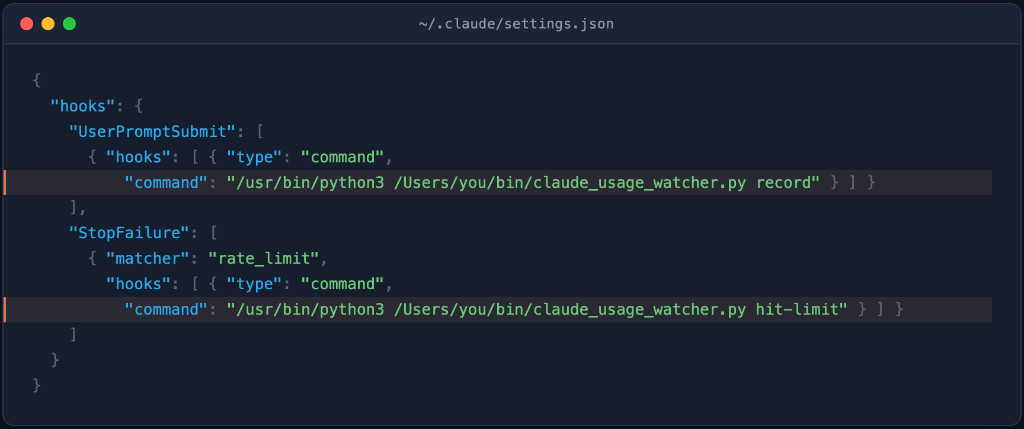
Merge the two hook entries from hooks.snippet.json into
~/.claude/settings.json under its hooks key. Merge, don't overwrite —
your settings.json likely has other config (MCP servers, effortLevel,
etc.) that must survive untouched.
{
  "hooks": {
    "UserPromptSubmit": [
      { "hooks": [ { "type": "command",
          "command": "/usr/bin/python3 /Users/YOUR_USERNAME/bin/claude_usage_watcher.py record" } ] }
    ],
    "StopFailure": [
      { "matcher": "rate_limit",
        "hooks": [ { "type": "command",
          "command": "/usr/bin/python3 /Users/YOUR_USERNAME/bin/claude_usage_watcher.py hit-limit" } ] }
    ]
  }
}
Note the absolute /usr/bin/python3 rather than a bare python3 — see
Known gaps for why that matters.
4. Create a Telegram bot and get your chat ID
- In Telegram, message @BotFather →
/newbot→ follow the prompts. You'll get back a bot token that looks like123456789:AA.... - Search for your new bot's username and send it any message (e.g. "hi") — this opens the chat so Telegram has somewhere to deliver to.
- Fetch your chat ID:
Look forcurl -s "https://api.telegram.org/bot<YOUR_TOKEN>/getUpdates" | python3 -m json.toolresult[0].message.chat.id.
5. Create an Upstash QStash account and get your token
- Sign up at console.upstash.com (free tier, no card required).
- Open QStash in the sidebar → copy
QSTASH_TOKENand the region-specificQSTASH_URLshown on that page. Use the region-specific URL, not the genericqstash.upstash.iogateway — the generic one returned a "user not found in this region" error for a fresh account in testing here.
6. Write the secrets file
mkdir -p ~/.claude-usage-watcher
cat > ~/.claude-usage-watcher/secrets.env <<'EOF'
CLAUDE_NOTIFIER_TELEGRAM_BOT_TOKEN=<your bot token>
CLAUDE_NOTIFIER_TELEGRAM_CHAT_ID=<your chat id>
CLAUDE_NOTIFIER_QSTASH_TOKEN=<your qstash token>
CLAUDE_NOTIFIER_QSTASH_URL=<your qstash region url>
EOF
chmod 600 ~/.claude-usage-watcher/secrets.env
Never commit this file or paste real values into this repo — it's
already covered by .gitignore (.env), but secrets.env itself lives
entirely outside the repo, under ~/.claude-usage-watcher/, by design.
7. Load the launchd fallback job
cp launchd/com.claude-usage-watcher.plist ~/Library/LaunchAgents/
launchctl bootstrap gui/$(id -u) ~/Library/LaunchAgents/com.claude-usage-watcher.plist
launchctl list | grep claude-usage-watcher   # should show it loaded, exit status 0
No secret substitution needed — see
Secrets live in one local file
above. (launchctl load still works but is the deprecated form;
bootstrap is the modern equivalent.)
To reload after editing the plist:
launchctl bootout gui/$(id -u)/com.claude-usage-watcher 2>/dev/null
launchctl bootstrap gui/$(id -u) ~/Library/LaunchAgents/com.claude-usage-watcher.plist
8. Real end-to-end test
/usr/bin/python3 claude_usage_watcher.py correct five_hour "$(/usr/bin/python3 -c "from datetime import datetime,timedelta,timezone;print((datetime.now(timezone.utc)+timedelta(minutes=2)).isoformat())")"
Check ~/.claude-usage-watcher/state.json for a populated
qstash_message_id — that confirms the cloud alarm was scheduled
successfully. A real push should land on your phone within ~2 minutes,
independent of launchd (you can launchctl bootout the job first to
prove it — that's how this was verified originally).
Usage
| Command | When it runs | What it does |
|---|---|---|
record | UserPromptSubmit hook | Starts a new 5-hour window if none is active and schedules its QStash alarm. No-op otherwise — usage volume never moves the reset time. |
hit-limit | StopFailure(rate_limit) hook | Logs the raw payload, marks confirmed_blocked_at; if it recognizes a real reset field, cancels the old alarm and schedules a new one. |
check [--dry-run] | launchd, every 5 min | Fallback + status sync — confirms actual delivery via QStash's logs API before marking notified=True; sends directly if delivery fails/times out or no alarm was ever scheduled. --dry-run previews without mutating state. |
correct <five_hour|weekly> <ISO8601> | manual, whenever you see a real value | Overwrites the tracked reset time with ground truth; cancels any existing alarm and schedules a new one. |
status | manual | Human-readable dump of both tracked windows. |
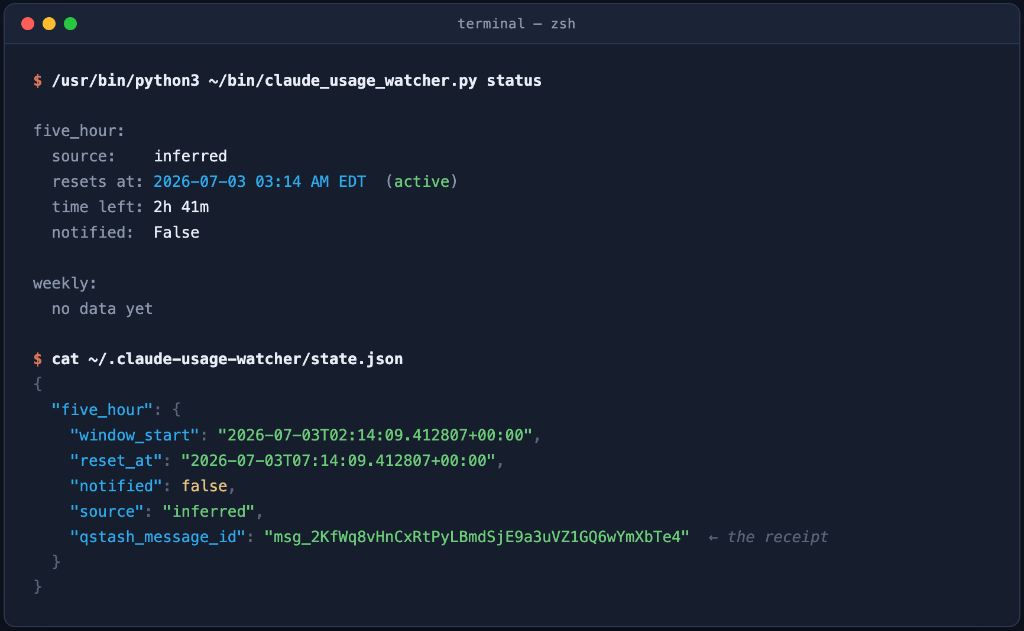
Running status displays a clean, human-readable summary of your tracked windows, or you can check the raw state.json file:
Known gaps
StopFailurepayload schema is unconfirmed.hit-limitsearches the whole payload recursively (any nesting depth, case/hyphen-insensitive) forreset_at/resets_at/reset_time/retry_after_ms/retry_after_seconds/retry_after-style keys, and accepts either ISO 8601 strings or Unix epoch numbers — but the real field names are still a guess. The next time a real rate limit hits during normal use, readstop_failure_events.jsonl(or the "no recognized field" note it prints to stderr, which lists every key it saw), find the real field names, and updateRESET_TIMESTAMP_KEYS/RETRY_AFTER_*_KEYSinclaude_usage_watcher.py.- Weekly cap mechanics are unknown. Only ever set via
correct weekly; never inferred. Feed it real observed values over time to eventually figure out whether it's rolling or fixed-boundary. - Blind to claude.ai web/mobile usage. If you split usage across surfaces, the 5-hour inference can drift from reality until corrected.
- A bare
python3can silently break HTTPS calls. Apython.orginstaller build of Python (as opposed to Apple's/usr/bin/python3) ships with its own cert bundle that isn't initialized until you run itsInstall Certificates.command— until then, anyurllibHTTPS call fails withCERTIFICATE_VERIFY_FAILED. This bittest.shduring development. Every invocation in this repo (hooks, plist, test.sh) is pinned to/usr/bin/python3specifically to avoid depending on whateverpython3happens to resolve first on$PATH. python3 -c "..."one-liners can fail under a TCC-protected working directory, even when running the actual script from the same place works fine. Python inserts different things intosys.path[0]depending on invocation style: running a script file inserts that script's directory, butpython3 -c "..."inserts the current working directory. If your shell'scwdhappens to be under~/Desktop/~/Documents/~/Downloadswhen you run an inline one-liner (like the timestamp helpers in this README's setup steps), Python's own startup import scan can hit the same TCC wall described above — even though hooks andlaunchdare unaffected (they always invoke the real.pyfile, never-c). If a copy-pasted one-liner throws aPermissionErrorduring import,cdsomewhere outside those three folders (e.g./tmp) first.
Troubleshooting
# is the job loaded?
launchctl list | grep claude-usage-watcher

# force a run right now, bypassing the 5-min interval
launchctl start com.claude-usage-watcher

# check what actually happened on the last few ticks
tail -f ~/.claude-usage-watcher/launchd.out.log ~/.claude-usage-watcher/launchd.err.log

# current tracked state, including qstash_message_id per window
cat ~/.claude-usage-watcher/state.json
/usr/bin/python3 claude_usage_watcher.py status
No qstash_message_id in state.json after record/correct:
scheduling failed silently from the caller's perspective (hooks shouldn't
crash your Claude Code session) but logs a warning to stderr — check
~/.claude-usage-watcher/launchd.err.log or run the command manually in a
terminal to see it. Usually a missing/wrong value in secrets.env, or the
generic (non-regional) QStash URL — see step 5 above.
launchd.err.log shows Operation not permitted opening the script:
you're pointing the plist at a script under ~/Desktop, ~/Documents, or
~/Downloads — all TCC-protected on macOS, silently blocking background
processes even though Terminal can read the same file fine. Point
ProgramArguments at the ~/bin deployed copy instead (run ./install.sh
first if you haven't).
launchd.err.log shows CERTIFICATE_VERIFY_FAILED: see the bare
python3 note in Known gaps — make sure ProgramArguments
uses /usr/bin/python3, not a bare python3.
Push arrives but shows no popup — check the app is backgrounded, not foregrounded when testing (Telegram, like most apps, doesn't banner its own foreground chat). If it still doesn't show as a real notification with the app closed, check the OS notification permission for the Telegram app specifically, and any Focus/Do Not Disturb modes.
Uninstall
launchctl bootout gui/$(id -u)/com.claude-usage-watcher
rm ~/Library/LaunchAgents/com.claude-usage-watcher.plist
rm ~/bin/claude_usage_watcher.py
# then remove the two hook entries from ~/.claude/settings.json by hand
rm -rf ~/.claude-usage-watcher   # also removes secrets.env
Also worth deleting the QStash token from the Upstash console and revoking
the Telegram bot (message @BotFather → /deletebot) if you're tearing this
down for good.
Architecture history
This tool went through two real pivots worth knowing about if you're extending it:
- ntfy.sh → Telegram. Originally used ntfy.sh (no account needed, simplest possible setup). On iOS, pushes reached the app's in-app list but never surfaced a system notification — not fixable via permission toggles or priority headers, tracked back to ntfy's Firebase/APNs relay being less battle-tested than a mainstream app's push pipeline. Telegram worked immediately.
- Local polling → cloud one-shot timer. Originally, notification
delivery was
launchdpollingcheckevery 5 minutes and sending directly. That only works while the Mac is awake — a closed laptop meant the notification arrived late, whenever the Mac was next opened, undercutting the entire point of the tool. Moved delivery to Upstash QStash:record/correct/hit-limitschedule a one-shot delayed message straight to the Telegram Bot API at the exact reset moment, so delivery no longer depends on this machine's power state at all. Localcheckwas demoted to a fallback (for when scheduling failed) plus local status bookkeeping, deliberately structured so it never fires the same notification QStash already sent.
Similar repos


Languages
Python
88.1%
Shell
11.9%
See what people are saying
README
Claude Sentinel
Know the instant your Claude usage window resets — even with your laptop closed.
Sentinel watches Claude Code activity on this machine, computes exactly when your 5-hour usage window resets, and hands delivery off to the cloud the instant it knows — so the notification arrives on time whether your laptop is open, asleep, or off.
./install.sh
[!TIP] The in-app/CLI countdown is always the source of truth, not Sentinel. If they ever disagree, run
correct five_hour <timestamp>to reconcile.
Why use Sentinel?
Anthropic doesn't publish a "your limit just reset" webhook — the only ground truth is built for humans to read, not machines to poll. Sentinel closes that gap:
- Event-driven, not polling — a Claude Code hook computes the reset time the instant a new window opens; nothing runs continuously.
- Cloud-delivered — Upstash QStash fires the push straight to Telegram at the exact second; your laptop is out of the loop the moment the alarm is scheduled.
- Delivery-confirmed — verifies the message actually reached Telegram before considering the job done, with an automatic fallback if it didn't.
- Self-correcting — one command reconciles drift the moment you spot it against the real countdown.
- Zero dependencies — one Python file, standard library only, nothing
to
pip install, ever.
Claude Code hook  →  claude_usage_watcher.py  →  Upstash QStash  →  Telegram
   (this Mac)          (computes reset_at)        (cloud alarm)      (your phone)
Documentation
- SYSTEMDESIGN.md — every design decision, every real bug this hit, and exactly how the QStash/Telegram wiring works
- FUTUREWORK.md — possible extensions, roughly ranked by effort vs. value
- Setup, usage, and troubleshooting — below
Directory layout
Claude-Efficiency/
├── README.md                            this file
├── SYSTEMDESIGN.md                       in-depth technical explanation of how this was built
├── FUTUREWORK.md                         possible future improvements/integrations
├── .gitignore
├── claude_usage_watcher.py              the tool itself (record / hit-limit / check / correct / status)
├── install.sh                           deploys the script to ~/bin (see "Why two copies" below)
├── test.sh                              local, side-effect-free test pass (no real network calls)
├── hooks.snippet.json                   the two hook entries to merge into ~/.claude/settings.json
├── claude_usage_watcher_HANDOFF.md      original planning brief this tool was built from, kept for reference
└── launchd/
    └── com.claude-usage-watcher.plist   LaunchAgent that runs `check` every 5 min (fallback only)
All commands below are run from the repo root.
Why two copies of the script exist
This repo is the source of truth and where you edit the script. But the
hooks and the launchd job don't execute it from here — they execute a
deployed copy at ~/bin/claude_usage_watcher.py. Reason: ~/Desktop (and
~/Documents, ~/Downloads) are TCC-protected on macOS. A background
launchd process trying to read a script under ~/Desktop/... fails with
a silent Operation not permitted, even though your interactive Terminal
reads the same path fine — this bit us once already setting this up.
~/bin isn't a protected location, so it sidesteps the issue entirely.
After editing claude_usage_watcher.py, run ./install.sh to redeploy
it to ~/bin — the two copies are not auto-synced.
Secrets live in one local file, not the repo or the plist
All four credentials (Telegram bot token, Telegram chat ID, QStash token,
QStash base URL) load from ~/.claude-usage-watcher/secrets.env
(chmod 600), read by the script itself at startup — not from
environment variables set in the plist or hooks. Reason: Claude Code hooks
and launchd don't reliably share the same environment, so relying on
either one to carry secrets is fragile. A fixed local file the script reads
directly works the same way no matter what invoked it.
# ~/.claude-usage-watcher/secrets.env
CLAUDE_NOTIFIER_TELEGRAM_BOT_TOKEN=123456789:AA...
CLAUDE_NOTIFIER_TELEGRAM_CHAT_ID=987654321
CLAUDE_NOTIFIER_QSTASH_TOKEN=eyJ...
CLAUDE_NOTIFIER_QSTASH_URL=https://qstash-us-east-1.upstash.io
This means the checked-in launchd/*.plist template needs no
EnvironmentVariables block and no secret substitution at all — the
installed copy in ~/Library/LaunchAgents/ can be an exact, byte-for-byte
copy of the repo template.
State (separate from secrets) also lives outside this repo, at
~/.claude-usage-watcher/:
| File | Contents |
|---|---|
state.json | current five_hour / weekly tracked windows, including each one's active qstash_message_id |
state.lock | empty lock file (flock) serializing concurrent reads/writes of state.json — safe to ignore |
secrets.env | the four credentials above, chmod 600 |
stop_failure_events.jsonl | every raw StopFailure payload ever seen, one JSON object per line |
launchd.out.log / launchd.err.log | stdout/stderr from the scheduled check runs |
Setup
0. Personalize the templates
hooks.snippet.json and the launchd plist ship with a
/Users/YOUR_USERNAME placeholder — launchd and Claude Code hooks both
need absolute paths, so they can't use ~ or $HOME themselves. One
command fills in your home directory everywhere it's needed:
sed -i '' "s|/Users/YOUR_USERNAME|$HOME|g" hooks.snippet.json launchd/com.claude-usage-watcher.plist
Run it once after cloning; every path below then matches your system.
1. Deploy the script to ~/bin
./install.sh
See Why two copies of the script exist
above. Re-run this any time you edit claude_usage_watcher.py.
2. Run the test pass
./test.sh
Confirms fresh-window inference, check --dry-run previewing without
mutating state, and hit-limit logging + confirmed_blocked_at — against
a scratch state file and with secrets deliberately unset, so it never
touches real state or makes a real network call regardless of what's
configured on the machine running it.
3. Register the Claude Code hooks
Merge the two hook entries from hooks.snippet.json into
~/.claude/settings.json under its hooks key. Merge, don't overwrite —
your settings.json likely has other config (MCP servers, effortLevel,
etc.) that must survive untouched.
{
  "hooks": {
    "UserPromptSubmit": [
      { "hooks": [ { "type": "command",
          "command": "/usr/bin/python3 /Users/YOUR_USERNAME/bin/claude_usage_watcher.py record" } ] }
    ],
    "StopFailure": [
      { "matcher": "rate_limit",
        "hooks": [ { "type": "command",
          "command": "/usr/bin/python3 /Users/YOUR_USERNAME/bin/claude_usage_watcher.py hit-limit" } ] }
    ]
  }
}
Note the absolute /usr/bin/python3 rather than a bare python3 — see
Known gaps for why that matters.
4. Create a Telegram bot and get your chat ID
- In Telegram, message @BotFather →
/newbot→ follow the prompts. You'll get back a bot token that looks like123456789:AA.... - Search for your new bot's username and send it any message (e.g. "hi") — this opens the chat so Telegram has somewhere to deliver to.
- Fetch your chat ID:
Look forcurl -s "https://api.telegram.org/bot<YOUR_TOKEN>/getUpdates" | python3 -m json.toolresult[0].message.chat.id.
5. Create an Upstash QStash account and get your token
- Sign up at console.upstash.com (free tier, no card required).
- Open QStash in the sidebar → copy
QSTASH_TOKENand the region-specificQSTASH_URLshown on that page. Use the region-specific URL, not the genericqstash.upstash.iogateway — the generic one returned a "user not found in this region" error for a fresh account in testing here.
6. Write the secrets file
mkdir -p ~/.claude-usage-watcher
cat > ~/.claude-usage-watcher/secrets.env <<'EOF'
CLAUDE_NOTIFIER_TELEGRAM_BOT_TOKEN=<your bot token>
CLAUDE_NOTIFIER_TELEGRAM_CHAT_ID=<your chat id>
CLAUDE_NOTIFIER_QSTASH_TOKEN=<your qstash token>
CLAUDE_NOTIFIER_QSTASH_URL=<your qstash region url>
EOF
chmod 600 ~/.claude-usage-watcher/secrets.env
Never commit this file or paste real values into this repo — it's
already covered by .gitignore (.env), but secrets.env itself lives
entirely outside the repo, under ~/.claude-usage-watcher/, by design.
7. Load the launchd fallback job
cp launchd/com.claude-usage-watcher.plist ~/Library/LaunchAgents/
launchctl bootstrap gui/$(id -u) ~/Library/LaunchAgents/com.claude-usage-watcher.plist
launchctl list | grep claude-usage-watcher   # should show it loaded, exit status 0
No secret substitution needed — see
Secrets live in one local file
above. (launchctl load still works but is the deprecated form;
bootstrap is the modern equivalent.)
To reload after editing the plist:
launchctl bootout gui/$(id -u)/com.claude-usage-watcher 2>/dev/null
launchctl bootstrap gui/$(id -u) ~/Library/LaunchAgents/com.claude-usage-watcher.plist
8. Real end-to-end test
/usr/bin/python3 claude_usage_watcher.py correct five_hour "$(/usr/bin/python3 -c "from datetime import datetime,timedelta,timezone;print((datetime.now(timezone.utc)+timedelta(minutes=2)).isoformat())")"
Check ~/.claude-usage-watcher/state.json for a populated
qstash_message_id — that confirms the cloud alarm was scheduled
successfully. A real push should land on your phone within ~2 minutes,
independent of launchd (you can launchctl bootout the job first to
prove it — that's how this was verified originally).
Usage
| Command | When it runs | What it does |
|---|---|---|
record | UserPromptSubmit hook | Starts a new 5-hour window if none is active and schedules its QStash alarm. No-op otherwise — usage volume never moves the reset time. |
hit-limit | StopFailure(rate_limit) hook | Logs the raw payload, marks confirmed_blocked_at; if it recognizes a real reset field, cancels the old alarm and schedules a new one. |
check [--dry-run] | launchd, every 5 min | Fallback + status sync — confirms actual delivery via QStash's logs API before marking notified=True; sends directly if delivery fails/times out or no alarm was ever scheduled. --dry-run previews without mutating state. |
correct <five_hour|weekly> <ISO8601> | manual, whenever you see a real value | Overwrites the tracked reset time with ground truth; cancels any existing alarm and schedules a new one. |
status | manual | Human-readable dump of both tracked windows. |
Running status displays a clean, human-readable summary of your tracked windows, or you can check the raw state.json file:
Known gaps
StopFailurepayload schema is unconfirmed.hit-limitsearches the whole payload recursively (any nesting depth, case/hyphen-insensitive) forreset_at/resets_at/reset_time/retry_after_ms/retry_after_seconds/retry_after-style keys, and accepts either ISO 8601 strings or Unix epoch numbers — but the real field names are still a guess. The next time a real rate limit hits during normal use, readstop_failure_events.jsonl(or the "no recognized field" note it prints to stderr, which lists every key it saw), find the real field names, and updateRESET_TIMESTAMP_KEYS/RETRY_AFTER_*_KEYSinclaude_usage_watcher.py.- Weekly cap mechanics are unknown. Only ever set via
correct weekly; never inferred. Feed it real observed values over time to eventually figure out whether it's rolling or fixed-boundary. - Blind to claude.ai web/mobile usage. If you split usage across surfaces, the 5-hour inference can drift from reality until corrected.
- A bare
python3can silently break HTTPS calls. Apython.orginstaller build of Python (as opposed to Apple's/usr/bin/python3) ships with its own cert bundle that isn't initialized until you run itsInstall Certificates.command— until then, anyurllibHTTPS call fails withCERTIFICATE_VERIFY_FAILED. This bittest.shduring development. Every invocation in this repo (hooks, plist, test.sh) is pinned to/usr/bin/python3specifically to avoid depending on whateverpython3happens to resolve first on$PATH. python3 -c "..."one-liners can fail under a TCC-protected working directory, even when running the actual script from the same place works fine. Python inserts different things intosys.path[0]depending on invocation style: running a script file inserts that script's directory, butpython3 -c "..."inserts the current working directory. If your shell'scwdhappens to be under~/Desktop/~/Documents/~/Downloadswhen you run an inline one-liner (like the timestamp helpers in this README's setup steps), Python's own startup import scan can hit the same TCC wall described above — even though hooks andlaunchdare unaffected (they always invoke the real.pyfile, never-c). If a copy-pasted one-liner throws aPermissionErrorduring import,cdsomewhere outside those three folders (e.g./tmp) first.
Troubleshooting
# is the job loaded?
launchctl list | grep claude-usage-watcher

# force a run right now, bypassing the 5-min interval
launchctl start com.claude-usage-watcher

# check what actually happened on the last few ticks
tail -f ~/.claude-usage-watcher/launchd.out.log ~/.claude-usage-watcher/launchd.err.log

# current tracked state, including qstash_message_id per window
cat ~/.claude-usage-watcher/state.json
/usr/bin/python3 claude_usage_watcher.py status
No qstash_message_id in state.json after record/correct:
scheduling failed silently from the caller's perspective (hooks shouldn't
crash your Claude Code session) but logs a warning to stderr — check
~/.claude-usage-watcher/launchd.err.log or run the command manually in a
terminal to see it. Usually a missing/wrong value in secrets.env, or the
generic (non-regional) QStash URL — see step 5 above.
launchd.err.log shows Operation not permitted opening the script:
you're pointing the plist at a script under ~/Desktop, ~/Documents, or
~/Downloads — all TCC-protected on macOS, silently blocking background
processes even though Terminal can read the same file fine. Point
ProgramArguments at the ~/bin deployed copy instead (run ./install.sh
first if you haven't).
launchd.err.log shows CERTIFICATE_VERIFY_FAILED: see the bare
python3 note in Known gaps — make sure ProgramArguments
uses /usr/bin/python3, not a bare python3.
Push arrives but shows no popup — check the app is backgrounded, not foregrounded when testing (Telegram, like most apps, doesn't banner its own foreground chat). If it still doesn't show as a real notification with the app closed, check the OS notification permission for the Telegram app specifically, and any Focus/Do Not Disturb modes.
Uninstall
launchctl bootout gui/$(id -u)/com.claude-usage-watcher
rm ~/Library/LaunchAgents/com.claude-usage-watcher.plist
rm ~/bin/claude_usage_watcher.py
# then remove the two hook entries from ~/.claude/settings.json by hand
rm -rf ~/.claude-usage-watcher   # also removes secrets.env
Also worth deleting the QStash token from the Upstash console and revoking
the Telegram bot (message @BotFather → /deletebot) if you're tearing this
down for good.
Architecture history
This tool went through two real pivots worth knowing about if you're extending it:
- ntfy.sh → Telegram. Originally used ntfy.sh (no account needed, simplest possible setup). On iOS, pushes reached the app's in-app list but never surfaced a system notification — not fixable via permission toggles or priority headers, tracked back to ntfy's Firebase/APNs relay being less battle-tested than a mainstream app's push pipeline. Telegram worked immediately.
- Local polling → cloud one-shot timer. Originally, notification
delivery was
launchdpollingcheckevery 5 minutes and sending directly. That only works while the Mac is awake — a closed laptop meant the notification arrived late, whenever the Mac was next opened, undercutting the entire point of the tool. Moved delivery to Upstash QStash:record/correct/hit-limitschedule a one-shot delayed message straight to the Telegram Bot API at the exact reset moment, so delivery no longer depends on this machine's power state at all. Localcheckwas demoted to a fallback (for when scheduling failed) plus local status bookkeeping, deliberately structured so it never fires the same notification QStash already sent.
Similar repos
Languages
Python
88.1%
Shell
11.9%